kajuandouglas.com is reader-supported. When you buy through links on our site, we may earn an affiliate commission.
Where to Buy
Shoppers hunting for the best digital cameras with wifi under 100 dollars usually picture a little point-and-shoot with a screen on the back, and the first honest thing this guide owes them is a map of what the money actually buys today. Traditional compact cameras with optical zooms have almost vanished from this price band, pushed upward by phone cameras from below. What genuinely lives under the hundred-dollar line, connects to your home network without a cable, and records respectable moving and still images is a different family altogether: compact wifi cameras built for rooms, porches, nurseries, and doorways, sold through the usual large retailers and the makers’ own stores.
That is not a bait-and-switch; it is the market telling the truth. A wifi camera in this class streams live view to a phone in another city, saves clips when something moves, lets two people talk through it, and costs less than a single interchangeable lens. If your real goal is holiday portraits across a lake, none of these will serve you, and this guide will say so plainly in its closing sections. If your goal is knowing the parcel arrived, watching the dog settle, checking a sleeping toddler without opening the door, or keeping an eye on an elderly parent’s kitchen, then wifi — not zoom, not sensor size — is the feature doing the work, and wifi is the axis every pick below was judged on.
One warning belongs up front because it shapes every verdict that follows. Prices in this category drift with promotions, bundles, and seasons, so treat the under-100-dollars frame as a shopping boundary to verify at checkout rather than a promise printed here. Some households will also choose a paid cloud plan for longer clip history; others will lean on local memory cards and pay nothing monthly. Both routes are legitimate, and the picks separate cleanly along that line, which is why the comparison table calls it out for each model.
Key Takeaways
- Wifi strength, app reliability, and clip access matter more in this class than headline resolution.
- The Wyze Cam v4 is the sharpest all-round bargain here, with colour night viewing and local card recording.
- Blink’s Mini 2 and Outdoor 4 stretch battery and simplicity furthest for hands-off households.
- The Tapo C210 pans and tilts, covering a whole room from one shelf corner.
- eufy’s Indoor Cam E220 keeps recordings at home on a card for privacy-minded buyers.
- The Ring Indoor Cam suits homes already living inside the Ring app and doorbell family.
In this guide
Quick Picks
| Badge | Pick | Why it stands out |
|---|---|---|
| Sharpest Value Overall | Wyze Cam v4 | Crisp 2.5K imaging, colour after dark, and card recording without a plan. |
| Simplest Plug-In Watcher | Blink Mini 2 | A tiny wired camera that disappears into daily routines fast. |
| Room-Covering Mover | TP-Link Tapo C210 | Motorised pan and tilt sweep a nursery or lounge from one spot. |
| Privacy-First Local Storage | eufy Indoor Cam E220 | On-device detection and card storage keep footage inside the house. |
| Battery Freedom Outdoors | Blink Outdoor 4 | Weather-resistant and wire-free for fences, sheds, and side gates. |
| Best Inside the Ring Family | Ring Indoor Cam (2nd Gen) | A privacy shutter and seamless fit with Ring doorbells and alarms. |
Reading the table vertically teaches the category’s central lesson. Every camera here speaks wifi fluently; they differ in where the footage sleeps, how the lens covers space, and what happens when the internet sneezes. Choose by those three questions and the shortlist usually collapses to one obvious name within minutes.
How Did We Rank Wifi Cameras When Every Box Claims Wifi?
Connection quality came first, ahead of imaging bragging rights. A camera that drops off the network twice a week is furniture, not a witness, so we favoured models with mature apps, dependable reconnect behaviour after router restarts, and live view that opens promptly rather than after a spinning wheel. Dual-band support, antenna sense, and honest range through ordinary interior walls all counted, because most of these devices will live far from the router that feeds them.
Recording access came second. Some households happily pay a modest plan for weeks of cloud history and rich notifications; others regard any subscription attached to a cheap camera as a quiet tax and want a memory card doing the archiving. Neither camp is wrong, so each pick below declares its storage personality openly, and the verdicts steer card loyalists and cloud loyalists to different shelves.
Third came the picture itself: resolution that survives a phone screen zoom, night behaviour in a genuinely dark room rather than a showroom, and motion handling that keeps a walking person recognisable instead of smeared. Finally we weighed the human factors — setup friction for a non-technical relative, two-way talk clarity, privacy shutters and indicator honesty, and how gracefully each app shares access with a partner or a housesitter.
Why Does Wifi Change What a Cheap Camera Can Do?
A generation ago, an inexpensive camera stored its secrets on a card you had to physically retrieve, which meant the footage mattered only after you already suspected trouble. Wifi inverts that relationship. The camera becomes a reporter instead of an archivist: it taps your shoulder the moment the side gate opens, shows you the scene while the scene is still happening, and lets you speak through it to a courier, a child, or a confused dog. The purchase stops being about collecting evidence and becomes about shortening the distance between an event and your awareness of it.
The connection also changes where intelligence lives. Detection of people, pets, and packages increasingly happens either on the camera itself or in the maker’s cloud, and wifi is the pipe both designs depend on. That is why two cameras with near-identical lenses can feel generations apart in daily use: one sends you forty clips of a curtain breathing in the heating vent’s draught, while the other quietly reports only the moments a person crossed the hallway. When you shop this category, you are really shopping for judgement delivered over a network.
There is a dependency to respect, though. Wifi cameras lean on your router, your broadband, and sometimes the maker’s servers, so a home with flaky internet will frustrate even the finest pick below. Placement, a mesh node near a distant doorway, and realistic expectations about upload speed are part of the product, whether the box admits it or not. The how-to section near the end walks through squeezing a stubborn connection into reliability.

Wyze Cam v4 — Sharpest Value Overall
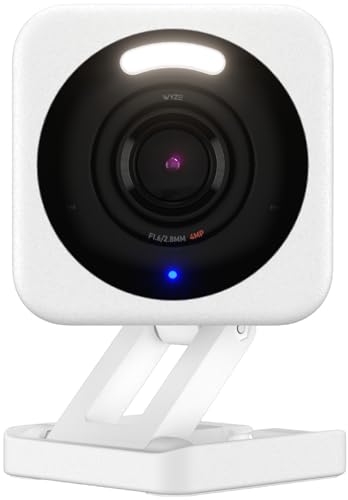
The Wyze Cam v4 earns the top badge by refusing to behave like a budget compromise. Its 2.5K sensor produces the crispest daylight frames in this line-up, fine enough to read a courier’s uniform logo or distinguish which cat owns the counter at midnight, and its colour night viewing — helped by a small built-in spotlight — keeps a dark kitchen legible in tones rather than grey ghosts. For a household buying its first wifi camera and wanting the picture itself to justify the purchase, this is the one that silences scepticism fastest.
Its storage story flatters the subscription-averse. A microSD card inside the camera records continuously or by events, so the footage survives even if the broadband sulks, and the optional cloud plan becomes an extra rather than a ransom. The app has grown busy over the years, with menus that reward a quiet ten minutes of exploration, yet the essentials — live view, playback scrubbing, sharing with a second phone — sit within easy reach once configured. Weather resistance also lets this nominally indoor camera shelter under a porch eave, widening its territory beyond the nursery shelf.
- Imaging: 2.5K resolution with colour night viewing and spotlight
- Storage: microSD continuous or event recording, optional cloud
- Connection: wifi with smart-home voice assistant compatibility
- Build: compact cube, weather-resistant enough for sheltered outdoor spots
- Talk: two-way audio for couriers, kids, and pets
Strengths
- Picture quality leads this price class by a visible margin
- Card recording keeps working when the internet does not
- Generous feature list without a mandatory monthly plan
Trade-offs
- App layout feels crowded compared with simpler rivals
- Some advanced detection perks sit behind the optional plan
- Spotlight at night announces the camera’s presence
Best for: first-time buyers wanting the strongest picture and card freedom for the money. Not suited for: anyone who wants the absolute simplest app and nothing to configure.

Blink Mini 2 — Simplest Plug-In Watcher
The Blink Mini 2 succeeds by disappearing. It is a small wired cube that plugs in, joins the Blink app in a few unhurried steps, and then simply watches — a hallway, a front room, a garage workbench — without asking its owner to learn a new hobby. Households buying a camera for a parent who describes every app update as an ambush will appreciate how little ceremony this device demands after installation day.
Within that simplicity sit useful refinements over its predecessor: a wider view that catches more of a room from a corner, an LED spotlight enabling colour recordings after dark, and weather resistance that, paired with the maker’s outdoor cable, lets it peek from a sheltered porch. Person detection and extended clip history lean on Blink’s subscription, which is the honest catch — card-free convenience is the product here, and the plan is its ongoing price. Buyers comfortable with that trade get a calm, legible system; buyers allergic to plans should walk one pick up or down this list instead.
- Imaging: HD video with spotlight-assisted colour night views
- Form: tiny plug-in body, optional weather-resistant outdoor setup
- Storage: cloud clips by plan, USB archive via a Sync Module
- Detection: person alerts available through the subscription tier
- Sharing: straightforward multi-user access in the Blink app
Strengths
- Gentlest learning curve in this entire group
- Small footprint suits shelves, windowsills, and rental homes
- Plays neatly with Alexa screens for quick live views
Trade-offs
- Best features assume the paid Blink plan
- No built-in card slot on the camera itself
- Fixed lens cannot sweep a large open-plan space
Best for: low-fuss households and gifts for relatives who value calm over tinkering. Not suited for: subscription refusers who want deep free archives.

TP-Link Tapo C210 — Room-Covering Mover
Most cheap cameras stare. The Tapo C210 turns its head. Motorised pan and tilt let one unit patrol a whole nursery, follow a toddler’s migration from cot to toy box, or sweep a lounge-diner that would otherwise demand two fixed cameras and two power points. From the app you steer the view with a thumb, set patrol points it revisits, and let motion tracking swing the lens toward whatever just moved — a party trick that quickly becomes the reason owners recommend it.
The rest of the package respects the same value brief. Its 2K sensor is a step above basic HD, night vision reaches respectably across a dark room, and a microSD slot swallows local recordings so a plan stays optional. Baby-crying and other sound alerts give it a second job as a nursery monitor, while privacy mode turns the lens away when the family is home and the watching should stop. TP-Link’s networking pedigree also shows in setup behaviour: in our judgement this is among the least temperamental wifi handshakes in the class.
- Movement: full pan-and-tilt range with motion tracking
- Imaging: 2K detail with infrared night viewing
- Storage: local microSD recording, optional cloud service
- Alerts: motion, person, and crying-baby sound detection
- Privacy: lens-away mode for family time
Strengths
- One camera genuinely covers a large single room
- Tracking turns passive recording into active following
- Strong fit for nurseries and pet surveillance alike
Trade-offs
- Moving mechanism is a long-term wear point
- Tracking can chase a lively pet past the real event
- Design is more conspicuous than the mini cubes
Best for: open-plan rooms, nurseries, and pet owners who want coverage from one socket. Not suited for: outdoor mounting or anyone wanting an invisible camera.

eufy Indoor Cam E220 — Privacy-First Local Storage
The eufy Indoor Cam E220 speaks to a specific and growing household: the one that wants a camera’s benefits without its footage holidaying on a distant server. Detection of people and pets happens on the device itself, recordings land on a microSD card inside the camera, and the system can be run with a deliberate coolness toward cloud accounts. For a home office handling sensitive calls, or a family simply principled about where nursery footage sleeps, that architecture is the headline feature.
It is also, almost incidentally, a capable mover. The lens pans and tilts, the 2K sensor is sharp, and the camera integrates with the major voice platforms for screen-based peeking. Two-way talk is clear, night vision is honest infrared, and the app’s event timeline is easy to scrub on a phone held one-handed over morning coffee. Owners should still practise ordinary hygiene — strong account passwords, updates applied — because local storage shifts responsibility toward the household rather than abolishing it.
- Imaging: 2K sensor with infrared night vision
- Movement: pan and tilt coverage from a single placement
- Intelligence: on-device person and pet recognition
- Storage: microSD local recording as the primary archive
- Platforms: works with leading smart-home ecosystems
Strengths
- Local-first design respects privacy-minded households
- Smart detection without depending on a cloud plan
- Moving lens covers nurseries and living rooms fully
Trade-offs
- Card footage is lost if the camera itself is stolen
- App experience varies more across phone platforms
- No weather ambitions; strictly an indoor citizen
Best for: privacy-conscious families wanting smart alerts and home-kept recordings. Not suited for: anyone needing off-site backup of every clip by default.

Blink Outdoor 4 — Battery Freedom Outdoors
Every other pick in this guide negotiates with a power socket. The Blink Outdoor 4 declines the negotiation entirely, running on replaceable batteries that Blink rates for remarkably long service, and shrugging off rain inside a weather-resistant shell. That freedom relocates the conversation: the camera can watch a side gate with no wiring, a shed at the garden’s end, a rental’s front path where drilling is forbidden, or a holiday home visited monthly rather than daily.
Freedom has a governor, of course. Battery cameras wake on motion rather than recording endlessly, so the Outdoor 4 is a sentinel for events, not a documentary crew for the whole afternoon, and its richest detection arrives with Blink’s plan and a Sync Module anchoring the system at home. Picture quality is a clear step into respectable HD with infrared night vision, and person detection helps ration both battery and attention. Placed thoughtfully — angled across a path rather than staring down it — it becomes the quietest member of a household’s security staff.
- Power: long-life replaceable batteries, no cables to run
- Build: weather-resistant housing for year-round outdoor duty
- Imaging: HD video with infrared night capture
- System: pairs with a Sync Module for local clip storage options
- Alerts: motion events with person detection on plan
Strengths
- Mounts where wired cameras simply cannot go
- Battery intervals measured in seasons, not weekends
- Ideal for rentals, sheds, gates, and outbuildings
Trade-offs
- Event clips only; no continuous recording
- Full value leans on the Sync Module and plan
- Busy locations drain batteries far faster
Best for: outdoor spots beyond the reach of sockets and extension leads. Not suited for: anyone wanting round-the-clock footage of a driveway.

Ring Indoor Cam (2nd Gen) — Best Inside the Ring Family
Judged in isolation, the Ring Indoor Cam is a tidy, competent wired watcher. Judged as a citizen of a home already running a Ring doorbell or alarm, it becomes the obvious indoor extension: one app, one notification style, one subscription logic, and a household that never has to remember which icon guards which doorway. Ecosystem gravity is a real feature, and this pick exists for the millions of hallways where that gravity already pulls.
Its signature touch is physical rather than digital — a swivelling privacy cover that closes over the lens and mutes the microphone with a satisfying mechanical finality. Guests relax, teenagers stop performing for the hallway, and the camera’s off state is visible from across the room instead of buried in a settings page. Video quality is clean HD with colour night vision, pre-roll-style clip context arrives through the Ring plan, and the little unit mounts on a wall or perches on a shelf with equal indifference. Standalone shoppers without Ring kit should weigh the Wyze or eufy first; Ring households can stop reading and measure their shelf.
- Imaging: HD video with colour night viewing
- Privacy: manual cover disables lens and microphone together
- Ecosystem: unified app with Ring doorbells and alarms
- Storage: cloud recording through the Ring subscription
- Mounting: shelf-standing or wall-mounted in minutes
Strengths
- Privacy shutter you can verify from the sofa
- Zero learning curve for existing Ring households
- Polished alerts and clip sharing inside the family app
Trade-offs
- Recording history requires the paid plan
- Little reason to choose it without other Ring gear
- No local card recording option
Best for: Ring doorbell and alarm homes adding indoor coverage. Not suited for: first-time buyers building a system from an empty hallway.
Comparison Table
| Pick | Power | Storage personality | Choose it when |
|---|---|---|---|
| Wyze Cam v4 | Wired | Card first, cloud optional | Sharpest picture on a strict budget |
| Blink Mini 2 | Wired | Cloud plan centred | Simplicity outranks everything else |
| TP-Link Tapo C210 | Wired | Card plus optional cloud | One camera must sweep a whole room |
| eufy Indoor Cam E220 | Wired | Local card, on-device smarts | Footage should stay inside the house |
| Blink Outdoor 4 | Battery | Plan plus module archive | The viewpoint has no power nearby |
| Ring Indoor Cam (2nd Gen) | Wired | Cloud plan only | Your front door already wears a Ring |
Which Setup Mistakes Make Cheap Wifi Cameras Feel Expensive?
The costliest error is mounting first and thinking later. A camera wedged into the far corner from the router, behind a metal cabinet, will spend its life reconnecting, and its owner will blame the brand instead of the physics. Walk the intended spot with a phone first; if the phone struggles for signal there, the camera will too. The second error is aiming through glass at night, when infrared reflects straight back into the lens and the world outside becomes a white fog with a ghost of the room floating in it.
Notification fatigue ruins more systems than burglary ever will. Owners who accept every motion alert — trees, headlights, the cat’s nightly opera — mute the app within a fortnight, and the one alert that mattered scrolls past unread. Spend the first week tuning zones and sensitivity with almost bureaucratic patience; the quiet system that results is the one still switched on in month six. Finally, treat the account like a bank login: a unique password and two-step verification are part of the purchase price, paid in minutes rather than money.
How Do You Place and Tune a Wifi Camera During Its First Week?
Begin with a temporary perch — a bookshelf, a stack of cookbooks — rather than screws. Live with the view for two days, checking the frame at noon, at dusk, and at the hour the room is darkest, because each light reveals a different flaw: backlight from a window, a lamp blooming in the corner, a hallway the lens somehow misses. Angle across traffic rather than directly at it; people crossing a frame give the detection more time to judge them than people walking straight at the lens.
Then walk-test the system like an actor hitting marks. Cross the room at a stroll, at a hurry, carrying a laundry basket, stooping as a courier stoops. Watch which passes trigger clips and which slip through, and adjust zones to forgive the television’s flicker and the radiator’s heat shimmer. Set the retention to match your real life — a household that reviews footage nightly needs a shorter archive than one that checks after holidays. By the weekend the camera should feel less like a gadget and more like a staff member whose habits you understand.
What Should You Check About Your Home Network Before Ordering?
Most of these cameras speak the crowded 2.4 GHz band, which travels through walls better than its faster sibling but shares airspace with every neighbour’s router and a parliament of appliances. A quick look at your router’s settings — and a willingness to let the camera live on that band permanently — prevents the classic setup failure where a phone on 5 GHz cannot introduce a camera to a network it cannot itself see during pairing. Mesh owners should also confirm the nearest node actually covers the chosen corner, not merely the room’s centre.
Upload speed deserves one honest measurement. Live view and cloud clips travel upward, the direction domestic broadband provisions least generously, and a house running several cameras plus a video call will find its ceiling quickly. Card-recording picks forgive a thin uplink because their archive never leaves the building; cloud picks deserve a speed test at the hour the household streams hardest. None of this requires new hardware in most homes — it requires knowing, before the parcel arrives, which of the six personalities above matches the network you actually own.
Final Recommendation
Buy the Wyze Cam v4 if one recommendation must serve most readers: it pairs the sharpest picture in this class with card recording that keeps working when the cloud cannot, and it does so inside the budget frame that defines this search. Choose the Tapo C210 when a single room needs sweeping coverage, the eufy E220 when footage should stay at home on principle, and the Blink Outdoor 4 when the viewpoint sits beyond any socket’s reach. The Blink Mini 2 is the kind gift for a relative who wants watching without learning, and the Ring Indoor Cam completes a Ring household with the least friction imaginable.
Whatever name lands in the basket, spend the saved money and the first week wisely: a generous memory card, a shelf position tested at three times of day, and notification zones tuned until the app speaks only when it has something to say. A cheap wifi camera configured with that patience will out-witness a costly one screwed up in a hurry — and the quiet confidence of glancing at your phone on a train, seeing your hallway exactly as you left it, is the real product this hundred-dollar class sells.
How Does Night Viewing Separate the Strong From the Ordinary Here?
Darkness is where inexpensive cameras confess. Every model in this guide can produce a handsome frame at noon with light pouring through a window; the honest examination begins at midnight in a room lit only by a hallway spill. Two technologies divide the field. Infrared cameras illuminate the scene with invisible light and render it in black and white, gaining reach and clarity at the cost of colour. Spotlight cameras answer darkness with visible light, preserving colour and identifying clothing or a car’s paint, while announcing themselves to anyone standing in the room.
The Wyze v4 and Blink Mini 2 lean toward the colour camp with their small lamps, the Ring Indoor Cam joins them, while the Tapo, eufy, and Blink Outdoor rely on infrared’s longer, quieter reach. Neither philosophy wins universally. A nursery camera that floods the room with white light each time a baby stirs defeats its own purpose, so infrared’s discretion suits sleeping children. A doorway camera meant to identify a stranger benefits from colour evidence and the deterrent honesty of a visible lamp. Match the technology to the room’s social rules before admiring the sample footage on a product page, because those samples were filmed in the maker’s ideal room, not yours.
Range claims deserve translation into furniture. A night-vision figure quoted in metres assumes an open corridor; your camera faces sofas, curtains, and a cat tree, each absorbing or reflecting the light differently. Expect the useful, recognisable-person distance to be roughly the span of the room the camera serves, and judge any model by whether faces stay identifiable at that distance in reviews filmed in real homes. In this class, a modest infrared array honestly lighting one room beats an ambitious specification that dissolves into grey static at the doorway.
What Does Two-Way Talk Actually Sound Like Through a Small Camera?
Two-way audio is the feature brochures list in a breath and owners use in a hundred small emergencies: telling the courier the gate code, calling a teenager down for dinner without climbing stairs, reassuring a dog whose anxiety is audible two streets away through the app. The reality varies with microphone placement and speaker size, and in this price class the honest expectation is a clear, slightly telephone-like voice rather than hi-fi warmth. What matters is intelligibility at conversational volume and latency low enough that both sides stop talking over each other.
Latency deserves its own sentence because it shapes whether talk feels like a conversation or a radio exchange between ships. The delay comes from your phone, the network, and the maker’s servers, and it grows when the camera sits at the edge of wifi range — one more reason the placement advice earlier in this guide is practical rather than fussy. Test talk during your first-week rehearsals, at the hours your broadband is busiest, and from a different network entirely, the way you will actually use it from work or a train.
Households with several cameras should also decide who may speak through them. Shared access for a partner is convenience; shared access for a rotating cast of sitters deserves a calendar reminder to revoke it. The picks here all support some form of managed sharing, yet the discipline belongs to the owner. A camera that lets the whole street address your hallway is not a feature — it is an account-setting accident waiting for its evening.
Why Do Detection Zones Matter More Than Detection Itself?
Every camera here can notice movement; the valuable ones can be taught which movement deserves your attention. A detection zone is a fence drawn on the picture — watch the doorway, ignore the window where trees perform all day — and it converts a noisy sensor into a tolerable colleague. Person detection adds a second filter, distinguishing a human silhouette from a robot vacuum’s wanderings, though in this class the sharpest versions of that intelligence often live behind the makers’ plans.
The tuning process is empirical and slightly tedious, and there is no shortcut that survives contact with a real room. Curtains breathe. Radiators shimmer. A television paints moving light across a wall for hours each evening, and a camera aimed carelessly will file each flicker as an event until its owner surrenders and disables alerts entirely. Draw the zone tightly around the path a person must cross — the hallway’s waist, the gate’s swing, the cot’s near edge — and let the rest of the frame go unwatched. The camera that reports three true events a week earns more trust than the one reporting three hundred maybes.
Pets complicate the geometry in ways worth planning for. A camera mounted high sees a cat on a counter as a shape at human torso height crossing a forbidden zone, while the same camera at shelf level reads the scene more literally. Owners of climbers should expect a fortnight of false alarms while zones, height, and sensitivity negotiate a truce with the household’s actual wildlife. That negotiation is normal, and finishing it is the difference between a security system and a screensaver.
How Should Renters and Landlords Think About These Cameras Differently?
Renters inhabit a special corner of this market: they need watching without drilling, wiring, or any modification a deposit could be argued over. The battery-powered Blink Outdoor 4 and the shelf-sitting minis were practically designed for that constraint, perching on bookcases and clinging to metal doors with magnetic or adhesive mounts that leave no evidence at moving-out time. A renter’s camera also travels well — the same unit that watched a studio flat’s door this year watches a house’s nursery three years later, which softens the already gentle prices further.
Landlords face the mirror-image question, and the answer is mostly restraint. Cameras in shared or tenant-occupied spaces carry legal and ethical weight that varies by jurisdiction, and no product recommendation overrides local rules or a lease’s plain language. Where a landlord legitimately monitors a building’s exterior or a vacant property between tenancies, the wire-free and card-recording picks simplify installation, yet disclosure to anyone recorded remains the owner’s responsibility, not the camera’s feature.
Both groups share one practical tip: keep the box and the pairing details. A camera that changes homes or owners needs a clean factory reset and a transfer of account ownership, and households that treat that paperwork as part of the device — filed with the manuals, not lost under them — avoid the peculiar frustration of a camera still spiritually owned by a previous address. Second-hand buyers should insist on that reset being done in front of them, for exactly the same reason.
What Does a Sensible Second Camera Add to a One-Camera Home?
Most households in this category begin with a single viewpoint and a specific anxiety — the front door, the cot, the dog’s favourite sofa — and the second purchase, when it comes, teaches the real architecture of home awareness. One camera sees an event; two cameras tell a story, following a figure from gate to hallway or confirming that the noise downstairs was the cat and not the window. The trick is resisting symmetry: the second camera should answer a different question from the first, not duplicate its angle from a more expensive shelf.
Pairings suggest themselves once the first camera’s blind spots announce themselves. A fixed indoor mini gains a pan-and-tilt partner that can sweep the room the mini only slices. A card-recording camera covering a private interior pairs sensibly with a cloud-backed camera on the door, where evidence preservation matters more than privacy. Battery and wired models also complement each other, the wired unit carrying the high-traffic room where constant recording is welcome, the battery unit standing patient watch over the quiet gate where events are rare and precious.
Budget discipline survives expansion because this class is modular by nature. Nothing here demands a hub, a contract, or matched sets, so a household can grow one doorway at a time as anxieties and paydays dictate. The only genuine trap is app sprawl: three brands mean three notification styles and three places to hunt for a clip. Consolidate around one maker’s family once your direction is clear — a lesson the Ring pick’s ecosystem verdict states from the other side — and the growing system stays a comfort instead of becoming a second inbox.
How Long Will a Camera in This Class Realistically Last?
The hardware itself is simple and, barring a power surge or a toddler’s architectural ambitions, likely to outlast its software welcome. That second lifespan is the one to plan around. Makers support apps and cloud services for years, yet features migrate, plans reprice, and a camera whose detection intelligence lives on a server is partly rented no matter what the receipt says. Card-recording models age more gracefully because their core job — watch, record, show me — can survive a maker’s changing moods with more dignity.
Physical care is humble work. Dust the lens monthly, because a cobweb across infrared lights turns night footage into an underwater dream. Keep firmware updates applied, since they carry security fixes as well as features, and replace memory cards on a schedule rather than after a failure, because cards wear out quietly under constant rewriting and always choose the week you needed the footage. A card rated for endurance, sold for dashcams and surveillance duty, earns its small premium here.
Set expectations with the calendar and the category becomes a bargain again. A camera that gives three to five attentive years for the price of a family takeaway evening has paid its way many times over, especially when it has once — just once — answered the question of whether you locked the door, fed the cat, or imagined the parcel that the courier swears was delivered. Longevity in this class is measured in settled arguments as much as in months.
Which Rooms Gain the Most From a Camera, and Which Gain the Least?
Entrances repay watching out of all proportion to their size. A hallway or porch camera answers the questions households actually ask — did the parcel land, did the cleaner come, did the teenager’s lift arrive — because nearly every meaningful event in a home crosses a threshold. Nurseries rank second for families in that season of life, and living rooms third, valued less for security than for the small comedies and minor mysteries of pets and children that a family would otherwise only hear described.
Kitchens sit in a useful middle: a camera there watches for the stove left glowing, the dog counter-surfing, the elderly parent’s morning routine unfolding on schedule, and its alerts are read with affection rather than alarm. Bedrooms, by contrast, gain the least and risk the most. The privacy cost is immediate and permanent, the events are few, and almost every legitimate purpose — checking a sleeping child, watching for a fall — is served as well by a camera in the hallway outside. Bathrooms should never hold a camera at all; no convenience in this guide’s universe survives that sentence.
The general principle is to point cameras at journeys rather than at lives. A threshold, a gate, a driveway, a cot — these are places where things happen and then conclude. Rooms where people simply exist produce footage nobody reviews and everybody resents. Households that internalise that distinction end up with fewer cameras, calmer apps, and recordings that remain welcome in the home they were bought to protect.
How Do You Keep a Cheap Camera Secure Once It Is on Your Network?
The camera joins your network as a small computer that never sleeps, and it deserves the same hygiene as a laptop. Start before it arrives: the account you create for it should carry a unique password stored in a manager, with two-step verification switched on during setup rather than postponed to a someday that never comes. The five minutes that takes is the highest-value security work in this entire category, worth more than any feature printed on any box in this guide.
During setup, connect the camera to your main network only if you trust your router’s isolation options; many modern routers offer a guest or internet-of-things network that keeps chatty gadgets at arm’s length from the family computers, and a camera loses nothing by living there. Apply firmware updates when the app offers them — they close holes as reliably as they add badges — and glance at the shared-users list twice a year, removing the sitter from two summers ago whose phone still holds a key to your hallway.
Finally, notice the physical layer. A camera’s indicator light and privacy behaviour should match what its app claims; a device that appears awake when it should be shuttered deserves a reset and, if the behaviour persists, a return. The Ring pick’s mechanical cover earns its praise in this section too, because a lens you can see is closed needs no trust at all. Security in this class is mostly habits, and habits, unlike subscriptions, cost nothing monthly.
What Should You Do on the Day the Camera Arrives?
Resist the shelf for the first hour. Charge or plug in the camera at the kitchen table, create the account slowly, apply whatever update it requests, and pair it while it sits within sight of the router — introductions made at close range fail least, and a camera that has joined happily can then be carried to its post and will usually reconnect without sulking. Name it for its room immediately; a fleet of devices called Camera 1 through Camera 4 becomes unsearchable the first time an alert matters.
Run the rehearsal the how-to section described while the packaging is still on the counter, because returns are easiest before the adhesive mounts are spent. Walk its routes, speak through it from the garden, kill the room lights and inspect the night frame, then unplug the router for one honest minute and watch whether the camera finds its way home unaided. A model that passes that small gauntlet at the table will rarely embarrass you on the wall.
Only then mount, coil the cable tidily beyond small fingers and pet teeth, and write the setup date on the memory card’s envelope or a note in your password manager. That humble record — when it was installed, which card, which account email — is the document your future self will want at the first fault, the first move, or the first upgrade. The camera’s working life begins quietly, and an unhurried first day is the cheapest insurance this guide can sell you, priced at one afternoon’s patience.
How Do Voice Assistants and TV Screens Change Daily Use?
The quiet luxury of this class is asking a screen across the room to show the front door while your hands are in washing-up water. Every pick here cooperates with at least one major voice platform, and the experience — a smart display waking to the nursery, a television cutting to the gate as a car arrives — converts the camera from an app you remember to check into a sense the house itself possesses. Setup takes minutes, yet owners consistently rank it among the features they would least surrender.
There are courtesies to observe. A display in a guest room should not be able to summon views of private spaces, and households with children quickly learn to gate camera views behind the same PIN discipline they apply to purchases. The convenience also cuts the other way for privacy: anyone within earshot of the speaker can ask for a view, which is one more argument for pointing cameras at thresholds and journeys rather than at the rooms where life is actually lived.
Used with that restraint, voice and screen access complete the wifi promise that opened this guide. The camera stops being a recorder you interrogate after the fact and becomes a window you glance through in the moment — at the cot, the gate, the sleeping dog — from whichever room you happen to occupy. That transformation, more than any resolution figure, is what a hundred dollars buys in this generation of small connected cameras.
What Changes When the Camera Watches an Elderly Relative’s Home?
Many of these cameras are bought not for property but for a person: a parent ageing in place, whose morning kettle and hallway crossing are the household’s real dashboard. Used with that parent’s knowledge and agreement, a camera in a shared room can confirm a routine, shorten the response when a routine breaks, and let a family coordinate care without a dozen anxious calls a day. The consent conversation comes first, in daylight, with the camera’s view shown on a phone so its scope is understood rather than imagined.
Choose placement and alerts for reassurance rather than surveillance. A view of the kitchen doorway, a notification when no morning motion has occurred by an agreed hour where the app supports it, and shared access limited to the relatives actually involved in care — that is the shape of a system that preserves dignity while doing its job. The picks with local recording and mechanical privacy options give families levers to adjust that balance as circumstances and feelings change, which they will.
Frequently Asked Questions
Can a camera under this budget really replace a traditional compact camera?
No, and pretending otherwise would be dishonest. These wifi cameras excel at watching rooms, doors, and yards, streaming to phones, and recording events. They lack optical zooms, large sensors, and the handling a travelling photographer wants for portraits and landscapes. Buy them for awareness, not for art, and they will delight you; buy them for a safari and nothing in this class can save the trip.
Do I have to pay a monthly plan for these cameras to work?
Live viewing and basic motion alerts generally work without one, but the depth of what you keep varies by brand. Wyze, Tapo, and eufy models here record to memory cards, so their archives survive subscription-free. Blink and Ring lean harder on their plans for history and richer detection. Decide which philosophy you prefer before choosing the hardware, because switching camps later means replacing cameras, not settings.
Will these cameras keep recording if the internet goes down?
Card-based models usually keep saving events or continuous footage locally and reconcile with the app when service returns. Cloud-dependent models may pause clip uploads until the connection revives, though the camera itself stays awake. If your broadband is unreliable, weight your shortlist toward the Wyze, Tapo, and eufy picks and treat the cloud as a bonus rather than the archive of record.
How many cameras can one home network handle?
Most routers comfortably host a handful, especially when clips are event-based rather than continuous streams. The practical limits arrive through upload bandwidth and notification sanity rather than any hard device count. Add cameras one room at a time, tune each before adding the next, and upgrade to a mesh node near distant doors before blaming the cameras for a weak corner of the house.
Are indoor wifi cameras appropriate for a baby’s room?
Many families use them exactly there, valuing the phone-based viewing and sound alerts, and the Tapo and eufy picks even flag crying. Remember that a wifi camera depends on your network and the maker’s service in ways a dedicated audio monitor does not, so some parents run both. Position any camera and its cable well beyond a child’s reach, and follow the maker’s mounting guidance precisely.
What happens to my footage if the camera is unplugged or stolen?
Cloud clips survive the camera; card clips travel with it. That single sentence is the sharpest dividing line in this guide. A camera guarding against intruders argues for at least some cloud backup, while a camera watching a sleeping pet argues for local storage and privacy. Several households compromise: cloud alerts for the front door, card-only watching for interior rooms where sensitivity runs higher.
Related Guides
Readers building a connected home around these cameras should also see our best digital cameras for home security on a budget for wider system planning, the best outdoor cameras for gardens and driveways when coverage moves outside, and the best cameras for keeping an eye on pets for households whose main subject has four legs.


