kajuandouglas.com is reader-supported. When you buy through links on our site, we may earn an affiliate commission.
Where to Buy
Beginner video has a cruel property: the camera is only half the problem, and the easier half. The best cameras for beginners video are the ones that remove every obstacle between a new creator and a finished, watchable clip — autofocus that holds a face without being asked, stabilisation that forgives walking and talking at once, a screen that shows you yourself while you perform, and audio connections that admit a real microphone, because audiences forgive soft pictures long before they forgive bad sound. The best cameras for beginners video also respect a beginner’s editing reality: files that a modest laptop can chew, colours that look finished without a grading course, and recording that does not stop mid-sentence to cool down. Buy through the Amazon listings linked in this guide, confirm the model name on the listing matches the pick, and keep back part of the budget for the microphone and the light — in video, those two accessories outrank the camera body they attach to.
This guide is deliberately the mirror image of a stills list. Where a photography beginner needs a viewfinder and an education in exposure, a video beginner needs a flip screen, a tally light and mercy — mercy from overheating limits, from autofocus that breathes, from menus designed for engineers. The picks below divide by the kind of video a beginner actually makes: talking to the camera, filming a life in motion, or learning the craft with ambitions beyond both.
One promise about honesty: every camera here can produce video a beginner would be proud to publish, and each review names the specific frustration its owner will meet first. Video beginners quit over frustrations, not over specifications, so the frustrations are the specifications that matter.
Key Takeaways
- The Sony ZV-E10 II is the complete beginner video camera: face-tracking autofocus, interchangeable lenses, a microphone input and colours that publish straight away.
- DJI’s Osmo Pocket 3 is the easiest footage of all — its gimbal makes walking shots smooth on the first day, before any skill exists.
- The Sony ZV-1F is the simplest start for talking-head videos, with a fixed lens and automation that leaves nothing to set wrongly.
- Canon’s EOS R50 is the hybrid doorway for the beginner who also wants real stills from the same body.
- Nikon’s Z30 records long and runs cool, suiting the beginner whose videos are lessons, streams and long conversations.
- The GoPro HERO13 Black is the action exception: for video that happens on bikes, boats and mountains, nothing else here survives the assignment.
In this guide
Quick Picks
| Badge | Pick | Why it stands out |
|---|---|---|
| Best Overall for Beginners | Sony ZV-E10 II | The complete creator camera with lenses to grow into. |
| Easiest Footage | DJI Osmo Pocket 3 | A gimbal camera that is smooth from the first clip. |
| Simplest Start | Sony ZV-1F | Fixed lens, face-first automation, nothing to mis-set. |
| Best Hybrid Doorway | Canon EOS R50 | Real stills and friendly video in one body. |
| Best for Long Videos | Nikon Z30 | Long recording and cool running for lessons and streams. |
| Best for Action | GoPro HERO13 Black | Waterproof, mountable, stabilised adventure video. |
How We Chose These Picks
Beginner video criteria begin where stills criteria end. Autofocus came first, and specifically the kind a solo creator needs: face and eye tracking that engages without menus, holds through head turns and hand gestures, and never hunts visibly while the creator is mid-sentence — because the audience reads autofocus hunting as amateurism faster than any other flaw. Stabilisation came second, judged for the walking-and-talking shot that defines modern beginner video, whether the solution is a gimbal, in-body correction or electronic smoothing.
Third was endurance in the plain sense: recording limits, heat behaviour and battery reality, because a beginner’s video is often a twenty-minute explanation that cannot be chopped into thermal intervals. Fourth was audio — a microphone input at minimum, and honest built-in microphones for the weeks before the external mic arrives. Fifth was the file’s friendliness: codecs a normal laptop edits without transcoding misery, and colour that looks published straight from the camera, because a beginner who must grade before they may post will quietly stop posting.
We weighted the flip screen and the tally light as the serious features they are for solo creators, and we treated “also takes nice stills” as a bonus rather than a criterion — the mirror of the stills guide’s discipline, applied in the opposite direction.
What Does a Beginner Actually Film?
Less variety than they expect, and that is good news for choosing. The overwhelming majority of beginner video is a person talking — to teach, to review, to vlog, to explain — filmed by that same person, alone, in a room or on a walk. The second great category is life in motion: family events, travel, sport, the dog’s biography. The third, smallest and most ambitious is deliberate filmmaking, where the beginner wants the craft itself. This list is organised by those three realities: the talking cameras first, the motion cameras where they belong, and honest notes throughout about which ambitions each body can grow with.
The talking category’s demands are unglamorous and absolute — a face in focus, a voice clearly heard, a frame that does not wobble — and they explain why the top of this list is occupied by cameras designed for creators rather than by the most powerful bodies. Power a beginner cannot operate alone, mid-sentence, is not power; it is inventory.

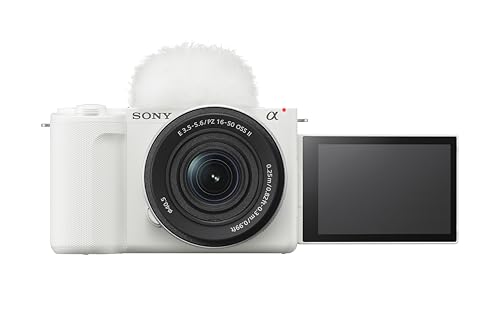
Sony ZV-E10 II — Best Overall for Beginners
The ZV-E10 II is what a beginner video camera looks like when a manufacturer studies beginners instead of assuming them. Its autofocus is the headline and deserves to be: face and eye tracking that engages the moment you step into frame, holds through the gestures and glances of natural speech, and quietly re-acquires if you duck out and return — the three behaviours a solo creator needs and cannot do for themselves. Set it on a tripod, press record, and the camera’s half of the performance is handled.
Around that focus sits a complete creator’s toolkit: a flip screen for self-framing, a microphone input and a proper mount for the shotgun mic that should be your second purchase, interchangeable lenses so the kit zoom’s education can be followed by a fast prime’s glow, and colour that publishes without a grading apprenticeship. It records long, edits kindly, and its stills are good enough that the hybrid beginner is not punished for choosing it.
Its honest limits are stabilisation that is electronic rather than magical — walking shots are calmer than a phone’s, rougher than the Pocket 3’s — and a body that asks the beginner to learn a real camera’s handful of controls. Both are tuition worth paying: this is the pick with the longest future in a beginner’s kit.
- Sensor: APS-C, strong in household light
- Autofocus: face and eye tracking, set-and-forget
- Audio: microphone input plus accessory shoe
- Screen: flips forward for solo filming
- Role: the default first creator camera
Strengths
- Autofocus a solo creator can genuinely trust.
- Lenses and audio grow with the channel.
- Colour and files publish without grading skills.
Trade-offs
- Stabilisation is good, not gimbal-smooth.
- No viewfinder for the stills-curious beginner.
- Rolling shutter shows in fast pans.
Best for: beginners starting a channel, course or vlog with room to grow. Not suited for: pure action filming or stills-first photographers.

DJI Osmo Pocket 3 — Easiest Footage
The Pocket 3 cheats, gloriously. Its camera rides on a three-axis gimbal — a motorised stabiliser the size of a thumb — so the walking shot that defeats every other beginner camera comes out of this one looking like it was filmed from a dolly. For the beginner whose video is movement — travel days, market walks, property tours, the children’s Saturday — that single mechanical fact outweighs every specification war in this guide. Smooth footage is the most visible difference between beginner video and the videos beginners admire, and the Pocket 3 hands it over on day one, before the beginner has learned a single thing about how it is achieved — which is either cheating or the entire point of a beginner camera, depending on how stern you are feeling.
The rest of the design serves the same mercy: a rotating screen that switches between filming yourself and filming the world, subject tracking that keeps a face or a chosen subject centred while you walk, a sensor large enough for evening streets, and a form factor that disappears into a jacket pocket so the camera is present for the unplanned footage that becomes the best of any trip. Its wireless microphone ecosystem, bought once, solves audio with the same click-and-forget elegance.
It is not a system camera: no lenses to change, a fixed view of the world, and a delicate gimbal that wants its case. For the beginner whose ambition is beautiful footage of a moving life rather than a studio practice, it is not a compromise at all — it is the correct tool, arrived early.
- Stabilisation: three-axis mechanical gimbal
- Sensor: large 1-inch type for low light
- Screen: rotating, for self and world filming
- Tracking: tap-to-follow subject tracking
- Role: travel, walks and moving-life video
Strengths
- Walking footage is smooth immediately, no skill required.
- Pocket size means it is always carried.
- Tracking keeps subjects centred while you move.
Trade-offs
- Fixed lens; no optical variety or growth.
- Gimbal is a mechanism that needs its case and care.
- Not the stills camera for a photography-curious owner.
Best for: beginners whose videos move — travel, tours, family days out. Not suited for: studio talking-head production as the main job.

Sony ZV-1F — Simplest Start
The ZV-1F is the camera for the beginner who is intimidated by cameras, and there is no shame in that address — it is where most creators start. Sony removed everything removable: the lens is fixed and wide, the exposure is automatic and intelligent, the autofocus lives on faces, and the controls amount to what a person can run while thinking about what they are saying. A beginner cannot set this camera wrongly in any way that matters, which is precisely the feature its audience is buying.
Within its simplicity it is genuinely capable: the wide lens frames a desk, a kitchen counter or an arm’s-length walk; the colour flatters skin in ordinary rooms; the built-in microphones are respectable until the external mic arrives; and the whole thing is small enough to live on the desk where the videos are made, which is where beginner consistency is actually built. Its stills are snapshots, honestly labelled.
Its ceiling is the price of its floor: no lens to upgrade, no viewfinder, and a sensor that asks the light to be kind. The beginner who outgrows it will know exactly why, and will have a year’s published videos — rather than a drawer of abandoned ambition — to show for the tuition.
- Lens: fixed wide prime, no decisions required
- Autofocus: face-priority, always on
- Screen: flips forward for self-framing
- Audio: capable built-in mics, creator-tuned
- Role: the gentlest possible first step
Strengths
- Nothing to mis-set; confidence from the first video.
- Small and desk-friendly for daily consistency.
- Flattering colour in ordinary indoor light.
Trade-offs
- No upgrade path in lenses or controls.
- Low light is its honest weakness.
- Stills are snapshots, not a photographer’s files.
Best for: nervous beginners making talking-head videos at home. Not suited for: beginners who already know they want a system camera.

Canon EOS R50 — Best Hybrid Doorway
Some beginners arrive at video with a photographer’s heart — they want the channel and the portfolio, the tutorial and the still life — and for them the R50 is the one-body answer. Its video is genuinely creator-ready: Canon colour that makes skin look like the reason people subscribe, eye autofocus that minds the face while the beginner minds the script, a flip screen, a microphone input, and recording that suits the long talking formats. Its stills, meanwhile, are a real camera’s — viewfinder, interchangeable lenses, files with depth — because the R50 is a system camera that does video well, not a video gadget that photographs as an afterthought.
The education it offers is the broadest here: a beginner can learn exposure on stills in the morning and apply it to video in the afternoon, on the same dials, through the same lenses. Canon’s guided menus smooth the first weeks of both crafts without hiding the real settings beneath.
Its video limits are the honest hybrid ones — stabilisation that leans on the lens, and thermal manners that prefer reasonable formats and rooms — and a pure video beginner will find the ZV-E10 II more single-minded. For the beginner who refuses to choose between the moving and the still image, the R50 refuses with them, gracefully.
- Sensor: APS-C for stills and video alike
- Autofocus: eye tracking across both crafts
- Audio: microphone input for creator audio
- Screen: vari-angle, plus a real viewfinder
- Role: the one-body hybrid start
Strengths
- Real photography and real video in one purchase.
- Canon colour flatters talking-head content.
- Guided menus teach both crafts gently.
Trade-offs
- Stabilisation depends on the lens fitted.
- Less video-specialised than the Sony creator bodies.
- Heavy video formats warm it on long sessions.
Best for: beginners who want video and stills from one camera. Not suited for: the pure videographer who will never use the viewfinder.

Nikon Z30 — Best for Long Videos
The Z30 was designed by asking a question the other makers sometimes forget: what if the video is long? Lessons, interviews, streams, sermons, tutorials — the formats where a beginner presses record and talks for the better part of an hour — are where recording limits and heat shutdowns humiliate lesser cameras, and where the Z30’s party trick, calm and unglamorous, is simply to keep going. It records long takes as a matter of design, runs as a webcam for live formats without drama, and its tally light and front screen respect the solo operator throughout.
The image it makes while enduring is properly good: Nikon’s colour is honest, the APS-C sensor handles the evening room, and the Z-mount’s affordable lenses give the long-form beginner a growth path that the fixed-lens picks cannot. Autofocus for faces is capable and improving with the system’s maturity, and the body is compact enough for the desk-corner studio most long-form creators actually inhabit.
It lacks a viewfinder and its creator-specific polish — the product-showcase tricks and vlogging flourishes — trails Sony’s. For the beginner whose videos are marathons rather than sprints, endurance is the polish that matters, and the Z30 wears it best here.
- Sensor: APS-C with honest Nikon colour
- Recording: long takes without practical limits
- Streaming: clean webcam operation for live video
- Screen: front-facing with a clear tally light
- Role: lessons, streams and long conversations
Strengths
- Keeps recording where others stop to cool.
- Webcam mode serves live formats natively.
- Affordable lens system for later growth.
Trade-offs
- No viewfinder for stills work.
- Fewer creator flourishes than Sony’s line.
- Stabilisation is electronic and lens-based.
Best for: teachers, streamers and interviewers filming long formats. Not suited for: action or heavy walking footage.

GoPro HERO13 Black — Best for Action
Every list needs its exception, and the HERO13 is this one’s: the beginner camera for video that happens where cameras are not supposed to go. It mounts to the helmet, the handlebars, the surfboard and the dog; it is waterproof as a way of life; its stabilisation — electronic, and by now astonishingly good — irons the vibration out of a mountain-bike descent into something watchable; and its ultra-wide view forgives the aim of a photographer who is, reasonably, watching the trail instead.
For the beginner whose channel is their sport, it is not the second camera but the only possible first one, and its stills and time-lapse modes cover the rest of the adventure’s documentation. The ecosystem of mounts is its curriculum: each new mount is a new angle, and learning to place it — low on the board, high on the mast, backwards at the rider behind — is the action videographer’s whole education in miniature.
Its unsuitability for the talking-head mainstream is total and cheerful: the fisheye view, the tiny screen, the audio that needs help in wind. Buy it for the life it is built to film, and let the desk-bound beginners keep their Sonys.
- Build: waterproof and crash-tolerant
- Stabilisation: class-leading electronic smoothing
- Mounts: the largest accessory ecosystem in video
- View: ultra-wide, forgiving of aim
- Role: sport, travel and adventure video
Strengths
- Films where no other pick here survives.
- Stabilisation turns chaos into watchable footage.
- Mount variety teaches action framing fast.
Trade-offs
- Ultra-wide distortion unsuits talking heads.
- Audio needs accessories in wind and weather.
- Small screen and controls while gloved or wet.
Best for: beginners filming sport, travel and the outdoors. Not suited for: indoor channels, lessons and interviews.
How Do the Picks Compare for a Video Beginner?
| Pick | Stabilisation | Autofocus | Recording stamina | The beginner it fits |
|---|---|---|---|---|
| Sony ZV-E10 II | Electronic | Excellent face/eye | Strong | The growing channel |
| DJI Osmo Pocket 3 | Mechanical gimbal | Tracking | Good | The moving life |
| Sony ZV-1F | Electronic | Face priority | Good | The nervous starter |
| Canon EOS R50 | Lens-based | Eye tracking | Good | The hybrid |
| Nikon Z30 | Electronic/lens | Face detection | Exceptional | The long-form talker |
| GoPro HERO13 Black | Electronic, superb | Fixed focus | Good | The adventurer |
Choose by the shape of your filming week rather than by any single column. The camera whose strengths match the videos you will actually make fifty of is the right one; the camera that wins a column you will use twice is a trophy, and trophies do not build channels.
What Should You Buy After the Camera?
A microphone, before anything else, and the order is not negotiable — not the lens, not the bag, not the second battery, however loudly the camera shop’s displays argue otherwise on the day. The gap between a camera’s built-in audio and even a modest external microphone is the largest quality jump available to a beginner at any price — larger than any camera upgrade on this page — because audiences judge video by its sound while believing they are judging its picture. A shotgun mic on the camera for talking work, or a wireless lapel system for the moving and teaching formats, transforms every pick here equally; buy it in the same month as the camera, not the same year.
Light is second: one soft source, placed at forty-five degrees, lifts a beginner’s room from evidence footage to intentional video, and it flatters every sensor in this guide impartially. A tripod that holds the camera at eye level without sagging is third, and thereafter the beginner’s money should pause — storage, a spare battery, and time spent filming will teach more than any further accessory. The channel is built in the filming, not in the shopping.
How Do You Set Up Your First Talking-Head Video?
Face the light, not the camera’s convenience. Seat yourself so a window or your one lamp lights your face at an angle, put the camera at eye level — a stack of books under a tripod has launched more channels than any studio — and frame from the chest up with a little headroom, on whichever pick you own. Set the autofocus to its face mode, lock the exposure once your face is lit as you want it, and set white balance for the light you actually have rather than the one the camera guesses at between your warm lamp and the cool window.
Record a thirty-second test and watch it with the sound up, because the test is where the beginner’s real problems live: the humming fridge the microphone loves, the autofocus drifting to the bookshelf, the echo of the bare room. Fix one problem, test again, and only then film the real thing. This ritual, ten minutes long, is the difference between beginner video that improves weekly and beginner video that repeats its first mistakes for a year. Write the ritual down — the order of the checks, the settings that worked, the microphone’s distance from your mouth — and tape it to the tripod, because the beginner’s memory on filming day is busy with the script, and the checklist never forgets what the performer does.
What Mistakes Do Beginner Videographers Make?
Neglecting audio is the first and the fatal one, addressed above and worth repeating because everyone does it once. The second is filming against the light — the bright window behind the beginner, turning their face into a silhouette the camera’s exposure cannot rescue and the audience cannot read. The third is the unedited ramble: beginner video improves most in the cutting, and the creator who learns to remove their own dead air has learned the craft’s central kindness to an audience.
Fourth is chasing settings mid-take — adjusting, checking, restarting — until the performance dies of self-consciousness; the cameras in this guide were chosen so that the setup can be finished before the talking starts and then forgotten. Fifth is quitting at video six, in the trough where the beginner can finally see the gap between their work and the work they admire — a gap that feels like a verdict and is actually a syllabus, since everything in it has a name, a cause and a fix that the next ten videos will quietly work through. Every creator they admire stood in that trough; the ones with channels are the ones who filmed video seven.
How Much Editing Does Beginner Video Need?
Less than beginners fear and more than they hope. The publishable unit of editing is three skills: cutting out the dead air and the false starts, levelling the sound so a whole video sits at one comfortable loudness, and adding the simple titles that tell a stranger what they are watching. Every pick here produces files that a modest laptop and a mainstream editor handle without protest, and the colour from these cameras is designed to need, at most, a gentle correction rather than a grade.
Resist the effects shelf for the first twenty videos. Transitions, colour looks and animated everything are the beginner’s procrastination dressed as production, and the channels that grow are built on the unglamorous virtues — a clear voice, a steady face, a point made once and well. When the filming is habitual and the cutting is quick, the polish will have something worth polishing.
Should a Beginner Film in 4K or 1080p?
For most beginners, most of the time: film in the resolution you can edit comfortably and store honestly, which for a modest laptop and a weekly schedule is often 1080p, and lose no sleep over it. The audience for beginner video watches on phones, in apps, at sizes where the difference between a well-lit 1080p frame and a badly lit 4K one is decided entirely by the light. Resolution is the specification beginners overvalue most, because it is the one printed largest on the box.
There are two honest exceptions. Cropping in the edit — reframing a wide 4K shot into a closer one, or producing both a wide and a vertical version from one take — is a real creative tool that 4K buys, and the ZV-E10 II and Pocket 3 deliver it well. And the beginner building a library for the long term may reasonably archive in 4K while publishing in 1080p. Choose per workflow, not per marketing, and let the light and the microphone have the budget first either way.
How Do You Light a Room for Video Without a Studio?
Start with the window you already own and the discipline of facing it. Daylight from a large window, slightly to one side, is a softbox the size of a wall, and a beginner who films facing it — never with it behind them — has lighting better than most purchased kits provide. On grey days and evenings, one lamp with the shade off and a shower cap’s worth of diffusion — or the purpose-made softbox that costs little more — placed at forty-five degrees to the face does the same work at a smaller scale.
The errors are consistent and curable: the ceiling light that carves shadows into eye sockets, the mixed temperatures that paint half a face orange and half blue, the background brighter than the subject so the camera exposes for the wrong thing. Kill the ceiling light, choose one temperature, darken or distance the background, and every camera in this guide will look a class more expensive. Light is the beginner’s cheat code precisely because it is bought once, learned quickly, and improves every future camera as much as the present one.
What Should a Beginner’s First Ten Videos Be?
Small, finished and published — in that order of importance. The first ten are tuition disguised as content: one talking piece to learn the setup ritual, one walking piece to learn stabilisation’s limits, one teaching piece to learn the edit, one interview or conversation to learn audio for two voices. Vary them deliberately, because the beginner does not yet know which format is theirs, and the camera in this guide was chosen to let all of them be tried on one body.
Publish each one while making the next. The audience’s silence or kindness in the early weeks is not the metric; the metric is the visible slope between video one and video ten, which will be steeper than the beginner believes possible from inside it. Creators are made in the second ten videos by the people who finished the first ten — a sentence worth taping to the tripod.
How Do You Film an Interview as a Beginner?
Sit the guest where the light is kind and the background is calm, put the camera at their eye level on the tripod you are not touching, and give the autofocus a single face to love — yours is out of frame, which is where a beginner interviewer’s face belongs. Audio is the interview’s real craft: a microphone near the guest matters more than anything the camera does, and the wireless systems that serve the ZV-E10 II and its peers were practically designed for the two-person conversation.
Ask shorter questions than you want to, and let silences live; the guest’s considered pause is better footage than your encouraging noises, which the microphone will faithfully preserve stepping on their answers. Film a minute of the empty room’s sound before you start — editors use it to smooth cuts, and remembering it is the kind of small professionalism that separates the beginner who is learning from the one who is merely recording.
What About Vertical Video and Short Formats?
The short vertical formats are where many beginners find their first audience, and the cameras here serve them better than their horizontal heritage suggests. The Pocket 3’s rotating screen was designed for the switch; the mirrorless picks can be mounted vertically or can shoot wide with the vertical frame composed inside it, and several offer aids for exactly that framing. The beginner’s discipline is to decide the destination before the take: a video composed for vertical suffers when cropped from a horizontal afterthought, and vice versa.
Short formats are also the beginner’s friend as pure training. A complete idea in under a minute, filmed weekly, teaches hook, framing, audio and editing at a pace long formats cannot match — and the skills transfer upward when the long channel begins. Treat the shorts as the gymnasium and the long videos as the sport, and the same camera serves both.
How Do You Keep Filming When Nobody Is Watching?
By deciding in advance what the filming is for. The beginner who films to learn has a metric the algorithm cannot take away — each video visibly better than the last — and a schedule that does not depend on applause. Keep the schedule small enough to survive a bad month: one video a week, finished, beats the daily ambition that collapses by February and takes the channel with it. Batch the filming when energy is high, edit in the troughs, and let the archive accumulate the evidence that the work is compounding.
Community substitutes for audience in the early phase: one fellow beginner to exchange cuts with, one honest friend briefed to be honest, the comments of the three strangers who found you. Every established creator’s archive contains the same unwatched first season; the only difference between them and the quitters is that their season ended with a second one. The cameras in this guide are good enough that equipment will never be the reason yours does not.
What About Live Streaming as a Beginner?
Live video forgives nothing and teaches everything, which is why beginners should approach it after a handful of recorded videos rather than before them. The kit is the recorded kit, rearranged: the camera as a webcam or through a capture device, the microphone already bought, the light already placed — and the Z30’s clean webcam operation and the Sonys’ streaming readiness mean none of the picks here needs replacing when the live chapter opens. What changes is the performance: no edit stands between the beginner and the audience, so the setup ritual from this guide becomes a pre-flight check performed without exception.
Start live small and scheduled — a weekly half hour on a topic the recorded videos have already taught you — and let the chat’s kindness cover the numbers. Streaming’s gift to a beginner is immediacy: questions arrive while the knowledge is warm, and a channel’s community is often built faster in a month of lives than in a season of uploads. The recording of each stream, kept and reviewed, is the cheapest coaching in the craft.
How Do You Organise and Store Video Files?
Video devours storage at a rate stills never prepared anyone for, and the beginner who does not build the system in month one excavates it in month six. The workable pattern is plain: a folder per video, named with its date and working title; the raw clips copied from the card the day they are shot, never edited from the card itself; the finished export kept beside its project; and a second copy of everything on a separate drive or a cloud tier before the card is formatted. Cards are transport, not storage — the beginner who treats them as shelves eventually loses a video they loved, once, and never again.
Delete ruthlessly at the project level and conservatively at the clip level. Failed projects teach by their exports; raw footage of a talking head teaches nothing after the edit is done, and its gigabytes are better spent on the next ten videos. The archive that matters is the published work and its projects — keep those like the stills photographers keep their negatives, backed up twice, named like you mean it.
What Does the Path From Beginner to Serious Look Like?
It is marked by purchases that get rarer and more specific. The beginner’s year buys breadth — the microphone, the light, the tripod — because everything is a bottleneck at once. The second year buys depth in the direction the work has chosen: the fast prime for the talking head’s glow, the second camera for the interview’s other angle, the audio recorder for the field. Notice what is not on either list: a new camera body, which the advancing creator replaces last, because by then they know precisely which limitation of the current one the work has outgrown — the same discipline this guide’s stills sibling preaches, learned from the other side of the craft.
The picks here were chosen to delay that replacement honourably. The ZV-E10 II’s lenses, the R50’s system, the Z30’s endurance and the Pocket 3’s unique gift all survive the beginner phase as working tools rather than training wheels to be sold. Buy the camera whose second year you can picture, and the first year will take care of itself.
How Do You Film in Public Without Dying of Self-Consciousness?
Every beginner creator faces the pavement moment: camera up, strangers present, courage gone. The cures are practical before they are psychological. Small cameras help — the Pocket 3 and ZV-1F attract a fraction of the attention a rig does — and filming the world more than yourself at first builds the muscle in private. Short takes lower the stakes of each attempt; a failed twenty seconds in a market is nothing, where a performed five minutes feels like a speech.
The deeper cure is arithmetic: strangers forget you in four seconds, the footage lasts, and the creators you admire all filmed their awkward publics with the same dry mouth. Respect the real courtesies — do not block paths, honour the person who asks not to be filmed, follow the rules of the places you film in — and let the rest go. Confidence in this craft is not a prerequisite; it is a by-product, manufactured by repetition, and the first fifty public clips are the factory.
How Do You Make a Room Sound Good?
Rooms are the beginner’s invisible problem: the voice is recorded faithfully and sounds like it was filmed in a stairwell, because it was filmed in the acoustic equivalent of one. Bare walls, hard floors and a desk in a corner return every syllable to the microphone a fraction late, and the accumulation is the echoey amateur signature no camera setting can remove. The cures are domestic rather than technical — film in the room with the most soft things in it, hang the duvet or the curtains’ worth of fabric near the filming corner, put the microphone closer to your mouth than feels polite so the room’s voice shrinks beneath yours.
Clap once, on camera, in your test recording and listen: a sharp, single report is a workable room; a fluttering tail is a room asking for cushions. This ten-second test, run whenever the filming place changes, will teach a beginner more about audio than a month of microphone reviews — and it explains, better than any specification, why the microphone’s position outranks its price.
What About Filming Family Events as a Beginner?
The birthday, the match, the school play: family events are where beginner video earns its emotional keep, and where its etiquette is learned. Film less than instinct demands — the parent who watches through a screen attends a different event from the one who films the entrance, the song and the cake, then puts the camera down and is present for the rest. The cameras here divide by event shape: the Pocket 3 and GoPro for the moving, outdoor chaos; the ZV-E10 II or R50 on a tripod at the back for the staged performance, where their autofocus and a modest zoom do the work while you sit with the family like a civilian.
Sound and light at events are given, not chosen, so the beginner’s skills are positioning and restraint: near enough for the microphone’s sake, early enough for the seat that allows it, and gone before the filming becomes the event’s story. The footage that results — imperfect, warm, irreplaceable — is also the archive the family will actually rewatch, which makes family events the beginner’s most forgiving classroom and their most permanent one.
How Do Titles and Thumbnails Fit a Beginner’s Camera Choice?
They do not — and remembering that is a beginner’s protection. The packaging of a video is a separate craft from its filming, learned from the platform’s own evidence over months, and no camera purchase influences it. What the camera influences is whether the person in the thumbnail looks like someone a stranger would trust for ten minutes: lit kindly, in focus, sounding clear in the first sentence. Beginners routinely invert the priority, spending their first month on graphics for videos not yet filmed. Film first, package second, and let the camera in this guide do the half of the work that only it can do.
There is one honest intersection: a camera that makes filming pleasant gets used, and a used camera produces the catalogue from which titles and thumbnails can eventually choose. Consistency is the real growth strategy available to a beginner in the platform era, and consistency is an ergonomics problem long before it is a talent problem — which is why this guide weighted flip screens, stamina and mercy so heavily from the start.
What Should You Do When a Video Goes Wrong?
Diagnose it in the order audiences notice: sound, focus, light, everything else. The beginner’s post-mortem habit — one written sentence per failed video, filed with the project — converts each disappointment into the next video’s checklist, and within ten videos the list stops repeating itself. Resist the two false conclusions: that the camera failed (it almost never did, in this company) and that you failed (you were learning, which is the assignment). The correct conclusion is nearly always procedural — the test recording skipped, the window behind you, the microphone in the drawer — and procedures, unlike talent, can be fixed by Friday.
Final Recommendation
Most beginners should buy the Sony ZV-E10 II, the microphone, and the light, in that order, and start filming this week. Choose the DJI Osmo Pocket 3 instead if your videos move more than they talk, the Sony ZV-1F if simplicity is the difference between starting and not starting, and the Nikon Z30 if your format is the long lesson or the live stream. Take the Canon EOS R50 if stills matter alongside the channel, and the GoPro HERO13 Black if your life is the location. Then film the imperfect first video with whichever you chose — the beginner’s only true mistake is the unfilmed one, and every camera here is good enough to make it a good one. A year from now, the videos will be better in every way this guide has discussed, and the camera that started them will still be in your hands, having asked for nothing along the way but a charged battery and a subject. That is what a beginner camera is for, and it is why the choice, made honestly against your own filming life, matters less than the filming itself — which begins, as all channels everywhere begin, with someone, somewhere, pressing record and truly meaning it completely.
Related guides
- Best Cannon Cameras for Videography: Canon Picks for Log, 10-Bit Colour, and Long Takes
- Best Cameras for Video Courses — Consistent Picks for Teachers, Coaches, and Training Teams
- Best Cameras for Novice Photographers: Six Foolproof First Cameras for Complete Beginners
- Best Cameras for HDR: 6 Picks for Dynamic Range, Brackets and HDR Video
Frequently Asked Questions
Do I really need a camera, or is my phone enough for beginner video?
A modern phone is a legitimate starting camera, and many channels begin there. The dedicated cameras in this guide earn their place on the things phones compromise: autofocus that behaves like a camera’s, real microphone inputs, recording stamina without a hot, storage-hungry handset, interchangeable lenses, and a device that is not also your messages. When the phone’s compromises start costing you videos, this list is the upgrade path.
What is the most important setting for beginner video?
Face-detection autofocus, switched on and trusted. It is the setting that lets a solo creator perform instead of operate, and every pick here implements it well. After that, a fixed white balance matched to your light, and exposure locked on your face — the trio that makes a beginner’s frame look intentional.
Why does my video look shaky even with stabilisation?
Usually because stabilisation is being asked to fix walking, panning and hand-shake simultaneously, and electronic systems crop and smooth only so far. Slow the walk, hold the camera with two hands and tucked elbows, and shorten the moving shots. If walking footage is your format rather than your exception, the Pocket 3’s gimbal exists precisely for you.
How do I stop my camera overheating during long videos?
Start by choosing the right tool — the Z30 was designed for long takes. On any camera: give it moving air, keep it out of sun, use the recording format your session actually needs rather than the maximum available, and power it from the mains where the format allows, since a charging battery adds its own heat. Test your full session length before the day it matters.
Do I need a microphone right away?
You need one sooner than you think, and it should be the first accessory bought — ahead of lenses, lights and everything else in this guide’s after-camera list. The built-in microphones here are respectable for the first videos, but the external microphone is the single largest quality jump available to you, and your audience will hear the difference in the first second.
Can I use one of these cameras for my online meetings too?
Yes, and it is an underrated dividend: most of these bodies work as high-quality webcams or through a simple capture device, so the camera that films your channel on Saturday presents you on Monday’s calls with the same flattering light and lens. The Z30 was designed with this double life in mind, and the Sonys and Canon follow with their own streaming modes. Set it up once, on the tripod, at the desk, and both of your on-camera lives improve together.
What frame rate should a beginner use?
Match the look to the content: standard frame rates for talking and teaching, where a natural, familiar motion is the goal; higher rates when you intend to slow footage down in the edit, as the action and travel picks invite. Consistency within a video matters more than the number — pick one, set every camera in the production to it, and let the edit be the only place rates change.
Related Guides
Video is one half of the beginner’s fork. Our guide to the best cameras for beginners for stills covers the photographic path with the same honesty, our roundup of the best cameras for vlogging goes deeper on the creator specialisms, and our explainer on the best microphones for beginner video expands the purchase this guide keeps insisting comes second only to the camera itself.


