kajuandouglas.com is reader-supported. When you buy through links on our site, we may earn an affiliate commission.
Where to Buy
A course is a promise kept over hours. Unlike a single video, which can survive on charm, a course asks a student to trust you across twenty or sixty lessons — and the best cameras for video courses are the ones that protect that trust visually: consistent framing from module one to module forty, a face that stays in focus while you think, colours that do not drift between the lesson recorded in March and the one recorded in June. This guide is written for course creators generally — independent teachers, coaches, and the training teams inside companies — whatever platform the finished course eventually calls home.
The filming reality of courses is batch work. Teachers record four lessons in a morning, demonstrate at a desk or a whiteboard in the afternoon, and repeat the pattern until the curriculum exists. A camera for this life must start fast, behave identically every session, and never make the fortieth take worse than the first. Heat, battery anxiety, and autofocus with opinions are not minor flaws in course production; they are schedule risks multiplied by every module in the outline.
Most course footage divides into three shots, and a wise purchase covers all three. The talking head carries the teaching personality. The demonstration shot — hands at a bench, a product on a desk, a process at a board — carries the skill itself. The screen companion, where slides or software share the frame with the teacher’s face in a corner, carries the explanation. Our six picks divide those duties: mirrorless bodies for the main stage, intelligent desk cameras for the screen-heavy formats, and one tireless full-frame body for teachers who record all day.
Audio is not this guide’s subject, but it is every course’s destiny, because students forgive a plain picture far longer than they forgive tiring sound. Each pick below was judged partly on its audio pathway — a proper microphone input on the bodies, respectable built-in capture on the desk cameras — since the camera you buy decides the microphone you can grow into. Buy the picture and the pathway together, or you will buy the camera twice.
Teachers coming from live classrooms often ask why recorded teaching feels harder, and the camera is most of the answer: a lens returns no nods, no laughter, no visible comprehension to teach toward. The setups in this guide are, in part, prosthetics for that missing feedback — a screen that shows you your own framing like a student’s view, a tally light standing in for attention, autofocus standing in for the colleague who would tell you the board is out of shot. Choose the prosthetic that lets you forget the audience is absent, and the teaching voice you already own will do the rest.
One more principle before the names: in course production, consistency outranks excellence. A modest camera used identically across sixty lessons produces a course that feels professionally calm; a superior camera reconfigured weekly produces a patchwork that quietly erodes student confidence. Choose the setup you can repeat on a tired Tuesday in month four, because that is the setup your course will actually be filmed on.
A scope note, so the right readers stay and the wrong ones are freed: this guide treats video courses as a general craft — independent teaching, coaching programmes, and organisational training alike — rather than as a manual for any single platform’s upload specifications. Platforms change their technical requirements the way weather changes; the filming principles here, and the cameras that serve them, remain valid underneath every one of those revisions. Learn the craft once, and each platform becomes a destination rather than a discipline.
Key Takeaways
- Course cameras are judged on consistency across dozens of lessons, not brilliance in a single take.
- The Sony ZV-E10 II leads for solo teachers, with autofocus that watches the presenter so the presenter can teach.
- Canon’s EOS R50 is the gentle entry point for first-time course creators who need flattering colour without a colourist.
- The Panasonic LUMIX S5II serves high-volume teachers who record full days without thermal negotiation.
- Desk-native formats — slides, software walkthroughs, live classes — are the natural home of the OBSBOT Tiny 2 and Elgato Facecam.
- Whatever body you choose, fix the frame, the light, and the settings, then leave them alone for the whole course.
Recording safety, in the plain sense, closes the introduction: a course is weeks of irreplaceable teaching performances, and the professional habit is to protect them like it. Dual-slot recording where the body offers it, a same-day copy of every card, and a simple rule — no card is reused until its lessons exist in two places — turn the commonest catastrophe in course production into a non-event. The cameras cannot want this for you, but the serious bodies here at least make the habit easy to keep.
In this guide
Quick Picks
| Badge | Pick | Why it stands out |
|---|---|---|
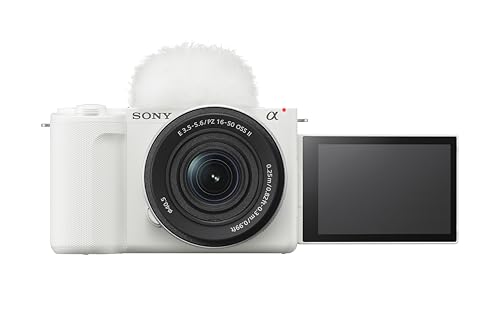
| Best Overall for Solo Teachers | Sony ZV-E10 II | Presenter-first autofocus, a screen that faces the teacher, and lens room for demonstration shots. |
| Best First Course Camera | Canon EOS R50 | Friendly handling and kind colour for teachers who would rather teach than configure. |
| Best for All-Day Recording | Panasonic LUMIX S5II | Fan-cooled stamina for batch-recording days and multi-lesson schedules. |
| Best for Whiteboard and Movement | OBSBOT Tiny 2 | A tracking PTZ camera that follows a teacher who stands, writes, and demonstrates. |
| Best Desk-and-Slides Camera | Elgato Facecam | Locked settings and honest image for screen-share lessons and live classes. |
| Best Simple Streaming Pick | Logitech StreamCam | Plug-and-teach simplicity with framing options for portrait and landscape lessons. |
One test in particular separated the list’s halves: the returning-teacher test. After a fortnight away, could the teacher sit down, switch on, and be recording a lesson indistinguishable from the previous module inside five minutes, without a manual or a warm-up take? The desk cameras pass that test by design, the creator mirrorless bodies pass it by intention, and many otherwise admirable cameras fail it completely — a failure no student ever sees directly, but every student pays for in delayed, inconsistent courses.
How We Chose These Picks
Evaluation imitated a production calendar rather than a photo shoot. Each camera had to record a sequence of short lessons back to back, hold its framing and colour across an artificial “month” of sessions simulated over several days, and survive the teacher standing to demonstrate, sitting to explain, and holding materials toward the lens. Cameras whose footage matched across sessions without persuasion rose; cameras that needed re-negotiating each morning fell, whatever their single-take quality.
Autofocus was tested pedagogically. Teachers move differently from vloggers: they lean in for emphasis, turn to a board, gesture at a screen, and look away to think — and a focus system that hunts during a student’s key explanation is a pedagogical failure, not a technical footnote. We favoured systems that hold a face calmly, shift politely to a held object, and return without drama.
Workflow closed the judging: file organisation across dozens of lessons, webcam behaviour for live cohorts and office hours, and the small matter of a teacher being able to check framing alone, from the teaching chair, without a second pair of hands. Course production is a solo industry for most of its practitioners, and the ranking respects that solitude.
There is a temptation, when a course begins selling, to re-film the early lessons on grander equipment. Resist it unless the early footage is genuinely deficient: students experience a mid-course equipment leap as a change of teacher, and the catalogue’s unity — its quiet promise that one mind organised all of this — is worth more than the marginal sharpness. Grow the production between courses, not inside one.
What Does a Course Ask of a Camera That a Single Video Does Not?
Repetition, first of all. A single video forgives a camera that behaves differently every day; a course is sixty arguments that the camera must behave the same. Exposure that drifts between modules, colour that warms as the body heats, a frame that creeps — students may never name these flaws, but they feel the course becoming less trustworthy, the way a classroom feels less serious when the furniture changes daily. The picks below were screened for that sameness as a primary virtue.
Stamina follows. Course teachers batch-record because teaching energy, like camera batteries, is finite and best spent in blocks. A body that records a morning of lessons at consistent quality, without thermal warnings or card drama, protects the batch; a body that fades at lesson nine costs the teacher a second setup day. This is why a fan-cooled full-frame camera appears in a list aimed largely at solo teachers — volume is volume, whatever the class size.
Finally, a course asks for teaching-specific graces a review camera never needs: a screen the teacher can read from the chair, a tally light visible at a glance, remote or app control for starting a take without walking around the desk, and clean output for the live sessions and webinars that increasingly accompany recorded courses. None of these headline a specification sheet. All of them decide whether recording day feels like teaching or like fighting the furniture.
Think, too, about the student’s replay button. Lessons are scrubbed, paused, and re-watched at the hard parts, which changes what good footage means: a steady frame tolerates pausing gracefully, burned-in confusion does not. Teachers who demonstrate intricate work should narrate for the replay — naming the step, pausing on the result, letting the camera hold the finished state for a breath. That courtesy costs seconds at recording and saves students minutes at every review, and every camera in this list holds a still, patient frame well enough to honour it.
How Should the Three Course Shots Be Planned?
The talking head deserves a permanent home: one chair, one backdrop, one lamp position, marked and repeatable. Students navigate a course partly by visual landmarks, and a stable teaching frame becomes as familiar as a classroom’s front wall. Set the camera at eye level, leave a comfortable margin around the head, and resist reframing between modules — the discipline feels dull in week one and pays compound interest by week ten.
Demonstration shots reward the cameras with articulating screens and trustworthy autofocus, because the teacher’s attention belongs on the skill, not the monitor. Position the camera where the student’s eyes would be if they stood beside you — over the shoulder for bench work, square-on for board work — and let autofocus manage the hands moving in and out of the plane of focus. A second, humbler angle, even a desk camera’s, gives the edit an escape route when a demonstration needs trimming.
The screen-companion shot — teacher in a corner, slides or software in command — is where the desk cameras in this list earn their badges. Their locked exposure and uncomplaining USB behaviour suit hours of walkthrough recording, and their modest footprint keeps the teaching desk a desk rather than a studio. Courses heavy on software, data, or slides can be built almost entirely on this shot, with a mirrorless body appearing for the welcome lesson and the finale, where personality deserves the bigger instrument.
Guest experts deserve a planning note of their own, because courses increasingly invite them and cameras must accommodate a second chair. The mirrorless picks widen gracefully to a two-shot and their autofocus arbitrates between two faces without favouritism; the desk cameras include a guest at a shared screen more awkwardly but serviceably for a remote interview recorded over a call. Decide, per course, whether guests are a garnish or a pillar — pillars justify the wider instrument and a second microphone from the start.
Assessment and feedback loops close the production circle. Many platforms let students submit video responses, join live critiques, or record practice attempts, and a teacher reviewing those submissions benefits from the same camera literacy this guide teaches: what a stable frame does for trust, what bad light does to a demonstration. Teaching students to film their own work well is, for skill-based courses, part of the curriculum hiding in plain sight.
Which of the Best Cameras for Video Courses Fits Your Teaching?

Sony ZV-E10 II — Best Overall for Solo Teachers
A solo teacher is simultaneously the talent, the director, and the crew, and this Sony was designed by people who understood that staffing model. The screen turns to face the teaching chair, so framing is verified from the seat where the lesson happens. Autofocus holds the teacher’s face through leans and gestures, then glides to a book, a tool, or a product held toward the lens for a closer look — the single most course-specific behaviour any camera in this list performs, because demonstration is teaching.
Consistency, this guide’s prime virtue, is engineered into its habits. Set the exposure and colour once, in your room, with your lamp, and the camera reproduces that lesson’s look across a season of recording days. Footage needs no colour rescue between modules, which matters more than it sounds: a teacher editing lesson thirty should not be re-grading lesson three’s skin tones because the camera had moods. Predictability is this body’s love language.
Growth is the second argument. E-mount lenses let the same body cover the talking head today, a wider demonstration angle next term, and a shallow-focus interview with a guest expert next year. The microphone input and headphone monitoring let audio mature from built-in beginnings to a proper teaching microphone without replacing the camera. Live cohorts and office hours are served by its webcam behaviour, so one instrument covers the recorded course and the live classroom around it.
Its honest limits suit its station: no in-body stabilisation, because a course camera lives on a tripod; a compact grip, because it lives on that tripod rather than in a traveller’s hand. Judged from the teaching chair — the only seat that matters here — the ZV-E10 II asks the least and gives the most of any pick in this guide.
- Sensor: APS-C, interchangeable E-mount lenses
- Screen: turns to face the teacher
- Focus: face tracking with product-showcase shifts
- Audio: microphone input, headphone monitoring
- Live use: doubles as a high-quality webcam
Strengths
- Demonstration focus shifts feel like a cameraman
- Identical look from lesson to lesson
- Lenses and audio grow with the catalogue
Trade-offs
- Tripod life assumed; handheld is not its gift
- Small grip for large hands
- Best colour still benefits from one good lamp
Best for: solo teachers filming talking-head and demonstration lessons for any platform or internal library. Not suited for: teachers who film while walking through workshops or sites.

Canon EOS R50 — Best First Course Camera
Many excellent teachers are held back from recording by a single fear: that they will look and sound amateur beside the polished courses they admire. The R50 dismantles that fear with kindness. Its automatic modes are genuinely competent, its colour flatters a face under ordinary room light, and its guided menus explain themselves to a person whose expertise is their subject, not their camera. A first course filmed on an R50 looks like a course, which is the entire battle for confidence.
Underneath the welcome mat sits the same course machinery as its pricier rivals: face and eye autofocus that minds the lesson while the teacher teaches, an articulating screen for solo framing, and clean output for live sessions. Vertical recording serves the short-form clips that market a modern course — the sixty-second insight, the myth-busting aside — from the same setup and the same afternoon as the main lessons, a rhythm independent teachers increasingly live by.
The RF mount keeps the future open without pressuring it. Start with the kit lens at the desk; add a fast prime when the backdrop deserves softening; borrow the platform’s depth when a guest expert or a conference talk enters the catalogue. Teachers who outgrow the R50’s conveniences tend to graduate within Canon’s own family, carrying their habits and accessories with them.
Budget realism earns it the final word in its favour. A first course’s money is usually better divided — camera, microphone, lamp, and the quiet room treatment nobody photographs — than concentrated in a flagship body. The R50 leaves that division possible while conceding nothing a student will ever see. Buy it, fix the frame, and spend your remaining attention on the curriculum, where it belongs.
- Sensor: APS-C, Canon RF mount
- Handling: guided modes for non-technical teachers
- Focus: face and eye detection
- Screen: vari-angle for solo lessons
- Clips: vertical-friendly for course marketing
Strengths
- First lessons look professional immediately
- Colour kind to faces under home lighting
- Leaves budget for microphone and light
Trade-offs
- Battery life asks for a spare on batch days
- Kit lens is a teacher, not a low-light hero
- Advanced colour work lives in bigger bodies
Best for: first-time course creators and subject experts who are not camera people. Not suited for: all-day batch recording without spare batteries and a break plan.

Panasonic LUMIX S5II — Best for All-Day Recording
Some teachers record like authors write: in long, protected blocks, a full day at the studio desk producing a module a week for a catalogue that never sleeps. For that working pattern, the S5II’s fan-cooled design is not a specification but a schedule guarantee. Lesson twelve records with the same composure as lesson one, in a warm room, under lights, without the teacher developing a superstitious relationship with a temperature warning. Corporate training teams, whose recording days are booked like meetings, should start their shortlist here.
Professional manners reinforce the case. Monitoring tools show exposure truthfully, so a morning’s footage is verified as it is made rather than mourned in the edit. The full-frame image gives demonstrations a clarity that rewards close viewing — the watchmaker’s bench, the clinician’s technique, the artist’s hand — and in-body stabilisation covers the occasional handheld insert without a gimbal ceremony. Dual recording habits and a video-first interface suit teachers who treat the camera as studio infrastructure.
There is also a credibility dividend in training contexts. A corporate course, a certification programme, a university’s online offering — these are judged by procurement-minded eyes, and footage with this body’s depth and calm reads as institutional quality. When a course is sold to organisations rather than to individuals, the picture itself is part of the pitch deck, and the Panasonic’s look closes arguments that a webcam’s cannot.
Concede the obvious: it is the largest commitment in this list, its lens ecosystem is the youngest of the mirrorless three, and a teacher recording two lessons a month will never use its stamina. Volume is its argument. Where volume exists — batch days, team production, a catalogue measured in hundreds of lessons — the S5II is not an extravagance but the correct tool, bought once and scheduled without fear.
- Cooling: fan design for uninterrupted batch days
- Sensor: full-frame for detailed demonstrations
- Monitoring: waveform-grade exposure tools
- Mount: L-mount alliance lenses
- Audio: microphone input and headphone monitoring
Strengths
- All-day recording without thermal negotiation
- Institutional image quality for B2B courses
- Exposure verified while teaching, not after
Trade-offs
- Serious investment for low-volume teachers
- Lens catalogue still maturing
- Bigger body for a small teaching desk
Best for: high-volume teachers, training teams, and corporate course production. Not suited for: occasional creators recording a lesson or two a month.

OBSBOT Tiny 2 — Best for Whiteboard and Movement
Some teaching cannot be done sitting down. The mathematics tutor works a board; the fitness instructor demonstrates a movement; the design teacher paces between a prototype and a sketch. For them, a fixed camera is a cage, and the Tiny 2 is the key: a small PTZ camera whose gimbal follows the teacher around the room, reframing as they move, zooming with a gesture, holding the lesson’s centre of gravity without a camera operator’s salary attached.
The intelligence is practical rather than theatrical. Voice and gesture controls let a teacher start, stop, and direct the camera mid-explanation, hands covered in chalk or mid-demonstration. The image, delivered over USB to recording or conferencing software, is sharp enough for board work at classroom distances provided the writing is bold — a constraint good teachers observe anyway. Live classes benefit most visibly: remote students get a lesson that moves like a lesson, not a statue’s monologue.
Set its boundaries with the same clarity. A tiny sensor in a dim room will not match a mirrorless body’s evening manners, the board must be lit for the camera as much as for the room, and handwriting at distance tests any small camera’s resolution. The Tiny 2 also depends on its software ecosystem for its full talents. Within a lit teaching space, though, it solves the one problem no other pick touches: the teacher who teaches on their feet.
Pairing is its natural destiny. Many movement-heavy teachers run the Tiny 2 as the room camera and a mirrorless body as the desk camera, cutting between the demonstration and the explanation. That two-angle grammar, once the privilege of produced television, now fits in a teaching bag — and students, who have watched produced television all their lives, register the difference as quality without knowing why.
- Movement: motorised pan, tilt, and subject tracking
- Control: voice and gesture commands
- Connection: USB to recording and class software
- Image: 4K-class detail for board work
- Role: the standing teacher’s camera
Strengths
- Follows a moving teacher automatically
- Live classes gain a camera operator
- Directing happens mid-lesson, hands-free
Trade-offs
- Dim rooms test its small sensor
- Board writing must be bold and lit
- Full talents live in its software
Best for: whiteboard teachers, movement instructors, and live-class presenters. Not suited for: dim studios or teachers who never leave the chair.

Elgato Facecam — Best Desk-and-Slides Camera
A large family of courses is taught from a chair, over slides and software, by a teacher whose face occupies a thoughtful corner of the screen. The Facecam was built for precisely that geometry, by a company that studied streamers the way Panasonic studied videographers. Its fixed-focus lens keeps a seated teacher sharp across the natural range of leaning and gesturing — no autofocus hunting while a point is being made — and its manual exposure and white balance lock down and stay locked, across sessions, across modules, across the whole course.
That lockability is a course virtue disguised as a streamer feature. A teacher recording lesson twenty in the same light as lesson two needs the camera to remember the arrangement, and the Facecam stores its settings on the device itself, indifferent to which application opens it each morning. The image processing favours honesty — no beautifying smear — which suits instruction, where students are reading the teacher’s expressions for emphasis and doubt.
Know the terms of the bargain. There is no built-in microphone, because its intended users own real ones; pair it with a proper USB or XLR microphone from day one, which course audio demanded anyway. There is no 4K headroom for reframing, so compose the corner-frame deliberately. Low light is not its parish; the lit desk it assumes is the same lit desk this guide keeps recommending.
For software trainers, data teachers, language tutors working over shared documents, and any instructor whose course is a voice, a face, and a screen, the Facecam may be the most rational purchase in this list: no lens decisions, no focus anxiety, no settings drift — a camera that behaves like classroom furniture, in the best sense, for years.
- Focus: fixed, with deep field for a desk
- Controls: manual exposure and white balance that lock
- Settings: stored on the device itself
- Image: honest processing under LED light
- Audio: external microphone assumed and required
Strengths
- Settings identical across a whole course
- No focus hunting during explanations
- Built for the slides-and-face format
Trade-offs
- No microphone built in at all
- No reframing headroom in post
- Expects a properly lit desk
Best for: software, slides, and screen-share courses plus live online classes. Not suited for: standing demonstrations or unlit rooms.

Logitech StreamCam — Best Simple Streaming Pick
Not every course needs a production; some need a Tuesday. The StreamCam is the camera for teachers whose course is an extension of their live teaching — recorded lessons cut from live sessions, cohort calls that double as content, office hours that become a library. It plugs in, frames up in landscape or portrait with a simple rotation of its mount, and delivers a clean, presentable image to whatever software the institution already uses. The learning curve is an afternoon, most of it spent on the curriculum instead.
Its virtues are the virtues of the familiar. Logitech’s software ecosystem is the one every IT department and every teacher’s laptop already tolerates, autofocus and exposure behave sensibly in ordinary rooms, and the dual microphones carry a clear voice at desk distance for teachers not yet ready to buy a dedicated microphone — though the upgrade, when it comes, pairs without friction. Vertical framing serves the short lesson clips and social teaching that increasingly surround a course’s main body.
Perspective is required about its ceiling. A webcam’s sensor in a dim room, a fixed lens at a fixed desk, no interchangeable anything — the StreamCam will not produce the demonstration footage or the cinematic welcome lesson a mirrorless body can. It is the right camera for the teacher whose authority is entirely in their knowledge and whose students meet them live, and the wrong camera for a flagship recorded catalogue with production ambitions.
Within its brief, its reliability is the recommendation. It will start every session, behave in every application, and never once be the reason a class was cancelled — and for the working teacher juggling a timetable, that boring dependability is worth more than a shelf of specifications. Courses are marathons of Tuesdays; the StreamCam is built for Tuesdays.
- Connection: USB plug-and-teach
- Framing: landscape or portrait by rotation
- Audio: dual built-in microphones
- Software: Logitech’s familiar ecosystem
- Role: live-taught courses and recorded sessions
Strengths
- Teaching starts the same day it arrives
- Portrait clips for course promotion built in
- Dependable across every teaching platform
Trade-offs
- Webcam ceiling in dim rooms
- Fixed lens, fixed desk, by design
- Not a demonstration camera
Best for: live-taught courses, cohort programmes, and teachers recording sessions simply. Not suited for: flagship recorded catalogues or demonstration-heavy subjects.
Music and language teaching, two quietly enormous course categories, stress-test different corners of this list. Music lessons live or die on audio fidelity and on a frame wide enough for hands and instrument together — the mirrorless bodies with a wider lens, and a microphone budget protected fiercely. Language teaching lives on the face: pronunciation is visible, so the desk cameras’ honest rendering and locked exposure serve it beautifully, and a close, well-lit talking head is worth more than any demonstration angle. Let the subject’s channel of meaning — sound, face, hands, screen — cast the deciding vote between these rows.
Three Teaching Formats, Six Cameras: The Comparison
| Pick | Format it owns | Session stamina | Defining virtue |
|---|---|---|---|
| Sony ZV-E10 II | Talking head plus demonstrations | Strong, with battery sense | Focus that teaches with you |
| Canon EOS R50 | First courses at a desk | Good, spare battery advised | Confidence for beginners |
| Panasonic LUMIX S5II | Studio and corporate production | All day, fan-cooled | Volume without drama |
| OBSBOT Tiny 2 | Whiteboard and movement | Class-length, self-operating | Follows the teacher |
| Elgato Facecam | Slides and software walkthroughs | All day at a desk | Settings that never drift |
| Logitech StreamCam | Live classes and simple recording | All day at a desk | Zero-friction reliability |
The table’s real lesson is that “course camera” names at least three different jobs, and the formats barely overlap. A whiteboard teacher and a software trainer can swap cameras only by ruining both courses. Read your own teaching honestly — where do you stand, what do students watch, how long are your recording days — and the correct row identifies itself with unusual clarity.
Budget flows from the same reading. The desk cameras cost a fraction of the mirrorless bodies and serve screen-led courses completely; the money they save belongs in the microphone and the lamp. The bodies earn their premium where demonstrations, guests, and production value enter the curriculum. Neither direction is the frugal one in the abstract — the format decides, as it decides everything in this guide.
Consider the economics that sit quietly under all of this. A course is an asset that sells while its teacher sleeps, teaches other cohorts, or writes the next one — which reframes the camera purchase entirely. Spread across hundreds of students and several years of enrolments, the difference between the adequate camera and the right camera becomes a trivial sum per student, while the difference in completion rates and refunds does not. Buy for the catalogue you intend to have, within the discipline of the formats above, and let the asset pay the difference back.
How Do Captions, Slides, and Accessibility Shape the Setup?
Modern courses are watched muted on trains, searched by transcript, and relied upon by students for whom clear captions are the course. Camera choices touch accessibility more than teachers expect: a stable frame keeps the teacher’s face readable for lip-readers and sign-language inset planning; consistent, adequate lighting keeps caption-timing editors and thumbnail makers sane; and clean audio — the microphone sermon again — is what makes automatic captions accurate enough to correct rather than rewrite from scratch.
Slides impose their own geometry. Text that a teacher reads comfortably on a monitor may be illegible in the recorded frame, so course veterans design slides for the camera: large type, ruthless contrast, one idea per screen. The desk cameras’ honest rendering helps here, refusing to flatter a muddy slide into false confidence. Record a test lesson, watch it at the size students will watch it — often a phone — and let that humbling screening set the slide template for the whole course.
Chaptering and consistency finish the accessibility picture. A camera setup that never changes lets a teacher promise students a stable visual rhythm across modules, which is itself an accessibility feature for learners who navigate by routine. Novelty belongs in the material; the frame should be the calmest thing in the course.
How Does Internal Corporate Training Change the Brief?
Inside a company, the “course creator” is often a subject expert with a day job — the engineer who understands the system, the nurse educator, the safety lead — filming between meetings in a borrowed room. That reality argues for the list’s simpler half: a StreamCam or Facecam on the expert’s own desk, a repeatable frame, and recording sessions that fit inside a calendar rather than consuming it. The best corporate training camera is the one the expert will actually switch on in February, not the production rig that needs a booking form.
Consistency carries a second meaning in organisations: many teachers, one library. When six experts record six modules, a shared camera model and a one-page setup standard — frame, lamp position, background, settings — keep the library feeling like one institution’s voice. Training teams should standardise deliberately, write the standard down, and lend the kit rather than letting every department improvise its own visual accent. The picks above were partly chosen for how gracefully they accept that kind of standardisation.
Review cycles add a workflow demand outsiders miss: footage must be easy to hand to a reviewer, a compliance checker, or an editor who was not in the room. Predictable files, clear naming, and cameras that behave identically across the team make that handover a link in a chain rather than an archaeological dig. Where an organisation records at volume, the Panasonic’s studio manners anchor the flagship content while desk cameras carry the long tail of updates, refreshers, and announcements.
Longevity closes the corporate case. Training libraries live for years and are re-recorded in pieces; a camera platform that remains available, supported, and familiar across that span protects the library’s visual continuity when module nine is filmed three years after module one. Buy the platform, not the moment — procurement language, but in this category it happens to be photographic wisdom too.
How Should a Teacher Script and Present for the Lens?
Camera choice and teaching craft meet in one uncomfortable place: the first thirty seconds of every lesson. Students decide whether to trust a course quickly, and they decide from the teacher’s ease — which is partly a camera property. A setup the teacher trusts, with framing verified and focus delegated to the machine, frees the face to do its actual work: greeting, promising, and beginning. Teachers filming on cameras they fight look like people fighting a camera, and no curriculum survives that first impression at full strength.
Scripting for courses differs from scripting for single videos. Full word-for-word scripts read as recitation on camera; bullet-structured notes, kept at the lens’s height, preserve both accuracy and eye contact. The articulating screens and desk previews in this list exist partly to serve that arrangement — notes beside the lens, eyes near the lens, the student addressed rather than the script. Record the welcome lesson last if confidence allows: by then the teacher and the camera will have become colleagues.
Energy management is the final craft note, and batch recording makes it a technical one. Film the hardest lessons first, while the voice is fresh; group the demonstrations on one set arrangement to avoid rebuilding the room; and keep a “pickup” list rather than re-recording whole lessons for a single stumbled sentence. A camera that starts instantly and behaves identically — the recurring hero of this guide — is what makes that humane schedule possible.
What Does a Sensible Course Editing Workflow Look Like?
Editing a course is manufacturing, not artistry, and the camera feeds the factory. Consistent footage — same frame, same colour, same levels — lets an editor build one template and apply it sixty times: same intro, same lower thirds, same caption style, same export. Every inconsistency the camera introduces is paid for in editing minutes multiplied by the number of lessons, which is why this guide has valued sameness over spectacle from its first paragraph.
File discipline begins at the camera. Record lesson by lesson rather than in marathon files; name or slate each take with its module and lesson number, spoken or shown to the lens; and let the camera’s folder structure become the course’s skeleton. Teachers who adopt the habit in week one edit in days. Teachers who do not, edit in weeks, inside folders named with hope and question marks.
Review at student size, on a student schedule: one lesson on a phone, with the platform’s compression applied, before the batch is declared done. That single screening catches the small slides, the quiet passages, the focus drift at the board — the flaws that matter — while they are still cheap. The cameras above all produce footage that survives that screening gracefully when the room and the light were arranged kindly, which is the closest thing course production has to a universal law.
What Mistakes Do Course Creators Make With Their First Camera?
Rebuilding the set for every lesson leads the list, because it feels like improvement and functions like sabotage: each module looks slightly different, editing takes longer, and the course reads as a compilation rather than a curriculum. Photograph your setup, tape the tripod’s position, save the camera’s settings — and then defend that arrangement against your own restlessness for the entire production. The second mistake is its twin: buying a camera whose complexity forces the rebuilds, when a simpler instrument would have held the frame for a year.
Recording the whole course before watching a lesson is the expensive classic. Film one complete lesson, edit it, watch it at student size, and let its flaws — the echo, the small slides, the focus hunting at the board — correct the setup while correction costs an afternoon. Courses corrected at lesson one are professional; courses corrected at lesson forty are apologies.
Finally, neglecting the live dimension: many creators discover, after recording, that their platform, employer, or audience expects live sessions too, on a camera that cannot serve as a webcam or stream cleanly. Every pick in this list was screened for that double life. A course today is a recorded library with a live heartbeat, and the camera should be fluent in both from the first purchase.
How Do You Keep a Course Looking Current Across Years of Updates?
Courses are living documents: a module is re-recorded when the software changes, a lesson is inserted when the field moves, a welcome is refreshed when the teacher’s haircut does. Visual continuity across those years is a production design problem with a camera at its centre. Keeping the same body, the same lens, the same lamp, and a photographed record of the set lets a 2027 lesson sit beside a 2025 lesson without the join showing — and students experience that invisibility as professionalism.
Wardrobe and backdrop deserve a archivist’s sentence: keep the teaching backdrop’s elements stored, not scattered, and note the small things — the plant, the shelf’s arrangement, the colour of the wall — in the course’s production file. When a backdrop item dies or a room is repainted, re-record the welcome lesson to re-anchor the course’s look, and let the older modules pass as earlier chapters rather than as errors. Audiences forgive evolution; they notice only chaos.
Finally, plan the update before it is needed. A teacher who records one spare evergreen lesson each batch day — a study-skills talk, a resources tour, a FAQ response — builds a buffer that keeps the catalogue fresh between major re-records. The cameras in this list, chosen for repeatability, are what make that buffer system honest: the spare lesson filmed in June must be indistinguishable in frame and colour from the course filmed in January, and on these instruments, it will be.
Final Recommendation
Solo teachers should start with the Sony ZV-E10 II: it frames you, focuses for you, demonstrates with you, and keeps every lesson looking like it belongs to the same course. Choose the Canon EOS R50 when confidence and budget argue for the gentlest start, and the Panasonic LUMIX S5II when recording volume — batch days, team production, corporate polish — is the actual shape of your teaching life.
Match the desk cameras to their formats without apology: the OBSBOT Tiny 2 for teachers who teach standing, the Elgato Facecam for slides and software, the Logitech StreamCam for live-taught programmes that prize simplicity. Whichever instrument you choose, fix the frame, light it once, save the settings, and spend the rest of your budget and attention on the two things students actually grade: your voice, and your material.
Frequently Asked Questions
Can I record a professional course with a webcam alone?
For screen-led teaching — software, slides, language, data — yes, provided the lighting is deliberate and the audio comes from a real microphone. The Facecam and StreamCam entries exist because that format is legitimate and large. Demonstration-heavy subjects, guest interviews, and flagship catalogues will outgrow a webcam’s fixed lens and small sensor, usually at exactly the moment enrolments justify a mirrorless body.
How long can I record lessons in one session?
Plan around the teacher before the camera: most voices and most concentration spans produce their best work in blocks of a few lessons. Technically, the Panasonic records all day without thermal complaint; the mirrorless Sonys and Canons handle long sessions with sensible settings and battery rotation; the desk cameras record as long as the computer does. Batch in the morning, review at lunch, and let stamina be a tested routine rather than a hope.
Do I need two cameras for demonstrations?
Not at first. One well-placed camera with an articulating screen covers most bench and board work, especially with autofocus that shifts to held materials. A second angle earns its place when demonstrations become intricate — hands occluding the work, steps that need a close view — or when editing flexibility starts saving real time. Many teachers add the second camera for their second course, informed by the first course’s scars.
What resolution should course videos be recorded at?
Record at a quality that survives the platform’s processing and lets you crop a vertical clip or tighten a frame without softness; for most teachers that means using the camera’s strong 4K modes for the master lessons and sensible settings for volume work. Students watch on phones and laptops, where a well-lit, well-focused lesson at modest resolution beats a poorly lit spectacle every time. Light and focus first; resolution will follow.
Should a course be filmed in one room or wherever the subject happens?
Anchor the course in one repeatable room for the talking lessons, and travel deliberately for demonstrations the subject demands — the workshop, the kitchen, the site. Students read the home frame as the classroom and the excursions as field trips, a grammar every viewer already understands from school. Chaos begins when the “classroom” itself relocates weekly; keep the anchor fixed and the excursions purposeful.
How important is a flip screen for a solo teacher?
It is the difference between teaching to a verified frame and teaching to a hope. From the chair, the teacher confirms the backdrop, the board’s edge, and their own position before the take — and catches the plant growing from their head before lesson twelve rather than after publication. The desk cameras solve the same problem by living in the software’s preview; the principle is identical: never teach blind.
What should I buy first if the budget only stretches to one upgrade?
The microphone, then the lamp, then the camera — in that order, almost regardless of which camera you currently own. Students abandon courses over tiring audio long before they abandon them over modest pictures, and a single well-placed lamp flatters every camera in this guide more than a body upgrade would. When the camera’s turn comes, this list is ordered so that the first row matching your teaching format is a safe place for the money to land.
Can one camera serve both my course and my live webinars?
Yes — that double duty was a screening criterion for this list. The mirrorless picks stream through capture or USB with their lenses’ quality intact, and the desk cameras were born in the webinar world. Test the live chain before advertising the session, keep the recorded setup and the live setup as nearly identical as the furniture allows, and students will experience one continuous classroom across both formats.
Related Guides
Build the rest of the teaching studio with our companion reading: best cameras for uploding to youtube for the channel that markets the course, best cameras for video art for the creative side of the same cameras, and best cameras for vacations for the well-earned break after launch.


