kajuandouglas.com is reader-supported. When you buy through links on our site, we may earn an affiliate commission.
Where to Buy
A mission trip rearranges your priorities in a hurry. The camera has to survive the journey, respect the people it points at, and still be ready when a moment worth keeping actually happens. The six cameras below were ranked against that reality — a volunteer team documenting a clinic build is the benchmark, not a product photograph on a clean desk.
Three kinds of day shaped this shortlist. There is the working day, all dust and lifting and laughter, like a volunteer team documenting a clinic build. There is the portrait day, slower and more delicate, like portraits taken with permission and printed on the spot. And there is the travel day in between, when everything you own bounces around together for hours. A camera that only shines on one of those days will let you down on the other two.
One promise before the details: nothing here needs perfect conditions to make sense. Light will be mixed, schedules will slip, and somebody will always step into your frame. The judgements below weigh how each camera behaves in that ordinary mess — how fast it wakes, how honestly it focuses on a moving person, and how its files behave when you finally sit down to look at them.
A note on how to read what follows. Work through the detailed sections in any order, but do not skip the two how-to parts near the end. They cover the habits — asking well, travelling light, practising before you go — that turn a sensible purchase into photographs a community is glad you took.
Key Takeaways
- OM SYSTEM Tough TG-7 leads this mission shortlist because rough transport and sudden rain cannot sideline it.
- Respect shapes every frame here: permission, patience and presence matter more than any camera specification.
- Weight discipline decides what actually travels; every gram saved leaves room for supplies the community needs.
- A camera the whole team trusts by week two beats a fragile flagship nursed through airports.
- Picks lacking a verified listing appear as prose only, yet each still serves field documentation well.
- Pack the simplest kit covering portraits, work scenes and quiet video, then practise together before departure.
In this guide
Quick Picks
| Pick | Badge | Why it earns its place |
|---|---|---|
| OM SYSTEM Tough TG-7 | Best Overall for Mission Travel | OM SYSTEM Tough TG-7 earns the Best Overall for Mission Travel slot, staying dependable while a clinic queue at dawn |
| GoPro HERO13 Black | Best for Rough Transport | Chosen as Best for Rough Transport: the GoPro HERO13 Black handles a clinic queue at dawn without fuss |
| OM SYSTEM OM-5 Mark II | Best Documentary System | The OM SYSTEM OM-5 Mark II takes the Best Documentary System place, keeping a clinic queue at dawn within reach |
| Canon EOS R50 | Best Team Camera | For Best Team Camera duties the Canon EOS R50 stands out during a clinic queue at dawn |
| DJI Osmo Pocket 3 | Best for Quiet Video | DJI Osmo Pocket 3 fills the Best for Quiet Video role with calm competence during a clinic queue at dawn |
| Fujifilm Instax Mini 12 | Best for Giving Prints Away | The Best for Giving Prints Away badge suits the Fujifilm Instax Mini 12, treating a clinic queue at dawn as routine |
How We Chose These Picks
We began by listing how mission photographs usually fail. Not exotic failures — ordinary ones. The shutter that lagged while a child laughed. The portrait taken too quickly, before trust had time to form. The camera left in a bag because the bag was at the bottom of a pile. Any model that could not answer those ordinary failures did not stay on the list for long.
Handling carried unusual weight in the ranking. A camera on a service trip gets used by tired people, borrowed by teammates, and operated one-handed while the other hand holds a ladder steady. Models that woke quickly, focused without fuss and kept their main controls under familiar fingers rose; models that demanded ceremony sank, however impressive their specifications looked on paper.
A word about links, because it affects what you will see below. Only cameras confirmed in this site’s verified pool carry a purchase link, always under the exact name the pool uses. A worthwhile model without a confirmed listing is still discussed openly, just without a link — we would rather leave a gap than dress a recommendation in an invented listing.
What Should You Understand Before Choosing the Best Cameras For A Mission Trip?
Begin with the people, not the hardware. Write down, honestly, who will be in front of this camera: teammates, hosts, children at a school, patients at a clinic you are helping to build. That one honest list settles most of the argument, because a camera chosen for portraits and storytelling is a different tool from one chosen for landscapes at dawn.
Then think about where the photographs will live afterwards. Most mission pictures are shared quickly — a message home, a slide in a Sunday presentation, a printed copy handed back to a family. That favours colour that looks finished straight away and transfers that take seconds. Deep editing potential matters less here than it does in almost any other kind of travel photography.
Weight is a moral question on a trip like this, not just a comfort one. Every gram of camera is a gram you are not carrying in supplies, and every bulky bag marks you out as a photographer first and a helper second. Small, tough and unobtrusive beats large and impressive nearly every time — your hosts will read the difference before you take a single frame.
Finally, plan for the camera as one part of a small kit. Storage, spare power, a strap you trust, and a bag that opens fast matter as much as the body itself, because the best camera is the one that is actually in your hand when portraits taken with permission and printed on the spot unfolds. The comparison further down will help you weigh the six against each other once these four questions are answered.

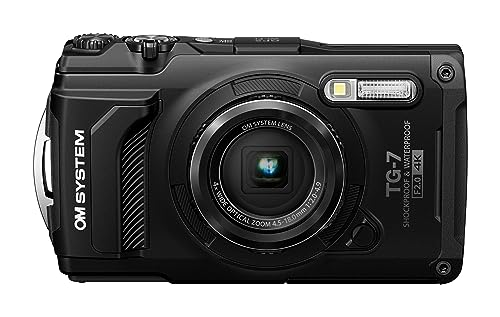
OM SYSTEM Tough TG-7 — Best Overall for Mission Travel
Picture a volunteer team documenting a clinic build and you have the test this camera had to pass. The OM SYSTEM Tough TG-7 is a genuinely waterproof, crush-resistant compact built for rough treatment, and that description matters here because nobody on a service trip has spare attention for fragile gear. It earns the badge of best overall for mission travel by coping first and showing off second, which is exactly the order your team will appreciate by day three. It also asks very little of the person carrying it, which leaves more of you available for the actual work.
Hand it to a teammate who has never used it and watch what happens. Within minutes the OM SYSTEM Tough TG-7 stops feeling like equipment and starts feeling like a tool anyone on the team can pick up. Buttons land where tired fingers expect them, the screen stays readable in harsh light, and nothing about the handling demands a quiet room and a manual. On a trip where the schedule belongs to your hosts, that kind of readiness is a form of courtesy.
What comes out of the OM SYSTEM Tough TG-7 looks honest. Colours stay close to how the scene felt, faces keep their warmth, and its macro modes open up tiny subjects that other travel cameras ignore. Files forgive a light touch in editing, which suits teams who will process pictures on a laptop at a kitchen table rather than in a studio. Nothing looks overcooked, and nothing needs rescuing as a matter of routine. Prints and shared screens both flatter that restraint; nothing in the rendering fights the subject for attention.
Now the honest cost. The OM SYSTEM Tough TG-7 was designed with a clear brief, and outside that brief its limits show: hand it a specialist assignment it never promised to handle and you will feel the edges quickly. Menus hide a few advanced settings deeper than they should, and the complete kit — case, spare power, storage — adds up beyond the camera alone. None of this cancels the badge of best overall for mission travel; it simply marks the border of the territory. Knowing the border in advance lets you plan around it instead of discovering it in front of an audience.
Ownership is mostly a story of small mercies. Charging the OM SYSTEM Tough TG-7 fits around shared power strips and early nights, moving files to a phone works without a ceremony, and after a week the menus stop being something you think about. Add a simple case and a spare card and the whole arrangement asks very little of a tired team.
Set the OM SYSTEM Tough TG-7 beside the other five and its character is consistency. Each part supports the next — handling serves the focusing, the focusing serves the files, and the files serve the story you came to tell. If your days look like a volunteer team documenting a clinic build, this is a pick that will not need apologising for. That steadiness, more than any single feature, is what a team ends up trusting by the second week.
- Role in this line-up: best Overall for Mission Travel
- Files: colour suiting mission fieldwork, still grading gracefully afterwards
- Handling: controls placed for swift, unrushed mission fieldwork changes
- Carry profile: proportioned for service work photographed far from repair shops
- Ownership note (mission fieldwork kit): cards, spare power and a case cost extra
Strengths
- The OM SYSTEM Tough TG-7 (mission fieldwork) locks focus dependably while a clinic queue at dawn
- Files from the OM SYSTEM Tough TG-7 (mission fieldwork) look polished immediately yet keep room for retouching
- Handling stays composed during mission fieldwork when the moment suddenly accelerates
Trade-offs
- Push it far outside mission fieldwork and its compromises surface quickly
- The complete mission fieldwork kit costs more than the camera alone suggests
- Several advanced mission fieldwork settings hide deeper in menus than shooters like
Best for: teams whose days resemble a volunteer team documenting a clinic build and who want the best overall for mission travel slot filled by something dependable rather than delicate.
Not suited for: specialists chasing a narrow professional niche this camera never claimed to serve.

GoPro HERO13 Black — Best for Rough Transport
Start with the work, not the spec sheet: portraits taken with permission and printed on the spot. Against days like that, the GoPro HERO13 Black makes sense as a rugged action body with swappable lens mods and strong stabilisation. Nobody is asking it to win a studio contest. The badge of best for rough transport simply says it fits this particular kind of travel, where hands are busy, roads are rough and the photograph is rarely the main event. That balance — capable when asked, invisible when not — is rarer in cameras than the brochures suggest.
There is a particular relief in gear that does not need managing. The GoPro HERO13 Black wakes ready, responds without sulking, and lets you return your attention to the people in front of you. During a camera riding in a dusty minibus for six hours, that calm handling is worth more than any clever extra mode buried three menus deep. Teammates who are nervous about technology relax noticeably when the gear itself seems unhurried.
Judge the GoPro HERO13 Black by the photographs your hosts will actually keep. Its rendering favours believable skin, steady colour and detail that survives being shared by phone, because its mounting ecosystem reaches places no ordinary camera should go. Heavy editing is optional rather than compulsory, and that mercy matters when the evening is short and the memory cards are full. Skin, dust, painted walls and bright midday sky all come through without the camera editorialising about any of them.
No camera on this page is the right answer to everything, and the GoPro HERO13 Black is no exception. Push it toward demanding professional work far from portraits taken with permission and printed on the spot and the compromises stop being charming. You trade ultimate flexibility for dependability, and a buyer who needs that flexibility should look further down this list rather than blame a tool for its brief. A buyer who reads that border honestly will be happier than one who discovers it at the worst possible moment.
Think about the unglamorous side for a moment: cards filling up, batteries shared between teammates, a camera passed hand to hand in the back of a vehicle. The GoPro HERO13 Black keeps that side tidy. It writes files without drama, sips power predictably enough to plan around, and shrugs off the knocks that a camera riding in a dusty minibus for six hours tends to deliver.
The short version: the GoPro HERO13 Black knows its job. Photographers whose trips revolve around a camera riding in a dusty minibus for six hours will feel that focus every time it wakes quickly and gets out of the way. It is not the flashiest body here, and on a mission trip that restraint reads as good manners. It also ages well: nothing about the choice depends on a trend that will embarrass it by next year’s trip.
- Slot in this shortlist: best for Rough Transport
- Output: attractive mission fieldwork colour, with latitude for editing
- Controls: dials reachable quickly during mission fieldwork adjustments
- Size in the bag: matched to service work photographed far from repair shops
- Budget note (mission fieldwork kit): memory cards, batteries and protection cost extra
Strengths
- The GoPro HERO13 Black (mission fieldwork) keeps moving subjects pinned in focus throughout a clinic queue at dawn
- Images off the GoPro HERO13 Black (mission fieldwork) arrive clean, still leaving headroom for careful editing
- The body feels calm in the hand throughout mission fieldwork, even as events speed up
Trade-offs
- Work beyond mission fieldwork exposes limits specialists would not accept
- Budget for the full mission fieldwork outfit: body price is only the start
- A few powerful mission fieldwork options sit buried in settings pages
Best for: volunteers who rank best for rough transport first and expect their camera to survive a camera riding in a dusty minibus for six hours without complaint.
Not suited for: buyers who want the camera to make up for poor light, poor position and no patience, all at once.

OM SYSTEM OM-5 Mark II — Best Documentary System
Why does the OM SYSTEM OM-5 Mark II appear in a guide built around a camera riding in a dusty minibus for six hours? Because it is a weather-sealed traveller with computational features and a compact lens ecosystem, and because its small system footprint leaves room in the bag for everything else. Those two facts cover most of what a mission trip actually asks of a camera. Everything else in this section is detail; the badge of best documentary system rests on those two pillars and on how calmly it behaves under pressure. Your hosts will never know its name, and that is rather the point of choosing it for a trip like this.
Daily handling tells the truth about the OM SYSTEM OM-5 Mark II faster than any chart. It carries without nagging at your shoulder, settles into one hand while the other hand is doing something useful, and forgives the half-second fumbles that happen when a moment arrives unannounced. Teams notice that kind of ease; it is why the camera keeps getting borrowed. You will feel the benefit most on the long middle days, when novelty has worn off and only habits remain.
The pictures have a plainspoken quality that suits this work. The OM SYSTEM OM-5 Mark II does not dramatise a scene or flatten it into a postcard; it records what stood in front of it, helped by the fact that its small system footprint leaves room in the bag for everything else. For stories that will be told back home in church halls and newsletters, that honesty is a feature, not a limitation. For a trip album that will be handled by many hands, that even temper matters more than drama ever would.
Where does the OM SYSTEM OM-5 Mark II ask you to compromise? Mostly at the extremes: the most ambitious low-light work, the most specialised lenses or techniques, the jobs where a dedicated professional body earns its keep. Within the wide middle ground of service travel it holds together well, but a guide that hid the edges would not deserve your trust. Treat those limits as packing information: they tell you what else, if anything, deserves space in the bag.
A fortnight into a trip, what owners praise about the OM SYSTEM OM-5 Mark II is rarely a headline feature. It is that nothing has gone wrong quietly: no lost afternoon to a confusing transfer, no photograph missed because the camera was charging in another building. Reliability compounds, and by the journey home it has become the loudest argument for the badge of best documentary system.
Compared with its five companions, the OM SYSTEM OM-5 Mark II is the coherent one. Nothing about it shouts for attention, yet every decision — size, controls, file character, focusing manners — points the same direction. Choose it when your priority is best documentary system and your real subject is people, not equipment. And when the photographs come home, nobody will ask which settings you used — they will ask who the people are.
- Position in this line-up: best Documentary System
- Files: flattering mission fieldwork palette tolerating retouching well
- Handling: layout supporting fast mission fieldwork tweaks mid-scene
- Carry profile: built around the demands of service work photographed far from repair shops
- Ownership note (mission fieldwork kit): storage, power and cover need separate funds
Strengths
- The OM SYSTEM OM-5 Mark II (mission fieldwork) finds focus calmly even as a clinic queue at dawn unfolds without warning
- The OM SYSTEM OM-5 Mark II (mission fieldwork) produces finished-looking photographs while preserving flexibility for grading
- Controls stay reassuring under mission fieldwork pressure, keeping attention on subjects
Trade-offs
- Assignments outside its mission fieldwork brief reveal the engineering compromises
- Total mission fieldwork outlay climbs once essential extras join the camera
- Some mission fieldwork refinements live deep in the menu tree
Best for: photographers whose honest priority is best documentary system, and whose suitcase space is already spoken for.
Not suited for: anyone unwilling to learn a small handful of basic controls before the trip begins.

Canon EOS R50 — Best Team Camera
Picture a volunteer team documenting a clinic build and you have the test this camera had to pass. The Canon EOS R50 is a light system body with guided menus and confident subject detection, and that description matters here because nobody on a service trip has spare attention for fragile gear. It earns the badge of best team camera by coping first and showing off second, which is exactly the order your team will appreciate by day three. It also asks very little of the person carrying it, which leaves more of you available for the actual work.
Hand it to a teammate who has never used it and watch what happens. Within minutes the Canon EOS R50 stops feeling like equipment and starts feeling like a tool anyone on the team can pick up. Buttons land where tired fingers expect them, the screen stays readable in harsh light, and nothing about the handling demands a quiet room and a manual. On a trip where the schedule belongs to your hosts, that kind of readiness is a form of courtesy.
What comes out of the Canon EOS R50 looks honest. Colours stay close to how the scene felt, faces keep their warmth, and colour that comes out of it ready to share, kind to skin and to travel scenes alike. Files forgive a light touch in editing, which suits teams who will process pictures on a laptop at a kitchen table rather than in a studio. Nothing looks overcooked, and nothing needs rescuing as a matter of routine. Prints and shared screens both flatter that restraint; nothing in the rendering fights the subject for attention.
Now the honest cost. The Canon EOS R50 was designed with a clear brief, and outside that brief its limits show: hand it a specialist assignment it never promised to handle and you will feel the edges quickly. Menus hide a few advanced settings deeper than they should, and the complete kit — case, spare power, storage — adds up beyond the camera alone. None of this cancels the badge of best team camera; it simply marks the border of the territory. Knowing the border in advance lets you plan around it instead of discovering it in front of an audience.
Ownership is mostly a story of small mercies. Charging the Canon EOS R50 fits around shared power strips and early nights, moving files to a phone works without a ceremony, and after a week the menus stop being something you think about. Add a simple case and a spare card and the whole arrangement asks very little of a tired team.
Set the Canon EOS R50 beside the other five and its character is consistency. Each part supports the next — handling serves the focusing, the focusing serves the files, and the files serve the story you came to tell. If your days look like a volunteer team documenting a clinic build, this is a pick that will not need apologising for. That steadiness, more than any single feature, is what a team ends up trusting by the second week.
- Role in this selection: best Team Camera
- Output: polished mission fieldwork colour, plus room to refine tones
- Controls: positioned for prompt mission fieldwork changes, rhythm intact
- Footprint: sensible for days spent on service work photographed far from repair shops
- Budget note (mission fieldwork kit): cards, extra power and case need budgeting
Strengths
- The Canon EOS R50 (mission fieldwork) holds focus with reassuring consistency whenever a clinic queue at dawn develops quickly
- Pictures from the Canon EOS R50 (mission fieldwork) need little rescue, though editors keep ample latitude
- Grip and layout keep nerves low during mission fieldwork while scenes refuse to slow
Trade-offs
- Stretch the mission fieldwork brief and this pick stops feeling like the answer
- Ownership spending for mission fieldwork extends beyond the headline body figure
- Occasional mission fieldwork features require menu-diving instead of direct controls
Best for: teams whose days resemble a volunteer team documenting a clinic build and who want the best team camera slot filled by something dependable rather than delicate.
Not suited for: specialists chasing a narrow professional niche this camera never claimed to serve.

DJI Osmo Pocket 3 — Best for Quiet Video
Start with the work, not the spec sheet: portraits taken with permission and printed on the spot. Against days like that, the DJI Osmo Pocket 3 makes sense as a gimbal-stabilised pocket camera whose footage stays eerily level. Nobody is asking it to win a studio contest. The badge of best for quiet video simply says it fits this particular kind of travel, where hands are busy, roads are rough and the photograph is rarely the main event. That balance — capable when asked, invisible when not — is rarer in cameras than the brochures suggest.
There is a particular relief in gear that does not need managing. The DJI Osmo Pocket 3 wakes ready, responds without sulking, and lets you return your attention to the people in front of you. During a camera riding in a dusty minibus for six hours, that calm handling is worth more than any clever extra mode buried three menus deep. Teammates who are nervous about technology relax noticeably when the gear itself seems unhurried.
Judge the DJI Osmo Pocket 3 by the photographs your hosts will actually keep. Its rendering favours believable skin, steady colour and detail that survives being shared by phone, because its rotating screen flips between filming other people and filming yourself. Heavy editing is optional rather than compulsory, and that mercy matters when the evening is short and the memory cards are full. Skin, dust, painted walls and bright midday sky all come through without the camera editorialising about any of them.
No camera on this page is the right answer to everything, and the DJI Osmo Pocket 3 is no exception. Push it toward demanding professional work far from portraits taken with permission and printed on the spot and the compromises stop being charming. You trade ultimate flexibility for dependability, and a buyer who needs that flexibility should look further down this list rather than blame a tool for its brief. A buyer who reads that border honestly will be happier than one who discovers it at the worst possible moment.
Think about the unglamorous side for a moment: cards filling up, batteries shared between teammates, a camera passed hand to hand in the back of a vehicle. The DJI Osmo Pocket 3 keeps that side tidy. It writes files without drama, sips power predictably enough to plan around, and shrugs off the knocks that a camera riding in a dusty minibus for six hours tends to deliver.
The short version: the DJI Osmo Pocket 3 knows its job. Photographers whose trips revolve around a camera riding in a dusty minibus for six hours will feel that focus every time it wakes quickly and gets out of the way. It is not the flashiest body here, and on a mission trip that restraint reads as good manners. It also ages well: nothing about the choice depends on a trend that will embarrass it by next year’s trip.
- Slot in this line-up: best for Quiet Video
- Files: confident mission fieldwork colour editors can adjust freely
- Handling: layout making quick mission fieldwork corrections feel deliberate
- Carry profile: shaped by the realities of service work photographed far from repair shops
- Ownership note (mission fieldwork kit): cards, batteries and storage add extra spend
Strengths
- The DJI Osmo Pocket 3 (mission fieldwork) tracks the decisive subject steadily during a clinic queue at dawn
- Output from the DJI Osmo Pocket 3 (mission fieldwork) reads polished on delivery and forgives later surgery
- It feels planted and predictable throughout mission fieldwork, never twitchy at the decisive second
Trade-offs
- Tasks beyond mission fieldwork make its narrower talents obvious
- The honest mission fieldwork cost includes accessories the base purchase omits
- Certain advanced mission fieldwork choices demand patience through layered menus
Best for: volunteers who rank best for quiet video first and expect their camera to survive a camera riding in a dusty minibus for six hours without complaint.
Not suited for: buyers who want the camera to make up for poor light, poor position and no patience, all at once.

Fujifilm Instax Mini 12 — Best for Giving Prints Away
Why does the Fujifilm Instax Mini 12 appear in a guide built around a camera riding in a dusty minibus for six hours? Because it is an instant camera that reads the scene for you and hands over a physical print, and because its selfie mirror and simple twist lens make operation almost foolproof. Those two facts cover most of what a mission trip actually asks of a camera. Everything else in this section is detail; the badge of best for giving prints away rests on those two pillars and on how calmly it behaves under pressure. Your hosts will never know its name, and that is rather the point of choosing it for a trip like this.
Daily handling tells the truth about the Fujifilm Instax Mini 12 faster than any chart. It carries without nagging at your shoulder, settles into one hand while the other hand is doing something useful, and forgives the half-second fumbles that happen when a moment arrives unannounced. Teams notice that kind of ease; it is why the camera keeps getting borrowed. You will feel the benefit most on the long middle days, when novelty has worn off and only habits remain.
The pictures have a plainspoken quality that suits this work. The Fujifilm Instax Mini 12 does not dramatise a scene or flatten it into a postcard; it records what stood in front of it, helped by the fact that its selfie mirror and simple twist lens make operation almost foolproof. For stories that will be told back home in church halls and newsletters, that honesty is a feature, not a limitation. For a trip album that will be handled by many hands, that even temper matters more than drama ever would.
Where does the Fujifilm Instax Mini 12 ask you to compromise? Mostly at the extremes: the most ambitious low-light work, the most specialised lenses or techniques, the jobs where a dedicated professional body earns its keep. Within the wide middle ground of service travel it holds together well, but a guide that hid the edges would not deserve your trust. Treat those limits as packing information: they tell you what else, if anything, deserves space in the bag.
A fortnight into a trip, what owners praise about the Fujifilm Instax Mini 12 is rarely a headline feature. It is that nothing has gone wrong quietly: no lost afternoon to a confusing transfer, no photograph missed because the camera was charging in another building. Reliability compounds, and by the journey home it has become the loudest argument for the badge of best for giving prints away.
Compared with its five companions, the Fujifilm Instax Mini 12 is the coherent one. Nothing about it shouts for attention, yet every decision — size, controls, file character, focusing manners — points the same direction. Choose it when your priority is best for giving prints away and your real subject is people, not equipment. And when the photographs come home, nobody will ask which settings you used — they will ask who the people are.
- Position in this shortlist: best for Giving Prints Away
- Output: pleasing mission fieldwork tones, retaining post-work flexibility
- Controls: arranged so mission fieldwork adjustments never feel fumbled
- Size and weight: planned with service work photographed far from repair shops firmly in mind
- Budget note (mission fieldwork kit): storage media and spare power need money back
Strengths
- The Fujifilm Instax Mini 12 (mission fieldwork) settles focus fast enough that a clinic queue at dawn rarely escapes unrecorded
- Frames from the Fujifilm Instax Mini 12 (mission fieldwork) appear assured immediately yet tolerate thoughtful post-processing
- Everything falls under the fingers naturally in mission fieldwork when chances arrive unannounced
Trade-offs
- Demand work far from mission fieldwork and cracks appear sooner than expected
- Expect the finished mission fieldwork kit to outrun the camera-only price
- Not every useful mission fieldwork option surfaces quickly in the menus
Best for: photographers whose honest priority is best for giving prints away, and whose suitcase space is already spoken for.
Not suited for: anyone unwilling to learn a small handful of basic controls before the trip begins.
How Do the Six Picks Compare Side by Side?
| Pick | Badge | Strongest suit | Watch out for |
|---|---|---|---|
| OM SYSTEM Tough TG-7 | Best Overall for Mission Travel | Dependability when subjects move unpredictably | Limits appear outside its home territory |
| GoPro HERO13 Black | Best for Rough Transport | Files needing the least rescue afterwards | Accessories worth budgeting from the start |
| OM SYSTEM OM-5 Mark II | Best Documentary System | Simplicity that speeds every step | Size suits some hands better than others |
| Canon EOS R50 | Best Team Camera | Consistency across an entire outing | Menus reward a patient first week |
| DJI Osmo Pocket 3 | Best for Quiet Video | Versatility when plans change mid-shoot | Kit costs extend beyond the camera |
| Fujifilm Instax Mini 12 | Best for Giving Prints Away | Comfort throughout long handheld sessions | A learning curve awaits complete beginners |
Read the comparison as six different answers to the same prayer, not as a league table with one winner. The first name on the list is the balanced default for most teams. Further down sit cameras that trade a little of that balance for a gift one specific traveller will value more — toughness, discretion, or the simple joy of handing somebody a print.
How Do You Photograph People on a Mission Trip With Real Respect?
Technique starts long before you raise the camera. Choose your position so the background tells the truth — the half-built wall, the queue at the water pump — rather than tidying people into a backdrop that flatters the photographer. Then settle the one setting you refuse to fiddle with, and let everything else about the scene stay gloriously unscripted.
Light on a service trip is whatever the day hands you: hard noon sun, kind shade under a tree, the glow of a single bulb in the evening. Learn to love the shade first. Faces soften there, eyes open properly, and nobody squints through your portrait. Move the person two steps rather than fighting the sun with settings you barely understand yet.
Work in short bursts of attention. A few frames, honestly reviewed, teach more than an afternoon of spraying. Look at the pictures with your hosts when you can; the shared laughter over a screen builds more trust than any single photograph, and you will quickly learn which images people are proud of and which they would rather you deleted.
End each day by finishing properly. Copy the files somewhere safe the same evening, keep the best few where they will actually be seen again, and note one thing you did well and one thing you fumbled. Trips are short. A small daily ritual like that is the difference between coming home with souvenirs and coming home with a story.
What Should a Mission Trip Camera Kit Weigh, and What Stays Home?
Here is a packing rule that survives contact with reality: if the whole camera kit cannot ride in the bag you already carry for the day’s work, it is too big. One body, one versatile way of seeing, spare power, spare storage, a cloth. That is the kit. Everything beyond it must argue its way in against the supplies it displaces, and most extras lose that argument.
Position, oddly, is part of travelling light. A photographer carrying less moves more — crouches by the foundation trench, steps closer instead of zooming from across the yard, waits for the background to clear rather than demanding the scene rearrange itself. With a volunteer team documenting a clinic build as your typical subject, those free movements improve more frames than any accessory you left behind.
Review your photographs the way you would review the day’s work: kindly, but without pretending. Keep the frames that show something true about the people and the place. Let the accidents go without ceremony. Study the near-misses longest, because they hold the lesson — a moment arrived late, a face turned away, a background you failed to notice.
Share the pictures early and share them locally first. A photograph shown to the family in it teaches you more than a hundred likes from home, because explaining why you took it forces you to hear how it lands. Intention, spoken out loud and tested against real reactions, is how a visitor’s snapshots grow into a community’s record.
What Mistakes Do Buyers in This Niche Keep Making?
Buying for the single most dramatic day of the trip instead of the ordinary ones, then leaving the camera behind because it suits neither the bag nor the work.
Judging a new camera by its first hundred frames, before hands and menus have had a fair chance to become familiar.
Spending everything on the body and then rationing memory cards and batteries as though keeping photographs were somehow free.
Leaving every control on automatic for the whole trip, then faulting the camera for decisions nobody ever asked it to make.
Inspecting files at absurd magnification while ignoring the handling quirks that cost real photographs out in the field.
Skipping the practice outing at home — the cheap afternoon where errors cost nothing and the lessons actually stay with you.
How Do You Practise Respectful Photography Before Travelling to Serve a Community?
Try this habit before you travel: at the end of a practice day, look at your frames full-size and pick the single decision that did the most good. Stepping closer. Waiting for the laugh to arrive. Turning your host toward the shade. Naming the win fixes it in memory far better than a folder of unexamined files ever will.
What Does Deliberate Practice Look Like for a Mission Trip Photographer?
Carry is a skill, so practise it too. Wear the strap the way you will wear it on the trip, open the bag one-handed, find the spare card by touch. These details sound domestic, yet they decide whether the camera is ready during a volunteer team documenting a clinic build or still zipped away when the moment passes.
How Can Rehearsing Portraits at Home Prepare You for Fieldwork Abroad?
Invite the people around you into the practice. Photograph family and friends the way you hope to photograph your hosts — ask first, show the screen, hand over a copy. Shared review sessions and a print on the fridge build the exact social reflexes a mission trip will ask of you, long before the stakes are real.
Which Practice Habits Protect Both Photographs and Relationships on a Mission Trip?
Rain, dust and heat will test whatever you take; rehearse for that too. A simple plastic cover in the kit, a cloth that actually gets used, and the habit of drying gear before it goes back in the bag will do more for a camera’s lifespan than any headline feature. Practise the routine once at home so it is boring by the time it matters.
How Do You Practise With Field Kit Until Handling Becomes Second Nature?
Keep your editing gentle and your order fixed. Straighten first, then exposure, then colour, and stop the moment the picture looks the way the moment felt. Heavy-handed processing is usually insecurity wearing a disguise, and honest scenes — a clinic wall rising, a shared meal — rarely need rescuing by sliders.
Before you pack, return to the three scenes this guide is built around: a volunteer team documenting a clinic build; portraits taken with permission and printed on the spot; and a camera riding in a dusty minibus for six hours. Photograph something like each of them with the camera you chose, twice — once the way you would have before any of this reading, and once using the single lesson that stayed with you. The gap between those pairs of frames is your real preparation.
Do the same exercise again, but this time hand the camera to a teammate for the second attempt. Mission photography is shared work, and a camera only you can operate is a liability on a team trip. If your teammate produces a frame you are proud of, your choice of gear — and your short lesson — have both passed the test.
One last rehearsal, a week before departure: photograph a whole ordinary day, start to finish, without deleting anything in the camera. Review it that evening with the discipline this guide keeps returning to — keep what is true, learn from the near-misses, share one frame with somebody whose reaction you trust. Then pack, and go and serve.
Final Recommendation
If one name has to go in the bag first, make it the OM SYSTEM Tough TG-7: it is the balanced answer for most teams, and it frees you to think about people instead of equipment. Move further down the list when a single strength — the badge tells you which — matches your trip more closely than all-round toughness does. Whichever body you take, give it a fair fortnight at home first: learn its three most important controls, shoot the practice day, and arrive already friends with it.
Frequently Asked Questions
Should I ask permission before every portrait?
Yes — and treat the asking as part of the relationship, not a legal hurdle before it. A smile, a gesture toward the camera, and patience for an answer will cover most situations; where language fails, your hosts and team leaders can guide you. Consent given warmly shows in the photograph, and a refusal accepted graciously often opens a better door later in the trip.
Is a tough compact better than a mirrorless camera for service travel?
For most service travel, yes. A tough compact survives the minibus, the rain shower and the building site without asking the team to reorganise around it, and its pictures are entirely good enough for the ways mission photographs are actually shared. A mirrorless system earns its extra weight only when somebody on the team is a committed photographer with a specific storytelling job to do.
How do I share photographs with the community afterwards?
Plan the sharing before you leave, not after you return. Agree with your hosts how pictures will get back — through a team contact, a community leader, or prints carried by the next visiting group. Then actually do it, promptly. Photographs promised and never delivered teach a community to stop trusting the next volunteer’s camera.
What happens if the camera is damaged far from a repair shop?
Assume it can happen and pack like it already has. A second simple camera shared by the team, phones as backup, and files copied every evening mean a single accident costs you a tool, not the trip’s whole record. Store the copies in two places, and keep the camera you rely on most on a strap rather than resting on vehicle seats.
Are instant prints appropriate gifts on a mission trip?
Handled well, they are among the kindest gifts you can carry. A print hands somebody a photograph of themselves that no phone signal or charging cable can take away. Ask first, as always, let children show parents before you give copies to children, and follow your hosts’ lead on what is appropriate — then enjoy how a small warm print changes the temperature of a room.
How should I handle photographing people respectfully on a mission trip?
Begin from the assumption that the camera is a guest, exactly as you are. Serve first and photograph second: join the work, learn a few names, and let people see you as a helper long before they see you as a photographer. Ask permission in plain language, accept a refusal instantly and without disappointment, and follow whatever guidance your hosts and team leaders set — they understand local sensitivities you cannot read. Where you can, share the results back: show the picture on the screen, offer to send it to the community afterwards, and let families keep something rather than only giving something away. Photographs that honour the people in them age well; souvenir hunting does not, and the difference is visible in every frame.
Related Guides
Keep exploring with our companion guide to choosing camera accessories that in practice earn their place, compare approaches in our field-tested notes on everyday carry for photographers, and revisit our beginner-friendly guide to camera controls that matter most when you are ready to go further.