kajuandouglas.com is reader-supported. When you buy through links on our site, we may earn an affiliate commission.
Where to Buy
The best app for using phone for security cameras starts with hardware you already own: the retired handset in the kitchen drawer, the one with the cracked corner and the battery that no longer lasts a commute. Apps that turn that phone into a camera are free or inexpensive downloads from the usual app stores, and the viewer side runs on the phone in your pocket. The only shopping this project usually involves is unglamorous — a long charging cable, a small stand or mount, and eventually, for the rooms that prove they matter, a proper camera from the online shelves. This guide treats the phone trick seriously, because for a rented flat, a holiday let or a first week in a new house, it is sometimes the only camera that can be watching by tonight.
Understand what you are building. A phone pressed into camera duty is a sender: it sits still, stays plugged in, watches one room and streams what it sees to you. The apps below divide by temperament. Some want to be a complete little security service with cloud clips and smart alerts. Some are proudly basic, a live feed and a motion ping and nothing else. Two picks are not apps at all but inexpensive dedicated cameras, included because every honest guide to this idea must name the moment the drawer phone stops being clever and starts being a compromise.
Bring one expectation and leave another. Bring patience for an evening of positioning, charging and test-walking the room. Leave any hope that a five-year-old phone will match a purpose-built camera at night, in heat, or after its battery swells. Within those limits, this is one of the most satisfying reuses in consumer technology: yesterday’s phone, standing guard.
Key Takeaways
- A phone-as-camera system has two halves: a sender app on the retired phone and a viewer on the phone you carry — judge apps on both halves, not one.
- Continuous power is the whole project: a sender phone lives on its charger, so cable length and socket position decide where your camera can be.
- AlfredCamera is the most complete starting point, with motion alerts, two-way talk and a gentle learning curve for a first setup.
- Heat and battery swelling are the honest end of every phone camera’s life — inspect the sender phone monthly, without exception.
- The Wyze Cam v4 and Blink Mini 2 in this guide are the escape hatches: inexpensive dedicated cameras for rooms that outgrow the phone experiment.
- Never aim a repurposed phone through a window and expect night vision; glass reflects the phone’s own screen glow back at it.
In this guide
Quick Picks
| Pick | Badge | Why it earns its place |
|---|---|---|
| AlfredCamera Home Security App | Best All-Round Phone-as-Camera App | The most forgiving first sender app: quick pairing between two phones, motion alerts with clips, and two-way talk through the old handset’s speaker. |
| AtHome Camera App | Best for a Drawer Full of Mixed Old Devices | Built for households whose spare technology spans old Androids, an ageing iPhone and a tablet nobody claims — it gathers them into one viewer. |
| WardenCam Home Security App | Best Stripped-Back Two-Phone Setup | For people who want a live view and a motion alert and are allergic to everything else — the quiet, simple sender-viewer pair. |
| Wyze Cam v4 | Best Dedicated Camera When the Phone Runs Out of Patience | A small mains-powered camera that takes over the room the phone was watching, with proper night viewing the phone never had. |
| Blink Mini 2 | Best Plug-In Successor for an Indoor Phone Post | The natural graduation indoors: always powered, always viewable, and part of a system that can grow outdoors later. |
| Manything App | Best for Cloud Recording From a Phone Post | For senders that must keep evidence while you are away — a phone camera with a cloud-recording temperament and remote arming. |
How Did We Choose These Picks?
The first filter was survival. A sender app must run for weeks on an elderly phone without demanding attention: it has to restart gracefully after an update, reconnect after a router sulk, and keep its settings when the phone’s storage fills with its own optimism. Apps with a reputation for nagging, crashing or burying the live view under advertisements failed that filter regardless of their feature lists, because a security camera you cannot trust to still be running is a ornament.
The second filter was the pair, not the app. Every candidate was judged as a system of two halves: how the sender behaves at 3 a.m. in an empty room, and how the viewer behaves at 3 p.m. in a noisy street when an alert arrives. Can you tell, from the notification alone, whether to care? Can you reach live view in two taps? Can a second household member watch without borrowing your sign-in? Those questions eliminated more candidates than any specification.
The third decision was honesty about the ceiling. Phone cameras share three physical limits — night blindness without an infrared light of their own, heat under constant charging, and a battery ageing in dog years while plugged in. Rather than pretend an app solves physics, this guide includes two inexpensive dedicated cameras from the verified pool for this site, linked as such, as the planned second chapter for any room where the phone post proves its worth. Software picks are prose-only throughout: apps are downloaded, not shipped, and no app here carries a product link.
Finally, plan language is kept deliberately loose. Several of these apps offer optional paid tiers whose clip history and smart-detection terms shift over time; this guide describes what the free and standard experience feels like and flags where a plan changes the character of a pick, without printing terms that may be stale by the season you read them.
AlfredCamera Home Security App — Best All-Round Phone-as-Camera App
Most people who try this idea start here, and most of them stay longer than they expected. Alfred’s trick is pairing without pain: install it on the retired phone, tell it this device is the camera, install it on your everyday phone, tell it this one is the viewer, sign both into the same account, and the two devices find each other with the relieved speed of relatives at an airport. Within ten minutes of opening the drawer, the old phone is watching the hallway and your pocket is watching the old phone.
The daily experience is built around the motion event rather than the live feed, which is the correct priority for a sender with a phone’s stamina. The camera phone keeps a rolling watch; when movement crosses its view it records a clip, attaches a thumbnail you can actually interpret, and pings the viewer. Two-way talk runs through the sender’s speaker and microphone — adequate for telling a dog to leave a sofa, for answering a child who has come home to an empty house, for the small theatre of making a room sound occupied. Low-light help squeezes what it can from the phone’s screen and sensor, and is honest assistance rather than true night vision.
Where Alfred earns the top spot is in its manners over weeks. It tolerates elderly hardware gracefully, its viewer gathers several sender phones into one list without complaint, and its settings speak plain language — motion sensitivity as a slider a human can reason about, scheduling in hours a household recognises. The free experience is genuinely usable, which matters for a project whose founding charm is spending nothing; the maker’s optional tier exists for longer clip keeping and cleverer detection, and the app mentions it without holding the basics hostage.
Its limits are the platform’s limits, plainly worn. It cannot give a phone infrared eyes. A sender aimed at a dark garden records a dark garden. It also inherits the phone’s microphone placement and modest speaker, so two-way conversations sound like what they are — a phone on a shelf, talking. Accept those, and Alfred is the app this guide would hand a neighbour, with the fewest caveats, for a first weekend of phone-post security.
- Type: sender-and-viewer app pair for repurposed phones and tablets
- Platform: Android and iOS, mixed pairs supported
- Core jobs: motion-event clips, live view, two-way talk, multi-sender viewer
- Power assumption: sender runs permanently on its charger
- Cost model: free core experience; optional maker tier for extended clip keeping
Strengths
- Pairing two phones takes minutes, not an evening
- Motion clips arrive with thumbnails worth glancing at
- Viewer handles several sender phones in one calm list
Trade-offs
- No app can give a phone true infrared night vision
- Two-way talk is limited by the old phone’s speaker and microphone
- Longest clip history sits behind the maker’s optional tier
Best for: first-time phone-post builders who want the complete, forgiving version of the idea.
Not suited for: dark outdoor posts, or anyone expecting dedicated-camera night performance from a handset.
AtHome Camera App — Best for a Drawer Full of Mixed Old Devices
Every household’s technology drawer is a small museum: a phone from two contracts ago, a tablet bought for a child who outgrew it, perhaps a laptop webcam pressed into service at a desk. AtHome was designed for exactly that museum. Its sender software runs across a catholic range of ageing devices, and its viewer gathers them — phone, tablet, computer — into a single watch list. Where Alfred is the polished pair, AtHome is the reunion.
The reunion has practical charms. A tablet makes a better sender than its reputation suggests: a large battery, a wide screen that can glow as a deterrent, and a natural home on a kitchen counter where a phone looks lost. A laptop sender covers an office with a webcam’s wide, unblinking stare. AtHome lets a household assemble these leftovers into something resembling a system — the nursery on the tablet, the study on the laptop, the hall on the old phone — and view the whole estate from one screen on the phone that actually leaves the house.
Its personality is more technical than Alfred’s, and some readers will prefer that. Streaming quality can be reasoned with, remote behaviour can be adjusted, and the app feels written by people who assume you will tinker. The trade is a setup that asks slightly more of you and an interface that occasionally shows its engineering. Households with one spare phone gain nothing here over the simpler picks; households with three spare devices gain a system for the price of an afternoon.
Treat AtHome as the collector’s choice. If your drawer holds a crowd, it turns the crowd into coverage — and it teaches the useful lesson that in phone-post security, the second and third cameras are effectively free, because you already own them and had forgotten.
- Type: multi-device sender-and-viewer app system
- Platform: Android, iOS and computer senders/viewers in mixed combinations
- Core jobs: multi-sender live view, motion alerts, remote streaming between household devices
- Power assumption: every sender lives on mains power
- Cost model: free core; optional maker services for extended recording features
Strengths
- Welcomes phones, tablets and computers into one viewer
- Second and third senders cost nothing but setup time
- Adjustable streaming behaviour rewards patient tinkerers
Trade-offs
- Setup and interface ask more of a beginner
- Mixed old devices mean mixed camera quality
- Best value only appears when you own several spares
Best for: households with a drawer of mixed retired devices waiting for a second career.
Not suited for: a single spare phone and a wish for the simplest possible evening.
WardenCam Home Security App — Best Stripped-Back Two-Phone Setup
There is a reader for whom every additional feature is a small insult. WardenCam is written for that reader. It does the ancient two-phone trick — one handset watches, the other views — with a minimum of ceremony, menus or ambition, and its admirers describe it the way people describe a good kettle: it does the thing, it has always done the thing, the thing is enough.
What the thing includes, chosen well: a live view you can reach quickly, motion detection that can wake the sender and notify the viewer, and night assistance that uses what the phone has. What it omits is equally deliberate — no elaborate cloud diary, no smart-home choreography, no social layer. For a single post — a phone watching a boat in a yard, a workshop bench, a holiday apartment’s door for one week — that restraint is not a compromise but a match.
The app’s age shows in places a polish-minded reader will notice, and its free experience carries the compromises of its model. But there is a reliability argument for software that has changed little while phones changed around it: it asks almost nothing of elderly hardware, sips rather than gulps, and is unlikely to surprise you with a redesigned interface the week you go on holiday.
Choose WardenCam when the brief is one room, one old phone, one viewer, and no appetite for an ecosystem. It is the pick in this guide most likely to be set up in a quarter of an hour and thought about never again — which, for a certain kind of security, is the highest praise available.
- Type: minimalist sender-and-viewer app pair
- Platform: Android and iOS
- Core jobs: live view, motion alerts, basic night assistance
- Power assumption: sender permanently charging on a stand or shelf
- Cost model: free with the maker’s optional extras; keep expectations set to simple
Strengths
- Almost nothing to learn and almost nothing to go wrong
- Gentle on the oldest hardware in the drawer
- A one-room post can be live within the half hour
Trade-offs
- No rich cloud diary or smart detection to grow into
- Interface and polish lag the newer rivals
- Free experience carries its maker’s compromises
Best for: a single temporary post — a week in a rented place, a workshop, a boat — watched from one phone.
Not suited for: a growing multi-room system, or anyone who wants kept evidence rather than a live glance.

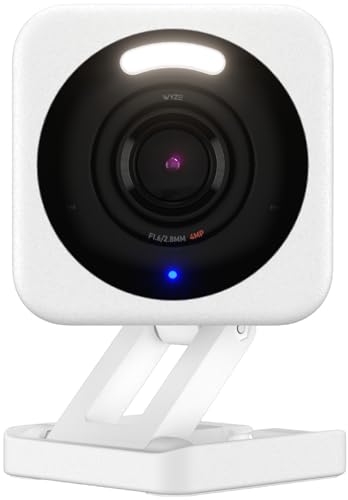
Wyze Cam v4 — Best Dedicated Camera When the Phone Runs Out of Patience
Every phone-post household has a room that graduates. It is usually the room with the incident — the parcel that vanished, the pet whose night manners became a mystery, the door that must simply be known about. For that room, the honest recommendation stops being an app and becomes this small mains-powered camera, which does the three things phones cannot: it sees in the dark properly, it runs cool indefinitely, and it was born to be watched rather than retired into watching.
The v4’s character is value-dense competence. It lives in its maker’s app with the usual grammar of live view, motion events and two-way talk, but the texture differs from a phone post in ways that compound nightly. Night viewing is a designed capability rather than a hope. The camera does not throttle, swell or sulk in summer heat. Its view is wide and fixed by intention, mounted where the view is best rather than where a charging cable happened to reach — though it, too, wants a socket, and rewards the same placement thinking the phone taught you.
As a graduation, it also reprices the whole idea kindly. A household that proved a post matters with a free phone can justify one inexpensive camera for that post, keep the phones on lesser rooms, and end with a hybrid system that spends money exactly where evidence lives. The Wyze app’s optional service tiers follow the industry pattern — described here only as plan-dependent, because their terms move — while the camera’s local-recording habits give owners a route to keeping clips at home.
Buy the v4 for the room that matters most and let the drawer phones keep the rest. That division of labour — silicon where it counts, leftovers where it suffices — is the mature form of the project this whole guide describes.
- Type: compact mains-powered indoor and sheltered-outdoor smart camera (pool pick, linked)
- App role: the dedicated successor to a proven phone post
- Core jobs: live view, motion events, two-way talk, designed night viewing
- Power: mains — placement follows sockets, as the phone taught you
- Recording: app-based events with local-storage options; extended cloud features plan-dependent
Strengths
- Proper night viewing a phone post cannot imitate
- Runs cool and indefinitely, with no battery to age
- Inexpensive enough to graduate one room without rethinking the budget
Trade-offs
- Its best cloud features sit within the maker’s optional plans
- Fixed view — one camera, one room, chosen deliberately
- Needs Wi-Fi with manners at the mounting spot
Best for: the one room whose evidence actually matters — the door, the nursery approach, the till, the tank.
Not suited for: covering a whole house at once; graduate room by room, as the phone experiment taught you.

Blink Mini 2 — Best Plug-In Successor for an Indoor Phone Post
If the Wyze is the graduation for the evidence room, the Mini 2 is the graduation for the living room — the post where the phone spent its days being checked idly, sociably, often. A plug-in indoor camera changes its relationship with its app completely: live view stops being a battery expense and becomes a free glance, so the camera gets used the way phone-post owners always wished they could use the sender — casually, repeatedly, without arithmetic.
Inside its maker’s app, the Mini 2 takes on the household jobs. It is the camera you check when a sound needs explaining. In systems that grow a doorbell from the same maker, it can sound the chime indoors where people actually are. It arms and disarms on the household’s schedule rather than standing sentinel over family life, and that scheduling is the privacy feature indoor cameras live or die by: on when the house is empty, off when it is full, decided once and honoured automatically.
Its placement discipline echoes the phone’s, with one freedom added. A socket still anchors it, but the camera is small, light and designed for shelves and mounts rather than balanced on a stand it was never shaped for. Angle it down a room’s diagonal from a modest height and it covers more life than any corner-ceiling drama. Buy a second and the system feeling arrives — grouped arming, a shared clip diary, one app for the indoor watch.
Choose the Mini 2 when the phone post you are replacing was indoors, frequently viewed and socially shared. It preserves everything likeable about the experiment — cheap, quick, phone-controlled — and removes the two things that were not: the battery and the guilt.
- Type: plug-in indoor smart camera (pool pick, linked)
- App role: always-available live view and indoor announcement duties
- Core jobs: live view, motion alerts, scheduled arming, system chime duties in its ecosystem
- Power: mains — no viewing ration, ever
- Ecosystem: groups with its maker’s wire-free cameras and doorbells under one schedule
Strengths
- Live view without battery guilt changes how often you actually look
- Scheduled arming makes indoor privacy a routine, not a decision
- Small, shelf-friendly and quick to place well
Trade-offs
- One room per camera — coverage grows unit by unit
- Socket position still negotiates with the perfect angle
- Cloud clip depth follows the maker’s current plan terms
Best for: indoor posts that get checked often and shared with the household.
Not suited for: outdoor posts or anywhere a socket cannot reach; its wire-free siblings exist for those.
Manything App — Best for Cloud Recording From a Phone Post
Most phone-post setups are witnesses of the present tense: they show you the room now, and alert you when it changes. Manything begins from the opposite question — what will you be able to prove next week? Its phone-camera system is built around recording to the cloud, so a sender in an empty property is not merely watching but keeping, and its viewer is as much an evidence locker as a window.
That temperament suits a particular set of posts. A vacant house between tenants. A small business’s back room after hours. A second home visited monthly, where ‘the app pinged’ is worthless without the clip. For these, Manything’s recording-first design, remote arming and alert discipline feel less like features than like the point. The sender phone still obeys phone physics — power, heat, night — but what it captures is filed somewhere the phone itself cannot lose, steal or cook.
The cost model is the honest shadow of that design: a recording service is a subscription-shaped thing, and this pick only makes sense for readers who accept a running cost in exchange for kept footage. Its terms belong to its maker and change on maker’s time, so this guide prints none — check the current arrangement in the app before a post depends on it. For a fortnight’s holiday cover the arithmetic may fail; for a year of vacant-property duty it may be the cheapest insurance-shaped purchase in the building.
Choose Manything when the post’s job is evidence rather than awareness. It is the grown-up end of the phone-camera idea: the drawer phone as a recording witness, with the archive kept safely somewhere else.
- Type: recording-first phone-camera app with cloud archive
- Platform: Android and iOS senders and viewers
- Core jobs: continuous or motion-triggered cloud recording, remote arming, alert review
- Power assumption: sender on permanent charge, ideally in a cool spot
- Cost model: subscription-shaped by design — verify current terms in the app before relying on them
Strengths
- Footage survives even if the sender phone does not
- Remote arming suits properties you rarely visit
- Alert and archive live in one deliberate workflow
Trade-offs
- Running cost is the design, not an upsell
- Phone physics still apply — no infrared, heat matters
- Overkill for a holiday week or a pet glance
Best for: vacant properties, second homes and small-business back rooms where kept evidence is the job.
Not suited for: casual live viewing, or any post where a subscription makes the free-phone idea pointless.
Phone, App or Camera: The Six in One View
| Pick | Badge | What defines it |
|---|---|---|
| AlfredCamera Home Security App | Best All-Round Phone-as-Camera App | The most forgiving first sender app: quick pairing between two phones, motion alerts with clips, and two-way talk through the old handset’s speaker. |
| AtHome Camera App | Best for a Drawer Full of Mixed Old Devices | Built for households whose spare technology spans old Androids, an ageing iPhone and a tablet nobody claims — it gathers them into one viewer. |
| WardenCam Home Security App | Best Stripped-Back Two-Phone Setup | For people who want a live view and a motion alert and are allergic to everything else — the quiet, simple sender-viewer pair. |
| Wyze Cam v4 | Best Dedicated Camera When the Phone Runs Out of Patience | A small mains-powered camera that takes over the room the phone was watching, with proper night viewing the phone never had. |
| Blink Mini 2 | Best Plug-In Successor for an Indoor Phone Post | The natural graduation indoors: always powered, always viewable, and part of a system that can grow outdoors later. |
| Manything App | Best for Cloud Recording From a Phone Post | For senders that must keep evidence while you are away — a phone camera with a cloud-recording temperament and remote arming. |
Who Else Lives With Your Phone Camera, and What Do They Deserve to Know?
A phone on a shelf is easy to forget, which is precisely why the household conversation matters more for this project than for any ceiling-mounted camera with a blinking light. Everyone who lives in the house should know where the posts are, what they can see, and when they are armed. Visitors deserve the same courtesy in plain words at the door — not a legal speech, just the honesty you would want in someone else’s hallway. Cleaners, sitters and tradespeople are professionals; tell them, agree the indoor posts’ schedule for their visit, and keep the agreement.
The technical settings can carry part of this ethics load if you let them. Arm indoor senders when the house empties and stand them down when it fills; use any privacy or scheduling tools the app offers rather than leaving a living room watched out of inertia. A camera everyone understands becomes part of the home’s furniture. A camera discovered becomes part of the home’s folklore, and not in a good way.
Children deserve a version pitched to them, too, because a phone camera in a family home is a small lesson in how watching works. The households that handle this well treat the posts as guard dogs, not spies: they watch the doors, they sleep when we are home, and nobody performs for them. Set that culture early and the technology stays in its proper, minor place.
How Much Wi-Fi Does a Phone Post Actually Need?
Less than a streaming box, more reliably than a smart bulb. A sender’s live view and event clips travel upstream — the direction home broadband is stingiest about — so a post at the far end of a weak signal produces the classic symptoms: clips that arrive as stills, live view that negotiates for half a minute, a sender that drops off the list overnight and returns by breakfast. Test the actual post with your everyday phone before installing the sender there; if a video call stutters in that corner, a camera will sulk there too.
Router placement beats app settings in this fight, every time. A sender one room from the router lives a charmed life; a sender three walls and a chimney away needs help — a repositioned router, a mesh node, or simply a different post. Resist the repeater bought in frustration until the free moves are tried, because half of all phone-post unreliability is furniture, not bandwidth.
Finally, give the system a graceful failure mode. When the connection drops, a good sender app queues its dignity and reconnects alone; your job is the monthly glance that confirms every post on the viewer list shows a fresh picture rather than a portrait from last Tuesday. Connectivity problems announce themselves quietly in camera systems, and quiet is only golden when somebody is listening for it.
Can a Phone Post Work in a Holiday Let, a Boat or a Workshop?
These temporary, semi-wild posts are where the idea earns its keep, precisely because installing real cameras would be absurd. A holiday let between guests: one sender watching the door from a shelf, powered from a socket the cleaner knows not to unplug, viewing handled from home. A boat under a cover in a yard: a phone in the cabin, a long cable, a weekly glance at bilges and hatches that saves a drive. A workshop with tools worth more than the building’s insurance excess: a sender above the bench, armed when the door is locked, forgotten until it matters.
Each setting writes its own footnote. Holiday lets demand the privacy conversation in its strictest form — a camera that watches while guests are in residence is a line no host should cross, so posts there are for empty periods, declared in the listing’s spirit if not its letter, and removed or visibly disabled when the property is occupied. Boats add damp and cold; workshops add dust that films a lens in a month. None of these is a reason to abstain — they are reasons to inspect on the rhythm the setting dictates.
The common thread is disposability as a virtue. If a sender in a rough place dies, it dies a retired phone, not an investment. That cheapness buys a kind of courage: posts get tried, moved, improved, and the system learns what the property actually needs before any real money follows it.
What Can a Phone Hear, and Should Sound Trigger Your Alerts?
Phones hear surprisingly well — they were built for voices — and most sender apps can treat sound as an event alongside motion. Used wisely, sound catches what a lens cannot: a smoke alarm’s voice from another room, glass doing the one thing glass should not, a dog announcing a caller before the caller reaches the door. For a post aimed at a cot or a kennel, sound may be the primary sense and the picture merely its illustration.
Used carelessly, sound is an alert firehose. Televisions, radios, plumbing and weather all speak, and a sender in a living room with sound alerts at full sensitivity will narrate the house to you until you mute it and miss the one genuine event. The tuning doctrine mirrors motion: start low, rehearse with the house’s real noises, and reserve sound triggers for posts in quiet places — the empty property, the nursery landing, the workshop after hours.
Two-way talk completes the acoustic picture and deserves its rehearsal too. Speak through the sender once from another room and learn its volume honestly: adequate for a child or a dog at conversational distance, hopeless for hailing a caller across a yard. Knowing your post’s voice prevents the midnight pantomime of shouting into a viewer phone at a speaker that was never built for it.
How Do You Run a Phone Post While You Are Away for a Month?
Long absences are the phone post’s examination, and preparation is the whole syllabus. A week before leaving, reboot everything — sender, router, viewer sign-ins — and then change nothing. Test the alert chain from outside the house on mobile data, because the view from a foreign network is the view you will actually have. Leave the sender’s charger on a socket that no timer, cleaner or well-meaning neighbour will disturb, and tell one trusted human where the post is and what to do if you phone them about it, which converts your worst case from helplessness into a favour you can ask.
During the absence, discipline replaces presence. Check the posts at a rhythm — daily at first, then every few days — not from anxiety but to catch the silent failures early: the sender that froze on Tuesday, the router that never forgave a power cut. Most apps and routers can be poked remotely through their own accounts; learn those levers before you need them, at the kitchen table, with tea. The traveller who has rehearsed remote recovery travels lighter than the one carrying a list of passwords and hopes.
And plan the homecoming audit. On return, walk every post, read its battery’s health with your fingers as much as its settings, review what it kept, and decide — with the evidence of a real month in hand — which posts graduate to dedicated cameras before the next long trip. Absences are when phone posts tell the truth about themselves; the only failure is not being there, afterwards, to listen.
Should the Sender Phone Wear a Case, a Mount or Nothing at All?
Nothing at all, mostly — cases trap the heat this project already fights, and a naked phone on a ventilated stand runs measurably calmer than a ruggedised one. The mount question matters more: a small adjustable stand that can tilt the lens down a room’s diagonal, and grip well enough that a slammed door does not re-aim your security, is worth more than any accessory marketed for the purpose. Wall mounts suit permanent posts; shelf stands suit experiments; tape and optimism suit neither for long.
How Do You Set Up a Phone as a Security Camera Without Regretting It?
Begin before the apps, with the phone’s second-life physical. Factory-reset it if its past life was crowded; a sender needs storage headroom and no inherited notifications. Remove the SIM or set the device to ignore calls, because a camera that rings is a comedy until it happens during an incident. Turn off every battery-saving behaviour that would let the system put the sender app to sleep, set the screen to its dimmest useful state, and give the device a name that describes its post — Hall Phone beats Galaxy-2019 at midnight.
Power is the second act and the one that decides placement. Use the maker’s charger or a reputable equivalent, route the cable so nobody trips it out of the wall, and prefer a socket the household does not switch off by habit — the lamp socket that dies every evening has ended more phone-post careers than any software. A small stand that aims the phone slightly downward beats a stack of books, and a strip of tape marking the stand’s feet will tell you, weeks later, whether the camera has been nudged off its view.
Then rehearse. Walk the room at walking pace, at a creep, carrying a box, being a cat — and read the alerts as a stranger would. Tune sensitivity until the rehearsal produces pings for the box-carrier and silence for the cat, draw any zones the app offers around the door rather than the window, and check the view after dark with the lights in their night state. The setup that survives rehearsal survives the month; the one installed in optimism gets muted by Friday.
Why Does the Sender Phone’s Position Matter More Than Its Camera?
Because phones were designed to be looked at, not to look. Their cameras are fine; their ergonomics as sentries are accidental. The lens sits at a corner of a slab that wants to lie flat, the microphone faces the room only if the slab does, and the whole device radiates heat into whatever it leans against. Position is where you negotiate with all of that: height first, at roughly the level a standing person’s chest would be, so faces arrive as faces rather than as hats; angle second, across the path people travel rather than along it, because crossing motion is what detection reads best; background third, away from windows whose daylight turns visitors into silhouettes.
Heat writes the second half of the doctrine. A charging phone running a camera all day is a small heater with opinions, and it throttles, dims or ages accordingly. Keep its back breathing — no blankets of dust, no sealed cabinets, no sunny sills in summer. A post that runs warm to the touch is a post asking for a cooler shelf, and listening early extends the experiment by seasons.
Finally, position for the microphone you forgot you had. Two-way talk and sound alerts depend on the phone hearing the room, so a sender buried behind a television hears television. A foot of clear air around the device is worth more than any setting in any app in this guide.
What Should You Watch for as a Phone Camera Ages?
The battery is the biography. A phone held at full charge, warm, for months will lose capacity and may eventually swell — the case gaps, the screen lifts, the device rocks on a flat table. Inspect monthly with your hands, not just the app: any swelling ends the experiment that day, without negotiation, and the phone is retired to recycling rather than to a hotter room. This is the one safety paragraph in the guide that is not a matter of taste.
Software ages more gently but just as surely. Operating systems stop updating old handsets; apps raise their minimum requirements; a viewer update on your new phone can strand a sender two versions behind. The defence is boredom: once a post works, freeze its world — disable automatic app updates on the sender, note its versions, and test after any change you cannot avoid. Security equipment should be the least exciting software you own.
And watch the watch itself. Lenses film over in kitchens, stands creep, a cleaner’s duster rotates the view two degrees a week. A monthly glance at each post’s picture — is this still the room I meant to guard? — catches the slow failures while they are still funny.
How Is Watching Different From Recording, and Which Does Your Post Need?
Watching answers the present: is the dog on the sofa, did the teenager get home, what was that sound. Recording answers the past: who took the parcel, when did the pipe start leaking, what exactly did the visitor do. Phone-post beginners almost always over-buy recording and under-buy watching, because recording sounds like security and watching sounds like nosiness. Live with a post for a month and the ratio inverts — most days ask present-tense questions, and the past matters fiercely perhaps twice a year.
The practical consequence is a division of posts. Rooms of curiosity — living rooms, pet territory, the hall — need good live view and light alerts: Alfred or a plug-in camera serves them, cheaply and happily. Rooms of consequence — the empty property, the stock room, the second home — need kept footage: Manything’s recording temperament, or a dedicated camera with a deliberate storage decision. Naming which kind each of your rooms is, before installing anything, is the single most clarifying exercise in this guide.
Hybrid honesty applies to alerts too. A watching post should ping sparingly and pleasantly; a recording post should ping rarely and gravely, because each alert may be the beginning of an evidence trail you will hand to someone else. Tune the two tempers differently and both stay believable.
What Mistakes Do Phone-Camera Builders Make?
The founding mistake is the window post: phone inside, lens against glass, watching the street. By day it half-works; by night the glass mirrors the phone’s own glowing screen and the camera records itself, beautifully, for eight hours. Phones have no infrared illuminator to throw through glass and no business pretending otherwise — night posts belong indoors with the lights they have, or they belong to a dedicated outdoor camera.
The second mistake is the switched socket, covered above, and the third is its cousin the short cable: a sender balanced at a shelf’s edge because the lead would go no further, one cat away from a fall and a cracked second retirement. Buy the longer cable. It is the cheapest reliability in the entire project.
Fourth is account hygiene. Sender and viewer signed into a household’s main account, password shared with the extended family, no thought for who keeps a view of the hallway when relationships change. Give the system its own account, share viewing deliberately through the app’s own mechanisms where they exist, and treat the sender phone as a key to the house — because that is what it has become. Fifth, and last: forgetting the experiment has a graduation. When a post matters, replace the phone with a camera and be pleased the phone proved it first.
Final Recommendation
Start with AlfredCamera on the best spare phone you own, posted in the room you check most, powered properly, rehearsed honestly. Add AtHome if the drawer offers a crowd, WardenCam if the job is one simple post, and Manything if the post must keep evidence while you are far away. Graduate the room that matters to the Wyze Cam v4, and the room you love checking to the Blink Mini 2, without a shred of sentimentality about the phones that scouted them.
The phone-in-the-drawer trick survives every fashion cycle because it answers a real moment: I need a camera tonight, and I own three. Honour its limits — power, heat, night — and it will repay you in the only currency security has: knowing, rather than wondering.
One last accessory earns its shelf space: a spare charger kept with the sender, labelled, because the original will eventually be borrowed for a guest’s phone at the worst possible moment, and a post discovered unplugged a week later teaches the lesson at incident prices. Label the plug, tell the household it is load-bearing, and your camera’s power supply stops being communal property.
Frequently Asked Questions
Will a phone camera work through a window at night?
Not usefully. Glass reflects the phone’s own screen and room light back into its lens, and a phone has no infrared light to illuminate the scene outside. By day a window post can watch a drive tolerably; after dark, move the post indoors or graduate that view to a camera designed for the outdoors.
Does the sender phone need a SIM card or a mobile plan?
No. A sender lives on your home Wi-Fi and needs no SIM at all — remove an old one or ignore it. The phone needs power, Wi-Fi with a decent signal at its post, and enough free storage for the app to breathe. Your viewer phone uses its normal connection, wherever you are.
How long will a phone survive running as a camera all day?
Months to a few years, depending on its age, battery health and how hot its post runs. Heat and permanent full charge age the battery fastest. Inspect the device monthly for swelling or a lifting screen, keep it ventilated and out of sun, and retire it the day the case stops sitting flat.
Can I use several old phones as cameras at once?
Yes — that is AtHome’s home ground and Alfred handles a multi-sender list comfortably too. Each sender needs its own power and post, and each adds its camera quality, good or bad, to the system. Name every sender for its room from day one; a list of identical phone models is a riddle at midnight.
Is it sensible to rely on a phone camera while a house is empty for months?
With the right temperament, cautiously: choose a recording-first app such as Manything, post the phone somewhere cool, arrange for a human to glance at the device occasionally, and accept that a dedicated camera is the better tool for truly long vacancies. The phone is a strong stand-in and a weak heir.
What should I do with the sender phone when I upgrade to a real camera?
Demote it, don’t bin it: a graduated phone makes an excellent viewer on a kitchen counter, a spare sender for a temporary post, or the household’s holiday-let camera. Sign it out of the old system deliberately, and keep its charger with it — a phone camera without its lead is just a phone again.
Related Guides
Continue with our guides to the best app for monitoring security cameras day to day, choosing a first dedicated indoor camera and keeping home camera clips without a cloud habit.