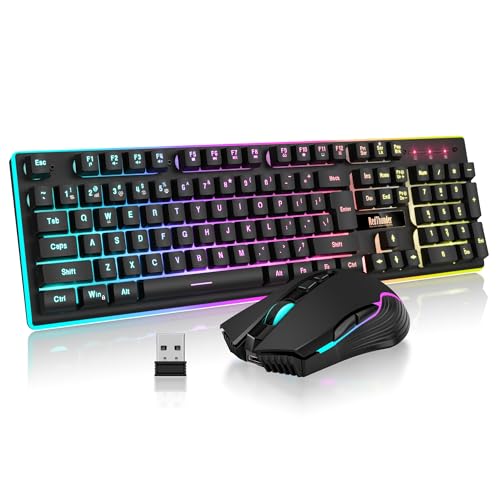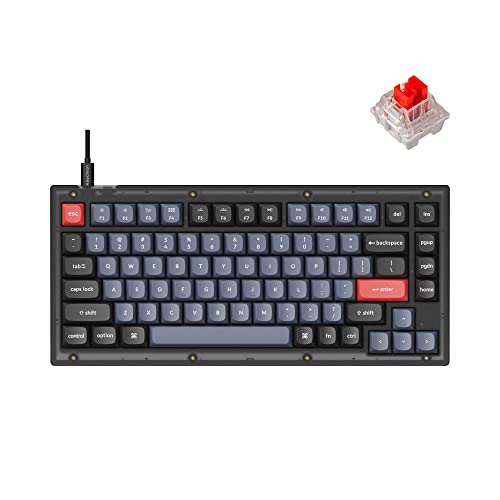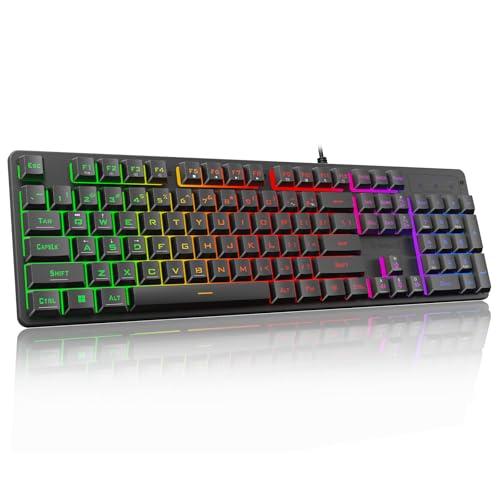
A good gaming keyboard does not need a big budget. The best gaming keyboards for 30 dollars cover the essentials that matter in play: reliable switches, anti-ghosting so key presses register, backlighting for dark rooms, and a layout that fits the desk. This guide covers six keyboards in that range, from a full-size Redragon with multimedia keys to a hot-swap 60 percent board, each checked against current listings with verified product details.
Every keyboard here is a genuine gaming board with a clear strength, whether that is true mechanical switches, a compact layout, or a full-size design with a number pad. The picks suit different players, but they share the same idea: a keyboard that feels good to game on without overspending.
In this guide
Quick picks: best gaming keyboards for 30 dollars
| # | Product | Where to buy |
|---|---|---|
| 1 | Redragon K521 Upgrade Rainbow LED Gaming Keyboard | Check on Amazon |
| 2 | Redragon K552 Mechanical Keyboard | Check on Amazon |
| 3 | Redragon K617 Wired 60 Percent Hot-Swap RGB Gaming Mechanical Keyboard | Check on Amazon |
| 4 | MageGee Mini 60 Percent Gaming Keyboard | Check on Amazon |
| 5 | MageGee MK-Box Portable 60 Percent Mechanical Gaming Keyboard | Check on Amazon |
| 6 | GEODMAER 65 Percent Gaming Keyboard | Check on Amazon |
How the picks were chosen
We started with keyboards that are explicitly gaming keyboards with backlighting and anti-ghosting, because those are the features that separate a gaming board from a plain office keyboard. A keyboard without backlighting or without anti-ghosting does not belong in this guide, and we excluded those.
Switches came next. A keyboard earns its place here by offering either true mechanical switches or a well-made mechanical-feeling design, and we checked that each pick names its switch type so a buyer knows what they are getting. Hot-swap sockets earned extra credit for upgradability.
Finally, we balanced the list by layout. The six keyboards cover full-size, tenkeyless, 65 percent, and 60 percent designs, so a player who needs a number pad and a player who wants maximum mouse space each have a real option.
Quick comparison
| Product | Standout feature | Best for |
|---|---|---|
| Redragon K521 | Full-size, rainbow LED, media keys | Full-size setups |
| Redragon K552 | Mechanical red switches, metal frame | First mechanical board |
| Redragon K617 | 60 percent, hot-swap, RGB | Competitive and minimalist play |
| MageGee Mini 60 Percent | Compact, waterproof, RGB | Small desks and dorms |
| MageGee MK-Box | Portable mechanical, 68 keys | Travel and LAN play |
| GEODMAER 65 Percent | 65 percent, arrow keys, backlit | Balanced compact use |

Redragon K521 Upgrade Rainbow LED Gaming Keyboard
The Redragon K521 is the full-size pick of this roundup, with 104 keys, rainbow LED backlighting, multimedia keys, and a wired connection that just works. The mechanical-feeling switches give a tactile response without the cost of true mechanical switches, and the one-touch backlit controls make it easy to change the lighting without opening software. Anti-ghosting keeps key presses registering during fast play, and the keyboard works with PC, Mac, and consoles.
Key specifications: 104-key full-size layout; rainbow LED backlighting; mechanical-feeling switches; multimedia keys; one-touch backlit control; anti-ghosting; wired; compatible with PC, Mac, PS4 and PS5, and Xbox.
This keyboard suits a gamer who wants a full-size layout with a number pad and dedicated multimedia keys, without giving up desk space to a larger board. The rainbow lighting looks good in a gaming setup, the multimedia keys control volume and playback without leaving the game, and the wired connection means no batteries and no wireless lag.
Plug the keyboard into a USB port and it works immediately, with no drivers needed for basic use. Set the backlight brightness to suit the room, and test the multimedia keys with your media player before a long session. A large mouse pad underneath keeps the keyboard stable during intense play.
Strengths
- Full 104-key layout with a number pad and multimedia keys
- Rainbow LED backlighting with one-touch controls
- Anti-ghosting and a wired connection for reliable gaming
Trade-offs
- Mechanical-feeling switches are not true mechanical switches
- Full-size layout needs a wide desk
- Rainbow lighting is fixed-pattern rather than fully programmable
A gamer who wants a complete, full-size keyboard with lighting and media controls will find the K521 the best value here. It is the full-size pick of this list.
Best for: gamers who want a full-size keyboard with a number pad and media keys / Not suited for: players who need a compact keyboard or true mechanical switches
Check price on Amazon: Redragon K521 Upgrade Rainbow LED Gaming Keyboard

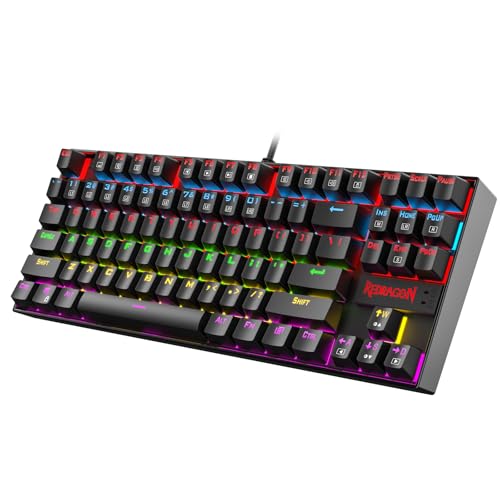
Redragon K552 Mechanical Keyboard
The Redragon K552 is the classic budget mechanical keyboard, and it remains the benchmark for what a low-cost mechanical board should feel like. True mechanical switches with a red switch feel, an 87-key tenkeyless layout, LED backlighting, and a metal frame give it a solidity that membrane keyboards cannot match. Anti-ghosting keeps every key press registering, and the compact layout leaves more room for the mouse. It is the keyboard that introduced a lot of players to mechanical switches.
Key specifications: 87-key tenkeyless mechanical keyboard; red switches; LED backlighting; metal frame; anti-ghosting; beginner-friendly design.
This keyboard suits a gamer who wants to try real mechanical switches without a big investment. The red switches are linear and smooth, which suits fast-paced games, and the tenkeyless layout is the sweet spot for most desks: full letter and function keys, no number pad taking up mouse space. The metal frame keeps the board rigid during heavy use.
Plug the keyboard in and start typing; no software is needed for the basics. Try the red switches in a few games before deciding whether the linear feel suits you, and set the LED brightness to a comfortable level for the room. A wrist rest helps during long sessions, since the metal frame sits higher than a membrane board.
Strengths
- True mechanical red switches at a budget-friendly level
- Metal frame feels solid and stays put during heavy use
- Tenkeyless layout leaves more room for the mouse
Trade-offs
- No number pad, which some users need for work or data entry
- Red switches are linear, so typists who like a click may prefer another switch
- LED lighting is simpler than full RGB customization
A player ready to move from a membrane keyboard to real mechanical switches will find the K552 the best first step. It is the mechanical pick here.
Best for: gamers trying mechanical switches for the first time / Not suited for: players who need a number pad or a full-size layout
Check price on Amazon: Redragon K552 Mechanical Keyboard
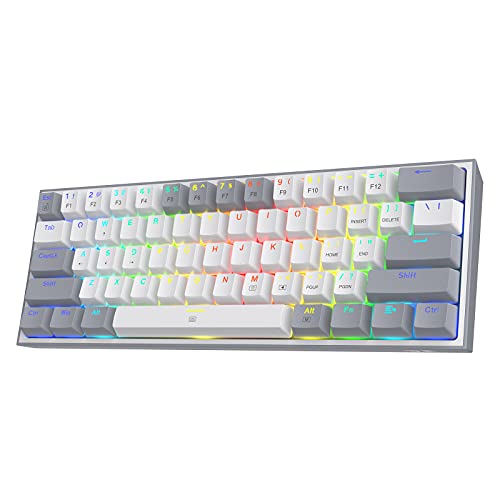
Redragon K617 Wired 60 Percent Hot-Swap RGB Gaming Mechanical Keyboard
The Redragon K617 is the compact, customizable pick of this roundup, with a 60 percent layout, hot-swap sockets, and RGB lighting. The 61-key design drops the function row, the number pad, and the navigation keys to save desk space, while the hot-swap sockets let you change switches later without soldering. The vibrant RGB lighting offers twenty modes, and the software support lets you remap keys and tune the lighting to match the rest of the setup.
Key specifications: 60 percent compact layout; 61 keys; hot-swap sockets; RGB lighting with 20 modes; wired; software support.
This keyboard suits a competitive gamer or a minimalist who wants maximum mouse space and a keyboard that can grow with them. The 60 percent layout is ideal for low-sensitivity mouse play, where the mouse travels widely, and the hot-swap sockets mean the switches can be changed later without buying a new board. The RGB lighting ties the keyboard into a larger gaming setup.
Plug the keyboard in, install the software if you want to remap keys or tune the lighting, and learn the function-layer shortcuts for the missing keys before a competitive match. The 60 percent layout takes a day or two to get used to, so give it a few sessions before judging it.
Strengths
- Hot-swap sockets let you change switches without soldering
- 60 percent layout gives maximum mouse space for competitive play
- RGB lighting with 20 modes and software support
Trade-offs
- Missing function row and navigation keys take time to learn
- Compact layout is not ideal for work that needs a number pad
- Small board can feel cramped for players with large hands
A competitive player or a minimalist who wants a small, customizable keyboard will love the K617. It is the compact pick here.
Best for: competitive gamers and minimalists who want a 60 percent board / Not suited for: players who need a full-size layout or a number pad
Check price on Amazon: Redragon K617 Wired 60 Percent Hot-Swap RGB Gaming Mechanical Keyboard
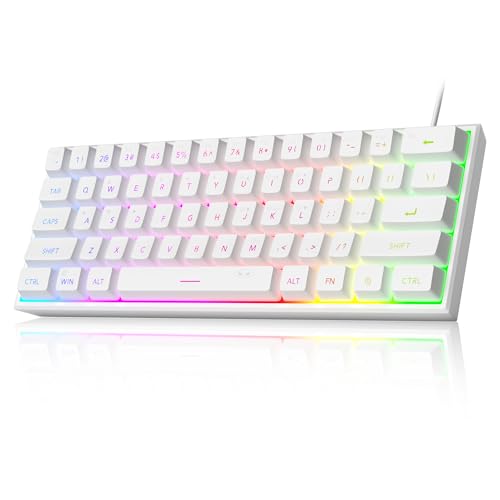
MageGee Mini 60 Percent Gaming Keyboard
The MageGee Mini is the colorful, compact option in this roundup, with a 60 percent layout, upgraded RGB backlighting, and a waterproof, mechanical-feeling design. The 61-key board is ultra-compact, which leaves plenty of room for the mouse, and the ergonomic, waterproof build adds a layer of durability that matters in a busy setup. It works with PC, Mac, and consoles, so one keyboard can serve the whole gaming station.
Key specifications: 60 percent gaming keyboard; 61 keys; RGB backlighting; waterproof design; mechanical-feeling switches; compatible with PC, Mac, PS4, and Xbox One.
This keyboard suits a gamer with a small desk, a dorm room, or a shared space where a compact board and a spill-resistant design are genuinely useful. The RGB backlighting looks good in a dark room, the 61-key layout keeps the desk clear, and the waterproof design adds peace of mind around drinks. It is also a good travel keyboard for a laptop gaming setup.
Plug the keyboard in and adjust the RGB lighting to suit the room. Learn the function-layer keys for volume and media control, and keep drinks away from the board even though it is waterproof. A small desk mat underneath keeps the compact board from sliding during play.
Strengths
- Ultra-compact 60 percent layout saves desk space
- Waterproof design adds durability around drinks
- RGB backlighting and wide compatibility with PC and consoles
Trade-offs
- Mechanical-feeling switches are not true mechanical switches
- Compact layout drops the function row and number pad
- White color shows dirt more readily than a dark board
A gamer with a small desk or a busy setup who wants a compact, spill-resistant keyboard will find the MageGee Mini the right fit. It is the compact value pick here.
Best for: small desks, dorm rooms, and travel gaming setups / Not suited for: players who want true mechanical switches or a full layout
Check price on Amazon: MageGee Mini 60 Percent Gaming Keyboard

MageGee MK-Box Portable 60 Percent Mechanical Gaming Keyboard
The MageGee MK-Box is the portable mechanical pick of this roundup, with a 60 percent layout, true mechanical switches, and a compact 68-key design. The LED blue backlighting gives it a clean, classic look, and the red switches provide a smooth, linear feel for gaming and typing. The portable size and the wired connection make it easy to carry to a friend's house, a dorm lounge, or a LAN setup, and the keyboard works with Windows laptops, PCs, and Macs.
Key specifications: 60 percent portable mechanical keyboard; 68 keys; LED blue backlighting; red switches; wired; compact design.
This keyboard suits a gamer who plays in different places and wants a real mechanical board that travels well. The 68-key layout adds a few more keys than a 61-key board, which helps with navigation and function shortcuts, and the red switches are smooth for fast games. The blue backlighting is easy on the eyes in a dark room.
Plug the keyboard in and start playing; the red switches need no break-in period. Learn the function-layer shortcuts for the extra keys, and carry the board in a sleeve or a padded bag to protect the switches during travel.
Strengths
- True mechanical red switches in a portable 60 percent board
- 68-key layout adds useful keys over a 61-key design
- Compact and portable for LAN play and travel
Trade-offs
- Blue backlighting is simpler than full RGB customization
- Compact layout still drops the number pad
- Wired only, so it needs a USB port nearby
A gamer who plays in different places and wants a portable mechanical keyboard will choose the MK-Box. It is the travel pick here.
Best for: LAN players and travelers who want a portable mechanical board / Not suited for: players who need RGB lighting or a full-size layout
Check price on Amazon: MageGee MK-Box Portable 60 Percent Mechanical Gaming Keyboard

GEODMAER 65 Percent Gaming Keyboard
The GEODMAER 65 percent keyboard closes this roundup with a balanced compact design: 68 keys in a 65 percent layout, wired backlighting, and a membrane switch design with anti-ghosting. The 65 percent size adds arrow keys and a few navigation keys that a 60 percent board drops, which makes it more practical for everyday use, while the ultra-compact footprint still leaves plenty of mouse room. It is a straightforward, no-fuss keyboard for a PC or a laptop gaming setup.
Key specifications: 65 percent gaming keyboard; 68 keys; wired backlit design; membrane switches; anti-ghosting; ultra-compact.
This keyboard suits a gamer who wants a compact board but misses the arrow keys on a 60 percent layout. The 65 percent size is the middle ground: smaller than a tenkeyless board, more useful than a 60 percent board, and still compact enough for a small desk. The backlighting helps in a dark room, and the anti-ghosting keeps key presses registering during fast play.
Plug the keyboard into a USB port and adjust the backlighting to suit the room. The membrane switches need no setup, and the compact layout is easy to learn after a session or two. Pair it with a mouse pad that gives the mouse room to move, since the whole point of a compact board is the extra space.
Strengths
- 65 percent layout keeps arrow keys in a compact board
- Backlit keys and anti-ghosting suit gaming in a dark room
- Ultra-compact size leaves plenty of mouse room
Trade-offs
- Membrane switches are not true mechanical switches
- Backlighting is simpler than full RGB
- No number pad or function row for work tasks
A gamer who wants a compact keyboard with arrow keys will find the GEODMAER the best compromise here. It is the balanced compact pick.
Best for: players who want a compact board with arrow keys / Not suited for: players who need true mechanical switches or a full layout
Check price on Amazon: GEODMAER 65 Percent Gaming Keyboard
Best gaming keyboards for 30 dollars: what matters most
Switches are the first decision, because they define how the keyboard feels. True mechanical switches offer a consistent, tactile response and last longer, while mechanical-feeling membrane switches cost less and still feel good for casual play. Red switches are linear and smooth for gaming, while clicky or tactile switches suit typists who like feedback.
Layout is the second decision. A full-size keyboard has a number pad and multimedia keys, a tenkeyless board drops the number pad for mouse space, and a 60 or 65 percent board drops even more for maximum room. Choose the smallest layout you can live with, since extra mouse space helps in fast games.
Backlighting matters more than it seems. A backlit keyboard is easier to use in a dark room, and RGB lighting lets the board match the rest of the setup. Simple LED backlighting is enough for most players, while full RGB suits a gaming room with other lights to match.
Finally, check the connection and the build. A wired keyboard has no batteries and no wireless lag, which suits gaming, and a metal frame or a solid base keeps the board stable during heavy use. Anti-ghosting is essential, since it ensures key presses register during fast combinations.
Buying guide: choosing gaming keyboards for 30 dollars
Start with the games you play. Fast-paced shooters benefit from a compact layout and linear switches, while strategy games and work benefit from a full-size board with a number pad. Match the layout to the desk and the games, not to a photo.
Decide on switches before you decide on a board. If you have never tried mechanical switches, a budget mechanical board like the K552 is a good first step. If you prefer a softer feel or a quieter board, a mechanical-feeling membrane keyboard may suit you better.
Check the size against the desk. A full-size keyboard needs a wide desk, while a 60 percent board fits almost anywhere. Measure the desk and leave room for the mouse to move, since a cramped mouse is a bigger problem than a missing number pad.
Think about the future. A hot-swap board like the K617 lets you change switches later without buying a new keyboard, which adds value over time. A board with software support lets you remap keys and tune the lighting as your setup grows.
Using and caring for your gaming keyboards for 30 dollars
Keep the keyboard clean by turning it upside down and shaking out dust and crumbs every few weeks, then wiping the keys with a slightly damp cloth. Avoid liquids near the board, even on waterproof models, and never submerge a keyboard.
For mechanical keyboards, remove the keycaps occasionally and clean underneath with compressed air, holding the can upright so no liquid sprays out. Check that the switches still feel consistent, and replace any keycap that has become loose or worn.
Store a portable keyboard in a sleeve or a padded bag when traveling, and coil the cable loosely rather than wrapping it tightly around the board. A kinked cable is a common cause of a keyboard that stops working.
Common mistakes to avoid
The most common mistake is buying a layout that does not fit the way you play. A 60 percent board is great for competitive shooters but frustrating for work that needs a number pad, while a full-size board crowds the mouse on a small desk. Choose the layout for your actual use.
Another mistake is ignoring the switch type. A mechanical-feeling membrane keyboard is not a mechanical keyboard, and a buyer who expects mechanical switches will be disappointed. Read the switch description in the listing before ordering.
Finally, many buyers forget anti-ghosting. A keyboard without anti-ghosting can drop key presses during fast combinations, which is frustrating in a game. Check that the board lists anti-ghosting before buying.
Budget and value
A gaming keyboard in this range is already a value buy, and the best value is usually a board that does one thing very well: true mechanical switches, a hot-swap design, or a full-size layout with media keys. Pay for the feature you will use every session, not the one that looks good in a photo.
Value also comes from durability. A metal frame, a solid base, and a wired connection last longer than a flimsy board with a weak cable. Buy the keyboard for the desk and the games you actually have, and it will serve you well for years.
Final recommendation
For most players, the Redragon K552 is the best all-round pick in this range: true mechanical switches, a metal frame, and a tenkeyless layout that suits most desks. If you need a full-size board, the K521 adds a number pad and multimedia keys, and if you want a compact board, the K617 offers hot-swap sockets and RGB lighting.
Small desks should look at the MageGee Mini, travelers should look at the MK-Box, and players who want arrow keys in a compact board should look at the GEODMAER 65 percent.
Frequently asked questions
Are mechanical keyboards better for gaming?
Mechanical keyboards offer a consistent, tactile key press and tend to last longer than membrane boards, which helps in fast-paced games. A well-made membrane keyboard still plays well, but a mechanical board is the better long-term choice for most gamers.
What is a 60 percent keyboard?
A 60 percent keyboard drops the function row, the number pad, and the navigation keys to save desk space, leaving about 61 keys. It suits competitive gaming where mouse space matters, but it takes time to learn the function-layer shortcuts for the missing keys.
What does hot-swap mean on a keyboard?
Hot-swap means the switches can be removed and replaced without soldering, so you can change the switch type later or replace a faulty switch. It adds flexibility and makes the keyboard easier to repair and customize.
Do I need RGB lighting on a gaming keyboard?
RGB lighting is not essential for gaming, but backlighting helps in a dark room and RGB lets the keyboard match the rest of the setup. A simple LED backlight is enough for most players, while full RGB suits a gaming room.
What is anti-ghosting on a keyboard?
Anti-ghosting ensures that multiple key presses register at the same time, so fast combinations in a game are not dropped. It is an essential feature for gaming, and every keyboard in this guide includes it.
How do I clean a mechanical keyboard?
Turn the keyboard upside down and shake out dust, then wipe the keys with a slightly damp cloth. For a deeper clean, remove the keycaps and use compressed air underneath, holding the can upright. Avoid liquids near the switches.
What is the difference between a membrane and a mechanical keyboard?
A mechanical keyboard uses individual switches under each key, which offer a consistent feel and last longer, while a membrane keyboard uses a rubber layer that is softer and quieter but less durable. Mechanical-feeling membrane boards mimic the feel without true switches.
Choosing switches and layouts
Switches are the heart of a keyboard, and the choice shapes every hour you spend typing and gaming. Linear switches like the red switches in the K552 and the MK-Box move smoothly from top to bottom with no bump and no click, which suits fast-paced games where the same key is pressed repeatedly. Tactile switches add a small bump halfway down, which suits typists who like feedback without noise, while clicky switches add a sound as well as a bump, which suits a private room but not a shared one. If you have never tried mechanical switches, a linear red switch is the safest first choice.
Layout is the second big decision, and it is mostly about desk space and habits. A full-size keyboard has a number pad, function keys, and navigation keys, which suits work that involves numbers and a desk with room to spare. A tenkeyless board drops the number pad and keeps everything else, which is the sweet spot for most gamers. A 65 percent board keeps the arrow keys and drops the function row, while a 60 percent board drops even more for maximum mouse space. The smaller the board, the more you rely on function-layer shortcuts, so a compact board takes a few days to learn.
Trying before buying helps, but it is not always possible. If you can, test a friend's keyboard or a display model in a store, paying attention to the switch feel, the key spacing, and the board height. If you cannot test, start with a well-reviewed budget board like the K552, which is a low-risk way to learn what you like. A hot-swap board like the K617 is the most flexible choice, since the switches can be changed later without buying a new keyboard.
Breaking in a new gaming keyboard
A new keyboard feels strange for the first few days, and that is normal. The key spacing, the switch feel, and the layout are all different from the old board, so typing speed drops and gaming mistakes increase for a short while. Give the keyboard a full week of daily use before judging it, and resist the urge to switch back to the old board after one bad session. Most players adapt within three to five days, and the new board starts to feel natural.
Settings help the transition. Set the backlight brightness to a comfortable level for the room, since a board that is too bright is distracting and a board that is too dim is hard to read in the dark. If the keyboard has software, remap any keys that feel awkward and save the layout, then test it in a few games before a competitive match. A wrist rest helps during the adjustment period, since a new board height changes the angle of your wrists.
Maintenance starts on day one. Keep drinks away from the board, wipe the keys with a dry cloth every week, and turn the keyboard upside down occasionally to shake out dust and crumbs. A keyboard that is cleaned regularly lasts longer and feels better than one that is neglected, and a budget board that is cared for will outlast an expensive board that is abused.
Keyboards for work and gaming in one setup
Many players use one keyboard for both work and gaming, and the right board handles both jobs well. A tenkeyless or full-size board with a number pad suits work that involves spreadsheets and data entry, while a compact board suits a small desk and a gaming-first setup. The switches matter for both: linear switches are quiet enough for a shared office and fast enough for gaming, while clicky switches may annoy coworkers or family members in the same room.
Backlighting helps in both roles. A backlit keyboard is easier to use in a dim room during an evening work session, and RGB lighting can be set to a calm, single color for work and a brighter pattern for gaming. Software that supports profiles makes this easy: one profile for work with a soft white light and standard key mapping, another for gaming with brighter lighting and remapped keys.
Ergonomics matter when one keyboard serves two jobs. A wrist rest reduces strain during long typing sessions, a keyboard tilt that keeps the wrists neutral prevents discomfort, and a layout that does not force the mouse too far to the side protects the shoulder. If the keyboard will be used for eight hours of work plus evening gaming, comfort is as important as switch feel, and a board that is comfortable for both is worth more than a board that is only good for one. Software profiles tie the two roles together. Many gaming keyboards let you save a work profile with a soft, steady backlight and standard keys, and a gaming profile with brighter lighting and remapped macros, switching between them with a key combination. Setting up those profiles takes a few minutes and saves daily fiddling, and it means the keyboard adapts to the task rather than forcing you to adapt to it. A keyboard that serves two jobs well is worth more than two keyboards that each serve one. Keycap quality is a detail that shows up after months of use. Budget keyboards often use thin ABS keycaps that shine and wear smooth with heavy use, while thicker keycaps last longer and feel better. A keyboard with standard keycap sizes can be upgraded later with a new keycap set, which refreshes the look and the feel without buying a new board. Check whether the keycaps are standard sized before buying, since non-standard layouts limit replacement options.
Keyboards for different games
Different games reward different keyboards, and the best board for one genre may not be the best for another. Fast-paced shooters benefit from a compact layout and linear switches, because the mouse needs room to travel and the keys need to register quickly without a tactile bump slowing the press. A 60 percent board with red switches is the classic choice here, and the extra mouse space matters more than a number pad that a shooter never uses.
Strategy and simulation games benefit from a full-size board, since they use more keys, more shortcuts, and often a number pad for unit groups or camera positions. A tenkeyless or full-size board with a comfortable switch and a good wrist rest suits long sessions of management and planning, where the keyboard is used as much as the mouse. Backlighting helps here too, since strategy sessions often run late into the evening.
Typing-heavy games and MMOs sit in between. An MMO player presses many keys in combinations, so anti-ghosting and a comfortable switch matter more than layout, while a typist who also games will prefer a tactile switch that feels good for writing as well as playing. The right keyboard is the one that matches the games you play most, not the one that matches a reviewer's favorite genre. A last thought on trying new layouts: borrow a compact keyboard from a friend or buy a budget model first, since a layout that looks good in a photo can feel wrong after an hour of play. Give any new layout a full week before deciding, and keep the old keyboard nearby during the transition so a competitive match is never ruined by unfamiliar keys. The best keyboard is the one your hands already know. Desk space is the other half of the layout decision. A compact keyboard leaves room for a large mouse pad, which matters for low-sensitivity play where the mouse travels widely, while a full-size board needs a wide desk to leave the same room. Measure the desk before choosing, and leave at least a mouse pad's width of free space beside the keyboard. A board that fits the desk feels better every day than a board that crowds the mouse, no matter how good its switches are. Cable management is a small detail that pays off daily. A wired keyboard with a long, loose cable can drag across the desk and catch on the mouse, so route the cable behind the monitor or through a channel and leave just enough slack for comfortable typing. A detachable cable is a bonus, since it can be replaced if it frays and makes the board easier to carry. A tidy cable run keeps the desk looking clean and the keyboard working well.
More guides from KajuanDouglas
Best Keyboards for College Students Best Gaming Keyboards Under 100 Dollars Best PC Head Sets