A PC headset is the part of the setup that touches the head for hours, and the difference between a good one and a bad one is felt immediately: a good headset disappears, a bad one presses, pinches, and distracts. Sound quality matters, microphone clarity matters, and comfort matters most of all, because a headset that hurts after an hour will not be worn for two.
The eight headsets below cover the range that matters for a PC: wireless gaming headsets with long battery life, wired headsets that never need charging, and multi-platform models that move between a PC, a console, and a phone. They come from the makers that have defined this category — Logitech, SteelSeries, Razer, HyperX, and Corsair — and each one is chosen for a real use, from competitive gaming to all-day work calls.
Choosing a headset starts with the connection. Wireless headsets free the desk and let the wearer stand up without removing them, but they need charging. Wired headsets never need charging and never drop a connection. The second choice is the microphone: a detachable or flip-to-mute microphone suits calls and streaming, while a built-in microphone suits casual use. The buying guide at the end covers sound, comfort, and microphones in detail.
A note on how the sections are written: each one names the connection type, the microphone, and the comfort, because those are the three things that decide whether a headset is worn or abandoned. Sound quality is discussed too, but a headset that sounds good and hurts is a bad purchase, and the sections are honest about that trade.
In this guide
Quick picks: best pc head sets
| # | Product | Where to buy |
|---|---|---|
| 1 | Logitech G733 Lightspeed Wireless Gaming Headset | Check on Amazon |
| 2 | SteelSeries Arctis Nova 5 Wireless Gaming Headset | Check on Amazon |
| 3 | Razer BlackShark V2 X Wired Gaming Headset | Check on Amazon |
| 4 | Logitech G Astro A50 Wireless Gaming Headset | Check on Amazon |
| 5 | Logitech G325 Lightspeed Wireless Gaming Headset | Check on Amazon |
| 6 | Logitech G Astro A50 X Wireless Gaming Headset | Check on Amazon |
| 7 | Logitech G432 Wired Gaming Headset | Check on Amazon |
| 8 | HyperX Cloud III Wired Gaming Headset | Check on Amazon |
Quick Comparison
| Product | Key spec | Best for |
|---|---|---|
| Logitech G733 Lightspeed Wireless Gaming Headset | Wireless, suspension headband, PRO-G audio | Best wireless gaming headset |
| SteelSeries Arctis Nova 5 Wireless Gaming Headset | Wireless, 60-hour battery, multi-system | Best battery life headset |
| Razer BlackShark V2 X Wired Gaming Headset | Wired, TriForce 50mm drivers, HyperClear mic | Best wired budget gaming headset |
| Logitech G Astro A50 Wireless Gaming Headset | Wireless, base station, PLAYSYNC audio | Best multi-platform headset |
| Logitech G325 Lightspeed Wireless Gaming Headset | Wireless, 24-bit audio, noise-reducing mic | Best all-day wireless headset |
| Logitech G Astro A50 X Wireless Gaming Headset | Wireless, base station, omni-platform | Best flagship gaming headset |
| Logitech G432 Wired Gaming Headset | Wired, DTS Headphone:X, 50mm drivers | Best wired surround headset |
| HyperX Cloud III Wired Gaming Headset | Wired, USB-C, USB-A, 3.5mm, memory foam | Best comfort wired headset |
Battery life is quoted for normal use at moderate volume. Turning the volume up, using RGB lighting, or enabling surround processing all shorten the battery, sometimes by a large amount.
Quick Picks
Short on time? The Logitech G733 is the best wireless all-rounder. The SteelSeries Arctis Nova 5 has the best battery life. The Razer BlackShark V2 X is the best budget wired headset, and the HyperX Cloud III is the best for comfort.

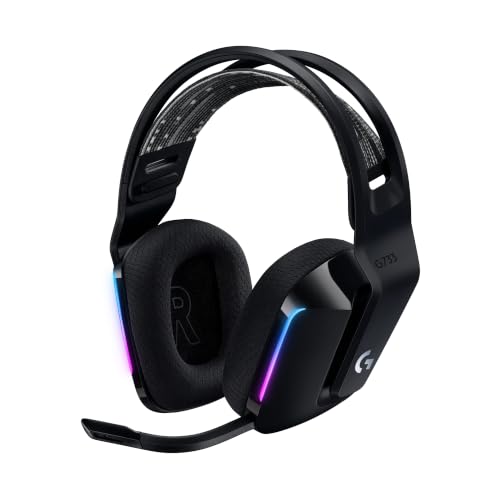
1. Logitech G733 Lightspeed Wireless Gaming Headset
The Logitech G733 Lightspeed is the wireless headset to buy first: light, comfortable, and colorful, with a suspension headband, a clear microphone, and PRO-G audio. It is the headset for gamers who want wireless freedom without weight.
The G733 weighs less than many wired headsets, and the weight matters: a light headset can be worn for hours without the neck noticing. The suspension headband spreads the pressure, the ear cups breathe, and the Lightspeed wireless connection keeps latency low. The microphone uses Blue VO!CE processing for clear voice, and the headset works with PC and PlayStation, which covers the two platforms most gamers use.
The ear cups use a breathable fabric that stays cooler than leather during long sessions, which matters in warm rooms. Leather cushions look premium but trap heat, and the fabric here is the practical choice.
The ear cups fold flat, which makes the headset easy to pack in a bag without a hard case. A headset that travels well is one that gets used away from the desk too.
What stands out:
- Light and comfortable: a low weight and a suspension headband that stays comfortable for hours.
- Lightspeed wireless: a low-latency wireless connection that feels as responsive as a cable.
- Clear Blue VO!CE microphone: voice processing that keeps calls and game chat clear.
Trade-offs to weigh: The plastic build feels lighter than premium rivals, the ear cups are on the small side for large ears, and the battery needs regular charging.
Who it fits: Gamers who want a light, colorful wireless headset for long sessions on PC and PlayStation.
When the headset arrives, wear it for a full session before judging it. A new headset always feels strange for the first hour, and the clamping force eases over the first week. A headset that still hurts after a week is the wrong fit, and the return window should be used for a real trial, not a first impression.
A headset stand is worth buying with the headset. It keeps the headset off the desk, protects the ear cushions from being crushed, and gives the headset a home. A headset that lives on a stand lasts longer than one that lives in a drawer or on the floor.
Check price on Amazon: Logitech G733 Lightspeed Wireless Gaming Headset

2. SteelSeries Arctis Nova 5 Wireless Gaming Headset
The SteelSeries Arctis Nova 5 is the battery champion in this roundup, with 60 hours of use per charge and a wireless connection that covers PC, console, and mobile. It is the headset for buyers who hate charging.
Sixty hours of battery changes how a headset is used: it can be worn for a week of evenings without a charge, and the quick-charge feature adds hours from a short plug-in. The neodymium drivers deliver clear game audio, and the multi-system wireless covers PC, PlayStation, Xbox, and mobile through 2.4 GHz and Bluetooth. The microphone retracts into the ear cup when not needed, which keeps the headset looking clean away from the desk.
The headset folds flat for travel, which makes it easy to pack in a bag without a hard case. A headset that travels well is one that gets used away from the desk too.
The quick-charge feature adds several hours of use from a short plug-in, which saves a session when the battery is low. A headset that charges fast is a headset that is rarely dead.
What stands out:
- 60-hour battery life: a week of evening sessions per charge, with quick charging for top-ups.
- Multi-system wireless: one headset for PC, console, and mobile, with 2.4 GHz and Bluetooth.
- Retractable microphone: the mic hides in the ear cup when not needed, for a clean look.
Trade-offs to weigh: The sound is tuned for gaming rather than music, the ear cups are fabric rather than leather, and the headset is best with the SteelSeries app.
Who it fits: Gamers who play on several systems and want a headset that rarely needs charging.
Keep the volume moderate. A headset that is too loud damages hearing over time, and the damage is permanent. The best headsets in this roundup are clear at moderate volume, which is the volume they should be used at. If the volume needs to be high to hear detail, the headset is the problem, not the ears.
Check the cable length on wired headsets before buying. A cable that is too short tethers the wearer to the desk, while a cable that is too long tangles. The right length reaches the PC with a little slack, and no more.
Check price on Amazon: SteelSeries Arctis Nova 5 Wireless Gaming Headset

3. Razer BlackShark V2 X Wired Gaming Headset
The Razer BlackShark V2 X is the wired value pick: TriForce 50mm drivers, a HyperClear microphone, and a light, comfortable design, at a price that leaves room in the budget for games. It is the headset for buyers who want Razer sound without the wireless premium.
Wired headsets have a simple advantage: they never need charging and never drop a connection, and the BlackShark V2 X uses that simplicity well. The TriForce drivers split the sound into highs, mids, and lows for clearer audio, the HyperClear microphone keeps voice chat intelligible, and the headset is light enough for long sessions. It works with PC and PlayStation, and the 3.5mm connection keeps it simple.
The microphone boom is flexible, so it can be positioned close to the mouth without touching it. A mic that is too far away picks up the room, and one that touches the lips picks up breathing.
The microphone is detachable, so it can be removed for music listening and replaced for calls. A headset that becomes headphones is two devices in one.
What stands out:
- TriForce 50mm drivers: separate tuning for highs, mids, and lows gives clearer game audio.
- HyperClear microphone: a cardioid microphone that focuses on the voice and reduces background noise.
- Light and affordable: comfortable for long sessions at a price that suits a first gaming headset.
Trade-offs to weigh: It is wired only, the ear cushions are fabric rather than cooling gel, and there is no surround processing without software.
Who it fits: Budget gamers who want a light, clear wired headset from a major gaming brand.
If the headset will be used for work calls, test the microphone on a real call before an important meeting. A microphone that sounds fine in a quiet room can pick up a keyboard, a fan, or a neighbor, and the first call is the wrong time to discover it.
For glasses wearers, the ear cushion matters more than any other feature. Soft memory foam molds around the arms of the glasses, while firm leather presses them into the head. The HyperX Cloud III in this roundup is the most glasses-friendly headset here.
Check price on Amazon: Razer BlackShark V2 X Wired Gaming Headset
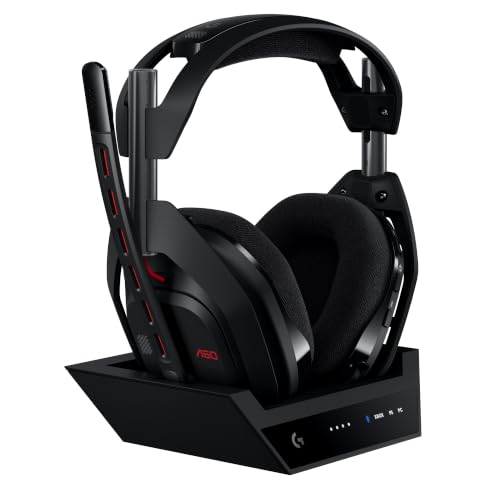
4. Logitech G Astro A50 Wireless Gaming Headset
The Logitech G Astro A50 is the premium multi-platform headset in this roundup, with a base station, PLAYSYNC audio switching, and support for PC, PlayStation, and Xbox. It is the headset for buyers with more than one platform.
The A50 is built around the base station, which charges the headset, connects to the platforms, and switches audio between them. PLAYSYNC lets the wearer move audio between PC, PlayStation, and Xbox without replugging cables, which is the feature that justifies the premium. The sound is tuned for gaming, the microphone is broadcast quality, and the build is the most substantial in this roundup.
The base station shows the battery level and the connection at a glance, which removes the guesswork about charging. A headset that is always charged is a headset that is always ready.
The base station has a small display that shows the battery and the connection, which removes the guesswork about charging. A headset that is always charged is a headset that is always ready.
What stands out:
- Base station charging: the headset charges on its stand, so it is always ready and never has a dangling cable.
- PLAYSYNC platform switching: audio moves between PC, PlayStation, and Xbox without replugging.
- Premium build and sound: a substantial headset with clear, detailed game audio.
Trade-offs to weigh: It is the most expensive headset here, the base station takes desk space, and the weight is higher than lighter rivals.
Who it fits: Gamers with a PC and one or more consoles who want one premium headset for everything.
When the headset arrives, wear it for a full session before judging it. A new headset always feels strange for the first hour, and the clamping force eases over the first week. A headset that still hurts after a week is the wrong fit, and the return window should be used for a real trial, not a first impression.
A headset stand is worth buying with the headset. It keeps the headset off the desk, protects the ear cushions from being crushed, and gives the headset a home. A headset that lives on a stand lasts longer than one that lives in a drawer or on the floor.
Check price on Amazon: Logitech G Astro A50 Wireless Gaming Headset

5. Logitech G325 Lightspeed Wireless Gaming Headset
The Logitech G325 Lightspeed is the all-day wireless pick: comfortable for hours, with 24-bit audio and a noise-reducing microphone. It is the headset for buyers who wear one headset for games, calls, and music alike.
All-day comfort is the G325 strength: the ear cups are soft, the headband distributes the weight, and the wireless connection frees the wearer to stand up and move. The 24-bit audio keeps music and game sound detailed, and the built-in microphone reduces background noise on calls. It is a headset that works as well in a work meeting as in a game, which is a rarer combination than it sounds.
The ear cups swivel flat, which lets the headset rest around the neck between sessions without removing it entirely. It is a small comfort that adds up over a day.
The headband is adjustable in small steps, which lets the fit be tuned precisely. A headband that only adjusts in large steps never fits quite right.
What stands out:
- All-day comfort: soft ear cups and a balanced headband that stay comfortable for hours.
- 24-bit audio: detailed sound for games, music, and calls alike.
- Noise-reducing microphone: background noise is reduced on calls, so the voice stays clear.
Trade-offs to weigh: It has no base station, the microphone is built in rather than detachable, and the styling is plain beside gaming rivals.
Who it fits: Buyers who wear one headset all day for work calls, music, and games.
Keep the volume moderate. A headset that is too loud damages hearing over time, and the damage is permanent. The best headsets in this roundup are clear at moderate volume, which is the volume they should be used at. If the volume needs to be high to hear detail, the headset is the problem, not the ears.
Check the cable length on wired headsets before buying. A cable that is too short tethers the wearer to the desk, while a cable that is too long tangles. The right length reaches the PC with a little slack, and no more.
Check price on Amazon: Logitech G325 Lightspeed Wireless Gaming Headset

6. Logitech G Astro A50 X Wireless Gaming Headset
The Logitech G Astro A50 X is the flagship of this roundup: an omni-platform wireless headset with a base station that connects PC, PlayStation, and Xbox at once. It is the headset for buyers who want the best and use every platform.
The A50 X takes the A50 idea further: the base station connects all three platforms simultaneously, and the headset switches between them at the touch of a button. The sound is the most detailed here, the microphone is the clearest, and the build is the most premium. It is a flagship in the honest sense: it does everything the range offers, and it does it well.
The base station connects to all three platforms at once, so switching is a button press rather than a cable swap. For a household with several consoles, that switching is the feature that matters most.
The base station connects to all three platforms at once, so switching is a button press rather than a cable swap. For a household with several consoles, that switching is the feature that matters most.
What stands out:
- Omni-platform base station: PC, PlayStation, and Xbox connect at once, with switching at a touch.
- Flagship sound and microphone: the most detailed audio and the clearest voice in this roundup.
- Premium build: materials and finish that match the flagship position.
Trade-offs to weigh: It is the most expensive headset here by a clear margin, the base station needs desk space and cables, and the features are wasted on a single-platform buyer.
Who it fits: Gamers who own every platform and want one flagship headset that covers them all.
If the headset will be used for work calls, test the microphone on a real call before an important meeting. A microphone that sounds fine in a quiet room can pick up a keyboard, a fan, or a neighbor, and the first call is the wrong time to discover it.
For glasses wearers, the ear cushion matters more than any other feature. Soft memory foam molds around the arms of the glasses, while firm leather presses them into the head. The HyperX Cloud III in this roundup is the most glasses-friendly headset here.
Check price on Amazon: Logitech G Astro A50 X Wireless Gaming Headset

7. Logitech G432 Wired Gaming Headset
The Logitech G432 is the wired surround pick: DTS Headphone:X 2.0, 50mm drivers, and a flip-to-mute microphone, in a headset that works over USB and 3.5mm. It is the headset for buyers who want surround sound without wireless.
Surround sound in a headset is about positioning: hearing where a footstep or a shot comes from, not just hearing it. The G432 uses DTS Headphone:X 2.0 to place sounds around the listener, and the 50mm drivers keep the sound full. The flip-to-mute microphone is the most convenient mute in this roundup: flip it up and the mic is off, with no button to find. The headset works over USB for surround and 3.5mm for everything else.
The headset works over USB for surround sound and over 3.5mm for a simple analog connection, which covers a PC, a console, and a phone with the same headset. Flexibility is the point.
The microphone boom flips up to mute, which is the fastest mute in this roundup. A mute that takes a second is a mute that gets used; a mute that takes five seconds is not.
What stands out:
- DTS Headphone:X 2.0 surround: positional audio that places game sounds around the listener.
- Flip-to-mute microphone: flip the mic up and it is muted, with no button to search for.
- USB and 3.5mm connections: surround over USB, and a simple analog connection for other devices.
Trade-offs to weigh: It is wired only, the surround needs software on PC, and the ear cups are large for small heads.
Who it fits: Gamers who want positional surround sound in a wired headset with a convenient mute.
When the headset arrives, wear it for a full session before judging it. A new headset always feels strange for the first hour, and the clamping force eases over the first week. A headset that still hurts after a week is the wrong fit, and the return window should be used for a real trial, not a first impression.
A headset stand is worth buying with the headset. It keeps the headset off the desk, protects the ear cushions from being crushed, and gives the headset a home. A headset that lives on a stand lasts longer than one that lives in a drawer or on the floor.
Check price on Amazon: Logitech G432 Wired Gaming Headset

8. HyperX Cloud III Wired Gaming Headset
The HyperX Cloud III is the comfort pick: memory foam ear cushions, a padded headband, and three connections in USB-C, USB-A, and 3.5mm. It is the headset for buyers who wear a headset for hours and feel every gram.
HyperX built its reputation on comfort, and the Cloud III continues it: the memory foam cushions mold to the head, the headband padding spreads the weight, and the headset stays comfortable through the longest sessions. The three connections cover a modern laptop, a desktop, and a console, and the sound is tuned for games with a clear, detailed presentation. It is the headset that disappears on the head, which is the highest praise a headset can earn.
The detachable microphone unplugs for music listening, which turns the headset into a pair of headphones. It is a useful double life for a headset that is worn all day.
The memory foam cushions are replaceable, which extends the life of the headset by years. Cushions wear out before anything else, and a headset with replaceable cushions is a headset that lasts.
What stands out:
- Memory foam comfort: cushions that mold to the head and stay comfortable for hours.
- Three connections: USB-C, USB-A, and 3.5mm cover laptops, desktops, and consoles.
- Clear, detailed sound: game audio that is detailed without being harsh.
Trade-offs to weigh: It is wired only, the microphone is detachable and easy to misplace, and the styling is understated beside RGB rivals.
Who it fits: Buyers who prioritize comfort above all and want a wired headset that works with every device.
Keep the volume moderate. A headset that is too loud damages hearing over time, and the damage is permanent. The best headsets in this roundup are clear at moderate volume, which is the volume they should be used at. If the volume needs to be high to hear detail, the headset is the problem, not the ears.
Check the cable length on wired headsets before buying. A cable that is too short tethers the wearer to the desk, while a cable that is too long tangles. The right length reaches the PC with a little slack, and no more.
Check price on Amazon: HyperX Cloud III Wired Gaming Headset
Buying Guide
Wired or wireless: decide first
Wireless headsets free the desk and let the wearer move, but they need charging and cost more. Wired headsets never need charging, never drop a connection, and cost less for the same sound. For competitive gaming, wired or 2.4 GHz wireless are the safe choices; Bluetooth alone can add latency that matters in fast games.
Comfort is a specification
A headset is worn, not looked at, so weight, clamping force, and ear cushion material are real specifications. A headset under 300 grams feels light; over 350 grams it is noticeable. Memory foam and fabric breathe better than leather in warm rooms. Try the headset for an hour before the return window closes.
Microphone: detachable, flip, or built-in
A detachable microphone suits streamers who want the best voice quality. A flip-to-mute microphone suits gamers who mute often. A built-in microphone suits casual calls. Check the mute method before buying: a mute that is hard to find is a mute that will not be used.
Surround sound: useful, not essential
Surround processing places game sounds around the listener, which helps in competitive games. It matters less for music and films, where stereo is often better. If surround is wanted, check whether it needs software on PC, because console support varies by model.
Battery life: read the fine print
Battery figures are measured at moderate volume with features off. High volume, RGB lighting, and surround processing all shorten the battery. For a headset used daily, a battery over 30 hours is comfortable; under 20 hours, it needs charging every couple of days.
Ear cushion material: leather or fabric
Leather cushions isolate sound well and look premium, but they trap heat and can peel over time. Fabric cushions breathe better and suit long sessions, but they let in more outside noise. For a quiet room, leather is fine; for a warm room or a long session, fabric is the better choice.
Software: helpful, not essential
Most gaming headsets come with software for equalizers, surround settings, and microphone tuning. That software is useful, but the headset should sound good without it. Check whether the software is required for basic use, and whether it works on the operating system in use.
Check the ear cup size for the wearer
Ear cups that are too small press on the ears instead of around them, which becomes painful within an hour. Look for cups that fully enclose the ear, and check the depth as well as the diameter. A headset that fits the ears is a headset that can be worn all day.
Frequently Asked Questions
Are wireless headsets good for gaming?
Yes, if they use 2.4 GHz wireless rather than Bluetooth alone. Modern 2.4 GHz headsets have latency low enough for competitive play, and the freedom to move is a real advantage. Bluetooth alone can add delay, so check the connection type before buying for gaming.
Do I need a headset with a microphone?
For multiplayer games and work calls, yes: a microphone is essential. For single-player games and music, a pair of headphones is enough. If a microphone is needed only occasionally, a detachable microphone is the flexible choice, because it can be removed when not in use.
How do I make a headset more comfortable?
Adjust the headband so the ear cups sit over the ears, not on them, and give the clamping force a week to ease. Glasses wearers should look for headsets with softer cushions or a channel for the arms. If a headset still hurts after a week, the fit is wrong and it should be returned.
Can one headset work on PC, PlayStation, and Xbox?
Some can: the Logitech A50 models in this roundup connect to all three through a base station. Others work on PC and PlayStation but not Xbox, because Xbox needs a specific wireless protocol. Check the platform list on the listing before buying for a console.
Is surround sound worth it in a headset?
For competitive games, yes: positional audio helps locate footsteps and shots. For music and films, stereo is often better, and many headsets let surround be switched off. Buy surround for games, not for music, and check whether it needs PC software.
Can I use a gaming headset for music?
Yes. A good gaming headset sounds good with music too, though it is usually tuned for game audio rather than a flat, accurate response. For critical music listening, a pair of dedicated headphones is better, but for everyday listening a gaming headset is perfectly enjoyable.
How long do gaming headsets last?
A good headset lasts for years if the ear cushions and the cable are looked after. The parts that wear first are the cushions, which can be replaced on many models, and the cable on wired models. A headset with replaceable cushions and a detachable cable lasts longest.
Should I buy a headset with a detachable microphone?
Yes, if the headset will be used for music as well as calls: removing the microphone turns the headset into a pair of headphones, which is more comfortable and looks better away from the desk. If the headset is only for games, a fixed microphone is fine.
A note on hearing
A headset sits directly on the ears, so volume matters more than with speakers. The safe habit is to keep the volume at a level where a conversation in the room is still audible, and to take a break every hour. The headsets in this roundup are all clear at moderate volume, which is where they should be used. Hearing damage from loud headsets is permanent, and no game is worth it. One more habit worth building: store the headset on a stand, not on the desk or in a drawer. A stand keeps the ear cushions from being crushed, keeps the cable from tangling, and gives the headset a home. A headset that lives on a stand lasts longer and is always easy to find, and the habit costs nothing to start. One more habit worth building: give the headset a break-in week. A new headset always feels strange for the first few days, and the clamping force eases as the headband settles. The ear cushions soften, the headband finds its shape, and the headset that felt tight on day one feels natural by day seven. Judge the headset after that week, not on the first evening, and use the return window for a real trial rather than a first impression.
Conclusion
The best PC headset is the one that is comfortable enough to wear for hours, clear enough for calls, and suited to the platforms in use. The Logitech G733 is the best wireless all-rounder, the SteelSeries Arctis Nova 5 is the best for battery life, and the HyperX Cloud III is the best for comfort. Decide wired or wireless first, check the microphone second, and the headset that arrives will be one that is worn every day rather than left on the desk. There is one more consideration that matters as much as the headset itself: the setup it will be used in. A headset that is used at a desk with a good microphone arm and a quiet room will sound different from the same headset used in a shared bedroom with a fan running, and the choice should reflect the real room rather than the ideal one. A wireless headset suits a desk where the wearer stands up often, while a wired headset suits a desk where the wearer sits for hours without moving. A headset with a detachable microphone suits a buyer who also listens to music, while a headset with a flip-to-mute microphone suits a gamer who mutes constantly. The headsets in this roundup cover all of these uses, and the sections above explain which is which. Decide wired or wireless first, check the microphone second, try the fit with a real session third, and the headset that arrives will be one that is worn every day rather than left on the desk. Comfort is the feature that decides whether a headset is used or abandoned, and it deserves the same attention as the sound.