kajuandouglas.com is reader-supported. When you buy through links on our site, we may earn an affiliate commission.
Where to Buy a Monitoring Camera, and Why Recording Is a Different Promise Than Watching
The best cameras for monitoring and recording are bought for the morning after: the package that vanished, the gate left open, the pet’s midnight mischief, the moment you need to show someone rather than tell them. Live viewing is the demo; recording is the product. This guide therefore judges home cameras by what they keep — how long, at what quality, stored where, at whose mercy — because a monitoring camera that cannot produce last Tuesday’s footage has not monitored anything. It has merely watched, and forgotten.
Purchasing notes: any linked name below opens that camera’s Amazon listing, where bundles and multi-packs are worth comparing, since monitoring is rarely a one-camera job. Budget for the system, not the camera: memory cards for local recording, perhaps a subscription tier, the second camera for the blind spot you will discover in week one. The honest total is the number to compare, and this guide will keep dragging the conversation back to it.
Two honest boundaries before the picks. First, these are home and small-property cameras — homes, yards, small shops, a relative’s front door — not enterprise surveillance, and nothing here replaces a professionally installed system for a business with compliance duties. Second, recording other people carries legal and ethical weight that varies by place: film your own property, respect your neighbours’ windows, and know your local rules about audio, which is regulated more strictly than video in many jurisdictions.
Within those boundaries, the six picks divide by philosophy. Some record to the cloud and charge rent for the archive; some record to a card in the camera and ask nothing monthly; one runs on batteries where no cable can go. The right philosophy depends on what you are monitoring and how much you trust a subscription with your evidence — and the reviews are written to make that choice explicit rather than to crown a single winner.
Key Takeaways
- Recording is the product: judge every camera by what footage it can produce a week later, not by its live view.
- The Wyze Cam v4 and TP-Link Tapo C210 lead the no-subscription school — continuous recording to a local card, no monthly rent.
- Ring and Blink trade a subscription for polish, ecosystem and effortless cloud archives; price the plan into the camera.
- The eufy Indoor Cam E220 pans and tilts to follow activity, covering a room one fixed camera cannot.
- The REOLINK Argus PT Ultra is the wire-free outlier: battery, pan-tilt and local recording where no power reaches.
- Placement and light decide what footage is worth; a well-placed modest camera out-records a flagship in a corner.
In this guide
Quick Picks
| Camera | Badge | Why it records well |
|---|---|---|
| Wyze Cam v4 | Best continuous recording value | Sharp 2.5K video, colour night vision and continuous recording to a local card at a price that invites a whole system. |
| Ring Indoor Cam (2nd Gen) | Best polished cloud ecosystem | The smoothest app and archive experience in home monitoring, with an ecosystem that extends from doorbell to alarm. |
| TP-Link Tapo C210 | Best pan-and-tilt room recorder | A rotating, tilting camera that patrols a whole room and records continuously to local storage, no subscription required. |
| eufy Indoor Cam E220 | Best privacy-leaning pan-and-tilt | On-device intelligence, local recording and pan-tilt coverage from a brand whose pitch is keeping your footage yours. |
| Blink Outdoor 4 | Best battery perimeter camera | Two-year battery life in Blink’s telling, wire-free placement anywhere on the property, and an ecosystem priced for covering ground. |
| REOLINK Argus PT Ultra | Best wire-free 4K pan-tilt sentinel | Battery-powered 4K pan-and-tilt with local recording — the most capable camera here for a position with no power and no mercy. |
How Did We Choose the Best Cameras for Monitoring and Recording?
We scored recording first and everything else second. Continuous recording versus motion-only clips, the length and retrievability of the archive, what happens to footage when the internet drops, and whether the evidence can be exported without a fight — those were the tests. A camera that records only twelve-second clips of a thirty-second event is a notification device with a lens, and several popular models failed this guide on exactly that ground.
Storage philosophy was treated as a first-class feature. Local recording to a memory card keeps evidence in your hands and your costs at zero, at the risk that the camera itself can be stolen with its archive inside. Cloud recording survives the camera’s theft and offers effortless searching, at the price of a subscription and a dependence on the maker’s servers and policies. Neither is correct in the abstract; the picks were chosen to represent both philosophies at their best, with the trade stated in plain words.
Detection quality came third, because an archive of false alarms is a haystack that hides the needle. We favoured cameras whose person, pet and vehicle detection — on-device where possible — keeps the event list honest, and whose notification discipline can be tuned before the owner mutes the whole system in week two, which is how most home monitoring quietly dies.
Finally, the unglamorous infrastructure: Wi-Fi reliability at the property’s edges, night vision that identifies rather than merely illuminates, power options for the places cameras actually need to be, and apps that a non-technical household member can search at 2 a.m. Monitoring is a system that must work on its worst night, and the picks below were chosen for their worst nights as much as their demo days.
What Is the Real Difference Between Motion Clips and Continuous Recording?
Everything that matters at 3 a.m. a week later. Motion-clip cameras wake on movement, record a snippet, and sleep — economical, and blind to context: the seconds before the event that explain it, the slow intruder who never triggers the sensor, the second person who arrived after the clip ended. Continuous recording keeps the whole river of the day, searchable by event markers, at the cost of storage, power and a camera that must be wired or frequently fed. For monitoring whose purpose is evidence — a dispute, a delivery claim, a pattern of behaviour — the river wins, and it is not close.
The middle path, and the one several picks here walk well, is continuous recording to a local card with events flagged by detection: the archive is complete, the search is painless, and no subscription mediates between you and your own footage. Its discipline is card management — a large, endurance-rated card, replaced on a schedule, with important events exported before the loop overwrites them. Households that adopt that rhythm get professional-grade evidence from consumer cameras.
Choose by the question you are asking the camera. ‘Tell me when something happens’ is a notification brief, and clip cameras serve it cheaply. ‘Show me what happened’ is an evidence brief, and it demands continuous recording or very generous event capture. Most buyers say the first and mean the second — this guide is written for what they mean.
Where Should Footage Live: A Card in the Camera or a Stranger’s Cloud?
The local card’s virtues are sovereignty and price: the footage is yours, in your house, costing nothing monthly, viewable during an internet outage, and immune to a company’s decision to change its plans or shut its servers. Its vulnerability is singular and physical — steal the camera and you steal the evidence — which matters at an exposed outdoor position and barely at all for an indoor camera watching a hallway the intruder has already been filmed entering by other means.
The cloud’s virtues are survival and search. Footage that leaves the property the instant it is recorded cannot be taken with the camera, and the big ecosystems’ apps search, label and present events with a polish local systems rarely match. Its costs are the subscription itself, the dependence on broadband and the maker’s continued goodwill, and a privacy calculus each household must do honestly: the inside of your home, on a company’s servers, under a policy that can change.
Mature setups often run both: cloud for the exposed perimeter camera whose theft is plausible, local continuous recording for the interior and the workhorse views. The picks below include both philosophies precisely so a household can build that hybrid deliberately, rather than discovering its preferences after the first incident.
Which Six Cameras Monitor and Record Best? The Picks in Detail
Read each review for its recording philosophy first — where the footage lives, what it costs monthly, what survives a theft or an outage — and its camera virtues second. In monitoring, the archive is the product and the camera is its author.

Wyze Cam v4 — Best continuous recording value
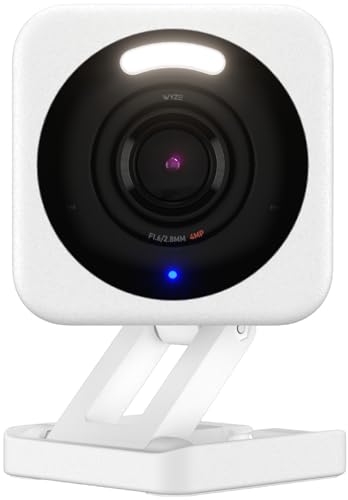
The Wyze Cam v4 is the evidence camera for people who count costs honestly. It records continuously to a memory card in the camera — the full river, not clips — in detailed 2.5K, with colour night vision that identifies a jacket’s colour rather than rendering the night in ghost-grey. Person and pet detection flag the events worth watching, and the whole arrangement asks no monthly rent for the privilege of your own footage. As the backbone of a home monitoring system, camera by camera and room by room, its value is simply unmatched in this guide.
The compromises are the ecosystem’s, not the camera’s: the app and cloud tiers are where Wyze monetises, free cloud clips are limited, and the polish of the experience trails Ring’s flagship smoothness. The camera itself is a wired indoor-outdoor-capable unit that asks for a power outlet and a sensible mount. Owners who embrace the local-recording philosophy — big endurance cards, events exported promptly — get a monitoring system of genuine evidentiary quality for the price of a single premium rival and its first year of subscription.
Buy it as a system from the start: three or four units covering the approaches and the interior choke points, cards in every one, detection tuned per position. A single camera is a witness; a placed system is a record, and the v4’s pricing is what makes the step from witness to record affordable for ordinary houses. That, more than any specification, is why it leads this guide.
- Video: 2.5K with colour night vision
- Recording: continuous to local microSD, events flagged
- Detection: person and pet alerts without mandatory subscription
- Power: wired, indoor and sheltered outdoor use
Strengths
- Continuous evidence with no monthly rent
- Colour night footage that identifies details
- Price that funds a whole system
Trade-offs
- Cloud features and polish trail Ring
- Needs a power outlet at each position
- Free cloud clips are limited by design
Best for: households wanting continuous recording across several positions on a budget. Not suited for: users who want a fully managed cloud service and nothing to maintain.

Ring Indoor Cam (2nd Gen) — Best polished cloud ecosystem
Ring’s Indoor Cam sells something the spec sheet cannot show: the feeling that the system is handled. Its app is the benchmark for finding an event, its cloud archive — on the subscription — is searchable and calm, and its integration with the doorbells, alarms and lights of the same ecosystem makes a house feel monitored as one organism rather than a pile of cameras. For the household that wants monitoring as a service rather than a hobby, this is the polished pole of this guide, and its polish is a real feature purchased with real rent.
The camera itself is a competent indoor unit with a physical privacy shutter — a small, civilised touch for a camera that lives in a home’s private rooms — and person detection that keeps alerts meaningful. The honest costs are structural: without the subscription, live view is mostly what you own, and the recording archive that justifies the system lives behind the plan. Price the plan across the years you will keep the cameras, compare it with the local-recording picks’ zero, and choose with both numbers on the table. Households that do still choose Ring, happily and in millions — the ecosystem is the reason.
Choose it as the centre of a Ring household, where its value compounds: the doorbell’s event wakes the indoor view, the alarm’s state arms the cameras, one app carries the whole property. Bought alone against the local-recording rivals, it is a fine camera carrying a rent bill; bought as an ecosystem citizen, it is the most coherent monitoring experience a consumer can purchase. The review’s job is to make that distinction unmissable, and the buyer’s job is to know which purchase they are making.
- Recording: cloud archive on subscription, polished event search
- Privacy: physical shutter for indoor peace of mind
- Ecosystem: doorbells, alarms and lights in one app
- Detection: person alerts that keep notifications honest
Strengths
- The benchmark app and archive experience
- Ecosystem coherence across a whole property
- Privacy shutter suits indoor placement
Trade-offs
- Recording value lives behind the subscription
- Local continuous recording is not its model
- Costs compound across years and cameras
Best for: households already invested in, or wanting, the Ring ecosystem as a service. Not suited for: subscription-averse owners who want footage stored at home.

TP-Link Tapo C210 — Best pan-and-tilt room recorder
One fixed camera watches a slice of a room; the Tapo C210 watches the room. Its pan-and-tilt head sweeps the space, tracks motion across it, and returns to its guard position — coverage that would take two or three fixed cameras — while recording continuously to a local card in the subscription-free Tapo tradition. For the classic monitoring briefs, the open-plan living space, the shop floor after closing, the relative’s front room watched with permission, it is the most coverage per camera in this guide.
The tracking deserves both its praise and its caveat. Following a pet’s patrol or an intruder’s path produces footage of genuine evidentiary narrative — the whole event, not fragments — but a moving camera can also be looking the wrong way when a second event begins, and its motors prefer a shelf or mount with a clear swing. Night vision, detection and the app are all competent rather than class-leading, which is the honest shape of a camera whose headline is mechanical. Place it centrally, give it the room, and it repays the trust.
It is also the kindest recommendation for the single-camera household: the flat, the small shop, the one room that matters. Where the Wyze system wins by numbers, the C210 wins by coverage per position, and for many real rooms one patrolling camera with a fat memory card is the entire correct answer. Buy the biggest endurance card it accepts, set the guard positions thoughtfully, and the room is monitored.
- Movement: pan and tilt with motion tracking and guard positions
- Recording: continuous to local microSD, no subscription needed
- Coverage: one camera patrols a whole room
- Night vision: infrared for after-hours monitoring
Strengths
- Room-wide coverage from one position
- Tracks an event into a complete narrative
- Continuous local recording without rent
Trade-offs
- A moving camera can face away from a second event
- Motors need a clear swing and a stable mount
- App polish trails the big ecosystems
Best for: single-camera rooms: flats, small shops and open-plan spaces. Not suited for: perimeter positions needing a fixed, weather-hard watch.

eufy Indoor Cam E220 — Best privacy-leaning pan-and-tilt
The eufy E220 makes the privacy argument in hardware: its detection intelligence lives on the device, its recording lives on a local card or home hub, and its pan-and-tilt coverage matches the Tapo’s room-patrolling brief with a subtly more premium execution. For the household that wants monitoring without a cloud relationship — no subscription, no footage on a stranger’s server as the default — it is the most considered indoor answer in this guide, and its pet and person detection keeps the local archive searchable rather than merely long.
The camera’s manners suit it to lived-in rooms: it is quiet in motion, quick to its guard position, and its app presents local footage with more grace than local systems usually manage. It asks the usual pan-tilt discipline — central placement, clear swing — and its ecosystem rewards those who add eufy’s hub and siblings. Against the Tapo it trades a little value for polish and privacy architecture; against Ring it trades cloud convenience for sovereignty. Those are adult trade-offs, stated plainly, and different households will land on different sides of both.
Choose it when the monitoring is intimate — a nursery corridor, an elderly parent’s flat monitored by consent, the home office with papers that matter — and the question ‘where does the footage live?’ has a household answer rather than a default. The E220 is the camera for people who have actually asked that question, and its engineering respects the asking.
- Intelligence: on-device person and pet detection
- Recording: local card or hub, no subscription default
- Movement: pan and tilt with guard positions
- Design: quiet, room-friendly operation
Strengths
- Privacy architecture for intimate monitoring
- Local archive that stays searchable
- Polish beyond the usual local systems
Trade-offs
- Costs more than the Tapo equivalent
- Best experience grows with its hub ecosystem
- Pan-tilt shares the moving-camera caveat
Best for: privacy-conscious households monitoring interior rooms by consent. Not suited for: buyers wanting the cheapest room coverage available.

Blink Outdoor 4 — Best battery perimeter camera
The Blink Outdoor 4 exists for the positions wires cannot reach: the far gate, the side passage, the tree at the drive’s bend. Its battery endurance — measured in seasons rather than weeks — makes wire-free monitoring a system rather than a stunt, and its weatherproof body simply lives where it is screwed. Footage goes to Blink’s cloud on subscription or to a local sync module, giving the household a choice of archive philosophies at the perimeter, where the theft-of-camera argument for remote storage is at its strongest.
Its recording model is event clips rather than the continuous river — the necessary economy of battery life — so it serves the notification-and-evidence brief at the perimeter rather than the total-archive brief indoors. Detection range, clip length and night reach are all tuned to the approach-and-alert job. Within that job it is superb value, especially in the multi-packs that make a perimeter affordable; as an indoor continuous recorder it would be the wrong tool, and this guide does not pretend otherwise.
Place it as the outer ring of a layered system: Blink at the approaches where its clips answer ‘who came and when’, continuous local cameras inside where the archive must be complete. That layering is how modest budgets build genuinely professional coverage, and the Outdoor 4’s pricing and stamina make the outer ring the easiest layer to afford and the least demanding to maintain.
- Power: long-life batteries, wire-free placement anywhere
- Recording: event clips to cloud plan or local sync module
- Body: weatherproof for gates, passages and drives
- System: multi-pack pricing for perimeter coverage
Strengths
- Placement freedom no wired camera matches
- Battery life measured in seasons
- Affordable perimeter in multi-packs
Trade-offs
- Event clips, not continuous recording
- Best archive features sit on the plan
- Night reach is perimeter-grade, not studio-grade
Best for: perimeter positions — gates, drives and passages — without power. Not suited for: indoor evidence archives that must be continuous.

REOLINK Argus PT Ultra — Best wire-free 4K pan-tilt sentinel
The Argus PT Ultra is the overachiever of this guide: a battery camera that pans, tilts, records in 4K to a local card, and asks for no subscription and no cable — a combination that serves the genuinely difficult positions, the barn, the far fence, the holiday home between visits. Its spotlight and colour night vision extend its authority after dark, and a solar panel pairing can make its power effectively permanent in a sunny position. For a single hard position, it is the most complete answer here.
Reolink’s philosophy is the local-sovereignty one carried to a professional pitch: footage on the card, detection on the device, the app as a window rather than a landlord. The costs are the battery camera’s eternal ones — event-led recording rather than a continuous river, a unit price above the indoor picks, and a size that announces itself, which at an exposed position cuts both ways: deterrent to some, target to others. Mount it high, pair the solar panel, and it becomes the closest thing in this guide to infrastructure.
It is also the connoisseur’s choice for the second property: the cottage, the allotment, the boat on its mooring — places monitored in absence, where visits are monthly and the camera must simply work, recording locally, sipping power, for the whole interval. The indoor picks cannot go there; the Blink can, with less authority. The Argus PT Ultra is what ‘monitoring and recording’ means when the monitored place has no one home at all.
- Video: 4K with spotlight colour night vision
- Movement: battery pan and tilt for hard positions
- Recording: local card, no subscription required
- Power: battery with solar pairing for permanence
Strengths
- The most capable wire-free recorder here
- Local sovereignty at a professional pitch
- Serves unoccupied properties for long intervals
Trade-offs
- Event-led recording, not continuous
- Premium price for a single position
- Conspicuous size at exposed mounts
Best for: hard, powerless positions: barns, fences, second properties. Not suited for: indoor rooms where a wired camera is simpler and cheaper.
How Do the Six Compare as Recording Systems?
| Camera | Recording model | Archive lives | Watch out for |
|---|---|---|---|
| Wyze Cam v4 | Continuous, local | Card in camera | App polish, cloud limits |
| Ring Indoor Cam (2nd Gen) | Cloud subscription | Ring’s servers | Rent is structural |
| TP-Link Tapo C210 | Continuous, local | Card in camera | Can face the wrong way |
| eufy Indoor Cam E220 | Local, on-device smarts | Card or home hub | Costs above Tapo |
| Blink Outdoor 4 | Event clips, battery | Cloud plan or sync module | Not a continuous archive |
| REOLINK Argus PT Ultra | Event-led 4K, local | Card in camera | Battery discipline required |
The table is this guide’s argument in miniature: decide where your footage lives and how complete it must be, and the camera chooses itself. Continuous local recording — Wyze, Tapo — serves the evidence brief at home; Ring’s cloud serves the managed-service household; Blink and Reolink take the archive to the positions power cannot reach, accepting event-led recording as the price of freedom. The wrong purchase is a philosophy mismatch, not a bad camera.
Where Should Cameras Actually Go in a Real House?
Think in choke points, not rooms. Every property has passages all stories must travel: the front approach, the hallway inside the door, the stairs, the gate between drive and garden. A camera on a choke point records everyone; a camera in a room records whoever chose that room. Begin the system at the choke points — usually fewer cameras than the room-by-room instinct suggests — and add room coverage only for specific briefs: the nursery corridor, the till, the medicine cabinet’s door.
Height and angle decide what the footage can prove. Mount at a height that captures faces rather than the tops of heads — lower than instinct suggests — and angle across the traffic’s path rather than along it, so a person is in frame for seconds, not a blur through its edge. Test with a household member walking the route at night before the screws are final; monitoring placement is a rehearsal, and the footage of the rehearsal is the cheapest lesson in the whole system.
Light the scene, not the camera. A porch light on a sensor, a hallway lamp on a timer — modest, deliberate light turns night footage from silhouette theatre into identification, and it deters more honestly than any camera’s presence. The best monitoring systems are half lighting design, and their owners know it.
How Do You Keep Alerts Useful Instead of Training Yourself to Ignore Them?
Alert fatigue is the silent killer of home monitoring: a system that cries wolf forty times a day is muted by Friday, and the one true event arrives in a silenced app. The defence is tuning as a weekly ritual in the first month — detection zones drawn to exclude the road and the swaying hedge, sensitivity set per position, person-only alerts for the quiet hours. Every pick here offers some of these tools; the owner’s discipline in using them is the actual feature.
Schedule the system’s manners by the household’s life: armed and vocal when the house is empty, discreet when it is full, silent in the rooms where family life would otherwise become a surveillance feed. Monitoring that respects the household’s rhythms survives; monitoring that fights them gets unplugged, and an unplugged system has never recorded anything.
Review the week’s events briefly and on purpose — delete the noise, save the meaningful, adjust one setting. That ten-minute habit keeps the archive honest and the detection tuned, and it converts the system from a gadget installed once into a practice that improves. The cameras in this guide all support the practice; none can perform it for you.
What Should You Do the Day After an Incident?
Export first, interpret second. Download the relevant footage from every camera that might hold it — card or cloud — before loops overwrite and retention windows close, and keep the raw exports unedited alongside any clips you share. Evidence degrades by handling; the untouched original, with its timestamps intact, is what insurers, police and neighbours’ better angels actually need.
Write the timeline while it is fresh: what the footage shows, what it does not, what you know from outside it. Footage feels omniscient and is not — it shows a gate, not an intention — and the honest timeline that separates observation from inference is what makes a household’s evidence credible to everyone who later relies on it.
Then improve the system with the incident as its teacher. Every real event reveals the blind spot, the bad angle, the alert that arrived late. One camera moved, one zone redrawn, one light added — the incident’s tuition is only wasted if the system stays exactly as it was. Monitoring, done well, is a practice that learns.
How Do Privacy and Consent Work Inside a Monitored Home?
A home camera records the household first and intruders a distant second: partners, children, guests, cleaners, the teenager’s friends. Healthy systems negotiate that openly — cameras in shared and transitional spaces, never in bedrooms and bathrooms, guests told plainly, household members able to shutter or pause the indoor units, as Ring’s physical shutter and the apps’ home modes allow. Monitoring that a household has consented to protects it; monitoring imposed on it merely relocates the unease.
Children deserve a specific honesty as they grow: the camera that watched the toddler’s stairs becomes, years later, a teenager’s grievance if its purpose is never re-negotiated. The systems that age well in a family are the ones whose rules are revisited as the family changes — a conversation the technology cannot have for you, and one this guide insists is part of the installation.
Neighbours hold rights in this too, in law and in peace. Angle cameras to keep their windows and gardens out of frame or masked with privacy zones, keep audio off where it would harvest conversations not your own, and know that the footage you keep of other people’s lives carries duties with it. A monitoring system that respects its surroundings rarely becomes a dispute; one that does not can become the neighbourhood’s defining feud.
How Much Should a Household Actually Spend on Monitoring?
Count the system across three years, not the camera across a checkout: bodies, cards, mounts, the subscription if any, the second camera the blind spot will demand, the replacement battery in year two. On that honest arithmetic, the local-recording picks’ advantage compounds quietly, while the cloud ecosystems’ rent reveals itself as the price of their polish — a price many households, eyes open, gladly pay. The sin this guide prosecutes is not spending; it is discovering the real total after the first incident, when changing philosophy is expensive.
Spend in the order of evidence value: coverage of the choke points first, recording completeness second, resolution third, elegance last. A household that follows that order with the modest picks here will out-record a household that bought one magnificent camera for the hallway and nothing for the gate. Monitoring is a system property; budgets should be written like it.
And keep a small reserve for the lesson of the first month — the extra camera, the better mount, the light — because no plan survives contact with a real house unchanged. The systems that end up excellent are the ones whose budgets allowed one honest revision.
How Do You Test a Monitoring System Before You Need It?
Stage the crime you fear, kindly: a household member ‘steals’ a parcel from the step at noon and again at midnight, walks the side passage, opens the gate and leaves by the other path. Then sit down and try to prove, from the footage alone, who it was and when. Every gap in that proof — the unlit angle, the clip that started late, the face rendered as a bright smear — is a defect found for free, in rehearsal, rather than at the price of the real event.
Test the failures too. Kill the router for an hour and learn what each camera did about it; fill a card and watch the loop behave; let a battery camera run to its warning and time the recharge ritual. A monitoring system’s character is what it does unsupervised and unwell, and the owner who has met that character in advance is never ambushed by it.
Repeat the rehearsal when anything changes — a camera moved, a hedge grown across a view, a new porch light altering the night exposure. Systems drift as houses and gardens change, and the twice-yearly walk-through, camera by camera, is the maintenance that separates a record from a hope.
What Does Monitoring a Relative’s Home With Consent Require?
Many of these systems are bought for someone else’s house: an elderly parent living alone, a relative recovering from surgery, a family member whose memory is thinning. The technology is the easy part. The installation begins with a conversation that gives the monitored person genuine authority — which rooms, which hours, who may view, how to switch it off — and treats the camera as their safety tool rather than the family’s window. Systems installed with that consent get used and trusted; systems installed around it get unplugged, and deserve to be.
Choose the equipment for the carer’s workflow, not the resident’s: the adult child checking in from another city needs the app’s clarity and the alerts’ honesty more than the resident needs any feature at all, while the resident needs the camera to be ignorable — small, quiet, without lights that announce surveillance at 3 a.m. The Tapo and eufy picks’ calm manners, and Ring’s shutter, all serve that ignorability in different ways.
Review the arrangement as needs change, because care is a moving target. The camera that was a fall-detector in spring may be an intrusion by winter, or the reverse. The families who handle this well treat the system as a standing agenda item rather than a finished installation — one more way monitoring, done properly, is a practice and not a product.
How Will You Know the System Has Earned Its Keep?
Not by the incidents alone — a quiet year is a good year, and the system that records nothing dramatic has still been insurance. It earns its keep in the small change of household certainty: the delivery dispute settled in one viewing, the gate question answered without a family inquiry, the dog’s escape route identified and fixed, the teenager’s curfew negotiated with evidence instead of suspicion. Count those, and most systems pay for themselves in avoided arguments long before any emergency.
It also earns by changing behaviour gently: parcels redirected to safer places because the footage showed the risk, the side gate finally locked because the camera kept noticing, the elderly parent’s routines confirmed as steady. A monitoring system is a mirror a household holds up to its own habits, and the households that look in it honestly run safer homes.
Keep the receipt of that value somewhere literal — the exported clips folder, with the three saves that mattered named and dated. When the subscription renewal or the upgrade question arrives, that folder is the honest ledger to consult, rather than the marketing of either the system you own or the one you are being sold.
How Do You Choose Between Resolution and Reliability at the Edge of the Property?
The far camera’s footage is governed by physics the spec sheet understates: Wi-Fi fades through walls and weather, batteries sag in cold, and a 4K stream is the first casualty of a weak link. At the property’s edge, a camera that records locally in high quality while streaming modestly — the Reolink pattern — beats a camera that streams beautifully and records nothing when the link drops. Judge edge cameras by what lands on their card, not by the live view on a good day indoors.
Reliability also wears a disguise called simplicity. Every feature between the sensor and the archive is a failure mode with a marketing name; the perimeter camera that simply detects, records and sleeps will out-serve the clever one across a winter. This is why the Blink’s plainness is a virtue at the gate and why the guide places the elaborate cameras indoors, where power and bandwidth forgive elaboration.
Test at the position, in the weather, before the mount is final — an afternoon’s experiment that has saved more systems than any review. The camera that holds its link through rain at the far fence has passed the only examination the position sets.
What Should a Landlord or a Small Shop Owner Do Differently?
Duties sharpen. A shop’s cameras record staff and customers, which brings signage, retention limits and, in many places, registration or policy obligations that a home never meets. The equipment advice in this guide transfers — choke points, recording completeness, honest archives — but the governance must be written down: who views, how long footage is kept, how a subject can request it. A small shop that writes that page before installing the first camera avoids the disputes that make monitoring a liability instead of a protection.
Landlords face the sharpest line of all: common areas may be monitorable with notice in many jurisdictions; a tenant’s private space, never. The perimeter picks here serve the legitimate brief — the parking area, the building’s approaches, the shared gate — and the moment the brief reaches toward a tenancy’s door or windows, the answer is not a better camera but a lawyer’s advice. This guide’s cameras are tools; the duties are the owner’s.
For both, the export discipline matters doubly, because footage may be requested by insurers or authorities. Keep originals untouched, log who accessed what, and let retention be a policy rather than an accident of card size. Professionalism in monitoring is mostly filing, and it is available to any owner willing to do it.
How Do You Monitor a Pet’s Day Without Becoming a Prison Warden?
Pet monitoring is the gentlest brief in this guide and the one that sells the most cameras: the dog’s afternoon, the cat’s secret life, the new puppy’s training progress. The pan-and-tilt picks shine here, following the animal’s patrol and — with two-way talk used sparingly and kindly — offering a familiar voice at the lonely hour. Footage of a pet’s day is also diagnostic gold: the separation anxiety’s exact minute, the counter-surfing technique, the visitor the dog actually likes.
Set the system to the pet’s dignity as well as the owner’s curiosity. Continuous watching changes how owners feel about perfectly normal animal solitude; the healthiest setups check in at chosen moments and review events, rather than streaming a life like a channel. The cameras will happily serve either habit — the discipline, as ever in this guide, is the household’s.
Share the footage generously, because pet archives become family treasure at a speed no one predicts. The puppy’s first month, recorded by the hallway camera nobody thought of as a chronicler, will be watched more in ten years than any deliberate film the household makes. Monitoring’s most valuable footage is routinely the footage nobody bought it for.
What Is the Upgrade Path From One Camera to a System That Covers a Life?
Grow by layers, in the order this guide has built them: the front approach first, because every story enters there; the interior choke point second; the room with the specific brief third; the perimeter’s far positions when the budget and the lessons of the first cameras say so. Each layer teaches the placement, tuning and archive habits the next layer needs, and a system grown this way coheres — one philosophy, one app or two at most, one archive discipline.
Resist the parallel temptation of the bargain bin: a fifth brand because it was cheap, a novelty camera because it was clever. Every orphan adds an app, an account and an archive habit, and the system’s total friction grows faster than its coverage. The households whose monitoring endures are the ones whose second purchase obeyed the first purchase’s philosophy.
Let incidents and rehearsals, not launches, schedule the growth. The camera added because the rehearsal found the blind spot earns its place permanently; the camera added because a newer model exists becomes next year’s e-waste. Monitoring is infrastructure, and infrastructure is bought on evidence.
What Are the Most Common Monitoring Mistakes?
The founding mistake is buying cameras before deciding the recording philosophy, then discovering — after the incident, naturally — that the archive is twelve-second clips, or a subscription never activated, or a card that looped over the crucial hour. Read the recording model before the resolution; it is the whole product. The second mistake is its cousin: cameras everywhere, coverage nowhere, because positions were chosen by where the outlets were rather than where the stories travel.
Third, the default-settings life: detection zones undrawn, alerts untuned, the app muted by week two, the system a decorative fiction. Monitoring is a practice with a weekly ten minutes in it, and households unwilling to give those minutes should buy the managed ecosystem and pay its rent gladly rather than pretend a local system will run itself.
Fourth, forgetting the footage’s duties: keeping recordings of guests and neighbours indefinitely and casually, sharing clips beyond their purpose, treating the archive as entertainment. Evidence is a responsibility with a retention habit — export what matters, let the loop take the rest, and handle other people’s images the way you would want yours handled in a stranger’s hallway.
Final Recommendation
Decide the philosophy and the cameras follow. For continuous local evidence on a budget, build on the Wyze Cam v4; for a patrolling single room, the Tapo C210 or the privacy-leaning eufy E220; for a managed cloud service inside a wider ecosystem, Ring’s Indoor Cam; and for the positions power cannot reach, Blink’s Outdoor 4 for the perimeter and the REOLINK Argus PT Ultra where the post is hard and the property empty. Place them at choke points, light the scenes, tune the alerts weekly — and the morning after, when it matters, the footage will be there. If you are hesitating between philosophies, run the rehearsal this guide described on a single borrowed or budget camera first — one week of living with an archive, local or cloud, will tell you more about your household’s true preferences than any comparison, and the first camera of the right philosophy is never wasted money. Start with one choke point this week; the system, and the habit of evidence, will grow from there. Evidence, kept honestly, is a household asset that compounds quietly for years. Choose the philosophy once, and let every later camera obey it.
Related guides
- Best Drones With Direct Recording Cameras Under 100: Phone-Free Picks That Save Onboard
- Best Cameras for RC Airplane Flying: Recording Picks Balanced for the Wing
- Best Cameras for Online Broadcast: Six Ways to Look Like a Channel, Not a Call
- Best Cameras for Oral History: Six Quiet Tools for Recording Voices That Matter
- Best Cameras for Mystery Shopping: Six Professional Picks and the Recording Rules That Come First
Frequently Asked Questions
Do I need a subscription for these cameras to record?
Not for the local-recording picks — Wyze, Tapo, eufy and Reolink record to cards without one. Ring’s archive is subscription-based, and Blink’s fuller features pair with its plan or a local sync module. Read each review’s recording model before buying.
How big a memory card should I buy?
The largest endurance-rated card the camera accepts, if you record continuously — endurance cards are built for constant rewriting, and capacity is days of archive. Ordinary cards wear out under continuous duty surprisingly fast.
Can these cameras record through an internet outage?
Local-recording models keep recording to their cards; you may lose live view and alerts until service returns. Cloud-dependent recording is interrupted. For outage-prone properties, local recording is the resilient choice.
Is it legal to record audio with a home camera?
It varies sharply by jurisdiction and is often stricter than video law. Many households disable audio recording entirely or enable it only where they have clear rights. Check your local rules — this guide is not legal advice.
Where should I not place a camera?
Bedrooms, bathrooms and anywhere guests or household members have a reasonable expectation of privacy — and angled into neighbours’ windows or gardens. Choke points and approaches give better evidence with none of the cost.
How long should I keep recorded footage?
Long enough to discover an incident — a week or two of loop for most homes — with significant events exported and kept deliberately. Indefinite retention of everyday life helps no one and burdens everyone in it.
Will a camera deter intruders by itself?
A visible camera plus light changes some behaviour, but treat deterrence as a bonus. The system’s proven value is evidence and awareness; locks, light and habits remain the actual security.
Can I watch all my cameras in one app?
Within a brand’s ecosystem, yes. Across brands, generally no — one more argument for choosing a philosophy and building within it, rather than accumulating unrelated cameras one bargain at a time.
Can I mix brands in one monitoring system?
You can, and layered setups often do — but expect separate apps and archives. Mixed systems work best when each layer has a clear job, as this guide’s perimeter-plus-interior pattern describes, rather than as a random accumulation of bargains.
Related Guides
Extend the system’s thinking with best cameras for home security, best cameras for watching pets and best cameras for driveways.


