kajuandouglas.com is reader-supported. When you buy through links on our site, we may earn an affiliate commission.
Where to Buy Cameras for Indoor Surveillance, and Why the Alert Is the Product
The best cameras for indoor surveillance are not really cameras; they are judgement systems with lenses. Any device can record a room — the question that decides whether a household is actually protected is whether the system can tell a burglar from a curtain, a returning teenager from a stranger, and an emergency from the cat, and then say so once, clearly, in time to matter. This guide ranks indoor cameras by that judgement first and by their pictures second.
Where to buy: each linked name below leads to that camera’s Amazon listing, and buyers should price the whole system honestly — camera, any subscription the features need, a memory card where local recording is the plan, and the mount or shelf the placement deserves. Surveillance bought by device price alone has a way of presenting its real invoice later.
The six picks divide by philosophy of watchfulness. Google’s Nest understands the room; Ring deploys effortlessly into Alexa homes; Wyze covers whole houses locally on a budget; eufy and Tapo move their lenses to follow the story, with Tapo adding open-standards manners; and Blink’s Mini 2 keeps the modest brief modestly. Every philosophy is legitimate; households differ, and so do threats.
A necessary word on consent and courtesy: indoor cameras watch the people you love as faithfully as the people you fear. Tell the household, tell guests, use privacy modes where they exist, and aim cameras at doors and routes rather than at the couch’s intimacies. Surveillance that respects the home it guards lasts; surveillance that feels like occupation gets unplugged, and an unplugged camera protects nothing.
Read the six, then, as six different agreements a household can make with being watched — by intelligence, by ecosystem, by thrift, by movement, by openness, or by modesty. The right agreement is the one your household will still be honouring, gladly, three winters from now.
Key Takeaways
The watchful summary, for households setting up this weekend:
- The alert is the product: detection judgement matters more than resolution indoors.
- The Nest Cam Indoor leads on intelligence — it bothers you rarely and means it when it does.
- Wyze Cam v4 and Tapo C210 keep footage local and subscriptions optional.
- Pan-and-tilt models from eufy and Tapo follow action across a whole room with one device.
- Ring and Blink serve Alexa homes best — price their plans into the purchase honestly.
- Aim at doors and routes rather than sofas, tell the household and the guests, and use privacy modes without exception: a camera the home trusts is a camera that stays plugged in, aimed, and believed.
- Run the stranger test in week one: enter as an intruder would, and grade the footage as evidence before you trust the system with a real night.
In this guide
Quick Picks
Six philosophies of watchfulness, from the understanding flagship to the modest sentinel.
| Camera | Badge | Why it earns its place here |
|---|---|---|
| Google Nest Cam Indoor (Wired, 3rd Gen) | Best at Telling You What Matters | Smart detection that separates a person from a curtain’s shadow — and alerts that respect your attention. |
| Ring Indoor Cam (2nd Gen) | Best for Alexa Homes and Simple Setup | The camera non-technical households actually finish setting up — and keep using. |
| Wyze Cam v4 | Best Value With Local Recording | Colour night vision and microSD recording at a price that invites covering every room that matters. |
| eufy Indoor Cam E220 | Best Pan-and-Tilt for Following the Action | A rotating lens that tracks a toddler, a pet, or an intruder across the whole room. |
| TP-Link Tapo C210 | Best for Local Storage and Open Standards | Pan-tilt coverage with card recording and the technical openness tinkerers and NAS owners want. |
| Blink Mini 2 | Best Small Camera for Simple Alerts | A tiny, simple sentinel for the hallway or the rental — easy to place, easy to live with. |
How Did We Choose the Best Cameras for Indoor Surveillance?
Detection judgement came first: how reliably each system separates people from pets, shadows, and light changes, because false alerts are not a nuisance but a failure mode — they train owners to ignore the real one. We weighed alert speed, the searchability of recorded history, and night identification, since indoor incidents keep indoor hours.
Second, the economics of honesty: what the camera costs over three years, including the subscription its advertised features actually require, and whether local recording exists for households that refuse the meter. Third, household fit — setup a non-technical owner can finish, sharing for partners and sitters, and privacy controls with physical credibility.
What we discounted: outdoor ratings, spotlight theatre, and resolution races. Indoors, at room distances, judgement and placement beat specifications every night of the week.
One more criterion ran quietly through every judgement: the company’s stewardship. A surveillance camera is a multi-year relationship with a maker’s servers, apps, and security practices, so we favoured brands with a track record of updates and clear policies — and we advise readers, whatever they buy, to enable every account protection offered on day one, before the first alert ever arrives.
Where Should Indoor Cameras Actually Point?
At doors, and at the routes between them. The surveillance photograph that matters is a face at an entry, taken at face height, in the moment of arrival — not a sweeping establishing shot of a living room that shows everything and identifies nothing. Choke points are the professional’s whole secret: the hallway every route crosses, the stair foot, the door from the garage. One camera at a choke point out-watches three cameras admiring furniture.
Height is the common error. Cameras mounted high in corners — the instinctive placement — record the tops of heads, which identify no one and follow nothing. Bring the lens toward face height at the point you are protecting, accept the narrower drama, and the footage becomes evidence rather than ambience. The pan-and-tilt picks relax this rule by following subjects; the fixed picks demand it be obeyed.
Should Indoor Footage Live in the Cloud or in the House?
Both answers are defensible, and the choice says more about the household than the technology. Cloud history survives the theft of the camera itself, is searchable from anywhere, and carries the smartest detection the makers offer — at a monthly rent, forever, with your home’s footage on someone else’s computers. Local recording keeps the footage in the house, costs nothing monthly, and dies with the card if the camera is taken — though the alert clip that already reached your phone may be evidence enough.
Many households split the difference the way this list does: a cloud flagship at the main entry, local cameras in the secondary rooms. What matters is choosing deliberately rather than discovering, after an incident, that the recording you assumed existed was behind a plan you never bought or a card you never installed.
Which Cameras Watch a Home Intelligently? The Six Picks in Detail
Judged on judgement: detection, alerts, history, and the humility to stay quiet.
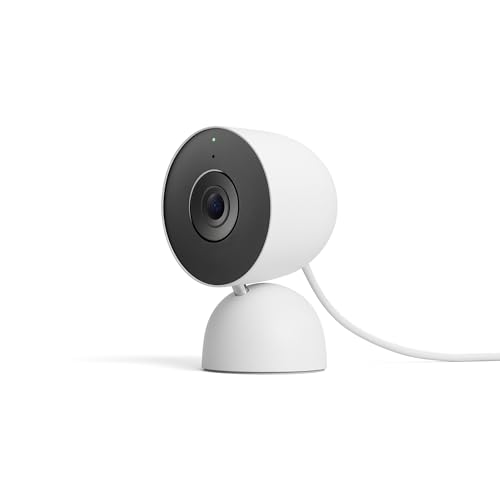
Google Nest Cam Indoor (Wired, 3rd Gen) — Best at Telling You What Matters
The central problem of indoor surveillance is not seeing; it is being told. A camera that alerts you forty times a day about light through blinds trains you to ignore it, and an ignored camera is furniture. The Nest Cam Indoor leads this list because its intelligence is the product: it distinguishes people from pets from passing shadows with the best judgement in the class, understands familiar faces in a household context, and sends the alerts that survive a month of real life — few, relevant, and worth opening.
Notifications eventually earn trust instead of demanding constant attention. Owners describe the same arc: the first week brings curiosity about every clip, the second brings calibration — zones drawn around the hallway that matters, the door that counts — and by the third the camera has gone quiet in the best way, silent for days, then precise on the one afternoon a stranger’s face appears at the window in the frame’s edge. Surveillance that respects attention is surveillance that is still switched on in year two.
Its craft details serve the same philosophy: a wide, honest view of a room without fisheye theatre, night vision that renders a face rather than a ghost, and an app that treats event history as a timeline you can actually search — when did the cleaner arrive, when did the dog get on the couch — rather than a pile of thumbnails. For households already living in Google’s ecosystem, the integration is seamless to the point of invisibility.
The terms deserve plain statement: the camera’s smartest features live in its subscription tier, and a household should price the service, not just the device, over the years it will run. Local storage minimalists will also note its cloud-first design. Those are real commitments, honestly labelled — the Nest bargain is intelligence as a service, and households that want exactly that will find it the most capable indoor sentinel here.
Set up thoughtfully — aimed at doors and the routes between them rather than at the couch, zones drawn tight, household members’ faces taught — it becomes the reference other cameras are compared against. Indoor surveillance has a flagship experience, and at the moment, this is it.
Choose it when the question is not can the camera see the room, but can it understand the room well enough to bother you only when bothering is the service. That understanding is the whole product category growing up, and the Nest is its current valedictorian.
Renters in smart-home-friendly buildings have adopted it as the no-drill flagship: it sits on a shelf, watches the door, and leaves no trace when the lease ends. Intelligence, it turns out, is the most portable security feature of all — it moves house in a backpack and resumes work the same evening.
A note for shift workers and irregular households: the Nest’s familiarity learning suits homes whose rhythms defeat schedules. It learns the household’s faces and patterns rather than demanding the household perform a routine for the camera, which is the correct direction for the relationship to run.
- Type: wired indoor smart camera
- Signature: person and face intelligence
- Alerts: few, relevant, searchable
- View: wide without fisheye theatre
- Role: the intelligent sentinel
Strengths
- Detection judgement leads the class.
- Event history is genuinely searchable.
- Night faces read as faces.
Trade-offs
- Smartest features need the subscription.
- Cloud-first, minimal local storage.
- Premium of its category.
Best for: busy households, ecosystem homes, and anyone whose last camera cried wolf.
Not suited for: subscription refusers and local-storage purists.

Ring Indoor Cam (2nd Gen) — Best for Alexa Homes and Simple Setup
More indoor cameras die in drawers from unfinished setup than from any technical failure, and the Ring Indoor Cam’s first virtue is that households complete it: unbox, scan, place, done, with a privacy cover built into the design for the hours when the living room should be unwatched. For the enormous installed base of Alexa households, it slots into routines and announcements — a chime when motion stirs in the nursery wing, a live view on the kitchen display — with a fluency its rivals envy.
Coverage grows gradually, one well-placed camera at a time. Because each unit is simple and the app treats ten cameras as easily as one, households grow a system room by room: the entry first, then the back door’s approach, then the basement stairs. Ring’s neighbourhood and doorbell ecosystem means the indoor cameras join a household security story that may already exist at the front door, and shared access for partners and house-sitters is the class’s most practised routine.
Its detection is competent rather than brilliant — motion and person alerts that do their job without the Nest’s finer distinctions — and its video is honest indoor quality: faces identifiable at room distances, night vision adequate to the brief. The privacy shutter deserves repeating praise in a surveillance guide: a physical cover, audibly clicked shut, is a trust feature no software toggle matches, and guests relax in a house that visibly can stop watching.
The subscription is the standing Ring conversation: recording history lives behind the plan, and a household should adopt the camera with the plan priced in rather than discovered later. Households inside the Ring ecosystem generally make that peace quickly, because the system’s coherence — one app, one timeline, one bill — is the actual product being bought.
Choose it when the household runs on Alexa, when the front door already wears the brand, or when the camera is a gift for relatives whose technical support is you. It is the indoor camera most likely to be working, watched, and understood a year after installation, and in surveillance, deployed beats brilliant.
Landlords furnishing short-stay properties — where local rules and guest consent permit — favour it for the setup’s brevity and the shutter’s honesty: guests can see the camera is off during their stay, and owners can verify the property between stays. Trust, in that market, is the whole business model.
Its doorbell synergy deserves a sentence: in a house where the Ring doorbell already stands guard, the indoor camera inherits the household’s habits — the same app, the same alert style, the same sharing list — and coherence across a system is worth real money in attention saved.
- Type: wired indoor camera, privacy cover
- Signature: setup anyone finishes
- Ecosystem: Alexa and Ring doorbells
- Access: sharing practised and simple
- Role: the household workhorse
Strengths
- Setup survives non-technical owners.
- Physical privacy shutter builds trust.
- Grows room by room painlessly.
Trade-offs
- Recording history needs the plan.
- Detection is competent, not cleverest.
- Amazon ecosystem is the assumption.
Best for: Alexa households, Ring doorbell owners, and gift-buyers for relatives.
Not suited for: households avoiding subscriptions entirely.

Wyze Cam v4 — Best Value With Local Recording
The Wyze Cam v4 disrupts this list’s economics: it offers colour night vision, sharp indoor detail, and — the feature budget rivals omit — local recording to a memory card, at a price point where a household can cover the entry, the garage door inside, and the nursery approach for the cost of one flagship camera. Surveillance is a coverage game before it is a quality game, and Wyze is how ordinary households afford coverage.
Most owners soon add a second camera anyway. Owners start with one at the door, discover the app is friendlier than the price suggests, and add the rooms a single premium camera would have left dark. Its colour night vision deserves its reputation: where infrared rivals render the night in grey, the Wyze keeps the hallway’s colours, and colour — the jacket’s red, the car’s shade through the window — is evidence-grade information when an incident is real.
Local recording changes the subscription conversation entirely. With a card installed, the camera keeps a rolling local history without a monthly bill, while the optional cloud plan adds smarter detection for households that want it. That optionality — pay for intelligence, not for access to your own footage — is the Wyze philosophy, and it has made the brand the default recommendation for the subscription-allergic.
Honesty about the trade-offs: the app carries more settings and more noise than the flagships’ polished timelines, detection intelligence without the plan is basic, and the company’s history invites buyers to keep firmware updated and accounts secured with two-factor sign-in — advice this guide gives for every camera, with emphasis here. None of it dents the value argument, which remains overwhelming.
Choose it to cover a whole home on a sane budget, to keep footage local, or to learn what your household actually needs from surveillance before spending flagship money. Many households learn that the answer was Wyze all along.
Second homes are its natural habitat: a cabin or flat visited monthly, where colour night vision distinguishes a raccoon’s visit from a person’s at a glance, and local recording keeps working through internet outages that silence cloud-only rivals. Evidence that survives the outage is the kind that matters.
Pet owners add their testimony: the Wyze’s alerts, tuned to the pet setting, turn a workday’s worry into a lunchtime amusement — the dog’s patrol, the cat’s forbidden counter, all in colour. Surveillance bought for fear that ends up delivering affection has justified itself twice.
- Type: wired indoor camera, card slot
- Signature: colour night vision
- Recording: local, no plan required
- Value: whole-home coverage economics
- Role: the people’s camera
Strengths
- Colour night vision aids identification.
- Local recording skips the bill.
- Coverage beats single-camera luxury.
Trade-offs
- App is busier than flagships’.
- Smart detection is plan-tier.
- Keep firmware and account hygiene strict.
Best for: whole-home coverage, renters, and subscription sceptics.
Not suited for: buyers wanting flagship intelligence included.

eufy Indoor Cam E220 — Best Pan-and-Tilt for Following the Action
A fixed camera watches a rectangle; a room is not a rectangle. The eufy E220’s pan-and-tilt design answers the geometry honestly: its lens rotates to follow movement across the full sweep of a living space, tracking a pet’s patrol or a person’s path from door to window in one continuous clip instead of three cameras’ fragments. For open-plan homes and single-camera budgets, that moving eye is the difference between surveillance of a doorway and surveillance of a home.
Checking in here comes with useful context attached. Parents following a toddler’s migration from rug to bookshelf, pet owners tracking the exact moment the couch rule was broken, carers glancing in on an elderly parent’s kitchen routine — the E220’s tracking turns a glance into a story with a beginning and an end. Its on-device detection for people and pets, and its local storage philosophy under the eufy banner, keep the footage at home and the alerts reasonably intelligent without a mandatory subscription.
Sound detection earns a specific mention for nurseries and elder care: a cry, a call, a crash can bring the camera’s attention — and its lens — around before motion would. Combined with two-way talk that is genuinely usable rather than a walkie-talkie novelty, the E220 serves the watch-and-reassure brief better than any fixed camera here.
The mechanics carry honest costs: a moving lens has moving parts, the tracking can be distracted by the busiest subject in a chaotic frame, and the design’s visible rotation is either reassuring or conspicuous depending on the household’s feelings about being watched by a thing that watches back. Placement matters more than for fixed cameras — a corner mount gives the mechanism its full sweep.
Choose it for one big room that must be wholly covered, for pets and toddlers whose stories move, and for households that prefer local storage with intelligent manners. It is the most cinematically capable camera here, and its footage has narrative the fixed cameras cannot match.
The E220’s preset viewpoints deserve emphasis for carers: one tap turns the lens from the front door to the kitchen to the favourite chair, so a check-in is a tour rather than a stare. For an adult child verifying a parent’s ordinary day from another city, that tour is the difference between surveillance and reassurance.
Its cry and sound detection have also made it a nursery graduate: bought for the baby, it follows the toddler, then retires to the playroom beat. Few cameras here have so natural a second and third act inside one childhood.
- Type: pan-and-tilt indoor camera
- Signature: motion tracking across rooms
- Detection: on-device people and pets
- Audio: sound alerts, two-way talk
- Role: the following eye
Strengths
- One camera covers the whole room.
- Tracking turns clips into stories.
- Local storage, no mandatory plan.
Trade-offs
- Moving parts, moving distractions.
- Visible rotation divides households.
- Placement decides its sweep.
Best for: open-plan homes, pet and toddler tracking, and elder check-ins.
Not suited for: multi-room fixed coverage plans.

TP-Link Tapo C210 — Best for Local Storage and Open Standards
The Tapo C210 is the camera that technical households recommend to each other in forum threads at midnight. It pans and tilts like the eufy, records locally to a card like the Wyze, and adds the quiet virtue of openness: it plays well with network storage and standard streaming arrangements that the walled-garden cameras refuse, so a household with a NAS or a home server can fold indoor cameras into a recording setup it already owns and controls.
Ownership, plainly, is the point of this design. Footage lives on your card or your server, detection runs without a subscription gate, and the Tapo app — cleaner than its price suggests — handles the everyday glances while the infrastructure handles the archive. For households whose surveillance is part of a larger smart-home project, the C210 is the building block that does not fight the blueprint.
Its detection covers the indoor essentials with manners: people distinguished from generic motion, baby-crying detection for the nursery deployment, night vision that handles a hallway without theatre. The pan-tilt mechanism patrols preset viewpoints — door, window, crib — on a schedule, which fixed cameras cannot imitate and which turns one device into a small patrol route.
Trade-offs are the tinker’s familiar ones: the deepest integrations reward owners willing to configure them, the app’s intelligence is a step behind the Nest’s understanding, and households wanting a single polished subscription ecosystem will find Tapo’s à-la-carte approach either liberating or fragmented, depending on temperament. Know which household yours is.
Choose it when the footage must stay home, when a NAS is already humming in a cupboard, or when the smart home is a project rather than a purchase. It is the most respectful camera here of an owner’s competence, and it prices that respect attractively.
Home-server households praise a specific Tapo behaviour: it keeps recording to its card when the network sulks, then reconciles with the archive when things recover. Infrastructure that degrades gracefully is infrastructure that can be trusted with a home’s memory.
It is also the tinker’s teaching camera — the one recommended to friends beginning a smart home, because its openness lets a beginner grow from app to server without replacing hardware. Systems that let their owners improve are rare at any price.
- Type: pan-and-tilt indoor camera
- Signature: openness to NAS and streams
- Recording: local card, no gate
- Patrol: preset viewpoints on schedule
- Role: the owner’s camera
Strengths
- Integrates with home infrastructure.
- Local recording without a plan.
- Preset patrol covers several views.
Trade-offs
- Best features reward configuration.
- Detection a step behind Nest.
- À-la-carte can feel fragmented.
Best for: NAS owners, tinkerers, and local-storage households.
Not suited for: buyers wanting one polished subscription.

Blink Mini 2 — Best Small Camera for Simple Alerts
The Blink Mini 2 makes the smallest claim on this page and keeps it completely: a compact indoor camera that watches a defined space, alerts simply, and asks almost nothing of its owner. Its smallness is the feature — it disappears on a shelf, suits rentals where installation is a negotiation, and covers the single-room briefs (the entry hall, the studio flat, the dorm-adjacent first apartment) that bigger systems over-serve.
A modest deployment, done well, beats an ambitious tangle. Because the camera is simple, owners place it thoughtfully rather than ambitiously: aimed at the door the room exists around, angled to catch faces rather than ceilings, its motion zones drawn around the path an intruder must take. Blink’s app keeps the same discipline — alerts, live view, a timeline — without the settings thicket that makes richer cameras a hobby. For many households, surveillance should not be a hobby, and this is their camera.
Within Amazon’s ecosystem it behaves like the Ring’s quieter sibling: Alexa announcements, live view on the household’s displays, and a subscription that unlocks recorded history, priced and structured for people already comfortable there. Person detection on the plan tier lifts its alert quality meaningfully, and owners should regard the plan as part of the product, as with its Ring cousin.
Its limits are the honest limits of simplicity: a fixed view, detection that leans on the subscription for its intelligence, and night performance adequate to a hallway rather than a warehouse. It will not follow a pet across a room or integrate with a home server, and it does not pretend otherwise on the box.
Choose it for the single space that needs a witness, the rental that forbids a project, or the relative who needs exactly three features and will use exactly three features. In a category that oversells, the Mini 2’s restraint is a form of honesty.
First flats are its kingdom: one room, one door, one camera that covers the brief without a project plan. Young renters consistently report the same satisfaction — it was up before the kettle, and the first alert it ever sent was the landlord’s agent arriving early, which paid for the camera in vindication.
It also serves the night-shift household quietly well: a simple sentinel on the hallway while the house sleeps in shifts, asking nothing, reporting the door. Not every security brief is a mansion’s; the Mini 2 honours the small ones.
- Type: compact wired indoor camera
- Signature: simplicity and smallness
- Ecosystem: Alexa announcements
- Plan: unlocks history and person alerts
- Role: the modest sentinel
Strengths
- Disappears on a shelf.
- App refuses to become a hobby.
- Placement-friendly for rentals.
Trade-offs
- Fixed view, no tracking.
- Intelligence lives in the plan.
- Night range suits small rooms.
Best for: rentals, single rooms, and simplicity-first households.
Not suited for: tracking, local storage, or open standards.
How Do the Six Compare at a Glance?
Judgement first, pictures second — the six watchers compared on the qualities a 3 a.m. alert is made of.
| Camera | Character | Watch out for |
|---|---|---|
| Google Nest Cam Indoor (Wired, 3rd Gen) | Intelligence-first indoor sentinel | Subscription carries the smarts |
| Ring Indoor Cam (2nd Gen) | Ecosystem indoor workhorse | Plan required for history |
| Wyze Cam v4 | Value champion with local storage | App polish trails flagships |
| eufy Indoor Cam E220 | Pan-and-tilt tracking camera | Mechanism needs the right corner |
| TP-Link Tapo C210 | Open, local-first pan-tilt | Rewards technical owners |
| Blink Mini 2 | Compact simple sentinel | Fixed view only |
How Do You Set Alerts So the Real One Still Reaches You?
Calibrate in the first week like you mean it. Walk the camera’s view at day and night, trigger it as a stranger would — through the door, not across the couch — and tune zones and sensitivity until the test alerts match the events you would act on. Mute the categories you will never act on; a camera allowed to report everything reports nothing, because its owner stops reading. Then schedule the quiet hours honestly: the system that respects the household’s mornings gets heard at 3 a.m.
Share alerts deliberately. The partner, the adult child nearby, the trusted neighbour during holidays — surveillance is a rota, not a solo vigil, and the household that shares the watch keeps it. Every app here supports some form of sharing; set it up before the holiday, not from the airport.
What Privacy Rules Should a Watched Household Agree?
Write them down while everyone is still friendly. Which rooms are never watched — bathrooms and bedrooms are the usual constitution — when privacy modes engage, who holds access, and how guests are told. The physical shutters and software modes in this list exist to make those agreements enforceable rather than aspirational, and a camera that clicks its cover shut at dinner teaches children more about consent than a lecture does.
Extend the courtesy outward: indoor cameras often glimpse the street through windows, and neighbours deserve the same consideration as guests. Angle for the room, mask the window zones where the app allows, and remember that the goal is a protected home, not a monitored street. Good surveillance is nearly invisible to everyone except the person it exists to catch.
What Are the Most Common Mistakes in Indoor Surveillance?
The corner mount aimed at the ceiling’s opinion of the room is the first; the unwatched alert stream is the second; the third is buying cameras before deciding what question they answer. ‘Know if someone enters while we are away’ is a brief; ‘surveillance’ is not. Households that state the brief place fewer cameras, aim them better, and actually review the one clip that matters.
Password hygiene is the unglamorous fourth: unique passwords and two-factor sign-in on every camera account, firmware kept current, old housemates removed from sharing lists when households change. A camera system is a set of eyes into a home, and its security deserves the seriousness of a front-door lock — because functionally, that is what it has become.
How Do You Test a Surveillance Camera Like a Stranger?
Stage the honest test in the first week. Enter your own home the way a stranger would — through the door, at a normal pace, in day clothes and again after dark in a coat and hat — and grade the footage as evidence: could you describe this person to someone who has never met them? Could you swear to the time? If the answer hesitates, move the camera before you blame it; placement fixes more surveillance failures than upgrades ever will.
Test the alert chain too: the phone in your pocket, on the lock screen, with the sound your real life uses. An alert that arrives silently in a folder is a diary entry, not an alarm. The system’s job is a chain — see, judge, notify, record — and a chain is graded at its weakest link, which is usually the notification nobody hears.
What Happens to Indoor Cameras When the Internet Dies?
Less than their owners fear, if the system was chosen with the outage in mind. Local-recording cameras — the Wyze and Tapo here, and eufy’s local mode — keep their eyes open and their cards writing through a broadband failure, which matters because outages and incidents are not strangers to each other. Cloud-first cameras typically keep detecting and queue what they can, but their history and alerts wait on the connection’s return.
The practical preparation is small: a router on a modest battery backup keeps the local network — and therefore the cameras — alive through short power cuts, and a camera’s memory card sized generously turns an outage weekend into a fully recorded one. Resilience is a purchasing criterion, and this list’s local-storage picks earn their places partly on it.
How Should Surveillance Change When the Household Changes?
Treat the system as a living arrangement, not an installation. A baby adds a nursery’s sound alerts; a teenager subtracts a hallway’s dignity and demands the privacy conversation be held again, seriously; a parent moving in adds routes and consent; a lodger, a separation, a grown child leaving — each should trigger the same small audit: who has access, which rooms are watched, do the zones still match the brief?
Access lists deserve the strictest housekeeping. Remove departed housemates, ex-partners, and last summer’s house-sitter with the same promptness you would change a lock, because that is precisely the act being performed. The audit takes ten minutes twice a year and is the difference between a security system and a vulnerability with good intentions.
What Do Indoor Cameras See That Owners Never Expect?
Themselves, mostly — the household’s own choreography, preserved by accident. Owners report the same discoveries: the dog’s secret afternoon route, the exact child responsible for the mysteriously empty biscuit tin, the sleepwalking, the cat’s double life with the neighbours visible through the window. This incidental archive is why privacy modes matter and why footage deserves a family’s respect: the camera does not distinguish the evidence from the intimacy, so the household must.
It is also why retention should be deliberate. Keep incident footage as long as it is evidence; let the ordinary days expire on the schedule the system offers. A home’s memory should be curated by its owners, not accumulated by default, and the healthiest surveillance households treat deletion as part of the design.
How Do You Talk to Guests About the Cameras?
Early, lightly, and with the shutter as the punchline. A sentence at the door — the entry camera watches the hall, the living-room one is off while you’re here, here’s the cover clicking shut — converts a potential awkwardness into evidence of a thoughtful house. Guests relax in homes whose watching is honest and bounded; they stiffen in homes where a lens is discovered unannounced at midnight in the hallway.
For overnight guests, extend control: show them the privacy mode, offer the guest room as a permanently unwatched space, and mean it. The surveillance that survives socially is surveillance with manners, and manners, in this category, are a technical feature — they keep the system plugged in.
How Much Resolution Does an Indoor Camera Actually Need?
Enough to identify a face at the distance the placement creates — which, at choke-point distances, is less than the marketing suggests. A camera watching a door from across a hallway works at conversational range, where every model here identifies comfortably; a camera asked to admire a whole open-plan floor from one corner is being asked to do a different job, and no resolution fully rescues it. Buy placement before pixels, and let the pan-tilt models solve width with movement rather than megapixels.
Night performance follows the same logic: infrared reach and colour night vision matter at the room’s actual distances, and a modest camera at the right choke point outperforms a flagship admiring the dark from too far away. The specification that decides indoor surveillance is the floor plan, and it is the one document every buyer already owns.
What Should You Do the Day an Incident Actually Happens?
Preserve first, review second, share carefully. Export the clip and a margin of footage around it before any rolling retention can overwrite it; note the times as the system reports them; and keep the original file untouched alongside any copy you trim for sharing. If the matter is serious, the footage’s value lies in its integrity, and households that treat the first hour casually sometimes discover the second hour cannot repair it.
Then let the incident teach the system: was the alert fast, the face identifiable, the route covered? Most real incidents expose exactly one gap — a dark corner, a muted category, a camera aimed at the ceiling’s opinion — and a household that fixes its one gap after each lesson ends up, within a few years, with surveillance shaped by evidence rather than by shopping.
How Do Indoor Cameras Earn Their Keep on Ordinary Days?
Ask owners a year in and the answer is rarely a burglar. It is the delivery confirmed, the teenager home safe at the expected minute, the dog located during a thunderstorm, the cleaner and the contractor arriving as agreed, the parent up and making tea at the usual hour. Surveillance’s daily dividend is reassurance — small certainties delivered quietly — and systems chosen for that dividend get placed, tuned, and kept with a care that fear alone never sustains.
This is the honest frame for the whole purchase: you are buying a household sense, an eye that reports. Judge the six here by the reports your household actually wants — the entry, the nursery, the ageing parent’s kitchen, the empty house on holiday — and the right camera is usually the one whose reports you would still be reading, calmly, in year three.
Why Does the Household’s Trust Decide the System’s Future?
Every surveillance system lives on a renewable licence: the household’s belief that it is protected rather than observed. That licence is renewed by manners — privacy shutters used, guests told, children’s spaces renegotiated as they grow, footage treated as family property rather than gossip. It is revoked quietly, by a camera found watching a room it had no business in, and revocation is permanent in a way no firmware update repairs.
Design for trust from the first placement and the system compounds in value: more rooms agreed, better angles offered, alerts shared willingly. The technology on this page is mature; the households that succeed with it are the ones that understood the product was never the camera. It was the agreement the camera serves.
How Do You Choose Between One Great Camera and Three Good Ones?
By the floor plan’s arithmetic. One flagship at the main entry answers the category’s core question superbly and leaves the garage door, the back route, and the nursery’s approach unwatched; three good cameras answer the core question adequately in three places. Security professionals lean toward coverage with competence over brilliance with blind spots, because incidents do not consult your camera’s placement schedule before choosing a door.
The hybrid most households land on — and this list is built to allow — is the flagship where identification matters most and honest coverage elsewhere: Nest at the entry, Wyze or Tapo on the secondary routes, perhaps the eufy where a big room must be followed. Ecosystems resist mixing, which is the one argument for purity; households that can tolerate two apps gain the better geometry.
What Maintenance Does a Watched Home Need?
A quarterly ten minutes: wipe the lenses, confirm each camera’s view has not drifted or been redecorated into uselessness, check that cards have space and firmware is current, and re-run the stranger test at the main door. Surveillance decays silently — a moved shelf, a new curtain, a shared account forgotten — and the decay is invisible precisely because the system keeps sending its reassuring ordinary alerts.
Add an annual review of the agreements: access lists, watched rooms, retention habits, the subscription’s value against the year it actually served. Systems that are maintained like this do not merely survive; they improve, because every review is a chance to aim the household’s eyes a little more exactly at what it loves and fears, in that order.
What Buying Mistakes Do Indoor Surveillance Shoppers Make?
Comparing device prices while ignoring the three-year cost is the expensive classic — the cheap camera whose every feature rents monthly can out-cost the flagship by year two. Price the system: device, plan, cards, and the second camera the first one’s success will inspire.
The second mistake is coverage by enthusiasm: cameras in every room, alerts from every angle, and a household that feels occupied rather than protected. Buy for the choke points first, live with the system a month, and let experience — not anxiety — order the expansion.
A third mistake is neglecting the network the cameras depend on: a wheezing router in a far cupboard silently degrades every camera’s alerts and streams. Surveillance households should budget the boring infrastructure — decent Wi-Fi at the camera positions, a battery backup for the router — with the same seriousness as the cameras, because the system is only ever as strong as its least glamorous component.
Final Recommendation
If one camera must be named for the most homes, it is the Google Nest Cam Indoor: the system whose judgement a household can trust at 3 a.m. Alexa homes and Ring doorbell owners will be happier inside their ecosystem with the Ring Indoor Cam, and households that refuse subscriptions should build on the Wyze Cam v4 and the Tapo C210, whose footage stays home.
The eufy E220 follows the action in the big room, the Blink Mini 2 keeps the small brief small, and every one of the six will outperform the camera that was never installed or long since muted. Decide the brief, aim at the doors, agree the privacy rules — then let the house watch itself, quietly, the way a good watchdog does.
Set the test this weekend: walk in as a stranger, grade the footage as evidence, and tune one zone. An hour of that honesty improves a real system more than a month of shopping for its replacement.
Finally, a proportion worth keeping: the best-protected homes on any street are rarely the most watched ones — they are the homes where someone thought clearly about doors, light, locks, and neighbours, and then gave that thought a camera. Let the six here serve a clear head, and they will not disappoint it.
Related guides
Frequently Asked Questions
Is indoor surveillance legal in my own home?
Generally yes for your own spaces, with real limits: bathrooms and areas where guests have a reasonable expectation of privacy are off limits in many jurisdictions, recording audio is regulated more strictly than video in some places, and landlords and employers face additional rules. Check local law, tell the household, and when in doubt, ask a local professional rather than a buying guide.
Do I need a subscription for an indoor camera?
It depends on the model, which is why this guide names the arrangement for each pick. Nest and Ring keep their best history and intelligence in their plans; Wyze and Tapo record locally to a card without one; eufy leans local with optional cloud. Price the arrangement you will actually use.
Where is the single best place for one indoor camera?
Facing the main entry from inside, at roughly face height, covering the route an entrant must take. That one placement answers the category’s core question — who came in, and when — better than any wide room view.
Can indoor cameras work with a NAS or home server?
The Tapo C210 is the pick here for that brief, with local recording and stream-friendly manners. The walled-garden flagships generally keep footage inside their own apps and clouds, which is either a feature or a refusal depending on the household.
How do I stop false alerts from training me to ignore the camera?
Draw motion zones tightly around doors and routes, enable person detection where offered, lower sensitivity for light-change areas like sunlit floors, and schedule quiet hours. Then test by entering as a stranger would. A week of calibration buys years of credibility.
Should cameras watch children and elderly parents?
With consent appropriate to the person: children under the household’s ordinary care, yes with privacy modes as they grow; elderly parents, only with their genuine agreement, aimed at safety routes rather than living spaces, and reviewed as a family. The eufy’s sound alerts and two-way talk serve agreed check-ins well; surveillance of an adult without consent is a relationship problem no camera solves.
Related Guides
Set up the rest of the watched home with our companion guides to placement and outdoor coverage: best outdoor security cameras for the same household how to draw motion zones that end false alerts local versus cloud recording: an honest comparison


