kajuandouglas.com is reader-supported. When you buy through links on our site, we may earn an affiliate commission.
Where to Buy
The best bang for your buck surveillance cameras are not found by sorting a store page by price, because surveillance is the one camera category where the sticker is the smallest part of the bill. A camera that watches your home asks for money every month it works — in cloud plans, in batteries, in your own ladder time — and it asks for trust every night it works, which is a currency too. The value question is therefore not “what does this camera cost?” but “what does a year of being watched over by this camera cost, in money, in chores and in missed moments?” This guide prices surveillance the way owners actually pay for it.
That framing rearranges the leaderboard in ways that surprise first-time buyers. The cheapest camera in the store, lashed to an expensive cloud plan and a battery that fades monthly, can cost more across two years than a mid-priced camera that records to its own memory card and sips power. The premium camera with the famous name can be poor value not because it is bad — it is usually excellent — but because its excellence is concentrated in features a porch and a driveway never use. And the unglamorous middle, where local recording, sane apps and honest battery life live, turns out to be where surveillance value has been hiding all along.
The six cameras below cover the ways real homes actually keep watch: the plug-in indoor sentinel, the wire-free outdoor post that must survive on batteries, the pan-and-tilt camera that follows movement across a yard, and the second-room camera that costs so little it changes what “covered” means. Each was chosen at the point where its maker’s pricing stops buying safety and starts buying decoration. Above that point you pay for polish; below it, you pay in gaps — and in surveillance, gaps are the one currency that matters on the worst night of the year.
Key Takeaways
- Price surveillance by the year, not by the box: cloud plans, batteries and your own ladder time are part of every camera’s true cost.
- Local recording — a memory card in the camera — is the single biggest value lever in this category, because it can retire a monthly plan entirely.
- The Wyze Cam v4 is the value benchmark: a plug-in camera with local storage that asks almost nothing per year to keep watching.
- Battery cameras trade money for chores; the Blink Outdoor 4 wins its class by making those chores rare.
- Pan-and-tilt is worth paying for exactly once — at the post where one camera must do the work of two fixed ones.
- A cheap second camera often adds more real coverage than one expensive flagship: two ordinary views beat one beautiful one.
In this guide
Quick Picks
| Pick | Badge | Why it earns its place |
|---|---|---|
| Wyze Cam v4 | Best Overall Surveillance Value | Plug-in power, local recording and a capable app at a price that lets you cover the house, not just the door. |
| Blink Outdoor 4 | Best Battery Value | Wire-free freedom with battery life measured in seasons, so the ladder stays in the garage where it belongs. |
| REOLINK Argus PT Ultra | Best Pan-and-Tilt Value | One wire-free camera that turns its head to follow the action, doing a fixed pair’s job at a single post. |
| TP-Link Tapo C210 | Best Indoor Pan-Tilt Value | Plug-in indoor coverage that sweeps a whole room, with local recording keeping the plan optional. |
| eufy Indoor Cam E220 | Best No-Subscription Indoor Value | Built around keeping footage at home — on the camera or your own hub — rather than renting it back monthly. |
| Blink Mini 2 | Best Second-Room Value | The plug-in camera cheap enough to be bought in pairs, turning one watched room into a watched floor. |
How Did We Choose These Surveillance Value Picks?
We built a two-year cost model for every candidate — box price, the plan its best features quietly require, the batteries or cells it will eat, and a frank valuation of the owner’s time for the posts that need visiting. Cameras that looked cheap in the store and expensive in the model were demoted without mercy. Cameras whose makers let owners keep footage locally, on a card or a home hub, were promoted for the same reason: local recording is not a feature in surveillance, it is an annuity that pays out monthly.
Then we weighted the night. Surveillance cameras earn their keep in the worst light, at the worst hour, in the worst weather their postcode offers, so low-light honesty and weather tolerance counted for more than daytime prettiness. A camera whose night picture dissolves into fog is a daytime ornament with a night-time alibi, and this guide has no use for alibis. We also favoured cameras whose alerts a normal person can tune — because a camera that cries wolf hourly trains its owner to ignore it, and an ignored camera is the most expensive kind there is.
Finally, we checked each pick against its own family. Every maker sells a ladder, and the value rung is rarely the bottom or the top: it is the model where the sensor, the night vision and the app stop improving in ways a driveway can perceive. The six below are those rungs. Their pricier siblings are finer objects; their cheaper siblings are finer prices. Neither fact survives the two-year model as well as these do.
What Does a Surveillance Camera Really Cost Over Two Years?
Walk through the ledger honestly, because each line hides in a different place. The first line is the box, the only number the store shows you. The second is the plan: many cameras reserve their smartest detection, their longest clip history or their richest notifications for subscribers, and the plan’s monthly figure — small enough to feel trivial — quietly doubles a cheap camera’s cost across a couple of years. Owners who never add up line two are the subscription economy’s favourite customers. The third line is power: cells for the battery cameras, a spare pack for the swappable ones, and the electricity — trivial for one camera, noticeable for a wired fleet left recording around the clock.
The fourth line is the one nobody prices: you. Every battery change is a ladder trip; every false-alert flood is attention taxed until you mute the app; every camera that needs re-aiming after a storm is a Saturday errand. A surveillance system’s true cost includes the chores it assigns, and chores are why so many expensive systems end up half-armed and ignored — the most expensive outcome of all, because the money was spent and the watching stopped. The value picks in this guide were chosen as much for the shortness of their chore lists as for the shortness of their bills.
There is a fifth line, invisible until it is the only one that matters: the incident. Surveillance is insurance, and like insurance its value is realised on a single bad day — the package thief identified, the disputed delivery settled, the night the fence came down and someone had to prove how. A system that saved a few coins a month and missed that day was not cheap; it was a decoration with a power supply. This is why the guide refuses to crown the absolute cheapest cameras: value in surveillance is cost divided by coverage that actually happens, and coverage that actually happens requires night vision that works, storage that keeps the clip, and an owner who has not been trained by false alerts to look away.
What Are the Best Bang for Your Buck Surveillance Cameras for Each Post?

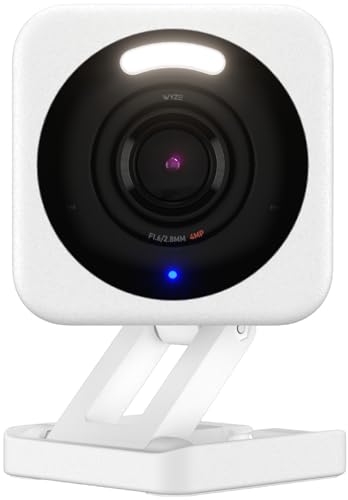
Wyze Cam v4 — Best Overall Surveillance Value
The v4 is the camera that broke the surveillance market’s pricing spell, and it remains the benchmark every value claim in this category must answer. It is a small plug-in camera — no batteries to feed, no ladder rota — that records to its own memory card, sees the night as a designed capability rather than a hope, and lives in an app whose core watching is not held hostage by a subscription. Bought singly it is inexpensive; bought in the pairs and trios its price invites, it changes the geometry of a home’s coverage from “the door is watched” to “the approaches are watched,” which is the difference between surveillance as a gesture and surveillance as a system.
Its value deepens on the two-year ledger. Plug-in power removes the battery line entirely. The memory card removes the plan line for owners content with local clips, while the maker’s optional tiers remain available for those who want cloud history — an option, not a toll. What remains is a camera that costs its owner, after purchase, approximately nothing but electricity and attention, and pays back in the currency surveillance exists for: clips that are there when the doorbell dispute, the missing parcel or the 3 a.m. noise needs explaining.
Its limits are the honest limits of its shape. It is a fixed view — one camera, one direction, chosen deliberately at install. It wants Wi-Fi with good manners at its mounting point, and sheltered placement outdoors despite its weather tolerance. Neither limit is a flaw in the value argument; both are arguments for the second v4, which its price makes a casual decision rather than a financial event. That is the deepest sense in which this camera is the value pick: it is the only one whose natural quantity is “several.”
Choose the v4 as the foundation of a home system — the door, the garage approach, the side gate — and let pricier specialists audition for the posts the v4 genuinely cannot fill.
- Type: plug-in smart camera with local card recording (pool pick, linked)
- Power: mains — no battery line in the two-year ledger
- Storage: memory card locally; cloud tiers optional, not required
- Night: designed colour night viewing for its class
- Best quantity: bought in pairs and trios for approach coverage
Strengths
- Two-year cost barely exceeds the box price
- Local recording keeps the subscription optional
- Cheap enough to cover approaches, not just doors
Trade-offs
- Fixed view — placement must be chosen with care
- Needs a socket and decent Wi-Fi at the post
- Its richest cloud features sit in the optional tiers
Best for: building a real multi-camera home system on a sane budget.
Not suited for: posts with no power and no wish to run a cable.

Blink Outdoor 4 — Best Battery Value
Wire-free cameras sell freedom and bill for it in chores — unless the battery lasts long enough for the chores to become rare enough to forget. That is the Outdoor 4’s entire value case, and it is a strong one: this is a camera designed around sipping power, running on AA lithium cells for stretches measured in seasons rather than weeks, so the ladder trip that defines battery-camera ownership happens seldom enough to stay a minor event instead of a monthly resentment.
The rest of the package serves that central frugality. Motion events are clipped and kept through Blink’s system, with a sync module anchoring the cameras at home; the camera itself is small, weather-tough and genuinely placeable anywhere a view exists — the tree at the drive’s bend, the shed, the gate post where no cable will ever run. For rural edges, rentals and the far corners of suburban gardens, it watches posts the plug-in picks cannot reach at any price, which makes its value partly a monopoly: at an unwired post, the comparison is not against a cheaper camera but against no camera.
Count its costs with the same honesty. The cells are a real, recurring line — lithium AAs, bought in quantity, on the schedule the camera’s appetite sets. Some of the system’s richest features live in Blink’s optional plan, and owners should read that menu before assuming the box price is the whole story. Even counted fully, the Outdoor 4’s two-year ledger undercuts rivals whose batteries demand monthly attention, because the scarcest resource in surveillance is not money. It is the owner’s willingness to keep climbing the ladder — and this camera spends it like it knows.
Choose the Outdoor 4 for the posts beyond the cable’s reach, and budget its cells the way you budget birdseed: a small, predictable, worthwhile tithe.
- Type: wire-free outdoor camera on AA lithium cells (pool pick, linked)
- Power: long-life cell design — ladder trips measured in seasons
- System: works with a home sync module; clips via the Blink app
- Placement: anywhere a view exists, no socket required
- Budget for: lithium AA cells in quantity; read the plan menu knowingly
Strengths
- Battery patience that keeps chores rare
- Watches posts no plug-in camera can reach
- Small, tough and easy to place well
Trade-offs
- Cells are a permanent, if modest, running cost
- Richest features sit within the maker’s optional plan
- Motion clips, not continuous recording
Best for: gates, sheds, drive bends and every post beyond cable range.
Not suited for: owners wanting continuous recording of a busy street.

REOLINK Argus PT Ultra — Best Pan-and-Tilt Value
There is one post in many gardens where the geometry defeats fixed cameras: the corner where the drive meets the path meets the gate, a three-way junction that would take two fixed cameras to cover and still leave a seam. The Argus PT Ultra exists for that corner. It is a wire-free camera on a motorised pan-and-tilt head that can sweep its view across the whole junction and follow detected movement within it — one camera, one battery, one mounting job, doing the work a fixed pair does with a seam between them.
Reolink’s value signature is independence. The camera records to its own memory card and is built to be useful without renting its own footage back to you, which keeps its two-year ledger closer to its box price than most wire-free rivals manage. Its battery is rechargeable and pairs naturally with the maker’s solar panel for posts in honest sun — a combination that converts the battery chore into a seasonal glance. The picture it watches with is a sharp one for its class, and its detection can be tuned to care about people and vehicles rather than every moth with ambition.
Moving parts deserve their honest paragraph. A motorised head is a mechanism living outdoors; it asks for a sheltered mount and a realistic view of its own lifespan, and its sweep, however wide, still means the camera is looking one way at a time — a fixed pair watches both directions at once, always. The PT’s value is therefore specific: it wins where one post must cover a junction, a yard’s sweep or a long facade, and where running a second camera’s power is the true alternative cost. Judged there, it is not a gadget. It is arithmetic with a motor in it.
Choose the Argus PT Ultra for the corner, the yard and the long wall — and add the solar panel if the post’s sun allows, completing the laziest powerful setup in this guide.
- Type: wire-free pan-and-tilt camera with local recording (pool pick, linked)
- Power: rechargeable battery; solar panel pairing available from the maker
- Storage: memory card in the camera — no plan required for core use
- Coverage: motorised sweep for junctions and yards
- Detection: person and vehicle filtering to calm the alerts
Strengths
- One post covers what would take two fixed cameras
- Local recording keeps the ledger near the box price
- Solar pairing can nearly retire the battery chore
Trade-offs
- Looks one way at a time, however wide the sweep
- Moving parts outdoors ask for a sheltered mount
- Bigger presence than the discreet fixed picks
Best for: drive-and-path junctions, yards and long facades on one post.
Not suited for: two directions that must both be watched every second.

TP-Link Tapo C210 — Best Indoor Pan-Tilt Value
Indoors, the geometry problem changes shape: one room, several doors, a pet with a schedule, a parcel shelf and a window — and a fixed camera sees whichever slice it was aimed at on installation day. The Tapo C210 answers with the same trick as the Reolink, at indoor prices and on mains power: a pan-and-tilt head that sweeps the whole room, tracks movement across it, and patrols between viewpoints you set. For a living room, a nursery approach or a small shop floor, it is one camera doing the honest work of two.
Tapo’s value habits are the ones this guide rewards. The camera records to a memory card in its base, so the footage lives in your house and the app’s core watching is not a subscription audition. Its night vision covers the room it sweeps, its two-way talk serves the pet-and-toddler diplomacy that indoor cameras actually perform daily, and the Tapo ecosystem behind it — plugs, bulbs, sensors — means the camera can grow into a modest smart home without changing apps or allegiances. That ecosystem depth is a quiet value line: the second and third Tapo devices are cheaper to own than the second app on your phone is to tolerate.
Its boundaries are clear-eyed. It is an indoor camera, full stop — no weather ambitions. Its sweep, like all sweeps, means looking one way at a time, though indoors the patrol routes and motion tracking soften that truth considerably. And its privacy manners rest, as all indoor cameras’ do, on the household using its scheduling and lens-cover habits faithfully; the camera provides the tools, the family provides the discipline.
Choose the C210 when one room must be properly covered rather than partially glanced at — it is the cheapest honest way to watch a whole room that this guide knows.
- Type: plug-in indoor pan-and-tilt camera (pool pick, linked)
- Power: mains — no battery chores indoors
- Storage: memory card in the camera; app core features without a plan
- Coverage: full-room sweep with motion tracking and patrol points
- Ecosystem: part of Tapo’s wider smart-home family
Strengths
- Whole-room coverage from a single socket
- Local recording keeps running costs near zero
- Two-way talk earns its keep with pets and children
Trade-offs
- Indoors only — no weather tolerance
- Sweeping view still looks one way at a time
- Privacy depends on the household’s scheduling discipline
Best for: living rooms, nurseries, pet rooms and small shop floors.
Not suited for: porches, yards or any post the weather can reach.

eufy Indoor Cam E220 — Best No-Subscription Indoor Value
Some buyers read the subscription menus of modern cameras and feel a principled itch: the footage is of their home, taken in their home, and they would like it to stay in their home. The E220 is eufy’s answer to that itch — an indoor pan-and-tilt camera designed around local storage, whether on a card in the camera or within eufy’s home hub ecosystem, with its smart detection performed on the device rather than rented from a cloud. Its value proposition is partly financial and partly constitutional, and for its tribe both parts matter.
The camera itself is a capable room-sweeper in the same mould as the Tapo: it pans, tilts, tracks movement, talks both ways and watches the night properly. Where it differentiates is in what happens to the clips — they are yours, stored under your roof, reviewable without a plan’s permission. Over two years, that architecture quietly undercuts rivals whose detection smarts live behind a monthly gate, and it keeps working — this is the part owners mention with feeling — when the internet does not. A camera that can still record and detect through a broadband outage is practising a kind of value the spec sheet never lists.
Note the naming discipline this guide observes: the E220 is a specific, verified model in our pool. Its similarly named siblings are different products, and buyers should order the badge they mean. Within its own identity, the E220’s trade-offs are modest: it is indoor-only, its ecosystem rewards those who commit to eufy’s hub world, and its app experience, while capable, asks a little more patience than the slickest rivals. None of that dents the central case for the buyer it was built for.
Choose the E220 if the words “no subscription” are not a preference but a position — it is the indoor camera that lets you hold that position without giving up the pan-and-tilt conveniences.
- Type: indoor pan-and-tilt camera with local storage (pool pick, linked)
- Storage: memory card or the maker’s home hub — footage stays home
- Detection: on-device smarts rather than cloud-rented
- Power: mains, with room-sweep coverage and two-way talk
- Note: order the E220 by its exact name; siblings differ
Strengths
- Designed to be fully useful without a monthly plan
- Keeps recording through internet outages
- Pan-tilt coverage with on-device detection
Trade-offs
- Indoor use only
- Deepest value appears inside the maker’s hub ecosystem
- App polish a step behind the slickest rivals
Best for: privacy-minded households that want footage kept at home.
Not suited for: buyers who prefer cloud convenience and managed storage.

Blink Mini 2 — Best Second-Room Value
Every surveillance system has a moment of expansion, when the owner realises the watched room is safe and the unwatched ones are where life happens. The Mini 2 is built for that moment: a compact plug-in indoor camera priced so casually that the second-room decision stops being a decision. It watches the hallway, the kitchen door, the garage’s inner entrance — the connective posts that turn a camera into a system — and it does so inside the same Blink app and plan household as its outdoor sibling in this guide.
Its design understands indoor life. Plug-in power means live view is a free glance rather than a battery expense, so the Mini 2 gets used sociably — checking the dog, confirming the door, answering the noise — in the way indoor cameras earn their affection. In homes with a Blink doorbell, it can serve as the indoor chime, sounding where people actually are. Scheduling lets it stand guard when the house is empty and stand down when it is full, which is the privacy rhythm indoor cameras live or die by.
Value honesty: the Mini 2’s richest clip features live in Blink’s plan world, and its fixed view is as fixed as the Wyze’s. What it offers instead is the mathematics of pairs — two Minis covering two rooms for the sort of money that buys one premium indoor camera with a narrower total view of your life. Surveillance history is unambiguous on this point: incidents distribute themselves across rooms with no respect for which one got the expensive camera. Breadth is a feature, and this is the cheapest breadth in the guide.
Choose the Mini 2 to finish the system the Outdoor 4 started, or to give a flat its second and third eyes. It is the pick that turns “a camera” into “coverage.”
- Type: compact plug-in indoor camera (pool pick, linked)
- Power: mains — live view costs no battery anxiety
- System: same Blink household as the Outdoor 4; can chime for a Blink doorbell
- Role: second and third rooms — hallways, kitchens, inner doors
- Budget for: the maker’s plan if you want its richest clip features
Strengths
- Priced for pairs — breadth over flagship polish
- Plug-in freedom makes casual checking effortless
- Shares one app and household with Blink outdoor gear
Trade-offs
- Fixed view, like all small plug-ins
- Fullest features sit in the optional plan
- Indoor and sheltered posts only
Best for: completing a Blink system and covering the in-between rooms.
Not suited for: buyers wanting local-only storage as a principle.
How Do the Six Surveillance Picks Compare?
| Pick | Post it owns | Power | Storage habit |
|---|---|---|---|
| Wyze Cam v4 | Doors and approaches | Plug-in | Card in camera; cloud optional |
| Blink Outdoor 4 | Unwired outdoor posts | AA lithium cells, long-lived | Sync module and app; plan for richest features |
| REOLINK Argus PT Ultra | Junction corners and yards | Rechargeable, solar-friendly | Card in camera; no plan needed |
| TP-Link Tapo C210 | Whole indoor rooms | Plug-in | Card in camera |
| eufy Indoor Cam E220 | Privacy-first indoor rooms | Plug-in | Card or home hub; footage stays home |
| Blink Mini 2 | Second and third rooms | Plug-in | Blink system; plan for richest features |
The storage column is the value column. Picks whose footage lives on a card in the camera ask the least per year; picks inside plan ecosystems ask a little more and return convenience for it. Neither column is a moral judgement — but read it before the price column, because over two years it matters more.
How Do You Place Surveillance Cameras So the Money Works?
The cheapest coverage upgrade in existence is moving a camera you already own. Begin with approaches, not objects: cameras earn their keep watching how someone reaches the door, the car or the gate, because an approach gives you a face, a direction and a timeline, while a camera aimed at the treasure itself gives you a close-up of a departure. Mount at a height that trades reach for detail — low enough to see faces under caps, high enough to discourage casual interference — and overlap views at the corners, where incidents change direction and single cameras lose the thread.
Then tune like you mean it. An afternoon spent shaping motion zones, teaching the camera to ignore the road and care about the path, and setting alert hours that match the household’s real risks will do more for your system’s value than any upgrade on sale. The test is the morning after: a phone with two meaningful alerts is a security system; a phone with ninety is a screensaver. Every pick in this guide has the tuning tools; the owners who use them are the ones who still trust their cameras in year two.
Finish with the unglamorous infrastructure. Wi-Fi strength at the post, measured where the camera will live rather than where the router sits; a socket or sun exposure that matches the camera’s power design; a memory card from a maker you have heard of, sized generously, because the card is where your evidence lives and evidence is a poor place to economise. Surveillance value is a chain, and these are its least photogenic, most load-bearing links.
What Does Good Night Footage Actually Require?
Since surveillance earns its money after dark, it is worth understanding what separates a usable night clip from an atmospheric one. The first factor is light the camera makes itself: infrared illuminators throw an invisible flood that the sensor sees clearly, and their reach — not the daytime resolution — decides how much of your drive exists at 2 a.m. The second is the porch-light problem: a bright lamp inside the frame convinces the camera to expose for the lamp, silhouetting everything beyond it, which is why some owners’ expensive cameras produce beautiful footage of a glowing bulb and a mysterious shadow where the incident happened. Aiming the camera so existing lights sit outside or beside its view, or adding a modest light of your own where the camera looks, routinely improves night footage more than an upgrade would.
The third factor is motion itself. A still scene at night is easy; a walking person challenges the camera’s shutter and its compression at once, and this is where honest mid-range cameras separate themselves from cheap ones — the walker stays a person rather than becoming a rumour. When you test a new camera at night, as the commissioning section insists, test it with a walker, at the distance your post actually guards. That thirty-second experiment contains more truth about a surveillance camera’s value than any specification printed on its box, and it costs nothing but a favour from someone willing to stroll your drive in the dark.
What Mistakes Waste Money in Surveillance?
The flagship mistake comes first: one expensive camera guarding one beautiful view while the side gate, the garage and the back path go unwatched. Incidents do not audition for your best camera. Breadth — several honest views — is the working core of home surveillance, and every pick above was priced to permit it. The second mistake is the uncounted subscription: the cheap camera whose plan quietly doubles its cost while its owner tells friends what a bargain it was. Add the plan before you buy, or choose a card-recording pick and skip the arithmetic entirely.
The third mistake is alert neglect — installing, accepting default sensitivity, drowning in notifications for a fortnight and muting the app forever. A muted system has a value of zero regardless of its invoice, which makes the tuning afternoon in the previous section the highest-return hour in this entire article. And the fourth is power fantasy: battery cameras placed on busy streets where they wake a hundred times a day, or solar panels mounted in shade on the theory that optimism is a photovoltaic material. Match the power design to the post’s real traffic and real sun, and the chores this guide keeps mentioning shrink to the rarities the value picks promise.
How Should a Whole-Home System Be Built From These Picks?
Build in rings. The outer ring is approaches: an Outdoor 4 at the unwired gate or shed, an Argus PT Ultra at the junction corner if your garden has one, each chosen because no cable reaches their post. The middle ring is doors: Wyze v4s at the entrances a socket can serve, overlapping the outer ring’s view so an arrival is a story with a beginning and a middle. The inner ring is rooms: a Tapo or eufy sweeping the main living space on the household’s privacy schedule, and Mini 2s in the connective rooms when the budget’s second wave arrives.
Notice what this architecture spends and what it refuses. It spends on coverage, night honesty and local storage. It refuses flagship polish, redundant plans and any camera whose job description duplicates a neighbour’s. Built this way, a whole home’s watch costs less than many buyers spend on two premium cameras and a year of their plans — and on the one bad night that justifies the entire category, it produces more angles, more context and more usable evidence. That is not a cheaper system. It is a better one that happens to cost less, which is the only definition of bang for buck this guide has ever been interested in.
What About Wired PoE Systems — Are They Better Value?
Somewhere in every surveillance value discussion, a confident voice recommends skipping Wi-Fi cameras entirely for a wired PoE system with a central recorder, and the voice is not wrong — it is answering a different household’s question. A recorder-based system offers continuous recording, no battery chores, footage centralised under your own roof and cameras that sip power through the same cable that carries their picture. For a large property, a small business, or a home already wired for it, the two-year ledger of such a system can be superb, and its reliability is the kind professionals stake reputations on.
But its first-year ledger tells the other half of the story: the recorder itself, the cameras, the cable runs, and — for most households — the labour of someone drilling, routing and terminating, or a long weekend of the owner learning to. Set against the picks in this guide, which begin watching the same afternoon they arrive, the wired system’s value arrives later and demands more of the house it protects. The honest dividing line is permanence and scale. A forever home with six or more posts and an owner who thinks in decades should price a wired system seriously. A renter, a first-time buyer, or a household covering three approaches this month will get more watching per coin, per hour and per unit of disruption from the six picks here — and can still graduate to wired later, post by post, having learned from these cameras exactly where their property’s true sightlines run. That education alone is worth a line in the value ledger: the cheap system teaches you where the expensive one should go.
How Do Weather, Seasons and Neighbours Change the Ledger?
Surveillance value is seasonal in ways the showroom never mentions. Winter shortens battery patience, lengthens nights — the hours when your cameras earn their keep — and fills lenses with the rain and frost that separate honest weather sealing from brochure weather sealing. A camera that was a bargain in June can become a chore in January, which is why this guide weights cold-weather behaviour and night performance so heavily: they are not edge cases, they are half the year. When comparing candidates, ask how each behaves in your worst month, not your best, and let the answer move money between picks before the weather moves it for you.
Neighbours belong in the ledger too, under the heading of goodwill — a currency surveillance spends carelessly when aimed badly. Cameras that watch approaches to your own doors are security; cameras that linger on a neighbour’s garden are a dispute with a power supply. The value picks here all offer motion zones and privacy masking precisely so coverage can be drawn tightly around your own ground, and using those tools is part of owning them well. A system that keeps the street’s trust keeps its sightlines unchallenged and its owner out of the peculiar misery of explaining a camera at a fence line. There is also a practical dividend: tightly zoned cameras record fewer irrelevant events, which means less storage, fewer false alerts and a shorter path to the clip that matters on the day it matters.
Finally, seasons change what you are watching for. The delivery season floods porches; the holiday season empties houses; the dark months invite the opportunists that the bright months discourage. A value system is one whose owner re-tunes it as the year turns — alert hours lengthened in winter, porch sensitivity raised when parcels peak — and the picks above were chosen partly for how gracefully they accept that re-tuning. The camera is a fixed cost. The watching is a practice. Bang for buck, in surveillance, is what happens when the two meet.
What Should You Check in the First Week of Owning a Value Camera?
The first week decides whether a surveillance bargain becomes a system or a shelf ornament, and it has a checklist. Night one: walk your own approach the way a stranger would — cap on, unhurried — and watch the clip back at breakfast. If you cannot describe the walker, the camera’s height, angle or night mode needs work while the ladder is still out. Day two: count the alerts. A number you can hold in one hand is a system; a number that needs scrolling is a settings session waiting to happen, and it should happen this week, not after the habit of ignoring forms.
Midweek, test the storage the way an incident would: find a specific clip from two nights ago, quickly, from the app, without instructions. If the path to old footage confuses you now, it will defeat you on the one day you need it urgently — so learn it while nothing depends on it, and if the camera is a card model, confirm the card is recording, formatted and cycling as it should. End the week by rehearsing the outage: kill the router’s power for ten minutes and see which cameras keep their composure and which sulk, because that behaviour — invisible in every showroom — is part of what you bought.
None of this is paranoia; it is commissioning, the same discipline any professional installer performs before signing off a system that costs fifty times more. The value picks in this guide reward the hour generously. A commissioned bargain outperforms an uncommissioned flagship every night of the year, because surveillance is not a product you buy but a state you maintain — and the first week is when that state is set, cheaply, calmly, by you.
Final Recommendation
Start with the Wyze Cam v4 at the doors a socket can reach; it is the value foundation of modern home surveillance. Then resist the two temptations that arrive with the first week’s enthusiasm: the urge to upgrade the foundation camera to something grander before it has failed at anything, and the urge to stop at one camera because the first one feels so capable. The foundation’s cheapness is not an invitation to apologise for it — it is the budget for the second and third views, which is where a camera becomes a system and a system becomes the thing an incident report describes as “covered from three angles.” Spend the enthusiasm there. Add the Blink Outdoor 4 where cables cannot go, the REOLINK Argus PT Ultra where one post must cover a junction, and choose between the Tapo C210 and the eufy E220 for the main room by a single question — do you want footage in the app’s cloud world, or kept at home on principle? Finish with Blink Mini 2s as the connective tissue. Priced by the year and placed by the approach, that system is the bang this category’s buck was invented for. Judged across two years and one bad night — the only accounting period surveillance respects — it is not close.
One closing thought on the word “surveillance” itself, because it shapes what value means here. These cameras are not really bought to survey — they are bought to answer, afterwards, the questions a household cannot answer any other way: who came, when, and what happened next. Every pick in this guide was judged as an answering machine before it was judged as a camera, and that is why storage, night honesty and alert discipline outrank daytime beauty throughout. Buy the answers, not the footage, and the value arithmetic in this article will keep balancing long after the boxes are recycled.
Related guides
- Best Compact Cameras Under 250: Honest Budget Picks by Format — Action, Instant, and Simple Zooms
- Best Cards for Cameras: SD, CFexpress and microSD Picks by Mode
- Best Cameras for Use With QNAP — ONVIF and RTSP Picks for Surveillance Station and QVR Pro
- Best Cameras for Online Broadcast: Six Ways to Look Like a Channel, Not a Call
- Best Cameras for Marine Wildlife From Shore: Six Picks for Whales, Seals and Sea Birds at Distance
- Best Cameras for Monitoring and Recording: Six Picks for Homes That Want Evidence, Not Just Alerts
- Best Cameras for a Makeup Artist Blogger: Six Picks for Building a Beauty Brand on Camera
- Best Cameras for Moon Pictures: Six Picks for Sharp Lunar Detail and Moonrise Drama
- Best Cameras for Image Quality: 6 Picks Judged by Their Files, Not Their Brochures
- Best Cameras for a 7 Year Old: 6 Picks Between Toy and Tool
Frequently Asked Questions
Do I need a subscription for these cameras to be useful?
Not for the card-recording picks — the Wyze v4, Tapo C210, eufy E220 and Reolink Argus PT Ultra all watch, record and alert with footage stored locally. The Blink picks are useful without a plan too, but their richest clip history and features live in the maker’s optional plan, so read that menu as part of their price.
How many cameras does a home actually need?
Enough to cover approaches rather than rooms: typically the main door, the back or side approach, and the drive or gate, with indoor coverage added by risk and by pet. Three honest views usually outperform six random ones. The value picks here are priced so that “three honest views” is a modest total rather than a project.
Are battery cameras false economy?
Only when their batteries demand constant attention or their posts are busy enough to wake them hourly. A long-life design like the Outdoor 4, on a post matched to its appetite, is genuinely economical — it watches places wired cameras cannot reach at all. The economy fails when owners buy wire-free for a post that had a socket all along.
Is local recording reliable enough for evidence?
Yes, with two disciplines: a quality card from a known maker, and a camera placed so an intruder cannot simply take the camera — and its card — with them. Owners who want belt and braces pair local recording with a modest cloud tier for the door camera only, keeping the fleet’s cost down while the most important view is backed up twice.
What resolution do I actually need for surveillance?
Enough to identify a face at the distance your post demands — which is a placement question before it is a pixel question. A well-placed camera of ordinary sharpness identifies more people than a ultra-sharp camera mounted too high and too far. Spend on position, night vision and storage before spending on headline resolution.
When is a pricier surveillance camera actually worth it?
When a specific, nameable demand appears: a long drive that needs a camera which can read detail at distance, a business post with liability riding on continuous recording, or a property where a wired recorder system will serve for a decade. Price follows named demands well. What this guide argues against is paying the premium for unnamed excellence — sharpness, polish and brand comfort that no incident will ever invoice. Buy the premium when you can complete the sentence “I need it because…” without using the word “just.”
How do I keep a value system valuable in year two?
With the smallest maintenance rhythm in home technology: a seasonal walk of the posts with a cloth for the lenses, a check that cards are cycling and batteries are honest, a re-tune of alert zones as foliage and routines change, and one playback test of an old clip to prove the evidence path still works. An hour per season, roughly. Systems decay by neglect, not by age — and the owners who spend that hour keep collecting the value the rest paid for once and abandoned.
Can these cameras work together, or must I pick one brand?
They can coexist, but every additional app taxes the attention that surveillance runs on. The value-minded pattern is one ecosystem for the battery posts, one for the plug-ins if you must — and the picks here were chosen so that a Wyze-led wired side and a Blink-led wire-free side cover most homes between them. Fewer apps, more watching.
And if the system you build from this guide does its job for a decade — as it should — let the record show that its most important component was never in any box: the owner’s habit of walking the posts each season, cloth in hand, checking that the watching still watches. Cameras are bought. Coverage is kept.
Related Guides
For the photographer’s version of this value hunt, see the best bang for your buck cameras, where the same two-year thinking is applied to cameras you carry. Keeping wire-free posts alive through winter is covered in our guide to the best backup battery for smart cameras, and readers comparing app ecosystems will find our roundup of apps for monitoring security cameras a useful companion.


