Disclosure: As an Amazon Associate, kajuandouglas.com earns from qualifying purchases. Links on this page are affiliate links; they cost you nothing extra. Prices and availability change often, so check the current Amazon listing before you buy.
The best loud mechanical keyboards make no apology, and this guide will not make one for them. A clicky keyboard is an instrument with an audible action: every keystroke confirmed by a crisp mechanical snap that tells your fingers, your ears and anyone in the building that work is being done. For the solo office, the private gaming room and the writer who drafts to a rhythm, that sound is not a side effect — it is the feedback system, the metronome and half the pleasure of the machine. The six boards here are the loud ones worth owning: five built around genuine clicky switches from Cherry and Gateron, one budget gaming board whose blue switches bring the noise to the macro-heavy desk, and all of them honest about the room they belong in.
Loud, done well, is not the same as noisy, and the difference is audible within one single sentence of ordinary, everyday typing. A good clicky board sounds tight and deliberate — each click a single event, the stabilisers silent beneath it, the case adding body rather than rattle. A bad loud board is a percussion section of loose parts. This guide separates the two with prejudice: every pick was chosen for the quality of its voice as much as its volume, across layouts from the Das Keyboard’s full-size Mac deck to Ducky’s 60 percent miniature and Keychron’s Alice-layout curve. Read the room warnings as seriously as the recommendations; they are the same advice, heard from the other side of the wall.
Key takeaways: Loud means clicky switches — Cherry MX Blue and its kin — in a board built tightly enough that the click is the only sound. Buy loud for a private room and a solo schedule; it is a household decision, not a personal one. The click is feedback, rhythm and confirmation in one mechanism, and the boards here differ in how refined that voice is, from the Filco’s concert pitch to the Redragon’s arena cheer.
Where to buy and how this guide handles best loud mechanical keyboards
Every keyboard below was confirmed in this site’s verified catalogue data, and each review closes with a Check price on Amazon link to that exact listing. Clicky boards live and die by their switch variant, and several of these models are sold with quieter switches under the same product family — so the variant named in each review is part of the recommendation itself. Match the listing’s selected switch against the review before ordering; a Majestouch or a Keychron in a silent switch is a fine keyboard, but it is not the keyboard this guide is recommending, and it will not make a sound worth writing home about.
A word on how loud is described here. This guide does not print decibel figures, because a keyboard’s volume in your room depends on your desk, your floor, your typing force and the hour — a number measured elsewhere would be a false promise in both directions. Instead the reviews describe each board’s voice in the terms owners actually use — tight or loose, crisp or rattly, deep or bright — and the framework explains the room arithmetic that decides whether any of them belongs in your life. Your walls are the specification; read them first.
In this guide
Quick picks: Best Loud Mechanical Keyboards
Six unapologetically loud boards for six different, distinct, proud, unrepentant kinds of noise-makers. If your room and your layout are settled, the shortlist is the fast lane; the reviews underneath give each board’s voice a full hearing, and the framework that follows covers the diplomacy, the mechanics and the mitigation that loud ownership involves.
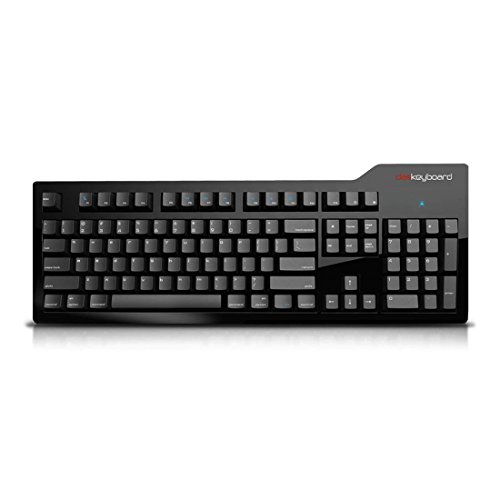
- Das Keyboard Model S for Mac — the full-size clicky institution, Cherry MX Blue with a hub, voiced for the Mac desk.
- FILCO Majestouch 3 TKL — the concert-grade click: double-shot PBT and Filco tuning in a tenkeyless frame.
- Varmilo Summit R2 TKL — the beautiful loud board, Cherry MX Blue in a designer case with dual-mode connection.
- Keychron Q8 — the Alice-layout clicky: Gateron Blue switches on a curved, gasket-mounted deck.
- Ducky One 2 Mini Pro — the compact click: Cherry Blue in a 60 percent board with serious RGB.
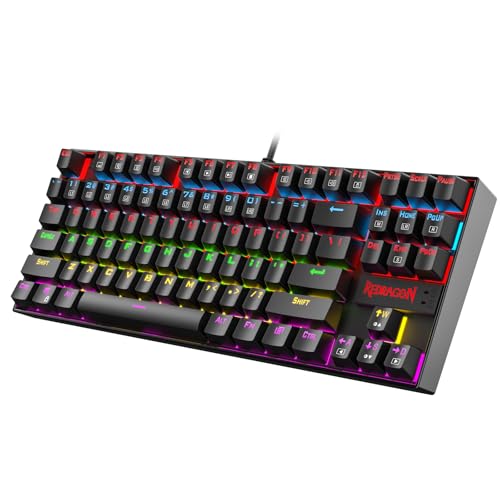
- Redragon K580 — the loud gaming board: blue switches, macro keys and a media wheel at the friendly tier.
How the picks were chosen
The shortlist began with the switch, because in this category the switch is the voice. Boards were required to carry a genuinely clicky switch — a mechanism with a click element designed into it, of the Cherry MX Blue family or its Gateron equivalent — rather than merely being a loud example of a quiet design. From that pool, boards were judged on the discipline of everything around the switch: stabilisers that do not add their own rattle to the performance, cases that give the click body without hollowness, keycaps dense enough to keep the sound tight. A clicky board is an ensemble instrument, and the picks are the ones whose ensembles play together.
Layout coverage structured the rest: a full-size Mac board, two tenkeyless flagships of different temperaments, an Alice ergonomic curve, a 60 percent miniature and a full-size gaming board with macros — because loud typists have every kind of desk. One deliberate exclusion deserves noting: merely loud-by-accident boards, the hollow budget decks whose volume is rattle rather than click, were cut regardless of price. This guide celebrates intentional noise, engineered and musical; accidental noise is just a defect with volume, and nobody should pay for it on purpose.
The picks in detail

Das Keyboard Model S for Mac — Best full-size clicky for Mac
At a glance: Full-size 104-key Mac layout; Cherry MX Blue clicky switches; laser-etched keycaps; 2-port USB hub; media keys; wired.
The Model S is one of the boards that taught the modern market what a mechanical keyboard was, and this Mac edition carries its founding specification proudly: genuine Cherry MX Blue switches under a full-size deck with Mac legends, laser-etched keycaps and a built-in USB hub. The Blues here are the reference click — a tactile bump with an audible snap, consistent across the board and across the years this model has been in production — delivered through a chassis with the solidity to give the sound a floor. Typing on it feels like operating a well-made machine because, by the standards of its design era and ours, it is one.
The Mac layout is a real commitment rather than a sticker: the modifier legends and arrangement speak the platform’s language, so a Mac writer’s shortcuts live where the board says they do. The hub takes the desk’s small peripherals, the full layout keeps the number pad for the data seasons, and the whole board has the unhurried permanence of equipment bought once. In a home office with a door, its voice is the sound of a professional at work — the board’s owners tend to describe their typing as audible productivity, and their households tend to agree once the door is closed.
The ledger: wired only, no backlight, and a design that predates the hot-swap era, so the Blues are the board’s voice for life — choose them as you would a piano’s tuning. It is also, deliberately, a Mac board; Windows users in this guide should take the Filco or the Varmilo and leave this one to its platform. For the Mac desk that wants the canonical clicky full-size, the Model S remains what it has been for years: the answer that ends the search.
Strengths
- Genuine Cherry MX Blue — the reference click
- Full Mac layout with correct legends and arrangement
- Built-in USB hub for the desk’s peripherals
- Laser-etched keycaps keep legends legible for years
- A long-production institution with proven consistency
- Full-size layout with number pad for data work
Trade-offs
- Mac-specific — Windows users should choose elsewhere here
- Wired only, no backlight
- Switches are fixed; the click is a lifetime commitment
Best for: Mac users with a private office who want the canonical full-size click.
Not suited for: Windows desks, shared rooms and the click-curious who want an exit.

FILCO Majestouch 3 TKL — Best concert-grade click
At a glance: Tenkeyless layout; Cherry MX Blue clicky switches; double-shot PBT keycaps; media functions via Fn; wired; Japanese professional construction.
If the Das is the click as institution, the Majestouch 3 TKL is the click as performance. Filco’s obsession is the ensemble around the switch — stabilisers tuned so the big keys speak with the same voice as the letters, a case that adds no rattle of its own, double-shot PBT keycaps whose density keeps each click tight and pitched — and the result is the most refined loud board in this guide: every keystroke a single, deliberate snap, the spacebar landing like a drum struck once rather than a tray dropped. Owners of clicky boards who upgrade to a Filco describe the same revelation: they did not know their old board had been making two sounds per key until this one made one.
The tenkeyless layout centres the letters and rescues the mouse, the double-shot PBT guarantees the legends and texture outlast the owner’s enthusiasm for cleaning them, and the board’s complete absence of software, lighting and configuration makes it the purest instrument here: plug it into anything and it is entirely itself. Cherry MX Blues in a deck this disciplined are the connoisseur’s argument for the whole category — feedback you can hear across the room and feel in the fingertip, with nothing accidental in the sound at all.
The costs are the purist’s usual: wired only, no backlight, fixed switches, and a price that buys refinement rather than features. It is also unapologetically loud in the way a grand piano is loud — beautifully, and through walls that are not up to the conversation. Buy it for a room that is yours, a desk that is permanent and a taste that hears the difference between noise and voice. On those terms it has no equal in this guide.
Strengths
- The most disciplined click in the guide — one sound per key
- Double-shot PBT keycaps: permanent legends, lasting texture
- Tenkeyless layout centres the typist and frees the mouse
- Filco stabiliser tuning silences everything except the click
- No software or configuration — a pure instrument
- Build quality measured in decades
Trade-offs
- Wired only, no backlighting
- Fixed switches — the voice is permanent
- Premium price buys refinement, not features
Best for: Click connoisseurs with a private room and a permanent desk.
Not suited for: Shared spaces, travellers and feature shoppers.

Varmilo VA Series V2 Summit R2 TKL — Best beautiful loud board
At a glance: Tenkeyless layout; Cherry MX Blue clicky switches; Summit R2 designer colourway; dual-mode connection (wired and wireless); dye-sub PBT keycaps in the Varmilo tradition.
Varmilo builds the boards that make visitors ask about the keyboard, and the Summit R2 — its palette drawn from mountain light — is the loud guide’s entry for the aesthete: a tenkeyless board whose case and keycaps are composed like a print, under which sit genuine Cherry MX Blue switches with their full, unapologetic click. The combination is rarer than it should be. Beautiful boards usually whisper; this one speaks up, and the contrast between its gallery looks and its typewriter voice is precisely its charm — a board that treats the desk as a designed space and the typing as a performed one.
Varmilo’s craftsmanship supports the concept properly: the brand’s keycaps are a byword for quality in the hobby, its cases are finished to a standard that justifies the artwork, and the dual-mode connection lets the board run wireless for the clean-desk photograph or wired for the zero-questions workday. The Blues give the full clicky programme — bump, snap, rhythm — and the tenkeyless footprint keeps the composition compact enough for real desks. It is the board for the home office that appears on video calls and means to be seen doing it.
The honest notes: themed boards commit your desk to their palette, and Summit R2’s mountains will either be your room’s favourite view or its loudest disagreement — picture it at noon, in your light, before ordering. The switches are fixed, and the wireless mode should be treated as the convenience it is rather than a gaming claim. For the buyer who wants the click and the composition in one object, though, no other board in this guide is even attempting the same sentence.
Strengths
- A designer colourway executed to Varmilo’s craft standard
- Genuine Cherry MX Blue click beneath the artwork
- Dual-mode connection for clean desks and wired certainty
- Tenkeyless footprint suits real desks and video calls
- Keycap quality the hobby uses as a reference
- The beautiful board that refuses to whisper
Trade-offs
- Themed palette is a desk-wide commitment
- Fixed switches
- Wireless is a convenience mode, not a gaming radio
Best for: Design-conscious typists with their own room who want looks and volume.
Not suited for: Understated offices and palette minimalists.

Keychron Q8 — Best Alice-layout clicky
At a glance: 65 percent Alice ergonomic layout with knob; gasket-mounted; QMK/VIA programmable; hot-swappable Gateron G Pro Blue clicky switches; wired; Mac, Windows and Linux compatible.
The Q8 is the guide’s ergonomic argument: an Alice layout — the two key halves angled outward like an opened book — so your hands approach the board at the angle your shoulders actually hold, wrists straight rather than cranked inward, while Gateron G Pro Blue switches provide the full clicky programme on top of a gasket-mounted, double-gasket deck. The combination sounds paradoxical — the comfort layout with the extrovert switch — and works beautifully in practice: the posture goes quiet so the switches can be loud, and the board becomes the one loud pick a long-session typist can use for a full working day without the layout taxing what the sound delights.
Keychron’s modern apparatus is all present: QMK/VIA firmware so the Alice’s layers and the knob are yours to programme from any system including Linux, hot-swappable sockets so the Blues can be joined or replaced by experiments, and a knob that earns its corner running volume and playback for the typing soundtrack. The Gateron Blues’ click has a slightly rounder register than the Cherry’s — a difference owners describe as wood against metal — and the gasket mount softens the landing beneath the snap, giving the Q8 the most cushioned voice among the loud six.
Alice is a commitment with a learning curve: the split angle rearranges a few keys’ homes — B’s ownership is the famous dispute — and the first week is humbling in proportion to your touch-typing pride. The board is wired and weighty. But it is also the only pick here that answers the loud keyboard’s longest-session problem, and for the typist whose wrists have opinions and whose ears want the click, the Q8 is not a compromise between two guides; it is the board both guides were pointing at.
Strengths
- Alice layout straightens wrists for long loud sessions
- Gateron Blue click with a cushioned gasket landing
- QMK/VIA programming and a useful knob
- Hot-swappable — the click can evolve with your taste
- Compatible across Mac, Windows and Linux
- The loud board a full working day can sustain
Trade-offs
- Alice layout demands a relearning week
- Wired only and desk-anchored by weight
- Its click is rounder; Cherry purists prefer the Filco’s pitch
Best for: Long-session typists who want the click without the wrist angle.
Not suited for: Buyers who need a standard layout from the first minute.

Ducky One 2 Mini Pro — Best compact click
At a glance: 60 percent layout; Cherry MX Blue switches in this variant; RGB backlighting; PBT keycaps in the Ducky tradition; detachable USB-C; wired.
Ducky’s One 2 line made the 60 percent board a mainstream object, and the Mini Pro in Cherry Blue is the compact click at its most concentrated: a small, dense deck where the Blues’ snap has nowhere to hide and every keystroke announces itself with miniature authority. Sixty percent suits the loud philosophy better than sceptics expect — the board is a solo instrument by design, its missing keys live on layers the owner programmes by DIP and function combinations, and the desk space it returns goes to the mouse or to the sheer theatre of a tiny board making that much noise.
Ducky’s execution is the enthusiast’s checklist in small: quality PBT keycaps, per-key RGB for those who want their punctuation lit, a detachable USB-C cable, and a build density that keeps the click tight rather than tinny — the failure mode of cheap small boards, whose clicks echo in hollow cases, is engineered out here. The sound is brighter than the full-size picks’, the small case giving the Blues a higher register, which owners either love as liveliness or mitigate with a desk mat’s damping.
The 60 percent terms apply in full: arrows and function keys are layer citizens, the learning curve is a week, and the board is wired. Variant discipline matters too — the One 2 family ships in many switches, and only the Blue is this guide’s pick. For the small-desk typist, the LAN-bag gamer-typist and anyone whose loud board must also be their portable board, the Mini Pro is the click in its most concentrated, characterful form.
Strengths
- Cherry Blue click concentrated in a dense 60 percent deck
- Quality PBT keycaps and per-key RGB
- Detachable USB-C — the portable loud board
- Ducky’s build keeps the small-case sound tight
- Layers and DIP settings make the layout your own
- Frees the whole desk for mouse or minimalism
Trade-offs
- 60 percent layers arrows and F-keys
- Wired only
- Brighter register than the full-size picks
Best for: Small-desk and travelling typists who want the click concentrated.
Not suited for: Buyers who need dedicated arrows and a function row.
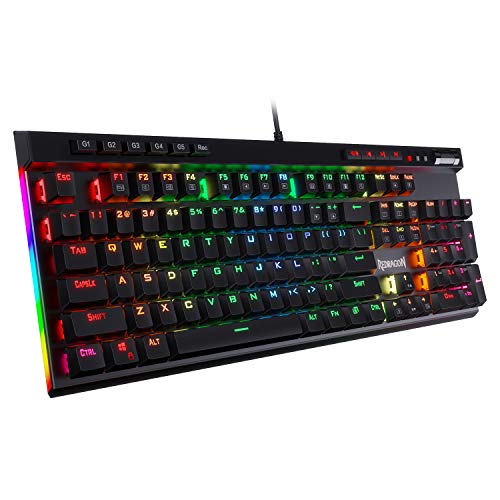
Redragon K580 — Best loud gaming board
At a glance: Full-size wired gaming layout; tactile blue clicky switches; five dedicated macro keys; media wheel and dedicated controls; RGB backlighting; onboard keybinding memory.
The K580 brings the noise to the arena: a full-size gaming board whose tactile blue switches deliver the clicky programme — bump, snap, audible confirmation — to the desk where macros and media controls live. Five dedicated macro keys run down the side for MMO rotations and MOBA item actives, a media wheel keeps volume under the fingers mid-game, and the onboard memory holds your keybindings without software babysitting. For the player who types in chat as hard as they play, the click is communication: your team hears confidence, your stream hears a mechanical keyboard being a mechanical keyboard, and your own hands get the crispest confirmation this guide’s gaming entry can offer.
Redragon’s value engineering is honest about its tier: the switches are the brand’s own blue design rather than Cherry’s, voiced a touch louder and looser than the reference click — arena volume rather than concert pitch — and the board spends its budget on the gaming apparatus rather than on keycap luxury. The RGB is full and theatrical, the frame is substantial, and the whole package sits at the friendly end of the market where a first loud board should sit: cheap enough to discover whether the click is your personality, complete enough to keep if it is.
That discovery framing is the right way to buy it. The K580 is the guide’s gateway loud board — the one to learn your household’s tolerance and your own taste on, before the Filco’s refinement or the Das’s institution. Its compromises are the tier’s: fixed switches, a voice with more rattle at the edges than the premium picks, and a full-size footprint that eats mouse room. None of that dims its role. Every loud typist started somewhere, and the ones who started here started with macros, a media wheel and a click they could hear from the door.
Strengths
- Clicky blue switches with a full gaming apparatus
- Five macro keys and a media wheel for MMO and MOBA play
- Onboard memory keeps bindings without software
- Full RGB and a substantial full-size frame
- The friendly tier — the right first loud board
- Audible feedback that streams and teammates notice
Trade-offs
- House blue switches are looser than the Cherry reference
- Fixed switches and a full-size footprint
- Its voice has arena rattle beside the premium picks
Best for: Gamers who want the click with macros, at a discovery price.
Not suited for: Click connoisseurs and small desks.
How a click is made: click jackets, click bars and the anatomy of loud
A clicky switch manufactures its sound deliberately. In the classic Cherry MX Blue design, a two-part stem — the click jacket — snaps against the housing as the key actuates, producing the sharp report layered over the tactile bump your finger feels. Other designs use a click bar, a small metal leaf that flicks at actuation for a crisper, sometimes louder snap. Either way, the sound is a mechanism, not an accident, and its quality depends on manufacturing consistency: a board whose eighty switches click at the same pitch and force sounds like an instrument, while variance across the deck sounds like cutlery. That consistency is much of what the premium picks here are selling.
Everything around the switch tunes the performance. Keycap density sets the pitch’s body; case construction decides whether the click lands on a floor or echoes in a box; stabilisers contribute silence, which in this category is a contribution — the spacebar should click once, not clatter twice. Desk material is the final amplifier: a loud board on a hollow desk on a wooden floor is a three-piece band, and the desk mat is the cheapest member to fire. When a loud board disappoints, diagnose in that order — switch, caps, case, desk — because each layer has its own remedy and its own price.
The diplomacy of loud: rooms, hours and households
Every recommendation in this guide carries an invisible subtitle: in a room of your own, on your own schedule. Clicky keyboards are the only computer peripheral whose primary feature is experienced by non-users, and the honest buying process includes them. Thin walls, open-plan offices, sleeping children, a partner on calls in the next room, a microphone that broadcasts your typing to a team — each is a veto that no switch quality can override, and the mature loud typist treats those vetoes as specifications rather than oppression. The click will still be there when the room is yours; bought against the household, it will be in a drawer by the second week, and the drawer is where loud boards go to become quiet ones.
For the borderline cases, mitigation is a real discipline: a desk mat under the board, a door closed, hours agreed, a quieter board — several guides in this series cover them — kept for the shared sessions. Some households negotiate the click the way they negotiate a drum kit: welcome at noon, unthinkable at midnight. What does not work is hoping nobody minds. Ask, agree, and then type as loud as the agreement allows, with the clean conscience that makes the sound enjoyable in the first place.
Loud at work: calls, recordings and open microphones
The modern loud-typist’s hardest room is not the house but the call. A clicky board on an open microphone is a percussion solo under your voice, and colleagues will remember the keyboard longer than the contribution. The working solutions are layered: a microphone positioned close, with its gain low and its back to the board; push-to-talk discipline for the worst offenders; the mute button as a typing companion; and, for the truly committed, a second, quiet board for call-heavy days — the two-board pattern this series recommends to writers applies to clicky gamers with meetings. None of this is an argument against the loud board. It is an argument for owning the whole system, microphone included, like the instrument it is.
Gaming loud: what the click does in play
In games the click earns its keep as confirmation under pressure: the ability you fired is the ability you heard, and in fast exchanges that audible receipt removes a whole category of doubt inputs. MOBA and MMO players feel it most, in rotations and item actives; rhythm-game players have adopted clicky boards as instruments outright. The counterweight is communication: a clicky board near an open team microphone taxes everyone’s ears, which is why the K580’s review frames its volume as a streamer’s asset and a squad’s negotiation. Push-to-talk and the click are natural partners, and the players who run both are the ones still loud in year three.
If you love the idea but fear the volume: the exits and half-measures
Every pick here except the K580 lets its owner soften the commitment somehow — the Q8’s sockets accept quieter switches when taste or tenancy changes, the Ducky’s small footprint exiles easily to a drawer for call days, and any of these boards can be paired with the two-board pattern. What cannot be done is making a clicky switch quiet: the click is the mechanism, and o-rings or mats only trim its edges. Buyers genuinely unsure should start at the K580’s tier, where the discovery is priced kindly, or choose the Q8, whose sockets keep every future open. The click is a personality test with a purchase attached; sit it honestly.
A short history of the click, for the typist who hears it daily
The click is older than the personal computer’s quiet era: the great terminal and typewriter-adjacent keyboards of the industry’s first decades were loud by construction, and their sound was the office’s weather. The membrane decades silenced the desk in the name of cost, and the mechanical revival that followed was, in part, an acoustic homesickness — a generation that had learned to type on quiet boards discovered, through boards like the Model S in this guide, that the old sound had been carrying information all along. The click told you the key had fired, told the room you were working, and told your rhythm where it stood.
That history explains the category’s emotional register, which no specification captures. Loud typists are not tolerating a side effect; they are keeping a practice. The modern clicky board — consistent, tuned, housed in a case that respects it — is the practice with its defects engineered out, which is why this guide insists on the distinction between voice and rattle so stubbornly. The ancestors were loud the way weather is loud. These six are loud the way instruments are loud, and the difference is the whole product.
How to choose: a buyer’s framework
Audit your room before your layout
The loud buying process starts with architecture, not keyboards. Whose ears share your typing hours, through which walls, on what schedule? A private office or gaming room with a door: the whole guide is open to you. A shared living space with agreed loud hours: the guide is open with a diary. An open-plan office, a sleeping household, a call-heavy remote job without a second board: the honest answer is a tactile from another guide, and this one kept as a map for the day the room changes. Every disappointed clicky owner skipped this audit; every satisfied one can recite theirs.
Choose your click character: concert, arena or cushioned
Within loud, voices differ and the difference is taste. The Filco and Das deliver the reference Cherry click at concert discipline — tight, pitched, single. The Varmilo wraps the same voice in art. The Q8’s Gateron click lands rounder on its gasket cushion, the Ducky’s brighter in its small case, and the K580’s house blues cheer at arena volume with the edges left on. None is the correct click; each is a correct click for a temperament. If you can, hear recordings of the exact boards — recorded consistently, same microphone — and trust the one your ear reaches for twice, because you will hear it ten thousand times.
Layout for loud typists
Layout interacts with loudness in one practical way: the more of your life the board serves, the more hours its voice is in the house. A full-size loud board is an all-day commitment for every key you own; a 60 percent like the Ducky concentrates the click into gaming and drafting sessions and leaves the household’s other typing to quieter tools. Alice’s Q8 is the long-session answer, spreading the work across a posture your wrists can sustain at volume. Choose the layout by the hours you intend to be loud, not only by the keys you need — in this category, duration is a feature.
The two-board pattern, loud edition
Most veteran clicky owners quietly run a pair: the loud board for solo hours and the quiet board for calls, guests and midnight. Budgeting for the pair from the start — a K580 now and a quiet tactile later, or a Filco as the crown beside an existing quiet board — converts the loud purchase from a household gamble into a system with a switch. If this guide’s diplomacy sections read like your life, plan the pair rather than pretending one board will be negotiated into silence it cannot produce. The click deserves its hours; the household deserves its own. A pair of boards gives both their due.
Setting up a loud board so it sounds its best
A loud board’s voice is partly bought and partly installed. The setup below — desk, mat, stabilisers, microphone and household — takes one evening and decides whether your click sounds like an instrument or an incident. Work through it before the board’s first full day, while every adjustment is still a choice rather than a repair.
Step 1: Give the board its stage: desk and mat
Place the board on the desk’s most solid territory — not a hollow overhang, not a wobbling side table — and slide a desk mat beneath it. The mat is the loud board’s tone control: it absorbs the case’s low resonance and the desk’s amplification, leaving the click itself crisper and more deliberate. Experiment with the board’s position over the mat’s first day; an inch’s move across a desk seam can change the voice audibly. What you are tuning for is a click with a floor under it — present, pitched, and finished the instant it starts.
Step 2: Silence everything that is not the click
The connoisseur’s setup work is subtraction. Check the stabilisers on the spacebar, Enter and shifts: any rattle, tick or secondary clatter is a sound the board was not designed to make, and the standard remedies — a touch of dielectric grease on the wires, a bandage mod under the housings — remove them without touching the click itself. On the Q8, confirm every switch is fully seated, since a proud switch clicks at a different pitch from its neighbours. The goal is a board where eighty switches speak and nothing else does; the premium picks arrive near that state, and an evening brings the rest within reach.
Step 3: Position the microphone like you mean it
If the board shares its life with calls or a stream, set the microphone up as part of the keyboard’s installation: close to your mouth, gain low, its insensitive side toward the keys, and a noise gate or push-to-talk configured before the first meeting rather than during it. Record a test sentence over honest typing and listen as your colleagues will. The click at a polite distance under a clear voice is character; the click at equal volume is a complaint with a date on it. This ten-minute setup is the difference between the loud board being your signature and being your reputation.
Step 4: Agree the loud hours and set the second board’s post
Have the household conversation while it is still a conversation: which hours are loud hours, which door closes, what the signal is when the plan changes. If a second, quiet board is part of your system, give it its post now — the drawer, the shelf, the other desk — and practise the swap until it takes a minute, because a system that is annoying to switch will not be switched, and the loud board will be blamed for the system’s failure. Write the agreement into the room’s habits rather than its tensions, and the click becomes what it should be: a sound everyone has already consented to enjoy ignoring.
Step 5: Learn your board’s voice over the first week
Type everything on it for a week — drafts, chat, code, the long email — and listen the way you would to a new instrument: which keys speak differently, whether the spacebar’s voice matches the letters’, how the sound changes between the desk’s morning hardness and evening calm. Small voicing differences usually settle as switches break in and your hands learn the board’s actuation; a key that stays foreign is a switch to reseat or replace on the hot-swappable picks. By the week’s end the board should sound like one object with one voice — and if it does, you will understand why this category’s owners describe their keyboards the way musicians describe theirs.
Common mistakes to avoid
Buying loud for a room that cannot consent
The category’s defining mistake is treating volume as a personal preference when it is a shared condition. A clicky board bought into a thin-walled flat, an open-plan office or a sleeping household is not a bold choice; it is a countdown to a drawer. The room audit in this guide’s framework takes four minutes and should precede every loud purchase, because the boards here deserve owners who can actually use them — and households deserve members who ask. If the audit fails today, bank the desire, buy the quiet tactile, and keep this guide for the room you will have next.
Confusing loud with good: the rattle trap
Volume is easy to manufacture and hard to refine, and the market’s cheap end sells the first as the second: hollow cases, loose stabilisers and inconsistent switches producing a clatter that photographs as enthusiasm and sounds like a toolbox. The test that separates them is subtraction — in a good loud board, if you removed the click mechanism, the board would be nearly silent; in a bad one, half the noise would remain. Read reviews for stabiliser discipline and switch consistency, not for decibel boasts, and let the picks here stand as the reference for what intentional loud sounds like.
Judging the click in the first ten minutes
Clicky switches break in, hands adapt, and a board’s voice on a bare desk in an empty room is its worst performance. New owners regularly return boards whose crime was an unmatted desk and an unfamiliar actuation, while the same board on its mat, in its room, at its owner’s practised force becomes the favourite object they own. Give a loud board its setup evening and its week of real typing before the verdict — the category demands more acclimatisation than any other in this series, and rewards it more, because the click you settle into is the one you will hear for years.
Running a clicky board on an open microphone
The fastest way to become a story in someone else’s meeting is to type on a clicky board with a live, distant microphone and no gate. The board is blameless; the system is not. Close microphone placement, low gain, push-to-talk and the second-board pattern exist precisely so loud typists can keep both their voice and their keyboard’s. Set the system up once, test it with a recording, and never let a colleague discover your new keyboard before you have heard it the way they will.
Final recommendation
For the pure click, the Filco Majestouch 3 TKL is this guide’s summit — the loudest argument that loud can be refined — with the Das Model S carrying the same voice to the full-size Mac desk and the Varmilo dressing it for the design-conscious room. The Q8 makes the click sustainable across long days, the Ducky concentrates it into sixty percent, and the K580 lets a gamer discover it at a kind price with macros attached. Six boards, one philosophy: noise, engineered and enjoyed, in rooms that have agreed to hear it.
Buy the room first, the voice second and the layout third, set the board up like the instrument it is, and then type at full volume with a clean conscience. A loud keyboard chosen honestly is one of computing’s great pleasures — feedback you can hear across the room, rhythm you can draft to, a machine that sounds like it works because it does. May your walls be thick, your hours agreed and your spacebar silent beneath the click.
Frequently asked questions
What makes a mechanical keyboard loud?
A dedicated click mechanism inside the switch. In the Cherry MX Blue family — five of this guide’s six picks — a two-part stem snaps at actuation, adding an audible report to the tactile bump; click-bar designs flick a metal leaf for a similar effect. Ordinary tactile and linear switches make only the incidental sounds of travel and bottoming-out, which is why loud is a switch choice, not a volume knob: you cannot make a quiet switch click, and you cannot make a clicky switch silent. Everything else — caps, case, desk — tunes the voice around that mechanism.
Are loud keyboards good for gaming?
For solo and push-to-talk play, genuinely: the audible confirmation of each input removes doubt in fast exchanges, and MMO and MOBA players build rotations around the feedback. The K580 exists in this guide for exactly that player, macros and media wheel attached. The qualifications are social and mechanical — an open team microphone taxes the squad, and players who prefer hair-trigger linears for shooters will find clicky switches’ bump and reset a matter of taste. Judge loud gaming as its owners do: an asset at your desk, a negotiation on your microphone.
Can I make a loud keyboard quieter without replacing it?
You can trim its edges but not silence its mechanism. A desk mat removes the desk’s amplification, stabiliser tuning removes the secondary rattle, and softer typing — riding the actuation point rather than bottoming out — lowers the incidental noise around the click. The click itself is the switch working as designed, and it stays. Owners who need true quiet for part of the day run the two-board pattern from this guide’s framework; owners who need it all day should buy a tactile or silent board instead, and let the loud one go to a room that wants it.
Which is the loudest keyboard in this guide?
Volume in a real room depends on desk, floor and typing force more than on the board, so this guide ranks voice rather than loudness. The K580’s arena register is the rawest and often the most penetrating; the Filco and Das deliver the reference Cherry click at full, disciplined volume; the Ducky’s small case pitches its click brightest; the Q8’s gasket cushions its click into the roundest voice here. If sheer presence is the goal, the full-size boards on a hard desk will fill a house — which is either the recommendation or the warning, depending on your walls.
Do clicky switches wear out or lose their click?
The switches here are rated for tens of millions of presses, and the click mechanism is part of that rated life — a well-made clicky board sounds in year five much as it did in year one, with individual switches occasionally drifting as individuals do. Hot-swappable picks like the Q8 let you replace a single tired switch in minutes; fixed boards answer with the switch families’ proven longevity. What ages fastest is usually the owner’s environment — a move to a shared office silences more clicky boards than wear ever has, which is a housing fact, not a hardware one.
Is a loud keyboard a bad idea for an office?
For an open-plan or shared office, yes — not because the board is bad but because the room cannot consent, and this guide’s room audit exists to say so before purchase rather than after the first complaint. For a private office with a door, a loud board is one of working life’s legitimate pleasures, and two of this guide’s picks — the Das and the Filco — are office institutions in exactly that setting. The variable is never the keyboard. It is the wall between your typing and somebody else’s concentration, and it deserves the deciding vote.
Related guides
Loud boards sit at one end of the keyboard spectrum; the rest of the hobby is in conversation with them. These guides cover the quiet alternatives, the layouts and the mods that loud typists read alongside.
- the 75 percent layout for compact loud desks
- Alice layouts and the Q8’s ergonomic family
- keyboards for writers, where sound is a working condition
- building a first custom keyboard around a clicky switch
- five easy modifications, including stabiliser tuning
- the Aula range for a quieter second board
- advanced modding techniques for voicing a board