Disclosure: As an Amazon Associate, kajuandouglas.com earns from qualifying purchases. Links on this page are affiliate links; they cost you nothing extra. Prices and availability change often, so check the current Amazon listing before you buy.
The best gaming keyboards for pc in this generation are defined by a technology war that finished keyboards spent a decade ignoring: what happens inside the switch between the moment your finger moves and the moment the game knows. Adjustable actuation, rapid trigger and magnetic Hall effect sensing have moved from forum exotica to the flagship standard, and the six boards in this guide map the new landscape — two esports-grade analogue boards, a clicky full-size classic reborn, a quiet mainstream all-rounder, a wireless tournament tenkeyless, and a 60 percent Hall effect board that drags the new technology down to a fraction of the flagship cost.
Yet the switch is only half the purchase. A PC gaming keyboard is also the thing you type passwords, chat messages and work email on, at a desk you share with a mouse that needs room to move. The right board is the one whose gaming technology matches the genres you actually play and whose everyday manners you can live with at 9 a.m. as happily as at midnight. This guide therefore judges each pick twice — once as a gaming instrument, once as a keyboard — because a board that wins the first judgement and loses the second ends up in a drawer by spring.
Key takeaways: Adjustable actuation and rapid trigger are real advantages in movement-heavy games, and marketing noise in most others — match the technology to your genres before paying for it. Tenkeyless is the competitive default for a reason: mouse room is a performance feature. And the quiet revolution is price: Hall effect performance now exists at the compact end of the market, not only in flagships. Whichever board you choose, tune it per key group rather than globally, and keep one sane desktop profile so the same keyboard can work as hard as it plays.
Where to buy and how this guide handles best gaming keyboards for pc
Every board linked below was confirmed in this site’s verified catalogue data, and each review closes with a Check price on Amazon link to that exact listing. Flagship gaming boards are sold in multiple switch and layout variants under one page — tactile versus linear, full-size versus tenkeyless — so confirm the selected variant before ordering; the reviews name the variant each listing describes. One famous name is handled in prose only: Wooting’s boards are discussed where the technology conversation requires them, but no verified listing for them was returned during this guide’s checks, so no Wooting product is linked.
A note on performance language. This guide does not print laboratory latency figures, because honest ones depend on firmware versions, test rigs and settings in ways that make a single printed number misleading. What it does instead is explain what each technology changes about the input you feel — reset behaviour, actuation depth, polling — and which genres can actually cash those changes in. That is the information that survives contact with your own desk, which is where the purchase has to perform.
In this guide
Quick picks: Best Gaming Keyboards For PC
Six boards, three switch philosophies, one for every serious PC gaming desk. If your genre and layout are already settled in your mind, start here; the long reviews underneath defend each placement, and the framework sections that follow help if your shortlist looks different from ours.
- SteelSeries Apex Pro Gen 3 — the adjustable-actuation flagship, with per-key tuning and the deepest Hall effect feature set.
- Razer Huntsman V3 Pro TKL — the esports optical board: rapid trigger, Snap Tap and a tournament-ready tenkeyless frame.
- Razer BlackWidow V4 — the full-size clicky command centre, macro keys and all, for MMO and strategy players.
- Corsair K70 CORE — the quiet mainstream pick: pre-lubed linears, a media dial and a palm rest in a full-size frame.
- Logitech G PRO X TKL Lightspeed — the wireless tournament board, built to travel and to disappear under your hands.
- Aula WIN60 HE — Hall effect and rapid trigger in a compact 60 percent board at the accessible end of the market.
How the picks were chosen
The shortlist was built by genre coverage first and brand balance second. A guide to PC gaming keyboards that only served tactical-shooter players would be a guide to a third of PC gaming, so the six deliberately span the analogue esports boards, a clicky macro-heavy full-size for the MMO and strategy crowd, a quiet full-size for shared rooms, a wireless TKL for the tournament-and-travel life, and the compact Hall effect disruptor. Within each role, the board chosen had to earn it on fundamentals — switch quality, build, software sanity — because gaming technology layered on a mediocre keyboard is a mediocre keyboard with a marketing budget.
Standards applied across all six: switches had to be a known quantity from a maker who publishes their behaviour; keycaps had to be PBT or double-shot where the tier demands it; software had to store profiles on the board or behave without an account; and any headline technology — rapid trigger, adjustable actuation, high polling — had to be genuinely implemented rather than a menu item that changes nothing. Boards that failed the everyday-keyboard test, with mushy stabilisers or layouts that punish typing, were cut even when their gaming specifications glittered.
The picks in detail
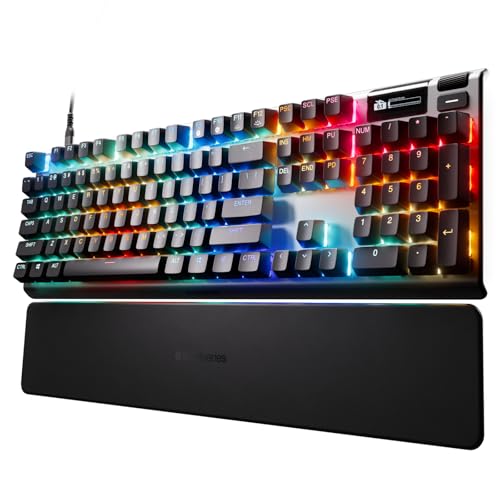
SteelSeries Apex Pro Gen 3 — Best adjustable-actuation flagship
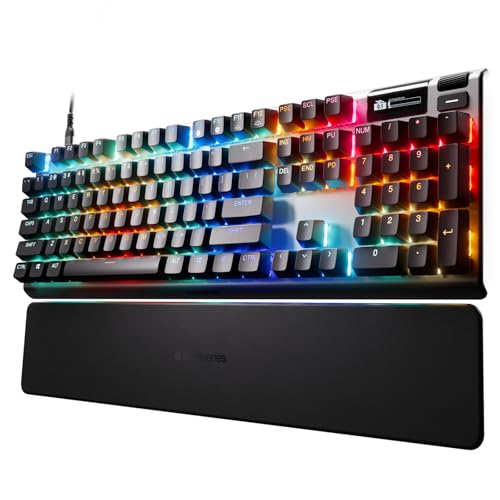
At a glance: OmniPoint 3.0 HyperMagnetic switches with adjustable actuation; rapid trigger; Rapid Tap/SOCD; Protection Mode; OLED display; per-key RGB; PBT keycaps; USB-C wired.
The Apex Pro line exists to answer one question — what if a key could be tuned like a trigger — and the Gen 3 is its most complete answer. The OmniPoint 3.0 magnetic switches let you set the actuation point per key across a wide range, so movement keys can fire at a hair’s travel while the ultimate ability sits deep enough to survive a panicked palm. Rapid trigger resets a key the instant it begins to rise rather than at a fixed point, which is the feature counter-strafing players feel in their bones: the stop is as fast as the start, and repeated taps stay crisp at speeds a fixed reset point smears.
SteelSeries wraps the technology in a full-size board with genuine everyday manners. The OLED display handles settings, profiles and notifications without opening software; the PBT keycaps keep their texture; and Protection Mode — which reduces the sensitivity of keys surrounding a deliberately pressed one — is a thoughtful answer to the fat-finger problem that hair-trigger actuation creates. The software remains the configuration hub, with game-ready presets that spare new owners the blank-page problem of tuning eighty keys from nothing.
The costs are the obvious ones: this is a flagship with a flagship’s price positioning, a wired-only connection, and a feature depth that casual players will use at ten percent. The magnetic switches also tie you to the board’s own ecosystem — there is no swapping in your favourite mechanical switch, because the sensing principle is different. Buy it if your games reward input tuning and you enjoy the tuning itself; it is the most complete expression of the modern gaming keyboard, and it plays like it.
Strengths
- Per-key adjustable actuation with genuinely useful presets
- Rapid trigger delivers crisp counter-strafing and repeated inputs
- Protection Mode tames accidental presses around hair-trigger keys
- OLED display keeps settings reachable without software
- PBT keycaps and a solid full-size build for daily work
- The most complete Hall effect feature set in this guide
Trade-offs
- Flagship positioning — the dearest board here
- Wired only, with no wireless mode
- Magnetic switch ecosystem means no mechanical switch swapping
Best for: Competitive FPS and movement-game players who will actually tune actuation per key.
Not suited for: Casual players who will never open the actuation settings.

Razer Huntsman V3 Pro TKL — Best esports optical board
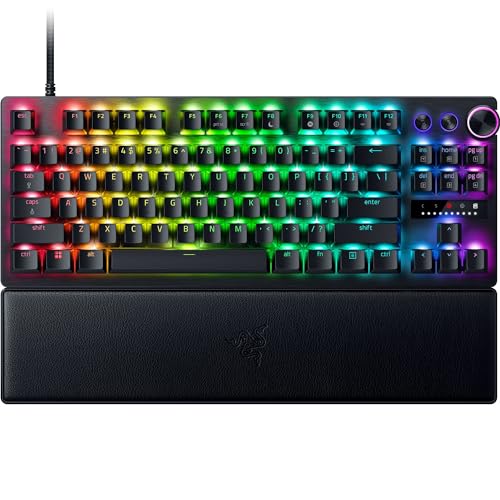
At a glance: Tenkeyless esports layout; analogue optical switches; rapid trigger mode; adjustable actuation; Snap Tap; media keys and dial; doubleshot PBT keycaps; wrist rest included; wired.
Where the Apex Pro is a laboratory, the Huntsman V3 Pro TKL is a tournament tool: everything about it is arranged for the player who flies to events or plays like they do. The analogue optical switches actuate by light, with adjustable actuation and a rapid trigger mode that Razer has tuned aggressively for shooters, and Snap Tap handles the SOCD problem — when opposing movement keys collide, the board prioritises the latest input, cleaning up counter-strafes that older boards would have cancelled into a standstill. The tenkeyless frame keeps the board bag-sized and the mouse field wide.
Daily-life details are better than Razer’s reputation for excess suggests. The doubleshot PBT keycaps are textured and durable, the media dial and keys sit where a right hand can find them without looking, and the included wrist rest is firm and properly sized rather than a foam afterthought. Onboard storage keeps essential settings with the board, and the actuation adjustments can be made from the keyboard itself with an LED readout — a genuinely considerate touch for players who tune between maps on machines where the software is not installed.
Optical ownership has two honest caveats. The switch feel is distinctly its own — light, fast, with a character some typists find hollow compared with a good mechanical or magnetic board — and the ecosystem is closed: these are not sockets for your switch collection. The board is also wired, deliberately, in the esports tradition. None of that dents the proposition for its intended player. If your gaming life is competitive shooters and your desk is a launchpad, this is the sharpest tool in the guide.
Strengths
- Analogue optical switches with rapid trigger tuned for shooters
- Snap Tap cleans up opposing-input collisions automatically
- Tenkeyless frame travels and leaves a wide mouse field
- On-keyboard actuation adjustment with LED readout
- Quality PBT keycaps and a properly made wrist rest included
- Media dial and keys placed for eyes-free use
Trade-offs
- Optical switch feel divides typists — light and distinctive
- Closed switch ecosystem; no hot-swap experimentation
- Wired only, in keeping with its tournament brief
Best for: Esports-minded shooter players who want rapid trigger in a travel-ready TKL.
Not suited for: Typists-first buyers and switch hobbyists.

Razer BlackWidow V4 — Best full-size clicky command centre
At a glance: Full-size layout; Razer Green tactile and clicky mechanical switches; six dedicated macro keys; Chroma RGB; magnetic plush wrist rest; doubleshot ABS keycaps; Snap Tap support.
The BlackWidow is the elder statesman of gaming keyboards, and the V4 leans into what the line has always been: a big, unapologetic command centre for players whose games have too many abilities for a normal keyboard. Six dedicated macro keys run down the left edge, waiting for MMO rotations, strategy control groups or streaming commands; the full-size layout keeps the number pad for the games and spreadsheets that use it; and the Razer Green switches deliver the tactile bump and audible click that a loyal school of players considers the only honest feedback a key can give.
Chroma RGB remains the ecosystem play it always was — per-key lighting that synchronises with a wider setup and reacts to games that support it — and the magnetic wrist rest is plush, properly attached and easy to remove for cleaning. Snap Tap support brings the modern SOCD handling to this mechanical board, so even the traditionalist pick here is not stuck in the past. Typing on the Greens is a deliberate pleasure: crisp, loud and unmistakable, the sound of work being done, in a private room.
Private room is the operative phrase. Clicky switches in a shared space or on an open microphone are a social decision, not just a personal one, and this board makes no apology for it. The doubleshot ABS keycaps will shine with use where PBT would not, and the footprint demands a desk that can spare the width without cramping the mouse. For the MMO player in their own room with a raid schedule and a macro for every occasion, no other board in this guide speaks their language as fluently.
Strengths
- Six dedicated macro keys for MMO, strategy and streaming
- Razer Green clicky switches with crisp tactile feedback
- Full-size layout keeps the number pad
- Plush magnetic wrist rest included and easily removed
- Chroma RGB synchronises with a wider Razer setup
- Snap Tap support keeps movement handling modern
Trade-offs
- Clicky switches are loud — a private-room board
- Large footprint eats mouse space
- ABS keycaps develop shine with heavy use
Best for: MMO and strategy players in their own room who want macros and clicky feedback.
Not suited for: Shared rooms, open microphones and small desks.

Corsair K70 CORE — Best quiet mainstream full-size
At a glance: Full-size layout; pre-lubed MLX Red linear switches; SOCD Flashtap; media control dial; palm rest included; ABS double-shot keycaps; RGB; wired.
The K70 line is Corsair’s mainstream institution, and the CORE edition’s insight is that most players want a gaming keyboard that behaves like a good appliance: fast, quiet and undemanding. The pre-lubed MLX Red linear switches are the headline — smooth and notably quiet for a mechanical board, with factory lubrication doing the work that used to require an evening with a brush. In a living room or a shared flat, that quietness is a competitive feature in its own right: you can play at full intensity at midnight without narrating every input to the household.
The full-size frame includes the number pad, a media dial that doubles as a settings control, and a palm rest in the box. Corsair’s Flashtap brings SOCD handling to the board’s movement keys, so the mainstream pick keeps pace with the esports boards on the one firmware feature shooter players currently care about. The double-shot ABS keycaps keep legends crisp, the RGB is tastefully implemented, and the whole board has the designed-by-adults restraint that makes it as presentable on a work call as in a game lobby.
Enthusiasts will note what is absent: no hot-swap sockets, no adjustable actuation, and ABS caps that trade PBT’s shine resistance for their crisp legends. The wired connection is fixed in spirit if not in cable. None of this matters to the buyer this board is for — the player who wants one full-size keyboard, bought once, that plays everything well and never becomes a project. In a guide full of specialisation, the K70 CORE is the honourable generalist.
Strengths
- Pre-lubed linear switches are smooth and unusually quiet
- Full-size layout with number pad and a useful media dial
- Flashtap SOCD handling keeps shooter movement modern
- Palm rest included; presentation suits work as well as play
- Double-shot legends stay crisp for the board’s life
- Mainstream support and software maturity
Trade-offs
- No hot-swap sockets — switches are fixed
- No adjustable actuation or rapid trigger hardware features
- ABS keycaps will shine sooner than PBT rivals
Best for: Players who want one quiet, full-size board for gaming and work with zero fuss.
Not suited for: Modders and players chasing rapid-trigger hardware.

Logitech G PRO X TKL Lightspeed — Best wireless tournament board
At a glance: Tenkeyless layout; Lightspeed wireless plus Bluetooth and wired modes; tactile switches in this variant; LIGHTSYNC RGB; PBT keycaps; carry case included; detachable cable.
The G PRO X TKL was designed with tournament players, and its defining virtue is disappearance: a board so sorted that you stop thinking about it in places where thinking about your equipment is a liability. Lightspeed wireless is the mature end of gaming radios — the connection behaves like a cable for every practical purpose — and the board adds Bluetooth for the second machine and a detachable wired mode for the desk. The tactile switches in this variant give a gentle bump that suits players who rest fingers on keys between rounds, and the PBT keycaps keep their grip and legends through seasons of travel.
Travel is engineered in rather than hoped for. The board ships with a carry case, the frame is compact and dense, and small mercies abound: a game mode switch that disables the keys that eject players from matches, media controls on a roller, and onboard lighting that does not need the software to look right. Logitech’s software handles remapping and profiles with the company’s usual polish, and the board’s battery endurance stretches across weeks of ordinary use, so wireless never becomes a charging ritual.
The trade-offs are ecosystem ones. The switches are not the hot-swappable kind in the way kit boards mean it, the feature set is deliberately conservative — no analogue actuation, no rapid trigger — and the price positioning reflects the pro branding. A shooter player chasing the newest input technology should look at the two boards above it in this guide. A player who wants the board that simply works, everywhere, on any machine, with a decade of tournament trust behind it, has found the end of their search.
Strengths
- Lightspeed wireless that behaves like a cable in play
- Tri-mode flexibility: wireless, Bluetooth and detachable wired
- Built to travel — carry case included, compact dense frame
- Tactile switches suit players who rest on their keys
- Game mode switch prevents match-ending accidental presses
- Weeks-scale battery life keeps wireless effortless
Trade-offs
- No rapid trigger or adjustable actuation
- Switch customisation is limited compared with kit boards
- Pro positioning within the price tiers
Best for: Competitive players who travel, stream or simply want wireless without asterisks.
Not suited for: Players whose priority is the newest analogue input technology.

Aula WIN60 HE — Best compact Hall effect value
At a glance: 60 percent layout; magnetic Hall effect switches, hot-swappable within the magnetic ecosystem; adjustable actuation; rapid trigger mode; high-rate polling; RGB; wired USB-C.
The WIN60 HE is the board that ended the flagship monopoly on Hall effect gaming. Its magnetic switches deliver the two features that define the modern esports keyboard — adjustable actuation and rapid trigger — in a 60 percent frame at the accessible end of the market, with high-rate polling to keep the input pipeline short. For the shooter player whose desk is small and whose budget is smaller, this is not a watered-down version of the Apex Pro idea; it is the same idea, concentrated. The compact footprint returns the maximum possible mouse room, which at this level of play is worth as much as the switch technology.
Aula’s recent boards have earned their following on sound as much as specifications, and the WIN60 HE continues the pattern: the board arrives with a composed, damped character that makes it pleasant to type on between matches. The magnetic switches are hot-swappable within their own ecosystem, so experimentation and replacement stay possible, and the wired USB-C connection keeps the high polling honest. Configuration runs through Aula’s software and web-style tooling, which covers actuation per key, rapid trigger sensitivity and lighting without drama.
The 60 percent layout is the commitment it always is — arrows and function keys live on layers — and a magnetic board’s switch menu is narrower than the mechanical world’s. Buyers should also set expectations for software polish a notch below the flagship brands. Weighed against what it delivers per unit of money, though, the WIN60 HE is the easiest board in this guide to call a disruptor: it makes the defining technology of this keyboard generation available to the players who will benefit from it most and could afford it least.
Strengths
- Adjustable actuation and rapid trigger at an accessible tier
- 60 percent footprint maximises mouse room for aiming
- High-rate polling keeps the input path short
- Pleasant, damped sound for a compact gaming board
- Magnetic switches swappable within their ecosystem
- Wired connection keeps performance consistent
Trade-offs
- 60 percent layout layers arrows and function keys
- Magnetic switch choice is narrower than mechanical
- Software polish trails the flagship brands
Best for: Shooter players on compact desks and real budgets who want true rapid trigger.
Not suited for: Players who need a function row or dislike layer-based layouts.
The analogue era: what adjustable actuation and rapid trigger actually change
A conventional mechanical switch is a binary device with fixed geography: it actuates at one depth and resets at another, and the gap between those points is dead time your finger must travel before the next input. Adjustable actuation moves the first point — set it shallow for a hair-trigger strafe key, deep for an ability you must never fire by accident. Rapid trigger attacks the second point: the key resets the moment it starts rising, so repeated inputs and counter-strafes register at the speed of your finger’s intention rather than its full travel. In movement-heavy shooters the combination is tangible within a single session.
Honesty requires the boundary conditions. These technologies pay out in games with continuous movement and rapid repeated inputs — tactical shooters, arena shooters, rhythm and movement titles. They pay almost nothing in turn-based games, little in MOBAs beyond cleaner movement, and nothing at all in the typing you do between games. SOCD handling — Snap Tap, Flashtap and their siblings — is the related firmware feature that resolves opposing movement keys intelligently, and it has spread from the esports boards to mainstream picks like the K70 CORE, which tells you the industry considers it settled rather than experimental.
The Wooting-shaped space in this guide
Any honest account of this category must acknowledge the board that popularised Hall effect gaming: Wooting’s compact boards proved that analogue sensing and rapid trigger belonged in serious play, and their influence is visible in at least three picks here. Wooting appears in this guide as context rather than as a linked pick, because the verified catalogue checks behind this article returned no Wooting listing to link. Readers cross-shopping should treat that as a sourcing note, not a verdict — the technology conversation in these pages applies to Wooting’s boards as much as to the linked ones, and the framework below will help you place them if you find one through another channel.
Polling rates, latency and the numbers game
Polling rate — how often the keyboard reports to the PC — has become the specification most inflated by marketing and least understood by buyers. The standard gaming rate already reports every millisecond, which is faster than any game’s own processing of your input in almost every title. Higher rates, like the WIN60 HE’s headline figure, shorten one link in a long chain; they do not shorten the chain. The gains are real in the narrow sense and negligible in the felt sense for most players, which is why this guide ranks switch behaviour, layout and build above polling arithmetic. Spend on the input you can feel.
The latency that does matter is the kind with variance: a wireless link that occasionally hesitates, a Bluetooth connection asked to do a gaming job, a hub introducing its own delays. This is why the wireless pick here uses a dedicated gaming radio, why Bluetooth is treated throughout as the convenience mode rather than the performance mode, and why every wired pick keeps its connection simple. Consistency, not a heroic best-case number, is what your hands learn to trust — and trust in your inputs is the actual performance feature.
Layout for PC gaming: why tenkeyless became the default
The competitive migration to tenkeyless and smaller layouts is ergonomics disguised as fashion. Removing the number pad moves the mouse hand closer to the body’s centre, straightening the shoulder angle during long sessions, and returns a hand’s width of low-sensitivity aiming space. Full-size boards fight back with utility — the BlackWidow V4’s macro column and the K70 CORE’s number pad serve real genres and real work — which is why this guide keeps two of them. The layout question is answered by your game list and your desk dimensions, not by what the current tournament broadcast shows on its desks.
Keycaps, wrist rests and the comfort layer
Two of these boards ship with wrist rests and four with PBT keycaps, and both details matter more over a season than any firmware feature. PBT’s texture survives the oils of daily play without turning slick, which keeps fingertip placement honest during long sessions; the BlackWidow’s doubleshot ABS trades some of that longevity for crisp legends and should be budgeted a replacement set in year two if shine bothers you. A wrist rest is a posture tool, not a cushion: it should support the palm during pauses and leave the wrists floating while you play, and the magnetic rests here make that discipline easy because they detach the moment they annoy you.
Sound belongs in this comfort layer too. The board you hear for six hours a day shapes your room’s peace and your microphone’s quality. The K70 CORE’s pre-lubed quietness, the WIN60 HE’s damping and the Huntsman’s optical crispness sit at the civilised end; the BlackWidow’s click is a deliberate instrument for a private room. None of these is a defect — but buying the loud one for a shared flat is, and it is the single most common regret in this category.
Durability and the two-year view
Gaming boards live hard lives — intense sessions, travel, desk food, the occasional fist of frustration landing nearby — and the picks here are built for that contract. Metal and dense frames shrug off flex, PBT keycaps keep their texture through oily seasons, and switches across all three technologies are rated for lifespans measured in tens of millions of presses, far beyond any realistic two-year total. The realistic wear items are mundane: cables at their flex points, wrist rest surfaces, the shine on ABS caps, and batteries in wireless boards slowly losing their longest weeks. All are manageable, and none requires replacing the board.
Software support is the durability nobody sees. A board whose configuration app is abandoned becomes a board frozen at its last settings, which is one reason this guide weights the maturity of each maker’s ecosystem. The flagship and mainstream brands here maintain their software across operating system generations, and the boards with strong onboard storage — the Huntsman and the G PRO X in particular — insure you even against that risk, because the settings that matter live in the keyboard itself. Buy the board whose maker will still be answering for it in three years.
One desk, two lives: gaming boards at work
Most PC gaming keyboards spend more hours in spreadsheets and documents than in games, and the six divide honestly on that duty. The K70 CORE and G PRO X TKL are the natural office citizens — quiet or tactile, restrained in lighting, full-featured for typing. The analogue flagships type perfectly well once a desktop profile restores sane actuation depths, which is a settings habit worth building from day one. The BlackWidow’s click and the WIN60’s layers are the two that ask something of a workday: volume diplomacy in one case, layer fluency in the other.
If the desk is shared with colleagues or family, let that fact vote early. A board that needs no excuses — quiet switches, a number pad where expected, lighting that can go dark — prevents the slow resentment that ends with a second, worse keyboard bought for work and the good one exiled to a drawer. The generalist picks exist in this guide because most desks have two lives, and the best gaming keyboard for a PC is very often the one that never has to leave it.
How to choose: a buyer’s framework
Match the switch technology to your genres
Start with your three most-played games and be literal about it. Movement shooters reward rapid trigger and adjustable actuation — Apex Pro Gen 3, Huntsman V3 Pro, WIN60 HE. MOBAs and RTS reward reliable switches, good keycap texture and layouts your hotkey hand knows — any pick here, with the BlackWidow’s macros tempting the ability-heavy. MMOs reward macros, number pads and comfort over hours — BlackWidow V4 or K70 CORE. Everything else — RPGs, strategy, indie, the typing between — rewards a board you simply like touching, which is why the generalist K70 CORE and the wireless G PRO X exist in this guide at all.
Decide your relationship with software
Modern gaming boards are configured, not just used, and the configuration lives in software of varying grace. Razer’s and SteelSeries’ ecosystems are deep and occasionally demanding; Logitech’s and Corsair’s are polished appliances; Aula’s tooling is younger and simpler. Ask how you actually behave: if you will tune actuation per key and enjoy it, buy the board whose software rewards that. If you will set lighting once and never return, prioritise onboard storage and onboard controls — the Huntsman’s keyboard-level actuation adjustment and the G PRO X’s set-and-forget manners exist for you.
Wireless for PC gaming, judged plainly
A dedicated gaming radio like Lightspeed is, for playing purposes, a cable that is not there: the G PRO X TKL’s tournament adoption is the evidence. Bluetooth is not that, and no board here pretends otherwise — it is the mode for the second machine and the film on the couch. Wired remains the choice for zero-battery, zero-pairing permanence and for the highest polling claims. The practical question is how many machines your desk serves and how much you hate cables; answer it honestly and the connectivity column of this guide selects itself.
The pre-purchase checklist for flagship-tier boards
Confirm the variant: switch type and layout differ within single listings, and the tactile G PRO X in this guide has a linear sibling you might prefer. Confirm the keycap material if shine matters to you. Confirm what the board stores onboard if you play on machines you do not administer. Measure the desk for full-size boards with macro columns. And if you are buying analogue technology, confirm your main games actually reward it — a weekend of reading your own genre’s forums will tell you more than any specification sheet, including the ones quoted here.
Dialling in a gaming keyboard: first-week setup
A modern gaming board at factory settings is a instrument tuned for nobody. The first week with any of these six should include the same five pieces of work: physical setup, switch tuning where the hardware allows it, layer and macro design, lighting discipline, and a settings backup. Do them once, in this order, and the board becomes yours in a way no unboxing achieves.
Step 1: Set the physical foundation first
Position the board so your forearms rest parallel and your mouse hand is not reaching across the board’s width — with a full-size pick, that may mean angling the board slightly or moving it left of centre. Set the feet to the height that keeps your wrists neutral rather than bent upward, attach the wrist rest if your board has one and learn to rest palms on it only between rounds, and route the cable or place the receiver so the connection path is short and uncluttered. Receiver placement matters: a front USB port or a short extension beats a rear port behind a metal case for any wireless board.
Step 2: Tune actuation and rapid trigger per key group
On the analogue boards, resist tuning all eighty keys individually. Work in groups: movement keys shallow with rapid trigger at its most sensitive; number-row abilities at a medium depth; the panic buttons — ultimate, push-to-talk, the grenade you always fumble — deep enough to require intent. Play two or three real matches between adjustments, changing one group at a time, because your hands need evidence rather than theory. Save the result as a named profile per game, and keep one sane general profile for desktop use so typing passwords does not become a hair-trigger exercise.
Step 3: Design your macros and layers around your actual games
On the BlackWidow, assign the macro column from your rotation outward: the sequence you perform most, the consumable you forget, the communication you type too often. On the compact boards, build the missing-keys layer before you need it mid-match — arrows, media and the function row placed where your fingers can find them blind. Keep macros honest: quality-of-life sequences and communications are the genre’s accepted use, while anything that plays the game for you crosses lines that tournament rules and fair play draw clearly. Your board’s power should organise your inputs, not replace them.
Step 4: Set lighting for information, not decoration
The most useful gaming lighting is a map: movement keys in one calm colour, abilities in another, everything else dim or dark. It speeds the glance that finds a key mid-fight and reduces the visual noise your eyes process for hours. Save the reactive effects and waves for the desktop profile if you enjoy them — in-game, lighting should be working for you. Players who stream have the opposite brief and should build a second, brighter profile for the camera rather than compromising the playing one.
Step 5: Back up your configuration and learn the onboard controls
Export your profiles, screenshot your actuation settings, and learn which adjustments your board can make without software — the Huntsman’s onboard actuation tuning is the exemplar. Machines get replaced, software gets reinstalled, tournament PCs are strangers: the player whose setup lives on the board and in a backup file is the player who is ready anywhere. Finish the week by playing your main game for one full session without touching a setting. If the board has disappeared from your attention, the setup is done, and it will stay done for seasons.
Common mistakes to avoid
Buying analogue technology for games that cannot use it
Rapid trigger in a turn-based strategy game is a sports suspension on a library cart. The premium for Hall effect and optical-analogue boards is justified entirely by movement-heavy, input-dense genres, and players outside them are paying for specifications that will never once fire. The honest generalists in this guide — the K70 CORE and the G PRO X TKL — exist precisely for the majority of PC gaming, which is varied, social and played at human speeds. Match the technology to the game list, not to the discourse.
Setting every key to the shallowest actuation
The first instinct with an adjustable board is to make everything instant, and the result is a keyboard that fires abilities when your fingers rest, types passwords with phantom characters, and punishes every relaxed moment. Actuation depth is a per-key decision with a correct answer per key: shallow where speed lives, deep where accidents live. Protection Mode and its equivalents exist because even careful players brush keys; your settings should assume a human hand, because one is attached.
Cramping the mouse to keep a number pad you never use
Full-size loyalty is often pure habit. Audit a week of play: if the number pad served only the occasional calculator session, a tenkeyless board returns desk space and shoulder comfort every single day in exchange for a keypad you can replace with a layer or a cheap standalone pad for tax season. The reverse mistake exists too — strategy and MMO players who buy compact and spend a year missing keys. The audit, not the aesthetic, should decide, and it takes five honest minutes.
Ignoring switch feel because the specifications glittered
You will press these switches a hundred thousand times before any firmware feature matters. An optical board’s distinctive feel, a clicky board’s volume, a linear’s smoothness — these are the purchase, with technology as the garnish. If a board’s feel is wrong for your hands, no actuation curve will save it, which is why this guide describes feel in every review and why buying from a listing with a sane return window is strategy, not pessimism. Specifications recruit your attention; feel decides your satisfaction.
Final recommendation
For the competitive core of PC gaming, the Apex Pro Gen 3 is the most complete instrument here, and the Huntsman V3 Pro TKL its sharpest tournament expression. The WIN60 HE performs the generation’s most useful trick — putting that same input technology within everyone’s reach — while the G PRO X TKL remains the wireless board against which trust is measured. The BlackWidow V4 and K70 CORE hold the full-size ground for the macro-driven and the quiet-seeking respectively, and between the six there is no serious PC gaming desk left unserved.
Choose by genre, then by layout, then by feel, and set the board up properly in its first week. Do that and the keyboard stops being a peripheral you bought and becomes part of how you play — which, at the level these six operate, is the entire point of the purchase.
A closing thought on timing: this category is mid-revolution, and next year’s boards will tune further, poll faster and cost less for the same tricks. That is an argument for buying the board your games need now rather than the board a roadmap promises — input technology only scores points in matches you actually play. Every pick here will still be a serious instrument when its successor launches, because the fundamentals it was chosen for — switches, build, layout, software sanity — do not expire on a product cycle.
Frequently asked questions
Is rapid trigger worth it for PC gaming?
In movement-heavy shooters, yes — it is the rare feature players feel within one session, because key resets track your finger’s release instead of a fixed point, tightening counter-strafing and repeated inputs. In most other genres its effect ranges from subtle to nonexistent. That is why this guide’s analogue boards are recommended to shooter players specifically, while the generalist picks spend their budgets on build, comfort and macros instead. Worth it is a property of your game list, not of the technology.
Hall effect, optical or mechanical — which switch technology is best?
Each leads somewhere. Hall effect magnetic switches offer adjustable actuation, rapid trigger and hot-swap within their ecosystem — the most complete gaming package, in the Apex Pro Gen 3 and WIN60 HE. Optical-analogue switches actuate by light with similar gaming features and a distinctive crisp feel, in the Huntsman V3 Pro. Conventional mechanical switches offer the widest feel variety, the clicky and tactile characters many players love, and mature simplicity, in the BlackWidow and K70 CORE. Best is the one whose strengths match your games and whose feel your fingers endorse.
Are wireless keyboards finally good enough for competitive PC gaming?
With a dedicated gaming radio, yes — the G PRO X TKL’s Lightspeed connection is trusted in tournament settings where a single hesitation would end careers and endorsements alike. The qualification matters: Bluetooth is a convenience mode, not a competitive one, and no-name wireless implementations vary. If you compete, choose a proven gaming radio or stay wired; if you play socially, even the distinction fades. Battery life on the board here is measured in weeks, so the old charging objection has expired with the latency one.
What size keyboard should I buy for PC gaming?
Tenkeyless is the evidence-based default: it preserves every key gaming uses, restores mouse room and centres the mouse hand. Go smaller — 60 percent like the WIN60 HE — if your games are shooters and your desk is tight, accepting layers for arrows and function keys. Go full-size if your genres use the number pad or macro columns, or if the same desk does number-heavy work. The size mistake is buying by photograph; the size method is auditing your own key usage for a week and believing the result.
Do I need a number pad or macro keys for MMOs?
Neither is required, but both are genuinely useful, which is why the BlackWidow V4 leads that genre here: its macro column absorbs rotations and quality-of-life sequences, and the number pad serves the players who bind it. Software macros on the other boards cover much of the same ground with less immediacy. If your MMO sessions are long and your ability count is high, dedicated keys earn their desk space; if you play casually, a tenkeyless with good software is the lighter life.
How much should a PC gamer expect to spend on a keyboard?
This guide deliberately frames tiers qualitatively, because flagship pricing moves with sales and variants. The honest structure: the accessible tier now includes real Hall effect performance in the WIN60 HE; the mid tier holds the mainstream full-size and the wireless tournament board; the flagship tier buys the deepest analogue tuning. Every tier here is a finished, durable tool — the spending question is which features your genres can cash in, and paying flagship money for features your games ignore is the only genuinely wasteful outcome.
Related guides
PC gaming keyboards connect to the rest of the hobby at several points, from layout science to genre-specific shortlists. These guides cover the layouts, wireless questions, connection types and brand ranges that gaming buyers most often explore next, each written to the same verified standard as this one.
- whether wireless keyboards are good for gaming, in depth
- the 75 percent layout for compact gaming desks
- keyboards chosen for MMO games like WoW and FFXIV
- keyboards for MOBA games like League of Legends and Dota
- Bluetooth versus 2.4 GHz and tri-mode connections explained
- the Aula range, including its Hall effect boards
- 75 mechanical keyboards compared for gaming and work