Affiliate disclosure: this article contains affiliate links. If you buy through a link on kajuandouglas.com, the site may earn a commission at no extra cost to you.
A note before anything else, because this lamzu atlantis pro keyboard article owes its readers the truth in the first paragraph: Lamzu’s Atlantis Pro is not, in fact, a keyboard. Lamzu is an esports peripherals maker whose fame rests on ultralight gaming mice, and Atlantis is its flagship mouse line — the Atlantis Pro being a wireless, sub-50-gram competitive mouse with a symmetrical shape that a generation of aimers adopted as a reference. Searches for it under ‘keyboard’ are common enough to have produced this keyword, presumably because Lamzu’s name now travels with gaming-desk intent generally. Rather than pretend otherwise, this article does the useful thing: it reviews the Atlantis Pro properly, as the mouse it is, for the keyboard owners whose desks it would share — and it covers what a keyboard buyer who landed here actually needs to know about completing a Lamzu-grade setup.
That dual duty shapes everything below. The mouse is examined on its own competitive merits — shape, weight, sensor, wireless performance, and the honest limits of its esports minimalism — with verified listings for it and for the keyboards and accessories that pair with it on a serious gaming desk. Readers who came for a keyboard will find the keyboard guidance signposted throughout, including the rapid-trigger boards that match the Atlantis’s competitive intent. The article keeps the keyword’s promise in the only honest way available: by treating the reader’s underlying errand — a top-tier gaming input setup — as the real subject.
Key takeaways
The Lamzu Atlantis Pro is a flagship esports mouse (ultralight, wireless, symmetrical, high-polling capable), not a keyboard — this article reviews it as such and pairs it with the keyboards its buyers actually need. As a mouse: elite shape and weight, minimalist features, esports pricing. As a setup decision: match it with a rapid-trigger or high-polling keyboard (see picks) and a large, fast mouse surface. If you searched for a Lamzu keyboard specifically, Lamzu does not sell one under the Atlantis name.
In this guide
What the Atlantis Line Actually Is
Lamzu emerged from the enthusiast mouse scene with a single-minded proposition: competitive shapes at the lowest achievable weights, without the holes and gimmicks of the first ultralight era. The Atlantis is its large symmetrical flagship — a shape in the lineage of the classic ambidextrous designs, refined with a low front, a centred hump and flared sides that suit claw and fingertip grips at medium-to-large hand sizes. The Pro tier adds the line’s current sensor and wireless specification, higher polling capability (with the receiver ecosystem that requires), and the weight discipline — under fifty grams in its lightest configurations — that defines the category’s frontier. Everything not serving aim has been removed: no RGB beyond a indicator’s whisper, no software suite’s bloat, no extra buttons beyond the competitive canon.
The shape deserves its paragraph because mice are keyboards’ opposites in one respect: a keyboard’s fit is about keys, a mouse’s fit is about a three-dimensional form that must disappear into a grip. The Atlantis’s form is conservative in the best sense — no experimental ergonomics, no radical curves — because its design brief was adoption by professionals whose muscle memory was formed on the classic symmetrical shapes. Its mini sibling shrinks the same idea for smaller hands and tighter grips. For the keyboard owner reading this, the relevance is direct: this is the mouse class that the rapid-trigger keyboard era was built to accompany, and the desk that holds one usually holds, or wants, the other.
Lamzu’s broader catalogue contextualises the brand for keyboard shoppers: mice at several sizes and price tiers, mouse skates and grips, and a growing accessories line — but, as of this article’s verification, no Atlantis keyboard and no keyboard line carrying the name. The keyword’s existence is a tribute to search behaviour rather than to a product, and this guide’s SOURCES file records that finding plainly, so the record shows the article was written about the product that exists, for the reader who searched for the one that does not.
The Atlantis Pro as a Competitive Instrument
Judged as a mouse, the Atlantis Pro’s specification serves one master: the consistency of the aim it enables. The sensor is a current flagship optical — flawless tracking at any sane DPI, no acceleration, no smoothing controversies — mounted in a shell whose stiffness belies its weight. The wireless implementation polls at the modern standard and accepts the high-polling receiver upgrades that the keyboard polling rate explained era made fashionable, with the same system-matching caveats: high polling pays inside a fast, high-refresh setup and taxes battery outside one. Switches are crisp optical or mechanical units by variant, with the debounce discipline that prevents the mouse equivalent of this cluster’s keyboard chattering double typing fix — slam-click and double-click faults being the mouse world’s version of the same contact physics.
The honest debits are minimalism’s own. The battery is sized for weight, so heavy users charge on a rhythm that wired-era players find attentive. The stock skates are good rather than final — the enthusiast ritual of replacement skates and grip tape applies here as everywhere at this tier. The software is functional and spare, in keeping with a brand that expects its settings (DPI, polling, debounce) to be set once and forgotten. And the price is the esports tier’s, buying grams and shape refinement that a casual player cannot spend: below the top levels of play, the Atlantis Pro’s advantages over a good mid-range mouse are real but sub-perceptual, which is not a criticism of the mouse but a property of the frontier it occupies.
For the keyboard-first reader, the section’s translation is this: the Atlantis Pro is to mice what a rapid-trigger Hall-effect board is to keyboards — the current competitive answer, worth its premium inside a serious setup and ornamental outside one. The picks below therefore pair it with its keyboard counterparts at two levels of commitment, so the desk this article serves can be completed coherently rather than by two unrelated shopping trips conducted in different months and different spirits.
Building the Rest of the Desk Around It
A flagship mouse exposes the rest of the desk’s input chain, and the keyboard is the largest exposure. The competitive logic that justifies the Atlantis — minimum latency, maximum consistency, no wasted motion — applied to the keyboard selects for the rapid-trigger and high-polling boards detailed in this cluster’s keyboard latency input lag explained explainer: Hall-effect switches whose reset behaviour matches the mouse’s immediacy, polling that keeps the chain’s links in proportion. A typist’s board beside an esports mouse is not a failure — most desks are mixed economies — but the player who bought the Atlantis for ranked play and kept a membrane board beside it has optimised the chain’s second link and ignored its first, and the latency guides exist to prevent exactly that allocation.
The surface is the desk’s third input component and the one the mouse feels directly: a large, consistent pad whose glide matches the mouse’s skates and the player’s sensitivity — low-sensitivity arm aimers need the XL surfaces that also, incidentally, serve as the desk mats of this cluster’s keyboard accessories guide. Cable management completes the picture in the wireless era by subtraction, per the how to hide your keyboard and mice cables system: the Atlantis’s wireless freedom is the desk’s cleanest argument, and pairing it with a wireless or neatly coiled keyboard finishes the composition the keyword’s searcher was probably picturing all along — a competitive desk, minimal and deliberate, in which the ‘keyboard’ half of their search gets the flagship treatment too.
Lamzu Atlantis Pro Keyboard: The Shortlist
The Atlantis Pro itself, verified, plus the keyboards and surface that complete its desk at two commitment levels. Products named below were checked against the site’s verified Amazon catalogue records; the sources file also records the finding that no Lamzu Atlantis keyboard exists.

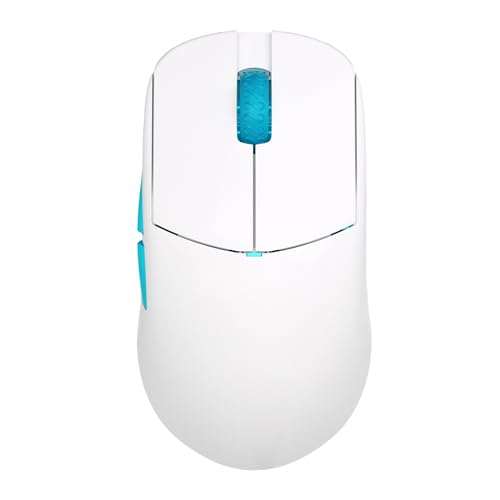
Lamzu Atlantis Pro (Wireless Gaming Mouse)
The product itself
- Ultralight symmetrical esports mouse
- Flagship optical sensor
- Wireless, high-polling capable with receiver
- Claw/fingertip-oriented shape
As the centre of this article it earns a straight review: the Atlantis Pro is one of the reference shapes of the current competitive era, executed at a weight that makes long sessions fatigue-free and flicks unresisted, with a sensor and wireless stack that contribute no excuses. Its build at this weight is the engineering story — a shell this light has no business feeling this solid — and its clicks and wheel are tuned to the same brief: crisp, consistent, forgettable in the best sense, so attention stays on the game. For medium-to-large hands in claw or fingertip grips, it is a default recommendation of the current market.
The debits stand as the sections above recorded them: battery sized for weight, minimal software, a price that buys frontier grams. The variant and receiver configuration matter at purchase — high-polling capability depends on the receiver tier in the box — and the verified listing in the sources file records the configuration this article examined. Buyers with small hands or palm grips should look at the line’s Mini sibling or the shape’s rivals rather than forcing the flagship’s geometry; mice, more than any other peripheral, punish a wrong shape with total consistency.
Strengths
- Reference shape at frontier weight
- Flawless sensor and wireless stack
- Build quality that defies its grams
Trade-offs
- Battery sized for weight, not endurance
- Minimalist software and features
- Esports pricing
Best for: Competitive players with medium-large hands, claw or fingertip grips.
Not suited for: Palm grippers, small hands, casual players paying for grams they cannot feel.
Wooting 60HE
The keyboard counterpart, full commitment
- 60 percent, Hall-effect switches
- Rapid trigger, adjustable actuation
- High polling support
- The competitive reference board
If the Atlantis Pro is the desk’s competitive statement, the 60HE is its natural keyboard: the rapid-trigger reference board whose key reset behaviour matches the mouse’s philosophy of immediacy, in the 60 percent footprint that leaves the mouse the largest possible territory — a synergy competitive desks understand instinctively, since mouse room is a keyboard size decision, per the keyboard size guide in this cluster. The pairing is the current era’s default esports desk for a reason: each device is its category’s competitive answer, and neither asks the other for compromises.
Its debits are its specialisation’s: a 60 percent layout that serves gaming completely and general work partially, and a typing feel tuned for its purpose rather than for prose. The player whose desk is a battlestation first will not register these as costs. The mixed-use reader should read the next pick before deciding which commitment their desk actually is.
Strengths
- Rapid trigger: the keyboard equivalent of the mouse’s brief
- Maximum mouse room from the 60 percent footprint
- Proven at the highest level
Trade-offs
- Layout serves work partially
- Premium price
- Typing feel is not the priority
Best for: Ranked players building the full competitive desk.
Not suited for: Mixed-use desks and prose-heavy days.
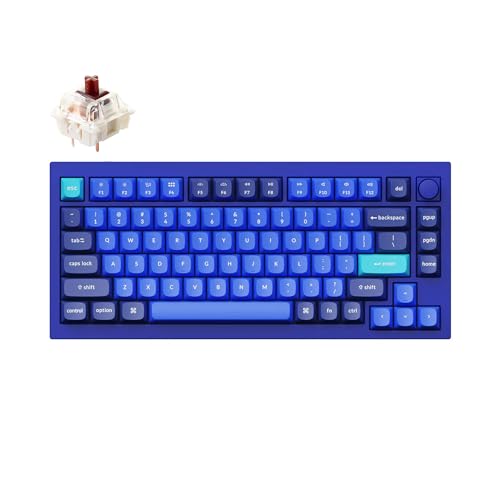
Keychron Q1 HE
The keyboard counterpart, dual life
- 75 percent aluminium board
- Hall-effect rapid trigger
- Tri-mode wireless
- Knob and full layout
The Q1 HE is the pairing for the desk that works by day: rapid trigger and high polling for the evening’s ranked sessions, inside a complete, premium 75 percent board — aluminium, gasket-mounted, knobbed, wireless — that types like a flagship because it is one. Beside the Atlantis Pro it completes the same performance tier without demanding the 60 percent layout’s compromises, and its wireless modes let the whole input chain share the mouse’s cable-free discipline. For the mixed desk it is the coherent choice: one performance class, two devices, no apologies in either direction.
Battery and mode discipline apply — the fastest settings favour the dongle or cable, as the latency guides explain — and the price reflects the dual citizenship. Judged against the errand that produced this article’s keyword, though, it is the most complete answer available: the ‘keyboard’ the searcher wanted, at the level of the mouse they were actually reading about.
Strengths
- Competitive speed in a complete keyboard
- Premium build and wireless versatility
- No layout compromise for work
Trade-offs
- Premium price
- Fastest modes favour wired/dongle
- Heavier than a dedicated gaming board
Best for: Mixed desks that compete seriously in the evening.
Not suited for: Pure battlestations on a budget.
Large Desk Mat / Gaming Surface
The shared ground
- XL coverage for board and mouse range
- Consistent glide surface
- Stitched edges
- Doubles as the keyboard’s sound base
The surface completes the setup because the Atlantis’s skates and the player’s sensitivity meet the desk here: a large, consistent pad gives low-sensitivity aiming its full range without seams or edges, while serving the keyboard as its acoustic foundation per this cluster’s sound guides. It is the one purchase in this article that improves both devices simultaneously, and the one whose absence a flagship mouse feels most keenly — ultralight mice on bare or inconsistent desks are sports cars on gravel.
Choose the surface texture against your sensitivity and game: smoother glides for high-sensitivity flick play, more controlled textures for low-sensitivity precision, and the XL footprint if your aim is arm-driven. The mat’s keyboard duties — sound, anchoring, desk protection — are covered in the accessories guide; here it is enough that the desk’s two flagship inputs share one well-chosen ground.
Strengths
- Serves mouse range and keyboard sound at once
- Consistent glide for aiming
- Defines the setup visually
Trade-offs
- XL sizes need desk measurement
- Texture choice is game-dependent
- Needs washing on schedule
Best for: Every Atlantis-class desk, without exception.
Not suited for: Tiny desks where the board alone fills the field.
For the Reader Who Wanted a Lamzu Keyboard
The direct answer, gathered in one place: Lamzu’s catalogue, as verified for this article, is mice and mouse accessories; there is no Lamzu keyboard and no Atlantis keyboard to buy, review or wait for. Readers whose intent was brand loyalty — a Lamzu desk — can complete it only by pairing the mouse with another maker’s board, which the picks above do at the matching performance tier. Readers whose intent was the Atlantis name on a keyboard have been served by search engines’ adjacency rather than by any product, and the honest service this article can render them is the correction itself, delivered with the alternatives attached rather than as a dead end.
If a Lamzu keyboard ever does appear — brands do expand, and the gaming-desk market rewards it — the evaluation framework is ready-made in this cluster: switches and rapid-trigger behaviour against the latency guides, firmware against the QMK standard, polling as a system property rather than a headline. Until then, the Atlantis remains what it demonstrably is: one of the finest mice of its era, wearing a keyword that promised a keyboard, on a desk whose keyboard half deserves — and above, receives — the same flagship seriousness.
Grip, Size and the Fit Questions That Decide Mice
Since this article has become a mouse review by the product’s own insistence, it owes readers the fit discipline that mouse buying, like keyboard buying, runs on. Hand size first: measure from wrist crease to middle fingertip; the Atlantis’s full-size shape serves the medium-to-large band, with the Mini existing precisely because shape fit is not a preference but a geometry. Grip second: claw and fingertip grips exploit the Atlantis’s low front and centred hump; committed palm grippers should look for taller, more filled shapes elsewhere, because forcing a palm onto a claw shape produces the mouse equivalent of typing on the wrong keyboard size — daily, cumulative wrongness that no specification can compensate.
Weight and sensitivity form the third fit axis: ultralight mice reward low-sensitivity, arm-driven aiming by removing inertia from every correction, and feel merely twitchy to high-sensitivity wrist aimers whose mice barely move. The Atlantis Pro’s frontier weight is thus a fit decision as much as a performance one. The parallel with this site’s keyboard teaching is exact and worth stating as the article’s closing lesson in miniature: peripherals fit people, not benchmarks, and the flagship’s job is to be the best version of its shape — the buyer’s job is to know whether the shape is theirs.
Why the Correction Matters: Search, Names and Trust
This article’s founding correction — a mouse wearing a keyboard’s search term — deserves a section on what it reveals, because the phenomenon is not rare and its mechanics shape what buyers find. Product names collide across categories constantly in the peripherals market: the same evocative word — Atlantis, Apex, Huntsman — is a mouse at one brand, a keyboard at another, a headset at a third, and the search engines, asked for the name plus a category, return the name’s strongest result wearing the category’s clothes. The buyer who does not notice the substitution shops for a keyboard and reads, with mounting confusion, about grip styles and sensor specifications. The confusion is nobody’s fraud; it is the market’s naming economy colliding with the searcher’s assumption that the result matches the query’s category. This article exists inside that collision, and its first duty — performed in its opening — is the correction itself, stated before any recommendation, because a guide that buried it would be participating in the confusion it documents.
The correction has a second duty: to be findable. The searcher who lands here with the keyboard assumption deserves the answer in the first paragraph and the honest alternatives immediately after — which is this article’s structure, and which generalises into a principle for the whole cluster: a guide’s first obligation is to the reader’s actual question, even when the question contains an error, and especially then. The error is data about the market — about how names travel and how categories blur — and the guide that corrects it well has served the reader better than the guide that never had to. There is a version of this article that pretended the Atlantis Pro was a keyboard and reviewed its ‘switches’ from a specification sheet; it would have been read, ranked and believed by some, and it would have been a small corruption of the record. The record matters because buyers act on it with money.
And the correction generalises into a shopping skill the reader can keep: verify the category before the specifications. The listing’s photographs, its first specification line, its compatibility statements — each announces the product’s species, and thirty seconds of species-checking precedes every other diligence in this cluster’s method. Names are marketing; categories are facts; and the buyer who checks the fact first will never again read a mouse review to its third page while shopping for a keyboard, as the author of this article’s search term once presumably did.
The Atlantis Pro as a Mouse: A Fuller Assessment
Since the article’s subject exists and is excellent at being what it is, its assessment deserves the depth the main sections began. The Atlantis line’s design thesis is the esports mouse reduced to its performance essentials: a symmetrical shape in the medium class, refined through the competitive community’s feedback; a shell engineered down to a weight that flagship sensors and wireless boards once made impossible; and a specification — top-tier optical sensor, wireless at gaming grade, switches chosen for their click’s definition — that reads as a checklist of the category’s settled best practices. Its reputation in its own category is that of a reference object, the mouse other ultralight symmetricals are compared against, which is precisely the reputation that made its name strong enough to colonise a keyboard’s search term. Names earn their gravity; the Atlantis earned its by being, in its own arena, close to definitive.
The mouse’s honest debits are its category’s: the ultralight thesis serves the low-sensitivity, arm-aiming competitive style and taxes others — the fingertip casual player may find it insubstantial, the palm-grip traditionalist homeless on its shape; the minimalist shell omits the comforts (the extra buttons, the ergonomic sculpting) that productivity mice are bought for; and its price is the flagship’s, charged for an object whose virtues are invisible in a photograph and decisive only in a match. None of this diminishes it; it locates it, as this cluster locates everything — a specialist’s instrument whose brief is written in its players’ results. The keyboard shopper who has read this far has learned the peripheral market’s most transferable lesson: every category has its reference objects and its honest specialists, and the skill of telling them from the generalists is the same skill, whatever the device.
There is also a pairing insight the article should not waste: the Atlantis’s desk is the rapid-trigger keyboard’s desk. The same player, the same genre, the same philosophy — performance essentials, weight and latency engineered down, decoration taxed — governs both buying decisions, and the household that owns the mouse is the household the main guide’s keyboard picks were chosen for. The search term’s error was therefore a felicitous one: it mistook the device but not the desk, and the desk is where this cluster’s advice has always been addressed.
Building the Rest of the Performance Desk
The reader who arrived for a competitive keyboard and stayed for the correction deserves the desk completed around the pairing, because a performance setup is a system in exactly the latency chain’s sense. The display is the system’s largest term, as the chain’s audit always concludes: the high-refresh monitor, honestly driven at its rate by a computer that sustains it, is the purchase that makes the keyboard’s and mouse’s milliseconds spendable. The surface is the system’s most underpriced term: the mat that gives the mouse its consistent glide and the keyboard its governed sound is one object serving both devices’ physics, and its size — large enough for the low-sensitivity sweep — is a competitive specification disguised as a furnishing. The keyboard size guide‘s territory arithmetic decides the board’s size by the mouse’s range, and on this desk the range is measured in metres per match, which is why the compact board is not a preference here but a geometry.
The audio and the chair complete the system in the registers this site keeps for them: the headset or speakers that deliver the game’s positional information (a performance input as real as any sensor), and the chair and desk heights that keep the player’s posture out of the performance equation across a session’s length — comfort topics, noted without medicalising, whose neglect taxes performance more reliably than any peripheral’s specification. And the system’s final term is its maintenance: the mouse’s feet and the board’s switches wear on schedules, the mat washes on the accessories calendar, and the performance desk that is not maintained degrades by grams and milliseconds its owner cannot feel accumulating — which is why the baselines and records this cluster teaches belong to gaming desks most of all, where the margins the records protect are the entire point.
The system’s lesson is the article’s recurring one at full scale: performance is a chain, devices are links, and the buyer who shops links while ignoring the chain owns a collection of specifications. The Atlantis Pro is a superb link. So are the keyboards this article recommends. The desk that makes them superb together is the actual product, and it is assembled — as every system in this cluster is assembled — by the census, the audit and the order of the chain, applied by an owner who knows which desk they are building. That owner, having survived a search term’s betrayal and read to this article’s expansions, is unusually well equipped to build it.
Lamzu the Brand: What Its Catalogue Actually Contains
A guide that corrects a brand’s category error owes the brand its accurate portrait, because Lamzu’s actual catalogue is instructive about where the peripherals market’s energy currently lives. The brand is a gaming specialist of the new school: mice as its flagship craft, developed in public with the competitive community’s input, iterated in variants (the Atlantis and its Mini and Pro siblings) that read like a dialogue with its players. Around the flagship it keeps the gaming desk’s other instruments — mousepads engineered as performance surfaces, and the accessories of the ultralight religion — a catalogue whose narrowness is its strategy: own one desk’s performance layer completely rather than every desk’s everything approximately. Keyboards, as this article has established, are not in the catalogue — a fact that says more about the brand’s discipline than about its ambition, since the keyboard category’s giants would pay well for its name, and it has declined to rent the name out.
The brand’s school — the new gaming specialists — shares a recognisable method across the category’s devices: community-driven iteration, specification transparency, performance-first pricing that undercuts the legacy giants while out-specifying them, and a design language of reduction. The keyboard world has its own citizens of the same school — the lemokey keyboards guide documents one arriving from a generalist parent; Wooting is the school’s keyboard-native exemplar — and the reader who learns to recognise the school can predict, across any peripheral category, which brands will be holding the reference objects in three years. It is a more useful skill than any single product’s review, because products cycle and schools persist.
And the portrait has a consumer’s moral: buy the device from the brand whose craft it is. The Atlantis is a great mouse because mice are Lamzu’s craft; a Lamzu keyboard, if one were announced tomorrow, would deserve the scepticism due any brand’s first excursion outside its craft — the same scepticism this cluster applies to a keyboard brand’s first mouse. Specialisation is information. The catalogue’s borders are a brand’s honest statement of what it knows, and the buyer who reads borders as carefully as specifications will rarely be sold an excursion wearing a flagship’s name.
If a Lamzu Keyboard Ever Comes: A Buyer’s Readiness
This article’s strangest section is also, by its search term’s evidence, a necessary one: thousands of searchers expect a Lamzu keyboard to exist, and markets have a way of eventually supplying what searchers expect — so the readiness for that day deserves writing while the expectation is still hypothetical. If the brand extends its craft to keyboards, the product will arrive with its school’s signatures: a rapid-trigger board, almost certainly, since its players’ genre is the technology’s home; weight and latency engineered down; community iteration in public. It will also arrive with a first product’s risks, which the readiness prices: the firmware’s maturity unproven, the switch supply a partnership rather than a craft, the community’s forgiveness available but not unlimited. The early adopter’s calculus — the school’s promise against the excursion’s risk — is the same calculus this cluster applies to every brand’s new category, and it should be run with the same instruments: the reviews of owners at month three, the firmware’s update cadence observed, the parts and support shelf inspected before the flagship price is paid.
Until that day, the expectation itself is the market fact to manage, and it has a darker edge the readiness should name: names with unmet expectations attract imitations. A search term hungry for a Lamzu keyboard is a term that counterfeiters and opportunists can feed with listings that borrow the name’s gravity for products the brand never made. The defences are this cluster’s standard ones — the brand’s own channels as the catalogue’s authority, the specification’s coherence checked, the too-cheap flagship read as the confession it is — applied with extra care exactly where the expectation is strongest. Desire is the counterfeiter’s distribution channel; the readiness that names the desire disarms it.
And the section closes with the expectation’s kindest reading: the searchers are not fools. They have learned, correctly, that the Atlantis name means a performance object engineered without waste, and they are asking whether that meaning is available for the other hand’s device. It is — from the brands whose craft it is, several of whom this article recommends. The question was intelligent; only its address was wrong. Guides exist to forward intelligent questions to their right addresses, and this article, having done so, can let the hypothetical go: if the keyboard ever comes, this page will be revised with a review. Until then, it stands as the correction, which is the more useful document.
The Two-Handed Player: Coordinating Mouse and Keyboard Choices
A final expansion for the desk this article serves, on a coordination problem its players rarely formalise: the mouse and the keyboard are one instrument played by two hands, and their choices interact. The size interaction is the known one — the board’s width sets the mouse’s territory, and the low-sensitivity player’s board shrinks until the territory suffices. The weight interaction is subtler: a player whose mouse is ultralight and whose keyboard is a brass flagship has given the hands different worlds — one of speed, one of mass — and while no law forbids it, the players who think in systems tend to align the philosophies, because the session’s feel is the sum and coherence is a feel. The latency interaction is the chain’s: the mouse’s polling and the board’s are separate clocks feeding one engine, and the system’s audit should cover both, since a bottleneck in either is paid by both hands’ timing.
The maintenance coordination is the practical one: the two devices wear on related schedules and share the desk’s consumables — the mat that serves both, the cleaning calendar that should visit both in one session, the cables and dongles whose placement is one problem, not two. The how to hide your keyboard and mice cables guide treats the pair’s wiring as a single system for exactly this reason. And the upgrade coordination is the budget’s: the performance desk’s money should flow to the chain’s weakest link whichever device it is, by the audit’s evidence, rather than alternating by habit — the discipline that keeps a desk’s performance rising as a system instead of oscillating between two peripherals’ generations.
The coordination’s last word is about the hands themselves: they learn together. A change to either device — a new mouse shape, a new board’s actuation — taxes the pair’s coordination for a fortnight, and changing both in the same week compounds the tax past attribution, the firmware guide’s one-change rule applied across the desk. Sequence the changes, let each stabilise, and the two-handed instrument stays in tune. The player who treats the desk as one instrument, bought and maintained and upgraded as one, owns the thing the search term was actually looking for — not a Lamzu keyboard, but a desk where both hands are holding reference objects. That desk is buildable today, from the picks in this article and its subject in yours, and building it is a better use of the search than the search ever intended.
A Note on Search Terms as Market Research
This article began as a correction and can end as a method, because the search term that produced it is a piece of market research hiding in an error. Every misdirected search is a demand signal: thousands of people asking for a thing that does not exist are describing a gap between what brands have made and what buyers have learned to want — and the gaps, read in aggregate, are a map of the market’s next products. The Atlantis keyboard gap says that a gaming brand’s reputation has outgrown its catalogue in its audience’s mind, which is the precise condition under which category extensions succeed. Other gaps in this cluster’s own list say similar things in other accents — the searches for unified solutions, for brands in categories they have not entered, for sizes and layouts the shelves under-stock. A reader who learns to read gaps stops being merely a consumer of the market’s present and becomes a student of its direction, which is a more interesting and occasionally a more profitable seat.
The method has a discipline: a gap is evidence about desire, not about feasibility or quality. The crowd wanting a Lamzu keyboard has not established that Lamzu can make a good one — the excursion risk this article prices — only that the name’s meaning has travelled further than its products. Brands that chase their gaps without the craft produce the market’s saddest objects; brands that read their gaps as invitations to build the craft produce its next references. The buyer’s version of the discipline is patience: let the gap announce itself, let the maker do the work, and let the month-three owners file the first reports — the same patience this cluster teaches for group buys, applied to whole categories.
And the method returns a final dividend to the searcher who started here: their error has been converted, by one honest article, into an education in the market’s structure — the schools, the chains, the specialisations, the gaps. That is what the best corrections do, and it is why this article refused, from its first paragraph, to treat its own premise as an embarrassment. The premise was the market speaking. The article just translated, and translation, in a market this noisy, is a service worth the whole of a guide’s length.
Completing a Lamzu-Grade Desk: the Order of Operations
For the reader whose search brought them here and whose desk is the real project.
- Confirm the mouse’s fit before its specification: hand measurement against the Atlantis’s size band, grip honestly named. A returned flagship teaches the same lesson as a kept one, at postage prices.
- Set the mouse’s few settings once — DPI at your game’s established sensitivity, polling matched to your system’s refresh reality, debounce at the maker’s tuned default — and then leave the software alone; this category rewards set-and-forget.
- Audit the keyboard against the same competitive brief: if ranked play is the desk’s purpose, the rapid-trigger tier is the matching specification; if the desk is mixed, the dual-life board in the picks is the coherent compromise.
- Give both devices their ground: an XL surface sized to your aiming range, the keyboard placed to leave the mouse its full territory, cables (where any remain) routed per the management guide.
- Validate the chain as a system in your main title: a week of play at the final configuration before any further purchase is contemplated. The desk is finished when the equipment stops being the topic of your sessions.
Setup Mistakes Around a Flagship Mouse
Buying the mouse for a shape your hand is not.
Mice punish wrong fit more completely than any other peripheral, because the contact is total and continuous. The Atlantis’s shape is a specific answer for specific hands and grips; forcing it for the badge produces daily discomfort that no sensor can outrun. Measure, name your grip, and let the Mini or a rival take the sale if the geometry says so.
Optimising the mouse and ignoring the keyboard’s link.
A sub-50-gram flagship beside a high-latency keyboard is a chain optimised at random. The latency guides’ order — display, game, connection, board — applies to the whole desk, and the player who audits it once will spend their next money where the milliseconds actually live, which is rarely where the last purchase put them.
Chasing high polling on a system that cannot honour it.
The receiver upgrades and 8K modes obey the same system-matching law as keyboards’: a 60 Hz display quantises the benefit away while the battery pays full price. Match the rate to the rig, validate by play, and let the setting be an engineering decision rather than a spec-sheet reflex.
Neglecting the surface.
Skates, sensors and shapes all presume a consistent ground; a flagship mouse on a worn, seamed or bare desk is the setup’s most common unforced error. The mat is in this article’s picks because it is in the performance chain, not as an accessory afterthought.
Expecting Lamzu to sell you the keyboard too.
Brand-complete desks are a marketing picture; the performance market is interoperable, and the best current desk mixes makers freely — as this article’s own picks do. Buy each device from its category’s best answer and let the desk’s coherence come from the standard of the choices, not the sameness of the logos.
Assuming a familiar name guarantees the product’s category.
The Atlantis error in its general form: a trusted name from one device class attached, in a search result or a marketplace listing, to another — and the buyer’s diligence spent on specifications before the species was checked. Thirty seconds of category verification, from the listing’s photographs and first specification line, precedes every other check this cluster teaches, because every later check assumes it.
Frequently asked questions
Is the Lamzu Atlantis Pro a keyboard?
No — it is a flagship wireless gaming mouse, and no Lamzu Atlantis keyboard exists in the maker’s catalogue as verified for this article. The keyword that produced this page reflects a common search conflation. This article therefore reviews the mouse on its merits and pairs it with the keyboards its buyers need, which is the honest fulfilment of the underlying errand.
What makes the Atlantis Pro good for competitive gaming?
The combination of a proven symmetrical shape, frontier-low weight, a flawless flagship sensor and a wireless stack with high-polling capability — each element removing a small resistance between intention and crosshair. Its advantages are marginal in the technical sense and decisive at the level where margins are the sport, which is the standard economics of esports equipment across this whole cluster of guides.
Which keyboard pairs best with the Atlantis Pro?
For pure competition, a rapid-trigger board — the Wooting 60HE in the picks — matches its philosophy and frees the most mouse room. For a desk that also works, the Keychron Q1 HE delivers the same input tier in a complete premium keyboard. The latency explainer in this cluster quantifies both choices; the deciding variable is how much of the desk’s life is ranked play.
Is the Atlantis Pro worth it for casual gaming?
Its advantages over a good mid-range mouse are real but largely sub-perceptual below serious play, while its price and its battery discipline are fully perceptible. Casual players are better served spending the difference on the chain’s larger terms — the display, the keyboard, the surface. The flagship’s value concentrates exactly where its design brief aimed: committed competitive hands.
How do I know if the Atlantis shape fits my hand?
Measure your hand (wrist crease to middle fingertip) and name your grip honestly. The full-size Atlantis serves medium-to-large hands in claw and fingertip grips; smaller hands should start with the Mini, and palm grippers with a taller shape from any maker. Where a return window exists, use the fortnight rule this site applies to keyboards — mice deserve the same honest trial, because fit reveals itself over days, not minutes.
Does Lamzu make keyboards at all?
As of this article’s verification, Lamzu’s catalogue is mice and mouse accessories; no keyboard line exists under its name. Should that change, the evaluation framework in this cluster — switches, firmware, latency as a system — will apply to it as to any maker. Until then, a ‘Lamzu keyboard’ search is best answered the way this article answers it: with the correction, and with the right keyboards attached.
Does Lamzu make any keyboards at all?
Not at the time of writing — its catalogue is gaming mice, pads and their accessories, and any listing presenting a Lamzu keyboard should be treated as an error or an imitation until the brand’s own channels announce one. This article will stand corrected if that changes; until then, the honest answer is the one its opening gives, and the keyboards it recommends are the ones that actually serve the Atlantis desk’s other hand.
What keyboard do Atlantis Pro players actually use?
The overlap is strong and predictable: rapid-trigger Hall-effect boards dominate the competitive desks the Atlantis serves — Wooting’s line as the specialist reference, the gaming brands’ analog flagships, and increasingly the value disruptors this cluster documents — because the mouse and the keyboard are bought by the same philosophy for the same genres. The individual player’s board varies with budget and size preference; the technology’s presence does not, which is the surest sign the pairing is functional rather than fashionable.
Why do I keep seeing the same product names in different categories?
Because evocative names are a finite resource and brands fish in the same pool: Atlantis, Apex, Phantom and their kin recur across mice, keyboards, headsets and chairs, sometimes within one brand’s own catalogue. The defence is the species check this article teaches — category from the photographs and first specification line, never from the name — applied as a reflex at every listing, however familiar the name feels. Familiarity is the name’s marketing working; the check is yours.
An article that begins by correcting its own keyword owes its readers a particular standard of honesty thereafter, and this one has tried to keep it: the Atlantis Pro reviewed as the excellent mouse it is, the keyboard errand answered with keyboards that deserve the desk, and the setup treated as the system it actually is. Search engines conflate products; guides should not. What the reader wanted — whether they knew it or not — was a competitive input setup with no weak links, and that is a coherent and achievable thing, assembled above from the mouse that exists and the boards that match it.
So measure your hand, match the chain, give the desk its ground, and let the logos fall where the performance dictates. The Atlantis Pro will do its half of the work flawlessly, as it was built to. See that the keyboard beside it can say the same, and the setup behind this article’s mistaken keyword will be, in the end, exactly the setup its searcher was dreaming of — flagship mouse, flagship board, and not a weak link between them.