Affiliate disclosure: this article contains affiliate links. If you buy through a link on kajuandouglas.com, the site may earn a commission at no extra cost to you.
This keyboard polling rate explained guide isolates one number from the latency chain and gives it a fair trial. Polling rate is how often, per second, your computer asks the keyboard whether anything has happened — 125 times on legacy hardware, 1000 times on the modern standard, and up to 8000 times on the current gaming flagships. It is a real quantity with real arithmetic behind it, quoted on product pages with a precision its importance rarely earns, and surrounded by two equal and opposite errors: the belief that it is everything, and the backlash belief that it is nothing. The truth has a magnitude, and magnitudes can be computed.
The explainer does the computation in the open: what a polling interval contributes to a keystroke’s journey on average and at worst, how it interacts with the chain’s other links — debounce, scan rate, the display’s frame quantisation, covered in the companion keyboard latency input lag explained guide — and where the returns diminish into imperceptibility for each audience. Verified boards across the polling spectrum are reviewed in the middle, and the closing sections cover the costs of high polling that spec sheets omit, a method for testing your own system’s sensitivity, the mistakes made in polling’s name, and the questions that remain after the arithmetic is done.
Key takeaways
Polling interval math: 125 Hz waits up to 8 ms (4 average), 1000 Hz up to 1 ms (0.5 average), 8000 Hz up to 0.125 ms. The step from 125 to 1000 Hz is the meaningful one; 1000 to 8000 refines the tail of the distribution more than the average. High polling costs host CPU and wireless battery. It pays only inside a system — high-refresh display, fast game pipeline — that can honour it. For typing, every rate on this page is below perception.
In this guide
The Arithmetic of Asking
Polling exists because USB keyboards do not interrupt the computer; they wait to be asked. The host polls the device on a schedule — the polling interval — and the keyboard reports any key events accumulated since the last ask. A press therefore waits, on average, half an interval, and at worst a full one, before its journey to the operating system even begins. The numbers follow directly: at 125 Hz the interval is 8 milliseconds, so the average wait is 4 and the worst 8; at 1000 Hz, 1 ms interval, half and one; at 8000 Hz, an eighth of a millisecond’s interval, and waits that vanish into the chain’s other terms. This is the entire mathematics of the specification, and it is worth noticing how small the flagship numbers are beside the intervals they replace — the journey from 125 to 1000 Hz recovered up to 7 real milliseconds; the journey from 1000 to 8000 recovers at most seven-eighths of one.
Two refinements keep the arithmetic honest. First, the keyboard must also have noticed the press — its internal scan of the switch matrix runs at its own rate, typically fast enough not to be the binding term, but on cheap boards the scan, not the poll, can be the slower clock, which is why serious gaming boards advertise scan rates alongside polling. Second, the press must survive debounce, the firmware’s confirmation wait detailed in this cluster’s keyboard chattering double typing fix guide, which commonly exceeds the polling interval of any modern board. A chain is appraised by its largest links; polling at 1000 Hz and above is, on competent hardware, never the largest link in the board’s own segment. That sentence is the explainer in miniature.
Wireless reframes the arithmetic without breaking it. A 2.4 GHz link polls its radio on a schedule designed to imitate the wired figures — the good implementations genuinely deliver 1000 Hz-class behaviour — while Bluetooth’s connection intervals are negotiated in larger steps and its effective reporting cadence is the slowest of the respectable technologies, as the bluetooth vs 2.4ghz keyboards tri-mode explainer on this site quantifies. The audience sorting follows immediately: typists live comfortably on any of these clocks; competitive players belong on the wired or 2.4 GHz schedules, not because Bluetooth’s average is catastrophic but because its variance is.
Where Polling Sits in the Chain, and Why the Display Rules
A keystroke’s total delay is a sum, and this explainer’s companion piece itemised it: actuation and scan, debounce, the polling wait, the operating system’s handling, the game’s sampling, and the display’s presentation. Polling’s share of that sum on a modern board is small — but the decisive fact is the display’s quantisation, which deserves restating in polling’s own terms. A game renders frames at the display’s refresh rate, and inputs are typically sampled and shown on frame boundaries: at 60 Hz, every keystroke, however promptly reported, waits an average of half a 16.7 ms frame for its visible effect. Against that quantum, the difference between a 1000 Hz and an 8000 Hz board is not merely small; it is structurally invisible, rounded away by the frame clock before it can reach the eye.
Raise the display to 240 or 360 Hz and the quantum shrinks to 4.2 or 2.8 ms — at which point polling’s sub-millisecond refinements remain sub-quantum but its consistency contribution becomes real: inputs distribute more evenly across frames, and the occasional worst-case wait that lands a press just past a frame boundary grows rarer. This is the honest summit of the pro-polling case: not raw speed, which the frame clock caps, but the tightening of arrival times inside a fast system, felt by the players whose drills and genres are built on frame-exact inputs. The are wireless keyboards good for gaming analysis on this site reaches the same summit from the connection side. Everyone below that summit — which is nearly everyone — is buying a number their system rounds away.
The cost side of the ledger is polling’s least advertised property and belongs in any fair trial. An 8000 Hz device generates eight thousand interrupts a second for the host to service; on marginal systems — older CPUs, busy USB controllers, laptops rationing power — the cost appears as CPU load, occasional stutter in unrelated tasks, and, on wireless boards, battery life measured in a fraction of the 1000 Hz figure. None of this is prohibitive on a healthy gaming system, for which the feature was designed. All of it is pure tax on a system that cannot use the rate, which is why the explainer’s recommendation is conditional rather than enthusiastic: polling is a system specification, and it should be bought the way systems are bought — as a matched set, or not at all.
Audiences: Who Can Spend a Fraction of a Millisecond
The competitive arena is polling’s legitimate home, and its case deserves precision rather than mockery. In fighting games and rhythm titles, inputs are judged against frame windows and the player’s own timing is trained to a consistency that makes arrival variance a performance variable; in tactical shooters, the rapid-trigger technologies covered in the latency explainer matter more than polling, but polling’s tail-tightening rides along nearly free on the same boards. The arena player’s correct procedure is systemic: display first, game settings second, connection third, polling as the final tightening — the order the latency guide’s how-to prescribes — and at the end of that order, 8000 Hz is a rational purchase the way a racing tyre is rational on a prepared car.
The working typist’s case is equally clear in the opposite direction. Text entry’s feedback loop tolerates delays an order of magnitude beyond anything on this page; the difference between the slowest respectable board and the fastest is, to a writer, indistinguishable from the difference between two mornings. Polling should therefore never select a typing board — size, switches, sound and firmware should, per the how to choose a mechanical keyboard the buyers guide — and the typist who encounters polling in a listing can safely read it as decoration. The middle audience — casual and mid-level gamers — inherits the arena’s logic at a discount: 1000 Hz, now effectively free across the market, is their correct specification, and the step beyond it buys bragging rights at a fair price only if it is known to be bragging rights.
One more audience deserves naming because marketing forgets it: the musician and the accessibility user, for whom the latency explainer already spoke. Their timing needs are real but differently shaped — consistency and configurability over raw rate — and polling’s contribution to their chains is dominated by the same debounce and software terms as everyone else’s. The general law survives every audience: know your chain’s largest term before buying its smallest. Polling rate, fairly tried, is acquitted of fraud and convicted only of being quoted out of context — by sellers who print the interval, and by buyers who mistake it for the journey.
Keyboard Polling Rate Explained: The Shortlist
Verified boards mark the spectrum: the 8000 Hz specialist class, the rapid-trigger flagship whose polling rides a larger technology, and the mainstream 1000 Hz board that already saturates most systems. The boards cited as evidence here come from listings confirmed in the site’s own Amazon catalogue verification.

Ducky One 3 Pro Nazca 8K
The rate, maximised
- 8000 Hz polling, wired and 2.4 GHz
- High scan-rate controller
- Gaming switch options
- Performance-first design
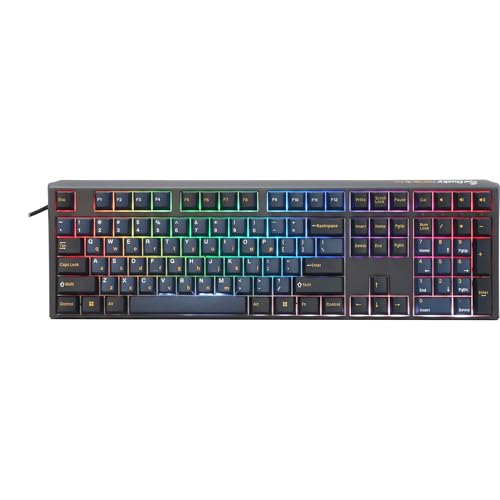
This class of board delivers exactly what the arithmetic promises: a polling wait whose average is six-hundredths of a millisecond and whose worst case barely exceeds a tenth — the connection link reduced, for practical purposes, to zero, with arrival consistency as the tangible residue. Inside a matched system (a 240 Hz-plus display, a game that samples input at full rate, a host with CPU to spare) it is the correct final component, and its players report the difference in the vocabulary this explainer has taught: not faster, but tighter — the tail of late arrivals trimmed away.
Outside a matched system it remains a well-made gaming keyboard whose headline is inert, and the class’s buyers should hold both truths while ordering. The verified listing in the sources file records the specific model examined; the class’s shared caveats — host load, wireless battery cost, the occasional older-system quirk — apply across makers and are priced into this guide’s conditional recommendation. Buy it as a system’s last link and it earns its rate. Buy it as a first upgrade and it is an expensive way to learn the chain’s order.
Strengths
- Connection latency effectively eliminated
- Arrival consistency at the top level
- Mature gaming feature sets
Trade-offs
- Invisible below high-refresh systems
- Host CPU cost is real
- Wireless battery pays heavily
Best for: Elite players completing a fast system.
Not suited for: Everyone else’s first upgrade.
Keychron Q1 HE
Polling in context
- 75 percent aluminium board
- Hall-effect switches, rapid trigger
- High polling support
- Tri-mode wireless
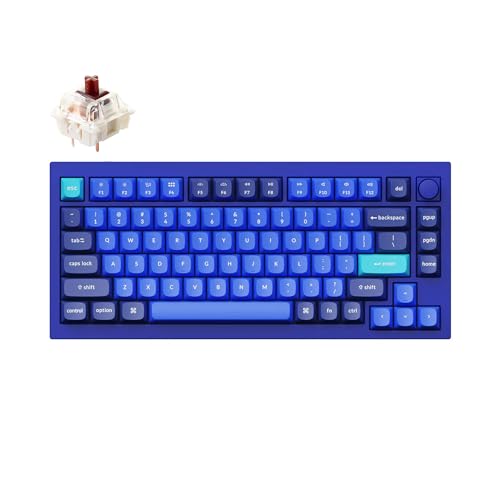
The Q1 HE is polling’s context lesson in product form: its high polling rate is genuinely present, but it is not the board’s headline — the rapid trigger is, because in the genres this board serves, the key’s reset behaviour moves more time than the connection’s interval ever could. Buying it teaches the chain’s hierarchy by ownership: the player feels the trigger’s contribution in their movement within the first session, and polling’s contribution as the background tightness that a matched display reveals over weeks. That ordering — mechanism first, rate second — is the explainer’s thesis wearing a price tag.
As a whole keyboard it remains the category’s grown-up compromise: aluminium case, gasket mount, a complete 75 percent layout and wireless for the desk’s other hours, with the fastest modes favouring the cable or dongle as the physics requires. For the serious player who also works, it is the board that lets one desk hold both truths about polling — that it matters, at the margin, inside a system; and that it was never the main event.
Strengths
- Rapid trigger plus high polling, correctly ordered
- Full premium keyboard around the speed
- Wireless for the non-gaming hours
Trade-offs
- Premium price
- Battery cost at top settings
- Speed features wasted on typing-only desks
Best for: Serious players with working desks.
Not suited for: Typists and single-purpose budget builds.
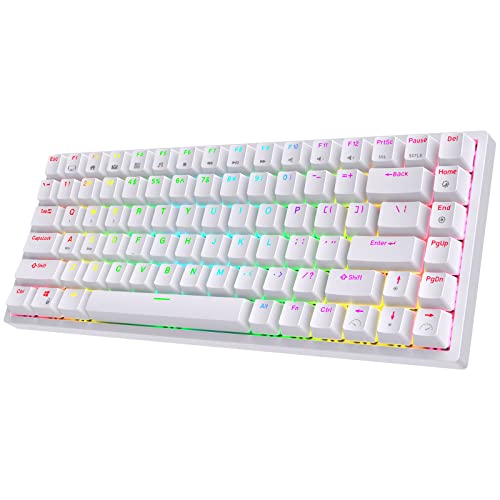
RK Royal Kludge RK84
The 1000 Hz mainstream
- 75 percent layout
- Tri-mode wireless, 1000 Hz-class dongle mode
- Hot-swap switches
- Budget-tier price
The RK84 stands in this explainer as the control condition: a budget board whose wired and dongle modes poll at the modern 1000 Hz standard, which is to say at a rate whose worst-case wait is one millisecond — already below the frame quantum of any display under 1000 Hz and below the debounce term of its own firmware. For the overwhelming majority of players, this board’s connection contributes nothing measurable to their losses, and its presence in the guide is the data point that disciplines the whole category: the mainstream rate is not a compromise awaiting an upgrade; it is, for most systems, the destination.
Its other properties are the budget tier’s usual — functional software, honest switches, hot-swap sockets — and its tri-mode flexibility makes it the wireless test case as well: Bluetooth for the tablet, dongle for the game, cable for the desk. A player who cannot feel their polling problem on this board does not have a polling problem; they have a display, a setting or a drill problem, each cheaper to fix than a flagship. That diagnostic service alone earns the RK84 its place in an explainer’s picks.
Strengths
- Modern polling standard at a budget price
- Tri-mode covers every audience’s connection
- The control board for honest self-testing
Trade-offs
- No rapid trigger or 8K mode
- Software is merely adequate
- Budget build and finish
Best for: Mainstream players and self-testers.
Not suited for: Arena specialists completing a system.
Scan Rate, Debounce and the Other Clocks
Polling is one of three clocks in the board’s segment, and the explainer owes the other two their paragraphs lest the reader leave with a single-number religion. The scan rate is how often the controller reads the switch matrix: at a few hundred hertz on lazy boards it, not the poll, is the wait; at the kilohertz rates of serious boards it disappears beneath the poll. Debounce is the deliberate wait for contact settling, and on contact-switch boards it is usually the segment’s largest term — single-digit milliseconds by design, tunable in open firmware between responsiveness and the chatter threshold, as the fix guide’s ladder describes. A board advertising 8000 Hz polling beside a conservative 5 ms debounce is a chain whose loudest link is silent in the marketing, and the reader who has followed this cluster’s guides can now hear the omission.
The three clocks also explain why two boards with identical polling specifications can feel measurably different in a drill test: their debounce philosophies and scan implementations differ, and those differences live in the milliseconds while polling’s live in the fractions. The practical consequence for buyers is a reading order for spec sheets — debounce behaviour (where stated), scan rate, then polling — that inverts the page’s typography. Makers who publish all three numbers are telling you they expect to be read by people who understand chains. That expectation, in this market, is a quality signal in itself.
Testing Your Own Sensitivity Before Spending
The explainer’s method for the undecided is a self-experiment with the drill discipline the latency guide prescribed, adapted to polling’s small magnitudes. Most gaming boards and many mainstream ones let the polling rate be set in software — 125, 500, 1000 and beyond — which converts the purchase question into a free experiment: set the lowest rate, run your game’s most timing-sensitive drill fifty times and log the scores; set the highest, repeat; compare distributions, not impressions. If the distributions overlap, your system and your perception have jointly acquitted your current rate, and the money belongs to the chain’s larger terms. If they separate cleanly and repeatedly, you are in the small audience the flagship boards serve, and the purchase is evidence-based.
Two cautions govern the experiment’s honesty. Expectation contaminates feel, so the drill scores — not the sensation — are the evidence, and a friend reordering the settings blind, where the setup allows, purifies it further. And the experiment must run on your real system in your real game, because polling’s value is a property of the whole chain: a result measured on a borrowed 360 Hz rig describes that rig’s owner, not you. Run it at home, count honestly, and let the distribution decide — the explainer asks for no greater loyalty than that.
Polling’s History: How 1000 Became the Floor
A short history explains the present market’s numbers. The USB specification’s early interrupt intervals made 125 Hz the default polling of the first USB keyboards — eight milliseconds between reports, in an era when the display’s own sixteen-millisecond frame made the keyboard’s share nearly invisible. Gaming mice broke the floor first, because the pointer’s motion makes polling visible as smoothness, and 500 then 1000 Hz became the performance standard through the 2000s. Keyboards followed for a subtler reason: a keypress is an event, not a stream, and its latency is the wait for the next poll — so the same arithmetic applied, with the same remedy. By the time displays reached 240 Hz, 1000 Hz was the gaming keyboard’s floor and the office board’s inheritance, and the frontier moved to the multi-thousand rates this explainer exists to grade.
The history matters because it explains the numbers’ marketing gravity: each generation’s frontier becomes the next generation’s floor, and the frontier’s price premium is charged at exactly the moment its benefit is least distributed — the early 1000 Hz boards served CRT and early high-refresh players while most desks ran 60 Hz panels that could not spend the rate. The pattern is repeating at 8000 Hz with unusual fidelity, which does not make the technology false; it makes the buyer’s question — is my system the one this frontier serves? — the historically literate one. The keyboard latency input lag explained chain is the same question drawn as a diagram, and its upgrade order is the history’s lesson compressed: the frontier pays the systems that are ready for it, in the order they became ready.
There is also a standards subplot worth knowing: the rates are achieved within USB’s rules by device class and endpoint design, and the highest rates on wireless are proprietary radio achievements rather than USB ones — which is why the dongle, not the cable, is the 8K wireless era’s enabling hardware, and why a board’s wired and wireless rates are separate specifications that listings love to blur. Read them separately, always: the rate you will use is the rate of the connection you will use, a sentence this cluster repeats in every domain because every domain’s marketing hopes you won’t.
The CPU Cost and the Laptop’s Ledger
Polling is not free at the host, and its price is paid in a currency this explainer should itemise: interrupts. Every poll is a small demand on the processor’s attention, and at 8000 polls per second, per device, the demands become a measurable load — a few percent of a modern core in the worst implementations, less in the good ones, and multiplied by every high-rate device on the bus. On a desktop with cores to spare, the tax is invisible. On a laptop — thermally limited, battery-bound, its processor shared with the game it is running — the tax can cost more performance than the polling buys, a trade that inverts the purchase’s purpose. The explainer’s validation method catches this in practice: the rate that will not hold stably, the frame rate that dips when the rate climbs, are the host filing its objection, and the objection should be believed over the specification.
The battery’s ledger is the wireless version of the same accounting. A radio reporting eight thousand times a second is a radio that never rests, and the boards that offer the rate on wireless price it in hours — sometimes a small fraction of the battery’s low-rate life. This is not a design failure; it is the physics of vigilance, and it makes the high wireless rates a mode rather than a setting: something to engage for the competitive session and release for the working week, the way the lemokey keyboards guide‘s flagships intend their fastest modes to be used. Owners who set the maximum rate and forget it have bought a board that lives on its charger, and their reviews — ‘terrible battery’ — are the ledger being read by someone who never opened it.
The host ledger has a final line for the shared machine: the work laptop, the family PC, where a high-rate device’s interrupt load lands on a system nobody optimised. The courteous and the practical align — run the rate the host sustains, validated, and let the flagship’s ceiling be a property you own rather than a tax you impose. Polling, like volume, has an etiquette, and it is simply the system’s other users, present and future, being counted in the decision.
Polling Versus Scan Rate: The Two Clocks
A confusion worth retiring precisely: the polling rate is not the only clock in the keyboard, and for some boards it is not the slowest. Inside the board, the matrix is scanned — the controller interrogating rows and columns in sequence — at its own rate, and a keypress waits for the scan as surely as it waits for the poll. Debounce adds its window. The chain the latency explainer draws has these clocks in series, and the slowest of them governs the sum’s floor: an 8000 Hz poll behind a leisurely scan and a conservative debounce is a sports exhaust on a family car, audible in the specification and absent from the road. Manufacturers quote the clock that flatters; the board’s true responsiveness is the composition, which is why the explainer’s measurement methods — the camera, the alternation test — grade the whole chain rather than trusting any single number on the box.
The scan clock has an enthusiast dimension: some firmwares scan the matrix at rates that climb into the kilohertz and advertise the fact, and per-key scanning architectures exist at the flagship tier. The honest grading is that these terms are real, small and usually dominated by the debounce window, which is itself small and usually dominated by the frame. The chain’s democracy of small terms is the explainer’s refrain, and its practical output is a shopping posture: prefer the board whose whole chain is competently engineered — a judgement made from the maker’s reputation and the community’s measurements — over the board advertising one heroic clock. Heroic clocks are cheap to print; competent chains are expensive to build, and their makers tend to advertise less, which is a market signal in itself.
For the owner, the two clocks reframe the settings they control: the polling rate is yours to set, the scan and debounce mostly the maker’s — except in the open firmware world, where the keyboard firmware QMK VIA guide exposes debounce and its kin to the owner’s tuning, with the chattering guide’s warning attached. Tune them as a system, by the measurement methods, in small steps, with the log kept. The clocks reward the methodical exactly as the springs and foams do, because they are the same hobby at a smaller scale: physics, measured, adjusted, and lived with.
Game Engines and the Frame’s Side of the Bargain
The poll delivers the keypress to the computer; the game decides when to read it, and the engine’s side of the bargain decides how much of the rate survives. Engines sample input at their frame’s cadence, or on a fixed simulation tick, or — in the best implementations — asynchronously with timestamps, and each architecture spends polling differently. The frame-sampled engine makes the poll a lottery ticket for the frame’s boundary, where higher rates genuinely improve the odds. The fixed-tick engine quantises inputs to its tick, capping the benefit of any rate above the tick’s frequency for simulation purposes, while still letting the freshest input win its tick. The timestamped engine is the rate’s ideal customer, using the arrival time itself in its calculations, and it is the architecture the frontier rates were born for — present in the serious competitive titles, absent from most of the catalogue.
The player’s practical knowledge is therefore title-specific in a way hardware marketing never mentions: your main game’s engine architecture is a specification of your system as real as your display’s refresh, and it is knowable — the competitive communities document their games’ input handling with a rigour the manufacturers envy. A player whose title quantises to a 64-tick simulation and renders at 144 frames has a chain whose keyboard link stops paying early; a player on a timestamped engine at 360 frames has a chain that spends every hertz they can buy. The explainer’s sorting is thus three questions, not one: the display, the frame rate, and the engine — and the third is the one that separates the informed from the marketed-to.
There is a corollary for the non-competitive reader, and it is merciful: outside the engines built for competition, input handling is uniformly leisurely, and the polling rate’s contribution to a strategy game, an MMO or a document is indistinguishable from zero at any setting the board offers. Buy those boards for everything else this cluster grades — fit, switches, sound, reliability — and let the polling specification be what it is for most of humanity: a number the board happens to have, like the thread count of a shirt, real and almost never the point.
Setting the Rate: A Procedure, Not a Preference
This explainer’s advice compresses into a procedure that an owner can run in one session and trust for the board’s tenure. First, establish the system’s ceiling: the display’s refresh and the game’s sustained frame rate, measured in the actual title at the actual settings — not the menu’s promise. Second, set the polling rate to the highest step your connection offers that does not exceed what the chain can spend — as a working rule, a rate comfortably above the frame rate captures the lottery’s benefit without paying for unspendable reports. Third, validate: play the title, watch for the instability signatures — frame dips correlated with input, stutters the lower rate did not have — and step down one rate if they appear, because an unstable maximum is slower than a stable step below it. Fourth, on wireless, read the battery’s consequence at the chosen rate and decide, knowingly, whether the mode is a session mode or a permanent one.
The procedure’s fifth step is the one owners skip and shouldn’t: write the result down, with the date, in the board’s record. Systems change — a new display, a new title, a driver update that re-opens the question — and the record converts the next run of the procedure from archaeology into revision. The keyboard size guide‘s census and the firmware guides’ backups are the same discipline in other materials: the owner’s own documentation is the only specification sheet that describes the system actually in use, and it is written, never bought.
And the procedure generalises past polling into the explainer’s whole philosophy, which is worth stating as it closes: a specification is a claim about a system, your system is the only one you own, and the distance between the claim and the system is closed by measurement or not at all. The polling rate, the latency chain, the switch’s actuation — every number in this cluster obeys the same law. Measure what you can, in the system you have, for the games you play, and the market’s numbers become what they should always have been: not promises, but hypotheses, offered for your testing. The boards that survive your testing are your boards. The rest is advertising, and it was never addressed to you personally, whatever the listing implied.
The Frontier’s Next Decade: Where Polling Goes From Here
A closing survey of the frontier, because explainers owe their readers a sense of which numbers will matter next. The wired rates have reached the point where the remaining chain — scan, debounce, engine, frame — dominates so completely that further polling increases are specification theatre for the foreseeable future; the honest frontier has moved to the chain’s other links, where analog sensing, per-key scanning and engine-side timestamps are producing the real gains, in the titles built to spend them. Wireless rates will keep climbing toward the wired ceiling as radios improve, with the battery’s physics as the lasting tax and the dongle’s placement as the lasting discipline. The interesting competition is no longer among keyboards but among chains, and the makers who publish whole-chain measurements — switch to photon, by a stated method — are signalling the industry’s maturation in the only way that counts: by making their claims falsifiable.
For the buyer, the decade’s shape simplifies the decision rather than complicating it. A board at today’s competent standard — 1000 Hz with headroom, a good dongle, honest firmware — will not be made obsolete by the frontier’s movement, because the frontier has moved off its axis. Buy the chain’s competence, the fit and the switches; let the polling rate be sufficient rather than supreme; and spend the difference on the display, where the milliseconds still live in bulk. That allocation, repeated across this cluster’s explainers until it becomes reflex, is the closest thing the keyboard market has to investment advice, and it has the unusual virtue of being true at every tier.
And for the reader who simply wanted to know what the number on the box means: it means how often your keyboard knocks on the computer’s door — a real thing, a small thing, a thing whose importance is decided entirely by the house it knocks at. You now know how to read the house. The number will never market to you successfully again, which was the explainer’s whole ambition, stated at its end as plainly as at its start: understand the chain, and the chain is yours.
A Buyer’s Translation Table: From Specification to System
This explainer’s ideas compress, finally, into a translation the buyer can run at any listing in one minute. Read the polling figure and ask: of which connection? (The dongle’s rate and the Bluetooth rate are different products sharing a box.) Ask: at what battery price, if wireless? (The specification’s endurance was measured at the standard rate; the frontier rate’s endurance is a mode’s, not a setting’s.) Ask: what stands beside it in the chain? (The board’s rate spends only inside a system whose display, frame rate and engine can honour it — and the listing cannot answer for your system, which is why the question is asked of your desk, not of the page.) And ask the maker’s question in return: does this brand publish whole-chain measurements, or only the one heroic clock? The answer sorts the market’s engineers from its advertisers more reliably than any review, because falsifiable claims are expensive to fake and heroic clocks are free to print.
Run the translation on the market’s current flagships and a pattern emerges that this explainer has been teaching from its first section: the competent chains cluster — good dongle, honest firmware, sane debounce, the rate as one term among several — while the heroic specifications scatter, each attached to a chain whose other links the listing does not mention. Buy the cluster. The polling rate will be sufficient, the chain will be coherent, and the system you build around it will be fast in the way that survives measurement — which is the only fast there is, whatever the box’s largest number says.
Setting Polling Correctly on a Real System
The configuration sequence that gives a high rate its only fair chance to matter.
- Confirm the display chain first: the monitor at its highest stable refresh, the game set to match, low-latency options enabled. Polling configured before the display is effort spent behind a locked door.
- Connect by the fastest stable link: direct wired, or the 2.4 GHz dongle on a clean port — not a bus-powered hub shared with hungry devices, whose negotiation can cost more than polling gains.
- Set the board’s polling in its software or configurator to the highest rate, then validate stability with a typing and gaming session: stutter, dropped inputs or system hiccups mean stepping down one rate, because a stable 1000 outperforms an unstable 8000 in every metric including honesty.
- If the firmware exposes debounce, leave it at the maker’s tuned default until polling is proven stable; then, if chasing the final margin, lower it gradually with typing validation at each step, per the chatter guide’s floor.
- Re-run your drill at the final configuration and log the distribution beside the baseline’s. Keep the numbers with the board’s records — they are the verdict on whether the rate, on your system, was a specification or a decoration.
Polling Mistakes, Itemised
Reading the interval as the latency.
The product page’s ‘0.125 ms’ is the polling interval of an 8000 Hz board — one link’s quantum, quoted as if it were the journey. The journey includes scan, debounce, the operating system, the game and the display, and totals one to two orders of magnitude more. Buyers who know the chain read the number correctly, as a component; buyers who do not have been sold a fraction as a sum, and the explainer exists to refund them in understanding.
Setting 8000 Hz on a system that stutters under it.
The interrupt load is real, and on a marginal host the flagship rate can cost more performance in system overhead than it returns in input timing — a negative upgrade, faithfully purchased. Stability validation is part of the configuration, and stepping down is not defeat; it is the correct engineering response to a measured system.
Running high polling over Bluetooth expectations.
Bluetooth’s connection intervals cannot honour a kilohertz-class schedule, and owners who enable a board’s high-rate mode while connected by Bluetooth are configuring a link that does not exist. The dongle or the cable is where the rate lives; the explainer’s audience-sorting exists because the technologies’ physics differ, not their marketing.
Blaming polling for a debounce or display problem.
The chain’s largest term absorbs the blame that belongs to it only if the diagnosis measures before it spends. Doubles and delays blamed on a 1000 Hz rate have repeatedly been a conservative debounce setting and a 60 Hz panel in a trench coat. Measure the chain, in order, and let each link answer for itself.
Paying the battery tax unknowingly.
Wireless boards at maximum polling can surrender most of their battery endurance to the rate — a trade their owners discover at the first mid-session death. If the board travels or the desk is wireless by conviction, the rate setting is a battery decision as much as a latency one, and it should be made with both ledgers open.
Judging a polling upgrade by the first evening’s feel.
A player who has just paid for speed will feel speed — expectation is a powerful peripheral — at differences their own camera test would not confirm. Validate by the alternation method — old rate and new, logged, in the same title — and let the log overrule the evening. The rates that survive logging are real; the ones that don’t were never yours, and returning the board inside its window is the tuition refund the honest method earns.
Frequently asked questions
What polling rate do most keyboards have?
The modern mainstream standard is 1000 Hz — wired gaming and enthusiast boards, and the dongle modes of tri-mode wireless boards, poll there by default. Office and legacy hardware may still run 125 or 250 Hz, and Bluetooth operates on its own slower cadence. The flagship gaming tier has moved to 4000 and 8000 Hz. For a buyer, 1000 Hz is the specification that requires no thought; everything above it is a deliberate, system-dependent choice.
Can I change my keyboard’s polling rate?
On gaming and enthusiast boards, usually yes — through the maker’s software, the configurator, or occasionally a key combination — with steps typically spanning 125 to the board’s maximum. On fixed-firmware office boards, no. The ability to change it is also the ability to run this explainer’s self-experiment, which is the most valuable use of the setting for most owners: the drill distribution at two rates settles the purchase question for free.
Does polling rate affect typing speed or accuracy?
No, in any amount a typist could detect or a test could measure: the largest wait on this page, the legacy 8 ms worst case, sits far below the timing resolution of text entry, and accuracy errors in typing trace to switches, layout and hands — never to the host’s asking schedule. Typists should spend exactly zero of their board budget on polling and all of it on the things the buyers guide lists.
Is 8000 Hz a gimmick?
It is a real quantity with a small, conditional value — which makes it neither a gimmick nor a breakthrough but a finishing specification. In a matched elite system it trims arrival variance measurably; elsewhere its effect rounds away inside larger terms while its costs remain. The gimmick is not the rate but the quoting of its interval as a keyboard’s total latency, a practice this explainer has itemised so its readers can decline it politely.
Why do wireless boards drain faster at high polling?
Because the radio must wake and transmit on the polling schedule: eight thousand conversations a second cost proportionally more energy than one thousand, and the battery pays the difference. Makers quote endurance at the default rate for this reason. The setting is therefore a genuine trade on wireless boards — latency tail versus days of use — and the right answer depends on whether the board’s owner competes from the couch or merely types there.
Does the game need to support high polling?
Effectively, yes: the game’s input sampling and frame pipeline decide how much of a faster report survives to the screen. Titles with high-rate input support and high frame rates honour the specification; a game locked to low frame rates quantises it away like the display does. This is the system-matching principle once more — the board’s rate is a promise the rest of the chain must be able to keep, and checking the game’s behaviour is part of the purchase research.
Should I set my keyboard to 8000 Hz for desktop typing?
There is no benefit to capture — a document cannot spend the rate — and there are small costs to pay: host interrupts, and on wireless a substantial battery tax. Run the working week at a standard rate and reserve the maximum for the systems and sessions that can spend it, if yours is among them. The setting is a mode, and modes are for occasions; a keyboard left at its maximum for typing is a sports car idling in a driveway, impressive and going nowhere at some expense.
Does polling rate affect battery life a lot?
At the high wireless rates, yes — dramatically, in the engineering sense: the radio’s vigilance is the battery’s largest single expense, and moving from 1000 Hz to 8000 Hz can cut a board’s wireless endurance to a fraction, with the exact figure varying by implementation. The boards’ own specifications usually state endurance at the standard rate; treat any unstated high-rate endurance as short until measured. The mode discipline in this explainer — maximum rate for the session, standard for the week — is the practical reconciliation of the frontier with the battery.
Polling rate, fairly tried, emerges as a small honest number with an inflated publicist. Its arithmetic is exact — an eighth of a millisecond here, a millisecond there — and its value is exactly as conditional as the arithmetic suggests: decisive nowhere, contributory at the elite margin, and invisible wherever a slower clock elsewhere in the chain rounds it away. Knowing that is not cynicism about the specification; it is the specification, understood. The players who benefit from 8000 Hz are precisely those who can say why, in chain terms, their system honours it.
So read every rate in context, set yours deliberately, validate it by drill rather than by faith, and spend the savings — in money and attention — on the links that dominate your chain. The keyboard will report as fast as it usefully can, the display will present as fast as it is able, and your inputs will arrive with the quiet consistency that was the real product all along. That is polling, explained: a number returned to its size, in a chain restored to its order.