Affiliate disclosure: this article contains affiliate links. If you buy through a link on kajuandouglas.com, the site may earn a commission at no extra cost to you.
This keyboard firmware qmk via guide explains the software layer that separates a keyboard that merely types from a keyboard that obeys: QMK, the open-source firmware that runs on a large share of the enthusiast keyboard world, and VIA, the friendly configurator that lets owners remap keys, build layers and program macros from a live interface — no code, no compiling, no flashing for the everyday changes. Together they answer the question every compact-board owner eventually asks (where did my function row go, and can I have it back on my own terms?) and the question every power user starts with (can this board be made to fit my software, rather than the reverse?).
The guide covers what the firmware actually does inside the board, the layer system that gives small keyboards large vocabularies, VIA’s live remapping in practical detail, the step beyond it — QMK proper, with its keymap files and features like tap-dance and combos — and the safety disciplines that keep experimentation reversible. Verified boards that run this firmware are reviewed in the middle, at three levels of commitment. The closing sections give a first-session walkthrough, the mistakes that make owners fear a power they actually hold, and the questions that arrive in every configurator’s first hour.
Key takeaways
QMK is open-source keyboard firmware; VIA is its live graphical configurator. If a board supports VIA, you can remap any key, build function layers, and record macros in seconds, with changes applying instantly and persisting in the board. Layers are the core idea: hold a key and the whole board becomes a second keyboard — arrows, function row, media, numpad — which is how 60 percent boards out-type their size. QMK itself (code, compiling, flashing) is the optional deeper level for features VIA does not expose.
In this guide
What Firmware Does, and Why QMK Won
Every keyboard contains a small computer whose only job is translating switch presses into the codes a host computer understands. That translation is the firmware’s, and it decides far more than the letters: when a press registers (debounce), what a key means (the keymap), what combinations do (layers, macros, shortcuts), and how the board presents itself to the operating system. Factory firmware on mainstream boards performs this translation competently and immutably — the board means what its maker decided it means, forever. QMK exists because the enthusiast community wanted the deciding for themselves, and built an open firmware, shared across hundreds of boards, that any owner can configure and any maker can adopt.
QMK won its position by accumulation: every feature one board’s community invented — layers, tap-hold keys, combos, leader keys, per-key lighting logic — became available to every other board running the firmware, so the ecosystem’s ceiling rose for everyone at once. For the buyer, the consequence is that ‘QMK/VIA support’ on a listing is a promise with a decade of infrastructure behind it: documentation, community keymaps for popular software, and configurators that assume no programming knowledge. The how to choose a mechanical keyboard the buyers guide ranks open firmware among its five core decisions for exactly this reason — it is the feature that keeps appreciating after purchase, because the owner’s imagination is its roadmap.
VIA is the layer of this stack that most owners will ever touch, and its design is a small masterpiece of demystification: connect the board, open the configurator, and the keyboard on your desk appears on screen; click a key in the picture, choose what it should do from menus, and the physical board changes its behaviour before your hand returns to it. No save button, no flashing, no restart. The psychological effect is as important as the technical one — remapping becomes play rather than procedure, and owners who would never have edited a line of code find themselves, within the hour, running a personal layout they designed. That is the gateway this guide now walks through properly.
Layers: the Idea That Makes Small Keyboards Large
A layer is a second (and third, and fourth) keymap stacked on the board, reached by holding or toggling a designated key — conventionally labelled Fn — the way Shift reaches the symbols above the number row. The concept is borrowed from the laptop world, but QMK generalises it into the board’s central organising principle: hold Fn and the letter cluster becomes arrows; hold another and the right hand becomes a number pad; toggle a layer and the board is a media controller, a macro pad for one application, or a left-handed variant of itself. The 65 keyboard layout guide on this site shows the layer maps that make that size class work, and the left handed southpaw keyboards guide in this cluster shows the same principle serving left-side number entry.
The design skill layers teach is economy of reach. A good layer puts its functions under the hand that is already home, on keys whose positions make spatial sense — arrows in the familiar inverted-T under the right fingers, the function row across the numbers it mirrors — so the layer is learned by geography rather than by memorisation. A bad layer is a junk drawer: functions scattered by availability rather than by logic, which its owner consults a diagram to use and eventually stops using. VIA’s live nature is the design tool here: try the geography, type with it for a day, move what the fingers vote against. Layers built this way — iteratively, against real work — become invisible within a fortnight, which is the entire promise of the compact keyboard, kept.
Two refinements separate adequate layers from beloved ones. Momentary layers (active while held) suit quick excursions — an arrow, a function key — while toggled layers suit modes, like a gaming or application profile the board stays in. And the layer key itself deserves placement thought: it belongs under a thumb or a pinky that can hold it without disturbing the home position, which is why so many custom layouts move it to where Caps Lock idles — a key the HHKB Topre keyboards deep dive famously repurposed for the same reason, a generation earlier and in hardware. The idea is old; QMK simply lets everyone have it.
Beyond VIA: QMK Proper, and Knowing Whether You Need It
VIA exposes the firmware’s everyday surface: remapping, layers, macros, lighting basics. Beneath it, QMK itself offers the features that need code — tap-dance (one key doing different things on tap, double-tap and hold), combos (two keys pressed together producing a third output), leader-key sequences, per-layer lighting logic, and behaviours tuned to the millisecond. Reaching them means writing or adapting a keymap in C, compiling it, and flashing the result to the board — a workflow with real tooling, real documentation and a real, if modest, learning curve. The honest question for most owners is whether their layout ambitions actually live down there, and for the overwhelming majority they do not: VIA’s surface covers the remaps, layers and macros that constitute ninety-something percent of what owners ever want.
The exceptions are genuine and worth naming. Developers whose editors reward exotic key behaviours, accessibility users whose needs are specific and non-negotiable, and layout experimenters pursuing the designs in the keyboard layouts QWERTY Dvorak Colemak explainer — these owners will find QMK’s depth not a luxury but the point. For them, the ecosystem’s maturity is the good news: the build environment is scripted, the community’s keymaps are a library of worked examples, and every QMK board can be returned to a known state by reflashing, which makes the depth safe to explore. The guide’s counsel is sequencing, not gatekeeping: exhaust VIA first, because its limits, once personally met, tell you exactly which coded feature you actually need — and learning to flash with a purpose is a weekend, while learning it speculatively is a chore.
One modern development deserves a footnote that may become a headline: several makers now ship their own configurators — web-based, VIA-adjacent or fully proprietary — and some boards that once required VIA sideloading now present their own polished tools. The buyer’s check is unchanged (can I remap any key, build layers and record macros, live, without code?) but the brand on the tool matters less than the answer. Open QMK underneath remains the deepest guarantee, because it outlives any maker’s configurator roadmap; treat proprietary tools as a convenience layer and ask what firmware breathes beneath them.
Keyboard Firmware QMK VIA Guide: The Shortlist
Three verified boards run this firmware at three levels of commitment — the value board that makes VIA an entry-tier feature, the aluminium platform for serious layout work, and the southpaw specialist whose layout is itself a firmware argument. The boards below were confirmed as real, current listings in the site’s verified Amazon catalogue records.
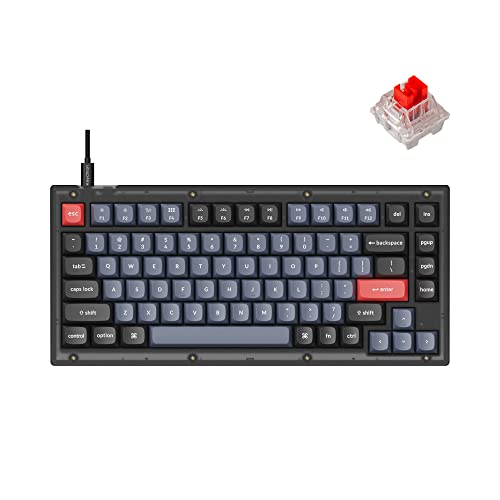
Keychron V1
VIA at the entry price
- 75 percent layout, hot-swap
- QMK/VIA support
- Live remapping and layers
- Assembled and ready
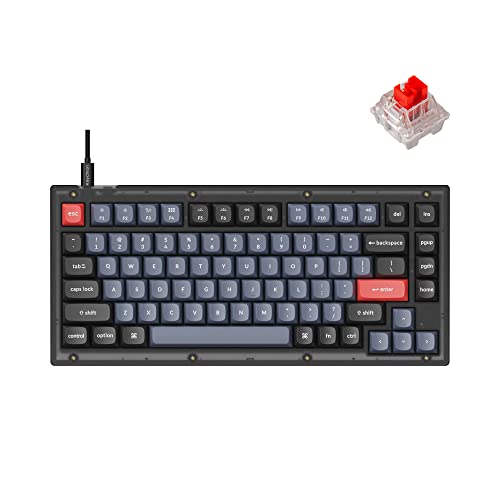
The V1’s significance in a firmware guide is democratic: it puts the full VIA experience — every key remappable, layers and macros live — at the hobby’s entry price, in a complete 75 percent board that hides nothing from beginners. For a first encounter with configurators it is nearly ideal, because the layout is complete enough that layers are an enhancement rather than a necessity; the new owner learns the system by improving a working board instead of by rescuing an incomplete one. That is the right order of education, and it costs the least in the catalogue.
Its firmware is the genuine article, not a reduced dialect — the same QMK foundation as the flagship below, with the same community keymaps and documentation applying. The board around it is light plastic with a modest voice, as its price promises, and the firmware does not care: layers do not weigh anything. Owners who outgrow the chassis routinely keep the layout they designed on it, exported and re-implemented on their next board, which is perhaps VIA’s most underrated feature — your layout becomes portable property, independent of the hardware that taught it to you.
Strengths
- Full VIA/QMK at the lowest price
- Complete layout for learning on
- Layouts export to future boards
Trade-offs
- Plastic chassis, modest sound
- Wired focus in the base line
- Stock keycaps are basic
Best for: First configurator users and budget layout designers.
Not suited for: Buyers who want flagship hardware with their firmware.
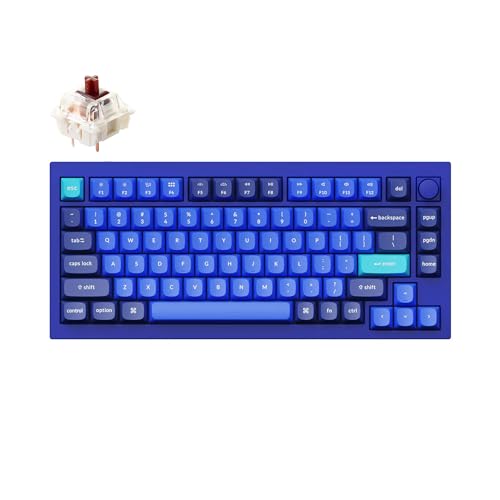
Keychron Q1
The serious layout platform
- 75 percent aluminium, gasket mount
- QMK/VIA firmware
- Hot-swap PCB
- Knob versions in the line
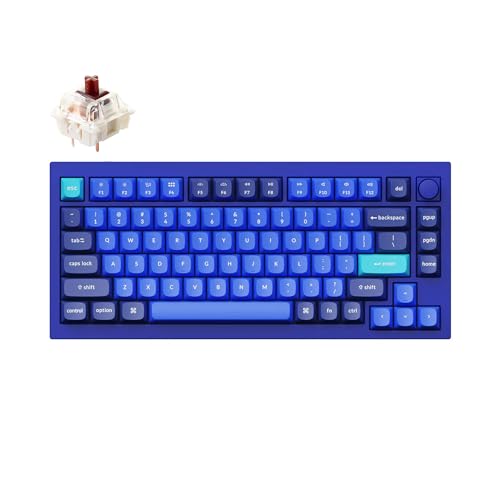
The Q1 pairs the firmware with hardware worthy of the layouts it will host: a machined aluminium case, gasket-mounted assembly and a knob that VIA lets you assign to volume, zoom, scrolling or an application’s own dial — the small, daily pleasure that converts configurator sceptics more reliably than any layer diagram. For the owner whose remapping is headed toward application-specific profiles and a personal system they intend to keep for years, this is the platform tier: the board’s physical quality stops being a reason to upgrade out from under a perfected layout.
Version awareness applies as ever — the line spans generations with different connectivity — and the verified listing in the sources file fixes the configuration this article describes. Judged as a firmware platform it lacks nothing the ecosystem offers: full QMK beneath VIA, community support at flagship depth, and the encoder as a bonus input most boards cannot offer their configurators. The layout you build here is meant to be a long-term asset; the Q1 is built like one too.
Strengths
- Flagship hardware under full QMK
- Knob becomes a VIA-programmable dial
- Deep community keymap library
Trade-offs
- Premium price
- Heavy; a permanent desk board
- Generations differ — verify the listing
Best for: Committed layout designers and application-profile builders.
Not suited for: Casual remappers, whom the V1 serves for less.
Keychron Q12
The southpaw firmware argument
- 96 percent layout, number pad on the left
- Aluminium case, gasket mount
- QMK/VIA firmware
- Hot-swap PCB
The Q12 is included because its very existence is a firmware-era argument: a full layout with the number pad moved to the left side, serving the southpaw workflow this cluster’s left handed southpaw keyboards guide explores — right hand free for the mouse, left hand entering data. Such a board is only viable because its owners can finish the design themselves in VIA: mirroring the pad’s behaviour, assigning the navigation cluster, and tuning the layout to a workflow no mass-market board would dare to ship as a fixed decision. Niche hardware plus open firmware is the ecosystem’s signature combination.
As a physical board it is the Q-series formula — machined case, gasket mount, hot-swap — rearranged, and its audience is specific by design: data-heavy right-hand-mouse users, left-handed typists, and layout experimenters. For them it is not a curiosity but the only board of its kind from a major maker, and its VIA support is what turns a brave layout into a workable one. General buyers should admire it as evidence and buy the Q1.
Strengths
- Unique left-pad layout, fully tunable
- Flagship build quality
- VIA makes the niche workable
Trade-offs
- A specialist’s board by design
- Adaptation period for the pad’s move
- Premium price
Best for: Southpaw data-enterers and layout experimenters.
Not suited for: Conventional layouts’ contented owners.
Designing Your First Layout: Principles That Survive Contact With Work
Begin from the factory layout and change one thing at a time — the discipline this cluster prescribes for tuning applies doubly to layouts, because a keymap changed wholesale cannot be debugged by its owner’s fingers. The highest-value first changes are nearly universal: Caps Lock becomes Fn or Control (or a tap-hold doing both, once QMK’s deeper features call), the arrow cluster settles under the right hand’s home fingers on layer one, and the media and function keys arrange themselves across the number row they mirror. These three moves teach the layer system, repay their learning within days, and leave the rest of the board familiar while they bed in.
Application layers come second, built from observation rather than ambition: spend a week noticing which shortcuts your main software makes you stretch for, then give exactly those to the layer positions your fingers already visit. Macros belong to the third wave, and the honest macro is short — a signature, a boilerplate line, a sequence of three shortcuts — because long macros are scripts wearing a key’s clothing and break the first time the software updates. The configurator’s live nature makes all of this empirical: every decision can be typed on within the minute and reversed within the next, so the layout converges by use rather than by theory. Export and back up the result when it settles; a perfected keymap is a document, and documents deserve copies.
Safety, Recovery and the Unbrickable Truth
New owners fear breaking the board, and the fear deserves a precise answer: remapping in VIA cannot damage anything. The configurator writes configuration, not firmware, and a layout can be reset to the board’s defaults from within the tool or by the board’s reset procedure. Even at the QMK level, flashing is designed to be recoverable — boards enter a bootloader mode by a key combination or a physical button, accept a known-good firmware file, and return to life; the genuinely bricked QMK board is a creature of folklore rather than of forums. The disciplines that keep it that way are small: flash only firmware built for your exact board model and revision, keep the factory firmware file downloaded before your first experiment, and never interrupt a flash mid-write.
Version hygiene is the quieter safety topic. VIA’s recognition of a board depends on definitions that occasionally need loading manually for newer or smaller-run models — a five-minute procedure with the maker’s provided file, and the single most common ‘VIA does not see my keyboard’ fix, ahead of the cable check (the board must be in wired mode for configuration on most wireless models) and the browser check (the web configurator wants a Chromium-based browser). None of these is a defect; they are the ecosystem’s known handshakes, and the troubleshooting guide in this site’s library covers their cousins. The firmware world rewards owners who read one page of documentation before panicking, and it nearly always rewards them within the page.
Layers, Thought Through: Designing for Your Own Hands
The main guide teaches the layer mechanics; this expansion teaches the design, because a layer system is a small language and most owners speak it badly for want of a grammar. The first principle is proximity: a layer’s most-used keys belong under the strongest fingers at their home positions, and its rarest keys can afford the far reaches — the same economics that arranged the base layer’s letters, applied by you, to your vocabulary. The second principle is mnemonics over geometry: a media layer whose volume sits under the keys your hand already associates with up and down will be remembered in a day; a logically gridded arrangement that requires a mental map will be forgotten by Friday. Design for the hand’s memory, which is spatial and habitual, not for the eye’s, which is neither present nor consulted while typing.
The third principle is that a layer should be a place, not a pile. The owners whose layers work treat each as a room with a purpose — the navigation room, the media room, the number room — entered deliberately and left without residue, while the owners whose layers frustrate them have built corridors of unrelated functions that must be traversed with a guide. The 40 percent keyboard guide‘s small-board survival depends on this principle absolutely, and full-size owners benefit from it in proportion: a board with two purposeful layers outperforms, in its owner’s actual speed, a board with six miscellaneous ones, because the cost of a layer is never the keystroke that enters it but the recall that finds anything inside.
And the design has a testing method worth institutionalising: the fortnight rule from the build guide applies to layers with doubled force. Live with a draft layer for two weeks of real work; keep a note — physical, beside the board — of every reach that failed, every function hunted, every key that should exist and doesn’t. Then revise once, from the note. Owners who revise daily never leave the draft state; owners who never revise live in their first draft forever. The fortnight is the interval at which evidence accumulates faster than annoyance, and it generalises to every configurable system in this cluster: firmware, like foam, is tuned by intervals, not by impulses.
Macros With Judgment: What Deserves Automating
A macro is a promise your future self must keep, and the judgment of what deserves one is a skill this guide should teach explicitly. The deserving macro has three properties: it is frequent (weekly at least), it is fixed (the same keystrokes every time, unvarying), and it is annoying (long enough, or awkward enough, that its manual performance taxes the work’s flow). Email signatures, standard replies, the build command, the date format your organisation demands — these are the macro’s natural citizens. The undeserving macro fails one of the tests: the rare sequence (whose recall will cost more than its performance), the variable sequence (which the macro will get wrong at the worst moment), and the short sequence (whose automation saves a second and costs a layer position forever). Most owners’ macro libraries are half citizens and half tourists; the audit that evicts the tourists is an hour that pays for years.
There is also a safety doctrine for macros, because a macro is keystrokes with the judgement removed. Never macro a sequence that ends in a commitment — a send, a delete, a purchase — without a deliberate pause built in, a keystroke the human must supply, because the macro fired into the wrong window is the firmware world’s own goal, and it happens to every macro author exactly once before they learn. Passwords must never live in macros at all: the keyboard’s memory is readable by design, and a credential stored in a keymap is a credential published to anyone with the board and a cable. The keyboard layouts QWERTY Dvorak Colemak guide’s remapping counsel shares this doctrine’s spirit — configuration is power, and power wants a safety review before it wants an audience.
And the macro library, like the keymap, wants its backup and its documentation. A macro whose purpose its author cannot state in a sentence is a macro whose accidental firing will be a mystery novel. Keep the keymap’s source — the JSON, the vial file, the exported configuration — with the build notebook, versioned by date, so that the board’s intelligence survives the computer’s replacement and the firmware’s update. Owners treat keymaps as settings; they are documents, the record of a thousand small decisions about how work should feel, and they deserve a document’s care.
QMK, VIA, Vial and the Vendor Tools: A Field Comparison
The firmware landscape divides into three territories, and a buyer or owner benefits from the map drawn plainly. QMK proper is the source-code territory: total power, total responsibility, a compile step between intention and board. It is the native land of builders and the destination of anyone whose desired behaviour is unusual enough that no graphical tool exposes it — per-key timing exotica, custom lighting physics, behaviours the configurators’ menus never imagined. VIA is the diplomatic territory: a graphical configurator that reprograms a QMK board live, without compiling, covering the overwhelming majority of what owners actually do — remaps, layers, macros, lighting — at the cost of the exotic. Vial extends VIA’s territory with tap-dance and combo configuration and an unlocked ethos, for boards whose firmware carries it. The vendor tools — each brand’s own utility — are the fourth territory pretending to be three: some are VIA in a costume, some are proprietary subsets, and their quality varies from excellent to abandonware, which the how to choose a mechanical keyboard the buyers guide counts among the buying criteria for exactly that reason.
The territories’ practical meaning for a buyer is a question to ask of any board: which land does it live in, and can it emigrate? A board on QMK with VIA support offers the full ladder — graphical ease today, source power tomorrow — and that ladder is worth money, because the owner’s ambitions grow with their tenure and the board should not cap them. A board on a proprietary tool is capped at its maker’s imagination and its maker’s lifespan; when the tool stops being updated, the board’s configurability is frozen at the last version that ran on a current operating system, which is a slower and sadder obsolescence than any switch’s wear. The firmware territory is thus a durability specification, and it belongs on the checklist beside the switches and the caps.
For the owner already placed, the map’s use is diagnostic: the behaviour you want lives in one of the territories, and knowing which one converts forum confusion into a route. Want a key to do a new thing? VIA, in minutes. Want a key to do a thing no menu lists? QMK, in an afternoon, with the community’s examples as your tutors. The firmware world is unusually well documented by its citizens — every exotic behaviour you can imagine has been implemented, published and explained by someone — and the owner’s real skill is not programming but searching: the precise naming of the behaviour you want, in the vocabulary the territory uses. This guide’s glossary sections exist to give you that vocabulary; the rest is retrieval.
Tap Dance, Combos and the Advanced Vocabulary
Three advanced behaviours repay explanation because they change what a small board can be. Tap dance gives one key several behaviours by rhythm: tap for one character, hold for a layer, double-tap for a third function — the technology that puts a full navigation cluster under a 40 percent board’s home row, at the cost of a timing window the owner must learn and tune. Combos produce a key from two keys pressed together — the stenographer’s principle, miniaturised — turning adjacent pairs into the characters a small board lacks, with a learning curve that is real and a speed, once learned, that surprises everyone who pays it. Mod-tap, the workhorse the main guide introduces, is the family’s eldest: a key that is a character tapped and a modifier held, the single behaviour most responsible for the small-board era, and the one whose timing window causes most of the misfires beginners blame on the concept rather than on the calibration.
The calibration is the section’s practical heart. Every timed behaviour has a window — the tapping term — and its correct value is a property of the owner’s hands, not of the internet’s defaults. Too short, and intended holds fire as taps; too long, and intended taps lag while the firmware waits to learn your intention, a delay typists feel as the board’s hesitation. The tuning method is the cluster’s universal one: change the term by small steps, live with each for days, and let the misfire count — kept honestly, on paper — arbitrate. Owners who tune by feel in a single session chase their own tail; the hands adapt to the window as the window adapts to the hands, and only the interval method separates the two motions.
And the advanced vocabulary has an admission price worth stating: complexity debt. Every timed behaviour is a behaviour that can misfire in a new way, under fatigue, on a borrowed computer, in a presentation’s first minute. The masters of these systems keep their base layers boring — a stranger could type on their board’s layer zero without incident — and confine the exotica to layers they enter deliberately. That architecture, dull at the surface and deep underneath, is the mark of a configuration designed by someone who has been embarrassed by their own cleverness in public, which is to say by someone experienced. Be experienced cheaply: copy the architecture before you need the lesson.
Troubleshooting Firmware: The Calm Ladder
Firmware faults have a ladder of their own, and climbing it calmly is a learnable procedure. The first rung is the cable and the port — the eternal first rung of every guide in this cluster, because the configurator that cannot see the board is usually reporting a connection, not a corruption. The second is the configurator’s version against the board’s firmware generation: the tools and the boards version independently, and a mismatch presents as exactly the weirdness — half the keys remappable, settings that will not save — that owners misread as hardware failure. The third is the reset: every board has a bootloader path and a factory state, documented by its maker, and returning to it is not defeat but diagnosis, dividing the world into faults that survive a reset (hardware, almost always) and faults that do not (configuration, almost always).
The fourth rung is the community’s memory: the board’s name plus the fault’s precise description, searched before it is posted, because firmware faults are population events — a version’s bug, a configurator’s regression — and their solutions are usually already written by the owner who met them last month. The fifth is the reflash, performed by the maker’s instructions exactly, with the board on a stable connection and the file verified as the board’s own — the one firmware procedure where improvisation is genuinely dangerous, because a wrong file or an interrupted write can leave a board awaiting a recovery procedure that not all boards possess. The ladder’s order is the protection: most faults die on rungs one to three, and the owner who starts at rung five has volunteered for risks the fault never required.
And the ladder has a preventive basement: the backup, taken when the configuration is good, stored with the build notebook, refreshed after every deliberate change. A board whose good state is backed up can be experimented on with a free mind, because every experiment is reversible in minutes — the same founding virtue as the tape mod’s, in software form. The owners who fear their firmware have usually never made the backup; the owners who play with it always have. Make the backup, and the whole territory changes character, from a cliff edge to a playground with a fence.
The Keymap as a Living Document
A closing reflection on what a keymap becomes across years of ownership, because it is unlike any other artefact in this cluster. A keymap accumulates: the layer designed for the job you have since left, the macro for the software you no longer use, the clever tap dance whose purpose its author must reconstruct from context. It becomes, unedited, a stratigraphy of your working life — and like all stratigraphy it repays an occasional excavation. The annual keymap audit, performed with the cable guide’s annual audit and the desk’s, asks of every layer and macro the audit’s question: what friction do you answer, and when did you last answer it? The evictions free the board’s best positions for the current life’s vocabulary, and the audit’s discoveries — the forgotten layer that solves this month’s problem — regularly repay the hour by themselves.
The keymap also wants sharing, in both directions. Published keymaps are the firmware world’s folk literature: the layouts that famous typists, programmers and writers actually use, available for import and adaptation, and reading them is an education no guide can replicate because they are solutions to real lives rather than to exercises. Publish yours when it has stabilised — with its reasoning in the comments, the courtesy the best examples extend — and the folk literature gains the dialect your work invented. The advanced keyboard modding techniques guide on this site treats configuration as the deepest modding layer; the keymap’s publication is where that layer becomes a commons.
And finally, the keymap is the one part of the keyboard that is wholly, inalienably yours — the switches are a maker’s, the case a designer’s, but the arrangement of functions under your hands is an autobiography written in keystrokes. Owners who understand this keep the document as they keep few settings: backed up, versioned, and revised with the respect due to a text that a decade of hands has co-authored. The board will be replaced someday. The keymap, exported and carried to its successor, will not — and that continuity, more than any switch or case, is what makes the second board feel like home on its first evening.
Sharing Keymaps: Etiquette and Licences of the Commons
The keymap commons runs on an etiquette worth recording, because the reader who publishes and borrows in it will meet its customs and should meet them prepared. Borrow freely and credit naturally: a layout adapted from a published keymap should carry its parentage in its comments, not as a legal anxiety but as the courtesy that keeps the commons’ authors publishing. Publish completely: a keymap shared without its reasoning — why this layer lives here, why that tap dance exists — is a puzzle; shared with its reasoning, it is a teacher, and the commons’ best artefacts are the commented ones whose authors explained themselves to strangers they would never meet. Respect the difference between a keymap and a product: the famous typist’s layout is a solution to their corpus and their hands, published as evidence, not as a prescription, and adopting it whole without the census is the layout equivalent of buying someone else’s prescription glasses because the frames looked well on them.
The commons also has a maintenance dimension that closes this guide’s circle: keymaps, like firmware, are revised, and the owner who follows a board’s community definitions and example layouts is subscribing to a literature whose new editions genuinely improve on the old. Check the commons when a behaviour frustrates you, before engineering your own — the odds are overwhelming that the frustration is a known country with a mapped road, because the firmware world has been inhabited, at this point, by millions of typists whose problems form a finite and well-catalogued set. Your problem is almost certainly in the catalogue. The commons is the catalogue, and learning to read it is the last firmware skill this guide teaches — the one that makes all the others cheaper, forever.
Your First VIA Session, Start to Finish
Twenty minutes from a factory board to a personally remapped one. The board is connected by cable for configuration.
- Open the VIA configurator (the web version in a Chromium-based browser, or the desktop app) with the board plugged in by USB. Confirm the board is recognised and its layout appears; if it is not recognised, load the maker’s definition file for your model before troubleshooting further.
- Before changing anything, find the reset-to-defaults command and note it. Knowing where the exit is makes the whole building safe to explore.
- Make the flagship change: assign Caps Lock to Layer 1 momentary (labelled MO(1) in the configurator). Test it physically — hold Caps and press a key on layer 1 — before designing anything.
- Build the arrow cluster on layer 1 under your right hand’s home position, in the inverted-T geography your fingers expect. Type with it for real work, not for a demo sentence.
- Add the function row across layer 1’s number row and the media keys where they feel inevitable. Resist adding more; the layer is finished when everything on it is used daily.
- Record one honest macro — your email signature or a boilerplate line — onto a layer-1 key, and use it in real correspondence. Then export the layout file and store it with your documents. Your keymap is now an asset with a backup.
Firmware Mistakes That Teach the Wrong Lesson
Remapping everything on day one.
A wholesale redesign cannot be learned, debugged or remembered, and its owner concludes within the week that layers ‘do not work for them’. The system failed no one; the rollout did. One change, a day of typing, the next change — the convergence is slower by the calendar and faster by every other measure, including the only one that counts, which is whether the layout is still in use in month three.
Burying essential keys on deep layers.
Layer 3’s cleverness is layer 3’s cost: every excursion beyond the first layer taxes memory and breaks flow. Functions used hourly belong on the base layer or the first; deep layers are for the rare and the ceremonial. A layout whose Print Screen requires a chorded pilgrimage will simply stop being used for screenshots, and its owner will reach for the mouse like the firmware never happened.
Flashing firmware meant for another model or revision.
The ecosystem’s one genuinely dangerous act, and it is prevented by reading the filename twice. Boards share names across revisions with different controllers; the maker’s page for your exact unit is the only source. The recovery usually exists — bootloader mode forgives much — but the evening it costs is entirely self-inflicted.
Designing layers by symmetry instead of by hand.
A layer that looks beautiful in the configurator’s grid but puts its arrows under the wrong fingers will be admired and unused. Layouts are choreography, not typography: build them from the home position outward, test them in real sentences, and let the fingers’ votes overrule the eye’s every time.
Never exporting the finished keymap.
A perfected layout that exists only in one board’s memory is a document with no copy, hostage to a future reset, a replacement board or a firmware update’s housekeeping. Exporting takes twenty seconds from the same configurator that built it. Do it when the layout settles, and again whenever it changes materially.
Remapping the board into an unusable state with no escape key.
Every configuration session should preserve the exits: a known path to layer zero, a reset combination you have actually tested, and the configurator’s access key left where muscle memory expects it. Owners who remap freely without securing the exits eventually build a board only they can operate — and then, one firmware hiccup later, a board nobody can. Secure the exits first; the playground is safe only with its fence.
Frequently asked questions
Does VIA work with any keyboard?
No — the board must run QMK (or a compatible firmware) and carry a VIA definition, which the maker supplies. The listing’s ‘QMK/VIA support’ line is the promise to check, and it has become common from the entry tier upward, as the V1 above demonstrates. Boards with proprietary-only firmware use their makers’ own configurators, whose quality varies from excellent to abandonware; the open stack’s advantage is that it cannot be discontinued out from under you.
Will remapping void my warranty or damage the board?
Remapping through VIA writes ordinary configuration and is a designed, supported use of the board — it damages nothing and resets completely. Flashing custom QMK firmware is likewise a designed capability on boards that advertise it, though makers’ warranty language varies on the point and is worth a glance for the cautious. The configurator path, which is where nearly all owners live, carries no risk worth the name.
What is the difference between VIA and Vial or other configurators?
Vial is a community relative of VIA with some deeper features exposed (tap-dance and combos in a graphical interface, among them) and its own board-support list; maker tools like Keychron’s Launcher cover their own ranges with a similar live experience. The concepts transfer completely — layers, remaps, macros — so learning VIA’s model in this guide equips you for all of them. Choose by your board’s support, not by configurator loyalty.
Can I share my layout with another board or a friend?
Layouts export as files from the configurator and import into the same model directly; across models, the key positions differ, so the file serves as a precise blueprint rather than a transplant. Community keymap sharing is a real culture — popular software’s layouts circulate as starting points — and beginning from a respected layout for your main application, then personalising it, is a legitimate shortcut past the blank-page stage.
My board is wireless. Can I configure it over Bluetooth?
On most current boards, configuration happens over the cable — plug in, configure, unplug, and the layout persists in the board for wireless use. A minority of newer models configure wirelessly through their makers’ tools. The cable-for-configure arrangement surprises owners once and never again; the layout itself is connection-agnostic once written.
How many layers do I actually need?
Most perfected personal layouts use two or three: the base, one main function layer, and occasionally an application or gaming layer. Boards offer more because modes multiply cheaply, but every layer beyond the third should justify itself against the memory it taxes. The HHKB’s designers reached the same conclusion in hardware a generation ago — one well-designed layer, learned completely, outperforms a stack of clever ones consulted from a diagram.
My board is not recognised by VIA. What do I check first?
In ladder order: the cable (it must carry data — charge-only cables are the classic culprit, and the board’s own cable is the control), the port and hub (connect directly for the test), the board’s VIA support itself (not every QMK board enables VIA; some require a definition file loaded into the configurator, which the maker’s page supplies), and the configurator’s version against the board’s firmware generation. Most recognition failures die on the first two rungs; the definition file is the third’s usual answer; a board that still will not appear after a reset is a question for the maker’s support with your ladder notes attached.
Can firmware updates damage my keyboard?
A correctly performed update with the board’s own file is routine and safe; the risks live in the deviations — a file for a different model or revision, a connection interrupted mid-write, a hub between the computer and the board at the critical moment. Follow the maker’s sequence exactly, on a direct connection, with the file verified, and keep the previous version’s file in your backup folder. Boards with dual-bank or recovery bootloaders forgive even most accidents; the backup habit is what makes the rest forgivable by hand.
Firmware is the keyboard layer that owners feel least at purchase and most across ownership, because it is the only part of the board that can keep improving after the box is opened. QMK and VIA convert the keyboard from a fixed appliance into a personal instrument whose vocabulary grows with its owner’s ambitions — a second keyboard inside every key, waiting under a held Caps Lock. Learning the system takes an evening; refining the layout it enables becomes one of the hobby’s quiet, durable pleasures, revisited whenever your software or your hands change their minds.
Start with the configurator and one honest change. Let the arrows settle under your fingers, let the macro earn its key, export the file like it matters — because a layout tuned to your work, portable across your future boards, genuinely does. The hardware brought you here; the firmware is where the board becomes yours, and unlike everything else in this cluster’s guides, it costs nothing but attention to begin.