Affiliate disclosure: this article contains affiliate links. If you buy through a link on kajuandouglas.com, the site may earn a commission at no extra cost to you.
This is how to choose a mechanical keyboard the buyers guide way: not by chasing the longest feature list or the loudest typing video, but by working through the handful of decisions that actually determine whether a board suits your hands, your desk and your work. Size, switch family, connectivity, firmware and build — five choices, made in the right order, narrow a market of thousands of boards to a shortlist of three or four, any of which would serve you well. Every other specification is either a consequence of those five or a distraction dressed as one.
The guide is organised as a decision path. Early sections settle size and switches, the two choices your fingers will judge daily; the middle reviews verified boards that exemplify the main branches of the path; later sections cover connectivity, firmware, sound and the secondary features marketing departments promote hardest. A mistakes section collects the purchasing errors that generate the hobby’s returns, and the FAQ answers the questions that survive every shortlist. Readers choosing their very first board should also read the companion how to choose first mechanical keyboard piece, which assumes less and reassures more.
Key takeaways
Decide in this order: size first (it fixes your layout and desk footprint), switch family second (linear, tactile or clicky — the feel you will judge ten thousand times a day), then connectivity, then firmware openness, then case and keycap quality. Hot-swap sockets are the beginner’s insurance policy because they let the switch decision be revised for the price of a switch set. Spend on the board you will keep; the hobby’s cheapest outcome is buying the right keyboard second.
In this guide
Decision One: Size, Layout and the Keys You Actually Use
Keyboard sizes are named by how much of a full-size board they keep: full-size retains everything including the number pad; tenkeyless removes the pad; 75 percent compresses the rest into a tight block with a function row; 65 percent drops the function row and keeps arrows; 60 percent drops the arrows into a layer as well. The keyboard sizes reference in this cluster lays the whole family out with key counts, and the keyboard size guide companion works through the desk-space arithmetic. The buyer’s task is not to memorise the taxonomy but to audit their own habits: count, honestly, how often the number pad, the function row and the dedicated arrows earn their space in a working week.
The audit surprises most people. Number pads turn out to be weekly tools for the spreadsheet-heavy and dead weight for almost everyone else; function keys matter intensely to users of certain professional software and not at all to writers; arrow keys are the sticking point, because even occasional users reach for them constantly and resent meeting them on a layer. The 75 percent layout exists precisely because it concedes nothing on that list — every key present, merely rearranged — which is why it has become the market’s centre of gravity and this guide’s default recommendation for anyone whose audit comes back mixed.
Regional layout is the size decision’s silent partner. ANSI and ISO standards differ in Enter shape and several key positions, and a board bought in the wrong standard will annoy its owner daily in a way no switch can compensate for. The ISO vs ANSI keyboard layout comparison explains the differences and how to verify a listing’s standard before purchase. Buyers in ISO regions should filter for their standard first and let the shortlist form inside it; the market is smaller there, and pretending otherwise wastes everyone’s time.
Decision Two: Switches — the Feel You Are Actually Buying
A mechanical keyboard is, in the end, a delivery vehicle for its switches, and the families divide by what your finger feels mid-press. Linears travel in one smooth motion and suit fast typists and gamers who bottom out every key. Tactiles insert a perceptible bump at the actuation point — feedback without noise — and suit writers and programmers who type by feel. Clickies add a deliberate sound mechanism to the bump; they are joyful at home and a social decision in an office. Weight matters within each family: light switches forgive long sessions and punish sloppy fingers with accidental presses, heavy switches do the reverse.
Two technologies complicate the family picture usefully. Optical and Hall-effect switches replace the metal contact with light or magnetic sensing, enabling adjustable actuation and rapid-trigger behaviour that competitive gamers genuinely benefit from — the keyboard latency input lag explained explainer quantifies how much of that benefit is real. Topre’s electro-capacitive switches sit outside the contact families entirely, with the dome-driven feel examined in this cluster’s HHKB Topre keyboards deep dive. For a first quality board, though, the mainstream families suffice, and hot-swap sockets — now close to universal — mean the choice is a starting point rather than a life sentence.
The practical method for choosing without a shop full of testers: buy a switch tester or a small sample set first if your uncertainty is real, and read force and travel specifications with the scepticism they deserve, since two switches with identical numbers can feel clearly different. Sound recordings help less than expected, because switches sound different in different cases — a theme the keyboard sound test guide develops. What transfers reliably between boards is the family’s character; what never transfers is the exact voice.
Decision Three and Four: Connectivity and Firmware
Connectivity divides into wired, Bluetooth and 2.4 GHz wireless, and modern boards increasingly offer all three — tri-mode — in one unit. The honest differences: wired is simplest and charges nothing; Bluetooth pairs with several devices and sips power but carries the highest latency; the 2.4 GHz dongle approaches wired responsiveness and suits gaming desks. The Bluetooth vs 2.4GHz keyboards tri-mode explainer on this site quantifies the trade-offs. Buyers with one computer and a tidy desk gain little from wireless beyond aesthetics; buyers rotating between a laptop, a desktop and a tablet gain a great deal, and should weight multi-device pairing accordingly.
Firmware is the quiet decision with the longest consequences. Boards running QMK or VIA can be remapped from a friendly interface — any key to any function, layers designed around your software — and that capability compounds in value as your habits evolve. Proprietary drivers range from adequate to abandonware, and a board whose driver is its only remapping path is a board whose usefulness has an expiry date set by its maker’s priorities. The keyboard firmware QMK VIA guide in this cluster shows what the open path actually looks like day to day. This guide’s position is simple: at any price where open firmware is available, take it.
Battery and polling specifications belong to this section and deserve deflation. Battery life claims assume backlighting off and ideal conditions; treat them as relative rankings rather than promises. Polling rate — how often the board reports to the computer — matters at the competitive gaming margin and almost nowhere else, as the keyboard polling rate explained analysis demonstrates. Neither number should outrank size, switches or firmware in a buying decision, whatever the product page’s typography suggests.
How to Choose a Mechanical Keyboard the Buyers Guide: The Shortlist
Four verified boards mark the main branches of the decision path: the open-firmware aluminium all-rounder, the value board that makes the fewest wrong choices, the full-size option for number-pad loyalists, and the low-profile branch for wrists that prefer it. Before writing, each pick was cross-checked with the Amazon catalogue data this site verified on the date in the sources file.
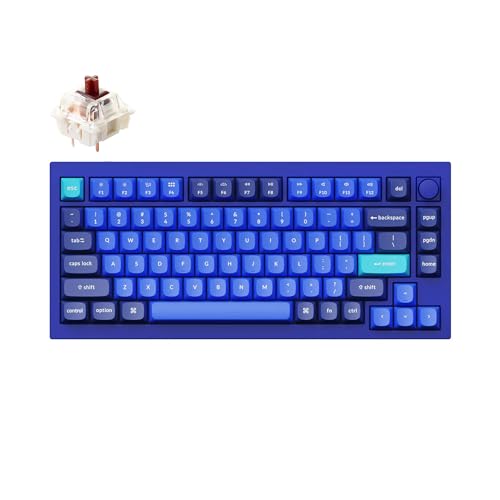
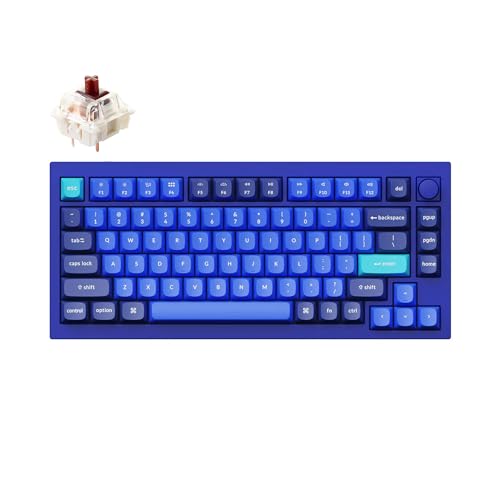
Keychron Q1
The all-round benchmark
- 75 percent aluminium case
- Gasket-mounted, hot-swap PCB
- QMK/VIA firmware
- Wired and wireless versions in the line
The Q1 is what the decision path looks like when every answer lands on the safe side: the size that concedes nothing, hot-swap sockets for switch revision, open firmware, a machined case that makes the board feel like equipment rather than accessory. It is the board this guide would hand to a buyer who refused to read further, with reasonable confidence that the ownership experience would vindicate the shortcut. Its sound out of the box is good rather than great, and the simple mods covered later in this guide close most of that gap.
Version discipline matters when ordering: the line spans wired-only and wireless generations with different features, and the listing title in the sources file records the verified configuration. Weight is the other honest caveat — this is a desk fixture, not a travel companion. For the buyer whose audit said 75 percent, tactile-or-linear undecided, multi-year horizon, the Q1 remains the market’s most defensible single answer.
Strengths
- Every major decision lands correctly
- Open firmware and hot-swap future-proof it
- Case quality a tier above its price rivals
Trade-offs
- Heavy; a permanent-desk board
- Stock sound benefits from tuning
- Versions differ — verify the listing
Best for: Buyers who want one board, chosen well, for years.
Not suited for: Travellers, or buyers certain they need a number pad.
Keychron V1
The value benchmark
- 75 percent layout, light plastic case
- Hot-swap PCB
- QMK/VIA firmware
- Assembled, ready to type
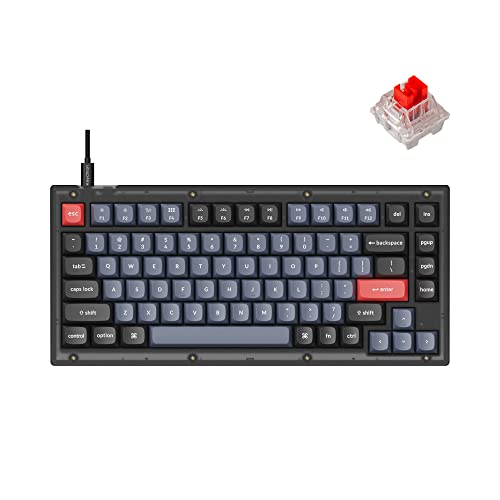
The V1’s argument is that the decision path’s most important answers — size, hot-swap, open firmware — do not require aluminium money. It delivers the same 75 percent layout and the same remapping freedom as the flagship above in a light plastic case at the entry tier, and for a buyer still unsure whether mechanical keyboards are for them, that price of admission changes the risk calculation completely. It is also the board this guide recommends to the genuinely undecided on switches: buy it with either family, learn your hands, and let hot-swap sockets finance the education.
The compromises are the case’s lightness and a stock sound that announces its price honestly. Neither matters at a first desk as much as internet discourse suggests, and both are partially addressable — a desk mat and the foam discussion in this cluster’s keyboard foam types guide do quiet work here. As a gateway that does not need replacing the moment enthusiasm arrives, the V1 is close to perfectly judged.
Strengths
- The important features at the lowest price
- Light enough to travel
- Open firmware, hot-swap — nothing essential missing
Trade-offs
- Plastic case feel and sound
- Basic stock keycaps
- Less satisfying for case-quality seekers
Best for: First-time buyers and the switch-undecided.
Not suited for: Buyers who know they want a heavy machined case.
Keychron Q6
The full-size branch
- Full-size layout with number pad
- Aluminium case, gasket mount
- Hot-swap PCB
- QMK/VIA firmware
For the buyer whose audit returned an unambiguous verdict — the number pad is used daily and non-negotiably — the Q6 carries the flagship formula to full size without dilution: machined case, gasket mounting, hot-swap sockets and open firmware, plus the pad, the function row and the navigation cluster all present as dedicated keys. It is a large, heavy, uncompromising object, and for data-heavy professionals it is simply the correct shape of keyboard, a category the compact era keeps forgetting to serve.
The costs are desk geometry and price: a full-size board pushes the mouse far to the right, which right-handed users with shoulder complaints should weigh seriously — one reason the southpaw arrangement in this cluster’s left handed southpaw keyboards guide exists. If the desk and the shoulders consent, the Q6 is the branch of the path with the fewest regrets in it.
Strengths
- Nothing missing: pad, F-row, nav cluster
- Flagship build and firmware
- Suits data-entry and finance workflows
Trade-offs
- Very large and heavy
- Mouse sits far right
- Premium price
Best for: Number-pad professionals who want flagship quality.
Not suited for: Small desks or mouse-shoulder sufferers.
NuPhy Air75 V2
The low-profile branch
- 75 percent low-profile layout
- Slim aluminium frame
- Tri-mode wireless
- Hot-swap low-profile switches
Low-profile boards are the path’s most distinct branch: shorter switches, shorter travel, a board that sits nearly flat and asks almost nothing of the wrists’ angle. The Air75 V2 is the branch’s standard-bearer, packing the 75 percent layout, tri-mode wireless and hot-swap sockets into a slim aluminium frame that travels in a laptop sleeve and looks at home in a design studio. Typists migrating from laptop keyboards find the transition gentler here than anywhere else in the mechanical world.
The branch’s terms should be understood before buying: low-profile switches and keycaps form their own ecosystem with fewer aftermarket options, and the typing feel — quicker, shallower — divides opinion sharply. The flat vs angled keyboard for typing comparison on this site explores the wrist question properly. For flat-desk devotees and frequent travellers, no full-height board answers as well as this one does.
Strengths
- Slim, light and genuinely portable
- Tri-mode wireless done well
- Gentle transition from laptop keyboards
Trade-offs
- Smaller switch and keycap ecosystem
- Shallow feel divides typists
- Battery life trails larger boards
Best for: Travellers and laptop-native typists wanting a mechanical step up.
Not suited for: Deep-travel traditionalists or heavy keycap collectors.
Decision Five: Build, Keycaps and the Sound You Will Live With
Case material is the specification buyers feel second and hear first. Aluminium cases add weight, solidity and a deeper, more controlled sound; plastic cases are lighter, cheaper and often brighter or hollower in voice depending on their internal design. Neither is a quality verdict in itself — excellent plastic boards and disappointing aluminium ones both exist — but the case sets the ceiling for the board’s acoustics, and buyers who care about sound should read the keyboard sound thock clack guide before ranking listings by their typing videos. Mounting style refines the same territory: gasket mounts soften and deepen, tray mounts are firmer and brighter, and the differences, while real, are smaller than the internet’s arguments about them.
Keycaps decide what your fingers touch and your eyes read, and two variables dominate: material and profile. PBT resists shine and keeps legends crisp for years; ABS feels smoother and carries the most vivid colours but polishes with use — the ABS vs PBT keycaps comparison settles that argument in detail. Profile — the height and sculpt of the rows — changes finger travel and sound more than most buyers expect, and the keycap profiles explained guide in this cluster is the reference to consult before paying for a set. Stock keycaps on the boards reviewed above are all serviceable; keycap upgrading is a pleasure to defer, not a need to finance on day one.
The Secondary Features, Ranked by Actual Importance
Product pages promote a predictable cast of extras, and a buyer’s guide earns its keep by ranking them honestly. A rotary knob is genuinely useful — volume control under a fingertip is the kind of small luxury that gets used hourly — and worth a tiebreak, not a premium. Backlighting splits by purpose: single-colour or south-facing white light helps in dark rooms; full RGB is decoration, delightful to some and invisible to anyone who types in daylight, and it should be priced as decoration. A screen on the board is the current fashion’s purest ornament, charming and functionally negligible.
Further down the honest ranking: detachable cables and tidy routing channels matter to desk minimalists and pair naturally with the cable-management thinking in this cluster’s how to hide your keyboard and mice cables guide; spare switches and a bundled puller in the box are small generosities that signal a maker thinking about ownership; carrying cases matter exactly as much as your travel does. What should never decide a purchase is the length of the feature list itself. The five decisions at this guide’s core will be felt in every sentence you type; the extras will be noticed, at most, in the first week and in photographs.
The Five-Year Cost of a Keyboard Decision
Buyers compare keyboards by purchase price because it is the only number on the page, but a keyboard’s true cost is a five-year sum with several terms the page omits. The first term is the accessories the board’s choices compel: the wrist rest its height demands, the cable its port position wants, the keycap set its stock caps make necessary, the switches its soldered PCB forbids you from ever needing — or its hot-swap PCB invites you to keep buying. The second term is replacement and repair: a board with a fixed cable and a tired port is a board with a lifespan, while a detachable cable and standard parts make the same fault a five-minute errand. The third term is the upgrade itch the board either settles or schedules: a board bought as a compromise is a deposit on its replacement, and the market’s veterans can recite the staircase — entry board, better board, the board — whose total exceeds the destination bought directly, a pattern the Topre deep dive in this cluster prices from the other end.
None of this argues for buying the most expensive board; it argues for pricing the decision rather than the object. A mid-priced board with hot-swap sockets, a detachable cable, standard keycap compatibility and a layout that fits the work is frequently the cheapest five-year keyboard in its comparison, because every one of its future events is cheap. The premium board with proprietary everything can be the most expensive even before it breaks. The how to choose first mechanical keyboard guide applies the same arithmetic to a first purchase, where the terms are smaller but the staircase risk is identical.
The five-year frame also disciplines the features debate. A feature you will use daily for five years — a knob mapped to your actual work, a layer system your hands have memorised — amortises to nothing. A feature you will use in the first month — lighting scenes, a screen’s novelty — amortises to its full price divided by thirty days. Buyers do not need to become accountants; they need to ask, of each headline feature, which of those two features it is. The boards that win five-year comparisons are relentlessly the ones whose features were boring and daily.
Trying Before Buying in a Showroom-Poor Hobby
Mechanical keyboards are bought mostly untested, which is the hobby’s strangest economic fact, and this guide’s research methods deserve a fuller treatment. The switch tester is the first instrument — a row of switches on a plate, pressed in a shop or ordered cheaply — and its evidence is real but narrow: it grades switches as isolated events, not as a board’s rhythm, rather as a single piano key grades a piano. The second instrument is the borrowed board: meetups, offices and friends’ desks are the hobby’s true showrooms, and ten minutes of real typing on a real board outweighs a month of reviews, because your hands file the only verdict that will still matter in year two. The third instrument is the returns window, used honestly: order the finalist, type real work for real days, and return it only if the hands vote no — a method retailers price into their margins and buyers should use without guilt and without abuse.
Video evidence sits below all three, and its proper use is narrow. Sound tests demonstrate a board’s voice in someone else’s room, through someone else’s microphone, on someone else’s desk — the keyboard sound test guide in this cluster exists largely to teach how much of that evidence survives the journey to your ears. Reviews, this one included, can grade construction, features and value with authority; they cannot grade fit, because fit lives in the reader’s hands and nowhere else. The buyer’s guide’s epistemology, stated plainly: research narrows the field to finalists; only contact crowns one.
There is a fourth instrument the hobby underuses: time on your current board, instrumented. Most upgrade desires are specific complaints in disguise — a pinging spacebar, a layout that wastes the right hand, caps worn to mirrors — and each complaint has a price to fix that is usually a tenth of a new board’s. The how to fix keyboard spring ping noise and keyboard chattering double typing fix guides in this cluster are, in this sense, buying guides too: they price the alternative to purchase, which is the comparison every honest buying decision must include. Buy when the complaint is the board’s nature. Repair when it is the board’s state.
Layout Literacy: Reading Your Own Work
The size decision — the comparison this guide’s main sections stage — has a research method worth teaching explicitly, because buyers choose sizes by looking at keyboards when they should be looking at their own hands’ history. For one week, notice: how often does the number pad actually get pressed, versus travelled to out of habit for numbers that the number row would serve? How much of the F-row’s use is real, and how much is a media key wearing a costume? Where does the mouse hand collide with the board’s right edge, and what does that collision cost in shoulder angle across a working day? The answers are a census of your own usage, and they choose the size with an authority no review can match — the method the keyboard size guide builds its whole framework on.
The census has a second use: it prices the transition. A typist whose F-row use is genuine but weekly will adapt to a layer in a fortnight; a data professional whose pad use is hourly will not adapt to its absence at all, and should not be asked to by any guide’s enthusiasm for small boards. Adaptation costs are real costs — a week of slowed work is a price, payable once — and the honest comparison includes them. This is why the same board can be the right answer for one desk and a false economy for the identical desk next door: the keyboards are the same, the censuses differ, and the census is the decision.
Regional layout is the census’s often-missed column. The physical layout your fingers learned — ANSI, ISO or JIS, the subject of two guides in this cluster — is a sunk skill, and switching it is a cost measured in months of small errors. Buyers seduced by a board stocked only in another region’s layout should price that cost as honestly as the pad’s. The market’s breadth means the right board exists in your layout for nearly every brief; the exception is worth it only when the board is extraordinary and the buyer is patient, a conjunction rarer than listings suggest.
The Specification Traps, Collected
Every category of product develops specification traps — numbers that are true and misleading simultaneously — and keyboards have a mature collection this guide should gather in one place. Polling rate headlines quote the dongle’s capability, not the connection you will use. Battery figures are measured with lighting off at the lowest polling rate, a configuration no gaming buyer has ever run. Switch lifespan figures count presses in a laboratory rig, not years at your desk. ‘Hot-swappable’ occasionally conceals a socket that accepts only one pin count. ‘PBT keycaps’ conceals walls thin enough to ring. None of these is a lie; all of them are truths arranged to be misread, and the defence is uniform: read the specification’s conditions, or find the reviewer who did.
The deepest trap is not numerical but categorical: the assumption that a board’s tier in one dimension implies its tier in others. A flagship case can house a mediocre PCB; a budget board can carry excellent switches; the market’s pricing bundles dimensions that engineering keeps separate. This is why this guide’s structure grades boards component by component — case, switches, caps, firmware, connection — rather than crowning tiers, and why its picks are framed as fits for briefs rather than ranks of worth. The buyer who internalises the component view becomes very hard to sell a trap to, in this category or any other.
And the final trap is the comparison’s frame itself. ‘Best’ lists, this site’s included, sort by the criteria their authors chose; a buyer whose criteria differ is reading a correct answer to a different question. The transferable skill — the one this whole guide exists to teach — is converting any recommendation, including the picks above, back into the criteria that produced it, and re-running the comparison with your own. Do that, and every guide on the internet becomes useful to you, including the ones whose conclusions you should reject.
Ownership: The First Month With a New Board
A new keyboard has a bedding-in period that buyers misjudge in both directions, and managing it well is the last skill this guide teaches. Week one is novelty: the sound is fascinating, the feel is an event, and every judgement made in it is unreliable in the optimistic direction. Week two is friction: the layout’s differences stop being charming and start being errors, the spacebar’s one imperfection becomes the board’s whole personality at 1 a.m., and returns windows close over buyers who mistake this week for the verdict. Week three is the truth arriving: the hands finish their remapping, the board’s voice becomes the room’s background, and what remains — the fit, the fatigue curve, the sound at hour six — is the board you actually bought. Judge there, and almost nowhere else.
The month has homework proportionate to the board’s ambitions. A programmable board wants its layers designed from the friction week’s evidence, per the firmware discipline this cluster teaches. A board with tuning potential wants its one variable changed — foam, a switch swap on the worst key — and then a week of peace. And every board wants its predecessor kept, unlisted and unboxed-away, until the month closes: the insurance of a fallback converts the bedding-in from a verdict under pressure into an observation at leisure, and leisure is the state in which keyboards are judged correctly.
If the month closes badly — the fit is wrong in a way tuning cannot reach — the correct move is the prompt, unembarrassed exit: return inside the window or sell into a market that prices new boards kindly. The expensive outcome is not the wrong board; it is the wrong board kept for a year out of reluctance to admit a month-old mistake, typed on resentfully while its value quietly halves. Every veteran of this hobby has a board they kept too long. The tuition is only wasted if the lesson — judge at week three, exit at week four — is not banked for the next decision.
A Word on Taste, Since It Decides Anyway
Guides pretend decisions are made by criteria, and then the buyer chooses the board whose photograph they kept returning to. This guide declines to pretend. Taste is a legitimate criterion — a keyboard is looked at and touched more than almost any object you own, and the board that pleases its owner gets typed on with a willingness that shows up in the work. The discipline is not to suppress taste but to sequence it: let the criteria in this guide build the shortlist of boards that fit the work, the hands and the budget, and then let taste choose among them freely, because among finalists that all pass, the heart’s preference is the only differentiator that will still be operating in year three.
The sequence matters because taste unsequenced is how the specification traps get their victims: the beautiful board with the wrong layout, the anointed colourway on the board whose switches the hands dislike. Every one of those purchases began with a photograph and skipped the census. But taste sequenced is also how owners end up with boards they keep for a decade — the Leopold buyers in this cluster chose correctness and then discovered it was also, to them, beautiful; the HHKB owners chose a philosophy and came to love its face. Affection follows fit more reliably than fit follows affection, which is the closest thing to a law this entire guide contains.
So the buyer’s guide ends where it should: with permission. Do the census. Grade the components. Price the five years. Shortlist honestly. Then buy the one you keep looking at, set it up with the care the how-to section teaches, give it its month, and type. The best mechanical keyboard — the phrase that started this search — was never a product. It is the outcome of that process, and it is different at every desk it is honestly run at, which is why this guide taught the process and only illustrated the products.
The Returns Window as a Research Instrument
Every buying guide in this cluster mentions the returns window; this one promotes it to a method, because for keyboards it is the only showroom most buyers will ever have and it deserves to be used like one. The method begins before the purchase: choose retailers whose windows are long enough for the bedding-in month this guide prescribes, and treat a short window as a price increase, because it is one — it converts uncertainty into risk and charges the buyer for the conversion. When the board arrives, the method continues with a discipline most buyers skip: keep every part of the packaging, every accessory, every film and tie, in the state the return would require, for the window’s whole duration. The buyer who throws the box away on day one has not expressed confidence; they have burned the instrument the research depends on, and the month’s verdict, if it goes against the board, becomes unenforceable.
The research itself has a protocol. Type real work, at real length, from the second day — the festival of the first evening grades novelty, not fit. Keep the old board connected or instantly connectable, because the comparison that matters is A/B across the same document, not the new board against a memory of the old. Write the verdict down as it forms, with dates, because the window’s deadline will ask for a decision and the notes will answer it better than the deadline’s mood will. And if two finalists are in contention, run them in sequence rather than in parallel where the retailers allow — the hands grade one board at a time more honestly than they grade a desk crowded with candidates, each interrupting the other’s bedding-in.
Used this way, the returns window changes what a buying guide can promise. No guide can guarantee a fit it cannot feel; it can only narrow the field to finalists whose differences are real and then hand the decision to the only instrument that can make it — your hands, given a month, with an exit kept open. That is not a lesser promise than certainty. It is the only honest one in the category, and the buyers who shop by it stop fearing the decision, because the decision is no longer final when the money moves. It is final when the month closes and the hands have voted — which is when it should be.
Running the Shortlist: A One-Evening Buying Method
Guides are only useful if they terminate in a decision. This is the method, start to finish, on one evening with a browser and a notebook.
- Write your audit answers down: number pad yes or no, function row yes or no, arrows dedicated or layered, operating system, desk width, and whether the board travels. Six lines that will eliminate ninety percent of the market without regret.
- Filter by size and regional standard first, then by hot-swap and open firmware. The survivors form a pool small enough to compare by hand — usually under a dozen boards.
- Choose the switch family by temperament if you cannot test: writers and programmers start tactile, gamers and bottom-out typists start linear, and only the home-based and the brave start clicky. Remember the sockets forgive revision.
- Compare the finalists on case, keycaps and the extras ranking above — in that order — and read two owner reviews per finalist that are at least a month into ownership, since honeymoon reviews measure packaging.
- Check the exact listing’s configuration against the manufacturer’s specification page: version, switch option, layout standard, included accessories. Most purchasing regret in this hobby is a variant error, not a product error.
- Order from a seller whose returns policy you have actually read. The best buying guide in the world is a poor substitute for a thirty-day window in which your own hands get the final vote.
Buying Mistakes This Guide Exists to Prevent
Choosing a size by photograph.
Compact boards photograph beautifully and hide their layer compromises completely. The buyer who discovers at work that the function row is a chord has not bought badly — they have bought blind. The audit exists to be run before the photographs are allowed to speak.
Paying for switches you cannot change on a board without hot-swap.
A soldered board with the wrong switch family is a resale listing waiting to happen. Until your preferences are proven, sockets are the insurance that makes every other decision low-stakes — which is why this guide treats them as close to mandatory for first and second boards.
Believing the stock sound is the final sound.
Foam, desk mats, keycap material and simple mods move a board’s voice substantially, as the tuning literature in this cluster shows. Rejecting an otherwise correct board for its out-of-box sound — or buying a worse-fitting board for its recording — inverts the actual hierarchy of what can and cannot be changed later.
Ignoring the returns policy on a first purchase.
Switch feel is the one variable no guide can fully transmit. A seller with a genuine returns window converts that irreducible uncertainty into a manageable experiment; a final-sale listing converts it into a gamble. Price the policy into the comparison, especially at flagship prices.
Letting a deal choose the board.
Discounts on the wrong size, the wrong standard or the wrong switch family are not savings. The hobby’s classifieds are full of boards bought because the price was remarkable, being sold because the keyboard was not. The shortlist method above is deliberately deal-proof: decide the board, then hunt its price.
Choosing by the comparison table’s winner.
A table’s winner is the answer to its author’s criteria, weighted their way. Buyers who outsource the weighting get a board optimised for a stranger’s desk — the most respectable way to buy the wrong keyboard ever devised. Use tables to build the shortlist and to learn the criteria; then re-weight with your own census before the money moves.
Frequently asked questions
What size mechanical keyboard should most people buy?
The 75 percent layout is the current centre of the market for good reason: it keeps the function row and arrows as real keys while reclaiming most of the desk a full-size board spends. Buyers with daily number-pad work should stay full-size or consider a separate pad; buyers who prize mouse room above all can step to 65 percent once they accept layered function keys.
Are expensive keyboards actually better, or is it hobby pricing?
Both forces operate. Money buys case machining, better stock keycaps, quieter stabilisers and support — real, feelable differences up to a point. Beyond the mid-range, returns diminish steeply and the money increasingly buys design, materials and scarcity. The boards reviewed in this guide sit at the points where the value curve bends, which is not a coincidence.
Should I buy a keyboard with a knob or a screen?
A knob earns its place — volume and scrolling under a fingertip are used constantly. A screen is ornament: enjoyable, occasionally handy for connection status, never essential. Treat the knob as a legitimate tiebreaker between finalists and the screen as decoration to be valued only if it personally delights you.
Is wireless reliable enough for work and gaming now?
For work, unambiguously yes on any reputable tri-mode board. For gaming, the 2.4 GHz mode of a good board is effectively indistinguishable from wired for all but the most latency-sensitive competitive play, while Bluetooth remains the casual mode. The explainer linked in the connectivity section quantifies the gaps; they are smaller than the marketing of wired purists suggests and larger than the marketing of wireless advocates admits.
How long will a good mechanical keyboard last?
The switches are typically rated in the tens of millions of presses, the electronics are simple, and the wear items — keycaps, cables, batteries on wireless models — are replaceable. A well-bought board is a five-to-ten-year tool with minimal maintenance, which reframes the price discussion: the relevant figure is cost per year of daily use, and by that measure the mid-range board you keep is cheaper than the budget board you replace.
What is the single most important thing to get right?
Size. Switches can be swapped on a hot-swap board, keycaps can be replaced, firmware can be learned — but the layout is the board, permanently. Run the audit, be honest about the number pad and the function row, and let every other decision be the revisable kind.
How much should I spend on a mechanical keyboard?
Enough to cover the components your census says you will actually use, and not a tier more. In practice that means: the value tier serves most typists completely; the mid tier buys build, firmware depth and silence that heavy users feel daily; the premium tier buys materials and finish whose value is real but aesthetic. The five-year frame from this guide’s expansion is the test — price the board plus its compelled accessories and its likely replacement date, and the right tier usually identifies itself. Spending past your census is the commonest waste in the category; spending below it is the second.
Are expensive keyboards quieter?
Not by price — by design. Quiet comes from damped switches, foam, gasket mounting and keycap mass arranged toward silence, and those choices appear at every tier: some budget boards are library-quiet and some flagships are proudly loud. Read for the design vocabulary (silent switches, foam stacks, gasket mounts) rather than the price tag, and verify with sound tests read the way this cluster teaches. The correlation buyers imagine between price and quiet is really a correlation between price and intention — premium boards state their acoustic intention more clearly, in either direction.
Should I buy two keyboards and return one?
Retailers’ windows permit it and many buyers do it, but the cleaner method is sequential: audition the first finalist for its full bedding-in, return or keep it, then audition the second with the first’s verdict written down as the standard. Parallel auditions split the hands’ attention, halve each board’s typing hours, and tend to crown the board that is merely more different rather than the one that fits. If you do run two, keep both packages return-ready and be scrupulous about condition — the instrument works because retailers trust it, and the trust is a commons every abuser spends.
What if I still cannot decide at the window’s end?
Then the evidence has told you something specific: the finalists are close enough that the difference will not matter across a decade, and the correct move is to keep the one whose ecosystem, price or looks you prefer on the secondary criteria, and stop. Indecision at the deadline is usually not a lack of data but a surplus of symmetry — and in symmetric decisions, the cost of choosing wrong is by definition small. Choose, close the window, and give the kept board the undivided month it needs to become yours.
The mechanical keyboard market rewards buyers who decide in the right order and punishes, gently but reliably, those who decide by feature list. Size, switches, connectivity, firmware, build — five questions, each of which eliminates most of the catalogue and none of which requires expertise to answer honestly. The boards that survive that filter are rarely the loudest products in the market; they are the ones whose compromises happen to be the ones you will never notice, because they were chosen against your own habits rather than a stranger’s enthusiasm.
Run the audit tonight, build the shortlist, and give your hands the final vote through a returns window if you can. The keyboard you are looking for is not the best keyboard — that object does not exist — it is the board whose size fits your desk, whose switches fit your fingers and whose quirks fit your patience. Those boards are findable, this guide’s shortlist method finds them, and the typing that follows a well-made choice has a particular quiet satisfaction to it that no unboxing video has ever quite captured.