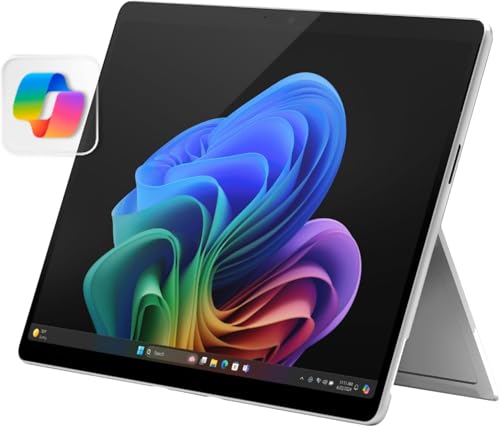
The laptop vs tablet question used to have an easy answer, but modern tablets with keyboards, styluses, and desktop-class chips have blurred the line until the choice genuinely depends on how you work. A laptop remains a complete, no-compromises computer: full operating system, real keyboard, every program, easy multitasking. A tablet is a lighter, simpler, touch-first device with instant-on convenience, outstanding battery life, and a natural talent for reading, drawing, media, and notes.
The quick verdict: if you type a lot, run full desktop software, manage files seriously, or multitask across many windows, buy the laptop. If your computing is mostly reading, browsing, video, notes, and drawing — and portability matters more than power — a tablet may serve you better and cost less. Many people eventually own both, but if you can only buy one, this guide will tell you which one it should be.
Disclosure: As an Amazon Associate, kajuandouglas.com earns from qualifying purchases. Links to Amazon on this page are affiliate links; they cost you nothing extra. Listing details such as price and availability change often, so check the current Amazon listing before you buy.
Laptop vs Tablet at a Glance
The accessory column matters: price a tablet with its keyboard and stylus before comparing it to a laptop.
| Criterion | Laptop | Tablet |
|---|---|---|
| Operating system | Full Windows, macOS, or ChromeOS | iPadOS, Android, or Windows on 2-in-1s |
| Typing experience | Full keyboard and large trackpad built in | On-screen or accessory keyboard at extra cost |
| Software | Every desktop program, no mobile limits | App-store apps; desktop-class apps growing but incomplete |
| Multitasking | Many windows, external monitors, full file system | Split-screen basics; improving, still constrained |
| Portability | Heavier, needs a bag | Very light, instant on, all-day battery |
| Media and reading | Good, but desk-oriented | Excellent — the natural reading and video device |
| Drawing and notes | Needs a 2-in-1 or separate graphics tablet | Stylus on a single surface; the best digital notebook |
| Total cost | One purchase covers everything | Keyboard, stylus, and case add significantly |
In this guide
Gear for This Guide
Three verified listings show the spectrum from tablet to hybrid to laptop:

Microsoft Surface Pro 2-in-1 Laptop/Tablet (2024), Windows 11 Copilot+ PC, 13″ Touchscreen OLED Display, Snapdragon X Elite (12 Core), 16GB RAM, 1TB Storage, Platinum — Microsoft’s Surface Pro is the bridge device — a tablet that runs full Windows, included here to show what the hybrid category offers. Check price on Amazon.

Lenovo Tab P12 – Expansive Touchscreen Tablet – 12.7″ 3K Display – 13MP Camera – 8GB Memory – 128GB UFS Storage – Android 13 – Dolby Atmos – Quad JBL Speakers – Pen Included — A large-screen Android tablet in Lenovo’s Tab P12 line, representative of tablets as media and note-taking machines. Check price on Amazon.

Lenovo IdeaPad Slim 3 – Everyday Laptop – Lightweight – Windows 11-15.6″ FHD – 8GB Memory – 256GB Storage – AMD Ryzen 5 7520U – Abyss Blue — A conventional everyday laptop for comparison — the complete keyboard, ports, and storage package in one box. Check price on Amazon.
Productivity and Software: Where Laptops Pull Away
A laptop runs the real versions of things. Full Microsoft Office with every feature, complete Adobe applications, professional development environments, specialized business and engineering software, and a real file system where you control where things live. Browser work is also fuller: desktop browsers support every extension and web app without the mobile compromises that still appear on tablets. If your work involves any of these, the laptop is not the safer choice — it is the only choice.
Tablets run apps, and the best tablet apps are excellent — note-taking, drawing, photo editing, and media apps on tablets can be more pleasant than their desktop equivalents. But app ecosystems have ceilings: some professional tools are missing or simplified, file management is sandboxed, and connecting the peripherals and workflows of a full office setup ranges from awkward to impossible. The gap narrows every year, yet for serious production work it has not closed.
Portability, Battery, and Everyday Convenience
Here the tablet wins plainly. A tablet weighs a fraction of a laptop, wakes instantly, lasts all day and often into a second, and works comfortably on a sofa, in a plane seat, or standing in a warehouse. It is the better device for reading, recipes, video calls on the move, and controlling smart-home gear. For students crossing a campus or professionals who present and take notes in meetings, that lightness is not a luxury — it changes how often the device actually gets used.
Laptops have improved — thin models now weigh little more than a tablet plus its keyboard case — but they still ask for a surface, a bag, and more care. The honest test is your day: count the hours you spend seated at a desk versus moving, reading, and consuming. The device that fits the majority of your hours should win.
Cost: The Accessory Trap
Tablets look cheaper until you equip them. A mid-range tablet plus its keyboard case, stylus, and protective cover frequently lands within reach of a good laptop — while still offering less storage, fewer ports, and app-limited software. Price the complete kit before comparing. Conversely, if you genuinely do not need a keyboard — your use is reading, media, and light browsing — a tablet alone undercuts any laptop and does the job better.
Longevity also belongs in the cost column. A laptop’s full software support and, on many models, upgradeable parts stretch its useful life. Tablets receive long update support from the best makers but cannot be upgraded at all, and their batteries are not replaceable in any practical sense. Over a five-year horizon, the laptop’s higher starting price often amortizes better for work use.
Who Each Option Suits
Choose the laptop if you are a student writing essays and doing research, a professional in documents, spreadsheets, code, or creative suites, or anyone whose device is their primary computer. Choose the tablet if your computing is consumption-first — reading, streaming, browsing, social apps — plus handwriting and drawing, or if you already own a desktop and need a mobile companion. Choose a 2-in-1 or a Surface-style hybrid if you truly need both shapes and accept the compromises of each: heavier than a tablet, pricier than a laptop of equal power.
Families often land on the practical split: a shared laptop for homework, taxes, and projects, and a tablet for the couch. If the budget forces one device for a household’s everything, the laptop remains the responsible default.
The Student Question, Answered Properly
Students ask this question more than anyone, so it deserves its own analysis. A tablet with a keyboard feels ideal in lectures: light, instant, superb for annotating slides and reading. The problems arrive at the library at midnight — the essay needing full referencing tools, the statistics package that does not exist as an app, the group project in a desktop-only format, the exam software that requires a real computer. Universities publish device requirements because these walls are real.
The budget math also surprises students. A mid-range tablet plus keyboard case plus stylus commonly costs what a capable laptop costs, while doing less. The exception is the student whose course is genuinely reading-and-writing only and whose institution confirms a tablet suffices — for them, the tablet’s weight and battery are real quality-of-life wins across a four-year degree.
The increasingly common student answer is sequencing: a laptop as the primary machine, and — if budget later allows — an inexpensive tablet as the reading and notes companion. That order matters. Nobody has ever needed to emergency-buy a tablet the night before an exam because their laptop could not annotate a PDF; the reverse emergency is a campus cliché.
Creative Work, Drawing, and Media in Depth
For illustrators and note-takers, the tablet is not a compromise — it is the best tool that exists. A pressure-sensitive stylus on a single surface, with mature drawing applications, beats a laptop-plus-graphics-tablet setup for the sketching and inking stages, and it is not close. Where the laptop reclaims the lead is the finishing stage: color-managed desktop software, large files, printing pipelines, and storage that behaves like a filing system rather than a shoebox.
Media consumption is the tablet’s other home turf. Video, reading, and casual browsing are simply better on a light, instant, long-lived device you can hold anywhere. A laptop on a sofa is a workstation visiting; a tablet on a sofa belongs there. Households that can afford both consistently report the same division of labor, which tells you the honest answer to this comparison for mixed use: the devices are complements pretending to be rivals.
Presenters and field workers form the third creative case. A tablet is the superior device for showing work to a client across a table, collecting signatures, marking up plans on site, and reading documentation standing up. If your computer’s job is to be carried and shown rather than sat at, weight and instant-on stop being conveniences and become the specification.
Longevity, Repairs, and the Five-Year View
Project both devices five years forward. The laptop’s software support is effectively unlimited for mainstream operating systems, its storage and memory are upgradeable on many models, and its battery is replaceable on many more. It ages by getting slower at new tasks while remaining able to do them. The tablet ages by exclusion: apps eventually require newer systems, the battery fades sealed inside, and storage you underbought on day one is storage forever.
Repair economics follow the same shape. A laptop’s common failures — battery, drive, fan, keyboard — are parts-and-labor jobs. A tablet’s common failures — battery, cracked digitizer — are often a significant fraction of replacement cost, which is why tablets are replaced rather than repaired in practice. None of this condemns tablets; it simply means their purchase should be sized to a shorter expected service life.
The five-year view also reframes the accessory question. The laptop you buy is the whole purchase. The tablet is a platform for purchases — keyboard, stylus, case, and eventually the replacement tablet. Budgeted honestly over five years, the work-capable laptop is frequently the cheaper device, and it is always the more capable one. The tablet wins when its specific talents — drawing, reading, mobility — are the actual job.
Tablets at Work: Where They Genuinely Win
Fairness requires dwelling on the tablet’s professional strongholds, because for some jobs it is not the lesser device but the correct one. Field inspection, surveying, and site documentation live on tablets: instant-on, glove-friendly, camera-integrated, and happy in one hand while the other holds a railing. Retail and hospitality run on them for the same reasons — a tablet is a register, a menu, and a stock checker that never asks for a desk.
Healthcare and education have their own versions: charts reviewed at a bedside, textbooks carried by the hundredweight in a schoolbag. In each case the pattern is identical — the work is mobile, the software is a purpose-built app, and the keyboard is an occasional guest. When that pattern describes your job, the laptop is the awkward device, and this guide’s verdict reverses without apology.
The creative stronghold belongs here too. For the illustrator, the tablet-plus-stylus is the primary instrument and the laptop is the accessory that finishes and files the work. Buying advice that ignores these cases would be laptop propaganda; the honest comparison says the tablet wins wherever computing is a thing you carry and show, and the laptop wins wherever computing is a thing you sit and build.
Battery, Connectivity, and the Small Print
Battery claims deserve translation in this comparison. A tablet’s all-day figure is usually honest for its workload because its processor is a phone-class chip sipping power. A laptop’s figure spans a wider range because its workloads do. The practical difference shows on travel days: the tablet reliably finishes the day; the laptop finishes it if you chose an efficient model and manage brightness. For a buyer whose worst day is a long flight plus a conference, both work — the tablet simply works with margin to lend your phone a charge.
Connectivity splits by philosophy. Tablets increasingly offer cellular options that keep them online anywhere — a genuine professional feature no mainstream laptop matches without a hotspot’s help. Laptops counter with ports: the drives, docks, monitors, and wired networks of real offices connect without adapters or apology. Count your own connections honestly; the device whose native shape matches your cables wins a daily, unglamorous victory.
The small print finishes the picture: tablet storage tiers are fixed and pricey, laptop storage is often upgradeable; tablet repairs are replacement economics, laptop repairs are parts and labor; tablet software updates are long but app support ends abruptly, laptop software support is effectively forever. None of these lines decides alone. Together they describe two different ownership shapes — and ownership shape, more than any benchmark, is what this purchase actually is.
Task-by-Task: Where Each Device Genuinely Wins
Abstract comparisons hide the truth that this decision is really a bundle of small decisions. Walk through the tasks that fill an actual week and the pattern becomes clear, because laptops and tablets do not win the same hours of the day.
Writing, documents and anything keyboard-first
Long writing belongs to the laptop, and not only because of the keyboard itself. A laptop holds the screen at a stable angle on any surface, including a lap, a train tray and a soft bed, while a tablet needs a case, stand or keyboard accessory that works well on desks and poorly almost everywhere else. Window management matters just as much: a report built from a browser, a spreadsheet and a chat window side by side is routine on a laptop and an exercise in patience on most tablets, where split-screen helps but still assumes one main task. Add file handling — downloading an attachment, renaming it, zipping a folder, uploading it to a portal that expects a real file system — and the laptop’s advantage compounds. Short writing reverses the verdict: notes, messages, journaling and marking up documents with a pen are faster and more pleasant on a tablet, which is why so many people who own both reach for the tablet for capture and the laptop for production.
Reading, video and relaxed consumption
Tablets own the sofa. A tablet is lighter than almost any laptop, works in portrait for articles and books, starts instantly, and runs for many hours of video without warm fans or a charger trailing across the room. Reading PDFs, magazines, comics and sheet music is simply better on a screen you can hold like the object it replaces. Laptops can do all of this, and a convertible that folds flat narrows the gap, but the standard clamshell is a desk-shaped answer to a sofa-shaped question. If the device’s main evening job is streaming in bed, browsing on the train and reading in the garden, the tablet is not the compromised choice; it is the correct one.
Video calls, classes and meetings
Both handle calls well, with different strengths. Tablets offer excellent front cameras, centred framing features on many models, and the freedom to carry the call from room to room. Laptops offer the stable angle, the better multitasking while on the call — notes, slides and chat together — and easier connection to headsets, external cameras and second screens. For a student in lectures or a professional in back-to-back meetings who also works during calls, the laptop is the workhorse. For family calls, telehealth appointments and casual classes, the tablet’s simplicity wins, especially for less technical users who find a laptop’s interface intimidating.
Gaming, hobbies and creative play
Serious gaming is laptop territory: full PC game libraries, controllers and headsets, mods, and hardware that can be specified for performance. Tablets dominate casual and touch gaming, with vast app-store libraries designed for exactly that screen. Creative hobbies split by type. Drawing and painting with a pen favour the tablet so strongly that many artists use one as a graphics tablet attached to a computer, or as their whole studio. Music production, video editing beyond simple cuts, 3D work and coding all favour the laptop’s software depth, storage and connectivity, even though capable tablet apps exist for lighter versions of each.
The Second-Device Reality Most Buyers Miss
The laptop-versus-tablet question is often asked as if the winner takes the whole house, but in practice the two divide labour. A common and very functional pattern is a capable laptop as the household’s production machine and an inexpensive tablet as the shared consumption screen. The reverse also exists: a powerful desktop or work laptop provided by an employer, plus a personal tablet for everything else. Before buying, ask which device you actually need to own. If your employer issues a laptop, a personal tablet may cover your evenings completely. If you are a student or freelancer, the laptop is the non-negotiable purchase and the tablet is the luxury. Framing it this way prevents the classic error of buying a tablet as a laptop substitute, being disappointed, and then buying the laptop anyway — the most expensive route to owning both.
Children, grandparents and shared household use
For children, tablets offer guided access controls, a huge library of educational apps, durability in a good case, and an interface a five-year-old can navigate. Schoolwork eventually demands a keyboard and specific software, which is why many families hand down a tablet for the early years and buy a laptop when homework becomes document-based. For older relatives, a tablet’s large icons, simple home screen and video-call ease make it the kindest computer ever sold, provided someone sets up accounts and updates. A shared household device also argues for the tablet’s instant-on, multi-user convenience on some models, while a laptop better serves a household where one machine must do taxes, work and school in the same evening.
Ownership Costs and Lifespan in Detail
The purchase price is the start of the bill. A tablet’s true price includes the keyboard case if you intend to type, the pen if you intend to draw, and possibly more storage than you planned, because tablets cannot be upgraded later. A laptop’s true price includes a bag, perhaps a mouse, and eventually a battery replacement if you keep it long enough. Tablets tend to receive software updates for many years and age gracefully for media and browsing, but their sealed construction means a cracked screen or tired battery can cost a large share of replacement value. Laptops, especially models designed for service, accept new batteries, storage and sometimes memory, stretching their useful life for work. Think in cost per year of happy use rather than ticket price: a mid-range laptop kept five years usually beats a premium tablet replaced in three because its battery faded and its keyboard case wore out, while a basic tablet kept six years for reading and video is one of the cheapest computing devices a household can own.
Storage, files and the cloud assumption
Tablets assume a cloud life: photos in a library service, documents in an app, media streamed. That assumption is fine until it is not — on a flight, in a rural cottage, with a large video project, or when a subscription lapses. Laptops still treat local storage as normal, connect to any external drive, and run full backup software that images the whole machine. If your digital life includes big local files, offline work or a professional backup routine, that difference alone can settle the choice. If your life is genuinely streamed and synced, the tablet’s assumption will never trouble you, and its simplicity becomes pure advantage.
Scenario Head-to-Heads for Common Buyers
The university student
Course requirements come first: any course built on documents, spreadsheets, statistics, coding or specialist software needs the laptop, full stop. A tablet can be a wonderful companion for readings, lecture slides and handwritten notes, and some students run a tablet-plus-campus-computers strategy successfully, but it is a strategy that depends on reliable access to shared machines at deadline time, which is exactly when they are busiest. If the budget forces one device, it is the laptop. If the budget allows a second, a basic tablet transforms reading and note-taking more cheaply than upgrading the laptop does.
The commuter and frequent traveller
Travel splits by what you do en route. For films, reading and light mail, a tablet is lighter, lasts the whole journey, and is easier through security and in cramped seats. For working travellers who write reports in transit, build presentations and wrangle attachments, the laptop earns its weight. Hybrid travellers increasingly carry the laptop in the hold bag or hotel and the tablet in the seat pocket, which tells you the honest answer: the devices are complements at exactly the point where travel makes weight matter most.
The home worker setting up a desk
A permanent desk erases most tablet advantages. The laptop docks to a large monitor, a real keyboard and a mouse, drives printers and scanners, and runs the full versions of work software. A tablet at a desk becomes a small, limited computer attached to accessories that cost as much as the laptop setup it imitates. Choose the laptop, and let a tablet, if you own one, live where it is best: everywhere that is not the desk.
The artist and the note-taker
Here the tablet strikes back. A pen on a tablet screen is the most natural digital drawing and handwriting surface available at any sane price, and the software for illustration, photo touch-up and annotated reading is excellent. Writers of typed words should buy the laptop; writers of handwritten words and drawers of anything should seriously consider making the tablet the primary device and borrowing laptop access for the occasional heavy task.
Ergonomics and Health Over Long Sessions
Neither device is ergonomically innocent. A laptop used for eight hours on a sofa curls the neck and wrists; a tablet held for hours tires arms and is usually viewed too low. The laptop’s saving grace is that it docks: raised on a stand with an external keyboard and mouse, it becomes a genuinely healthy workstation. A tablet can also be propped and paired with a keyboard, but the smaller screen keeps it a short-session device for most people. If the device will host your working day, judge it as a workstation, and the laptop wins on posture alone. If it will host your evenings in half-hour stretches, ergonomics matter less and the tablet’s comfort in hand matters more.
Battery behaviour and charging habits
Tablets typically deliver their promised hours for years because their workloads are light and their batteries large relative to their screens. Laptop batteries face heavier loads and more heat, and their real-world runtime varies enormously by task: writing all day is easy, video editing on battery is not. Both charge over USB-C in most modern cases, which simplifies travel. The practical difference is expectation management: a tablet is a charge-it-whenever device, while a working laptop is a charge-it-nightly device, and buyers who expect tablet-like freedom from a powerful laptop are the ones who feel misled.
Myths That Distort This Decision
- A tablet plus keyboard equals a laptop: it equals a tablet with a keyboard. The software, file system and multitasking limits remain tablet-shaped.
- Laptops are obsolete: laptops remain the default tool for producing documents, code, media and businesses, and sales to students and professionals reflect that.
- Tablets are just toys: for reading, drawing, calls, media and light work they are often the best tool in the house, which is not a toy’s description.
- A 2-in-1 makes the choice unnecessary: convertibles are excellent laptops that can present content and take pen notes, but most are heavier and less comfortable as handheld reading devices than a true tablet.
- Kids only need a tablet: true until schoolwork becomes documents, research and typing, at which point the laptop becomes homework infrastructure.
Software Depth: The Difference That Shows Up at Deadline Time
App stores make tablets look equal to laptops until a task needs the full version of something. Spreadsheet models with complex formulas and macros, desktop publishing with precise layout control, full photo and video editors with plugin ecosystems, development environments, virtual machines, and the specialist software of a hundred professions live on laptops. Tablet versions are often excellent for viewing, light editing and capture, and deliberately limited for production. The pattern to recognise is your own worst-case task, not your average one. If, twice a year, you must do something only the full application can do, and no other computer is reliably available, you need the laptop, even if the tablet would be nicer the other fifty weeks. Conversely, if your heaviest task is email with attachments and a monthly document, the tablet’s limits may never appear in your life at all, and paying for laptop capability would be buying insurance against a risk you do not carry.
Printing, peripherals and the physical world
Laptops connect to the physical world without negotiation: any printer, scanner, external drive, camera card, musical instrument interface or presentation clicker, usually with the right driver a download away. Tablets print to modern wireless printers happily and pair with keyboards, mice and headphones, but specialist peripherals, older hardware and anything expecting a desktop driver remain laptop territory. Households with an old printer they love, a scanner for archives, or a hobby involving hardware should weight this heavily; it is the least glamorous and most decisive category in the whole comparison for many buyers.
Making the Final Call With a One-Week Test
If you already own one of the two, borrow or trial the other for a week before buying, and keep a note of every moment you reached for the missing device. That list is your answer. People who reach for the laptop three times a day for files and typing need a laptop, whatever the tablet’s charms. People who find the tablet handling everything except one monthly task can often cover that task with a library, workplace or family machine and enjoy tablet life. Where neither device exists yet, buy for the heaviest regular task: production work points to the laptop, consumption and capture point to the tablet, and a genuine fifty-fifty split points to a convertible laptop or to the laptop first, tablet later sequence that most households end up happiest with.
Resale, Hand-Me-Downs and the Second Life of Each Device
Tablets have a celebrated second life: kitchen recipe screen, children’s device, bedside reader, video-call terminal for relatives. Their simplicity makes them easy to hand down, and a factory reset gives the next owner a clean start in minutes. Laptops hand down well too, especially to students, but carry more history: accounts, files and licences that need deliberate cleaning, and batteries that may need replacement to be useful away from a desk. Both hold resale value best in their first few years, with premium tablets and business-class laptops aging most gracefully. Planning the second life at purchase time is surprisingly practical: a tablet bought with a child in mind can be specified modestly, while a laptop bought to become a student’s machine in three years deserves the better screen and more memory today. Devices in this category are rarely thrown away after one owner anymore; they cascade through a household, and the cascade favours whichever device your family’s next user actually needs.
Whichever you choose, set it up deliberately on day one: accounts for each user, automatic updates, a backup or sync you trust, and the accessories that make it fit your rooms. The laptop-versus-tablet debate ends at the shop; the satisfaction is decided at home, by fit.
Durability, Accidents and Life With Real Humans
Tablets live dangerously: carried one-handed, balanced on sofa arms, propped against kitchen tiles. A good case transforms their survival odds, and their light weight means drops often end better than expected, though a screen-first landing onto tile is unforgiving for any device. Laptops drop less often because they travel in bags and live on desks, but when they do fall, hinges, corners and screens suffer, and the repair bill reflects the complexity. Households with toddlers should weight this section heavily: a cased tablet is the most survivable computer you can hand a child, while a laptop should stay a supervised, desk-bound device until children are old enough to understand hinges. For adults, the pattern is simpler: commuters should protect whichever device travels, with a padded sleeve for the laptop and a folio or rugged case for the tablet, and homebodies can skip the armour and spend the money on the better screen instead.
Sound, cameras and the small specifications
Tablets often have better speakers and cameras than laptops at similar prices, because they are media and communication devices first. Laptop speakers range from excellent on premium models to merely adequate on budget ones, and laptop webcams, while much improved, still trail a tablet’s front camera for family calls. If the device will be your main video-call and media screen and you will not add accessories, these small specifications quietly favour the tablet. If it will sit in a dock with external speakers, a monitor and a headset, they barely matter, and the laptop’s connectivity wins the argument by making them irrelevant.
The Verdict, Stated Plainly for Each Reader
Buy the laptop if you write, calculate, code, organise files, use specialist software, print and scan, or need one machine to be a complete workstation; it is the only one of the two that never has to apologise for a task. Buy the tablet if your computing is reading, watching, browsing, calling, drawing, note-taking and light communication, and you value lightness, simplicity and battery life over depth; it will feel like the future every single day. Buy both, in that order, if your life contains heavy production and heavy consumption, and let each device do the half it is brilliant at. The only wrong purchase here is the one made against your own habits: a tablet bought to be a cheap laptop, or a laptop bought to be an expensive reading screen. Match the device to the week you actually live, and this stops being a difficult decision at all.
A Note on Buying for Someone Else
Choosing between these devices for another person adds a layer of guesswork, and the safest principle is to buy for their demonstrated habits rather than their aspirations. A relative who lives on their phone for everything except video calls will flourish with a tablet and may never open a laptop you buy them. A student who says a tablet looks cooler but whose course involves essays and spreadsheets needs the laptop, and will thank you at deadline time rather than unboxing time. When in doubt, ask the people who see their daily routine, check what their school or employer expects, and favour the device that removes friction from tasks they already do every day. Gifts of technology succeed when they slot into a life; they fail, expensively and quietly in a drawer, when they ask the recipient to build new habits around them. That principle, applied honestly, resolves most laptop-versus-tablet decisions made on someone else’s behalf, and it explains why the same household can be right to buy a tablet for one member and a laptop for another in the same month.
Finally, remember that this choice is reversible in a way few technology purchases are. Both devices hold value, both can be handed down, and both teach you what your household actually needs. A first purchase that turns out to be the second device is not a failure; it is research with a resale value, and the household that owns both shapes of computer is equipped for almost any task the next few years invent.
One last check: the bag test
Before paying, picture the device in your actual bag, on your actual commute, in your actual rooms. Weight, size and the accessories it drags with it decide whether it gets used or left behind, and a device left behind helps nobody. The laptop that fits the bag and the desk, or the tablet that fits the hand and the sofa, is the one that earns its cost. Run that picture honestly for both shapes and the choice usually names itself.
And whichever shape wins, protect the purchase with the basics from day one: a case or sleeve that suits how it travels, automatic updates switched on, accounts set up for each person who will use it, and a sync or backup arrangement you have tested once with a real file. Those ten minutes matter more to your long-term satisfaction than the last few percent of any specification comparison in this guide.
Decide, buy once, and then give the device a fair month in your real routine before judging it. Most regrets in this category are not wrong devices but right devices abandoned during the first week’s unfamiliarity.
Keep the packaging and receipt until that month is over, and the trial costs you nothing if the answer surprises you.
One more consideration belongs in every household version of this decision: noise and heat. A tablet is silent and barely warm in any task it can do, which suits bedrooms, libraries and shared sofas. A laptop under light work is nearly as quiet, but under heavy work its fans announce themselves, and its warmth on a lap is real. If the device will be used in bed, in meetings or around sleeping children, that difference is not trivial, and it is one more reason the two shapes coexist so comfortably in the same home.
Related Guides
- best laptops for students
- best laptops for writers
- best 2-in-1 laptops on a budget
- best laptops for home use
- best laptops for travel
- windows laptop vs macbook
- how to choose a laptop
Frequently Asked Questions
Can a tablet replace a laptop for college?
For some courses, yes — note-taking, reading, research, and essay writing in mainstream apps all work well, especially with a keyboard case. But courses requiring specific desktop software, heavy data work, or programming environments will fight the tablet’s limits. Check your program’s software requirements, and remember the accessory costs when comparing budgets.
What is a 2-in-1 laptop?
A 2-in-1 is a laptop whose screen folds back or detaches so it can be used like a tablet, with touch and often stylus support. It runs a full laptop operating system, so it avoids the tablet’s software limits. The compromises are weight in tablet mode and price — but for buyers who genuinely need both shapes, it is the sensible middle path.
Which is better for drawing and digital art?
A tablet with a good stylus is the most natural digital sketchbook: one surface, pressure-sensitive pen, and excellent drawing apps. A laptop needs a separate graphics tablet peripheral or a 2-in-1 design to compete. Serious digital artists often use both — sketching on the tablet, finishing in full desktop software on the laptop.
Do tablets last as long as laptops?
Top-brand tablets receive many years of software updates and their simple, sealed designs are durable. Their limits are fixed storage, non-replaceable batteries that fade over years, and app ecosystems that eventually move on. A laptop of similar price generally stays useful longer for work tasks, especially if its memory or storage can be upgraded.
Which is better for travel?
For consumption and communication, the tablet: lighter, longer battery life, instant on, and comfortable in any seat. For working travel — documents, spreadsheets, presentations, real multitasking — the laptop earns its weight. Frequent travelers who work on the road increasingly choose thin laptops that narrow the portability gap.
Can I print and use USB drives with a tablet?
Modern tablets can print to wireless printers easily. USB drives and accessories work through the tablet’s USB-C port, sometimes with adapters, but file management is more restricted than on a laptop and some devices and formats are unsupported. If your workflow leans on external drives and varied peripherals, that friction adds up fast.
Can a tablet handle online school and homework on its own?
For younger children and light homework, usually yes, especially with a keyboard case. Once assignments involve long documents, spreadsheets, coding or specific desktop software, a laptop becomes the safer primary device.
Is a convertible laptop a true replacement for owning both?
For many people, yes for work and mostly for leisure. It matches a laptop fully and a tablet partially: pen input and presentation modes are excellent, but handheld reading comfort still belongs to a lighter, dedicated tablet.


