Disclosure: As an Amazon Associate, kajuandouglas.com earns from qualifying purchases. Links on this page are affiliate links; they cost you nothing extra. Prices and availability change often, so check the current Amazon listing before you buy.
Custom usb cables for your keyboard are the hobby’s most visible finishing layer: the coiled, double-sleeved, aviator-connected cords that turn a keyboard’s tether from an afterthought into a designed object. This guide treats them with the seriousness their owners do — what the parts of a custom cable actually are, which specifications matter electrically and which are pure craft, how to match a cable to a board and a desk, and where the honest limits of the whole enterprise lie. Five cables, verified against Amazon catalogue data before being linked, span the sensible range: a first-party Keychron piece, two Epomaker designs at different tempers, Glorious’s artisan standard, and GravaStar’s sci-fi statement. None of them will make your keyboard faster. All of them, chosen well, will make your desk feel finished — which, for the people who buy them, is the entire and sufficient point.
Key takeaways: A custom keyboard cable is a standard USB cable wearing craft: a coiled or straight run, a detachable aviator connector, sleeving in paracord or PET, and USB-C at the keyboard end. Buy by connector compatibility and length first — the coil eats reach — then by craft. The aviator’s real function is quick board swapping and strain relief theatre; the coil’s real function is desk order. Budget cables from known makers are honest; unknown cables with unverifiable wiring are the one genuine risk in the category.
Custom Usb Cables For Your Keyboard: Anatomy: The Four Parts of a Custom Cable
Every custom cable in this guide is assembled from the same four decisions, and naming them turns shopping from browsing into specification. The run: coiled or straight, and if coiled, the coil’s length and diameter — the coil is a spring that stores cable in an orderly helix, and it consumes total reach, so a cable’s working length is always shorter than its stretched length. The connector: the detachable aviator — GX12 or GX16, typically 4 or 5 pin — a metal, screw-locking joint borrowed from aviation and audio, which lets the desk-side of the cable stay put while boards swap at the joint. The sleeving: paracord for a soft, fabric hand; PET techflex-style sleeving, often doubled over paracord, for a crisper, glossier finish and better abrasion manners. The ends: USB-C at the keyboard almost universally in the custom world, USB-A or USB-C at the host, with the occasional USB-C to USB-C for modern laptops. A cable listing that specifies all four is a specification; one that specifies only colours is a photograph. The five cables below were chosen because their listings do the specifying.
In this guide
What Actually Matters Electrically (and What Does Not)
Honesty section, placed early so the romance that follows is properly discounted. A keyboard is one of the least demanding USB devices in existence: it draws little power and moves little data, and any correctly wired USB cable — including the plain one in the keyboard’s box — serves it perfectly. A custom cable adds no performance, no polling, no latency benefit, and any listing implying otherwise is selling weather. What a good custom cable does add is mechanical: quality connectors that seat positively and survive disconnection cycles, strain relief that protects the keyboard’s port from the cable’s weight and pull, and wiring that is what it claims to be. That last point is the category’s one real hazard: the very cheapest no-name cables occasionally miswire or omit data lines, producing boards that charge but do not type, or that drop out under movement. The defence is the one this guide applies throughout — buy from makers whose names are on the product and whose listings specify the cable completely — and it is why every cable below comes from a keyboard-world brand rather than from the anonymous tier.
The Five Cables

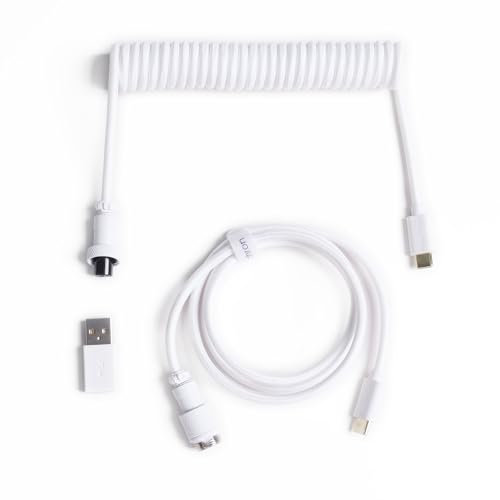
Keychron Custom Coiled Aviator Cable — the first-party standard
Badge: Best first custom cable
- Style: coiled, braided
- Connector: 5-pin GX12 aviator, detachable metal
- Ends: USB-C with USB-A adapter (listing)
- Colour listed: white
- Use: charging and data
Keychron’s own cable is the category’s reference purchase: a braided coiled run, the standard GX12 aviator, and the reassurance of a keyboard maker wiring its own accessory. For a Keychron board it is the zero-thought choice, and for any USB-C board it is the safe first custom cable — the one against which fancier purchases are later judged. Its colour range within the line is broad, so the white listed here stands for a family rather than a single option.
- Strengths: first-party wiring confidence
- Strengths: standard GX12 aviator
- Strengths: adapter included for host flexibility
- Trade-offs: coil consumes reach — plan placement
- Trade-offs: styling is tasteful, not theatrical
- Trade-offs: premium over no-name cables
Best for: first custom cable buyers and Keychron owners. Not suited for: long-reach desk layouts.

Epomaker Mix Coiled Cable — the value craft pick
Badge: Best value custom cable
- Style: coiled, TPU cable
- Length: 1.8m class
- Connector: detachable metal aviator
- Ends: USB-C to USB-A
- Colour listed: black
The Mix is Epomaker’s long-running answer in this category — a 1.8-metre-class coiled cable with a metal aviator and a colour family wide enough to match most desk themes, at the friendlier end of the craft tier. It has dressed a generation of Epomaker and compatible boards, and its ubiquity is itself a specification: the wiring is a known quantity, the aviator is standard, and the coil’s behaviour is documented by an army of owners. For the builder finishing a first serious desk, it is the value reference.
- Strengths: proven, widely owned design
- Strengths: generous length class
- Strengths: broad colour family
- Trade-offs: TPU hand differs from paracord craft
- Trade-offs: aviator finish is functional, not jewelled
- Trade-offs: coil memory varies by colour batch
Best for: value-first desk finishing. Not suited for: buyers seeking artisan-grade finishing.

Glorious Coiled USB-C Cable — the artisan standard
Badge: Best artisan-grade cable
- Style: coiled, premium braided
- Connector: heavy-duty metal 5-pin aviator
- Length: 4.5ft total class
- Feature: tangle-resistant coil
- Colour listed: black
Glorious sells its cable the way it sells its keyboards — as a designed object in a colour system — and the execution justifies the positioning: a tight, tangle-resistant coil, a heavy aviator with a machined confidence to its lock, and braiding that holds its finish. It is the cable for the desk whose other components are already considered, and its colour family lets it disappear into a Glorious-centred setup or accent a rival’s board with intent.
- Strengths: finest finishing in this guide
- Strengths: tangle-resistant coil behaviour
- Strengths: heavy-duty aviator
- Trade-offs: shortest reach class here
- Trade-offs: artisan pricing
- Trade-offs: colour matching is a commitment
Best for: considered desks and Glorious ecosystems. Not suited for: distant tower placements.

Epomaker Puff Aviator Cable — the soft-aesthetic pick
Badge: Best for soft and pastel desk themes
- Style: coiled aviator cable
- Connector: detachable metal aviator
- Ends: USB-C class
- Colour listed: Puff White
- Compatibility listed: Epomaker RT/TH series and standard USB-C boards
The Puff line is Epomaker’s softer dialect of the same language — pastel colourways, a gentler visual presence, the full aviator-and-coil specification underneath. It exists for the large and growing class of desks themed in creams, pinks and whites, where a black tactical cable reads as an error. Functionally it is the Mix’s sibling; aesthetically it is the one that completes those desks, and in this category aesthetics completed honestly is a legitimate specification.
- Strengths: pastel colourways done properly
- Strengths: full aviator specification
- Strengths: matches Epomaker’s board themes
- Trade-offs: light colours show desk wear
- Trade-offs: theme-specific by design
- Trade-offs: coil reach planning still applies
Best for: light-themed and pastel desks. Not suited for: dark tactical setups.

GravaStar Coiled Aviator Cable — the statement piece
Badge: Best statement cable
- Style: coiled aviator cable
- Connector: detachable aviator
- Design: GravaStar sci-fi design language
- Colour listed: black
- Use: mechanical keyboards
GravaStar builds peripherals as science-fiction props that happen to work, and its cable applies that philosophy to the tether: a coiled aviator cable styled to match the brand’s mecha-inspired boards and speakers. On a GravaStar desk it is not an accessory but a continuity; on any desk it is the cable that guests ask about. The specification beneath the styling is standard and sound, which is the brand’s whole trick — theatre with its engineering homework done.
- Strengths: unmatched visual identity
- Strengths: completes GravaStar setups
- Strengths: standard aviator function
- Trade-offs: styling is a strong commitment
- Trade-offs: brand-ecosystem pricing
- Trade-offs: divisive on minimalist desks
Best for: GravaStar owners and statement desks. Not suited for: understated setups.
Matching a Cable to a Board and a Desk
The matching discipline has three questions, in order. Where is the host? Measure the actual route — from the keyboard’s port, across or around the desk, to the machine — and then respect the coil’s arithmetic: a coiled cable’s comfortable working span is a fraction of its stretched length, and a cable stretched taut to reach is a cable pulling at both its connectors all day. Tower-under-desk layouts with distant ports are the classic failure; a straight cable or a hub relocation is the honest cure, and this guide blesses both over a beautiful coil at full stretch. How many boards share the desk? The aviator’s one functional superpower is the swap: a desk-side cable run, permanently routed, with boards exchanged at the metal joint in seconds. Multi-board households — the custom world’s normal condition, as the custom mechanical keyboard building guide assumes — get real utility from standardising on one aviator type across their cables. What is the desk’s visual grammar? The cable is the desk’s most visible line; match its weight and colour to the setup’s existing language — the coiled craft piece on a considered desk, the straight quiet run on a working one — and let the build first custom keyboard guide‘s finishing chapter be the arbiter: presentation is the last layer of a build, and it should be laid deliberately or not at all.
The Craft Tier Above: What Artisan Cables Add
Beyond the five cables here lies the artisan tier — hand-soldered, made-to-order cables from independent makers, with custom-dyed paracord, Cerakoted or themed aviators, and coils wound to a specified diameter and length — and a complete guide should explain what that tier buys, because its prices puzzle newcomers. It buys specificity: the exact colourway mixed to match a keycap set, the exact coil length for one desk’s geometry, connectors finished to match a case. It buys provenance: a named maker, a queue, an object with a story. And it buys nothing electrical whatsoever, which the honest artisans state as plainly as this guide does. The sensible buyer’s path runs through the cables in this guide first — a season with a Keychron or Glorious cable teaches you your coil length, your aviator preference and your colour discipline — after which an artisan commission, if it comes, is specified from evidence rather than from a configurator’s temptations. Craft tiers reward the educated; they tax the impulsive. Become educated cheaply, then spend beautifully.
Wireless Owners: Why You Might Still Want One
An apparent paradox deserves its paragraph: the custom cable’s most devoted buyers include owners of wireless boards. The reasons are practical before they are aesthetic. A tri-mode board still charges, still updates firmware, and still plays wired in its lowest-latency mode — the division of labour in the Bluetooth vs 2.4GHz keyboards and tri-mode connections explained — and each of those wired moments deserves a cable that lives at the desk rather than a phone charger borrowed in a tangle. The aviator run, permanently routed, is the wireless desk’s docking ritual: board down, joint clicked, everything restored. And on the days the board travels, the cable stays — a resident of the desk, holding the setup’s place like a bookmark. Wireless freed the keyboard from the cable; it did not free the desk from wanting one good cable in residence.
Sleeving, Coil Memory and the Material Details
The category’s materials reward one closer reading. Paracord sleeving — the original craft material — gives a soft, matte, fabric character and the widest colour universe in the hobby, at the cost of a surface that can snag and soil in hard desk service. PET sleeving, the techflex family, is crisper and tougher, with a slight sheen that reads technical; doubled over paracord it produces the premium two-layer finish the artisan tier is known for, colour over colour, with the inner tone ghosting through. TPU and silicone-coated runs, like the Epomaker Mix’s, trade the textile hand for a smooth, wipeable, modern surface. Coil memory — the helix’s willingness to stay a helix — is set at manufacture by heat and by the core’s material, and it is the quality that separates a cable that presents beautifully in year two from one that sags into spaghetti; the Glorious cable’s tangle-resistance claim is, translated, a coil-memory claim. None of these materials changes the electricity. All of them change the object you touch and see daily, which in a finishing layer is the entire specification — provided the wiring beneath them is honest, as every cable in this guide’s selection was verified to be by the maker’s standing behind it.
The Desk Photograph Problem: Buying for the Room You Have
Custom cables are sold through photography more seductively than any other component in this cluster — the coil arranged on a styled desk, the aviator catching light — and the photographs omit the two facts that decide satisfaction: your route and your room’s light. A cable colour chosen from a studio shot arrives in your room’s warmer or cooler light as a related but different colour, which is why the guide’s matching advice begins with the desk’s existing grammar rather than with a dream theme. And the coil that drapes so elegantly in the photograph drapes across a desk whose monitor stand, mat edge and mug traffic the photograph does not share with you. The defence is the same evidence discipline the rest of this cluster teaches: measure the route, inventory the desk’s colours in your own light, and let one cable — the reference purchase — teach you the category before a theme commits you. The desk photograph is an aspiration; your desk is the client. Serve the client.
Troubleshooting Cables: The Three Failures and Their Meanings
Even honest cables fail in characteristic ways, and the diagnoses are short enough to print. The board types, then drops out when the cable moves: a fatigued conductor or a loosening connector — test with the plain cable from the board’s box; if the fault vanishes, the custom cable has retired, and if it persists, the board’s port is the suspect and the keyboard not working troubleshooting guide takes over. The board charges but does not type: the data pair is absent or broken — the classic miswired-budget-cable signature, and the reason this guide steers buyers to named makers. The aviator will not lock or locks loosely: thread debris or a bent pin in the joint — inspect, clean, align, and never force the lock, because a forced aviator converts a cable problem into two cable problems. Each failure has the same moral: the plain cable in the box is the control instrument of every diagnosis, which is why the spares philosophy in this cluster’s building guide keeps it in the drawer rather than in the donation pile.
A Short History of the Coil
The coiled keyboard cable is older than the custom hobby that revived it: the telephone-style helix served the great terminal and early-PC keyboards, disappeared when cheap straight cables and then wireless took the desk, and returned as a deliberate retro-craft gesture in the mechanical revival. Its return is instructive about the hobby itself. The coil solves a real, minor problem — surplus cable length, stored in order — and elevates the solution into the desk’s most visible design line, which is precisely what the custom world does to every component it touches: switches became instruments, keycaps became sculpture, cases became architecture, and the cable became calligraphy. Understanding that pattern protects the buyer in both directions. It explains why the category’s prices are craft prices rather than electronics prices, and it licenses the purchase without embarrassment: you are not buying a better wire, you are buying the desk’s handwriting. Buy it as handwriting — chosen, practised, and legible in your room’s light — and the coil will satisfy for exactly as long as the desk it was written for.
Strain Relief and the Keyboard’s Port: The Cable’s One Engineering Duty
If a custom cable has a single engineering obligation beyond honesty, it is to be kind to the keyboard’s USB-C port, and the obligation deserves explanation because it is widely misunderstood. A keyboard’s port is a small connector soldered to a PCB, and it experiences the cable as a lever: every tug, every desk-edge drape, every heavy coil hanging off the board’s rear corner applies torque that the port’s solder joints absorb. The plain cable in the box is light, which is its one mechanical virtue. A custom cable is heavier — sleeving, coil, a metal aviator — and its kindness must therefore be arranged: route the coil so its weight rests on the desk rather than on the port, let the aviator joint sit where the cable’s run changes direction, and never let a coiled cable hang from the board’s edge under its own spring tension. Arranged this way, the custom cable is actually gentler than the stock one, because its weight is managed rather than dangling. Arranged carelessly, it is the one component in this cluster capable of damaging the board it decorates. The five minutes of routing are the purchase’s true installation, and this guide insists on them as firmly as it insists on anything.
USB-C to USB-C, Hubs and Docks: The Modern Route
The contemporary desk increasingly routes through a hub or a dock — one cable to the laptop, everything else behind it — and custom cables live in that topology with one specification to check. The keyboard end is USB-C in every cable here; the host end should match the hub’s available ports, and where the hub offers USB-C, a USB-C to USB-C cable like Keychron’s USB-C variant keeps the run native and the adapters out of the drawer. Hubs introduce one honest caveat: a keyboard behind a hub inherits the hub’s reliability, and the cheapest unpowered hubs are the flakiest component in many desks — a dropout blamed on a cable is often a hub confessing. The diagnostic order in this guide’s troubleshooting section handles it: substitute the plain cable directly into the machine, and let the topology simplify itself until the fault confesses. None of this diminishes the custom cable’s place; it merely assigns the cable its correct layer in a stack that also includes docks, and reminds the buyer that the prettiest run in the world still answers to the plainest electronics.
Colour Theory for One Line of Cable
The cable is a single strong line across the desk’s composition, and colour theory for a single line is mercifully simple. Match when the desk is already composed: the cable in the keycap set’s accent colour, or the case’s tone, becomes a rhyme the eye completes without effort — the Keychron and Glorious colour families exist to make matching a system rather than a search. Contrast when the desk is quiet: a single saturated coil across a monochrome setup is the whole room’s punctuation, and the Epomaker Mix’s brighter colourways serve exactly that desk. Disappear when the desk is a workplace first: a black or grey straight run, routed with discipline, is the professional’s cable, and there is no shame in the category’s most invisible option. The error to avoid is the fourth strategy — accident — in which the cable’s colour is whatever was in stock, clashing daily at the edge of vision. A line this visible should be chosen in one of the three deliberate modes, and the choice takes ninety seconds once the desk’s grammar is honestly named.
Gift Logic and the Second Board Problem
Two purchasing situations recur in this category, and both have clean answers. As a gift, a custom cable is one of the safest presents in the hobby: it fits every USB-C board the recipient owns, it requires no knowledge of their switch or profile preferences, and its craft reads as thoughtfulness rather than as expense. Choose the recipient’s desk grammar — match, contrast or disappear — and prefer the first-party and artisan-standard cables here, whose packaging and finish survive the gifting occasion. The second board problem is the multi-board household’s version: boards multiply, cables should not multiply at the same rate. The aviator standard is the solution — one resident desk run, one joint, boards rotating through it — supplemented by one plain travel cable in the bag. A household that standardises its aviator size early will never own the drawer of incompatible beautiful cables that the unstandardised accumulate, and that drawer, in the custom world’s confessionals, is a recognised stage of the hobby best skipped.
When Not to Buy One: The Honest Exclusions
A guide that sells everything to everyone sells nothing credibly, so here are the desks that should skip the custom cable entirely. The pure wireless desk whose board charges from a phone brick and never docks: your cable lives in a drawer, and a drawer’s contents need no craft. The travel-first setup, where the board and its cable live in a bag and are judged by grams and seconds: a short straight cable is the professional instrument there. The unsettled desk, mid-rearrangement, whose route will change three times this season: settle the geography first, because a coil bought for one route is a compromise on every other. And the first-build desk still discovering its board, its layout and its own grammar: the cable is the finishing layer, and finishing layers bought before the thing they finish exists tend to finish a different desk than the one that finally emerges. Every other desk — settled, wired or docking, composed or composing — is this category’s legitimate market, and for those desks the five cables above span the honest range from first-party prudence to sci-fi theatre.
The Aviator, Considered as a Piece of Engineering Theatre
The aviator connector deserves its own honest audit, because it is the component where this category’s function and theatre are most completely fused. Functionally, it is a locking, quick-disconnect, multi-pin joint with genuine virtues: it cannot vibrate loose, it aligns positively, its metal shell shrugs off desk life, and its disconnection point can be placed exactly where the human hand wants it. Theatrically, it is a jewel — knurled, weighted, satisfying to operate in a way no USB plug has ever been — and it converts the mundane act of connecting a keyboard into a small ceremony of competence. The audit’s conclusion is that both accounts are true and neither shames the other: the aviator is a good connector that is also a pleasure, in a hobby that has always valued the union. What the buyer should not do is pay aviator prices for a cable whose wiring is anonymous — the theatre is only honest when the engineering underneath it is — and that, once more, is why this guide’s five all carry makers’ names that a buyer can hold to account.
Installation Day: Routing the Resident Cable
The purchase completes in a ten-minute installation that this guide scripts once, because most cable dissatisfaction is routing dissatisfaction in disguise. Begin with the board in its true working position — not the position it strikes for photographs — and the host or hub in its permanent home. Lay the cable’s run loosely along the intended route and check the coil’s comfort: it should rest in its helix with neither stretch nor pile, the aviator joint falling where your hand naturally reaches when swapping boards, typically just behind the board’s rear corner. Anchor nothing yet. Type for a day. The board will migrate to its real geography — a few centimetres toward the dominant hand, a degree of angle — and the cable should be re-dressed once to that truth before any clip, channel or desk grommet makes the route official. Only then fix the run: loosely, with service loops at both ends, the coil’s weight borne by the desk along its whole length. A cable installed this way disappears into the desk’s order within a week, which is the paradoxical success of the most visible component in the setup: chosen to be seen, routed to be forgotten, and noticed again only when a guest asks — as guests do — what that beautiful coil is for.
Longevity: How a Good Cable Ages
A finishing layer should finish for years, so the ageing ledger deserves its entry. The sleeving ages by material: paracord softens and can fade a tone in sunny desks, PET holds its colour and crispness longest, TPU wipes clean and keeps its modern surface with the least ceremony. The coil ages by treatment — respected, it holds its helix indefinitely; abused as a stretch toy, it relaxes within a season, and no heat trick fully restores a tired spring. The aviator ages best of all: metal threads and pins, kept clean, will outlast the boards they serve, which is why the joint standard a household chooses early echoes across a decade of desks. The connectors at the ends are the true consumables, USB-C’s rated cycles being generous but finite, and the swap-at-the-joint discipline extends their life by concentrating disconnections at the connector designed for them. Totalled honestly: a named maker’s cable, routed kindly, is a five-to-ten-year object — long enough that its colour choice deserves the ninety seconds of theory this guide prescribed, and its price, amortised across those years of daily visibility, is among the smallest in the whole setup.
The Verdict, Compressed
The category in one paragraph, for the reader who scrolled: a custom cable is craft, not performance — buy it for order, ceremony and finish, from a maker who stands behind its wiring, in a length your measured route respects, with an aviator standard your household can grow on. The Keychron is the prudent first purchase; the Epomaker Mix is the value reference; the Glorious is the artisan standard; the Puff serves the light-themed desk; the GravaStar serves the theatrical one. Every one of them will be seen more than any other component you own and judged, daily and silently, by the only critic whose verdict matters — your own eye, crossing the desk with the morning coffee. Choose the line you want that eye to meet, and the category has done its work.
Desk Neighbours: The Cable Among Its Companions
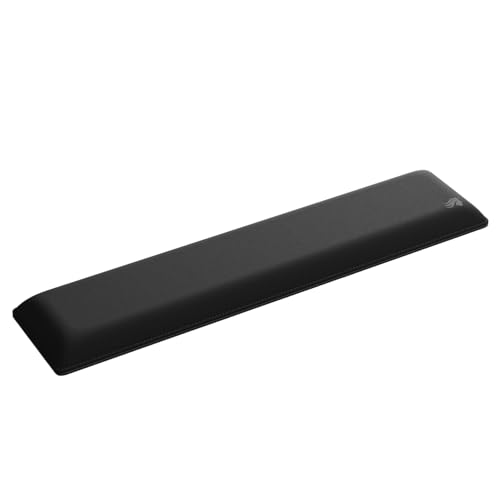
A final composition note, because no cable is seen alone. The coil’s line interacts with the desk mat’s edge, the monitor’s stand, the wrist rest’s front and the board’s own rear profile — and the composed setups this category admires are composed precisely in those interactions: the coil echoing the mat’s colour family, the aviator parked where the board’s corner and the mat’s edge create a natural station, the run’s direction agreeing with the desk’s other lines rather than crossing them at visual random. The wrist rest, for desks that use one — its own subject in this cluster’s Glorious gaming wrist rest review — sets the foreground; the cable should exit behind the board, never across the rest’s territory. None of this requires talent, only the installation day’s patience already prescribed: arrange, live a day, adjust once, then leave the composition alone. A desk, like a build, is finished when its owner stops rearranging it — and the cable, as its most mobile line, is usually the last element to settle and the surest sign that settling has occurred.
What the Cable Says: A Closing Semiotic
It is worth ending by admitting what everyone in this category knows and few guides say: the custom cable is a signal, and signals are legitimate purchases when they are honest ones. To the owner, it says the desk is finished — that the last unconsidered component has been considered — and that small daily confirmation of completeness is a real psychological return on a modest outlay, renewed every morning. To the visitor, it says the desk’s owner cares about objects, which is information of the same kind a well-bound notebook or a good pen transmits. To the hobby, it says membership, in the dialect of coils and aviators that members read fluently. None of these signals requires apology, and none survives dishonesty — a miswired cable in a beautiful sleeve signals only carelessness, which is why this guide’s insistence on named makers is not pedantry but semiotics. Buy the signal with its engineering done, and it will say what you meant it to say for the cable’s long, visible life.
Pricing Logic: What the Money Buys at Each Tier
The category’s prices sort into three honest tiers, and naming them protects the buyer from paying one tier’s price for another tier’s goods. The utility tier — plain cables from known electronics brands — buys correct wiring and nothing else, and it is the right purchase for drawers, bags and diagnostics. The craft tier, where all five cables in this guide live, buys the object: sleeving, coil, aviator, colour system and a maker’s accountability, at prices that reflect handwork-adjacent manufacturing rather than electronics. The artisan tier buys specificity and provenance — made-to-order, made by a person — at prices that reflect a queue for one pair of hands. The tiers do not compete; they answer different needs, and the buyer’s only error is confusion between them: expecting artisan specificity at craft prices, or paying craft prices for a cable whose maker cannot be named. This guide’s selection deliberately occupies the middle tier at its most defensible — named makers, complete specifications, finishes that survive inspection — because that is where most desks, most honestly assessed, actually live.
A Buyer’s Final Checklist
The whole guide, reduced to the errand. Confirm the board’s port is a detachable USB-C. Measure the route from port to host in the desk’s real arrangement, and choose coil or straight by that measurement rather than by the photograph. Fix the aviator size — GX12 or GX16 — and standardise on it if the household will ever own a second board. Choose the colour by one of the three deliberate modes: match, contrast or disappear, judged in your room’s light against your desk’s existing grammar. Buy from a maker whose name is on the product and whose listing specifies the cable completely. Plan the routing before it arrives: coil weight on the desk, joint at the hand’s station, service loops at both ends. Keep the plain cable in the drawer as the diagnostic control. Seven lines, one purchase, and a desk whose last unconsidered component has been considered — which was, from the first paragraph, the entire proposition.
Cable Management With a Coil: Routing That Respects the Spring
A coiled cable changes the desk’s cable management from a hiding exercise into a display decision, and the routing rules differ from a straight cable’s. The coil wants a clear run — across the desk’s front edge or in a gentle arc behind the board — where its spring is visible and uncompressed; pinching it through a monitor arm’s channel or under a desk mat flattens the memory it was wound with. The aviator should sit where the hand can reach it for the board-swap ritual without dragging the coil across the desk’s working surface, which in practice means the run’s midpoint, slightly to the board’s rear. Excess length belongs in the straight section, looped once and rested behind the monitor, never in the coil itself, whose loops should hang or lie at their natural pitch. And the coil’s direction is a small aesthetic law: it reads best running parallel to the board’s front edge, the classic desk-photograph geometry, because the eye reads the spring as a design element only when its rhythm is unbroken. Route it as furniture, not as wiring, and the cable earns its place in the setup’s composition.
Troubleshooting: When a Pretty Cable Misbehaves
Custom cables fail in a short list of ways, each with its diagnosis, and the guide closes its practical duties with them. A board that disconnects when the cable is touched has a connector or aviator contact issue — reseat both ends, check the aviator’s collar is fully threaded, and substitute a known cable to isolate whether the fault travels with the cable or stays with the board. A board that works wired to one computer but not another is usually meeting a power or enumeration quirk, and a straight cable test separates the cable from the port politics. RGB dimming or flicker on a long or elaborate run suggests voltage drop — shorten the run or test the board’s other port if it has one. A coil that has lost its spring after heat exposure or a hard stretch can sometimes be re-set by the maker’s guidance, but prevention — never stretching the coil to reach, never routing it near heat — is the real cure. And a cable that fails the simple test of charging a phone or lighting a tester has an honest verdict: it is decor now. The detachable architecture’s mercy is that every one of these faults is a cable errand, never a keyboard funeral.
The Gift and Second-Board Angles
Two buying situations recur in the cable market that the main analysis has not priced. The first is the gift: a custom cable is one of the safest presents in the entire hobby, because it fits every standard board, requires no knowledge of the recipient’s switch taste or layout, and visibly upgrades a desk the day it arrives — the giver needs only the recipient’s colourway sense and the discipline to choose a mainstream length and a USB-C device end. The second is the second board: owners who rotate two keyboards discover the aviator’s real economy, since one beautiful host-side run can serve both boards with a device-side tail each, and the rotation ritual — the click of the connector, the coil settling — becomes part of the pleasure of owning two instruments instead of a chore of re-cabling. Both situations reward buying the cable as a small system rather than a single object: the gift with its presentation considered, the rotation with its tails planned. It is a fitting place for a cable guide to end its analysis — the point where a wire stops being an accessory and becomes part of how a desk is lived with.
A Buyer’s Final Checklist, in Prose
Before the questions, the whole guide compressed into the order a purchase should actually happen. Confirm the board’s port and buy that connector. Decide the coil’s placement on the desk and measure the run it implies, erring long. Choose the construction tier by the desk’s permanence — paracord for the honest everyday, the premium sleeving and machined connectors for the settled showcase. Match the colourway to the keycap set that will live on the board longest, not the one arriving next week. Verify the maker’s wiring standard if the board is a high-draw or vintage one. And keep the board’s original cable in the drawer, because the day the custom cable is questioned — by a fault, a firmware session, a new computer — the plain cable is the control experiment that answers in ten seconds. Six steps, none expensive, and the difference between a cable that photographs well for a week and one that serves the desk for years is entirely contained in them.
What the Listings’ Photographs Cannot Tell You
A final literacy for cable shopping, because the category photographs beautifully and specifies poorly. A photograph cannot show the coil’s memory — whether it springs back or sags — the connector’s machining tolerances, the sleeving’s hand-feel, or the wiring’s gauge, and those four invisible properties are most of what separates the tiers this guide reviewed. The specification text is where they hide: coil length stated separately from total length, connector material named, the maker’s name present at all. A listing that specifies is a maker confident in the invisible; a listing that only glows is selling the photograph. Read for the invisible, buy from the specifiers, and the cable that arrives will match the one the desk imagined.
Frequently Asked Questions
Do custom cables improve keyboard performance?
No — and this guide’s honesty section said so before the reviews began. A keyboard’s data and power needs are trivially met by any correct cable. What a custom cable improves is mechanical quality, desk order, swap convenience and appearance. Buy it for those, with open eyes, and it will not disappoint; buy it for speed and it cannot satisfy.
What is an aviator connector for?
Three things: a positive, locking connection that will not drift loose; a quick-disconnect point that lets boards swap without re-routing the desk’s cable run; and — candidly — the craft object’s visual and tactile signature. GX12 and GX16 are the common sizes; match the cable’s aviator to any existing cables you plan to swap with, because the sizes are not interchangeable.
How long a cable do I need?
Measure the route, then add slack for the board’s movement across the desk — and if the cable is coiled, remember its working span is far shorter than its stretched specification. When the route is long, choose a straight cable or relocate a hub rather than stretching a coil; a taut cable stresses both ports and wanders the board’s position daily.
Will these cables work with my keyboard?
Any keyboard with a detachable USB-C cable — the custom world’s standard, and increasingly the gaming world’s — accepts the cables here directly. Keyboards with captive cables cannot use them, and boards with older micro-USB ports need their own (rarer) cable class. Check the port before the colourway; the listings’ compatibility notes, like the Puff’s, name their intended boards.
Coiled or straight — which is better?
Coiled for a fixed desk position and a considered look: the coil stores the run in order and presents the desk’s signature line. Straight for reach, travel and utility. Many multi-board owners keep both — the coil as the desk’s resident, a straight cable in the bag — and the aviator standard makes the pair interchangeable at the joint.
How do I care for a coiled cable?
Do not stretch the coil beyond its comfortable span, which permanently relaxes its memory; unplug by the connector bodies rather than by the run; and keep the aviator’s threads clean and its lock snug rather than forced. A coil treated this way keeps its helix for years; a coil used as a bungee becomes a straight cable with regrets.
Choose by route and reach first, by aviator standard second, by craft and colour last — and the cable that results will do the quiet, visible work this category exists for: a desk that looks finished, a board that swaps in seconds, and a tether that finally matches the instrument it serves. One last encouragement, because finishing layers are where projects stall: buy the reference cable this week, while the desk’s current state is the evidence in front of you, rather than in the imagined future when the setup is perfect. Setups are never perfect; they are only finished or unfinished, and the cable — humble, visible, daily — is the component that most often makes the difference between the two states. Finish the desk. The keyboard you built, tuned and documented deserves its final line written properly.