The best reviewed wireless tablet keyboards turn a tablet from a media screen into a real work machine. A tablet on its own is fine for watching videos and reading, but the moment a student needs to write an essay, answer a long email, or take notes through a two-hour lecture, a physical keyboard changes everything. The keyboards in this guide connect over Bluetooth, pair with iPad, Samsung, and Android tablets, and cover the main styles buyers actually choose: ultra-slim travel keyboards, backlit models for late-night work, multi-device keyboards for people who switch between tablet and phone, and full-size stainless steel models for desk use.
Choosing the right wireless tablet keyboard comes down to how and where it will be used. A student who types in lectures needs a quiet, compact keyboard with long battery life. A writer working in bed or on the couch needs backlighting and comfortable key spacing. Someone who answers messages on a phone and drafts documents on a tablet needs a keyboard that pairs with several devices and switches between them quickly. This guide compares six well-reviewed options across those use cases, with honest strengths and trade-offs for each one, so the choice matches the way the keyboard will actually be used day to day.
Every keyboard here is wireless, rechargeable or long-life battery powered, and designed for tablets first. None of them needs a cable during use, and all of them work with the major tablet platforms. Read the comparison table for a quick overview, then the detailed reviews for typing feel, battery behavior, and fit, and finish with the buying guide to check compatibility before ordering.
In this guide
Quick picks: best reviewed wireless tablet keyboards
| # | Product | Where to buy |
|---|---|---|
| 1 | Logitech K480 Wireless Multi-Device Keyboard | Check on Amazon |
| 2 | Arteck Universal Backlit Wireless Bluetooth Keyboard | Check on Amazon |
| 3 | Arteck HB193 Universal Bluetooth Keyboard | Check on Amazon |
| 4 | OMOTON Bluetooth Tablet Keyboard | Check on Amazon |
| 5 | Ultra-Slim Bluetooth Keyboard | Check on Amazon |
| 6 | Arteck Compact Wireless Bluetooth Keyboard | Check on Amazon |
How the Picks Were Chosen
Each keyboard on this list was selected for a specific job that tablet owners actually do. The first filter was connectivity: the keyboard had to connect over Bluetooth to tablets from the major platforms, including iPad and Samsung Galaxy Tab models, without requiring a proprietary app or dongle. The second filter was typing feel, because a keyboard that is unpleasant to type on will sit unused no matter how good its specification sheet looks. Key spacing, key travel, and layout all matter, and the picks here cover the range from compact travel layouts to full-size desktop-style boards.
Battery behavior came next. A wireless keyboard that needs charging every few days becomes a chore, so the picks here favor rechargeable models with long standby and efficient Bluetooth, plus a few models known for months of battery life. Portability was weighed alongside battery: a keyboard that lives in a bag next to a tablet has to be thin, light, and tough enough to survive daily carrying. Backlighting earned a place in the criteria too, since so much tablet typing happens in dim rooms, on evening flights, or in bed.
Finally, each pick had to be a real keyboard with a clear brand and model, a stated battery arrangement, and a layout designed for tablet use. No keyboard cases with built-in boards that only fit one tablet model made the list, and no listing that hid its compatibility behind vague language. The result is six keyboards that cover the main buying decisions: the smallest travel keyboard, the best backlit option, the best multi-device switcher, the sturdiest full-size board, and the best value compact picks.
Quick Comparison
| Keyboard | Connection | Backlit | Best For |
|---|---|---|---|
| Logitech K480 Multi-Device | Bluetooth | No | Switching between tablet, phone, and computer |
| Arteck Universal Backlit | Bluetooth | Yes | Night typing and tablet work in dim rooms |
| Arteck HB193 Stainless Steel | Bluetooth | Yes | Full-size desk typing with a tablet |
| OMOTON Bluetooth Tablet Keyboard | Bluetooth | Yes | Comfortable typing with oversized keys |
| Ultra-Slim Bluetooth Keyboard | Bluetooth | No | Maximum portability in a bag |
| Arteck Compact Wireless | Bluetooth | No | Simple, light, everyday tablet typing |
1. Logitech K480 Wireless Multi-Device Keyboard

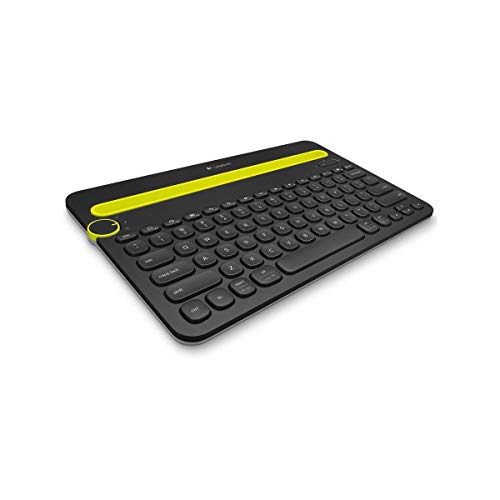
The Logitech K480 Wireless Multi-Device Keyboard is the best-known keyboard on this list, and its reputation is built on one feature: a built-in cradle that holds a tablet or phone upright while typing. The K480 pairs with up to three Bluetooth devices and switches between them with a dial, so a student can type a document on a tablet, answer a message on a phone, and check something on a computer without re-pairing anything. It works with Windows, macOS, iPadOS, Android, and Chrome OS, which makes it one of the most flexible keyboards available for mixed-device households.
The typing experience is comfortable and quiet, with full-size keys that feel closer to a desktop keyboard than to a travel board. The integrated slot holds a tablet at a readable angle, which turns any table into a small workstation. Battery life is measured in months rather than days, since the K480 runs on replaceable batteries and sips power efficiently. That combination of multi-device switching, a device cradle, and long battery life makes it the most practical pick for anyone whose tablet is one of several screens.
Strengths
- Pairs with three devices and switches between them with a simple dial.
- Built-in cradle holds a tablet or phone at a comfortable viewing angle.
- Works across Windows, macOS, iPadOS, Android, and Chrome OS.
Trade-offs
- No backlight, so typing in a dark room is harder than on backlit models.
- Heavier and bulkier than ultra-slim travel keyboards.
- Uses replaceable batteries rather than a rechargeable USB connection.
Who it fits: the multi-device user who types on a tablet, a phone, and a computer through the same day. Best for: switching between tablet, phone, and computer without re-pairing. Not suited for: travelers who need the thinnest, lightest keyboard possible.
A practical note for buyers: the K480 rewards a stable desk or table, where its cradle and weight become advantages. On a lap or in bed, its bulk is more noticeable, and a slimmer keyboard may be more comfortable. Keep a spare set of batteries in a desk drawer, since the keyboard gives little warning when power runs low. For students and remote workers who keep a tablet beside a laptop, the K480 is the keyboard that ties the setup together, and its multi-device dial is the feature that gets used every single day.
One detail that matters for buyers is how the K480 handles the transition between devices during a real workday. A typical pattern is to draft a document on the tablet in the morning, switch to the phone to answer messages at lunch, and check a spreadsheet on the computer in the afternoon. The dial makes each switch a one-second turn rather than a trip into Bluetooth settings, and the keyboard remembers all three pairings even after being switched off. That persistence is what turns multi-device support from a specification into a habit. The cradle deserves attention too: it holds tablets up to ten inches comfortably, and the viewing angle is close to a laptop screen, which reduces neck strain during long sessions. Students who use a tablet as a laptop replacement will find the cradle more useful than any other feature on this list.
2. Arteck Universal Backlit Wireless Bluetooth Keyboard
Check price on Amazon: Logitech K480 Wireless Multi-Device Keyboard

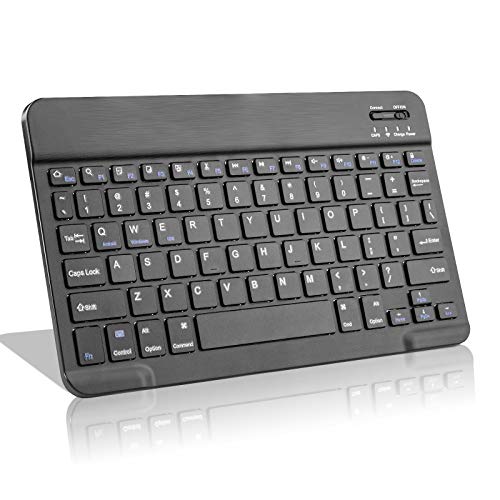
The Arteck Universal Backlit Wireless Bluetooth Keyboard is the pick for anyone who types after dark. Its backlit keys glow softly enough to see in a dim room without lighting up the whole space, which matters for students in shared dorms, parents working after bedtime, and travelers on night flights. It pairs with iPad, tablets, and PCs over Bluetooth, and its universal layout works across the major platforms without special software.
Arteck has built a steady reputation for affordable wireless keyboards, and this model shows why. The keys are low-profile and quiet, the board is thin enough to slip into a bag beside a tablet, and the rechargeable battery keeps it going through long sessions. Backlighting is adjustable, so it can be dimmed for a dark room or turned off entirely during the day to save power. For the price class, it is one of the most complete packages: backlight, rechargeable battery, universal compatibility, and a layout that works for real writing rather than just short messages.
Strengths
- Backlit keys make typing easy in dim rooms, dorms, and night flights.
- Rechargeable battery with efficient Bluetooth for long use between charges.
- Universal Bluetooth pairing works with iPad, Android tablets, and PCs.
Trade-offs
- Backlighting drains the battery faster, so it needs charging more often with the light on.
- Low-profile keys feel different from a desktop keyboard and take a day to get used to.
- No device cradle, so a separate tablet stand is needed for the best viewing angle.
Who it fits: the night owl who writes in dim rooms and wants to see the keys clearly. Best for: late-night typing, shared rooms, and travel. Not suited for: buyers who want a built-in tablet stand or a full-size desktop layout.
One habit makes this keyboard last longer: turn the backlight off when it is not needed. The light is the biggest power draw, and daytime typing does not need it. Charge the keyboard overnight once a week and it will rarely run flat. Pair it with a small folding tablet stand and the setup becomes a genuinely portable workstation that works in a library, a coffee shop, or an airplane seat, and the backlit keys mean the work does not have to stop when the lights go down.
Backlighting quality varies widely between keyboards, and this Arteck gets the balance right. The light is bright enough to read keys in a dark room but soft enough not to disturb someone sleeping nearby, which is exactly the use case in a shared dorm or a bedroom. The keys themselves are scissor-style with short travel, which makes typing quiet and quick once the fingers adjust. Battery behavior is predictable: with the backlight off, the keyboard runs for weeks on a charge, and with the light on at medium brightness it still covers several long evenings. Buyers who type mostly during the day may never need the light, but for the many students and writers who do their best work after dark, it is the feature that justifies choosing this model over cheaper non-backlit boards.
3. Arteck HB193 Universal Bluetooth Keyboard
Check price on Amazon: Arteck Universal Backlit Wireless Bluetooth Keyboard

The Arteck HB193 Universal Bluetooth Keyboard is the full-size option on this list, built from stainless steel with a layout that feels like a proper desktop keyboard. It connects to multiple devices over Bluetooth and works with Windows, iOS, and Android, so it suits a tablet user who also types on a phone or a computer. The stainless steel body gives it a weight and rigidity that plastic keyboards lack, and it stays planted on a desk during fast typing instead of sliding around.
Full-size keyboards make a difference for long writing sessions. The HB193 has a standard key layout with comfortable spacing, so touch typists can work at full speed without relearning key positions. The multi-device support means the same keyboard can serve a tablet in the evening and a desktop during the day. Its rechargeable battery and energy-saving design keep it running for weeks of regular use, and the auto-sleep function preserves power when the keyboard sits idle.
Strengths
- Full-size stainless steel design feels solid and stays stable during fast typing.
- Multi-device Bluetooth works across Windows, iOS, and Android.
- Standard key spacing suits touch typists and long writing sessions.
Trade-offs
- Larger and heavier than travel keyboards, so it is best kept on a desk.
- The stainless steel body adds weight that travelers will notice in a bag.
- No built-in cradle for holding a tablet upright.
Who it fits: the desk worker who pairs a tablet with a full-size keyboard for serious writing. Best for: long writing sessions at a desk with a tablet as the screen. Not suited for: commuters and travelers who need a pocket-size keyboard.
Buyers should think of the HB193 as a desk keyboard that happens to work beautifully with tablets, rather than as a travel accessory. It earns its place on a home desk or a study table, where its weight becomes stability and its full-size layout becomes speed. Paired with a tablet stand, it turns a tablet into a compact desktop for writing, email, and research. Keep it charged with the included cable, and let the auto-sleep feature handle power saving between sessions.
The stainless steel construction of the HB193 is more than a cosmetic choice. A heavier keyboard stays where it is put, and that stability matters during fast typing, when a light plastic board tends to creep across the desk. The metal body also resists flex, so the keys feel consistent across the whole board rather than soft in the middle. For a tablet user who works at a desk, that solidity turns the tablet into a credible desktop replacement. The multi-device support means the same keyboard can stay on the desk while the tablet, phone, and computer rotate through it, which keeps the workspace simple. It is not a travel keyboard, and it does not pretend to be one: its place is on a desk, where its weight and size become strengths rather than drawbacks.
4. OMOTON Bluetooth Tablet Keyboard with Backlit
Check price on Amazon: Arteck HB193 Universal Bluetooth Keyboard

The OMOTON Bluetooth Tablet Keyboard stands out for one reason: oversized keycaps. The larger keys give fingers more room to land, which reduces typos and makes the keyboard feel more forgiving than the cramped layouts found on many compact boards. It is rechargeable, backlit, and designed for Samsung tablets, iPads, and other Bluetooth devices, and its ultra-slim profile means it slides into a bag without adding bulk.
Key size matters more than most buyers expect. On a compact keyboard, keys are often shrunk to fit the board, and that forces the hands into a tighter, less accurate pattern. The OMOTON takes the opposite approach: keep the board slim, but make the keys as large as possible. The backlight helps in dim rooms, and the rechargeable battery avoids the cost and hassle of disposable cells. For students and writers who type for hours, the combination of large keys and backlighting is genuinely easier on the hands and eyes.
Strengths
- Oversized keycaps give fingers more room and reduce typing errors.
- Backlit keys with a rechargeable battery for dim-room and night use.
- Ultra-slim design that packs easily beside a tablet.
Trade-offs
- Oversized keys mean fewer keys fit on the board, so some secondary keys are smaller or relocated.
- Backlight use shortens battery life between charges.
- No device cradle, so a stand is needed to hold the tablet upright.
Who it fits: the heavy typist who wants large, forgiving keys in a slim travel board. Best for: long writing sessions and users who make typos on cramped keyboards. Not suited for: buyers who need a full numeric keypad or a built-in tablet stand.
Pair this keyboard with a lightweight folding stand and it becomes a complete mobile writing kit. The oversized keys are the feature to test first: spend ten minutes typing a real paragraph rather than tapping a few keys, and the difference in accuracy becomes obvious. Charge it fully before a long trip, keep the backlight at a medium level rather than maximum, and the battery will comfortably cover a full day of writing.
The oversized keycaps on the OMOTON solve a problem that many tablet typists do not realize they have until they try a better keyboard. Small keys force the fingers into precise, tense movements, and over an hour of typing that tension becomes fatigue and errors. Larger keys forgive slight misses, so typing stays relaxed and fast. The backlight and rechargeable battery round out a package that is clearly designed for people who write a lot. It is worth noting that the OMOTON is especially well suited to Samsung tablet owners, since the layout and pairing are tuned for Android, though it works with iPad as well. Anyone who has ever abandoned a compact keyboard because typing on it felt like a chore should try oversized keys before giving up on tablet keyboards entirely.
5. Ultra-Slim Bluetooth Keyboard
Check price on Amazon: OMOTON Bluetooth Tablet Keyboard
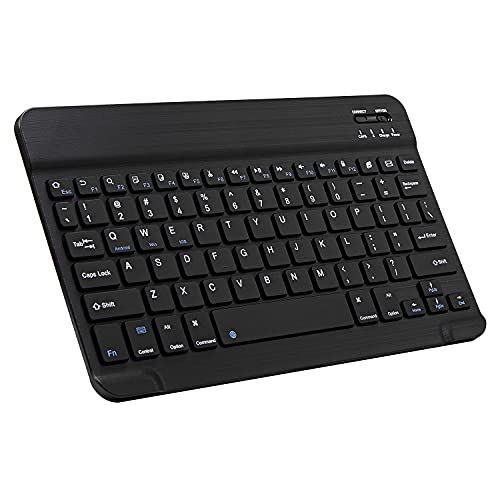
The Ultra-Slim Bluetooth Keyboard is the minimalist of this list: a portable, rechargeable mini keyboard designed to disappear into a bag until it is needed. It pairs with Apple iPad, iPhone, Samsung tablets, and Android phones over Bluetooth, and its slim profile makes it the easiest keyboard here to carry every day. For a student or traveler who wants a real keyboard without carrying a real keyboard, this is the closest thing to having both.
Mini keyboards ask for a small compromise in key size, and this one is honest about that trade. The keys are compact, so touch typists will need a short adjustment period, but the board is quiet, responsive, and far faster than any on-screen keyboard. The rechargeable battery keeps it running through weeks of light use, and the slim body means it fits in a bag pocket that a full-size keyboard never would. It is the keyboard for people who carry a tablet everywhere and want typing to be available, not a production.
Strengths
- Extremely thin and light, so it adds almost nothing to a bag.
- Rechargeable battery with long standby between uses.
- Pairs with iPad, iPhone, Samsung tablets, and Android phones.
Trade-offs
- Compact keys require an adjustment period for touch typists.
- No backlight, so it is best used in well-lit rooms.
- No device cradle, so a tablet stand or case is needed for hands-free viewing.
Who it fits: the traveler and student who want a keyboard available everywhere without the weight. Best for: everyday carry, short notes, and travel. Not suited for: long-form writing marathons or dark-room typing.
This keyboard works best as an everyday companion rather than a primary desk keyboard. Keep it charged, keep it in the bag, and it will be there for lecture notes, airport emails, and coffee shop writing. For heavy daily writing, pair it with a larger keyboard at home and let the ultra-slim board handle everything on the move. That split is how most tablet owners end up using it, and it plays to the board’s real strength: being there when it is needed, without being noticed when it is not.
The real test of an ultra-slim keyboard is whether it is still in the bag a month after purchase, and this one passes because it asks for nothing. It weighs almost nothing, takes up almost no space, and pairs in seconds when it is switched on. The rechargeable battery lasts through weeks of light use, and the slim profile means it fits in the same pocket as a notebook. For a student who carries a tablet to every class, that invisibility is the point: the keyboard is available whenever typing is needed, without ever becoming a burden. It will not replace a desk keyboard for long writing sessions, but it was never meant to. Its job is to make the tablet useful for notes, messages, and short documents anywhere, and it does that job with the least fuss of any keyboard on this list.
6. Arteck Compact Wireless Bluetooth Keyboard
Check price on Amazon: Ultra-Slim Bluetooth Keyboard

The Arteck Compact Wireless Bluetooth Keyboard is the straightforward choice: a small, light, reliable keyboard for iPad, tablets, iPhone, and PC that does the basics well and costs little. It connects over Bluetooth, runs on a rechargeable battery, and uses a compact layout that keeps the board portable without shrinking the letter keys to unusable size. For buyers who want a simple keyboard for everyday tablet typing, this is the no-fuss option.
Arteck’s compact keyboards have earned a following because they are consistent. Pairing is quick, the connection stays stable, and the keys are quiet enough for a library or lecture hall. The board is light enough to carry daily and sturdy enough to survive a bag. It does not have backlighting or a device cradle, and it does not need them: its job is to make tablet typing fast and comfortable, and it does that job without complication.
Strengths
- Compact and light, easy to carry daily with a tablet.
- Stable Bluetooth pairing with iPad, tablets, iPhone, and PC.
- Quiet keys that work well in libraries and lecture halls.
Trade-offs
- No backlight for typing in dark rooms.
- Compact layout means some keys are smaller than on a full-size board.
- No device cradle, so a stand is needed for the best setup.
Who it fits: the everyday tablet user who wants a simple, reliable keyboard for notes and messages. Best for: daily tablet typing, lectures, and light writing. Not suited for: night typing or users who need a full-size layout.
Keep expectations matched to the design and this keyboard delivers. Charge it weekly, pair it once and leave it paired, and carry a small stand for the tablet. The compact Arteck is at its best as the keyboard that lives in the bag and comes out whenever the tablet comes out, turning quick notes into real typing without any setup ritual.
The Arteck Compact earns its place through reliability rather than flash. Pairing is quick and stable, the keys are quiet, and the board holds a charge well, which are the three things that matter most in a daily keyboard. It is the kind of product that gets used every day without being thought about, and that is high praise for an accessory. The compact layout keeps the board portable while preserving full-size letter keys, so typing speed stays close to normal after a short adjustment. For buyers who want to spend the least and still get a keyboard that works every time it is switched on, this is the sensible choice. It pairs well with a simple folding stand, and together they make a tablet setup that costs little and works everywhere.
Buying Guide: Choosing a Wireless Tablet Keyboard
Start with compatibility. Check that the keyboard pairs with the tablet it will be used with, including the operating system version, and confirm that any special keys, such as a home or search key, match the platform. Bluetooth keyboards are broadly compatible, but a keyboard designed for iPad may place some symbols differently on Android, and that small difference becomes annoying during long typing sessions. If the keyboard will serve several devices, favor a multi-device model such as the Logitech K480, which switches between paired devices without re-pairing.
Key feel is the next decision, and it is the hardest to judge from a listing. Compact keyboards save space by shrinking keys, which slows touch typists and increases errors. Full-size keyboards type faster but weigh more. Oversized keycaps, as on the OMOTON, split the difference by keeping the board slim while giving fingers more room. If possible, read reviews that describe typing feel rather than just listing features, and pay attention to comments about key travel and noise, since a loud keyboard is unwelcome in a library.
Backlighting matters for anyone who types in dim rooms, and it is worth paying for if late-night work is common. Battery type matters too: rechargeable keyboards are convenient and avoid buying cells, while replaceable-battery models such as the K480 can run for months on one set. Check whether the keyboard has an auto-sleep function, since that is what stretches battery life between charges. Finally, think about the stand. Most keyboards on this list do not include a tablet cradle, so budget for a small folding stand unless the tablet case already props the screen up. A keyboard without a stand is only half a workstation.
Weight and size deserve a final thought, because they decide whether the keyboard actually gets used. A keyboard that stays home because it is too heavy is worthless, no matter how good its keys are. Think honestly about where typing will happen: a desk keyboard can be full-size and heavy, a commuter keyboard must be thin and light, and a lecture keyboard must be quiet above all else. The best keyboard is the one that matches the routine, not the one with the longest feature list. Measure the bag it will live in, check the tablet case for a built-in stand, and choose the board that fits the daily pattern rather than the most impressive specification sheet.
Check price on Amazon: Arteck Compact Wireless Bluetooth Keyboard
How to Use and Care for Your Wireless Keyboard
Pair the keyboard once and leave it paired. Bluetooth keyboards remember their host device, and re-pairing from scratch is rarely needed. Keep the keyboard charged on a regular schedule rather than waiting for it to die mid-sentence, and turn off backlighting when it is not needed to stretch battery life. Store the keyboard in a sleeve or a bag pocket where keys are protected from pressure, since a key held down for hours in a packed bag can drain the battery or damage the switch.
Clean the keyboard gently with a dry cloth, and keep food and drinks away from it during use. If the connection drops, the usual fix is simple: turn Bluetooth off and on again on the tablet, or toggle the keyboard power switch. Keep the keyboard firmware and the tablet operating system updated, since updates often fix Bluetooth stability issues. With light care, a good wireless keyboard lasts for years, and the battery is usually the only part that ages noticeably.
Common Mistakes to Avoid
The most common mistake is buying a keyboard that only fits one tablet model, then replacing the tablet and losing the keyboard. Universal Bluetooth keyboards avoid that trap entirely. Another frequent error is choosing the smallest keyboard available and then struggling to type on it for hours. Portability matters, but a keyboard that is painful to use will be abandoned, and the money is wasted either way.
Many buyers also forget the stand. A keyboard without a way to prop up the tablet forces an awkward neck angle, and the setup feels wrong no matter how good the keys are. Finally, do not ignore battery behavior. A keyboard that needs charging every two days becomes a chore, while one that lasts weeks disappears into the routine. Check battery comments in reviews before ordering, and favor models with auto-sleep and efficient Bluetooth.
Final Recommendation
For most tablet owners, the Logitech K480 is the best all-round choice: its device cradle and three-device switching make it the most useful keyboard for a mixed tablet, phone, and computer routine. Night typists should choose the Arteck Universal Backlit model, and desk writers should choose the Arteck HB193 for its full-size stainless steel layout. The OMOTON is the best pick for anyone who makes typos on cramped keys, the Ultra-Slim board is the best travel companion, and the Arteck Compact is the simplest everyday keyboard for lectures and notes. Match the keyboard to where the typing happens, add a small stand, and the tablet becomes a genuinely productive machine.
Frequently Asked Questions
Do wireless tablet keyboards work with both iPad and Android tablets?
Yes, in most cases. The keyboards in this guide connect over standard Bluetooth and pair with iPad, Samsung Galaxy Tab, and other Android tablets. Check the listing for the exact platforms supported, and note that some special keys may behave differently between iPadOS and Android. Multi-device models such as the Logitech K480 are designed to switch between platforms.
Is a backlit keyboard worth it for a tablet?
Yes, if typing happens in dim rooms. Backlighting makes keys visible in a dark dorm room, on a night flight, or in bed, and it can be turned off during the day to save battery. Buyers who only type in bright rooms will not miss it, but night typists consider it essential, and the Arteck and OMOTON picks on this list both offer it.
How long does a wireless keyboard battery last?
It depends on the model and on backlight use. Rechargeable keyboards typically last days to weeks between charges, with backlighting shortening that time. Models with replaceable batteries, such as the Logitech K480, can run for months. Auto-sleep functions help a lot, and turning off the backlight when it is not needed is the single best way to extend battery life.
Can one keyboard switch between a tablet and a phone?
Yes. Multi-device keyboards pair with several devices and switch between them with a key or dial. The Logitech K480 switches between three devices, and the Arteck HB193 also supports multiple pairings. Single-device keyboards need to be re-paired when switching, which takes a few seconds but becomes tedious if done many times a day.
Do I need a stand with a wireless tablet keyboard?
Almost always. Most wireless keyboards do not include a tablet cradle, so the tablet needs a stand or a case that props it up. Without a stand, the tablet lies flat and the neck angle becomes uncomfortable within minutes. The Logitech K480 is the exception on this list, since it has a built-in cradle. For the other picks, a small folding stand is an inexpensive addition that completes the setup.
Are wireless tablet keyboards noisy?
Most are quiet. The keyboards in this guide use low-profile or scissor-style keys designed for shared spaces such as libraries and lecture halls. Mechanical-style keyboards are louder, but none of the picks here are mechanical. If noise is a concern, favor the Arteck Compact or the Logitech K480, both of which are known for quiet operation, and avoid typing forcefully, which increases noise on any keyboard.
Related reading on Kajuandouglas: Best 10-Inch Tablets Under 100, Best Tablets for Under 300, and Bluetooth vs 2.4GHz Keyboards Explained.