The best laptops for small business owners with a 15.6 inch screen are the ones that do the daily work without fuss: documents, spreadsheets, email, video calls, and invoicing, all day, every day, on a screen large enough to see two windows side by side. A 15.6 inch laptop is the sweet spot for business work, because it gives a full size keyboard with a numeric keypad, a screen that fits a spreadsheet comfortably, and a body that still travels to meetings and job sites. The six laptops in this guide are all 15.6 inch business models from known brands, with exact brand and model names, so buyers can find the same laptop again.
Many small business owners buy a laptop once and rely on it for years, which makes the choice matter more than it does for a casual buyer. The laptop is the office, the cash register, the meeting room, and the filing cabinet, all in one machine, and a slow or unreliable laptop costs time and money every single day. The laptops below are current business models with Windows 11 Pro, solid keyboards, and the ports a business needs, and they cover the range from a value ThinkPad to a high memory ExpertBook.
This guide judges business laptops by work performance first, then by screen, keyboard, and value. A laptop with a great screen but a slow processor will frustrate an owner every day, and a laptop with a fast processor but a poor keyboard will slow down every email. The picks below balance processor, memory, storage, and a 15.6 inch screen, and each one fits a different buyer, from the owner who needs the lowest cost to the owner who needs 32GB of memory for heavy multitasking.
In this guide
Quick picks: best laptops for small business owners 15 6 screen
| # | Product | Where to buy |
|---|---|---|
| 1 | Lenovo ThinkPad E15 15.6 inch business laptop | Check on Amazon |
| 2 | ASUS ExpertBook B1 Core 7 15.6 inch business laptop | Check on Amazon |
| 3 | Lenovo V15 Gen 5 Core i7 15.6 inch business laptop | Check on Amazon |
| 4 | Lenovo V15 Gen 4 Core i5 15.6 inch business laptop | Check on Amazon |
| 5 | HP ProBook 455 G10 Ryzen 7 15.6 inch business laptop | Check on Amazon |
| 6 | ASUS ExpertBook B1 Core i5 15.6 inch business laptop | Check on Amazon |
How the picks were chosen for best laptops for small business owners 15.6 screen
A laptop earns a place in this guide when it is a current 15.6 inch business laptop that suits a small business owner, judged by screen, performance, and business features. First, the laptop must have a 15.6 inch screen, with Full HD resolution, because that is the size this guide is about, and it must be a business model, with Windows 11 Pro and a full size keyboard, not a consumer laptop with a small screen. Second, it must have enough performance for real business work, with at least 16GB of RAM and a solid state drive, so it stays fast when many applications are open.
Keyboard, ports, and value were checked next. Every pick here has a full size keyboard, with a numeric keypad where the model includes one, and the ports a business needs, including USB-C, USB-A, HDMI, and Ethernet. Laptops with a smaller screen, with less than 16GB of RAM, with a hard drive instead of an SSD, or with a refurbished listing were left out. The result is a shortlist of six 15.6 inch business laptops that genuinely serve a small business owner.
The six best laptops for small business owners 15.6 screen
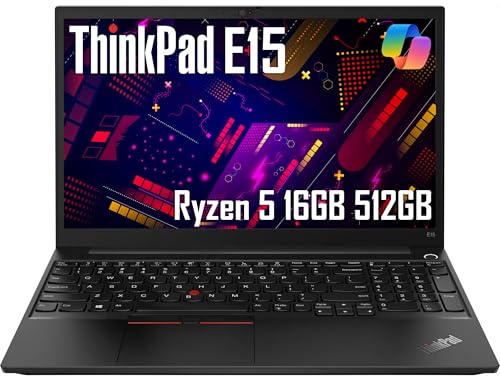
Lenovo ThinkPad E15 Business Laptop, 15.6 inch FHD, AMD Ryzen 5 5500U
The Lenovo ThinkPad E15 is the business laptop that leads this guide, a 15.6 inch FHD IPS anti-glare laptop with an AMD Ryzen 5 5500U processor, 16GB of RAM, and a 512GB SSD, built for small business owners who need a reliable work machine at a fair cost. ThinkPad is the best known business laptop line in the world, and the E15 brings its strengths to a small business budget: a solid keyboard, a bright anti-glare screen that stays readable in a bright office, and a build that survives daily travel. The 15.6 inch screen is the sweet spot for business work, large enough for spreadsheets and documents side by side, and small enough to carry to meetings and job sites.
The Ryzen 5 5500U is a capable processor for business work, handling documents, spreadsheets, video calls, and browser tabs without slowing down, and 16GB of RAM means the laptop stays smooth when many applications are open at once. The 512GB SSD gives fast startup and plenty of room for files, and the anti-glare IPS screen reduces eye strain during long workdays. The trade is that the E15 is a value ThinkPad, not a flagship, so it lacks some premium features such as a metal body or a top end screen, but for a small business owner who needs a dependable work laptop, it is the right balance of cost and quality.
Key specs: 15.6 inch FHD IPS anti-glare; AMD Ryzen 5 5500U; 16GB RAM; 512GB SSD; ThinkPad keyboard
Strengths:
- ThinkPad keyboard and build quality at a small business cost
- 15.6 inch anti-glare IPS screen suits long workdays
- 16GB RAM and 512GB SSD handle real business workloads
Trade-offs:
- Value ThinkPad, so it lacks some premium flagship features
- Ryzen 5 suits business work but not heavy video or design work
- Plastic build is practical but less premium than metal models
Best for: Small business owners who want a dependable ThinkPad for daily office work.
Not suited for: Buyers who need a premium metal body or a top end screen.
Check price on Amazon: Lenovo ThinkPad E15 15.6 inch business laptop

ASUS ExpertBook B1, Intel Core 7 150U, 32GB RAM, 1TB SSD, 15.6 inch FHD
The ASUS ExpertBook B1 with an Intel Core 7 150U processor, 32GB of RAM, and a 1TB SSD is the high memory pick in this guide, a 15.6 inch FHD business laptop built for small business owners who run many applications at once and never want to wait. ExpertBook is ASUS business line, and the B1 brings enterprise grade security with a TPM 2.0 chip, BIOS protection, and a privacy camera shutter, plus a MIL-STD 810H military grade durability rating, which means it is built to survive drops, vibration, and daily travel. The 15.6 inch FHD anti-glare screen is bright and clear for presentations and documents, and the full set of ports includes dual USB-C, dual USB-A, RJ45 Ethernet, and HDMI.
Thirty-two gigabytes of RAM and a 1TB SSD are the reason to choose this model: it handles large spreadsheets, many browser tabs, video calls, and business software at the same time without slowing down, and the 1TB drive holds years of files, photos, and documents. The Core 7 150U processor is efficient and capable for business work, and Wi-Fi 6 keeps the connection fast in a busy office. The trade is weight and price, since a 15.6 inch laptop with this much memory costs more than a basic model, but for an owner who uses the laptop as the main work machine all day, the extra memory pays for itself in saved time.
Key specs: 15.6 inch FHD; Intel Core 7 150U; 32GB RAM; 1TB SSD; Wi-Fi 6; TPM 2.0; MIL-STD 810H
Strengths:
- 32GB RAM and 1TB SSD handle heavy multitasking easily
- Enterprise security with TPM 2.0 and privacy shutter
- MIL-STD 810H durability survives travel and daily use
Trade-offs:
- Costs more than a basic business laptop
- 15.6 inch size is less portable than a 14 inch model
- No fingerprint reader in this configuration
Best for: Owners who run many applications at once and need 32GB of memory.
Not suited for: Buyers who want the lightest laptop for constant travel.
Check price on Amazon: ASUS ExpertBook B1 Core 7 15.6 inch business laptop

LENOVO V15 Gen 5, Intel Core i7-13620H, 16GB DDR5, 512GB, 15.6 inch FHD
The Lenovo V15 Gen 5 with an Intel Core i7-13620H processor, 16GB of DDR5 memory, and a 512GB SSD is the performance pick in this guide, a 15.6 inch FHD business laptop built for small business owners who need speed. The V15 is Lenovo value business line, and the Gen 5 brings a fast 13th generation Core i7, DDR5 memory, and a full HD screen with a numeric keypad, which matters for owners who work with numbers all day. Ethernet, HDMI, and a full size keyboard make it a proper office machine, and the 15.6 inch screen gives room for spreadsheets, invoices, and documents side by side.
The Core i7-13620H is a strong processor for business work, handling large files, many tabs, and demanding software without slowing down, and DDR5 memory keeps everything responsive. The numeric keypad is a real advantage for accounting, inventory, and data entry, since it speeds up number work far more than a keyboard without one. The trade is battery life, since a fast processor uses more power, and the V15 is a value line, so it lacks some premium features such as a metal body or a backlit keyboard in every configuration. For owners who need speed for the cost, it is the strongest value here.
Key specs: 15.6 inch FHD; Intel Core i7-13620H; 16GB DDR5; 512GB SSD; numeric keypad; Ethernet; HDMI
Strengths:
- Fast Core i7-13620H with DDR5 memory for demanding work
- Numeric keypad speeds up accounting and data entry
- Full size keyboard with Ethernet and HDMI for office use
Trade-offs:
- Fast processor uses more battery than an efficient model
- Value line build lacks some premium features
- Heavier than a 14 inch ultraportable
Best for: Owners who need fast performance and a numeric keypad for number work.
Not suited for: Travellers who need maximum battery life above all else.
Check price on Amazon: Lenovo V15 Gen 5 Core i7 15.6 inch business laptop

Lenovo V15 Gen 4 Business Laptop, 15.6 inch FHD, Intel Core i5-13420H
The Lenovo V15 Gen 4 with an Intel Core i5-13420H processor is the balanced pick in this guide, a 15.6 inch FHD business laptop that gives small business owners solid performance at a lower cost than the Core i7 Gen 5. It has a 15.6 inch FHD display, HDMI, RJ45 Ethernet, a webcam, and a numeric keypad, which covers the full list of what a business laptop needs: a clear screen, wired network for the office, video calls for remote meetings, and fast number entry for accounting. The Core i5-13420H handles documents, spreadsheets, email, and video calls smoothly, and it is efficient enough to last through a workday without hunting for an outlet.
The V15 Gen 4 suits owners who want a proper business laptop without paying for performance they will never use. It is not the fastest machine here, and it will not suit heavy video work or large design files, but for the daily work of a small business, invoicing, email, spreadsheets, browsing, and calls, it is more than enough. The trade is that it is a value line, so the screen and the build are practical rather than premium, and buyers who want a brighter screen or a metal body should look at a higher line. For most small business owners, it is the right laptop at the right cost.
Key specs: 15.6 inch FHD; Intel Core i5-13420H; HDMI; RJ45 Ethernet; webcam; numeric keypad
Strengths:
- Balanced Core i5 performance at a lower cost than Core i7 models
- Full business connectivity with HDMI, Ethernet, and webcam
- Numeric keypad for accounting and data entry
Trade-offs:
- Not suited to heavy video or large design files
- Value line screen and build are practical, not premium
- RAM and storage should be checked in the exact listing
Best for: Owners who want a balanced business laptop without paying for unused speed.
Not suited for: Buyers who need heavy video work or a premium metal body.
Check price on Amazon: Lenovo V15 Gen 4 Core i5 15.6 inch business laptop

HP ProBook 455 G10, 15.6 inch Full HD, AMD Ryzen 7 7730U, 32GB, 1TB SSD
The HP ProBook 455 G10 with an AMD Ryzen 7 7730U octa-core processor, 32GB of RAM, and a 1TB SSD is the AMD performance pick in this guide, a 15.6 inch Full HD business notebook built for small business owners who need power and memory. ProBook is HP business line, and the 455 G10 brings a Ryzen 7 octa-core processor that handles multitasking, large files, and demanding business software with ease, plus 32GB of RAM that keeps everything smooth when many applications are open. The 1TB SSD holds years of files, and the 15.6 inch Full HD screen at 1920 by 1080 gives a clear workspace for documents and spreadsheets.
The Ryzen 7 7730U is an eight core processor, which means it handles parallel work well, such as running a video call while working on a large spreadsheet and keeping a browser full of tabs open at the same time. The 32GB of memory is the key number here, since it is what keeps the laptop fast when the workload grows, and the 1TB drive means the owner will not run out of room. The trade is weight and battery, since a 15.6 inch laptop with this much power is not the lightest traveller, but for an owner who works mostly at a desk with occasional travel, it is a strong and capable machine.
Key specs: 15.6 inch Full HD 1920 by 1080; AMD Ryzen 7 7730U octa-core; 32GB RAM; 1TB SSD
Strengths:
- Eight core Ryzen 7 handles heavy multitasking easily
- 32GB RAM and 1TB SSD for large files and many applications
- Full HD screen gives a clear workspace for documents
Trade-offs:
- Heavier than a 14 inch ultraportable for constant travel
- Powerful processor uses more battery than an efficient model
- ProBook design is practical rather than premium
Best for: Owners who need eight core power and 32GB of memory for heavy work.
Not suited for: Travellers who need the lightest laptop for constant movement.
Check price on Amazon: HP ProBook 455 G10 Ryzen 7 15.6 inch business laptop
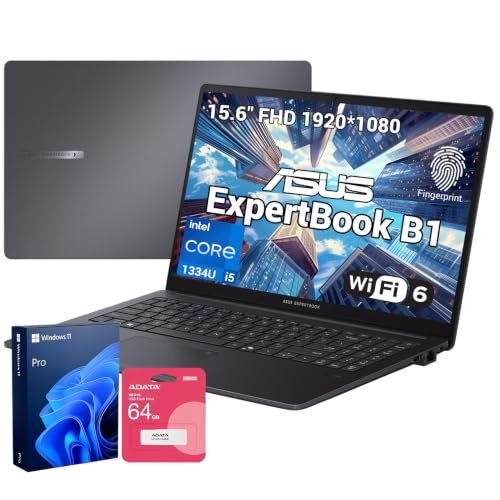
ASUS ExpertBook B1, Intel Core i5 1334U, 16GB RAM, 512GB SSD, 15.6 inch FHD
The ASUS ExpertBook B1 with an Intel Core i5 1334U processor, 16GB of RAM, and a 512GB SSD is the value ExpertBook in this guide, a 15.6 inch FHD business laptop that brings the same enterprise features as its Core 7 sibling at a lower cost. It has a 15.6 inch FHD screen at 1920 by 1080, a fingerprint reader for fast secure login, Wi-Fi 6 for fast office wireless, and Windows 11 Pro, which is the business version of Windows with the management and security features a small business needs. The fingerprint reader is a small feature that saves time every day, since it logs the owner in with one touch instead of a password.
The Core i5 1334U is a capable processor for business work, handling documents, spreadsheets, email, and video calls smoothly, and 16GB of RAM keeps it responsive when many applications are open. The 512GB SSD gives fast startup and room for files, and the ExpertBook build includes the same durability and security focus as the higher model. The trade is performance against the Core 7 version, since the i5 is slower for heavy multitasking, but for the daily work of a small business it is more than enough, and it costs less. For owners who want ExpertBook quality at a value cost, it is the right choice.
Key specs: 15.6 inch FHD 1920 by 1080; Intel Core i5 1334U; 16GB RAM; 512GB SSD; fingerprint reader; Wi-Fi 6; Windows 11 Pro
Strengths:
- Fingerprint reader for fast secure login every day
- Windows 11 Pro with business management and security
- ExpertBook durability and security at a value cost
Trade-offs:
- Core i5 is slower than the Core 7 version for heavy multitasking
- 16GB RAM suits daily work but not the heaviest workloads
- 15.6 inch size is less portable than a 14 inch model
Best for: Owners who want ExpertBook quality with a fingerprint reader at a value cost.
Not suited for: Buyers who need 32GB of memory for the heaviest multitasking.
Check price on Amazon: ASUS ExpertBook B1 Core i5 15.6 inch business laptop
Comparison table
| Laptop | Processor | RAM and storage | Screen |
|---|---|---|---|
| ThinkPad E15 | Ryzen 5 5500U | 16GB, 512GB SSD | 15.6 inch FHD IPS |
| ExpertBook B1 Core 7 | Core 7 150U | 32GB, 1TB SSD | 15.6 inch FHD |
| V15 Gen 5 | Core i7-13620H | 16GB DDR5, 512GB SSD | 15.6 inch FHD |
| V15 Gen 4 | Core i5-13420H | 16GB, 512GB SSD | 15.6 inch FHD |
| ProBook 455 G10 | Ryzen 7 7730U | 32GB, 1TB SSD | 15.6 inch Full HD |
| ExpertBook B1 Core i5 | Core i5 1334U | 16GB, 512GB SSD | 15.6 inch FHD |
Best laptops for small business owners 15.6 screen: how to choose
Start with the work, because the right laptop depends on what the business does all day. An owner who mostly writes emails, invoices, and documents needs a good keyboard, a clear screen, and enough memory to keep many tabs open, while an owner who works with large spreadsheets, photos, or video needs a faster processor and more memory. Check the daily workload honestly, and choose a laptop that handles the heaviest day, not the lightest, since a laptop that slows down under load costs time every day.
Next, look at memory and storage. Sixteen gigabytes of RAM is the minimum for a business laptop today, and 32GB is worth it for owners who run many applications at once or work with large files. A 512GB SSD is the minimum for storage, and 1TB is better for owners who keep years of files, photos, and documents on the laptop. A solid state drive is essential, since a hard drive makes even a fast laptop feel slow, and every laptop in this guide uses an SSD.
Finally, check the keyboard, the ports, and the warranty. A full size keyboard with a numeric keypad speeds up number work, and a backlit keyboard helps in dim meeting rooms. The laptop should have USB-C, USB-A, HDMI, and Ethernet, so it connects to monitors, projectors, and wired networks without adapters. Windows 11 Pro is the business version of Windows, with the management and security features a small business needs, and a business warranty with on site service is worth more than a consumer warranty when the laptop is the office.
Setting up and caring for a business laptop
When a new business laptop arrives, set it up before the first workday, and check that Windows 11 Pro is activated, that the fingerprint reader or Windows Hello is configured, and that the business software is installed and licensed. Back up the files from the old laptop before moving them, and check that email, invoicing, and accounting software all work on the new machine. Connect the laptop to the office monitor, printer, and network, and confirm that everything works together.
For care, keep the laptop updated, since Windows and security updates protect the business data, and back up files every day to the cloud or an external drive, because a laptop that holds the business should never be the only copy of anything. Clean the keyboard and the screen with a soft cloth, keep the vents clear of dust, and carry the laptop in a padded sleeve. A business laptop that is set up well and backed up daily will serve for years.
Common mistakes when buying a business laptop
The most common mistake is buying a consumer laptop for business work, which leaves the owner without Windows 11 Pro, without a business warranty, and without the ports the office needs. Another common mistake is buying too little memory, which makes the laptop slow within a year as software grows. A third mistake is choosing a small screen to save weight, and then struggling to read spreadsheets on a 14 inch display all day.
Buyers also forget to check the exact model code, and they order a laptop with a slower processor or less memory than the listing they read, since similar names hide different configurations. Finally, many buyers forget the backup: a business laptop without a backup plan is a single point of failure, and a lost or stolen laptop should never mean a lost business. Set up cloud backup on the first day.
Our final recommendation
For most small business owners, the best laptop in this guide is a 15.6 inch business model with at least 16GB of RAM, a 512GB SSD, Windows 11 Pro, and a full size keyboard with a numeric keypad. That combination handles daily business work smoothly and lasts for years. Owners who run many applications at once should choose a 32GB model, while owners who need the lowest cost should choose a value ThinkPad or V15 model with 16GB.
Whatever the choice, buy the exact model code in this guide, check the memory and storage in the listing before ordering, and keep the receipt until the laptop has been through a full workweek. A good business laptop should start fast, stay fast all day, and never get in the way of the work. For more laptop options, see our guides to laptops for business under 1000, 17 inch laptops for business, small business laptops under 1000, and business laptops under 1000 15 inch.
15.6 inch versus smaller screens for business work
The 15.6 inch screen is the most popular business laptop size for a reason, and the reason is the balance it strikes between workspace and portability. A 14 inch laptop is lighter and easier to carry, but its screen is cramped for spreadsheets, and its keyboard often lacks a numeric keypad, which slows down number work. A 17 inch laptop has a large screen and a full keyboard, but it is heavy, needs a large bag, and its battery drains faster. A 15.6 inch laptop sits in the middle: its screen fits two windows side by side, its keyboard has room for a numeric keypad, and its body still fits in a standard laptop bag and travels to meetings without strain. For a small business owner who works at a desk most of the day and travels sometimes, the 15.6 inch size is the right call, and the six laptops in this guide all use it. The practical rule is simple: if the laptop mostly stays on a desk, choose the largest screen that fits the budget, and if it travels every day, choose the lightest 15.6 inch model that still has the memory and storage the work needs.
A quick check before ordering a business laptop
Before ordering a business laptop, run through a short check that takes a few minutes and prevents most returns. First, list the software the business uses every day, and note whether it needs Windows 11 Pro, since a consumer laptop with Home will not do. Second, count the applications that run at once on a busy day, since that decides between 16GB and 32GB of memory. Third, check the ports the office needs, including HDMI, Ethernet, and USB, since a laptop without the right ports needs adapters for everything. With those three answers, the choice in this guide becomes clear.
What a small business owner should check before the first workday
A new business laptop should be checked before the first workday, so that no surprise appears in the middle of an important job. First, confirm that Windows 11 Pro is activated and that the fingerprint reader or Windows Hello is set up, since a login problem on Monday morning wastes the whole day. Second, install the business software, including email, invoicing, accounting, and any industry specific tools, and check that each one opens and works, since a missing licence or a failed install is far easier to fix before the work starts. Third, connect the laptop to the office monitor, printer, and network, and confirm that everything works together, including the wired Ethernet connection when the office uses one. Fourth, set up cloud backup and check that it runs, since a laptop without a backup is a risk the business should not take. Fifth, move the files from the old laptop, and check that the important documents, spreadsheets, and customer records all arrived safely. Finally, charge the battery fully and carry the charger, since a new laptop should be ready for a full day of work, and the first week will show whether the battery lasts as long as the workday needs.
Backing up business data from the new laptop
A business laptop holds the business, and a backup plan should be set up on the first day, before any real work is done on the new machine. Files, invoices, customer records, and photos should exist in at least two places, with one copy on the laptop and one copy in the cloud or on an external drive, so that a lost, stolen, or broken laptop never means a lost business. Cloud backup is the simplest answer for most small businesses, since it runs automatically in the background and keeps a copy off site, while an external drive is a good second copy that works even when the internet is down. The backup should be automatic, not manual, since a manual backup is forgotten on busy days, and it should be checked regularly, since a backup that has never been restored is only a hope, not a plan. Test the restore process once, by recovering a single file from the backup, so the owner knows it works before it is ever needed. Keep the backup running every day, and keep a copy of the most important files somewhere else as well, since two copies are good and three copies are better for the files the business cannot live without.
Choosing between 16GB and 32GB of memory
Memory is the most important number on a business laptop after the processor, and the choice between 16GB and 32GB decides how smooth the laptop stays as the workload grows. Sixteen gigabytes is enough for daily business work, with documents, email, a browser full of tabs, and a video call running at once, and it will serve most small business owners well for years. Thirty-two gigabytes is worth it for owners who run many applications at once, who work with large spreadsheets, photos, or video, or who keep dozens of browser tabs open all day, since it keeps the laptop fast when the workload is heavy. The difference shows most over time, since software grows heavier every year, and a laptop with 32GB will stay fast longer than one with 16GB. The cost difference is real, but it is small compared with the cost of a slow laptop that wastes time every day, and memory cannot always be upgraded later, so the buyer should choose more memory now rather than less. The practical rule is simple: if the work is mostly documents and email, 16GB is enough, and if the work involves large files, many applications, or heavy multitasking, 32GB is the right choice.
Frequently asked questions
Why is 15.6 inch the best screen size for a small business laptop?
It balances workspace and portability. The screen fits two windows side by side and the keyboard has room for a numeric keypad, while the body still travels to meetings without the weight of a 17 inch model.
How much RAM does a small business laptop need?
At least 16GB for daily business work, and 32GB for owners who run many applications at once or work with large files. Less than 16GB will feel slow within a year as software grows.
Do I need Windows 11 Pro or is Home enough?
Windows 11 Pro is the business version, with management, security, and remote desktop features a small business needs. Home lacks those features, so Pro is worth it for a work laptop.
Is a numeric keypad important on a business laptop?
Yes, for owners who work with numbers. A numeric keypad speeds up accounting, invoicing, and data entry far more than the number row, and every 15.6 inch laptop in this guide has room for one.
Should I buy a laptop with a hard drive or an SSD?
Always an SSD. A solid state drive makes the laptop start fast, open files quickly, and stay responsive, while a hard drive makes even a fast laptop feel slow. Every laptop in this guide uses an SSD.


