The best ultrabook laptops for business are the machines that make travel feel easy. They are thin, light, fast to wake, and good for a full day of meetings, yet they carry the processors, memory, and security features that office work demands. This guide covers the six ultrabooks that define that category right now, from the definitive Dell XPS 13 to the featherlight LG gram.
An ultrabook is not just a thin laptop. The category means a light chassis, a solid-state drive, a good display, long battery life, and quick resume from sleep, all in a machine that survives daily travel. For business users, it also means a backlit keyboard, a fingerprint reader or IR camera, Wi-Fi 6 or better, and the ports to connect a dock at the desk. The picks below meet that bar.
The six laptops in this guide span the ultrabook range: the premium XPS 13 and Spectre x360, the OLED-equipped Yoga Slim 7x and Zenbook 14, the value Swift Go 14, and the ultralight LG gram 14. Every one of them runs Windows 11, carries at least 16GB of memory and a 512GB SSD, and handles email, documents, spreadsheets, and video calls without complaint.
Use the comparison table to narrow the list by weight and standout feature, then read the section for the model that fits how you travel and work. The buying guide explains how to choose between them, and the final recommendation names the single best pick for most business travelers.
One honest note before the list: an ultrabook is a trade-off, and the trade is ports and repairability for lightness. The thinnest machines have fewer ports, soldered memory, and batteries that are harder to replace than a thicker business laptop. For most travelers that trade is worth it, because the laptop goes everywhere and works all day. But if you need many ports, a replaceable battery, or a machine that can be repaired easily, a standard business laptop may suit you better than any ultrabook here.
In this guide
Quick picks: best ultrabook laptops for business
| # | Product | Where to buy |
|---|---|---|
| 1 | Dell XPS 13 | Check on Amazon |
| 2 | HP Spectre x360 16 | Check on Amazon |
| 3 | Lenovo Yoga Slim 7x | Check on Amazon |
| 4 | ASUS Zenbook 14 OLED | Check on Amazon |
| 5 | Acer Swift Go 14 | Check on Amazon |
| 6 | LG gram 14 | Check on Amazon |
How the picks were chosen
We started with the ultrabook lines that consistently earn praise for business travel: Dell XPS, HP Spectre, Lenovo Yoga Slim, ASUS Zenbook, Acer Swift Go, and LG gram. These are the lines that prioritize lightness, display quality, and battery life without giving up business features. Gaming laptops and budget consumer machines were excluded.
Then we checked each candidate listing to confirm it was a new unit of the exact model named, with the processor, memory, storage, display size, and operating system stated in the listing itself. Any listing marked renewed or used was excluded, as were listings for accessories, parts, or the wrong model. The specifications quoted in each section come from those listings.
We required every pick to meet a modern ultrabook baseline: at least 16GB of memory, at least a 512GB solid-state drive, a full HD or better display, and Windows 11. We also looked for the features that make an ultrabook pleasant to travel with: a touchscreen or high-resolution display, Wi-Fi 6 or better, USB-C or Thunderbolt ports, and a weight that stays comfortable in a bag all day.
Finally, we spread the picks across display types, processors, and budgets so the list serves different kinds of travelers. The XPS 13 and gram 14 suit buyers who count every gram, the Spectre x360 suits presenters who want a large touchscreen, the Yoga Slim and Zenbook suit buyers who want an OLED display, and the Swift Go suits value buyers. No pick in this guide is a compromise machine: each one is a strong ultrabook in its class.
Quick comparison
| Product | Standout feature | Best for |
|---|---|---|
| Dell XPS 13 | 3K 120Hz touchscreen, featherlight | premium travel and executive work |
| HP Spectre x360 16 | 16-inch two-in-one, 9MP camera | presentations and large-screen work |
| Lenovo Yoga Slim 7x | 3K OLED, Snapdragon X Elite | travel with a superb display |
| ASUS Zenbook 14 OLED | 2K OLED, Ryzen AI 9 | travel, reading, and presentations |
| Acer Swift Go 14 | Ultra 7 touch, Thunderbolt 4 | value ultrabook purchases |
| LG gram 14 | 2.47 lbs, 32GB RAM | frequent travel with a light bag |

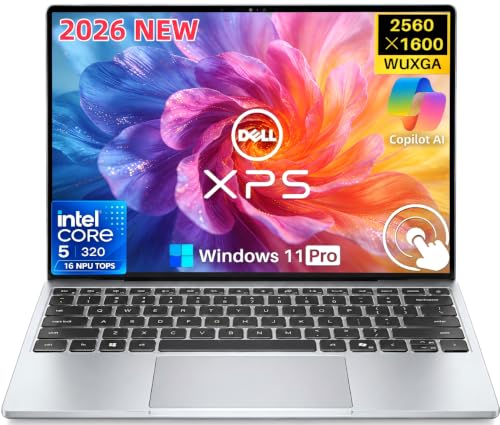
Dell XPS 13 — 13.4-inch 3K 120Hz Touchscreen, Intel Core 5 320, 16GB RAM, 512GB SSD
The Dell XPS 13 is the ultrabook that defines the category for business users. This 2026 configuration has a 13.4-inch 3K touchscreen running at 120Hz, an Intel Core 5 320 processor, 16GB of DDR5 memory, and a 512GB SSD, with Wi-Fi 7, a backlit keyboard, USB-C, and Windows 11 Pro. It is featherlight, fast, and built to a standard that makes it feel premium from the first touch.
For business, the XPS 13 covers the essentials with room to spare. The sharp 3K display makes documents and spreadsheets crisp, the 120Hz refresh keeps scrolling smooth, and the touchscreen adds a direct way to work through presentations. Wi-Fi 7 keeps video calls stable on modern office networks, and the Copilot PC features bring AI assistance to everyday tasks.
The XPS 13 is a machine that prioritizes thinness, so its port selection is USB-C only, and buyers who rely on older peripherals will need an adapter or a dock. For travelers who live on Wi-Fi and USB-C, that is a fair trade for a laptop this light and this capable.
Key specifications: 13.4-inch 3K 120Hz touchscreen; Intel Core 5 320; 16GB DDR5 RAM; 512GB SSD; Wi-Fi 7; backlit keyboard; USB-C; Windows 11 Pro.
A good fit for executives and travelers who want the definitive ultrabook.
Strengths
- Sharp 3K 120Hz touchscreen display
- Featherlight premium build
- Wi-Fi 7 and Copilot PC features
Trade-offs
- USB-C ports only, so adapters needed for older gear
- No HDMI or USB-A port built in
- Keyboard layout is compact
Business travelers who want a premium, featherlight 13-inch laptop.
Best for: premium travel and executive work / Not suited for: desk setups with legacy peripherals
Check price on Amazon: Dell XPS 13

HP Spectre x360 — 16-inch 120Hz WQXGA Touchscreen, Intel Core Ultra 7 155H, 16GB RAM, 1TB SSD
The HP Spectre x360 in its 16-inch form is the ultrabook for buyers who want a large screen without giving up portability. It has a 16-inch 120Hz WQXGA IPS touchscreen, a 16-core Intel Core Ultra 7 155H processor, 16GB of LPDDR5 memory, and a 1TB SSD, with Thunderbolt 4, Wi-Fi 6E, a backlit keyboard, a fingerprint reader, a 9MP IR camera, and Windows 11 Pro.
The two-in-one design is the reason to choose the Spectre. Flip the screen around and it becomes a tablet for reading and presenting; flip it back and it is a full laptop for typing. The 9MP IR camera is one of the best webcams on any laptop in this guide, which matters for people who present on video all day. The 1TB SSD holds a large working library without a second thought.
Sixteen inches is a large ultrabook, and it needs a bigger bag than the 13- and 14-inch models here. But for buyers who want the biggest screen in a machine they can still carry, the Spectre x360 is the right compromise.
Key specifications: 16-inch 120Hz WQXGA IPS touchscreen; Intel Core Ultra 7 155H 16-core; 16GB LPDDR5 RAM; 1TB SSD; Thunderbolt 4; Wi-Fi 6E; fingerprint reader; 9MP IR camera; Windows 11 Pro.
A good fit for presenters and desk-first workers who want a large touchscreen.
Strengths
- Large 16-inch touchscreen with two-in-one flexibility
- 9MP IR camera for excellent video calls
- 1TB SSD and Thunderbolt 4
Trade-offs
- Larger and heavier than 13- and 14-inch ultrabooks
- Premium pricing
- Battery life is shorter on the big bright display
Professionals who present often and want a big, flexible screen.
Best for: presentations and large-screen work / Not suited for: ultralight travel
Check price on Amazon: HP Spectre x360 16

Lenovo Yoga Slim 7x — 14-inch Touch 3K OLED, Snapdragon X Elite, 32GB RAM, 1TB SSD
The Lenovo Yoga Slim 7x is the ARM-powered ultrabook in this guide, and it is here because of its display and its battery life. It has a 14-inch touch 3K OLED display, a Snapdragon X Elite processor, 32GB of memory, and a 1TB SSD, with a backlit keyboard, a 1080p webcam, Wi-Fi 7, and Bluetooth 5.4. It is a Copilot+ PC, with 45 TOPS of AI performance.
The OLED display is the star: deep blacks, vivid colors, and sharp text make documents and presentations look their best, and the 3K resolution keeps fine print comfortable. The Snapdragon X Elite chip delivers long battery life and runs cool and quiet, which suits long days of meetings and travel. With 32GB of memory and a 1TB SSD, this is a machine with room to grow.
The honest caveat is software compatibility. The Snapdragon chip runs native ARM apps and most modern software well, but some older x86 business applications run in emulation. Buyers should check that the specific software their work depends on runs well on Snapdragon before choosing this model.
Key specifications: 14-inch touch 3K OLED display; Snapdragon X Elite; 32GB RAM; 1TB SSD; Copilot+ PC; 45 TOPS; backlit keyboard; 1080p webcam; Wi-Fi 7.
A good fit for travelers who want the best display and battery life.
Strengths
- Stunning 3K OLED touchscreen display
- Long battery life, cool and quiet
- 32GB RAM and 1TB SSD
Trade-offs
- Some older x86 apps run in emulation
- No Thunderbolt port on this configuration
- ARM compatibility needs checking for niche software
Mobile professionals who value display quality and endurance.
Best for: travel with a superb display / Not suited for: legacy x86 business software
Check price on Amazon: Lenovo Yoga Slim 7x

ASUS Zenbook 14 OLED — Ryzen AI 9 465, 16GB RAM, 512GB SSD
The ASUS Zenbook 14 OLED is the ultrabook for buyers who want a beautiful display and a powerful processor in a light, affordable package. It has a 14-inch OLED touchscreen with a 2K resolution and 500 nits of brightness with HDR, an AMD Ryzen AI 9 465 processor, 16GB of RAM, and a 512GB SSD, with a backlit keyboard, Windows 11 Pro, and Copilot+ PC features for business and office work.
The OLED display makes the Zenbook stand out: colors are vivid, blacks are deep, and text is crisp, which makes long days of documents and presentations easier on the eyes. The Ryzen AI 9 chip is a strong performer for office work and AI features, and the laptop is genuinely light enough to carry all day without noticing it. Long battery life rounds out a machine built for travel.
ASUS positions the Zenbook as a business and office machine, and it shows in the details: a backlit keyboard, a solid chassis, and the Copilot+ AI features that help with everyday tasks. It is one of the best values in this guide for buyers who want an OLED display.
Key specifications: 14-inch OLED touchscreen; 2K resolution; 500 nits HDR; AMD Ryzen AI 9 465; 16GB RAM; 512GB SSD; backlit keyboard; Windows 11 Pro; Copilot+ PC.
A good fit for travelers who want a beautiful display at a fair price.
Strengths
- Vivid 2K OLED touchscreen with HDR
- Powerful Ryzen AI 9 processor
- Light with long battery life
Trade-offs
- Fewer ports than larger business laptops
- OLED display needs care to avoid image retention
- No fingerprint reader on this configuration
Professionals who read and present from their laptop all day.
Best for: travel, reading, and presentations / Not suited for: heavy docking with many peripherals
Check price on Amazon: ASUS Zenbook 14 OLED

Acer Swift Go 14 — 14-inch Touch, Intel Core Ultra 7 155H, 16GB RAM, 512GB SSD
The Acer Swift Go 14 is the value ultrabook for business buyers who want current specifications without a premium price. It has a 14-inch touch display, an Intel Core Ultra 7 155H processor with Intel Arc graphics, 16GB of LPDDR5 memory, and a 512GB NVMe SSD, with a backlit keyboard, a fingerprint reader, Thunderbolt 4, and Wi-Fi 6E.
What makes the Swift Go a strong business ultrabook is the combination of a current Ultra 7 processor, a touchscreen, and Thunderbolt 4 at a working price. The fingerprint reader keeps sign-in quick, the backlit keyboard suits late sessions, and the Thunderbolt port connects a dock and an external display with one cable. For small businesses buying several laptops, the value adds up quickly.
Acer does not have the premium image of Dell or HP, and the Swift Go feels practical rather than luxurious. But the specifications are current, the display is a touchscreen, and the port selection is strong. For buyers who care about what the laptop does rather than the badge, it is one of the best values here.
Key specifications: 14-inch touch display; Intel Core Ultra 7 155H; Intel Arc Graphics; 16GB LPDDR5 RAM; 512GB NVMe SSD; backlit keyboard; fingerprint reader; Thunderbolt 4; Wi-Fi 6E.
A good fit for value-conscious businesses buying ultrabooks.
Strengths
- Current Ultra 7 processor with touchscreen
- Thunderbolt 4 and fingerprint reader included
- Strong value for small businesses
Trade-offs
- Less premium feel than XPS or Spectre
- Display brightness is standard
- No numeric keypad at this size
Small businesses and professionals who want current specs at a fair price.
Best for: value ultrabook purchases / Not suited for: premium feel or luxury materials
Check price on Amazon: Acer Swift Go 14

LG gram 14 — Intel Core Ultra 7 355, 32GB RAM, 512GB SSD
The LG gram 14 is the lightest laptop in this guide, and lightness is its whole reason for being. It is 0.67 inches thin and weighs 2.47 pounds, yet this configuration carries an Intel Core Ultra 7 355 processor, 32GB of RAM, and a 512GB SSD, with Thunderbolt 4 and Windows 11 Home. LG describes it as a Copilot+ PC with dual AI features and up to 36.5 hours of playback.
For business travelers, the gram is hard to beat: it disappears into a bag, it runs all day, and it has the memory and storage to handle demanding office work. The 32GB of memory is generous for an ultralight machine, and the Thunderbolt 4 port keeps docking simple. The large battery life claim reflects the efficient processor and the light chassis.
The trade-off is that the gram is built for lightness, so its chassis feels less rigid than a ThinkPad or an XPS, and this configuration ships with Windows 11 Home rather than Pro. Business buyers who need Pro features should factor in the edition difference. For everyone else, the gram is the easiest laptop here to carry.
Key specifications: 14-inch display; Intel Core Ultra 7 355; 32GB RAM; 512GB SSD; 0.67 in. thin; 2.47 lbs; Thunderbolt 4; Windows 11 Home; Copilot+ PC.
A good fit for frequent travelers who count every gram.
Strengths
- Extremely light at 2.47 pounds
- 32GB RAM with long battery life
- Thunderbolt 4 for docking
Trade-offs
- Chassis feels less rigid than rivals
- Ships with Windows 11 Home, not Pro
- No touch display on this configuration
Business travelers who want the lightest capable laptop.
Best for: frequent travel with a light bag / Not suited for: buyers who need Windows 11 Pro
Check price on Amazon: LG gram 14
Best ultrabook laptops for business: what matters most
Weight is the first thing that matters in an ultrabook, because you carry it all day. The LG gram at 2.47 pounds disappears into a bag, while a 16-inch Spectre needs a bigger bag and a stronger shoulder. The difference sounds small until you have carried it through an airport, a client site, and a full day of meetings. If you travel constantly, weight should be near the top of your list.
Battery life is the second priority. An ultrabook should survive a full working day of meetings, email, and documents without hunting for a power outlet. The Snapdragon-powered Yoga Slim and the efficient Intel and AMD models in this guide are built for that, with long battery life claims and processors that sip power. Carry a compact USB-C charger for heavy days, and check the real-world battery life for your workload.
Display quality matters more on an ultrabook than on a desk machine, because you use it in bright rooms, on trains, and outdoors. OLED displays like those on the Yoga Slim and Zenbook stay vivid and readable, and a high-resolution panel makes fine text comfortable. Touchscreens add flexibility for presentations, but they also add glare and a little weight, so weigh that trade before choosing one.
The keyboard and trackpad deserve a deliberate look, because you will touch them for hours every day. Ultrabooks have less room for key travel than larger business laptops, so the feel varies more between models. The XPS 13 and Spectre x360 have good keyboards for their size, and the Zenbook and Swift Go are comfortable for long typing sessions. If you type all day, the keyboard matters as much as the processor.
Finally, think about the ports and the operating system edition. Most ultrabooks have USB-C and Thunderbolt only, so buyers who rely on HDMI or USB-A will need an adapter or a dock. The LG gram in this guide ships with Windows 11 Home rather than Pro, which matters for business buyers who need Pro features. Check both before you buy.
Security features deserve attention on a machine that travels. A fingerprint reader or an IR camera keeps sign-in quick and secure, and the webcam privacy shutters and IR cameras on several picks in this guide add protection in shared spaces. Device encryption should be turned on from day one, since a lost ultrabook with unencrypted files is a serious problem. These features are standard on business ultrabooks and worth confirming in the listing.
Buying guide: choosing ultrabook laptop
Start by deciding how much weight you are willing to carry. A 13- or 14-inch ultrabook under three pounds is the standard business travel size, and the gram 14 is the lightest in this guide. A 16-inch machine like the Spectre x360 gives you a bigger screen but needs a bigger bag. Think about your actual travel: airports, client sites, and meeting rooms, not just the desk.
Choose the display for how you work. An OLED display is the best choice for reading, presenting, and working in varied light, while a high-resolution IPS display with a high refresh rate suits long days of documents and spreadsheets. A touchscreen adds flexibility for presentations and annotation, but it also adds glare. The Yoga Slim 7x and Zenbook 14 have the best displays in this guide.
Pick the processor for the work you actually do. For email, documents, spreadsheets, and video calls, a modern Core 5, Ryzen AI, or Snapdragon X Elite is plenty. Step up to a Core Ultra 7 or Ryzen AI 9 if you run large spreadsheets, virtual machines, or many applications at once. Check software compatibility on the Snapdragon model if your work depends on older x86 applications.
Memory and storage deserve a deliberate choice. Treat 16GB of RAM and a 512GB SSD as the default for an ultrabook you plan to keep for three or more years. The 32GB models in this guide, the Yoga Slim 7x and the LG gram, are worth the step up if you multitask heavily or keep large files local. Check whether the memory can be upgraded later; most ultrabooks solder it in place.
Check the ports and the operating system edition before you buy. A Thunderbolt 4 port lets one cable connect a dock, monitor, and charger at your desk. The LG gram ships with Windows 11 Home, so business buyers who need Pro features should factor that in. The other picks in this guide ship with Windows 11 Pro.
Buy from a listing that states the full configuration and condition clearly. For ultrabooks, prefer new listings from sellers who name the exact processor, memory, storage, display, and operating system. Avoid listings that hide the condition in small print or that show a different model in the photos. Keep the receipt and check the return terms before the laptop becomes your daily carry.
Using and caring for your ultrabook laptop
Set the ultrabook up properly on day one. Run the operating system updates, install your office suite and browser, and sign in with your work account so files sync before you need them on the road. Turn on device encryption and set up a fingerprint or PIN for sign-in, since quick, secure access is one of the main advantages of a business ultrabook.
Protect the machine the way you would any travel tool. An ultrabook needs a padded sleeve or a dedicated laptop compartment, because its thin chassis is more vulnerable to knocks than a thicker business laptop. A screen protector is cheap insurance for a touchscreen model, and a compact USB-C charger belongs in the bag at all times.
Manage the battery for travel days. Charge the laptop fully before you leave, carry a compact charger and cable, and turn on battery saver when the day runs long. OLED displays use more power on bright screens, so lower the brightness when you can. Know where the charger is before you need it.
Keep your files backed up. Mobile devices are lost, dropped, and stolen more often than desk machines, so cloud sync is not optional. Turn on automatic backup for documents and notes, and test that you can reach your files from another device before you travel.
Give the ultrabook a proper desk setup and it will repay you. A Thunderbolt dock can drive an external monitor, keyboard, and mouse through a single cable, turning a 13-inch portable into a full workstation. Keep the laptop on a stand so the screen sits at eye level and air flows freely underneath.
Common mistakes to avoid
The most common mistake is buying an ultrabook for the wrong screen size. A 13-inch machine is wonderful in a small bag and cramped for split-screen spreadsheet work; a 16-inch machine is wonderful at a desk and a burden on a plane. Think about where you actually use the laptop most before you choose.
Another frequent mistake is forgetting the ports. Ultrabooks have few ports by design, and buyers who rely on HDMI, USB-A, or Ethernet discover the gap on the first meeting-room visit. Check the port list before you buy, and budget for a small adapter or a dock if your work needs legacy connections.
Buyers also underestimate the Windows edition. The LG gram in this guide ships with Windows 11 Home, which lacks some business features of the Pro edition. If your work needs Pro, factor that into the decision rather than discovering it after purchase.
Do not skip the software-compatibility check on ARM models. The Snapdragon-powered Yoga Slim runs modern software well, but some older x86 business applications run in emulation. Check that the specific software your work depends on runs well before you commit.
Finally, do not buy on thinness alone. A laptop that is a fraction thinner but has a worse keyboard, a dimmer display, or a shorter battery life is a worse business tool. The best ultrabook is the one that balances weight, display, keyboard, and battery life for your working day.
Budget and value
Ultrabooks span a wide range of prices, so set the budget around how the laptop earns its keep. A premium XPS 13 or Spectre x360 costs more and returns the difference in build quality, display, and support. A Swift Go 14 or Zenbook 14 covers the same office work at a lower price. Decide which of those matters to you before comparing listings.
Think in terms of cost per year of service. An ultrabook that serves for four years is a better buy than a cheaper laptop that feels slow after eighteen months. Memory and storage are the cheapest ways to extend a laptop life, so spending a little more on 16GB of RAM and a 512GB SSD is normally the better value.
Watch for the extras that add up: a dock, a sleeve, a spare charger, and adapters can add a meaningful amount to the total. The Thunderbolt ports on the picks in this guide keep docking simple, and a single USB-C dock can serve the laptop at home and in the office.
If two models are close in price, choose the one with the better display, keyboard, and battery life rather than the one with the slightly faster processor. For business travel, those are the differences you feel every day, while a small processor gap is invisible.
Finally, remember that an ultrabook is only part of the cost of traveling for work. A good sleeve, a compact charger, a portable battery, and a reliable mobile data plan all add to the total. Budget for the whole travel kit, not just the laptop, and you will not be caught short on the first trip.
Final recommendation
If you want one answer, start with the Dell XPS 13. It is the most balanced pick in this guide: a sharp 3K 120Hz touchscreen, a featherlight chassis, Wi-Fi 7, and a premium build that suits executives and frequent travelers alike. It is the ultrabook that defines the category for business users, and the safest choice for most travelers.
If you want the best display, take the Lenovo Yoga Slim 7x. Its 3K OLED screen, long battery life, 32GB of memory, and 1TB of storage make it the best travel machine here for reading and presenting, as long as your software runs well on Snapdragon. If you want the lightest laptop of all, take the LG gram 14, which disappears into any bag.
If you work mostly at a desk and want the largest screen, take the HP Spectre x360 in its 16-inch form. Its two-in-one design, 9MP camera, and 1TB SSD make it the best large-screen ultrabook here. Whichever you choose, confirm the listing is new, check the full configuration, and test the machine thoroughly in its first week.
Frequently asked questions
What is an ultrabook?
An ultrabook is a thin, light laptop with a solid-state drive, a good display, long battery life, and quick resume from sleep. For business use, it also means a backlit keyboard, security features like a fingerprint reader, and the ports to connect a dock. The picks in this guide all meet that bar.
How much should an ultrabook weigh for business travel?
Treat three pounds as the practical maximum for a laptop you carry all day, and lighter is better. The LG gram at 2.47 pounds is the lightest in this guide, while the 13- and 14-inch models cluster around two and a half to three pounds. A 16-inch ultrabook is heavier but still portable.
Is an OLED display worth it on a business laptop?
Yes, if you read and present from your laptop all day. OLED displays have deeper blacks, more vivid colors, and sharper text than standard IPS panels, which makes long days easier on the eyes. They use more power on bright screens, so manage brightness on travel days.
Do ultrabooks have enough ports for office work?
Most ultrabooks have USB-C and Thunderbolt only, which is enough if you use a dock or a USB-C monitor. If you rely on HDMI, USB-A, or Ethernet, budget for a small adapter or a dock. The Thunderbolt 4 ports on the picks in this guide make docking simple, and a single cable can connect a monitor, a keyboard, and a charger at your desk.
Should I buy an ARM laptop like the Snapdragon Yoga Slim?
Yes, if your software runs well on ARM. Modern office applications, browsers, and video-call software run natively on Snapdragon, and battery life is excellent. Check that any older or specialized business software you depend on runs well before you commit, since some of it runs in emulation.
Ultrabooks and the mobile office
The ultrabook changed what business travel looks like. Before ultrabooks, a business laptop was a heavy machine that needed a large bag, a big charger, and a desk to work at. The ultrabook made it possible to work from a train seat, an airport lounge, or a client meeting room without planning around the laptop. That shift is why businesses adopted ultrabooks so quickly: they removed the friction from mobile work. The picks in this guide continue that story, with lighter chassis, better displays, and longer battery life than the ultrabooks of a few years ago.
Ultrabook displays: OLED versus IPS
The choice between OLED and IPS displays is the most visible difference among the ultrabooks in this guide. OLED panels, like those on the Yoga Slim 7x and the Zenbook 14, produce deeper blacks and more vivid colors, which makes text sharper and presentations more striking. IPS panels, like those on the XPS 13 and the Spectre x360, are bright, accurate, and consistent, with no risk of image retention. For reading and presenting, OLED has the edge. For all-day office work with static windows, IPS is the safer choice. Either way, a high-resolution display is worth having on a laptop you stare at all day.
More guides from KajuanDouglas
Best Ultrabook Laptops That Can Play Games Best 13-Inch Laptops for Business Best 17-Inch Laptops for Business Best Affordable Laptops for Business