The best mini laptops for business are the machines that make a full working day fit in a small bag. They are not netbooks and not toys: they are business laptops with business processors, business keyboards, and business security, built around a 13.3-inch or 14-inch screen instead of a 15.6-inch one. This guide names six of them, from the 13.3-inch ThinkPad X13 in three generations to the 13.3-inch HP EliteBook 830 G9 and the 14-inch ASUS ExpertBook B9, each one verified as a new listing with its full title checked. Every laptop here runs Windows 11 Pro, carries 16GB or 32GB of memory, and is built for office work on the move. The six laptops below were verified as new listings with their full titles checked, and any renewed or used listing was dropped, so the links here lead to new units of the compact business machines that give up the least.
Mini, in this guide, means compact rather than compromised. A 13.3-inch laptop saves roughly a pound and an inch in every direction against a 15.6-inch machine, and that difference is felt on every commute, every flight, and every meeting-room table. What is given up is screen space and, sometimes, ports, and this guide is honest about both. The six picks below are the compact business laptops that give up the least: current processors, good keyboards, and the security features an IT department needs, in the smallest package that still works as a real office machine.
In this guide
Quick picks: best mini laptops for business
| # | Product | Where to buy |
|---|---|---|
| 1 | Lenovo ThinkPad X13 Gen 7 Intel Core Ultra 5 325 | Check on Amazon |
| 2 | Lenovo ThinkPad X13 Gen 5 Intel Ultra 7 165U | Check on Amazon |
| 3 | Lenovo ThinkPad X13 Gen 6 Intel Core Ultra 7 255U | Check on Amazon |
| 4 | HP EliteBook 830 G9 Intel Core i7-1265U | Check on Amazon |
| 5 | ASUS ExpertBook B9 Intel Core i7-1255U | Check on Amazon |
| 6 | Lenovo ThinkPad X13 Gen 5 Convertible Intel Ultra 7 165U | Check on Amazon |
How the picks were chosen
The picks were chosen on five points. First, size: every laptop here is 13.3 inches or 14 inches, with most at 13.3 inches, because the keyword is mini laptops and a 15.6-inch machine is not one. Second, business class: ThinkPad, EliteBook, and ExpertBook lines only, with the build, keyboard, and security features that separate business machines from consumer laptops. Third, current hardware: Intel Core Ultra 5, Ultra 7, and Core i7 processors with DDR5 or LPDDR5 memory and NVMe storage. Fourth, configuration: 16GB or 32GB of memory and 256GB to 2TB of storage, which is the range that stays useful for years. Fifth, verification: every ASIN was checked by its full listing title, and renewed or used listings were dropped, which removed many compact laptops in this category.
Quick comparison
| Product | Key detail | Best for |
|---|---|---|
| Lenovo ThinkPad X13 Gen 7, Intel Core Ultra 5 325 | X13 Gen 7, Ultra 5 325, 16GB, 512GB, 13.3-inch, Copilot+ PC | The newest compact ThinkPad for travel |
| Lenovo ThinkPad X13 Gen 5, Intel Ultra 7 165U | X13 Gen 5, Ultra 7 165U, 32GB, 1.5TB storage, 13.3-inch | Compact laptops with big memory and storage |
| Lenovo ThinkPad X13 Gen 6, Intel Core Ultra 7 255U | X13 Gen 6, Ultra 7 255U, 16GB, 512GB, 13.3-inch | The balanced compact ThinkPad |
| HP EliteBook 830 G9, Intel Core i7-1265U | EliteBook 830 G9, i7-1265U, 16GB, 256GB, 13.3-inch | Compact HP business laptops for travel |
| ASUS ExpertBook B9 B9450CBA, Intel Core i7-1255U | ExpertBook B9, i7-1255U, 32GB, 2TB SSD, 14-inch, thin and light | Thin and light business laptops for travel |
| Lenovo ThinkPad X13 Gen 5 Convertible, Intel Ultra 7 165U | X13 Gen 5 convertible, Ultra 7 165U, 16GB, 1TB SSD, touchscreen | Convertible compact laptops for presentations and notes |
Best mini laptops for business: what matters most
Size is the first decision, and it is a trade. A 13.3-inch screen saves weight and bag space but gives less room for split-screen work, and a 14-inch screen is the middle ground that many buyers prefer. Weight is the second: a compact laptop should be light enough to carry all day, and the ExpertBook B9 in this guide is the lightest in spirit, built thin for travel. The keyboard is third, and it matters more on a small laptop, because a cramped keyboard ruins the machine; the ThinkPad X13 keeps the ThinkPad keyboard DNA in a small body, which is why it leads this guide. Ports are fourth: a compact laptop has fewer of them, so Thunderbolt 4 and USB-C matter more, and a dock at the desk covers the rest. Battery life is fifth, because a travel laptop lives away from outlets, and a bright screen matters more on the move than it does at a desk. The battery matters more on a travel laptop than on a desk machine, because a travel laptop lives away from outlets, and a bright screen matters more on the move than it does at a desk.

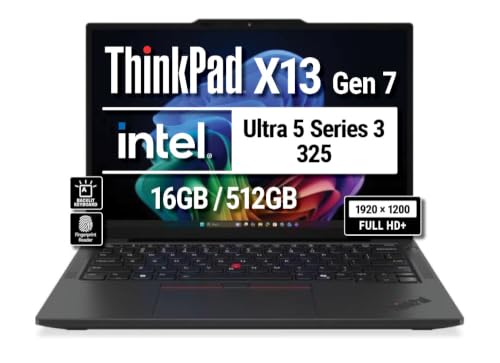
Lenovo ThinkPad X13 Gen 7, Intel Core Ultra 5 325
The ThinkPad X13 Gen 7 is the newest compact laptop in this guide, and the one that shows where the X13 line is going. A 13.3-inch WUXGA display, an Intel Core Ultra 5 Series 3 325 processor, 16GB of memory, and a 512GB SSD give it the current-generation hardware for office work, and the Copilot+ PC badge marks it as a machine built for the current Windows AI features. It is the smallest and newest X13 here, and the pick for a buyer who wants the latest compact ThinkPad and is happy with 16GB of memory. The X13 keyboard is the same DNA as the larger ThinkPads, which is the reason the line leads this guide. The Copilot+ PC badge is the marker that this is a machine built for the current Windows AI features, and the Ultra 5 Series 3 processor is the newest generation of chip in this guide.
Key specs: 13.3-inch WUXGA display, 60 Hz; Intel Core Ultra 5 Series 3 325; 16GB memory; 512GB SSD; Copilot+ PC; English keyboard; black; model 21YH0016US. The Copilot+ PC badge marks a machine built for current Windows AI features, and the 13.3-inch WUXGA display is the smallest in this guide.
Strengths:
- Newest X13 generation with a current Ultra 5 processor
- Copilot+ PC badge for current Windows AI features
- 13.3-inch size is genuinely portable
Trade-offs:
- 16GB of memory is the floor rather than the comfortable choice
- 13.3-inch screen is small for split-screen work
- Fewer ports than a 14-inch business laptop
A buyer who wants the newest compact ThinkPad and travels light with a Copilot+ PC. It suits a buyer who wants the newest compact ThinkPad and travels light with a Copilot+ PC.
Best for: The newest compact ThinkPad for travel
Not suited for: Heavy multitaskers who should take 32GB of memory
Check price on Amazon: Lenovo ThinkPad X13 Gen 7 Intel Core Ultra 5 325

Lenovo ThinkPad X13 Gen 5, Intel Ultra 7 165U
The ThinkPad X13 Gen 5 is the big-memory compact pick of this guide. An Intel Ultra 7 165U processor, 32GB of memory, and 1.5TB of storage, made up of a 512GB SSD plus a 1TB docking station, give it the headroom for heavy multitasking in a 13.3-inch body. The backlit keyboard and fingerprint reader keep the ThinkPad essentials, and Windows 11 Pro keeps it a proper business machine. It is the configuration for a buyer who wants a small laptop that does not feel small, because the memory and storage match a full-size office machine. Note the storage as listed: 512GB in the machine plus a 1TB docking station, which is a bundle rather than a single drive. The 1.5TB of storage is made up of a 512GB SSD plus a 1TB docking station, which is a bundle rather than a single drive, and it is worth knowing before buying because the docking station is a separate piece.
Key specs: 13.3-inch WUXGA display; Intel Ultra 7 165U; 32GB RAM; 1.5TB storage, 512GB SSD plus 1TB docking station; Intel graphics; backlit keyboard; fingerprint reader; Windows 11 Pro; black. The 1.5TB of storage is a 512GB SSD plus a 1TB docking station, which is a bundle rather than a single drive.
Strengths:
- 32GB of memory and 1.5TB of storage in a 13.3-inch body
- Ultra 7 processor with ThinkPad keyboard and fingerprint reader
- Compact size with full-size working headroom
Trade-offs:
- Storage is a bundle, not a single large drive
- 13.3-inch screen is small for split-screen work
- Gen 5 chassis is a generation behind the newest X13
A buyer who wants a compact laptop with big memory and storage, and who is happy with a storage bundle. It suits a buyer who wants a compact laptop with big memory and storage.
Best for: Compact laptops with big memory and storage
Not suited for: Anyone who wants a single large internal drive
Check price on Amazon: Lenovo ThinkPad X13 Gen 5 Intel Ultra 7 165U

Lenovo ThinkPad X13 Gen 6, Intel Core Ultra 7 255U
The ThinkPad X13 Gen 6 sits between the Gen 5 and Gen 7 in this guide, and it is the balanced pick of the three. An Intel Core Ultra 7 255U processor, 16GB of memory, and a 512GB SSD give it a faster processor than the Gen 7's Ultra 5, in a newer chassis than the Gen 5, at a middle position on price. The 13.3-inch WUXGA display is the same compact size as the other X13s, and the ThinkPad keyboard and business build are the same throughout the line. For a buyer who cannot decide between the newest X13 and the biggest-memory X13, the Gen 6 is the middle answer, and it is a good one. The Ultra 7 255U processor is faster than the Gen 7's Ultra 5, in a newer chassis than the Gen 5, which is why the Gen 6 is the balanced pick of the three X13 generations in this guide.
Key specs: 13.3-inch WUXGA display; Intel Core Ultra 7 255U; 16GB memory; 512GB SSD; English keyboard; black; model 21RK006AUS. The Ultra 7 255U processor is faster than the Gen 7's Ultra 5, in a newer chassis than the Gen 5.
Strengths:
- Ultra 7 processor in a compact 13.3-inch body
- Newer chassis than the Gen 5, faster chip than the Gen 7
- ThinkPad keyboard and business build
Trade-offs:
- 16GB of memory is the floor for heavy multitasking
- 13.3-inch screen is small for split-screen work
- Fewer ports than a 14-inch business laptop
A buyer who wants the balanced X13: a fast processor and a current chassis without paying for the newest generation. It suits a buyer who wants the balanced X13, with a fast processor and a current chassis.
Best for: The balanced compact ThinkPad
Not suited for: Heavy multitaskers who should take 32GB of memory
Check price on Amazon: Lenovo ThinkPad X13 Gen 6 Intel Core Ultra 7 255U

HP EliteBook 830 G9, Intel Core i7-1265U
The HP EliteBook 830 G9 is the HP answer to the X13, and the only HP in this guide. A 13.3-inch WUXGA display, an Intel Core i7-1265U processor with ten cores, 16GB of memory, and a 256GB SSD give it a genuine business specification in the smallest HP business body. The 830 line is HP's compact business laptop, built for travel, and the G9 generation is a proven one. The 256GB of storage is the smallest in this guide, and it is the honest trade-off to note: it is enough for office work with cloud storage, but a buyer who keeps large files locally should plan for an external drive or a larger configuration. The WUXGA display gives more vertical room than a standard Full HD panel, which suits documents and web pages, and the ten-core i7-1265U is a genuine business processor in the smallest HP business body.
Key specs: 13.3-inch WUXGA 1920×1200 display; Intel Core i7 12th Gen i7-1265U, deca-core, 10 cores; 16GB total RAM; 256GB SSD. The WUXGA display gives more vertical room than Full HD, and the ten-core i7-1265U is a genuine business processor.
Strengths:
- 13.3-inch HP business laptop with a ten-core i7
- WUXGA display gives more vertical room than Full HD
- Proven EliteBook build for travel
Trade-offs:
- 256GB of storage is the smallest in this guide
- 12th-generation chip is a generation behind the newest
- 16GB of memory is the floor for heavy multitasking
An HP buyer who wants the smallest EliteBook, and a traveller who works mostly in the cloud. It suits an HP buyer who wants the smallest EliteBook, and a traveller who works mostly in the cloud.
Best for: Compact HP business laptops for travel
Not suited for: Anyone who keeps large files locally without cloud storage
Check price on Amazon: HP EliteBook 830 G9 Intel Core i7-1265U

ASUS ExpertBook B9 B9450CBA, Intel Core i7-1255U
The ASUS ExpertBook B9 is the thinnest and lightest-feeling laptop in this guide, and the one built most explicitly for travel. A 14-inch FHD display, an Intel Core i7-1255U processor, 32GB of LPDDR5 memory, and a 2TB SSD give it the largest storage and the most memory of any 14-inch machine here, and the military-grade durable build, the webcam privacy shield, and Windows 11 Pro keep it a proper business laptop. The B9 line is famous for its weight, or rather for the lack of it, and this configuration pairs that lightness with a specification that does not compromise. It is the pick for a traveller who wants a 14-inch screen without the weight. The B9 line is famous for its weight, or rather for the lack of it, and this configuration pairs that lightness with 32GB of memory and a 2TB SSD, which is the most storage in this guide.
Key specs: 14-inch FHD display; Intel Core i7-1255U; 2TB SSD; 32GB LPDDR5 RAM; military grade durable; webcam privacy shield; Windows 11 Pro; black; model B9450CBA-XVE77. The military-grade durable build and webcam privacy shield suit travel, and the 2TB SSD is the largest storage here.
Strengths:
- Thin and light with 32GB of memory and a 2TB SSD
- Military-grade durable build with a webcam privacy shield
- 14-inch screen in a travel-friendly body
Trade-offs:
- 12th-generation chip is a generation behind the newest
- LPDDR5 memory is soldered and cannot be upgraded later
- ASUS business support network is smaller than Lenovo or HP
A frequent traveller who wants a 14-inch business laptop that feels light, with big memory and storage. It suits a frequent traveller who wants a 14-inch business laptop that feels light, with big memory and storage.
Best for: Thin and light business laptops for travel
Not suited for: Anyone who needs the newest processor generation
Check price on Amazon: ASUS ExpertBook B9 Intel Core i7-1255U
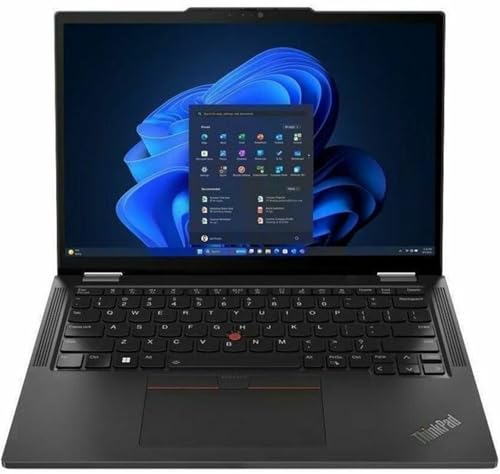
Lenovo ThinkPad X13 Gen 5 Convertible, Intel Ultra 7 165U
The ThinkPad X13 Gen 5 convertible is the only 2-in-1 in this guide, and the one for a buyer who wants a laptop that also works as a tablet. The 13.3-inch WUXGA touchscreen folds back into a tablet, the Intel Core Ultra 7 165U processor with vPro technology gives it business-grade performance and management, and 16GB of memory with a 1TB SSD covers the working specification. vPro is the detail for IT departments, and the convertible form is the detail for presenters and note-takers. It is the most versatile compact laptop here, and the pick for a buyer whose work changes shape through the day. The convertible hinge is the feature that sets this X13 apart from the standard models: the touchscreen folds back into a tablet, which suits presentations and note-taking in a way a standard laptop cannot match.
Key specs: 13.3-inch WUXGA touchscreen convertible 2-in-1; Intel Core Ultra 7 165U; vPro technology; 16GB memory; 1TB SSD; English keyboard; black; model 21LW002BUS. The convertible touchscreen folds back into a tablet, and vPro technology brings remote management for IT departments.
Strengths:
- Convertible 2-in-1 touchscreen for laptop and tablet use
- Ultra 7 processor with vPro technology for IT management
- 16GB of memory and a 1TB SSD in a 13.3-inch body
Trade-offs:
- Convertible hinge adds weight and complexity over a standard laptop
- 16GB of memory is the floor for heavy multitasking
- Touchscreen adds cost for buyers who will not use tablet mode
A presenter or note-taker who wants a compact laptop that folds into a tablet, and an IT buyer who needs vPro. It suits a presenter or note-taker who wants a compact laptop that folds into a tablet.
Best for: Convertible compact laptops for presentations and notes
Not suited for: Anyone who wants the simplest, lightest standard laptop
Check price on Amazon: Lenovo ThinkPad X13 Gen 5 Convertible Intel Ultra 7 165U
Buying guide: choosing mini laptops for business
Start with the screen size, because it is the decision that defines a mini laptop. A 13.3-inch screen saves weight and bag space but gives less room for split-screen work, and a 14-inch screen is the middle ground that many buyers prefer. Then check the weight, because a compact laptop that is not light has missed the point; the ExpertBook B9 in this guide is the lightest in spirit, and the X13 line is the most consistent. Keyboard quality matters more on a small laptop, because a cramped keyboard ruins the machine; the ThinkPad X13 keeps the ThinkPad keyboard DNA in a small body, which is why it leads this guide. Processor and memory are next: a current Core Ultra or Core i7 chip with 16GB of memory is the floor, 32GB is comfortable, and a 512GB SSD is the minimum, with 1TB the better buy. Ports matter more on a compact laptop, so Thunderbolt 4 and USB-C are worth having, and a dock at the desk covers the rest. Battery life matters because a travel laptop lives away from outlets. Finally, read the full listing title before buying, because renewed and used hide at the end of long titles, and this category is full of them.
Using and caring for your mini laptops for business
A compact business laptop lasts longest with simple habits. Keep the battery between roughly 20 and 80 percent when it can be managed, keep the vents clear, and do not use the machine on a soft surface that blocks airflow. Update Windows and the drivers, use Windows Hello or the fingerprint reader, and keep a backup of the work files. Clean the keyboard and the screen with a soft cloth, and for a touchscreen model use a soft, slightly damp cloth and avoid harsh cleaners. Carry the machine in a padded sleeve, because a compact laptop is carried more and dropped more than a desk machine. If the machine slows down, check the startup programs and the storage space before blaming the hardware.
Common mistakes to avoid
The most common mistake is buying a small laptop for the size and forgetting the screen: a 13.3-inch display is small for split-screen work, and a buyer who lives in two windows at once may be happier with 14 inches. The second is buying 8GB of memory in a compact laptop, which is too little for modern office work. The third is trusting a shortened listing title: renewed and used hide at the end of long titles, and this category is full of them. The fourth is buying a convertible and never using tablet mode, when the money would have been better spent on memory. The fifth is forgetting the ports: a compact laptop has fewer of them, so check that the dock, the monitor, and the peripherals will connect before buying. The sixth is assuming small means slow: a modern compact business laptop with a current processor is as fast as a full-size one, and the compromise is screen space, not speed.
Travelling with a mini business laptop: the kit that makes it work
A mini business laptop is only half of a travel kit, and the other half is the set of small decisions that make a small machine work on the road. The first is the dock at the desk. A 13.3-inch laptop has fewer ports than a 14-inch machine, and a Thunderbolt 4 dock turns it into a full desk machine in one cable: a monitor, a keyboard, a mouse, and charging, all connected by plugging in a single cable. Without a dock, every peripheral needs its own adapter, and the adapters live in the bag, get lost, and get forgotten at the hotel. The second is the second charger. A travel laptop needs a charger in the bag and a charger at the desk, because a charger that is always being packed and unpacked is a charger that gets left behind, and a laptop without a charger is a paperweight. A compact USB-C charger is lighter than a barrel charger, and it can charge a phone as well, which saves another item in the bag. The third is the bag. A 13.3-inch laptop fits in a slim sleeve and a small bag, while a 14-inch machine needs a larger one, and the weight of the bag, the charger, and the accessories adds up to more than the laptop alone. A sleeve that fits snugly protects the machine better than a loose bag, and a bag with a padded laptop compartment is worth more than a fashionable one without it. The fourth is the screen habit. A 13.3-inch screen is small for split-screen work, so learn the window-snapping shortcuts and use a virtual desktop for a second workspace, because a small screen with good habits beats a large screen with bad ones. A portable monitor is the other answer for a traveller who needs two screens, and it folds into the bag alongside the laptop. The fifth is the battery habit. A travel laptop lives away from outlets, so learn the battery saver settings, dim the screen a notch, and carry the charger, because a laptop that dies in a meeting is a meeting that stops. The sixth is the security habit. A travel laptop is lost and stolen more often than a desk machine, so use the fingerprint reader or Windows Hello, keep the drive encrypted, and keep a backup, because a lost laptop with no backup is a lost week's work. The laptops in this guide are built for this life: the ThinkPad X13 line is the most consistent travel machine, the EliteBook 830 G9 is the HP answer, the ExpertBook B9 is the lightest-feeling 14-inch machine, and the convertible X13 is the one for presenters. Pair any of them with a dock, a second charger, a good sleeve, and the habits above, and a mini laptop will do the work of a full-size machine from anywhere.
13.3 vs 14 vs 15.6: the size trade in numbers
The size of a business laptop is a trade measured in inches, pounds, and pixels, and the numbers are worth knowing before buying. A 13.3-inch laptop is about 12 inches wide and 8 inches deep, and it weighs roughly 2.5 to 2.8 pounds, which is the size that fits in a slim sleeve and a small bag. A 14-inch laptop is about 12.5 inches wide and 9 inches deep, and it weighs roughly 3 to 3.5 pounds, which is the size that offices buy most, because it balances screen space and portability. A 15.6-inch laptop is about 14 inches wide and 9.5 inches deep, and it weighs roughly 3.5 to 4.5 pounds, which is the size for a desk rather than a bag. The screen area tells the same story: a 13.3-inch screen has about 15 percent less area than a 14-inch screen and about 30 percent less than a 15.6-inch screen, and that difference shows up in split-screen work, where two windows side by side are cramped on a 13.3-inch display and comfortable on a 15.6-inch one. The keyboard tells another part of the story: a 13.3-inch laptop has a full keyboard without a numeric keypad, a 14-inch laptop is the same, and a 15.6-inch laptop usually has a numeric keypad, which is the feature that spreadsheet workers ask for by name. The ports tell a third part: a 13.3-inch laptop has fewer ports than a 14-inch machine, because there is less room on the sides, and a 15.6-inch laptop has the most, including room for a full-size Ethernet port and an HDMI port without an adapter. The battery tells a fourth part: a larger laptop has room for a larger battery, but it also has a larger screen to power, so the battery life is often similar across sizes, and the real difference is the weight in the bag. The practical advice is simple: for travel, take the 13.3-inch machine and a dock at the desk; for the standard office laptop, take the 14-inch machine; for number work at a desk, take the 15.6-inch machine with its keypad. The laptops in this guide follow that advice: the X13 line and the EliteBook 830 are the 13.3-inch travel machines, the ExpertBook B9 is the 14-inch middle ground, and the 15.6-inch machines are covered in the companion guides for buyers who need the biggest screen. Buy the size that matches the work, not the size that looks best on the shelf.
Final recommendation
For most travellers, the Lenovo ThinkPad X13 Gen 6 with the Ultra 7 255U is the best mini laptop for business in this guide: the balanced compact ThinkPad with a fast processor and a current chassis. The X13 Gen 7 is the newest, the X13 Gen 5 with 32GB is the big-memory pick, the X13 Gen 5 convertible is the versatile 2-in-1, the HP EliteBook 830 G9 is the HP answer for travellers, and the ASUS ExpertBook B9 is the thinnest and lightest-feeling machine here with the biggest storage. Buy the exact configuration named, match the size to the work, and the laptop will travel well for years. Buy the size that matches the work rather than the size that looks best on the shelf, and pair the laptop with a dock, a second charger, and a good sleeve, because a mini laptop with the right kit does the work of a full-size machine from anywhere. The size that matches the work is the size to buy, and the kit around it is what makes a small laptop a complete working machine.
Frequently asked questions
What is the best mini laptop for business?
For most travellers, a 13.3-inch ThinkPad X13 Gen 6 with an Ultra 7 processor, 16GB of memory, and a 512GB SSD. The right choice depends on whether the newest generation, the most memory, a convertible screen, or the lightest body matters more. For most travellers, a 13.3-inch ThinkPad X13 Gen 6 with an Ultra 7 processor, 16GB of memory, and a 512GB SSD; the right choice depends on the newest generation, the most memory, a convertible screen, or the lightest body.
Is a 13.3-inch laptop too small for office work?
It depends on the work. A 13.3-inch screen is fine for documents, email, and video calls, and it saves weight on every trip. For split-screen work with two windows side by side, a 14-inch screen is more comfortable, and a dock with an external monitor covers the desk. It depends on the work: a 13.3-inch screen is fine for documents, email, and video calls, and it saves weight on every trip, while a 14-inch screen is more comfortable for split-screen work.
Do mini business laptops have the same performance as larger ones?
Yes, with the same processor and memory. A compact business laptop with a current Core Ultra or Core i7 chip is as fast as a full-size one. The compromise is screen space and ports, not speed. Yes, with the same processor and memory, because a compact business laptop with a current Core Ultra or Core i7 chip is as fast as a full-size one; the compromise is screen space and ports, not speed.
Should I buy a convertible mini laptop?
Only if tablet mode will be used for presentations, notes, or reading. A convertible adds weight, complexity, and cost, and a buyer who never folds the screen would be better served by a standard laptop with more memory. Only if tablet mode will be used for presentations, notes, or reading, because a convertible adds weight, complexity, and cost, and a buyer who never folds the screen would be better served by a standard laptop.
Are renewed mini laptops worth buying?
They can be, from a reputable seller with a warranty, but they are a different purchase from a new laptop. Check the battery health, the exact processor code, and the warranty, and read the full listing title, because renewed hides at the end of long titles. They can be, from a reputable seller with a warranty, but they are a different purchase from a new laptop; check the battery health, the exact processor code, and the warranty, and read the full listing title.
Is a 13.3-inch laptop good for working from home?
Yes, with a dock and an external monitor, because the laptop becomes a full desk machine in one cable. Without a dock, a 13.3-inch screen is small for a full working day.
Do mini laptops have worse battery life?
Not necessarily. A smaller laptop has a smaller battery, but it also has a smaller screen to power, so the battery life is often similar to a larger machine. The real difference is the weight in the bag.
Can a mini laptop replace a desktop?
Yes, with a dock, a monitor, a keyboard, and a mouse, because the laptop becomes a desktop in one cable. Without the desk setup, a mini laptop is a travel machine rather than a desktop replacement.
What is the lightest mini laptop for business?
The ASUS ExpertBook B9 in this guide is the thinnest and lightest-feeling machine here, built for travel, while the ThinkPad X13 line is the most consistent travel machine across its generations.
More guides from KajuanDouglas
If this guide helped, these related roundups go deeper on the same topics: the best small business laptops under 1000 the best laptops for home business the best business laptops under 1000, 15-inch.