Disclosure: As an Amazon Associate, kajuandouglas.com earns from qualifying purchases. Links to Amazon on this page are affiliate links; they cost you nothing extra. Listing details such as price and availability change often, so check the current Amazon listing before you buy.
Where to buy
Every linked pick in this guide to the best laptops for live streaming is sold on Amazon, where you can check the current price, availability and delivery options before you order. Prices and stock change often, so the listing — not any guide — is the final word at checkout. Orders are placed with Amazon, and qualifying purchases made through these links may earn a commission at no extra cost to you. The shortlist below follows the same order as the full reviews further down the page.
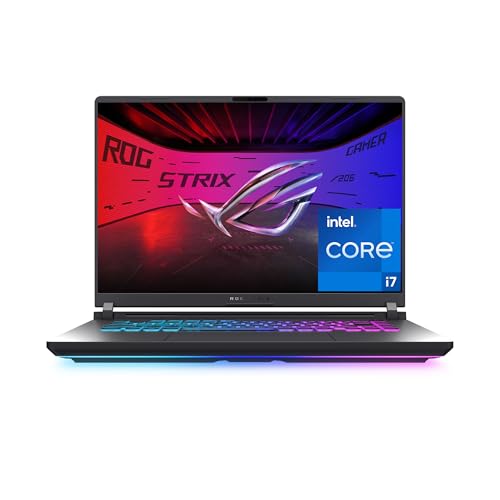
- ASUS ROG Strix G16 (RTX 5060) — Chosen as the best overall option — built for gamers who also stream or create content.
- Lenovo Legion 5i (RTX 5070, OLED) — Chosen as the best for quality option — built for gamers who want top performance and the best picture.
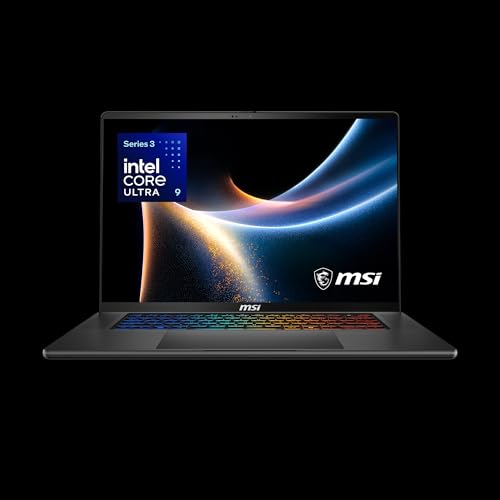
- MSI Stealth 16 AI+ (RTX 5070 Ti) — Chosen as the best portable streamer option — built for professionals who want one machine for creation and gaming.
- Apple MacBook Pro 14 (M5 Pro) — Chosen as the best for mac streamers option — built for creators, developers and professionals with heavy workloads.
- Acer Nitro V 16S (RTX 5060) — Chosen as the best value option — built for gamers who want a complete package with no upgrades needed.
- Lenovo LOQ (RTX 5060) — Chosen as the best budget pick option — built for gamers who want current-generation performance without flagship prices.
Read the full guide ↓
Finding the best laptops for live streaming means ignoring most of the laptop market on purpose. The machines that matter for live streamers are the ones built around live streaming games or content, where the machine must run the game and the broadcast encode at the same time without dropping either. This guide narrows the field to six picks that cover the realistic range — a clear best overall, honest budget options and premium machines for readers whose work justifies them — and every linked pick below has been cross-checked against the manufacturer’s specification for the exact model named. Prices move too often to print responsibly, so each pick links to its live Amazon listing instead; what this guide gives you is the part that does not change weekly: which machine fits which kind of user, and why.
The short version: start with the ASUS ROG Strix G16 (RTX 5060), which earns the top spot for most live streamers. If the budget is the binding constraint, the budget-badged pick further down protects the components that decide long-term satisfaction and trims the ones that do not. And if your version of broadcasting live video to an online audience is heavier than average — bigger projects, longer days, more demanding software — the premium picks are not decoration; they are the machines whose headroom you will actually use.
Below you will find the quick-picks table, the reasoning behind the selection, a full review of each machine, a side-by-side comparison, a buying guide for this specific use, a practical how-to section, the mistakes buyers in this category keep making, and answers to the questions live streamers ask most. Read the reviews for the two or three picks closest to your situation and the choice usually makes itself.
Key Takeaways
- Best overall for most buyers: the ASUS ROG Strix G16 (RTX 5060).
- The deciding factors for this use are live streaming games or content, where the machine must run the game and the broadcast encode at the same time without dropping either.
- Memory and storage headroom matter more than a small processor difference — buy for year three, not week one.
- Every linked pick was verified against the exact model specification; check the live listing for current price and stock.
- Sale prices change constantly — the configuration matters more than the discount banner.
In this guide
Quick Picks
Six machines made the cut for live streamers. The table summarises the verdicts; the full reviews below explain each one.
| Badge | Pick | Why it stands out | Link |
|---|---|---|---|
| Best Overall | ASUS ROG Strix G16 (RTX 5060) | HX-class Intel CPU for gaming plus streaming/creation | Check price on Amazon |
| Best for Quality | Lenovo Legion 5i (RTX 5070, OLED) | OLED WQXGA 165Hz screen looks superb in games | Check price on Amazon |
| Best Portable Streamer | MSI Stealth 16 AI+ (RTX 5070 Ti) | RTX 5070 Ti power in a discreet slim design | Check price on Amazon |
| Best for Mac Streamers | Apple MacBook Pro 14 (M5 Pro) | M5 Pro power with active cooling for sustained work | Check price on Amazon |
| Best Value | Acer Nitro V 16S (RTX 5060) | RTX 5060 with 32GB RAM and 1TB SSD included | Check price on Amazon |
| Best Budget Pick | Lenovo LOQ (RTX 5060) | RTX 5060 with current DLSS features for smooth play | Check price on Amazon |
How These Picks Were Chosen
The selection started from what broadcasting live video to an online audience actually demands of a laptop, then filtered the current market against it. Machines were excluded for failing the basics — too little memory for the workload, screens that undermine the work, or designs whose compromises this audience would feel daily — regardless of how impressive their headline specifications looked.
- Fit for the job: each pick is genuinely suited to live streaming games or content, where the machine must run the game and the broadcast encode at the same time without dropping either, not merely powerful in the abstract.
- Verified specification: every linked pick’s processor, memory, storage and display were cross-checked against the exact model listing before inclusion.
- Balanced configurations: picks favour the configuration a buyer should actually order, not the stripped variant used to advertise a low starting price.
- Honest compromises: each review states the trade-offs plainly, including where a cheaper or dearer pick would serve better.
- Price discipline: because prices change constantly, no fixed prices are printed — each pick links to its live listing so you judge value at the moment you buy.
The Best Laptops For Live Streaming
Six picks, reviewed in the same order as the tables above. Each review covers who the machine suits, its verified specification, three strengths, three honest trade-offs, and a plain verdict.

ASUS ROG Strix G16 (RTX 5060)
Badge: Best Overall
| Processor | Intel Core i7-14650HX |
| Graphics | NVIDIA GeForce RTX 5060 |
| Memory | 16GB DDR5 |
| Storage | 1TB Gen 4 SSD |
| Display | 16-inch FHD+ 165Hz, 3ms |
The Strix G16 pairs a desktop-class Core i7-14650HX with an RTX 5060 and a fast 16-inch FHD+ 165Hz panel with 3ms response. ROG’s cooling gives the HX chip room to work, so CPU-heavy games, streaming while gaming and content creation all run well. You get a 1TB SSD and Wi-Fi 7, and the chassis has the full ROG lighting treatment. It is big, heavy and hungry — a desk machine that can travel, not a travel machine — but the performance foundation is excellent for the tier.
The fit for live streaming games or content, where the machine must run the game and the broadcast encode at the same time without dropping either comes down to a few specifics. Its fast processor and 16GB of memory set the everyday pace, and the 1TB SSD of storage decides how much of your working library lives on the machine itself. The high-tier graphics hardware is the headline: GPU-accelerated stages of the work run at full speed rather than becoming the bottleneck, and the cooling in this class of chassis is built to sustain that pace. As a gaming-class chassis it brings serious cooling and a high-refresh display, both of which this workload can exploit. Windows 11 keeps the widest range of software open to you, including the specialist tools this audience often grows into.
Ownership details round out the picture. Expect fan noise under sustained load and modest battery life away from the socket — the standard tax of this performance class — balanced by cooling that keeps the hardware at full pace and, on most gaming chassis, memory and storage that can be upgraded later. Taken together with its badge in this guide, that ownership profile is why it sits where it does in the running order for this audience.
Strengths
- HX-class Intel CPU for gaming plus streaming/creation
- RTX 5060 with a fast 165Hz 3ms display
- 1TB SSD and Wi-Fi 7 as standard
Trade-offs
- Large and heavy with a big power brick
- Battery life is short
- 16GB RAM is fine now, upgraders will want 32GB later
Choose it if you are looking for a machine built for gamers who also stream or create content. Skip it if your situation matches the other side of its design: it is not the right tool for commuters wanting a light bag. Readers whose needs sit between those poles should weigh the badge it carries in this guide — best overall — against the picks either side of it.
Best for: gamers who also stream or create content / Not suited for: commuters wanting a light bag

Lenovo Legion 5i (RTX 5070, OLED)
Badge: Best for Quality
| Processor | Intel Core Ultra 7 251HX |
| Graphics | NVIDIA GeForce RTX 5070 |
| Memory | 16GB RAM |
| Storage | 1TB SSD |
| Display | 15.3-inch OLED WQXGA 165Hz |
The Legion 5i combines an RTX 5070 and a Core Ultra 7 251HX with something gaming laptops rarely offer — a 15.3-inch OLED WQXGA display at 165Hz. Games look extraordinary on it: perfect blacks, instant response and rich colour, while the HX processor keeps frame rates fed and handles streaming or editing between matches. Legion cooling is among the best in the class. Battery life and the usual OLED care notes apply, but as a performance-plus-picture package this is one of the most desirable gaming laptops here.
For live streaming games or content, where the machine must run the game and the broadcast encode at the same time without dropping either, the specification here lines up well. Its flagship processor and 16GB of memory set the everyday pace, and the 1TB SSD of storage decides how much of your working library lives on the machine itself. The high-tier graphics hardware is the headline: GPU-accelerated stages of the work run at full speed rather than becoming the bottleneck, and the cooling in this class of chassis is built to sustain that pace. As a gaming-class chassis it brings serious cooling and a high-refresh display, both of which this workload can exploit. Windows 11 keeps the widest range of software open to you, including the specialist tools this audience often grows into.
Living with it day to day adds a few more facts worth weighing. Expect fan noise under sustained load and modest battery life away from the socket — the standard tax of this performance class — balanced by cooling that keeps the hardware at full pace and, on most gaming chassis, memory and storage that can be upgraded later. Taken together with its badge in this guide, that ownership profile is why it sits where it does in the running order for this audience.
Strengths
- OLED WQXGA 165Hz screen looks superb in games
- RTX 5070 with a powerful HX processor
- Legion cooling keeps performance consistent
Trade-offs
- OLED requires some care with static HUD elements
- Battery life is limited under gaming loads
- Premium pricing over IPS rivals
Choose it if you are looking for a machine built for gamers who want top performance and the best picture. Skip it if your situation matches the other side of its design: it is not the right tool for marathon unplugged sessions. Readers whose needs sit between those poles should weigh the badge it carries in this guide — best for quality — against the picks either side of it.
Best for: gamers who want top performance and the best picture / Not suited for: marathon unplugged sessions
MSI Stealth 16 AI+ (RTX 5070 Ti)
Badge: Best Portable Streamer
| Processor | Intel Core Ultra 9 386H |
| Graphics | NVIDIA GeForce RTX 5070 Ti |
| Memory | 32GB DDR5 |
| Storage | 1TB NVMe SSD |
| Display | 16-inch QHD+ OLED 240Hz |
The Stealth 16 AI+ hides flagship hardware in a charcoal chassis that could pass in a boardroom: a Core Ultra 9, an RTX 5070 Ti, 32GB of memory and a 16-inch QHD+ OLED display running at 240Hz. It is equally at home rendering video, compiling code and playing demanding games at high settings — a genuine creator-gaming crossover. Slim high-power machines run warm and cost accordingly, but for professionals who game (or gamers who work), it threads the needle better than almost anything else.
Judged against what this job actually demands — live streaming games or content, where the machine must run the game and the broadcast encode at the same time without dropping either — this machine is well matched. Its flagship processor and 32GB of memory set the everyday pace, and the 1TB SSD of storage decides how much of your working library lives on the machine itself. The high-tier graphics hardware is the headline: GPU-accelerated stages of the work run at full speed rather than becoming the bottleneck, and the cooling in this class of chassis is built to sustain that pace. As a gaming-class chassis it brings serious cooling and a high-refresh display, both of which this workload can exploit. Windows 11 keeps the widest range of software open to you, including the specialist tools this audience often grows into.
Living with it day to day adds a few more facts worth weighing. Expect fan noise under sustained load and modest battery life away from the socket — the standard tax of this performance class — balanced by cooling that keeps the hardware at full pace and, on most gaming chassis, memory and storage that can be upgraded later. Taken together with its badge in this guide, that ownership profile is why it sits where it does in the running order for this audience.
Strengths
- RTX 5070 Ti power in a discreet slim design
- QHD+ OLED 240Hz display for work and play
- 32GB memory and Wi-Fi 7 complete the spec
Trade-offs
- Slim chassis runs warm under full load
- Premium pricing
- Battery life drops fast when gaming
Choose it if you are looking for a machine built for professionals who want one machine for creation and gaming. Skip it if your situation matches the other side of its design: it is not the right tool for budget buyers. Readers whose needs sit between those poles should weigh the badge it carries in this guide — best portable streamer — against the picks either side of it.
Best for: professionals who want one machine for creation and gaming / Not suited for: budget buyers

Apple MacBook Pro 14 (M5 Pro)
Badge: Best for Mac Streamers
| Processor | Apple M5 Pro (15-core CPU, 16-core GPU) |
| Memory | 24GB unified memory |
| Storage | 1TB SSD |
| Display | 14.2-inch Liquid Retina XDR |
| OS | macOS |
The 14-inch MacBook Pro with M5 Pro is a genuine workstation: a 15-core CPU and 16-core GPU, 24GB of unified memory, a 1TB SSD and the superb Liquid Retina XDR display with its high brightness and contrast. Video timelines, large photo catalogues, code builds and 3D scenes all run quickly, and active cooling keeps performance up through long exports where the Air would slow down. It is heavier and pricier than the Air, and overkill for pure browsing — but for creators and developers it is one of the finest laptops made.
The fit for live streaming games or content, where the machine must run the game and the broadcast encode at the same time without dropping either comes down to a few specifics. Its flagship processor and 24GB of memory set the everyday pace, and the 1TB SSD of storage decides how much of your working library lives on the machine itself. The high-tier graphics hardware is the headline: GPU-accelerated stages of the work run at full speed rather than becoming the bottleneck, and the cooling in this class of chassis is built to sustain that pace. The conventional clamshell design is a virtue here: stable on any desk or lap, with a keyboard deck built for long sessions. Running macOS, it suits buyers inside Apple’s ecosystem, with the battery efficiency Apple silicon is known for during long unplugged stretches.
Ownership details round out the picture. Ownership is defined by efficiency and integration: long battery life, silent or near-silent running, and effortless cooperation with an iPhone or iPad if you own them. Memory and storage are fixed at purchase, so the configuration decision is permanent — choose it with the whole ownership period in mind. Taken together with its badge in this guide, that ownership profile is why it sits where it does in the running order for this audience.
Strengths
- M5 Pro power with active cooling for sustained work
- Liquid Retina XDR display is superb for photo and video
- 24GB memory and 1TB SSD suit professional projects
Trade-offs
- Premium price and more weight than the Air
- Overkill for email-and-browsing buyers
- macOS ecosystem only
Choose it if you are looking for a machine built for creators, developers and professionals with heavy workloads. Skip it if your situation matches the other side of its design: it is not the right tool for casual users who will never use the power. Readers whose needs sit between those poles should weigh the badge it carries in this guide — best for mac streamers — against the picks either side of it.
Best for: creators, developers and professionals with heavy workloads / Not suited for: casual users who will never use the power

Acer Nitro V 16S (RTX 5060)
Badge: Best Value
| Processor | AMD Ryzen 7 260 |
| Graphics | NVIDIA GeForce RTX 5060 |
| Memory | 32GB DDR5 |
| Storage | 1TB Gen 4 SSD |
| Display | 16-inch WUXGA IPS 180Hz |
The Nitro V 16S is the Nitro line grown up: an RTX 5060 and Ryzen 7 260 in a slimmer 16-inch chassis, with a generous 32GB of DDR5 memory, a 1TB SSD and a fast 180Hz WUXGA display. The extra memory and storage remove the usual budget-gaming compromises, and the slimmer design travels better than traditional Nitro models. It still sounds like a gaming laptop under load and battery life is modest, but as a complete, no-upgrades-needed gaming package it is very well judged.
Judged against what this job actually demands — live streaming games or content, where the machine must run the game and the broadcast encode at the same time without dropping either — this machine is well matched. Its fast processor and 32GB of memory set the everyday pace, and the 1TB SSD of storage decides how much of your working library lives on the machine itself. The high-tier graphics hardware is the headline: GPU-accelerated stages of the work run at full speed rather than becoming the bottleneck, and the cooling in this class of chassis is built to sustain that pace. As a gaming-class chassis it brings serious cooling and a high-refresh display, both of which this workload can exploit. Windows 11 keeps the widest range of software open to you, including the specialist tools this audience often grows into.
Living with it day to day adds a few more facts worth weighing. Expect fan noise under sustained load and modest battery life away from the socket — the standard tax of this performance class — balanced by cooling that keeps the hardware at full pace and, on most gaming chassis, memory and storage that can be upgraded later. Taken together with its badge in this guide, that ownership profile is why it sits where it does in the running order for this audience.
Strengths
- RTX 5060 with 32GB RAM and 1TB SSD included
- Fast 180Hz WUXGA display
- Slimmer design than traditional gaming laptops
Trade-offs
- Fans are audible under gaming loads
- Battery life is modest
- Build is good rather than premium
Choose it if you are looking for a machine built for gamers who want a complete package with no upgrades needed. Skip it if your situation matches the other side of its design: it is not the right tool for quiet-room or unplugged use. Readers whose needs sit between those poles should weigh the badge it carries in this guide — best value — against the picks either side of it.
Best for: gamers who want a complete package with no upgrades needed / Not suited for: quiet-room or unplugged use

Lenovo LOQ (RTX 5060)
Badge: Best Budget Pick
| Processor | AMD Ryzen 7 250 |
| Graphics | NVIDIA GeForce RTX 5060 |
| Memory | 16GB RAM |
| Storage | 512GB SSD |
| Display | 15.3-inch WUXGA IPS 165Hz |
The RTX 5060 version of the LOQ is the sweet spot of the range: a Ryzen 7 250, 16GB of memory and a 15.3-inch WUXGA 165Hz display that is sharper than the usual 1080p panel. The RTX 5060 brings current-generation DLSS features, so demanding games stay smooth at the native resolution with smart settings. Lenovo’s cooling keeps noise and temperatures sensible for the class. Storage is again 512GB — budget for a second drive if your library is large — but performance per dollar is excellent.
For live streaming games or content, where the machine must run the game and the broadcast encode at the same time without dropping either, the specification here lines up well. Its fast processor and 16GB of memory set the everyday pace, and the 512GB SSD of storage decides how much of your working library lives on the machine itself. The high-tier graphics hardware is the headline: GPU-accelerated stages of the work run at full speed rather than becoming the bottleneck, and the cooling in this class of chassis is built to sustain that pace. As a gaming-class chassis it brings serious cooling and a high-refresh display, both of which this workload can exploit. Windows 11 keeps the widest range of software open to you, including the specialist tools this audience often grows into.
Ownership details round out the picture. Expect fan noise under sustained load and modest battery life away from the socket — the standard tax of this performance class — balanced by cooling that keeps the hardware at full pace and, on most gaming chassis, memory and storage that can be upgraded later. Taken together with its badge in this guide, that ownership profile is why it sits where it does in the running order for this audience.
Strengths
- RTX 5060 with current DLSS features for smooth play
- Sharper WUXGA 165Hz display
- Effective cooling for the price class
Trade-offs
- 512GB SSD fills fast with modern games
- Battery life is short under gaming loads
- Heavier than thin-and-light alternatives
Choose it if you are looking for a machine built for gamers who want current-generation performance without flagship prices. Skip it if your situation matches the other side of its design: it is not the right tool for travellers needing long battery life. Readers whose needs sit between those poles should weigh the badge it carries in this guide — best budget pick — against the picks either side of it.
Best for: gamers who want current-generation performance without flagship prices / Not suited for: travellers needing long battery life
Comparison Table
| Pick | Processor | Memory | Storage | Display |
|---|---|---|---|---|
| ASUS ROG Strix G16 (RTX 5060) | Intel Core i7-14650HX | 16GB DDR5 | 1TB Gen 4 SSD | 16-inch FHD+ 165Hz, 3ms |
| Lenovo Legion 5i (RTX 5070, OLED) | Intel Core Ultra 7 251HX | 16GB RAM | 1TB SSD | 15.3-inch OLED WQXGA 165Hz |
| MSI Stealth 16 AI+ (RTX 5070 Ti) | Intel Core Ultra 9 386H | 32GB DDR5 | 1TB NVMe SSD | 16-inch QHD+ OLED 240Hz |
| Apple MacBook Pro 14 (M5 Pro) | Apple M5 Pro (15-core CPU, 16-core GPU) | 24GB unified memory | 1TB SSD | 14.2-inch Liquid Retina XDR |
| Acer Nitro V 16S (RTX 5060) | AMD Ryzen 7 260 | 32GB DDR5 | 1TB Gen 4 SSD | 16-inch WUXGA IPS 180Hz |
| Lenovo LOQ (RTX 5060) | AMD Ryzen 7 250 | 16GB RAM | 512GB SSD | 15.3-inch WUXGA IPS 165Hz |
Specifications are for the configurations described in the reviews; manufacturers sell variants of most models, so confirm the exact configuration on the listing before ordering.
Buying Guide: How to Choose a Laptop for Live streamers
This section steps back from individual models to the decisions underneath them, so you can judge any machine — including next season’s — against the needs of broadcasting live video to an online audience.
Two Workloads, One Machine
Streaming doubles a laptop’s job: it renders the game and encodes the broadcast simultaneously. Modern NVIDIA GPUs include dedicated encoder hardware that does the second job almost for free, which is why the picks above lean GeForce — a single-machine stream on an RTX laptop keeps game frame rates high while the encoder handles viewers. For best laptops for live streaming, pair that with 16GB of memory minimum, a strong processor for the scene compositing and alerts, and wired Ethernet whenever possible: streams die on Wi-Fi congestion long before they die on hardware.
The second screen question matters too. Chat, alerts and broadcast software need somewhere to live; most streamers end up with an external monitor, so check the laptop’s display outputs as carefully as its GPU.
Audio, Camera and the Stream Around the Laptop
Viewers forgive a soft picture sooner than bad audio. For best laptops for live streaming, the laptop decision should leave budget for a USB microphone and a decent camera, and the machine itself should be quiet enough not to feature in your audio — gaming laptops under load are loud, so position and a noise gate matter. The quieter picks above suit bedroom streamers; the powerful ones suit a treated room or a desk away from the microphone.
Upload bandwidth is the other invisible spec: confirm your connection’s sustained upload comfortably exceeds your intended bitrate, because no laptop fixes a thin pipe. Test at the hour you plan to stream — evening congestion is real.
Growth changes the answer: a laptop that streams your current game beautifully may strain when you move to a heavier title or add a second PC-free capture source. Buying one GPU tier of headroom is the streamer’s version of future-proofing, and it is cheaper than replacing the machine in a year.
Think about the software subscriptions and services around the machine, too. Office suites, cloud storage, creative tools and security software increasingly rent rather than sell, and the honest cost of a laptop over five years includes them. A slightly cheaper machine that forces a pricier software tier — or lacks the ports for the drive you already own — can be the more expensive purchase by year two.
Lastly, buy the machine in front of you, not the rumoured one. There is always a newer model a season away, and waiting for it is a strategy only if your current machine still serves you. If it does not, the best laptop is the well-chosen one you can order today from this list, verified, checked in its first week and put to work.
Noise, heat and light are the three comfort taxes nobody lists in a specification table. A machine that runs its fans during a call, warms the desk under your wrists or washes out beside a window will be resented daily regardless of its benchmark scores — which is why the reviews above mention these traits wherever they are known, and why your first week with the machine should include using it in the brightest, quietest room you work in.
One more consideration that rarely appears in listings: how a laptop ages. Batteries lose capacity, keyboards polish smooth and software grows heavier, so the configuration with headroom — memory above the minimum, storage above the immediate need — is the one that still feels competent in year four. Every pick in this guide was chosen with that horizon in mind rather than for its first-week benchmarks alone.
It is also worth deciding where this laptop sits in your wider setup. If a monitor, keyboard and dock wait at a desk, the laptop’s own screen and weight matter less and its ports matter more; if the laptop is the whole setup, its screen, keyboard and speakers carry the full weight of your satisfaction. The reviews above note which picks lean each way, so match the machine to the life it will actually live.
Finally, a note on timing and configuration discipline. Laptop lines refresh frequently, and the exact model you researched can quietly change memory or screen specification between seasons. When you order, screenshot the configuration on the listing, verify it against the manufacturer’s page, and check the delivered machine against both in its first days — that small ritual prevents nearly every ‘not what I ordered’ story.
Accessories deserve one paragraph of honesty: the right case, a second charger for the bag or desk, and — for desk workers — a decent external mouse often improve daily life more than one component tier would have. Budget for the two or three you will genuinely use, and ignore the rest of the accessory wall.
How Do You Set Up a Laptop for Your First Stream?
Get one clean broadcast working before adding flair.
Step 1: Install your broadcast software and run its auto-configuration wizard on a wired connection, then do a private test stream and watch it back.
Step 2: Set the encoder to the GPU’s hardware encoder if available, and pick a resolution and frame rate your upload can sustain all night.
Step 3: Arrange your scenes simply
gameplay, a starting-soon screen and a be-right-back screen cover ninety percent of real streams.
Step 4: Position the microphone close, set a noise gate, and record a voice test — fix audio before anyone hears it live.
Step 5: Keep the laptop plugged in, ventilated and in its performance mode for the whole broadcast.
Troubleshooting
Problem: frame rates drop after twenty minutes of play → That pattern is heat. Confirm the vents are clear, the laptop is on a hard surface and the performance mode is active; a cooling pad or raising the rear of the machine restores the lost frames in most cases.
Problem: a game uses the integrated graphics instead of the GPU → Set the game to the high-performance GPU in the operating system’s graphics settings or the GPU maker’s control panel, and keep the laptop plugged in — many machines will not engage full GPU power on battery.
Problem: stutter in online matches with a strong machine → Suspect the network before the hardware: switch to a wired connection or the less crowded Wi-Fi band, and close other devices’ downloads during matches.
Problem: the drive fills up with games → Move the game library’s older titles to an external SSD through the launcher’s storage settings rather than uninstalling; load times on a modern external SSD stay respectable.
Common Buying Mistakes
Under-buying the graphics card to save money
The GPU is the one component you cannot upgrade in a laptop, and it decides whether games and GPU-accelerated software run well for the life of the machine. A small step up in graphics tier usually adds years of useful life; a step too far down cannot be fixed later.
Believing headline battery claims without context
Manufacturers quote battery life under light video-playback tests, not under your real workload. Heavy tasks can cut runtime to a fraction of the headline figure. Read the claim as a best case, check the battery capacity where it is published, and plan charging around your longest unplugged stretch.
Forgetting ports and living in dongle debt
Count the ports before you buy: chargers, external drives, monitors, printers and wired internet all compete for sockets. A laptop with the ports you actually use — or one good USB-C dock in the budget — saves daily friction that no processor upgrade can fix.
Buying the minimum memory to save money
Memory is the first thing that makes a laptop feel old. A machine that is fine with three tabs open today crawls with ten tomorrow, and on most modern laptops the memory is soldered and can never be upgraded. Buy the configuration with headroom now, even if it means stepping down a screen or storage tier to pay for it.
Ignoring weight until the first commute
A laptop that feels fine on a desk feels different after a day in a backpack with its charger. Add the power brick to the quoted weight, think about the bag you actually carry, and be honest about how often the machine will travel before choosing a large, heavy model.
Final Recommendation
For most live streamers, the answer is the ASUS ROG Strix G16 (RTX 5060). It matches the demands of broadcasting live video to an online audience without forcing the compromises that cheaper machines hide or the overspend that flagship machines invite.
The runner-up is the Lenovo Legion 5i (RTX 5070, OLED), which suits readers whose priorities tilt slightly differently — read its review alongside the winner’s and the difference will be obvious. Everyone else should find their machine by badge: follow the label that describes your situation, and let the detailed reviews confirm it.
Whichever pick you choose, do the two things this guide keeps repeating: verify the exact configuration before ordering, and check the live listing for the current price and availability on the day you buy. Do those, and the best laptops for live streaming question answers itself.
Related Guides
- best laptops for twitch streaming
- best website for refurbished laptops
- best gaming laptops under 500 dollars
- best laptops for junior high students
- best laptops for website design
Frequently Asked Questions
Is the top pick in this guide powerful enough for broadcasting live video to an online audience?
Yes — the ASUS ROG Strix G16 (RTX 5060) was chosen as the lead recommendation precisely because it handles broadcasting live video to an online audience with headroom to spare. Its specification leaves room for the heavier end of the workload, not just the average day. If your work is lighter than typical for this category, the budget picks further down the list will still serve you well; if it is heavier, look at the premium options, which trade portability and price tier for sustained performance.
How much memory do I actually need?
For light use — browsing, documents and streaming — 8GB is workable, though 16GB feels noticeably smoother and lasts longer before feeling dated. For creative suites, development tools, virtual machines or heavy multitasking, treat 16GB as the floor and 32GB as the comfortable choice. Because most modern laptops cannot be upgraded later, buying memory headroom now is the cheapest longevity you can purchase.
How important is the graphics card for this use, really?
It depends entirely on whether your software uses it — and for best laptops for live streaming the answer is that the GPU carries a real share of the work, from GPU-accelerated effects and exports to the games and simulations this audience runs. The trap is that the graphics card is the one component that can never be upgraded in a laptop, so a tier too low is a permanent ceiling while a tier too high is merely wasted money. The picks above are ordered so the lead recommendations hold their performance for the machine’s whole life.
Can I upgrade the laptop later?
It depends on the model. Many thin laptops solder memory and sometimes storage to the board, making upgrades impossible, while larger and gaming-oriented machines often allow memory and SSD upgrades. The reviews above note upgradeability where the design allows it. If upgrading matters to you, confirm the exact configuration’s service manual or manufacturer specifications before ordering.
What should I check when the laptop arrives?
In the first days, verify the delivered configuration matches the order — memory, storage, screen resolution and processor — then test every port, the keyboard backlight, the webcam, speakers and Wi-Fi. Run the machine on battery to confirm the runtime is sane, and check for dead pixels and excessive fan noise under load. Doing this inside the return window turns any problem into a simple exchange instead of a repair claim.
How long should a laptop bought today last?
A sensibly specified laptop should stay comfortable for four to six years of everyday use. Longevity is decided mostly by memory and storage headroom, battery health and build quality rather than the processor badge. Choosing one tier above your minimum needs today is the most reliable way to stretch the machine’s useful life, and a battery replacement midway can refresh an otherwise healthy laptop.


