Disclosure: This article contains affiliate links. If you buy through links on this page, we may earn an affiliate commission at no extra cost to you, and that support helps us keep researching and updating guides like this one.
A security system used to mean a keypad, a few door sensors, and a loud siren. Cameras were the expensive extra. That order has flipped. For most households today, the cameras are the part of the system you actually interact with every day: checking whether a package arrived, seeing who rang the bell while you were in the garden, confirming that the noise downstairs was the cat and not something worse. The alarm panel still matters, but it is the video that turns a vague alert into an answer.
That shift creates a new buying problem. Some systems are alarm-first platforms that added cameras later. Others are camera ecosystems that bolted on sensors and call themselves full security systems. A few genuinely do both jobs well. This guide sorts out which is which. We look at six real systems that combine sensors, a hub or base, and cameras in one app, and we judge them on the things that decide whether you will still be happy in year three: how monitoring works, where your footage lives, what the ongoing costs feel like, and how the cameras behave at night, in bad weather, and on an ordinary Tuesday when nothing is happening.
One honest note before the picks. No camera system prevents crime by itself. What a good system does is shorten the time between something happening and you knowing about it, give you clear evidence if you ever need it, and stay out of the way the rest of the time. Buy for those three jobs and you will buy well.
What to look for in a security system with cameras
Monitoring: professional, self, or a hybrid
Professional monitoring means a staffed center receives your alarm signals and can dispatch police, fire, or medical help when you cannot respond yourself. It is the main reason to buy a traditional alarm platform instead of a pile of standalone cameras. Self-monitoring means alerts come to your phone and the responsibility sits with you. Hybrids exist too: several systems below let you self-monitor for free and switch professional monitoring on for a month while you travel.
Think about your actual life before choosing. If you sleep with your phone on silent, spend weeks away, or have a home that sits empty during school hours, professional monitoring earns its keep. If someone is almost always home and you mainly want to see the driveway and the front door, self-monitoring with good cameras may cover you completely. What you should not do is pay for a monitoring tier out of habit when the household pattern does not justify it.
Camera quality beyond the resolution number
Spec sheets lead with resolution, but the footage you get depends on more than pixels. Field of view decides whether one camera can watch a whole porch or just a slice of it. Night performance matters even more: infrared night vision is standard, color night vision using a spotlight or ambient light is far more useful for identifying clothing and vehicle colors. HDR helps when a shaded porch faces a bright street. Frame rate and how quickly the camera wakes from sleep affect whether you capture a delivery driver or just the back of their head as they leave.
Also check how the camera connects. Battery cameras are easy to place but need charging every few months and can miss the first second of motion while waking. Wired cameras record continuously or pre-buffer events, so clips start earlier. A good system usually mixes both: wired where power is available, battery where it is not.
Storage: local, cloud, or both
Where footage lives changes your costs and your privacy. Cloud storage keeps clips safe even if a burglar steals the camera or hub, and it powers the smart alerts that tell a person from a parcel. The catch is that cloud plans are subscriptions, and without one, many cameras become little more than live-view toys. Local storage, on a hub in your home or a microSD card in the camera, avoids the monthly fee and keeps video off third-party servers, but the footage is only as safe as the hardware it sits on.
The strongest setups offer both: local recording as the foundation, cloud as an optional layer. When you read the picks below, note which systems still function fully with no plan at all. That detail matters more over five years than a small difference in camera resolution.
Sensors and the alarm half of the system
Cameras watch; sensors guard. Entry sensors on doors and windows, motion detectors inside, glass-break sensors, and environmental sensors for smoke, carbon monoxide, water leaks, and freezing pipes form the part of the system that works while you sleep. Check how much sensors cost to add, because the starter kit price is rarely the price of protecting a whole house. A three-bedroom home typically needs entry sensors for every ground-floor door and accessible window, which can double the hardware list.
Professional systems also differ in how they connect. A hub with cellular backup keeps working when your Wi-Fi or power fails, which is exactly when you need it most. Camera-led systems that depend entirely on home Wi-Fi go blind in the same moment. Neither approach is automatically right, but you should know which one you are buying.
Smart home integration
Your security system will share the house with everything else you own. Alexa and Google Assistant support lets you arm the system by voice and view cameras on smart displays. Apple HomeKit support is rarer and worth noting if your household runs on iPhones. Automations, such as turning porch lights on when a camera sees a person at night, make a system feel intelligent rather than merely connected. Matter and Thread support is still emerging in this category, so treat promises of future compatibility as a bonus, not a reason to buy.
Installation and everyday friction
Every system in this guide is designed for self-installation, but the experiences differ. Peel-and-stick sensors take an afternoon at most. Cameras that need outdoor mounting, ladders, and weatherproof power take a weekend. Then there is the daily friction nobody advertises: how often the app nags you, how fast live view loads, how many false alerts the system generates from trees, headlights, and spiders. A system that cries wolf gets muted, and a muted system protects nothing. Person detection and activity zones are not luxuries; they are what keep alerts believable.
In this guide
Quick comparison: six systems at a glance
| System | Best for | Monitoring style | Storage approach | Positioning |
|---|---|---|---|---|
| Ring Alarm with Ring cameras | Alexa households wanting one app for alarm and video | Optional professional monitoring | Cloud plans; no local video storage | Mid-range hardware, plan-dependent |
| SimpliSafe | Fast, no-contract professional monitoring | Professional monitoring focus, camera recording tied to plans | Cloud | Mid-range |
| Arlo | Best camera quality and flexible placement | Self-monitoring, optional pro add-ons | Cloud plan unlocks smart alerts; some local options | Premium cameras |
| SimpliSafe 12-Piece Wireless Home Security System | Larger homes that want full sensor coverage in one box | Professional monitoring focus, camera recording tied to plans | Cloud | Mid-range |
| Abode | HomeKit users and automation tinkerers | Flexible: self or professional, no contract | Cloud plans plus onboard options | Mid-range |
| Eufy Security | Avoiding monthly fees with local storage | Self-monitoring; optional services | Local storage on HomeBase | Mid-range hardware, low running cost |
The table compresses a lot. Two households can read the same row and reach opposite conclusions, because the right system depends on whether you value monitored response, camera quality, privacy, or freedom from subscriptions most. The full reviews below take each system on its own terms.
The six systems, reviewed
Top pick
1. Ring Alarm with Ring cameras: the easiest all-in-one for Alexa homes
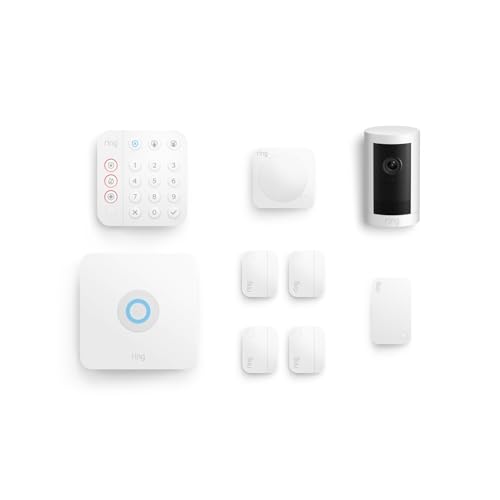
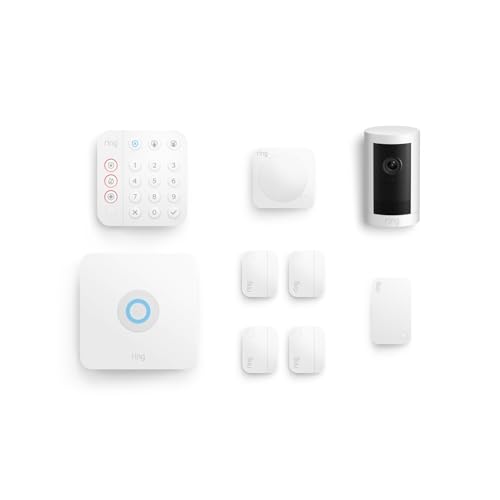
Ring built its name on the video doorbell, and the Ring Alarm turns that foothold into a complete system: a base station with battery and cellular backup, a keypad, entry and motion sensors, and the deepest camera catalog in this roundup. Doorbells, stick-up cameras, floodlight and spotlight cameras, and indoor cameras all live in the same app as the alarm, so arming the house and checking the porch happen in one place.
The practical strength is coherence. When the alarm triggers, linked cameras can start recording, and events from every device appear in one history timeline. Ring’s cameras are not the sharpest here, but they are consistent, quick to load, and the doorbell range in particular covers nearly every budget and wiring situation, battery or hardwired. For a household already using Echo devices, viewing a camera on an Echo Show by voice feels effortless.
Strengths
- One mature app for alarm, doorbells, and cameras, with a tidy shared event history.
- Base station includes cellular backup and a battery, so the alarm keeps working through outages.
- Huge accessory range: range extenders, flood sensors, smoke listener, and retrofit kits for old wired sensors.
- Optional professional monitoring on Ring’s plans, with the ability to self-monitor instead.
Trade-offs
- Video history requires a Ring Protect subscription; without one you get live view and alerts but no recorded clips.
- No local storage for camera footage, so the cloud plan is effectively permanent if you want recordings.
- Apple HomeKit support is absent; this is an Alexa-first ecosystem.
- Camera video quality is good rather than class-leading, especially in tricky backlight.
Who it suits: households that want one mainstream system doing alarm and video competently, especially anyone already invested in Alexa. If you dislike subscriptions on principle, look at Eufy below instead. Overall it sits in the mid-range for hardware, with running costs that depend on the plan tier you pick — check price on Amazon.

2. SimpliSafe: professional monitoring without the contract
SimpliSafe’s pitch is the traditional alarm experience without the traditional lock-in. You install the sensors yourself in under an hour, and a professional monitoring center watches the system on a rolling monthly basis you can cancel whenever you like. In recent years the company has filled in its camera lineup — an indoor camera with a privacy shutter, a wireless outdoor camera, and a video doorbell — so the system now answers the “show me what happened” question as well as the “someone opened the back door” one.
Where SimpliSafe genuinely stands out is response design. Its monitoring plans emphasize fast verification, including live agent viewing of indoor camera footage during an alarm on its higher tier, which can speed up police dispatch and cut false-alarm fines. The hardware itself is plain and unobtrusive, the keypad is simple enough for guests and house sitters, and the sensor range covers smoke, carbon monoxide, water, and freeze risks alongside intrusion.
Strengths
- Professional monitoring with no long-term contract, and a reputation for fast alarm handling.
- Video verification options that help monitoring agents confirm a real emergency.
- Very easy installation and a gentle learning curve for less technical households.
- Strong environmental sensor range for leaks, freezes, smoke, and CO.
Trade-offs
- Camera features and recording lean heavily on having an active plan; the system is at its best when monitored.
- The camera catalog is smaller than Ring’s or Arlo’s, with fewer specialty options.
- Smart home integration is thinner: Alexa and Google basics, no HomeKit.
- Outdoor camera battery life and wake-up speed are merely average.
Who it suits: anyone who wants a monitored alarm first and cameras second, including renters who need permission-free installation and the freedom to cancel. It is a mid-range system whose value rises the moment you actually subscribe to monitoring — check price on Amazon.

3. Arlo: the camera specialist that grew into a system
Arlo approaches from the opposite direction. Its cameras are the best in this guide: sharp 2K and 4K options, wide fields of view, excellent color night vision with integrated spotlights, and battery life that embarrasses most rivals. The Arlo Home Security System adds a keypad hub with built-in sensors — motion, and even smoke and CO alarm listening — plus entry sensors, turning the camera setup into something that can legitimately guard a house while you sleep.
The footage quality shows up where it counts. Faces stay recognizable further from the camera, license plates are more often readable, and Arlo’s person, vehicle, animal, and package detection is among the most accurate available. Placement flexibility is superb: wire-free cameras go on fences, trees, and sheds where wired rivals cannot reach, and the solar panel accessory can make recharging nearly a non-event in sunny spots.
Strengths
- Best-in-class camera image quality, night vision, and smart detection.
- Wire-free cameras with long battery life and optional solar charging go almost anywhere.
- Works with Alexa, Google, and Apple HomeKit on many models, a rare triple.
- Security hub sensors add leak, freeze, and alarm-listening coverage in one device.
Trade-offs
- Premium hardware pricing, and an Arlo Secure plan is needed to unlock cloud recording and the smartest alerts.
- The alarm side is younger and lighter than Ring’s or SimpliSafe’s; fewer sensor types and no traditional monitoring depth.
- Battery cameras still wake a fraction slower than wired ones, so the first moment of an event can be clipped.
- Some features vary by camera model and region, so read the fine print for the exact bundle you buy.
Who it suits: buyers who rank video quality first and want coverage of driveways, yards, and outbuildings that wired systems struggle to reach. Treat it as a premium camera platform with a growing alarm layer rather than the other way round — check price on Amazon.
4. SimpliSafe 12-Piece Wireless Home Security System: the expanded kit for larger homes
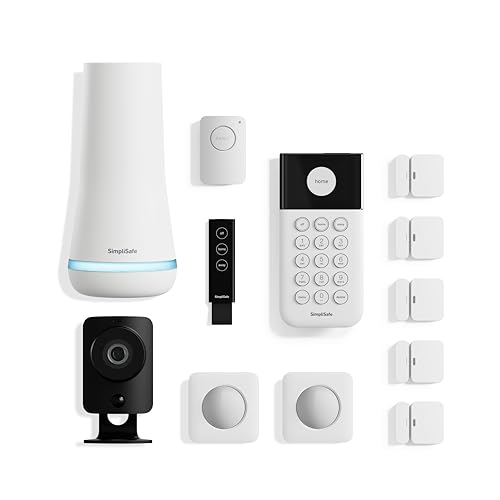
Where the smaller SimpliSafe bundle above suits compact homes and apartments, this 12-piece kit is the same platform scaled for a full house. The box covers more doors and rooms from day one: a base station, a keypad, a generous spread of entry and motion sensors, and an HD camera, so a three- or four-bedroom layout can be protected without immediately shopping for add-on sensors. Optional 24/7 professional monitoring with no contract applies here exactly as it does across the SimpliSafe range.
The appeal is coverage arithmetic. Every ground-floor door and accessible window a burglar might try gets a sensor in the first installation session, rather than joining a shopping list for later. The included camera adds an eye inside the home for alarm verification and everyday checks, and the whole kit still installs with the same peel-and-stick approach, talking to the base station wirelessly. Alexa and Google Assistant support covers arming and status checks by voice.
Strengths
- Twelve pieces cover a larger home’s doors, rooms, and hallways in one purchase.
- The same no-contract professional monitoring options as the rest of the SimpliSafe range.
- HD camera included for indoor viewing and alarm-time verification.
- Wireless, renter-friendly installation despite the bigger sensor count.
Trade-offs
- It overlaps the smaller SimpliSafe pick if your home is small; buy one kit, not both.
- Camera recording and the richest features still depend on an active plan.
- No HomeKit support, and the camera catalog beyond the kit stays limited.
- More sensors mean more batteries to track over the years.
Who it suits: owners of larger homes who like the SimpliSafe approach but know a six-piece starter would leave doors and rooms uncovered. It sits in the mid-range, with monitoring costs shared across a lot of hardware — check price on Amazon.
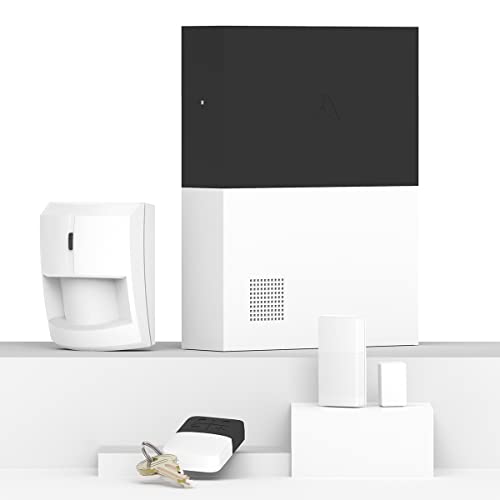
5. Abode: the flexible system for smart home enthusiasts
Abode is the quiet overachiever of this category. Its gateways pack an unusual amount of technology into a small box: support for a wide range of sensor protocols, battery backup, optional cellular, and native Apple HomeKit compatibility that the bigger brands mostly skip. Its CUE automation engine lets you build rules — arm at midnight, turn lights on when the door opens after dark, record when motion follows an entry event — that rival dedicated smart home hubs.
Monitoring is equally flexible. Self-monitor for free with app alerts, or add professional monitoring on short rolling terms, including brief on-demand stretches for holidays. Abode’s own cameras are serviceable rather than spectacular, covering indoor and doorbell duties competently, but the platform’s openness means the alarm and automation layer is the reason to buy. For tinkerers, it also plays well with broader smart home setups instead of walling you into one app.
Strengths
- HomeKit support plus Alexa and Google, rare breadth in one system.
- Powerful built-in automations that go beyond simple schedules.
- Monitoring on your terms: free self-monitoring or professional cover with no long contract.
- Gateway supports a wide range of sensors, including many third-party devices.
Trade-offs
- Abode’s own cameras trail Arlo and Nest on image quality and polish.
- The app and setup reward patience; casual users may find the options dense.
- Smaller company feel: accessory availability and support hours are more limited than the giants.
- Some advanced features sit behind its plans, so check what your tier includes.
Who it suits: Apple households and anyone who wants the security system to be part of a wider automated home rather than a sealed appliance. Hardware sits in the mid-range, and the free self-monitoring tier keeps running costs as low as you choose — check price on Amazon.

6. Eufy Security: local storage and no monthly fee
Eufy, Anker’s security brand, built its following on a promise the others resist: buy the hardware once and keep your footage at home. Its HomeBase hub stores recordings locally with expandable storage on newer models, performs on-device person and pet detection, and lets cameras work without any subscription. The camera range is broad, including solar-powered models, floodlight cameras, a video doorbell line, and indoor pan-and-tilt units, and the SoloCam and eufyCam families cover most homes.
The alarm side is thinner than Ring’s or SimpliSafe’s. Eufy offers entry and motion sensors and a keypad that pair with the HomeBase, and optional paid services exist in some regions, but there is no deep professional monitoring tradition behind it. Think of Eufy as a camera system with a useful basic alarm layer, bought mainly to escape monthly fees and keep video on your own shelf. On-device processing also means alerts can be quick, since the hub is not waiting on a distant server to decide that a person is a person.
Strengths
- Local storage on the HomeBase: recordings and smart detection with no required subscription.
- On-device AI distinguishes people, pets, and vehicles without cloud round trips.
- Solar and battery camera options make placement easy and maintenance rare.
- Strong value over time: mid-range hardware, minimal running costs.
Trade-offs
- Professional monitoring is limited or absent depending on region; this is fundamentally a self-monitored system.
- If the HomeBase is stolen or damaged, locally stored footage goes with it, unless you use optional cloud backup.
- The sensor and keypad ecosystem is smaller than the alarm-first brands.
- Past security headlines mean privacy-focused buyers should review Eufy’s current practices and settings carefully.
Who it suits: anyone whose top priority is owning their footage and skipping subscriptions, and who is comfortable responding to alerts themselves. It is the budget-friendly long-term play in this guide despite mid-range hardware prices — check price on Amazon.
Professional monitoring vs self-monitoring: how to decide
The monitoring question deserves more than a spec-table row, because it changes what the system is for. A self-monitored system is an information tool: it tells you what is happening and trusts you to act. A professionally monitored system is a response tool: it assumes you might be asleep, abroad, or incapacitated, and it acts anyway.
Consider three scenarios. A smoke sensor triggers at 3 a.m. while the house sleeps: a monitored system can have the fire department moving while you are still waking up, and that gap is the entire argument for monitoring environmental sensors. A camera spots someone trying car doors at noon while you are in a meeting with your phone face-down: self-monitoring fails silently, monitoring does not. A teenager forgets the alarm code and trips the entry delay twice a month: here monitoring adds nothing but false-alarm risk, and good app design matters more.
Cost framing helps too. Monitoring fees across this category are generally in the price-of-a-couple-of-coffees-per-month territory at the low end and climb toward a streaming-bundle level for premium tiers with video verification and cellular backup. None of the systems here demands a multi-year contract anymore, which removes the old fear of being trapped. A sensible pattern many households land on: self-monitor during settled periods, and switch professional monitoring on for holidays, work trips, or the months after a local break-in makes everyone nervous.
best cameras for outdoor bridge superzoom
Local vs cloud storage, in depth
Storage debates often sound theological, but the practical differences are concrete. Cloud storage gives you an off-site copy. If the worst happens and someone steals the hub or smashes a camera, the evidence survives. Cloud processing also powers the fanciest alerts, because server-side models are bigger than anything a hub can run. The trade is a subscription that never really ends and footage that transits someone else’s infrastructure.
Local storage inverts that. A hub with a hard drive or a generous internal store can hold weeks of event clips, costs nothing per month, and keeps working when your internet connection drops. The risks are physical: theft, fire, or a failed drive takes the archive with it. Some systems hedge with both, recording locally and backing up important events to the cloud, and that hybrid is where the category is heading.
Whichever you choose, do the retention math. Event-only recording stretches storage far further than continuous recording. A busy front-door camera might generate hundreds of clips a week; a quiet side gate, almost none. Check how many days of history your plan or hub actually holds for your busiest camera, not the marketing average, and set motion sensitivity so passing traffic does not eat the archive.
Camera placement: where systems succeed or fail
Buyers obsess over which camera and ignore where it goes, yet placement decides what your footage is worth. Mount outdoor cameras roughly eight to ten feet up: high enough to deter tampering, low enough to capture faces rather than the tops of heads. Angle them along the approach path, not straight at it, so a visitor crosses the frame and gives the sensor time to wake and record. A camera pointed directly at a front door from across the porch often records the back of a head at the moment that matters.
Cover approaches, not areas. The front door and driveway handle the majority of real incidents, followed by the back door and any ground-floor windows hidden from the street. One camera watching a whole garden at a wide angle produces scenery, not evidence; two narrower views at choke points produce identification. Indoors, a single camera in the main living space covering the path between entry points beats a camera in every room, and it is far kinder to everyone’s privacy.
Lighting deserves a thought as well. Cameras with spotlights deter and illuminate, but they also announce themselves, which is sometimes the point and sometimes not. Porch lights on smart schedules, motion lights, and cameras with good low-light sensors can be layered so the system sees clearly without turning the house into a stadium.
Power, Wi-Fi, and the outage test
Ask of any system: what still works when the power cuts and the router dies? Alarm-first platforms with battery and cellular backup keep sensors reporting and can still reach the monitoring center. Camera-led systems usually cannot record or alert without Wi-Fi, although hubs with local storage may keep saving footage for later review. Neither answer is disqualifying, but the difference should be a conscious choice, especially in areas with unreliable power or severe weather.
Wi-Fi quality is the silent variable in every camera review. A camera at the far end of a house with one bar of signal will stutter, miss events, and drain its battery retrying connections, no matter how good its sensor is. Budget a little of the project money for a mesh Wi-Fi node near camera clusters if your coverage is patchy. It improves the system more than stepping up one camera tier.
what is dynamic range on a camera
False alarms, privacy, and being a good neighbor
False alarms are not a minor annoyance; they are how systems die. Cities increasingly fine repeated false dispatches, and households respond to alert fatigue by muting the app, which quietly converts a security system into a decoration. Tune activity zones to exclude the street and swaying trees, use person detection rather than all-motion alerts, and set entry delays long enough for real life. The best system is the one whose alerts you still believe in month six.
Privacy runs in two directions. Inward: indoor cameras should have physical shutters or clear schedules, guests and cleaners deserve honesty about recording, and two-way talk features should never surprise anyone. Outward: aim cameras at your own property, be thoughtful about audio recording, which is regulated more strictly than video in many places, and check local rules before recording conversations anywhere. A system that respects the household and the street lasts longer in both.
Anatomy of the alarm half: sensors explained
Because cameras get the attention, buyers often under-specify the sensor layer and regret it. Here is what each sensor type actually does, so you can build a kit list that matches your floor plan instead of a marketing bundle.
Entry sensors are two-piece magnetic contacts for doors and windows. They are cheap, run for years on a coin battery, and form the perimeter of the system. Every exterior door deserves one, plus ground-floor windows that open wide enough to climb through. Motion sensors watch interior volume using passive infrared; one well-placed unit covers a hallway or open-plan ground floor and catches anyone who entered through an unwatched opening. Modern units ignore pets below a set weight, which matters in any home with a large dog.
Glass-break sensors listen for the acoustic signature of breaking glass and cover a room of windows with a single device — useful for sunrooms and sliding doors. Environmental sensors are the quiet heroes: smoke and carbon monoxide detectors that report to the monitoring center protect life rather than property, and water-leak and freeze sensors placed near the water heater, washing machine, and under sinks prevent the most common and expensive insurance claims in ordinary homes. A burst pipe caught in twenty minutes is a mop; caught after a holiday, it is a renovation.
When comparing kits, count what your house needs first, then price the system that covers it. A cheaper starter kit with expensive add-on sensors can cost more in total than a pricier kit with generous bundles, and this arithmetic is exactly where the alarm-first brands and camera-first brands diverge.
Doorbell cameras deserve their own paragraph
The doorbell is the hardest-working camera in most homes. It watches the approach, the doorstep, and the street edge, and it handles two-way conversations with couriers and callers. Because it is pressed into service dozens of times a week, small qualities loom large: how fast the live view opens when someone rings, whether the chime works with your existing mechanical bell or needs a plug-in unit, and whether package detection actually catches the drop-off rather than the pickup an hour later.
Wiring decides the experience. A hardwired doorbell trickle-charges continuously and can pre-record a few seconds before motion, which is the difference between seeing a face and seeing a shoulder leaving. Battery doorbells are renter-friendly and install in minutes, but in cold winters and on busy streets they may need charging every few weeks, and they wake slightly slower. If your home has no doorbell wiring, a battery model plus a solar charger or a spare battery on rotation solves most of the pain.
Every system in this guide offers a credible doorbell, but ecosystems differ in depth. Ring’s range is the broadest, Nest’s image quality and familiar-face alerts are excellent, Eufy’s dual-camera doorbells watch both faces and the package zone, Arlo’s square field of view is designed to show a visitor head-to-toe plus the parcel at their feet, and Abode and SimpliSafe cover the basics competently. Pick the system first, but check that its doorbell fits your wiring before you commit.
Setting up: a sensible order of operations
Installation goes smoothly when you resist mounting anything on day one. Start by activating the hub and keypad, then add sensors on a table and confirm each one reports correctly in the app. Walk the house with your phone and check Wi-Fi strength at every planned camera position; fix weak spots with a mesh node before a single bracket goes up, because relocating a mounted camera is nobody’s idea of fun.
Next, live with the cameras temporarily. Rest them on shelves, tape them at mounting height, and review a day of footage. You will discover that the obvious spot catches mostly sky, or that the driveway camera faces straight into the sunset. Adjust angles until faces and plates are readable, then drill. Set activity zones and alert types only after a few days of real footage, when you know which motions are routine. Finally, test the alarm properly: arm it, open a door, let the entry delay expire, and confirm the siren, the app alert, and, if you subscribe, the monitoring center’s call all behave as expected. A system you have never heard trigger is a system you are merely hoping works.
Choosing by household: five common situations
The empty-nest house that travels. Weeks away at a time means professional monitoring, cellular backup, and environmental sensors matter more than camera glamour. SimpliSafe and Ring, with monitoring switched on and leak and freeze sensors added, fit this life best.
The busy family home. Deliveries, kids arriving home alone, a dog walker at noon: the doorbell and driveway cameras do the heavy lifting, and familiar-face or package alerts cut the noise. The SimpliSafe 12-piece kit’s deep sensor coverage or Arlo’s sharp detection make the school-run hours calmer.
The renter’s apartment. No drilling, no wiring, nothing left behind. Battery cameras, peel-and-stick sensors, and self-monitoring keep deposits safe. Abode and Eufy both travel well to the next lease, and Ring’s smaller kits are equally portable.
The privacy-first household. Local storage, physical shutters indoors, and minimal cloud dependence point to Eufy, with Abode as the flexible alternative. Either way, read the audio-recording rules in your state and set indoor cameras to privacy mode when people are home.
The large or rural property. Distance is the enemy: outbuildings, long driveways, and weak Wi-Fi at the fence line. Arlo’s wire-free range and solar options reach furthest, ideally paired with a mesh network or outdoor access point, and local storage avoids depending on a slow upload connection.
The second home or short-term rental. A property you visit monthly needs eyes more than alarms: freeze and leak sensors, a camera on the approach, and alerts that reach you two states away. Self-monitoring usually suffices, but choose hardware with cellular or battery resilience, respect local rules and platform policies on cameras at rentals — exterior only, disclosed to guests, never indoors — and expect Wi-Fi outages to be your most common event by far.
The subscription fine print, translated
Every brand phrases its plans differently, but the same four questions cut through all of them. First: what still works with no plan at all? Live view almost always survives; recorded history and smart alerts are the usual casualties. Second: is the plan priced per camera or per household? Per-home plans make multi-camera setups far cheaper over time. Third: how many days of video history do you get, and is continuous recording offered or only events? Fourth: does professional monitoring bundle with the video plan or stack on top of it?
Run your own three-year arithmetic before buying hardware. Add the kit, the sensors your floor plan actually needs, and thirty-six months of the plan tier you will realistically keep. Ranked on that total, the order of this guide can shuffle considerably: premium cameras on a per-home plan may undercut mid-range hardware stacked with per-camera fees, and Eufy’s zero-plan model quietly wins any long horizon. The starter-kit price is advertising; the three-year figure is the truth.
Smart alerts: what the detection labels really mean
Person, vehicle, animal, package: these labels decide whether an alert deserves your attention, and the systems here implement them at different levels of maturity. Cloud-based detection, used by Ring, Nest, and Arlo’s plans, runs heavier models and tends to be the most accurate, at the cost of a subscription and a short processing delay. On-device detection, Eufy’s specialty and increasingly present in Arlo and Nest cameras, answers faster and works without a plan, but can be fooled by unusual angles or lighting.
Two refinements separate good from great. Familiar-face recognition turns “person at the door” into “Maya at the door,” which transforms how a family uses alerts, though it requires enrolling faces and is restricted in a few jurisdictions. Rich notifications, which attach a thumbnail or short animated preview to the alert, let you judge most events from the lock screen without opening the app at all. When you compare systems, test these features in the trial period: detection quality in your lighting, on your street, with your trees is the only benchmark that matters, and every brand’s marketing footage was shot somewhere easier.
Also consider what happens after detection. The best integrations chain events together: a person detected on the driveway after midnight turns on the floodlight, starts the porch camera recording at full quality, and sends a rich alert, while the same event at noon just logs quietly. Abode’s automation engine and Ring’s linked-device rules both attempt versions of this. Simple today, these behaviors are where the category is heading, and they reward buyers who choose an ecosystem rather than a pile of gadgets.
Beyond cameras: locks, lights, and the garage door
A security system grows more valuable as it absorbs the rest of the entry points. Smart locks paired with the alarm can disarm the system with a code, log which family member arrived, and remove the hidden-spare-key problem entirely. Smart lighting on schedules and motion rules makes an empty house look occupied, which deters more effectively than any recording. A garage door controller closes the most-forgotten opening in American homes and confirms it from the same app as the alarm.
Not every ecosystem supports these equally. Ring and Abode have the widest third-party sensor and lock compatibility through Z-Wave and related protocols. SimpliSafe keeps a tighter, simpler catalog. Eufy sells its own locks and lighting but integrates less with outside brands. None of this should override the core choice of monitoring and cameras, but if you already own a smart lock or plan to add one, check compatibility before the ecosystem chooses for you.
Maintenance: keeping the system trustworthy
Security hardware decays quietly. Batteries sag in the cold, lenses film over with pollen and spider silk, firmware ages, and a sensor knocked askew by a vacuum cleaner stops reporting the door it guards. A light routine keeps the system honest: walk-test sensors twice a year when you change the clocks, wipe outdoor lenses with a microfiber cloth each season, and glance at the app’s device health page monthly for low batteries and offline devices.
Battery cameras deserve a rotation plan. Note which units drain fastest — usually the busiest views and the coldest spots — and charge them on a staggered schedule so coverage never lapses everywhere at once. Solar panels, where the sun cooperates, remove the chore almost entirely for Arlo and Eufy cameras. Finally, review your alert settings after any change: new puppy, new tree, new neighbor with a flag. Detection zones tuned for last year’s yard are this year’s false alarms.
Keep a simple record, too. A note of when each camera and sensor was installed and when its battery was last changed turns the inevitable “why is the side gate offline” evening into a two-minute fix instead of a ladder expedition of discovery.
Camera power options: wired, battery, and solar compared
Every camera decision eventually becomes a power decision. Hardwired cameras — fed by your doorbell transformer, a porch light circuit, or a plugged-in adapter — record the most reliably. They can buffer a few seconds of video before motion triggers, run brighter spotlights without rationing, and never ask for a ladder in February. Their weakness is the install: if power is not already where the camera needs to be, you are drilling, fishing cable, or hiring an electrician.
Battery cameras trade that permanence for freedom. Modern units run for months per charge in quiet locations, and the newest batteries are swappable, so a spare on the charger turns a dead camera into a thirty-second errand. The costs are subtler: a brief wake-up delay on motion, conservative recording settings to protect battery life, and performance that dips in deep cold. Busy locations punish them; a camera watching a lively street can drain in weeks.
Solar panels split the difference for sun-facing positions. A small panel in decent light typically keeps a battery camera topped up indefinitely, which is why Arlo and Eufy owners in sunny climates treat charging as solved. In shaded, northern, or snow-covered spots the panel helps less, and the honest answer is seasonal: effortless in summer, occasional manual charging in winter. Match the power source to the position’s traffic and sunlight, not to a general preference, and most households end up with a mix — wired at the door, battery at the fence, solar on the shed.
When the alarm actually goes off: the sequence that matters
It helps to rehearse the real event once, mentally, before choosing. A sensor trips. The hub starts an entry delay — typically thirty to sixty seconds of beeping grace — while the app asks whether everything is fine. Disarm in time and nothing else happens. Let it expire, and the siren sounds, cameras linked to the alarm begin recording if they were idle, and the signal travels out: over broadband first, over cellular if broadband is down.
On a monitored plan, the center calls or texts the primary contact, then secondary contacts, asking for a password or confirmation. Video verification, where offered, lets the agent glance at the relevant camera before dispatching, which many police departments now reward with faster response because verified alarms filter out the overwhelming majority of false ones. On a self-monitored setup, that whole chain is you: your phone, your judgment, your call to the local non-emergency or emergency line. Both models work; they simply place the burden in different hands at 3 a.m.
Afterwards comes the evidence question, and here camera quality stops being a hobbyist metric. Useful footage means a face, a distinguishing feature, or a plate, captured close enough to matter, with a timestamp the police can rely on. That is the product of every earlier decision in this guide combined: resolution, placement, lighting, storage retention, and whether the clip still exists because the plan was active. Systems earn their price in this ten-minute window, not in the spec sheet.
One last practicality: tell your insurer. Many providers offer modest discounts for monitored systems, particularly those covering burglary plus smoke and water damage, and some require a monitoring certificate you can download from the app. It will not transform your premium, but over years it quietly offsets part of the subscription you were paying anyway.
Our verdict: match the system to your first priority
After all the comparisons above, the choice collapses into one question: what do you most need this system to do on its worst day? If the answer is “get help even if I cannot act,” buy a monitored platform — SimpliSafe for contract-free simplicity, Ring if you also want the deepest camera catalog in one app, the SimpliSafe 12-piece kit if you want the widest sensor coverage in a single box.
If the answer is “show me, clearly, what happened,” Arlo’s cameras are the ones to beat, with the understanding that its alarm layer is younger. If the answer is “never send my footage anywhere and never pay monthly,” Eufy stands alone in this guide, accepting self-monitoring as the trade. And if the answer is “run my whole smart home, Apple included,” Abode is the system the others are not trying to be.
There is no wrong pick among the six for the household it fits, and there is no pick that fits everyone. Choose by your worst day, install it carefully, tune the alerts until you trust them, and the system will repay you in the most valuable currency a security product can offer: being ignored, month after month, because nothing it showed you was ever a false alarm — and because on the one day it mattered, it worked.
Frequently asked questions
Do I really need professional monitoring if I have cameras?
Not always. Cameras plus phone alerts cover most everyday needs when someone in the household reliably sees notifications. Monitoring earns its cost when the home is often empty, when you want smoke and CO events escalated even while you sleep, or when local police require verified alarms for priority response. The good news is that every system in this guide lets you choose, and most let you change your mind monthly.
How many cameras does a typical home need?
Most homes are well covered by three to four: a doorbell camera, one for the driveway or front approach, one for the back door or garden, and optionally one indoor camera for the main living area. More cameras mostly add blind-spot insurance and maintenance. Spend on placement and lighting before adding a fifth camera.
Will these systems work during a power cut or internet outage?
The alarm platforms with battery and cellular backup — Ring and SimpliSafe in particular — keep sensors and monitoring alive through outages. Cameras are more fragile: cloud-based recording stops without internet, while systems with local hub storage can keep saving clips for later. A small battery backup for your router closes much of the gap cheaply.
Can I take the system with me when I move?
Yes, and this is a genuine advantage of DIY systems over old hardwired installs. Peel-and-stick sensors, battery cameras, and hubs all move house easily, and no-contract monitoring simply transfers to the new address. Renters should favor systems that need no drilling and no control-panel wiring, which is most of this guide.
What ongoing costs should I expect beyond the hardware?
Depending on the brand, expect some combination of a monitoring fee, a cloud video plan, and occasional battery or accessory replacements. Eufy is the outlier that can run at effectively zero monthly cost with local storage. For the others, think in terms of a modest monthly utility for the household rather than a one-off purchase, and compare systems on a three-year total cost, not the starter-kit price.
Whichever system you choose, the measure of success is boring: months of quiet, believable alerts and a camera roll of nothing more dramatic than deliveries and weather — until the one evening it shows you exactly what you needed to see.