kajuandouglas.com is reader-supported. When you buy through links on our site, we may earn an affiliate commission.
Where to Buy the Camera Your Channel Actually Needs
Every streaming career begins with the same upgrade itch: the audience has arrived, the content is working, and the picture — soft, smeared, lit like a hostage video — is the last amateur thing about the channel. The best cameras for live streaming videos solve that problem at a desk, in a spare room, for a creator who is simultaneously the presenter, the producer and the entire technical department. That context decides everything in this guide. A streaming camera for a home studio must focus on a face without being asked, survive four-hour sessions without complaint, connect without a capture-card saga, and make its owner look like the authority their content claims they are — all before breakfast, every day, for years.
Where to buy: the linked names below take you to each camera’s Amazon listing, where configurations can be compared and box contents checked. One piece of sequencing advice before the reviews: the camera is the second purchase, not the first. A microphone your audience can relax into and a light that flatters you will improve a stream more, per coin, than any camera in this guide — so if the budget forces an order, sound and light go first, and the camera arrives to a studio ready to deserve it.
The six picks divide into two families. Three are mirrorless cameras — Sony’s ZV-E10 II, Canon’s EOS R50 and Sony’s ZV-1F — that double as serious photography and filming tools for creators whose work leaves the desk. Three are dedicated streaming cameras — Elgato’s Facecam, Logitech’s StreamCam and the OBSBOT Tiny 2 — that plug in by USB, ask almost nothing, and specialise in the seated, lit, talking-to-lens work that is most of streaming. Which family is right depends on whether your channel ever leaves the room, and the reviews below argue both cases honestly.
Key Takeaways
- For desk streaming, autofocus trust and session-length reliability matter more than sensor size.
- The Sony ZV-E10 II is the creator camera to grow with — interchangeable lenses, superb tracking, real video depth.
- Dedicated USB cameras — Facecam, StreamCam, Tiny 2 — win on simplicity: plug in, look good, go live.
- The OBSBOT Tiny 2’s tracking gimbal is the standing-desk and whiteboard presenter’s unfair advantage.
- The Canon EOS R50 is the hybrid pick for creators who also shoot photos and video away from the desk.
- Light and audio outrank the camera: budget for them first, and let the camera complete the studio.
In this guide
Quick Picks
| Camera | Badge | Why it is here |
|---|---|---|
| Sony ZV-E10 II | Best creator camera overall | Lens choice, tracking autofocus and video quality a channel can grow into for years. |
| Elgato Facecam | Best plug-and-play upgrade | A fixed-focus, software-tuned webcam that makes a desk setup look produced. |
| OBSBOT Tiny 2 | Best for moving presenters | A tracking gimbal camera that follows you around the studio on its own. |
| Canon EOS R50 | Best hybrid for beginners | Friendly, capable mirrorless for streams, photos and filmed content alike. |
| Logitech StreamCam | Best simple vertical-friendly cam | Easy USB quality with framing that suits both widescreen and vertical formats. |
| Sony ZV-1F | Best for vlog-style streaming | An ultra-wide lens and creator touches for streamers who move and present. |
How Did We Choose the Best Cameras for Live Streaming Videos?
We set up a desk, a key light and a four-hour session, and judged these cameras as working streamers rather than as photographic instruments. The first test was connection honesty: how does the camera reach the streaming software — directly by USB, through a capture device, or through the maker’s utility — and how much of the creator’s evening does that chain consume in setup, updates and mysterious black screens? Cameras that appear in the software as a camera, every time, without negotiation, scored as the professionals they are.
Autofocus was judged at conversational distance, in the streamer’s actual behaviour: leaning in for emphasis, holding a product to the lens, turning to a second monitor, standing to a whiteboard. The systems that hold a face through all of that — or, in the dedicated cameras’ case, the fixed-focus designs that make focus a non-question — earned their places. Image quality was assessed the way audiences assess it: skin that looks like skin under a decent light, colours that survive the platform’s compression, and detail that reads on a phone screen, where most viewing happens.
Session endurance completed the scoring. Streaming cameras run hot and long in a way event cameras rarely must, in rooms without a producer to notice a warning icon. We favoured cameras with honest long-session reputations, sensible power arrangements, and software that remembers its settings between streams — because the creator’s scarcest resource is not money but the will to go live on a tired Tuesday, and every friction in the chain taxes it.
Why Does a Streaming Camera Fail Differently From a Filming Camera?
A filming camera’s mistakes can be reshot; a streaming camera’s mistakes are broadcast, archived in the VOD, and clipped by the audience. That single fact rearranges the virtues. Peak quality matters less than the absence of failure modes: the focus hunt during the key explanation, the overheating shutdown in hour three of the charity stream, the software update that rearranges the setup ten minutes before a sponsored slot. We scored the cameras below as much for what they never do as for what they do brilliantly.
The home studio adds its own physics. The light is fixed and modest, the distance is arm’s length, the background is a bookshelf that must look intentional rather than accidental, and the presenter is also the engineer — any problem must be diagnosable from the chair, on camera, with the audience watching. This is why the dedicated streaming cameras exist and why they keep winning desks from more powerful photographic tools: they trade ultimate quality for a chain so short and predictable that the creator can forget it exists. Forgetting the camera is the goal. The audience should remember the presenter, and the presenter should be free to think about the audience — which is why this guide weighs simplicity as a first-class specification rather than a compromise.
Which Six Cameras Deserve a Permanent Place on the Desk? The Picks in Detail

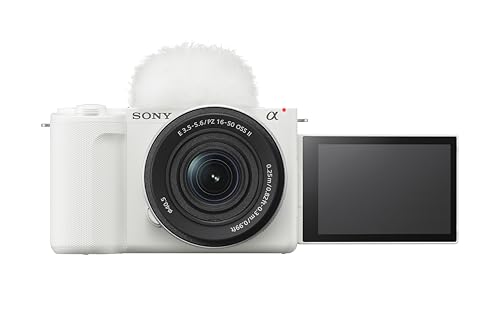
Sony ZV-E10 II — Best creator camera overall
The Sony ZV-E10 II is the camera a channel grows into rather than out of. Its 26-megapixel APS-C sensor and 4K video deliver the crisp, colour-confident image that makes a stream look produced, and Sony’s eye autofocus performs the desk streamer’s essential service: it holds your face while you lean, gesture, hold products to the lens and glance at chat, without a single visible hunt. Around that core sits the creator-specific detailing this line pioneered — a tally light, product-showcase focus behaviour, a defocus switch for instant background separation — each one a small friction removed from a working day.
The strategic argument, as throughout Sony’s appearances in these guides, is the lens mount. Today’s desk lens can become tomorrow’s filming lens; the fast prime that flatters your talking head this year shoots your documentary next year, and E-mount’s affordable third-party range keeps that growth honest. The working costs are the mirrorless tax: a capture chain or Sony’s streaming utilities to configure once, power to arrange for long sessions, and a body whose video-first layout stills photographers must forgive. For the creator whose ambitions exceed the desk — and whose channel’s look must survive success — this is the guide’s principal recommendation, and the camera most likely to still be the main camera at a million subscribers.
- Sensor: 26MP APS-C with strong 4K video
- Autofocus: eye tracking that anchors desk presenting
- Creator tools: tally light, product showcase, defocus switch
- Mount: Sony E — the deepest growth path here
Strengths
- An image and focus system a channel never outgrows
- Lens economics that reward long-term creators
- Hybrid strength for filmed content beyond the stream
Trade-offs
- Setup is a project compared with USB webcams
- Long sessions need power and thermal common sense
- No viewfinder for outdoor stills work
Best for: ambitious creators building a channel meant to last. Not suited for: streamers who want to plug in and go live in five minutes.

Elgato Facecam — Best plug-and-play upgrade
Elgato built the Facecam by asking what a webcam would be if it were designed by the people who make streaming software rather than by a peripherals catalogue. The answer removes autofocus entirely — a fixed-focus lens, precisely set for desk distance, so focus can never hunt because it can never move — and puts the intelligence into a proper lens, a Sony sensor and software that exposes real camera controls: exposure, white balance, and processing that can be dialled rather than endured. The result is the fastest route in this guide from “laptop camera” to “that looks professional,” achievable in one lunch break.
Its streaming virtues are the quiet ones. It appears as a camera in every application, remembers its settings, runs cool through marathon sessions, and its image — sharp, honest, with skin rendered like skin under a decent key light — survives platform compression with dignity. The limits are the design’s own: the fixed focus assumes a seated presenter at a desk, the field of view is the desk’s framing and no wider story, and there is no world in which it shoots your holiday. Judge it as what it is — the dedicated instrument for the talking-to-camera hours that constitute most streaming — and it is close to flawless at its job, which is why so many large channels keep one mounted permanently above the monitor.
- Design: fixed-focus lens tuned for desk distance
- Connection: USB, appearing natively in streaming software
- Software: real manual control over the image
- Sessions: cool, unlimited, forgettable — in the good way
Strengths
- The simplest professional-looking upgrade in streaming
- Focus that cannot hunt, ever, by design
- Settings that persist between sessions
Trade-offs
- Seated-desk framing only; no standing or wide shots
- Needs decent light to show its quality
- A specialist — it does nothing but this, brilliantly
Best for: desk streamers, professionals on calls, educators at a fixed setup. Not suited for: presenters who move, roam or film beyond the desk.

OBSBOT Tiny 2 — Best for moving presenters
Some presenters cannot sit still, and their content is better for it: the teacher at the whiteboard, the fitness instructor, the maker pacing between bench and camera, the seller walking the product around the studio. The OBSBOT Tiny 2 is their camera — a 4K sensor on a motorised gimbal that tracks its subject around the room, reframing and zooming with a smoothness that reads as a camera operator’s work. Gesture and voice commands start and stop the tracking from across the studio, so the presenter directs without touching anything, and the picture follows like a colleague who has learned the show.
At a desk it behaves as a first-rate streaming camera with a party trick; away from the desk it becomes the only camera in this guide that can hold a moving presenter in frame, alone, for an hour. The image from its small sensor is good in decent light and honest about its limits in poor light, so the studio’s key light remains part of the bargain. Tracking deserves one rehearsal to learn its manners — where it loses you, how it recovers — after which it is startlingly dependable. For the moving formats that are streaming’s growth area, this little robot is not a novelty; it is the enabling technology, and it earns its place beside the conventional cameras rather than beneath them.
- Camera: 4K on a two-axis tracking gimbal
- Control: gesture and voice commands from across the room
- Role: moving presenters, teachers, demonstrators
- Desk mode: a capable fixed streaming camera when parked
Strengths
- Follows a presenter no fixed camera can follow
- Production value of a camera operator, at webcam effort
- Desk and studio duties in one small device
Trade-offs
- Small sensor asks for decent studio light
- Tracking manners must be rehearsed once
- Image quality trails the mirrorless picks
Best for: teachers, demonstrators, fitness and maker streamers. Not suited for: seated-only streamers, for whom the Facecam is simpler.

Canon EOS R50 — Best hybrid for beginners
The Canon EOS R50 is the recommendation for the creator whose life will not stay at the desk — who streams on weekdays, films on location on Saturdays and photographs the family on Sundays, and needs one friendly camera to be good at all of it. Its streaming credentials are genuine: clean output for capture workflows, Canon’s welcoming colour for skin, autofocus that tracks a face with the confidence of its professional lineage, and menus that a beginner can survive without a tutorial open in another tab. As a first serious camera that also streams, it has no equal in this guide for sheer approachability.
The Canon case deepens with use. The RF mount’s affordable primes give the desk setup its flattering lens now and the travel kit its character later, and the camera’s guided modes teach exposure while the channel grows. Its streaming debits are the standard mirrorless ones — a capture chain to assemble, power to arrange for the longest sessions, and video depth a notch below the Sony’s creator flagship — balanced against a price of entry and a kindness of handling the Sony does not attempt. For the new creator choosing a first camera with streaming in the plan, this is the door we open first.
- Sensor: 24MP APS-C, strong stills and video
- Autofocus: face tracking from Canon’s professional lineage
- Design: the friendliest handling in this guide
- Mount: Canon RF, with affordable primes for the desk
Strengths
- One camera for stream, film and family
- Beginner-kind without being beginner-limited
- Canon colour that flatters presenters unedited
Trade-offs
- Capture chain and power setup required for streaming
- Creator-specific tools fewer than the ZV-E10 II’s
- Battery life suits sessions planned with a spare
Best for: new creators whose content roams beyond the desk. Not suited for: desk-only streamers, who pay for versatility they will not use.

Logitech StreamCam — Best simple vertical-friendly cam
Logitech’s StreamCam occupies the sensible middle of the dedicated cameras: more considered than a generic webcam, less specialised than the Facecam, and built on an insight its rivals missed — that modern streaming is two formats at once. Its mount rotates between landscape and portrait, serving the widescreen broadcast and the vertical clip economy from one device, and its autofocus and exposure behave with a steadiness that keeps a presenter looking consistent while they think about other things. Plugged into a laptop or a modest desktop, it is a complete streaming camera in minutes.
Its honest tier is the good-webcam tier: the image is clean and pleasing in decent light, a clear elevation from integrated cameras, and a clear step below the mirrorless picks in depth and low-light grace. For the streamer whose content is conversation — podcasts, commentary, study streams, community calls — that tier is not a compromise but a match, and the money saved against a mirrorless chain buys the microphone and light that audiences will actually notice. Logitech’s software keeps framing and settings simple to hold between sessions. As the guide’s recommendation for the creator who values momentum over maximalism, the StreamCam is exactly calibrated: good enough to be taken seriously, simple enough to never be the reason a stream did not happen.
- Design: rotating mount for landscape and vertical formats
- Connection: USB-C, native in streaming software
- Focus: autofocus with steady exposure behaviour
- Role: conversation formats, podcasts, community streams
Strengths
- Two formats from one small camera
- Setup measured in minutes, reliability in years
- Lets the budget flow to light and audio
Trade-offs
- Image quality is good-webcam class, not mirrorless class
- Low light reveals the small sensor
- Fewer manual controls than the Facecam
Best for: conversational streamers and podcasters on sensible budgets. Not suited for: creators whose brand is cinematic image quality.

Sony ZV-1F — Best for vlog-style streaming
The Sony ZV-1F serves the streamer whose show is themselves in a place — the studio tour, the workshop walkthrough, the desk that becomes a stage — rather than a face in a frame. Its fixed ultra-wide lens holds presenter and environment together at arm’s length, its eye autofocus keeps the human sharp while the background tells the story, and its creator touches — the defocus switch, product-showcase focusing, a tally light — were designed for exactly this one-person production. It starts fast, weighs almost nothing, and mounts anywhere a small tripod or clamp can go, which makes it the second-angle and roving camera of many desk setups as well as a main camera for vlog-format streams.
Its limits are the fixed lens’s limits, stated plainly: no zooming into detail, an ultra-wide perspective that must be kept at flattering distances, and stills that serve the feed rather than the album. Within its brief it is complete — the camera for the creator whose format is movement and personality. Paired with a desk-bound Facecam or StreamCam as the static angle, it forms the two-camera creator studio this guide recommends at the sensible end of the market: one camera that never moves and never fails, and one that goes where the content goes.
- Lens: fixed ultra-wide for presenter-plus-place framing
- Autofocus: Sony eye tracking for moving presenters
- Creator tools: defocus switch, product showcase, tally light
- Design: featherweight, mounts anywhere
Strengths
- The natural camera for personality-led, moving formats
- Instant, light and unobtrusive on any set
- An ideal second angle beside a fixed desk camera
Trade-offs
- Ultra-wide perspective is a framing discipline
- No zoom and modest stills ambitions
- Desk purists are better served by the Facecam
Best for: vlog-format streamers and roving second angles. Not suited for: seated talking-head purists or detail-zoom demonstrations.
How Do the Six Compare at the Desk?
| Camera | Type | Desk strength | Watch out for |
|---|---|---|---|
| Sony ZV-E10 II | Mirrorless | Quality and growth path | Setup project |
| Elgato Facecam | Dedicated USB | Fixed-focus simplicity | Seated framing only |
| OBSBOT Tiny 2 | Tracking gimbal | Follows moving presenters | Needs light |
| Canon EOS R50 | Mirrorless | Hybrid versatility | Capture chain |
| Logitech StreamCam | Dedicated USB | Vertical and landscape | Webcam-class image |
| Sony ZV-1F | Fixed ultra-wide | Roving presenter framing | No zoom |
The table sorts by a single question: does your content sit, move, or leave the room? Sit — take a dedicated camera. Move — take the tracker or the ZV-1F. Leave — take a mirrorless. Every other consideration is refinement.
How Do You Light and Frame a Home Studio So Any of These Shine?
The camera is the last link in an image chain that begins with light, and a modest key light placed at forty-five degrees, slightly above eye level and as close as the frame allows, will do more for every camera in this guide than the price difference between the cheapest and the dearest. Close light is soft light, and soft light is flattering light; the streamer’s second fixture, a dim fill or a practical lamp in frame, exists to give the background depth so the presenter separates from the bookshelf without a blur filter’s help. Frame with the camera at eye level — a stack of books under a laptop has launched more careers than any mount — and leave the headroom a hand’s width, no more.
Background deserves the presenter’s vanity applied in reverse: the audience reads it as your character, so curate it like a set — a shelf with intention, a plant for life, one object that starts conversations — and then light it gently so it reads as a place rather than a backdrop. Set the camera’s white balance to the light you actually have instead of letting it hunt between the window and the lamp, lock the exposure once your face is right, and record a two-minute test watched on a phone before the first real stream. Every camera above rewards this hour of craft visibly; none of them can substitute for it.
What Mistakes Make Streams Look Amateur Despite Good Cameras?
The first is the camera below the chin, broadcasting up the presenter’s nose from a laptop on a low desk — the single most reliable amateur signal in the medium, and the cheapest to fix. The second is the window behind the presenter, which turns a face into a silhouette while the camera exposes heroically for the garden. The third is autofocus left to hunt in a dim room, the picture breathing in and out of focus while the content begs for attention. All three are cured by placement and light, not by purchase, which is why they persist among creators who bought the camera before the craft.
The professional mistakes are quieter. Streaming at the camera’s maximum quality into a connection that cannot sustain it produces the stutter audiences describe as “bad internet” and blame on the creator. Neglecting the VOD’s first impression — the opening frame a new viewer meets — wastes the archive the stream laboured to create. And changing the setup constantly, chasing each new release, taxes the one resource that compounds: the habit of going live. The streamers who grow keep a chain that works, from this guide’s cameras, and spend their novelty budget on content. Audiences subscribe to people, and people are clearest through a camera that has been allowed to become invisible.
How Do You Build a Two-Camera Creator Setup Without a Producer?
The two-camera creator studio follows the same grammar as the event rigs in our companion guide, scaled to a desk. Camera one is home: the fixed, dependable framing — a Facecam or StreamCam, or the mirrorless locked off — that the stream can always return to. Camera two is punctuation: the Tiny 2 for the standing segment, the ZV-1F for the tour, the mirrorless on a longer lens for the product close-up. Switching happens in the software, on a hotkey or a small control deck under the presenter’s hand, rehearsed until the cut lands on the sentence’s end rather than after it.
The discipline that makes it work solo is pre-commitment. Decide the show’s segments and their cameras before going live; set each camera’s exposure and white balance to agree, because a cut between two colour temperatures reads as an error even to viewers who cannot name it; and give the second camera a job it can do unattended, since the presenter cannot operate and perform at once. Built this way, a one-person studio produces the visual rhythm audiences associate with produced television — and the creator’s whole technical staff remains, as it should be, one calm person in a chair.
How Do You Choose Between Mirrorless and a Dedicated Streaming Camera?
Strip the question to its working parts and it answers itself. The dedicated camera offers a chain of one link: USB cable, software, live. It asks for no capture device, no power arrangement, no configuration evening, and it forgives the tired Tuesday when the creator’s whole technical ambition is to press the button. Its ceiling is its honesty — the image is what it is, the framing is the desk’s framing, and when the channel’s ambitions outgrow the chair, the camera cannot follow. The mirrorless offers a chain of several links and a ceiling far above the room: lenses that change the picture’s character, sensors that keep working as formats evolve, and a second career filming everything the channel becomes. Its tax is paid in setup, in accessories, and in the small ongoing attention a photographic instrument expects.
The deciding evidence is your own content plan, stated honestly. If the next two years of your channel happen at this desk, the dedicated camera is not the compromise — it is the correct tool, and the Facecam and StreamCam in this guide will serve it without a single regret. If the plan includes filmed pieces, events, travel or a second format, the mirrorless tax buys real capability, and the ZV-E10 II or R50 becomes the economical choice precisely because it refuses to be outgrown. The expensive error is the mismatch in either direction: the mirrorless chain abandoned in a drawer by a desk streamer who never needed it, or the dedicated camera replaced in month eight by a channel that was always going to leave the room.
There is a respectable hybrid path, and many established creators walk it: begin with the dedicated camera, let the channel prove itself, and add the mirrorless later as the filming and second-angle instrument while the desk camera keeps its permanent post. Nothing is wasted in that sequence, because a streaming desk can always use a camera that never fails — and the creator arrives at the mirrorless purchase with an audience, a format and evidence about what they actually film, which are the three things that make the second purchase the right one.
What Does a Working Streamer’s Week Ask of the Camera?
Monday is the planning stream, two hours at the desk, where the camera’s job is to be forgotten entirely. Wednesday is the long one — the gameplay marathon, the charity build, the co-working session that runs past its schedule — where session endurance and a chain with no warnings to acknowledge earn their keep. Friday is the performance: the interview, the launch, the sponsored segment, where the picture must be at its best and the second angle earns its electricity. Across that week the camera is powered on for perhaps fifteen hours, handled for almost none of them, and noticed only when it misbehaves — which is why this guide’s scoring weighted boring reliability so heavily, and why the dedicated cameras, which do nothing else with their lives, hold their own against far more powerful instruments.
The week also explains the accessory that matters more than all others: the mount. A camera that lives at eye level on a proper stand or arm, cabled once and never re-rigged, starts every session in the right place; a camera that is fetched, balanced and re-aimed each time taxes the ritual until the ritual breaks. Buy the mount with the camera, fix the framing with tape marks if necessary, and let the studio’s geography become permanent. Streamers are creatures of ritual because ritual is what survives motivation — and the camera’s highest service to the ritual is to be, every single time, already ready.
How Do You Grow the Setup Without Rebuilding It Every Year?
Growth should arrive as additions, never as replacements. The first addition is usually the second angle, because it changes the show’s grammar most per coin: the Tiny 2 for movement, the ZV-1F for roaming, a locked-off mirrorless for the product bench. The second addition is control — a small deck or hotkey discipline that puts switching, muting and scene changes under the presenter’s hand without a glance down. The third is the background’s slow evolution, a shelf and a light at a time, because the set is the channel’s visual signature and signatures are built by accretion, not renovation.
What should not grow is complexity at the chain’s heart. Every device between the camera and the audience is a device that can fail at showtime, and the mature creator’s setup is recognisable by its restraint: cameras from this guide chosen once and kept, software scenes that have survived a hundred streams, and a written note of the configuration that produced them. When an upgrade is genuinely earned — the audience has grown into it, the format demands it — it is rehearsed off-air and introduced on a quiet stream, never on the sponsored one. Channels are built on the streams that happened; the setup’s job is to make sure they all do.
Why Does the Same Camera Earn Its Keep on Calls and Guest Appearances?
A streaming camera’s second career is the professional one nobody planned: the podcast invitation, the conference panel, the client call, the job interview conducted from the same desk. In each, the camera from this guide quietly testifies — this person is prepared, equipped, and takes the encounter seriously — before a word is spoken. The effect is asymmetric in the streamer’s favour, because most participants still arrive through laptop cameras in dim rooms; a Facecam’s honest sharpness or a mirrorless’s depth reads, in that company, as seniority. Creators who stream from a considered setup discover their guest invitations multiply, partly for their content and partly because producers know the picture will not embarrass the show.
The discipline transfers without modification: same eye level, same locked exposure, same background curated like a set. The only addition is rehearsal of the unfamiliar platform — each call application treats cameras and microphones in its own dialect, and the professional joins five minutes early to confirm the chain rather than discovering it live. It is a small vanity with a serious return, and it costs nothing beyond the equipment this guide already put on the desk.
Which Software Settings Matter More Than the Camera’s?
Once any camera in this guide is mounted and lit, the remaining picture quality lives in the software, and three settings dominate. The first is the output discipline: stream at the resolution and frame rate your connection sustains on its worst evening, not its best afternoon, because consistency is what audiences experience as quality. The second is the encoder’s workload — a computer asked to game, encode and record simultaneously will drop something, and the professional arrangement gives the stream its own headroom, closing the dozen background tenants every machine accumulates. The third is the scene’s composition inside the software: the camera’s frame placed with intention, overlays that respect the face rather than decorating over it, and alerts sized for the audience’s phones rather than the creator’s monitor.
Audio’s software chain deserves its own sentence, because it is where home studios most audibly succeed or fail: a noise gate set by testing rather than by default, a compressor’s gentle hand on the excited moments, and monitoring — the creator hearing their own broadcast sound on headphones — as the only honest quality control. None of this requires new purchases, which is precisely why it is neglected in favour of new purchases. The streamers who master it find their cameras, whichever row of our table they chose, suddenly performing a class above their price — the software being the one upgrade that applies retroactively to every camera ever made.
How Do You Shoot a Guest or Co-Host in a One-Room Studio?
The second chair changes the geometry of everything. Two faces need either a wider frame — the ZV-1F’s ultra-wide was born for the sofa interview, and the mirrorless picks on a wide lens hold a desk for two without crowding — or a second camera, which is the moment many solo studios become two-camera studios by necessity rather than ambition. Light must now flatter two faces at two angles, which usually means the key light moves further back and grows softer, trading a little drama for fairness. Audio, predictably, becomes the hard part: two voices, one room, and the microphone arrangement matters more than every camera in this guide combined.
The rehearsal rule doubles in importance, because a guest cannot be asked to debug your chain. Test the two-shot with a stand-in, mark the chairs’ positions, and brief the guest on the only things they need — where the lens is, where the light is kind, and that the audience is lovely. Guest episodes are a channel’s growth engine, recommended by the guest’s own audience, and their production polish is remembered long after the conversation. A studio built on this guide’s cameras, with the second angle planned rather than improvised, makes guests look like the best version of themselves — which is why they come back, and bring their audiences with them.
What Does the First Month With a New Streaming Camera Teach?
Week one is honeymoon and friction in equal measure: the picture is transformed, and the setup has a dozen small surprises — a setting that resets, a cable a foot too short, a framing that looked right on the monitor and wrong on the phone. The correct response is a notebook, not a return label: every surprise written down and fixed once, permanently, becomes the studio’s constitution. Week two is when the light gets its revenge, because the honest camera reveals what the laptop camera forgave, and the key light’s position gets its final, flattering adjustment. By week three the chain has survived a tired evening, a long session and a guest, and can be trusted; by week four the camera has achieved its purpose and disappeared, and the creator’s attention is back where the audience needs it — on the content.
That arc is worth expecting, because it inoculates against the medium’s most expensive habit: concluding in week one that the camera was the wrong purchase, and beginning the cycle of returns and replacements that substitutes shopping for streaming. Every camera in this guide has carried channels vastly larger than the one you are building, through exactly this month. Give yours the month, keep the notebook, and judge at the end of it — by then the question will have answered itself, and the answer is almost always that the camera was fine and the ritual needed building. Rituals, unlike cameras, cannot be bought; they can only be kept, one stream at a time.
How Do You Keep a Camera in Your Home Without It Owning the Room?
A streaming studio is usually also a bedroom, a study or a corner of a shared life, and the camera’s presence deserves household diplomacy. The practical courtesies are simple and worth stating: a camera that is visibly off when it is off — a lens cap, a shutter, a power strip with a switch the whole household understands — because a lens pointed at a room asks a question even when it is not recording. Indicator lights, like the tally lights several picks here wear, are a feature in a shared home, not a decoration. Schedules help too: the household that knows streaming hours treats them as a job’s hours, and the stream that respects the household’s quiet hours keeps the arrangement — and the streamer — welcome.
Security is the same conversation at the network’s edge. Streaming software and camera utilities should be kept updated, accounts behind strong authentication, and the studio machine’s camera permissions reviewed like any other door into the house. None of this is cause for anxiety; it is the ordinary hygiene of a home that contains a broadcast studio, which is what these rooms now are. The creators who manage it well speak of the studio as a place with a door that closes — physically where possible, ritually where not — and find that the boundary improves both the stream and the home it streams from.
How Do You Decide What Your Stream Should Actually Look Like?
Before the camera’s settings comes the channel’s visual decision, and it is worth making deliberately rather than inheriting from a tutorial. Study the streams you admire and name what their pictures share: it is rarely sharpness. It is a consistent framing, a colour temperature that feels like a place, a background with a point of view, and a presenter lit like the most important thing in the room — because they are. Choose your own version of those four decisions and write them down: the framing’s tightness, the warmth or coolness of the light, the background’s story, the one object that is yours. Then configure whichever camera from this guide you chose to serve those decisions, and resist re-deciding weekly, because consistency is what turns a look into a brand.
The test of the look is the thumbnail and the muted autoplay: a stranger scrolling should recognise your frame before reading your name, and should be able to follow the stream’s emotion with the sound off. Cameras enable that recognition; they do not create it. The creators who understand this spend their first month on the look and their following years on the content — and when they finally upgrade the camera, the audience notices only that everything became slightly clearer, the way a familiar room does when the windows are cleaned.
Final Recommendation
Choose by format. The seated presenter who wants the problem solved today should take the Elgato Facecam; the conversational streamer on a budget, the Logitech StreamCam. The presenter who moves should take the OBSBOT Tiny 2 and rehearse it once. The creator building for the long term should take the Sony ZV-E10 II and grow into its lens mount, while the beginner whose content roams should start with the Canon EOS R50. The Sony ZV-1F completes the set as the roving camera and the vlog-format specialist. Whichever you mount, buy the light and the microphone first, set the camera at eye level, and go live this week — the audience is the only reviewer whose opinion compounds.
Related guides
- Best Cameras for YouTube Music Videos: Sync-Ready Picks for Performances, Covers and Live Sessions
- Best Cameras for Making HD Videos: Six Friendly Picks for Sharp, Simple Filming
Frequently Asked Questions
Do I need a capture card with these cameras?
The dedicated USB cameras — Facecam, StreamCam and Tiny 2 — need nothing; they are cameras to your computer the moment they are plugged in. The mirrorless picks connect through a capture device or their makers’ streaming utilities, a one-time setup that this guide counts honestly in their cost of ownership.
Is 1080p enough, or should a streaming camera be 4K?
For the stream itself, a clean 1080p picture with good light beats a struggling 4K one on almost every real connection and platform. The 4K-capable picks earn their place through cropping flexibility, recorded content and future-proofing rather than through the live picture alone. There is a workflow dividend worth naming: a 4K camera feeding a 1080p stream can be reframed digitally — tightened for emphasis, widened for a guest — without a visible quality penalty, which gives a solo creator a whisper of the multi-camera grammar described above from a single device. It is not a reason to buy 4K by itself, but for creators already choosing between the mirrorless rows of our table, it is a genuine point in the modern column.
Why does my expensive camera look worse than my phone on stream?
Almost always: light and placement. Phones apply aggressive processing that flatters dim rooms; a real camera shows the room honestly. Add the key light, raise the camera to eye level, lock the exposure and white balance, and the honest camera wins by the distance you paid for.
How long can these cameras stream in one session?
The dedicated USB cameras run indefinitely — it is their design brief. The mirrorless picks stream for long sessions when powered properly and given ordinary thermal respect; marathon and charity streams should be rehearsed at full length with the exact setup, as with any production. Build the rehearsal into the calendar rather than treating it as pessimism: a private test stream, run for the full planned duration while you do other work in the room, will surface the cable that loosens, the hub that sleeps and the warning that appears at hour three, all in front of an audience of nobody. Charity and launch streams fail publicly precisely when this afternoon of boredom was skipped, and succeed invisibly when it was not.
What should I buy first: camera, microphone or light?
Microphone first — audiences leave bad audio fastest. Light second — it transforms every camera including the one you own. Camera third, from this guide, into a studio ready to show it off. It is the least exciting order and the one every experienced streamer gives. If the budget will only stretch to one item this month, let the month’s streams be the evidence for the next: record a test with borrowed light before buying any, borrow a microphone for one show and read the comments, and let the audience’s actual complaints — not the catalogue’s promises — sequence the purchases. Studios assembled in that order rarely contain a regretted item, which is more than can be said for studios assembled from unboxing videos.
Can one of these cameras also record my non-live videos?
The mirrorless picks and the ZV-1F are genuine filming cameras, and the Tiny 2 records its tracked sessions happily. The Facecam and StreamCam record through your software perfectly well for desk content. Creators whose filmed work leaves the desk should weight the mirrorless rows of the table.
How do I test a new streaming camera before building my setup around it?
Record a private test session at your usual streaming hours, speaking at normal volume while moving around your chair the way you do during a real broadcast. Watch that recording on a phone and on a television, because artefacts invisible on a small preview become obvious at larger sizes and on mobile data connections. Deliberately wear patterned clothing and sit against your busiest background, checking whether autofocus hunts or the image softens when you gesture. Invite one honest friend to join an unlisted stream and report lag, lip sync drift and any moment where your face disappeared into shadow. Note every setting you change in a small document, since returning to a working configuration beats guessing after an update resets your preferences. Test again after dark under your normal room lighting, because a camera that sparkles at noon can smear motion and pump exposure once lamps take over. Compare a still moment against a quick head turn, watching whether skin texture survives movement or dissolves into watercolour softness. Keep the packaging until several full sessions have passed, giving yourself an easy return path if long recordings reveal heat warnings or dropped connections.
What does a calm pre-stream routine look like on a recording day?
Open your streaming software thirty minutes early and confirm the correct camera appears, because updates and unplugged cables love rearranging sources overnight. Check focus by zooming the preview to full screen, then wipe the lens with a clean cloth even when it looks spotless. Restart notifications off, phone silenced and water within reach sounds trivial until a doorbell or a coughing fit interrupts a sponsored segment. Run a ten second local recording and play it back through headphones, listening for fan noise, keyboard clatter and the refrigerator hum you stopped noticing months ago. Post your starting soon screen a few minutes ahead of schedule, using that buffer to breathe, review your opening lines and glance at the chat greeting early arrivals. Close unrelated programs that compete for processing power, especially cloud backups scheduled for the evening. Write the routine on a card taped near your monitor, removing decision fatigue on days when nerves or a late start compress your preparation. Review the previous broadcast for one fixable flaw and fold that single correction into today, keeping improvement steady without rebuilding your whole process each week. Finish by saving the scene collection under a new name, protecting a working layout from accidental edits during the show.
Related Guides
Continue with best cameras for live streaming events for produced multi-camera work, best cameras for church live stream for weekly services, and best cameras for instagram videos for short-form filming.


