kajuandouglas.com is reader-supported. When you buy through links on our site, we may earn an affiliate commission.
Where to Buy
The best cameras for church live stream have to solve a problem no product page mentions: a volunteer in a back pew, running a broadcast alone, while the room itself fights the picture — tall windows behind the platform blowing out the exposure, a preacher who walks the aisle mid-sermon, and a congregation at home that includes grandparents watching on a television and teenagers watching on phones. A church camera is therefore judged less by its sensor than by its manners across a two-hour service: clean HDMI output that never sleeps, autofocus that follows a moving speaker without hunting, and controls simple enough that a rota of willing helpers can learn them in one Saturday morning.
Buy through the Amazon listings linked below and check the exact model name before ordering, because several of these cameras have near-identical siblings with different streaming features. Budget honestly for the unglamorous half of the rig — a capture device or a camera with direct USB streaming, long HDMI runs or wireless links, and a tripod head smooth enough for slow pans across a choir. The camera is the visible purchase; the chain behind it decides whether Sunday’s stream looks like a broadcast or a webcam pointed at a stage.
Key Takeaways
- Clean, unlimited HDMI output matters more for a sanctuary than raw resolution — the Panasonic LUMIX S5II leads this list for exactly that reason.
- Sony’s Alpha 7 IV gives a mid-size church the low-light headroom that tall windows and dim evening services demand.
- The OBSBOT Tiny 2 lets one volunteer cover a whole platform, because its AI tracking follows the preacher without a camera operator.
- Canon’s EOS R6 Mark II suits churches that also shoot baptisms, weddings and youth events with the same body.
- Sony’s ZV-E10 II is the realistic first camera for a small congregation streaming from the sound desk.
- The DJI Osmo Pocket 3 earns a place as the roaming second angle — processions, choir close-ups and welcome-desk shots no fixed camera can get.
In this guide
Quick Picks
| Pick | Badge | Why it earns its place |
|---|---|---|
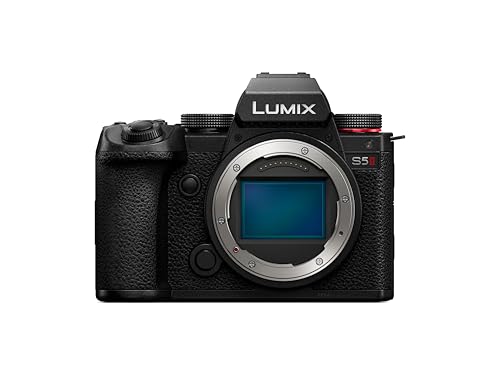
| Panasonic LUMIX S5II | Best sanctuary streaming body | Built for long video work, with the cooling and clean output a two-hour service demands. |
| Sony Alpha 7 IV | Best for dim sanctuaries | Full-frame low-light strength for evening services and candlelit rooms. |
| OBSBOT Tiny 2 | Best one-volunteer camera | A PTZ webcam that follows the preacher by itself, so nobody has to operate it. |
| Canon EOS R6 Mark II | Best all-ministry hybrid | Streams the service, then shoots the wedding and the youth weekend beautifully. |
| Sony ZV-E10 II | Best first church camera | A creator-focused body a small congregation can afford, learn and lock down. |
| DJI Osmo Pocket 3 | Best roaming second angle | A gimbal camera for processions, choir close-ups and the shots a fixed camera misses. |
How Did We Choose Cameras for a Sanctuary, Not a Studio?
Streaming behaviour came first: we favoured cameras that output a clean feed without overlays, run for a full service without thermal sulking, and either stream over USB directly or pair predictably with common capture hardware and software such as OBS. Autofocus was judged on a walking speaker at platform distance, not a seated presenter at arm’s length. Low-light performance was weighed for the realities of worship spaces — candlelit services, evening prayer meetings, and sanctuaries where the lighting budget went to the roof fund. Finally, we scored volunteer-proofing: how much of the camera’s competence survives being operated by a different willing helper each week, with settings that can be locked, labelled and taught.
Why Does a Church Stream Fail More Often at the Desk Than at the Camera?
Most failed church streams are not camera failures at all. They are a capture card that overheated in a warm sound booth, an HDMI cable run a few metres too long for its quality, a laptop that decided Sunday morning was update time, or a camera that quietly fell asleep twenty minutes into the sermon because nobody disabled its auto power-off. The camera choices in this guide were filtered for exactly those unglamorous failure points: feeds that stay awake, outputs that stay clean, and bodies that tolerate being left running at the back of a warm room. When you plan your own setup, walk the whole chain on paper — lens to camera, camera to cable, cable to switcher or computer, computer to network — and ask of every link what it does at minute ninety, not minute nine. Churches that rehearse the full chain once, on a weekday, with the actual volunteers, almost never meet its failure modes for the first time in front of a congregation. The other recurring culprit is audio borrowed as an afterthought from the camera’s own microphone, which sits at the back of the room faithfully recording the congregation’s coughs and the room’s echo while the preacher sounds like a voice down a corridor; every camera here was also judged on how gracefully it accepts a proper feed from the mixing desk, because in a worship stream the sermon audio is the product and the picture is its companion.

Panasonic LUMIX S5II — Best sanctuary streaming body
The S5II is the camera in this list that treats a Sunday service as a normal working day rather than an endurance stunt. Its active cooling is the headline for churches: where many hybrid bodies grow warm and cautious during long recordings, this one was designed to keep going, and a Maundy Thursday service or a Christmas production is exactly where that design brief stops being a specification and becomes a relief. The phase-detect autofocus Panasonic added in this generation tracks a speaker crossing the platform with a steadiness earlier Lumix bodies could not offer, which matters when your operator is also watching the stream chat.
Its colour is forgiving on skin under mixed sanctuary lighting — LED house lights, warm practicals, daylight through stained glass — and its full-frame sensor keeps evening services clean when the light falls. For a church buying one serious camera to anchor a stream for years, this is the body whose compromises are least likely to be discovered live, in front of people, on a holy day.
- Format: full-frame mirrorless, L mount
- Video: long-form recording with active cooling
- Autofocus: phase-detect, speaker tracking
- Output: clean HDMI for switchers and capture
- Role: main platform camera
Strengths
- Cooling that respects a full-length service.
- Autofocus a single volunteer can trust.
- Pleasing colour under mixed church lighting.
Trade-offs
- L-mount lenses are a new shelf for most churches.
- Menus reward an initial setup evening.
- Heavier than the compact picks here.
Best for: churches buying one anchor camera for years of services. Not suited for: teams wanting the smallest possible travel body.

Sony Alpha 7 IV — Best for dim sanctuaries
Evening worship is where congregations discover what their camera is made of, and the Alpha 7 IV is made of low-light headroom. Its full-frame sensor holds a clean, watchable picture when the sanctuary is lit for atmosphere rather than for cameras, and its autofocus keeps working in that gloom with a confidence that lets the operator frame wider and trust the camera to hold the speaker. Churches with tall windows face the opposite problem at midday — brutal contrast between bright glass and a shaded platform — and this body’s dynamic range gives the stream a fighting chance at holding both.
It is also the natural anchor for a church whose media work extends beyond Sunday: the same body shoots the baptism photographs, the youth weekend, the building-project film. That double life is why it sits near the top of this list despite being more camera than a fixed streaming position strictly needs — in a church, equipment that serves three ministries gets cared for, budgeted for, and learned properly.
- Format: full-frame mirrorless, E mount
- Sensor: strong high-ISO performance
- Autofocus: real-time subject tracking
- Output: clean HDMI, USB streaming support
- Role: main camera plus general ministry body
Strengths
- Evening services stay clean and watchable.
- Autofocus holds speakers in poor light.
- One body covers streaming and stills ministries.
Trade-offs
- More camera than a fixed position requires.
- Lens costs follow full-frame logic.
- Setup menus need one careful pass.
Best for: mid-size churches with evening services and mixed media needs. Not suited for: the tightest first-stream budgets.

OBSBOT Tiny 2 — Best one-volunteer camera
The Tiny 2 answers the most common church streaming problem, which is not picture quality but people: there is one volunteer, and that volunteer is also doing sound. This little PTZ camera sits at the front or on the sound desk, connects over USB, and follows the speaker with AI tracking — panning and tilting as the preacher moves, reframing without a hand on it. For a small congregation, that automation converts an impossible rota into a manageable one, and its gesture and voice control mean the speaker can start the stream’s framing without summoning help.
Its limits are a webcam’s limits: a small sensor that prefers decent light, and a wide room shot that will never match an interchangeable-lens body. Used honestly — as the tireless second camera, the midweek prayer-meeting camera, or the only camera in a chapel annex — it is one of the most practical devices in this guide, and the one most likely to still be streaming reliably in three years because it asks so little of the humans around it.
- Type: 4K PTZ webcam with AI tracking
- Control: gesture, voice and app control
- Connection: USB direct to streaming computer
- Mounting: desk, tripod or front-of-room shelf
- Role: unattended speaker camera
Strengths
- Follows a moving preacher automatically.
- One volunteer can run sound and stream.
- Ideal for midweek meetings nobody staffs.
Trade-offs
- Small sensor wants reasonable light.
- Not a main camera for a large sanctuary.
- Tracking needs a clear view of the speaker.
Best for: small churches and chapels short on volunteers. Not suited for: large rooms needing a long lens.

Canon EOS R6 Mark II — Best all-ministry hybrid
Churches rarely buy a camera for one job, and the R6 Mark II is the strongest generalist here: a body that will stream Sunday’s service from a tripod, then spend Saturday photographing a wedding in the same room and Friday filming the youth group’s chaotic highlight reel. Its autofocus is the calmest in this list for moving subjects, which helps when the platform holds a worship band, a children’s talk and a preacher who treats the whole stage as his pulpit. Its low-light files are excellent, and its handling will feel familiar to any volunteer who has held a Canon before.
For streaming specifically, confirm your capture chain during setup week — this is a photographer’s hybrid first — but once integrated it behaves with the reliability its event-photography reputation promises. Choose it when the camera budget must be defended to a treasurer as one purchase serving the whole life of the church, because that argument, with this body, happens to be true.
- Format: full-frame mirrorless, RF mount
- Autofocus: deep-learning subject detection
- Video: high-quality modes for productions
- Stills: a genuine event-photography body
- Role: streaming plus whole-church camera
Strengths
- Serves streaming, weddings and events alike.
- Autofocus volunteers find confidence-building.
- Superb in candlelit and evening light.
Trade-offs
- Priced as the professional tool it is.
- Streaming chain needs a setup-week check.
- RF lenses are a committed investment.
Best for: churches wanting one body for every ministry. Not suited for: a fixed, set-and-forget stream position.

Sony ZV-E10 II — Best first church camera
The ZV-E10 II is where this guide sends the church that is streaming for the first time and cannot afford a mistake. It was designed for people who film themselves and talk to a lens, which translates surprisingly well to a sanctuary: clear menus, dependable autofocus, product-showcase habits that become sermon-illustration habits, and a size that disappears on a shelf at the back of the room. Paired with a modest zoom it frames a platform honestly, and its picture is clean enough that the congregation at home stops noticing the camera entirely — the true goal of church streaming.
It asks for the usual small-body disciplines: power it properly for long services, give it light where you can, and lock its settings once the media team has found the look, so a substitute volunteer cannot wander into a creative filter mid-liturgy. As a first camera it teaches a team everything it needs to know, and when the church eventually upgrades, it retires gracefully into the youth room or the second angle rather than the cupboard.
- Format: APS-C mirrorless, E mount
- Design: creator-first menus and handling
- Autofocus: reliable face and eye tracking
- Size: compact enough for a rear shelf
- Role: first streaming camera
Strengths
- Learnable by a new volunteer in one session.
- Picture quality far beyond its price class.
- Retires into second-angle duty later.
Trade-offs
- Needs proper power for long services.
- APS-C low-light ceiling below full-frame picks.
- No weather sealing for outdoor events.
Best for: small congregations buying their first real camera. Not suited for: very large, dim sanctuaries.

DJI Osmo Pocket 3 — Best roaming second angle
Every fixed church camera produces the same respectful wide shot, and the Pocket 3 exists in this guide to break that politeness. Its gimbal keeps a walking shot smooth — down the aisle during a procession, across the choir stalls during the anthem, around the font at a baptism — and those moving, close, human angles are what make a stream feel like being there rather than watching a security feed of a service. It records beautifully on its own card for edited films of weddings and concerts, and can serve as a webcam-class feed for simpler setups.
Treat it as a complement, never the foundation: it is a roaming instrument in a volunteer’s hand, with a battery and a field of view suited to minutes of magic rather than hours of coverage. Churches that add one after the main camera is settled usually find it transforms their Christmas and Easter broadcasts most, because those are the services where the room itself — candles, decorations, children, movement — is half the story the home congregation is missing.
- Type: pocket gimbal camera, 1-inch-class sensor
- Stabilisation: three-axis mechanical gimbal
- Recording: high-quality video to card
- Handling: one-hand, walk-and-film design
- Role: roaming and close-up second angle
Strengths
- Walking shots stay smooth and calm.
- Close human angles fixed cameras miss.
- Superb for weddings and seasonal services.
Trade-offs
- A complement, not a service-length main camera.
- Battery life suits highlights, not whole liturgies.
- Small screen in bright daylight.
Best for: media teams adding life to an established stream. Not suited for: being a church’s only camera.
What Does Clean HDMI Actually Mean, and Why Should a Church Care?
A clean HDMI feed is one that carries only the picture — no focus boxes wandering across the preacher’s face, no battery icon, no menu text, no recording dot pulsing in the corner for the whole internet to see. Cameras aimed at stills photographers sometimes bury the option to hide those overlays, or remove them only at certain resolutions, and a church discovers this on its first broadcast. Every interchangeable-lens pick in this guide can send a genuinely clean feed, which is one reason the list leans toward hybrid bodies rather than pure stills machines. The second half of the question is duration: a camera that limits its output, or overheats sending it, is a studio camera on loan to a context it was not built for. Sanctuary services run long, festivals run longer, and a camera that manages a wedding-length stream in a warm room has passed the honest test. Ask, too, whether the camera can be powered continuously from USB or a mains adapter while it streams, because a battery swap mid-sermon is the kind of moment that lives forever in a congregation’s memory and its group chat.
How Should a Small Church Start Streaming Without Buying Twice?
Start with one camera, one good position, and audio done properly, then grow. The position matters more than the purchase: a centre-aisle spot at the back, raised above head height, with a lens long enough to frame the platform without digital cropping. A single well-placed ZV-E10 II or EOS R50-class body, fed desk audio and run by one trained volunteer, will look more professional than three cheap cameras switched badly. Spend the second tranche of money on the boring infrastructure — a decent tripod with a fluid head, cable runs installed once and properly, a small hardware switcher when the second camera arrives — because infrastructure outlives cameras by a decade. Resist the urge to cover every angle in month one; congregations forgive a simple, stable, well-lit stream indefinitely, while a ambitious multi-camera production that stutters teaches them to stop opening the link. Write down the setup as you build it: which input is which camera, where the gain lives, what gets checked before the doors open. That one-page document, taped inside the sound-desk lid, is worth more than any single upgrade in this guide.
Where Should the Camera Stand in a Sanctuary?
Position is the church stream’s first and cheapest production decision, and it is usually made by architecture rather than by the media team. The classic spot — centre aisle, rear of the room, raised above the congregation’s heads — exists because it works: the preacher’s sightline, the platform’s symmetry and the congregation’s own view all live on that axis, so the stream inherits the room’s intended composition for free. Height matters more than luxury; a camera at head height films the backs of heads, while the same camera a metre higher, on a riser or a wall shelf installed once and properly, films the platform as the architect dreamed it. Side positions earn their keep as the second angle, particularly from the choir or organ side where faces in profile and the congregation’s response can be caught without crossing the room’s sightlines. Whatever position is chosen, test it with the room full, not empty: a congregation changes the light, the sound and the available inches, and the camera that framed beautifully on Tuesday’s rehearsal may spend Sunday filming the hat of the tall gentleman in row three. Mark the tripod’s feet with tape once the position is proven. Sanctuaries are rearranged for weddings, funerals and Christmas with cheerful disregard for media geometry, and the tape marks are the difference between a five-minute reset and a morning of rediscovery.
How Does a Church Feed Proper Audio Into the Stream?
The mixing desk is the stream’s true microphone, and the craft is in the marriage between desk and camera chain. Most sanctuaries already mix for the room — preacher, worship team, congregational singing balanced for the space — and the stream wants a cousin of that mix rather than a clone: the room itself contributes natural ambience to the live congregation’s ears, while the stream’s listeners have no room, so a dedicated auxiliary feed with a little more voice and a little less band usually serves them better. Many desks can build that second mix on an auxiliary output; where they cannot, even a simple split of the main mix, sent at a sane level into the camera or the streaming computer, will transform the broadcast from corridor echo to presence. Levels are the discipline: set them during a full rehearsal with the band playing at service volume, not during the soundcheck’s polite murmur, and write the final numbers on the checklist taped inside the desk lid. Congregational singing deserves one ambient microphone of its own if the budget ever stretches — the sound of the room worshipping is the thing the home congregation misses most, and a single well-placed microphone restores it more completely than any camera upgrade in this guide.
What Lighting Helps a Sanctuary Stream Without Rebuilding the Church?
Churches are lit for worship, not for cameras, and the respectful order of operations is to adapt the stream to the room before adapting the room to the stream. The commonest enemy is the tall window behind the platform, which turns the preacher into a silhouette for the morning service; the camera-side cures are exposure discipline — metering for the face and letting the glass glow — and, where the building allows, a blind or curtain for the worst hour of the week. The second enemy is mixed colour: warm tungsten practicals, cool daylight and whatever the LED retrofit contributed, arguing across the preacher’s face. A single white balance set deliberately for the platform, rather than left to wander automatically, calms most of the argument. Where a modest lighting budget exists, spend it on the platform’s front light — the gentle, face-friendly wash that lets every camera in this guide work a stop or two kinder — before spending anything on effects or colour. Congregations forgive a simple picture indefinitely; what they notice, without knowing why, is a preacher whose face they cannot read, and front light is the purchase that fixes exactly that.
When Should a Church Add a Second and Third Camera?
When the first camera has become boring in a specific, nameable way — and not before. The single wide shot’s boredom usually has a diagnosis: the congregation at home cannot see faces during the sermon, or the music feels distant, or baptisms happen outside the frame. Each diagnosis prescribes its own second camera: a tighter platform angle for faces, a congregation-facing angle for response and singing, a font-side or roaming camera for the sacraments and processions. Add one, integrate it into the switching routine until the volunteer team runs it without thinking, and only then consider the third. Hardware switching — a small video switcher at the desk — becomes worthwhile at the second camera, because software switching on an ageing laptop is where ambitious church streams go to stutter. Keep the grammar simple when the angles multiply: wide for context, tight for words, congregation for response, and never cut on a whim the director cannot explain. A two-camera church stream cut with discipline looks more professional than a five-camera one cut with enthusiasm, and its volunteers still volunteer in year two, which no equipment list can buy.
How Do Volunteers Learn the Stream Without a Training Budget?
By apprenticeship, the way every church skill has always travelled. Pair each new volunteer with the experienced operator for three Sundays — watching, then assisting, then driving with the mentor beside them — and the rota gains a trained member without a single course fee. The one-page checklist is the curriculum’s spine: power order, camera checks, audio levels, stream start, the recording started as well as the broadcast, and the shutdown sequence, each written as actions rather than knowledge. Record the checklist’s failures, not just its successes; when something goes wrong on a Sunday, the fix goes onto the page that week, while the memory is honest. Rotate roles gently so no single volunteer becomes irreplaceable — the stream that depends on one person’s presence is one holiday away from silence — and thank the team publicly and specifically, because media volunteers serve invisibly by design and invisibility curdles without gratitude. Finally, rehearse the disasters once a year: stream down, camera down, power blip. A team that has practised failing recovers in thirty seconds; a team that has not, improvises in public for ten minutes.
What About Captioning and the Congregation’s Accessibility Needs?
A church stream quietly becomes an accessibility ministry, and its camera choices should honour that. The home congregation includes the hard of hearing for whom captions are not a feature but the service itself; most streaming platforms now generate live captions of usable quality, and the media team’s duty is to enable them, check them against a real sermon, and feed the captioning the cleanest possible audio — one more reason the desk feed matters. The housebound elderly, often the stream’s most faithful congregation, watch on televisions through whatever device a grandchild installed; a stable, simple, reliably scheduled stream serves them better than any production flourish, and a large-print note in the church magazine explaining how to find it is media ministry too. Consider also the recorded archive’s accessibility: services kept with their captions intact, funerals shared privately with family who could not travel, the baptism a grandparent overseas watches at midnight. None of this appears on a camera’s specification sheet, and all of it is the point of the purchase — the camera is merely the instrument; the congregation at home is the product.
How Should Special Services Change the Streaming Plan?
Christmas, Easter, weddings and funerals each rewrite the stream’s assumptions, and the wise media team keeps a one-page variation for each. Candlelit services invert the lighting: expose for faces in near-darkness, accept the glow and the grain as the aesthetic they are, and position for the procession rather than the platform, because the night is about movement through a dark room. Weddings add a second, private audience and a couple who will keep the recording for life — record locally at the highest quality the camera offers, confirm the couple’s wishes about the stream’s visibility, and place a camera for the vows’ exchange, which is the moment the wide shot always misses. Funerals demand the most care: default to private links, frame wide and respectfully, never chase close-ups of grief, and treat the recording as a family heirloom being made in real time. Festivals and concerts reward the roaming second angle this guide gave the Pocket 3. The pattern across all of them is that the technology stays the same and the manners change — which is why a church’s streaming wisdom lives in its checklists, not its cupboard.
What Does a Sensible Church Streaming Budget Look Like, Tier by Tier?
At the first tier, the money buys presence: one camera from this guide’s affordable end, a proper desk audio feed, the cables and capture the chain requires, and nothing decorative. This tier, built carefully, already exceeds what most congregations experienced from the phone-on-a-tripod era by a distance they will remark on. The second tier buys polish: the anchor camera steps up to the S5II or Alpha 7 IV class, front light for the platform is installed, a hardware switcher arrives with the second angle, and the desk gains its dedicated stream mix. The third tier buys production: multiple angles, a roaming camera, graphics and hymn words integrated cleanly, an operator directing rather than surviving. Two rules govern every tier. First, infrastructure before cameras — cables, power, light and the switcher outlive three generations of bodies. Second, each tier must be fully finished before the next is begun: a completed first tier streams beautifully for years, while a half-built third tier streams worse than either, with better equipment. Churches are patient institutions; let the streaming ministry grow at the speed of its volunteers, funded in finished stages.
How Do You Troubleshoot a Stream That Fails Five Minutes Before the Service?
With a triage order practised in advance, because five minutes is a procedure, not a brainstorm. First, picture: is the camera on, awake, and sending — check its screen, then the cable, then the switcher or capture input, in that order, because the fault is almost always in that sequence. Second, sound: the desk feed’s level moving on the streaming software’s meter is the single most reassuring sight in church media; silence there means the desk’s auxiliary send, the cable, or the input selection, again in that order. Third, the stream itself: if picture and sound are healthy at the desk but the congregation sees nothing, the platform or the network is the culprit, and the correct move is to restart the broadcast once, calmly, while the recording — which never stopped — preserves the service for upload later. That local recording is the triage’s safety net and this guide’s most repeated insistence: broadcast failures are embarrassing, recording failures are permanent. Post the recording with an apology and the timestamps of the sermon, and the congregation’s memory of the morning will be of a church that handled it well.
What Should a Church Check Before Buying Any Streaming Camera?
Four things, in the shop or on paper, before the budget meeting. Confirm the clean output: the camera must send a feed without overlays, at the resolution your chain uses, for longer than a service — a specification to verify in reviews and manuals, not to assume from the box. Confirm the power story: continuous power from mains or USB while streaming, because battery swaps are not a liturgy. Confirm the audio path: how the desk’s feed enters the chain, and whether levels can be monitored by the person running the stream. And confirm the human story: who will run it in February, when the novelty has faded — a camera the rota can operate beats a marvel it cannot, every Sunday of the year. Take those four answers to the treasurer alongside the price, and the purchase will still look wise at the annual meeting, which is the true test of church equipment. The cameras in this guide were chosen to pass all four checks; the checklist, taped inside the desk lid beside the setup page, is how they keep passing.
How Does a Church Handle the Stream When the Internet Itself Fails?
With the humility of a plan B rehearsed in daylight. The connection that has never failed will choose a festival morning to do so, and the media team’s response divides into the prepared and the poetic. The prepared response is layered: the local recording never stopped, so the service exists; a phone’s data connection, tested in advance as a bonded or backup route, may carry a reduced-quality stream within minutes; and a calm announcement — on the church’s social channel and from the platform if appropriate — converts a failure into a promise that the recording will be posted by a named hour. Keep that promise religiously and the congregation learns that a failed stream is a delayed one, not a lost one. The deeper lesson is architectural: never let the broadcast be the only copy, never let one cable, one account password or one volunteer be a single point of failure, and write the plan B on the same taped page as the plan A. Churches have survived two millennia of communication technology failing at the worst moment; the stream is simply the newest verse of an old hymn, and it is sung the same way — by preparation, honesty and carrying on regardless.
What Should the Stream Show During Music, Readings and Silence?
A grammar of attention, decided in advance. During congregational singing, the words matter more than the band for the home viewer — lyrics integrated cleanly, over a wide shot that shows the room worshipping rather than a close-up of a guitarist’s hands. During readings and the sermon, the speaker’s face carries the words’ meaning, and the tighter angle earns its keep; a stream that stays wide through a forty-minute sermon asks the home congregation to watch a postage stamp preach. During prayers and silence — the moments livestreams handle worst — resist the urge to wander: a held wide shot of a praying room, or a simple held image, honours the moment better than a restless camera hunting for something to show. The switcher’s discipline is liturgical as much as technical: cuts on sense, never on whim, and the camera that moves only when the service moves. Write this grammar into the checklist beside the technical steps, because the volunteer switching in month six should inherit the church’s decisions, not reinvent them at the console with the congregation watching.
How Do Churches Stream Outdoor and Overflow Events?
By treating them as field productions with the same checklist and lighter luggage. Garden services, church fetes, carol singing on the green and the overflow room at Christmas each move the stream outside its sanctuary habits: power comes from an extension lead whose route is taped and guarded, the network becomes a phone hotspot whose signal was tested at the spot rather than assumed, and the camera — one of the hardier bodies here, or the Pocket 3 as a roaming reporter — is positioned for the event’s geography rather than a platform’s. Sound, outdoors, is the battle: wind is the enemy of every microphone, and the desk feed or a close, shielded microphone matters more outside than it ever did indoors. The overflow room deserves its own sentence, because it is the stream’s most forgiving audience and its most common technical embarrassment: a projector or television, the same stream the internet sees, and one volunteer whose whole job is that room’s picture and volume. Serve the overflow well and Christmas stops being the media team’s annual dread.
How Should a Church Choose Between Streaming Platforms?
By the congregation it has, not the features it admires. The platform questions that matter are pastoral: where do the housebound already live online, what plays on the television a grandchild set up, how are private services kept private, and what happens to the archive in five years. The big video platforms win on familiarity and television apps; church-specific platforms win on privacy controls, prayer features and support desks that answer on Sunday morning’s behalf. Many churches run both — public services on the familiar platform for outreach, private ones on the controlled one for funerals and children’s work. The camera chain in this guide is gloriously indifferent to the answer, which is why the decision can be made on pastoral grounds alone. Review it annually, as platforms change their terms the way weather changes, and keep the local recordings as the archive of record regardless: platforms are landlords, and the church’s history should live in the church’s own keeping.
What Records Should a Church Media Team Keep?
A small, dull, invaluable archive of its own operations. The setup page and checklist, versioned as they evolve. The settings that produced the look the congregation loves — camera profile, white balance approach, desk levels — written down before the camera is reset by a helpful hand. The log of failures and fixes, which becomes the team’s training manual and the next volunteer’s inheritance. The licence paperwork for music, the platform account details held by more than one officer, and the rota with its gaps honestly marked. None of this is bureaucracy for its own sake; it is how a ministry survives its founder’s holiday, illness or move to another town. Churches think in decades and staff in volunteers, and the written page is the bridge between those two facts. Keep the records where the team can reach them at 8 a.m. on a Sunday, review them at the annual clear-out, and the stream will outlast every individual who built it — which is, in the end, the definition of a church institution rather than a project.
How Does the Stream Serve Funerals With Particular Care?
Funerals are where the church stream stops being a broadcast and becomes a vessel, and the media team’s craft turns almost entirely to manners. Confirm the family’s wishes before anything is switched on — who may watch, whether the link is private, whether a recording is wanted at all — and let those wishes override every habit. Frame wide and still; the camera does not pursue grief, and close-ups of mourners are a decision that belongs to no volunteer. Test the audio with special attention, because the eulogy’s quiet passages are the part the distant family member travelled electronically to hear. Afterwards, deliver the recording promptly, in the simplest format the family can open, with the link’s privacy exactly as promised. Many families report that the funeral stream, watched by a sibling on another continent, was the moment the technology justified its entire existence to the church. Treat every funeral as that report’s author, and the ministry’s reputation will be made in the services nobody livestreams about.
What Does Good Enough Look Like for a Church Stream?
It looks like a service, clearly seen and clearly heard, that starts on time and never becomes the story. The pursuit of broadcast polish has a point of diminishing returns that churches reach sooner than studios, because the congregation’s needs are presence and participation, not production values — a grandmother following the sermon from her kitchen table is not comparing your stream to a television network, she is comparing it to absence. This guide’s cameras were chosen to reach ‘good enough’ reliably and then stop costing attention: the volunteer hours a church saves by not chasing the last five percent of picture quality are hours available for visiting, for the food bank, for the thousand ministries that cannot be streamed. Let the stream be excellent at the things its congregation feels — sound, stability, faces, reliability — and serenely unbothered about the rest. The best church stream is the one the church forgets to think about, Sunday after Sunday, while the people it serves simply feel present. That forgetting is the technology’s finest achievement, and it is purchasable at every tier in this guide.
How Should a Church Review Its Stream Each Year?
Once a year, watch a whole service as the home congregation watches it — on a television, at a kitchen table, through the link a newcomer would find — with a notebook and no mercy. Note the moments the picture fought the words, the audio’s dips, the framing that missed what mattered, and the parts where the stream quietly excelled. Interview two or three home viewers, whose experience is the product and whose complaints are more precise than any specification. Then spend the year’s modest budget on the single worst thing the review found, and only that thing, completely fixed. This discipline — one honest review, one complete fix — compounds like interest: in three years the stream has shed its three worst faults, which is a transformation no shopping spree matches. File the review with the team’s records, so the next year’s reviewers can see what their predecessors saw. Institutions improve by remembering; the annual review is how a media ministry remembers on purpose.
What Mistakes Do Church Media Teams Make Most?
The classic mistake is buying the camera before the audio. A stream with a modest picture and the preacher’s voice clear from the desk mix will hold a congregation; the reverse — cinematic picture, echoing room sound — empties it within two Sundays. Second is the discovery, live, of a camera’s sleep timer or dirty HDMI output; both are five-minute settings checks that must happen in rehearsal, never in the service. Third is staffing optimism: a setup that needs three trained people will, by October, have one, so build the stream the one can run. Fourth is forgetting the room’s own congregation — a camera position that blocks a sightline or an operator who stands throughout will generate complaints no picture quality can answer. Finally, churches neglect the archive: services recorded only as a stream, never saved locally, vanish the week the platform hiccups, taking a funeral or a baptism with them. Record in the camera or the streaming software as well as broadcasting, every time, as a matter of liturgy-grade routine.
Comparison Table
| Camera | Streaming strength | Best church role | Watch out for |
|---|---|---|---|
| Panasonic LUMIX S5II | Cooling for long services | Anchor platform camera | L-mount lens shelf |
| Sony Alpha 7 IV | Low-light headroom | Dim sanctuaries, mixed ministry | Full-frame lens costs |
| OBSBOT Tiny 2 | Automatic speaker tracking | Unattended second camera | Needs decent light |
| Canon EOS R6 Mark II | Hybrid stills and video | Whole-church workhorse | Setup-week chain check |
| Sony ZV-E10 II | Simplicity and value | First camera, small rooms | Power it for long services |
| DJI Osmo Pocket 3 | Gimbal-smooth roaming | Processions and close-ups | Not a main camera |
Final Recommendation
For most churches the honest answer is one anchor camera chosen by room size: the S5II where services are long and productions ambitious, the Alpha 7 IV where the light is low, the ZV-E10 II where the budget and the team are small. Add the Tiny 2 when volunteers are scarce, the Pocket 3 when the stream needs life, and the R6 Mark II when one body must serve the whole congregation’s calendar. Build the chain, rehearse it on a weekday, write the one-page checklist — and the technology will quietly disappear, which is the highest compliment a church stream can earn.
Related guides
- Best Cover for Church Cameras: 6 Ways to Protect a Camera in a House of Worship
- Best Cameras for Live Streaming Videos: Six Desk and Studio Picks for Creators
Frequently Asked Questions
Can a church stream with just a webcam?
Yes, and many small congregations should start there — the OBSBOT Tiny 2 in this guide is exactly that idea executed well. A webcam stream with proper desk audio beats an expensive camera with room echo. Graduate to an interchangeable-lens body when the room is large, the light is low, or the congregation at home has grown enough to notice the difference.
How far can HDMI run from the camera to the desk?
Shorter than most churches hope. Ordinary passive cables become unreliable beyond modest lengths, and a flickering feed at minute forty is usually a cable, not a camera. For long sanctuary runs, plan on proper solutions — active cables, or converters that carry the signal over network-style cabling — and test the exact run, at service length, before relying on it.
What lens does a church streaming camera need?
Reach matters more than speed at the back of a room: the lens must frame the platform from the camera’s fixed position without digital zoom. A versatile zoom that covers the platform wide and the preacher tighter is the practical answer, and it is worth borrowing or hiring once to confirm the framing from your actual camera position before buying.
Should the stream be public or unlisted?
That is a safeguarding and community decision, not a technical one, and churches should make it deliberately — many keep services public for outreach while making funerals and children’s items unlisted or private by default. Every camera in this guide is indifferent to the setting; the streaming platform holds it, and the media team should know where before the first broadcast.
How do we handle music copyright on a stream?
Through the licences your church likely already holds for congregational singing, extended to cover streaming — check that your licence includes the broadcast extension, and keep the reporting habit your licence requires. This is administrative, inexpensive and entirely separate from camera choice, but it belongs on the same checklist as the HDMI run.
What is the one rehearsal every church should do?
A full-length dummy run: camera on, stream running to a private link, a speaker walking the platform and reading for twenty minutes, the desk feeding audio, a volunteer swapping in mid-way. Every failure in this guide’s mistakes section has announced itself in such a rehearsal to somebody — the churches that stream well are simply the ones who arranged to hear the announcement on a Tuesday.
Related Guides
Keep exploring: best cameras for live streaming events, best cameras for campus, and best cameras for studio interviews.


