kajuandouglas.com is reader-supported. When you buy through links on our site, we may earn an affiliate commission.
Where to Buy
Advertising is controlled honesty: colour you can defend, repeatability you can schedule, and a product that looks like itself on its best day. The six cameras below were ranked against that standard, with a thirty-second spot for a local bakery as the reference brief — because a camera that can carry that job, solo, on a Tuesday, can carry most of what small brands will ever ask.
Notice the company these picks keep. None of them is a cinema flagship or a billboard specialist, because the briefs that pay small creators rarely need either. They need stills and motion from one body, files a client can approve quickly, and handling calm enough that a founder, a product and a deadline can share a room without the camera becoming a fourth problem.
A promise about method, since money is involved: the judgements below are weighted toward behaviour under production conditions. How fast the camera is ready when the shop opens. How honestly it focuses on a presenter who will not stand still. How its files behave when the edit is tonight and the launch is tomorrow. Laboratory perfection was not consulted and would not have survived the meeting.
Read the reviews in any order, but keep the two practical sections for before your next booking. One examines what a client actually judges in a small advertisement; the other plans a one-day shoot around a single camera. Between them they will improve your deliverables more than the difference between any two bodies on this page.
Key Takeaways
- Sony Alpha 7 IV leads this advertising shortlist because clients judge files, not camera specifications, at delivery.
- Colour honesty sells products truthfully: what a customer receives should match what the advertisement promised them.
- One camera covering stills and motion keeps a solo shoot day coherent, affordable and calm.
- Reliability under a brief — tethering, clean files, predictable handling — outweighs novelty features every single shoot.
- Picks lacking a verified listing appear as prose only, yet each still fits small-brand production needs.
- Plan the simplest rig covering your first client’s deliverables, then expand lighting and lenses deliberately.
In this guide
Quick Picks
| Pick | Badge | Why it earns its place |
|---|---|---|
| Sony Alpha 7 IV | Best Overall for Ads | Sony Alpha 7 IV earns the Best Overall for Ads slot, staying dependable while a skincare bottle arranged on linen |
| Panasonic LUMIX S5II | Best Solo-Crew Hybrid | Chosen as Best Solo-Crew Hybrid: the Panasonic LUMIX S5II handles a skincare bottle arranged on linen without fuss |
| Canon EOS R6 Mark II | Best for Mixed Stills and Motion | The Canon EOS R6 Mark II takes the Best for Mixed Stills and Motion place, keeping a skincare bottle arranged on linen within reach |
| Fujifilm X-T5 | Best for Styled Product Stills | For Best for Styled Product Stills duties the Fujifilm X-T5 stands out during a skincare bottle arranged on linen |
| Sony ZV-E10 II | Best Small-Business Starter | Sony ZV-E10 II fills the Best Small-Business Starter role with calm competence during a skincare bottle arranged on linen |
| DJI Osmo Pocket 3 | Best for Quick Social Cutaways | The Best for Quick Social Cutaways badge suits the DJI Osmo Pocket 3, treating a skincare bottle arranged on linen as routine |
How We Chose These Picks
The ranking began with the failures clients actually remember. A launch shot soft because focus hunted at the wrong second. Colour that made the product look like a different, worse product. A shoot that ran long because the camera needed managing. We listed those failures first, and the long list of candidate bodies was cut against them without sentiment.
Handling was scored as a production cost. Every minute spent in a menu is a minute the presenter cools, the food wilts or the shop fills with customers, so bodies that woke fast, focused without theatre and kept their working controls accessible rose quickly. A marginally larger sensor never once compensated for a camera that slowed a shoot down.
The links on this page obey a strict rule. Purchase links belong only to cameras confirmed in this site’s verified pool, named exactly as the pool names them; other worthy models are discussed in plain words with no link attached. It is a small discipline with a large consequence: every recommendation here can be traced to a listing that actually exists.
What Should You Understand Before Choosing the Best Cameras For Ad Making?
Start with the deliverables, not the camera. Write down what clients will actually receive — a thirty-second spot, a set of packshots, a month of social cutaways — and let that list interrogate every candidate. A body chosen for a thirty-second spot for a local bakery is a business asset; a body chosen for an imaginary campaign is furniture with a lens mount.
Then think about where the work will be judged. Most small-brand advertising lives on phones, in feeds, at the mercy of compression and short attention. That shifts value toward colour that reads correctly at a glance, focusing that keeps a moving presenter honest, and files that survive being exported three ways before lunch. Print-scale perfection matters to fewer briefs than beginners in this niche expect.
Hands and hours deserve equal billing. A one-person crew operates the camera while directing, styling and watching the clock, so weight and control layout are production decisions, not comforts. A body that tires its operator by the second setup will quietly tax every deliverable of the day; the reviews below treat ergonomics as a line item, because clients end up paying for it either way.
Finally, think in systems rather than boxes — the phrase earns its keep here. The camera plus fast cards, spare power, a way of monitoring sound, and a backup habit form the real product you are buying. The comparison below weighs the six as production systems in that sense, which is why a pocket camera can outrank larger bodies for certain briefs without apology.

Sony Alpha 7 IV — Best Overall for Ads
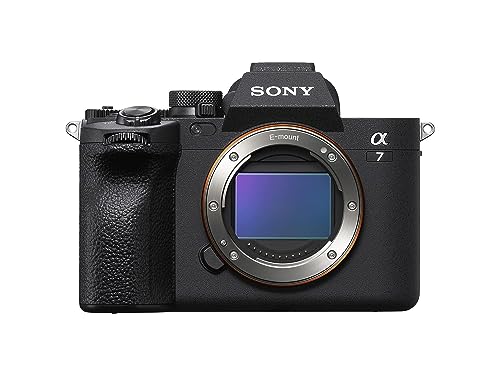
Brief first, camera second: a thirty-second spot for a local bakery. That is the job, and the Sony Alpha 7 IV fits it because it is a full-frame all-rounder that divides its talent between stills depth and serious video tools. Advertising does not reward the most impressive camera; it rewards the one whose output a client can trust at deadline. The badge of best overall for ads records that judgement — this is the tool whose strengths arrive in the order a small production actually needs them. A client will never ask which body you used; they will ask whether Thursday is still possible.
On set, the Sony Alpha 7 IV behaves like a crew member who has done this before. It wakes ready, its key controls sit where a working hand expects them, and nothing about the handling inserts itself between the plan and the shot. When a founder demonstrating a product at a market stall runs long and the light starts leaving, that steadiness is worth more than any feature with a trademark. Takes run long, presenters tire and shops stay open around you; calm equipment is a production value.
Output is the argument, so start there. The Sony Alpha 7 IV renders products truthfully: colours stay close to the item a customer will receive, and scenes mixing shade and glare leave its files with generous room for the grade. Files accept a proper grade without drama, yet they also survive being used nearly straight — a mercy on the days when the edit window is measured in hours and the client is refreshing their inbox. Approvals go faster when the first file a client opens already looks like the product they sell.
The invoice for those virtues arrives as limitations, and a professional reads it before signing. The Sony Alpha 7 IV trades away the extremes: cinema-scale productions, exotic stills assignments, schedules that would punish any body not built for them. A few advanced settings also sit deeper in menus than a mid-take adjustment would prefer. None of this dents the badge of best overall for ads; it defines the productions the badge covers. Read the limits as a quoting tool: they tell you which jobs to accept, which to rent for, and which to decline.
Ownership, for a working camera, is a workflow question. The Sony Alpha 7 IV keeps the workflow short: charging that fits an evening routine, transfers that do not require a tutorial, files that open where the client expects them. Add the working kit — spare power, fast storage, a case that travels — and the total demand stays proportionate to the work it enables. None of that requires a studio, a crew or a prayer — just a camera whose habits match the working week.
Set against the other five, the Sony Alpha 7 IV argues through fit. Its handling serves its focusing, its focusing serves its files, and its files serve the only verdict that matters — a client who approves the deliverables without a negotiation. If best overall for ads describes the work you actually sell, the rest of this guide is due diligence. After the first delivery, the argument is over; the files will have made it for you.
- Role in this line-up: best Overall for Ads
- Files: colour suiting advertising production, still grading gracefully afterwards
- Handling: controls placed for swift, unrushed advertising production changes
- Carry profile: proportioned for small-brand product films against a client brief
- Ownership note (advertising production kit): cards, spare power and a case cost extra
Strengths
- The Sony Alpha 7 IV (advertising production) locks focus dependably while a skincare bottle arranged on linen
- Files from the Sony Alpha 7 IV (advertising production) look polished immediately yet keep room for retouching
- Handling stays composed during advertising production when the moment suddenly accelerates
Trade-offs
- Push it far outside advertising production and its compromises surface quickly
- The complete advertising production kit costs more than the camera alone suggests
- Several advanced advertising production settings hide deeper in menus than shooters like
Best for: small productions whose typical brief is a thirty-second spot for a local bakery and who need best overall for ads without a rental habit.
Not suited for: productions whose briefs demand dedicated cinema or flagship stills territory.

Panasonic LUMIX S5II — Best Solo-Crew Hybrid
Put the Panasonic LUMIX S5II on a real shoot — a founder demonstrating a product at a market stall — and its priorities make sense immediately. It is a full-frame hybrid praised for its stabilisation and its video assistance tools. Nothing about that description is glamorous, and advertising rarely is either: it is schedules, surfaces and second takes. The badge of best solo-crew hybrid goes to the camera that treats those realities as the main event rather than as an inconvenience. That fitness for an ordinary, pressured Tuesday is the least marketed and most valuable quality here.
Solo operators will feel the benefit first. The Panasonic LUMIX S5II asks for remarkably little management: set it, trust it, and return your attention to the product, the presenter and the clock. A camera that needs babysitting steals exactly the attention a one-person production cannot spare, and this one seems designed by people who have worked alone under a deadline. You will feel the benefit most in the last hour of the shoot day, when everything else is fraying.
Look at the files the way a client will: on a phone, at arm’s length, next to a competitor’s. The Panasonic LUMIX S5II produces images with believable colour and detail that holds up under that unkind comparison, because monitoring aids that help a solo operator judge exposure without guesswork. Nothing is sweetened into dishonesty, and rescue work in the edit is the exception rather than the workflow — the two failure modes of small-brand advertising, avoided in one body. That trustworthiness is measurable in the only currency that matters here: fewer revision rounds.
No camera here is the answer to every brief, and this one says so plainly if you listen. Push the Panasonic LUMIX S5II toward work far outside a founder demonstrating a product at a market stall — toward jobs a dedicated cinema rig or a flagship stills body exists to do — and its design brief will introduce itself. Within the wide middle of small-brand production, the compromises stay where they belong: in this paragraph, not in your deliverables. Professionals are not people without limitations; they are people who know theirs before the client does.
Run the unglamorous ledger before the glamorous one. Cards fast enough for the codec you actually use, batteries counted against the longest plausible shoot day, backups that happen the same night: the Panasonic LUMIX S5II keeps its side of that ledger tidy. Productions rarely fail on image quality; they fail on logistics, and this camera’s logistics are mercifully dull. It also travels between jobs without a reset ritual, which is how small productions actually live.
The brief verdict: the Panasonic LUMIX S5II understands production. Photographers whose weeks look like packshots filmed between customers will feel that understanding every time a shoot day ends on schedule with the cards full of usable material. It is not the most theatrical tool here, and clients — who pay for outcomes, not theatre — will not hold that against it. Choose it, and let the next brief be the review that counts.
- Slot in this shortlist: best Solo-Crew Hybrid
- Output: attractive advertising production colour, with latitude for editing
- Controls: dials reachable quickly during advertising production adjustments
- Size in the bag: matched to small-brand product films against a client brief
- Budget note (advertising production kit): memory cards, batteries and protection cost extra
Strengths
- The Panasonic LUMIX S5II (advertising production) keeps moving subjects pinned in focus throughout a skincare bottle arranged on linen
- Images off the Panasonic LUMIX S5II (advertising production) arrive clean, still leaving headroom for careful editing
- The body feels calm in the hand throughout advertising production, even as events speed up
Trade-offs
- Work beyond advertising production exposes limits specialists would not accept
- Budget for the full advertising production outfit: body price is only the start
- A few powerful advertising production options sit buried in settings pages
Best for: creators and businesses that put best solo-crew hybrid first and deliver to clients on real deadlines.
Not suited for: anyone expecting the camera to replace lighting, planning and a agreed shot list.

Canon EOS R6 Mark II — Best for Mixed Stills and Motion
Clients never see your camera; they see what it delivers. Judged on delivery, the Canon EOS R6 Mark II earns its place as a full-frame hybrid with deep stabilisation and focusing that sticks to a moving subject, and because its files stay together when the light on set turns thin and contrasty. Hold those two facts together and the badge of best for mixed stills and motion needs no further decoration. The rest of this section examines how the promise holds up across a working day, a tight edit and a honest look at the compromises. It is a choice that looks sensible in a catalogue and indispensable somewhere around the third reshoot.
There is a professional calm to the handling that clients never notice and always benefit from. Adjustments happen quietly, between takes, without a conference. The Canon EOS R6 Mark II becomes part of the furniture of the shoot — present, ready, unremarkable — which is precisely what equipment should be when the product is supposed to be the star. Assistants, founders and shopkeepers all relax around gear that behaves as if it has done this before.
The rendering leans toward controlled honesty, which is this guide’s whole thesis. The Canon EOS R6 Mark II will make a product look like its best true self and no better, helped by the fact that its files stay together when the light on set turns thin and contrasty. Audiences have finely tuned detectors for the alternative, and the trust that honesty buys is the only advertising asset that compounds. It also protects you in the comments, where audiences punish exaggeration with public enthusiasm.
Where will a client feel the limits? Mostly, they will not — the limits live at the edges a small production rarely visits: extreme low light, extreme duration, extreme deliverable counts in a single day. Name them anyway, plan around them honestly, and the Canon EOS R6 Mark II will repay the planning with the one thing clients actually remember: a shoot that felt under control. A boundary admitted in the planning call costs nothing; discovered on the shoot day, it costs the relationship.
After a season of briefs, what owners report is trust with a paper trail. The Canon EOS R6 Mark II delivered at a thirty-second spot for a local bakery, behaved identically at the next three jobs, and never became the story of the day. In client work that invisibility is the product. A camera nobody had to think about is a camera that will be hired again. Reliability like that is what turns a purchase into infrastructure, and infrastructure is what businesses run on.
Compare the six as business decisions and the Canon EOS R6 Mark II still makes sense. Every choice in it — size, controls, file character, focusing manners — points at deliverables. Choose it when the badge of best for mixed stills and motion matches your order book, then spend your remaining budget on light, sound and time, where advertisements are actually won. In the end it is hired for the same reason good freelancers are: it makes the client’s day easier.
- Position in this line-up: best for Mixed Stills and Motion
- Files: flattering advertising production palette tolerating retouching well
- Handling: layout supporting fast advertising production tweaks mid-scene
- Carry profile: built around the demands of small-brand product films against a client brief
- Ownership note (advertising production kit): storage, power and cover need separate funds
Strengths
- The Canon EOS R6 Mark II (advertising production) finds focus calmly even as a skincare bottle arranged on linen unfolds without warning
- The Canon EOS R6 Mark II (advertising production) produces finished-looking photographs while preserving flexibility for grading
- Controls stay reassuring under advertising production pressure, keeping attention on subjects
Trade-offs
- Assignments outside its advertising production brief reveal the engineering compromises
- Total advertising production outlay climbs once essential extras join the camera
- Some advertising production refinements live deep in the menu tree
Best for: solo operators whose honest workload is best for mixed stills and motion, shot between other responsibilities.
Not suited for: buyers who will not learn the handful of controls their deliverables depend on.

Fujifilm X-T5 — Best for Styled Product Stills
Brief first, camera second: a thirty-second spot for a local bakery. That is the job, and the Fujifilm X-T5 fits it because it is a system camera run from physical dials, known for high-resolution stills and its much-loved film simulations. Advertising does not reward the most impressive camera; it rewards the one whose output a client can trust at deadline. The badge of best for styled product stills records that judgement — this is the tool whose strengths arrive in the order a small production actually needs them. A client will never ask which body you used; they will ask whether Thursday is still possible.
On set, the Fujifilm X-T5 behaves like a crew member who has done this before. It wakes ready, its key controls sit where a working hand expects them, and nothing about the handling inserts itself between the plan and the shot. When a founder demonstrating a product at a market stall runs long and the light starts leaving, that steadiness is worth more than any feature with a trademark. Takes run long, presenters tire and shops stay open around you; calm equipment is a production value.
Output is the argument, so start there. The Fujifilm X-T5 renders products truthfully: colours stay close to the item a customer will receive, and physical dials encourage the slower, more considered composition styled work rewards. Files accept a proper grade without drama, yet they also survive being used nearly straight — a mercy on the days when the edit window is measured in hours and the client is refreshing their inbox. Approvals go faster when the first file a client opens already looks like the product they sell.
The invoice for those virtues arrives as limitations, and a professional reads it before signing. The Fujifilm X-T5 trades away the extremes: cinema-scale productions, exotic stills assignments, schedules that would punish any body not built for them. A few advanced settings also sit deeper in menus than a mid-take adjustment would prefer. None of this dents the badge of best for styled product stills; it defines the productions the badge covers. Read the limits as a quoting tool: they tell you which jobs to accept, which to rent for, and which to decline.
Ownership, for a working camera, is a workflow question. The Fujifilm X-T5 keeps the workflow short: charging that fits an evening routine, transfers that do not require a tutorial, files that open where the client expects them. Add the working kit — spare power, fast storage, a case that travels — and the total demand stays proportionate to the work it enables. None of that requires a studio, a crew or a prayer — just a camera whose habits match the working week.
Set against the other five, the Fujifilm X-T5 argues through fit. Its handling serves its focusing, its focusing serves its files, and its files serve the only verdict that matters — a client who approves the deliverables without a negotiation. If best for styled product stills describes the work you actually sell, the rest of this guide is due diligence. After the first delivery, the argument is over; the files will have made it for you.
- Role in this selection: best for Styled Product Stills
- Output: polished advertising production colour, plus room to refine tones
- Controls: positioned for prompt advertising production changes, rhythm intact
- Footprint: sensible for days spent on small-brand product films against a client brief
- Budget note (advertising production kit): cards, extra power and case need budgeting
Strengths
- The Fujifilm X-T5 (advertising production) holds focus with reassuring consistency whenever a skincare bottle arranged on linen develops quickly
- Pictures from the Fujifilm X-T5 (advertising production) need little rescue, though editors keep ample latitude
- Grip and layout keep nerves low during advertising production while scenes refuse to slow
Trade-offs
- Stretch the advertising production brief and this pick stops feeling like the answer
- Ownership spending for advertising production extends beyond the headline body figure
- Occasional advertising production features require menu-diving instead of direct controls
Best for: small productions whose typical brief is a thirty-second spot for a local bakery and who need best for styled product stills without a rental habit.
Not suited for: productions whose briefs demand dedicated cinema or flagship stills territory.

Sony ZV-E10 II — Best Small-Business Starter
Put the Sony ZV-E10 II on a real shoot — a founder demonstrating a product at a market stall — and its priorities make sense immediately. It is a video-first mirrorless body whose focusing tricks were designed with products in mind. Nothing about that description is glamorous, and advertising rarely is either: it is schedules, surfaces and second takes. The badge of best small-business starter goes to the camera that treats those realities as the main event rather than as an inconvenience. That fitness for an ordinary, pressured Tuesday is the least marketed and most valuable quality here.
Solo operators will feel the benefit first. The Sony ZV-E10 II asks for remarkably little management: set it, trust it, and return your attention to the product, the presenter and the clock. A camera that needs babysitting steals exactly the attention a one-person production cannot spare, and this one seems designed by people who have worked alone under a deadline. You will feel the benefit most in the last hour of the shoot day, when everything else is fraying.
Look at the files the way a client will: on a phone, at arm’s length, next to a competitor’s. The Sony ZV-E10 II produces images with believable colour and detail that holds up under that unkind comparison, because its microphone options and tally cues make recording alone markedly less stressful. Nothing is sweetened into dishonesty, and rescue work in the edit is the exception rather than the workflow — the two failure modes of small-brand advertising, avoided in one body. That trustworthiness is measurable in the only currency that matters here: fewer revision rounds.
No camera here is the answer to every brief, and this one says so plainly if you listen. Push the Sony ZV-E10 II toward work far outside a founder demonstrating a product at a market stall — toward jobs a dedicated cinema rig or a flagship stills body exists to do — and its design brief will introduce itself. Within the wide middle of small-brand production, the compromises stay where they belong: in this paragraph, not in your deliverables. Professionals are not people without limitations; they are people who know theirs before the client does.
Run the unglamorous ledger before the glamorous one. Cards fast enough for the codec you actually use, batteries counted against the longest plausible shoot day, backups that happen the same night: the Sony ZV-E10 II keeps its side of that ledger tidy. Productions rarely fail on image quality; they fail on logistics, and this camera’s logistics are mercifully dull. It also travels between jobs without a reset ritual, which is how small productions actually live.
The brief verdict: the Sony ZV-E10 II understands production. Photographers whose weeks look like packshots filmed between customers will feel that understanding every time a shoot day ends on schedule with the cards full of usable material. It is not the most theatrical tool here, and clients — who pay for outcomes, not theatre — will not hold that against it. Choose it, and let the next brief be the review that counts.
- Slot in this line-up: best Small-Business Starter
- Files: confident advertising production colour editors can adjust freely
- Handling: layout making quick advertising production corrections feel deliberate
- Carry profile: shaped by the realities of small-brand product films against a client brief
- Ownership note (advertising production kit): cards, batteries and storage add extra spend
Strengths
- The Sony ZV-E10 II (advertising production) tracks the decisive subject steadily during a skincare bottle arranged on linen
- Output from the Sony ZV-E10 II (advertising production) reads polished on delivery and forgives later surgery
- It feels planted and predictable throughout advertising production, never twitchy at the decisive second
Trade-offs
- Tasks beyond advertising production make its narrower talents obvious
- The honest advertising production cost includes accessories the base purchase omits
- Certain advanced advertising production choices demand patience through layered menus
Best for: creators and businesses that put best small-business starter first and deliver to clients on real deadlines.
Not suited for: anyone expecting the camera to replace lighting, planning and a agreed shot list.

DJI Osmo Pocket 3 — Best for Quick Social Cutaways
Clients never see your camera; they see what it delivers. Judged on delivery, the DJI Osmo Pocket 3 earns its place as a pocket camera on a gimbal, small enough to vanish into a jacket between takes, and because the rotating screen flips between filming the product and filming the presenter. Hold those two facts together and the badge of best for quick social cutaways needs no further decoration. The rest of this section examines how the promise holds up across a working day, a tight edit and a honest look at the compromises. It is a choice that looks sensible in a catalogue and indispensable somewhere around the third reshoot.
There is a professional calm to the handling that clients never notice and always benefit from. Adjustments happen quietly, between takes, without a conference. The DJI Osmo Pocket 3 becomes part of the furniture of the shoot — present, ready, unremarkable — which is precisely what equipment should be when the product is supposed to be the star. Assistants, founders and shopkeepers all relax around gear that behaves as if it has done this before.
The rendering leans toward controlled honesty, which is this guide’s whole thesis. The DJI Osmo Pocket 3 will make a product look like its best true self and no better, helped by the fact that the rotating screen flips between filming the product and filming the presenter. Audiences have finely tuned detectors for the alternative, and the trust that honesty buys is the only advertising asset that compounds. It also protects you in the comments, where audiences punish exaggeration with public enthusiasm.
Where will a client feel the limits? Mostly, they will not — the limits live at the edges a small production rarely visits: extreme low light, extreme duration, extreme deliverable counts in a single day. Name them anyway, plan around them honestly, and the DJI Osmo Pocket 3 will repay the planning with the one thing clients actually remember: a shoot that felt under control. A boundary admitted in the planning call costs nothing; discovered on the shoot day, it costs the relationship.
After a season of briefs, what owners report is trust with a paper trail. The DJI Osmo Pocket 3 delivered at a thirty-second spot for a local bakery, behaved identically at the next three jobs, and never became the story of the day. In client work that invisibility is the product. A camera nobody had to think about is a camera that will be hired again. Reliability like that is what turns a purchase into infrastructure, and infrastructure is what businesses run on.
Compare the six as business decisions and the DJI Osmo Pocket 3 still makes sense. Every choice in it — size, controls, file character, focusing manners — points at deliverables. Choose it when the badge of best for quick social cutaways matches your order book, then spend your remaining budget on light, sound and time, where advertisements are actually won. In the end it is hired for the same reason good freelancers are: it makes the client’s day easier.
- Position in this shortlist: best for Quick Social Cutaways
- Output: pleasing advertising production tones, retaining post-work flexibility
- Controls: arranged so advertising production adjustments never feel fumbled
- Size and weight: planned with small-brand product films against a client brief firmly in mind
- Budget note (advertising production kit): storage media and spare power need money back
Strengths
- The DJI Osmo Pocket 3 (advertising production) settles focus fast enough that a skincare bottle arranged on linen rarely escapes unrecorded
- Frames from the DJI Osmo Pocket 3 (advertising production) appear assured immediately yet tolerate thoughtful post-processing
- Everything falls under the fingers naturally in advertising production when chances arrive unannounced
Trade-offs
- Demand work far from advertising production and cracks appear sooner than expected
- Expect the finished advertising production kit to outrun the camera-only price
- Not every useful advertising production option surfaces quickly in the menus
Best for: solo operators whose honest workload is best for quick social cutaways, shot between other responsibilities.
Not suited for: buyers who will not learn the handful of controls their deliverables depend on.
How Do the Six Picks Compare Side by Side?
| Pick | Badge | Strongest suit | Watch out for |
|---|---|---|---|
| Sony Alpha 7 IV | Best Overall for Ads | Dependability when subjects move unpredictably | Limits appear outside its home territory |
| Panasonic LUMIX S5II | Best Solo-Crew Hybrid | Files needing the least rescue afterwards | Accessories worth budgeting from the start |
| Canon EOS R6 Mark II | Best for Mixed Stills and Motion | Simplicity that speeds every step | Size suits some hands better than others |
| Fujifilm X-T5 | Best for Styled Product Stills | Consistency across an entire outing | Menus reward a patient first week |
| Sony ZV-E10 II | Best Small-Business Starter | Versatility when plans change mid-shoot | Kit costs extend beyond the camera |
| DJI Osmo Pocket 3 | Best for Quick Social Cutaways | Comfort throughout long handheld sessions | A learning curve awaits complete beginners |
Read the comparison as six business models rather than a beauty parade. The first name is the balanced default for a mixed stills-and-motion practice; further down sit bodies that trade balance for a sharper edge — solo operation, styled stills, social speed. Match the badge to your order book, not to your ambitions, and the table will rarely mislead you.
What Does a Client Actually Judge in a Small-Brand Advertisement?
A client judges three things, in this order: whether the product looks like itself, whether the piece feels like their brand, and whether it arrived when promised. Camera technique serves all three invisibly. Position yourself so the product’s real proportions survive, settle the settings that govern colour before the presenter arrives, and let the performance — not the equipment — supply the energy.
Light is where small advertisements are won, and it rewards observation over expenditure. Watch how a shop window rakes across a counter at different hours, how open shade flatters a founder’s face, how a single practical lamp turns an evening scene expensive. The camera records what the light decides; your job is to schedule the decision, not to outspend it.
Shoot the brief in deliberate passes rather than one anxious marathon. The hero take, the detail take, the safety take — then review honestly while there is still time to fix what the review exposes. Write down the one recurring fault, whether it is drifting colour or a background that keeps stealing the eye, and let the next setup be its correction.
Finish like a professional, because finishing is what clients photograph in their memory. Files backed up the same night, the best material organised the way the agreement promised, one frame sent early as a courtesy. Cameras earn repeat bookings through that rhythm of competence long after the client has forgotten which body was on the tripod.
How Do You Plan a One-Day Ad Shoot Around a Single Camera?
Begin smaller than the client’s ambition suggests: one location, one setup family, one lighting idea executed well. Constraints like these teach a solo operator faster than variety does, and they protect the schedule — the invisible deliverable every client grades. A repeatable routine, rehearsed on a quiet day, is what makes a pressured day look effortless.
Position is the cheapest production value in advertising. Step closer instead of cropping, raise the camera for the counter shot, lower it for the product’s-eye view, wait for the background to clear of strangers and signage. With a founder demonstrating a product at a market stall as the day’s reality, those free movements separate professional-looking footage from expensive-looking footage — and only one of those impresses clients twice.
Review on the day, ruthlessly but kindly. Keep the takes that show the product truthfully, discard the accidents without a post-mortem, and give the near-misses your longest look, because that is where the next brief’s lesson is hiding. Was the moment right and the colour wrong, or the colour right and the moment dead? Name it precisely; vague lessons do not survive contact with a new client.
Share a frame early — one still, sent to the client while the shoot is young. It teaches more than any mood board, because reacting to a real frame exposes what the client actually wants, as opposed to what the brief said. Intention, tested early and adjusted cheaply, is how one-day shoots avoid three-day arguments.
What Mistakes Do Buyers in This Niche Keep Making?
Buying a camera for the campaign they hope to win next year, then shooting this year’s actual briefs on a body that fights every one of them.
Judging a working camera by its first shoot, before hands, menus and workflow have had any fair chance to settle.
Spending the whole equipment budget on the body, then rationing cards and batteries as if deliverables stored themselves.
Leaving colour and exposure entirely to automatic for a whole season, then blaming the camera for a look it was never asked to choose.
Inspecting files at pixel level while ignoring the handling and audio realities that decide whether clients enjoy the shoot day.
Skipping the rehearsal shoot — the low-stakes afternoon with a friend’s business where mistakes are cheap and lessons stick.
How Do You Practise Product Photography Before a Client Books You?
Practise the review habit that professionals actually use: after a shoot, walk the take at full size and identify the one decision that did the most work — the setup you simplified, the take you waited for, the background you cleared. Saying it aloud converts luck into method, and method is what a client is really buying when they book you twice.
What Does Deliberate Practice Look Like for a One-Person Advertising Crew?
Carry, for a working camera, means readiness in a working bag. Practise the draw: camera out, settings where the last job left them checked and reset, spare card reachable without looking. Photographs may begin with presence, but productions begin with preparation, and the difference is visible in the first ten minutes of every shoot.
How Can Spec Shoots for Imaginary Brands Build a Convincing Portfolio?
Practise with people in the frame, not around them. Founders, staff and customers are part of the craft: brief them kindly, show them the screen, share the review. A presenter who trusts the process performs better in every take, and a shop that enjoyed the shoot becomes a reference that sells the next one.
Which Practice Drills Improve Colour Accuracy and Styling Consistency?
Conditions will test the kit eventually — a bright window behind the product, a kitchen full of steam, a market stall in hard noon sun. Rehearse the countermeasures cheaply at home: a cloth that lives in the bag, a cover for spray and dust, gear dried and charged before anything is packed away. Routines that survive bad days are the ones that were boring long before the bad day arrived.
How Do You Practise a Full Shoot Day Against the Clock?
Edit with a producer’s restraint. Level the frame, set the exposure, correct the colour toward the product’s truth, and stop the moment the piece looks like the business it advertises. Heavy-handed grades are usually insecurity in disguise, and audiences can smell it; controlled honesty is not a limitation of small budgets but the house style of brands that last.
Close the loop with the exercise this guide is built on. Take your chosen camera back to a thirty-second spot for a local bakery — and to a founder demonstrating a product at a market stall, and to packshots filmed between customers — and shoot each job twice: first as you would have before this guide, then applying the one lesson that stayed with you. Compare the deliverables as a client would, on a phone, quickly. The gap between the pairs is your development budget, already spent.
Then repeat the exercise against a clock, because advertising is the same photography with a deadline attached. If the repeat still outshoots the original once the hour turns short and the presenter grows impatient, the lesson has become a working habit — and working habits, unlike resolutions, show up on invoices.
Final Recommendation
Start with the Sony Alpha 7 IV if you want the balanced answer for mixed stills and motion and would rather be producing than deliberating. Choose further down the list when a single strength — solo operation, styled stills, social speed — matches your order book more closely than all-round polish does. Whichever body you take onto a set, give it one honest month of real work: master the controls your deliverables actually touch, shoot the rehearsal brief, and judge it by what clients approved rather than by what forums argued. That month is worth more than the difference between the first and second names on this page.
Frequently Asked Questions
Do advertisements need the same camera for stills and video?
Usually one body can, and for small productions one body is a feature: one set of batteries, one colour character to learn, one workflow from card to client. The stills-versus-motion argument matters at the extremes — billboard stills, cinema spots — and most small-brand briefs live comfortably between them. Split into two bodies when the work, not the worry, demands it.
How important is colour accuracy for product work?
More than any other single factor, because colour is where a product either looks like itself or like a stranger. Clients forgive a modest lens and an imperfect location; they do not forgive a handbag that photographs the wrong red. Learn your camera’s colour behaviour on the products you actually sell, set it deliberately, and check it on the screen the audience will use.
Can one person realistically shoot a complete ad alone?
Yes, thousands do — but the honest version of solo is choreographed, not heroic. One camera, a short shot list, setups that reuse light, and a schedule with slack built in where presenters are involved. The cameras in this guide were chosen partly for how little management they demand, because a solo operator’s scarcest resource is attention, and every paragraph above is really about spending it well.
Which deliverables should be agreed before filming starts?
Agree the deliverables before anyone presses record: how many pieces, in which shapes, for which channels, by when, and what ‘finished’ means. Half of all production misery is a deliverable that was assumed rather than agreed. A short written list, confirmed by the client, protects the shoot day, the edit and the relationship — and it makes the camera choice itself almost boringly easy.
How do I keep a product looking honest rather than over-polished?
By remembering that the audience is comparing your product with the real one, not with other advertisements. Shoot it in honest light, correct colour toward truth rather than toward fantasy, and let styling do the flattering — arrangement, context, a human hand for scale. Products photographed honestly generate fewer returns and better comments, and both of those are advertising too.
Related Guides
Continue with our working notes on accessories that earn their keep on a one-person set, our field-tested approach to everyday carry for commercial shooters, and our beginner-friendly guide to the camera settings that matter first.