The best wireless gaming mouse with extra buttons turns your thumb into a second keyboard, with programmable buttons for abilities, weapons, macros, and shortcuts that keep your left hand on movement. A gaming mouse with extra buttons is the difference between reaching across the keyboard mid-fight and firing the right ability instantly, and wireless means no cable drag when you flick. The six mice in this guide cover Logitech, Razer, Corsair, and Redragon, checked against current listings with verified product details.
This guide covers six wireless gaming mice with exact model names and specifications from their listings: the Logitech G502 Lightspeed, the Razer Naga V2 Pro, the Corsair Scimitar Elite Wireless, the Logitech G604 Lightspeed, the Razer Basilisk V3 Pro, and the Redragon M913. Each section names the programmable button count and the sensor, so you can match the mouse to your games. Every pick below is a wireless gaming mouse with extra programmable buttons, not a wired mouse and not a basic office mouse.
In this guide
Quick picks: best wireless gaming mouse with extra buttons
| # | Product | Where to buy |
|---|---|---|
| 1 | Logitech G502 Lightspeed | Check on Amazon |
| 2 | Razer Naga V2 Pro | Check on Amazon |
| 3 | Corsair Scimitar Elite Wireless | Check on Amazon |
| 4 | Logitech G604 Lightspeed | Check on Amazon |
| 5 | Razer Basilisk V3 Pro | Check on Amazon |
| 6 | Redragon M913 | Check on Amazon |
How the picks were chosen
We started with the button count, since that is what this guide is about. Every pick has programmable buttons beyond the standard left, right, and wheel, from 11 on the G502 Lightspeed and Basilisk V3 Pro to 20 on the Naga V2 Pro. More buttons suit MMO and MOBA games, while fewer buttons suit shooters where the thumb cluster stays simple.
Sensor and wireless performance came next. A wireless gaming mouse needs a fast, accurate sensor and a low-latency connection, or the extra buttons do not matter. We favored mice with high-DPI optical sensors and proven wireless technology, and we checked that each pick lists its sensor and its battery life.
Finally, we balanced shape and weight. A mouse with extra buttons needs a comfortable grip for long sessions, since the thumb cluster adds width and weight. The six picks cover palm, claw, and fingertip grips across Logitech, Razer, Corsair, and Redragon, with the exact model numbers named in each section.
Software quality also shaped the list. A mouse with great hardware and poor software is frustrating, since the buttons cannot be mapped properly. Logitech, Razer, and Corsair all have mature software for mapping buttons and saving profiles, and we favored mice whose software runs well and saves to on-board memory.
Quick comparison
| Product | Key detail | Best for |
|---|---|---|
| Logitech G502 Lightspeed | 11 buttons, adjustable weights, POWERPLAY | all-round gaming with a proven shape and 11 buttons |
| Razer Naga V2 Pro | 19+1 buttons, 3 side plates, 30K sensor | MMO gaming with a full button grid |
| Corsair Scimitar Elite Wireless | 16 buttons, 26,000 DPI, 150-hour battery | MMO and MOBA with an adjustable thumb grid |
| Logitech G604 Lightspeed | Dual wireless, thumb buttons, AA battery | gaming and work on one desk with dual wireless |
| Razer Basilisk V3 Pro | 11 buttons, 30K sensor, 150-hour battery | shooter gaming with extra buttons and a fast sensor |
| Redragon M913 | 16,000 DPI, remappable keys, wireless | extra buttons on a budget for MMO and FPS |

Logitech G502 LIGHTSPEED Wireless Gaming Mouse
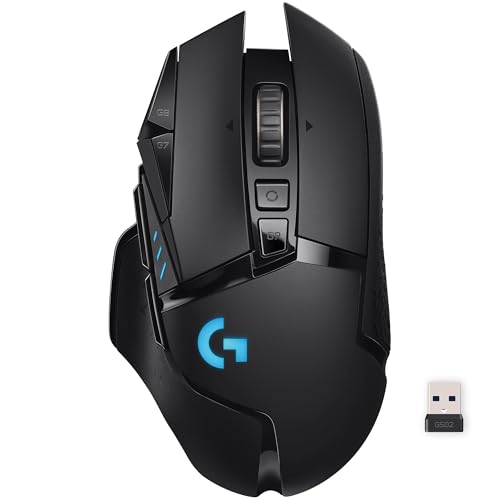
The Logitech G502 Lightspeed is the most popular gaming mouse in this guide, and the one most players end up buying. It is a wireless gaming mouse with 11 programmable buttons, RGB lighting, adjustable weights, POWERPLAY compatibility, and on-board memory, in Black. The G502 shape is the standard that other gaming mice are judged against.
Eleven programmable buttons are the sweet spot for most games: enough for abilities, weapons, and macros without overwhelming the thumb. The adjustable weights let you tune the feel, adding or removing small weights until the mouse moves exactly how you like. On-board memory saves your button mapping on the mouse itself, so it works the same on any computer.
POWERPLAY compatibility means the G502 can charge wirelessly on a Logitech POWERPLAY mousepad, so the battery never runs out mid-game. The RGB lighting is customizable, and the wireless Lightspeed connection is fast enough for competitive play. For most players, the G502 Lightspeed is the safe first choice.
Key specs: Wireless gaming mouse; 11 programmable buttons; RGB; adjustable weights; POWERPLAY compatible; on-board memory.
Strengths:
- 11 programmable buttons suit most games without overwhelming the thumb.
- Adjustable weights let you tune the feel precisely.
- On-board memory keeps your mapping on any computer.
Trade-offs:
- Heavier than the lightest gaming mice in this guide.
- POWERPLAY charging needs a separate mousepad.
- Shape suits palm and claw grips more than fingertip.
This mouse fits most gamers, from shooters to MOBAs, who want extra buttons without a huge thumb grid. It also fits anyone upgrading from a basic mouse who wants a proven design.
Best for: all-round gaming with a proven shape and 11 buttons
Not suited for: MMO players who need a full 12-button thumb grid
Check price on Amazon: Logitech G502 Lightspeed

Razer Naga V2 Pro Wireless MMO Gaming Mouse
The Razer Naga V2 Pro is the MMO pick in this guide, a wireless gaming mouse with 19 plus 1 programmable buttons, three swappable side plates, a HyperScroll Pro wheel, and a Focus Pro 30K optical sensor. It has a 300-hour battery life, in Black. If you play MMOs, this is the mouse built for your game.
Three swappable side plates are what make the Naga V2 Pro special: a 2-button plate for shooters, a 6-button plate for MOBAs, and a 12-button plate for MMOs. Swap the plate, and the mouse changes games with you, so one mouse covers every genre. The 19 plus 1 programmable buttons give a binding for every ability, and the HyperScroll Pro wheel switches between tactile and free-spin scrolling.
The Focus Pro 30K optical sensor is one of the most accurate in this guide, tracking precisely at high speeds. Three hundred hours of battery life means the mouse lasts for weeks of play before needing a charge. For MMO players who need a button for every spell, the Naga V2 Pro is the standard.
Key specs: Wireless MMO gaming mouse; 19+1 programmable buttons; 3 swappable side plates; HyperScroll Pro wheel; Focus Pro 30K sensor; 300-hour battery.
Strengths:
- Swappable side plates adapt the mouse to MMO, MOBA, and shooter games.
- 19 plus 1 programmable buttons cover every ability.
- 300-hour battery lasts for weeks of play.
Trade-offs:
- Large and heavy for small hands.
- Costs more than the other mice in this guide.
- Side plates take practice to swap quickly.
This mouse fits MMO players who need a button for every ability. It also fits players who switch between genres and want one mouse for all of them.
Best for: MMO gaming with a full button grid
Not suited for: small hands or players who want a light mouse
Check price on Amazon: Razer Naga V2 Pro

Corsair Scimitar Elite RGB Wireless MMO Gaming Mouse
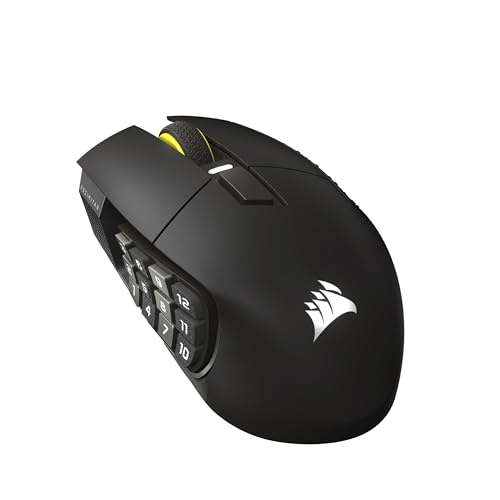
The Corsair Scimitar Elite Wireless is the MOBA and MMO pick from Corsair, a wireless MMO gaming mouse with 16 programmable buttons, a 26,000 DPI sensor, up to 150 hours of battery life, and iCUE compatibility, in Black. It has an adjustable key slider, so the thumb grid moves to fit your hand, which is the feature that sets it apart.
The adjustable key slider is the detail that makes the Scimitar fit more hands than a fixed thumb grid. Slide the 12-button side panel forward or back until your thumb rests naturally on it, and the buttons fall under your thumb without stretching. Sixteen programmable buttons cover abilities, items, and macros, and the 26,000 DPI sensor tracks precisely at any speed.
Up to 150 hours of battery life means the Scimitar lasts for weeks of play, and iCUE software lets you map every button, set the lighting, and save profiles for different games. The wireless connection is fast enough for competitive play, and the mouse charges over USB-C when it finally needs power.
Key specs: Wireless MMO gaming mouse; 16 programmable buttons; 26,000 DPI; up to 150-hour battery; iCUE compatible; adjustable key slider.
Strengths:
- Adjustable key slider fits the thumb grid to your hand.
- 16 programmable buttons suit MMO and MOBA games.
- Up to 150 hours of battery lasts for weeks.
Trade-offs:
- Large thumb grid takes practice to use without looking.
- Heavier than the lightest mice in this guide.
- iCUE software takes time to learn.
This mouse fits MMO and MOBA players who want a thumb grid that adjusts to their hand. It also fits anyone who found fixed thumb grids uncomfortable.
Best for: MMO and MOBA with an adjustable thumb grid
Not suited for: shooter players who want a simple, light mouse
Check price on Amazon: Corsair Scimitar Elite Wireless

Logitech G604 Lightspeed Wireless Gaming Mouse
The Logitech G604 Lightspeed is the multi-genre pick in this guide, a wireless gaming mouse built around a bank of programmable thumb buttons and dual wireless connectivity. It pairs Lightspeed wireless for gaming with Bluetooth for a second device, so one mouse can switch between a gaming PC and a laptop. It is the mouse for players who also work on the same desk.
Dual connectivity is the feature that makes the G604 special for a shared desk. Lightspeed wireless gives the low latency that gaming needs, while Bluetooth connects to a laptop or a tablet for work, and a button on the mouse switches between them. The thumb button bank gives quick access to abilities and shortcuts in games, and to copy, paste, and forward in work apps.
The G604 is shaped for long sessions, with a comfortable grip that suits palm and claw holds. It runs on a single AA battery, which lasts for months, and the Lightspeed receiver stores inside the mouse for travel. For players who game and work at the same desk, it is the most versatile mouse in this guide.
Key specs: Wireless gaming mouse; Lightspeed wireless and Bluetooth; programmable thumb buttons.
Strengths:
- Dual wireless switches between a gaming PC and a laptop.
- Thumb button bank suits games and work shortcuts alike.
- Long battery life from a single AA battery.
Trade-offs:
- Heavier than the lightest gaming mice.
- No RGB lighting for builders who want it.
- AA battery means buying replacements, unlike rechargeable mice.
This mouse fits players who game and work at the same desk. It also fits anyone who wants one mouse for a PC and a laptop.
Best for: gaming and work on one desk with dual wireless
Not suited for: players who want a rechargeable mouse with RGB
Check price on Amazon: Logitech G604 Lightspeed

Razer Basilisk V3 Pro Customizable RGB Wireless Gaming Mouse
The Razer Basilisk V3 Pro is the shooter pick in this guide, a customizable RGB wireless gaming mouse with 11 programmable buttons, optical switches Gen-3, a HyperScroll tilt wheel, and a Focus Pro 30K optical sensor. It has a 150-hour battery life, in Black. It is the mouse for shooter players who want extra buttons without a full MMO grid.
Eleven programmable buttons are the right number for shooters: enough for weapons, abilities, and macros, without a thumb grid that gets in the way. The optical switches Gen-3 click faster and last longer than mechanical switches, and the HyperScroll tilt wheel scrolls fast for weapon switching and tilts for side-to-side movement.
The Focus Pro 30K sensor tracks precisely at high speeds, which matters for flick shots, and the 150-hour battery lasts for weeks of play. RGB lighting is customizable, and the ergonomic shape suits palm and claw grips for long sessions. For shooter players who want extra buttons, the Basilisk V3 Pro is the pick.
Key specs: Wireless gaming mouse; 11 programmable buttons; optical switches Gen-3; HyperScroll tilt wheel; Focus Pro 30K sensor; 150-hour battery.
Strengths:
- 11 programmable buttons suit shooters without a full thumb grid.
- Optical switches click faster and last longer.
- 150-hour battery lasts for weeks of play.
Trade-offs:
- Costs more than the G502 Lightspeed for similar buttons.
- Ergonomic shape suits right hands only.
- Heavier than the lightest shooter mice.
This mouse fits shooter players who want extra buttons and a fast sensor. It also fits anyone who wants a premium wireless mouse with RGB lighting.
Best for: shooter gaming with extra buttons and a fast sensor
Not suited for: MMO players who need a full 12-button thumb grid
Check price on Amazon: Razer Basilisk V3 Pro
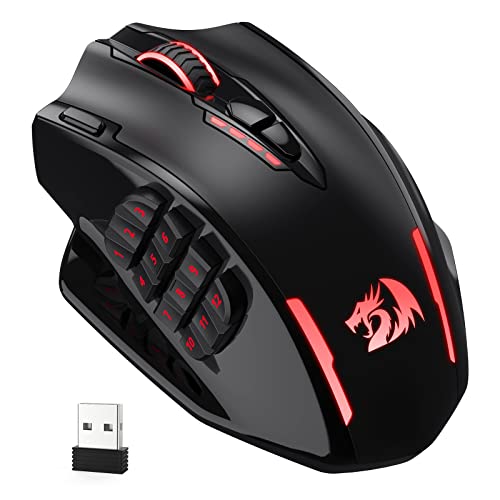
Redragon M913 Wireless RGB MMO Gaming Mouse
The Redragon M913 is the value pick in this guide, a wireless RGB MMO gaming mouse with 16,000 DPI, remapping keys, and a cable-free design for FPS gamers. It has an ergonomic grip body, a vibing backlight, and macro keybinding, at a cost far below the big-brand picks. It is the mouse for players who want extra buttons on a budget.
Sixteen thousand DPI is plenty for gaming, and the remapping keys let you bind abilities, weapons, and macros to the extra buttons. The cable-free wireless design removes drag for flick shots, and the ergonomic grip suits long sessions. The RGB backlight is the gaming look, and it is customizable to match a setup.
The M913 proves that extra buttons do not need a premium price. It gives the MMO button layout, the wireless freedom, and the macro support that cost twice as much from bigger brands, with a build that holds up to daily play. For a first gaming mouse with extra buttons, it is the sensible buy.
Key specs: Wireless RGB MMO gaming mouse; 16,000 DPI; remapping keys; ergonomic grip.
Strengths:
- Lowest cost in this guide for a wireless MMO mouse.
- 16,000 DPI and remapping keys suit MMO and FPS games.
- Cable-free wireless design removes drag for flick shots.
Trade-offs:
- Sensor and switches are a step below the premium picks.
- Software is simpler than Logitech or Razer software.
- Battery life is not listed, so it needs checking.
This mouse fits budget buyers and first-time MMO players who want extra buttons cheaply. It also fits as a second mouse for a laptop or a travel setup.
Best for: extra buttons on a budget for MMO and FPS
Not suited for: competitive players who need the most accurate sensor
Check price on Amazon: Redragon M913
Best wireless gaming mouse with extra buttons: what matters most
Button count is the first choice, and it depends on your games. Shooters need 11 buttons or fewer, MOBAs need around 12 to 16, and MMOs need a full 12-button thumb grid plus more. Buy the button count for the games you actually play, not the biggest number on the shelf.
Button placement matters as much as count. A thumb grid that your thumb cannot reach comfortably is worse than fewer buttons placed well, which is why the Corsair adjustable slider and the Razer swappable plates exist. Try the grip if you can, and favor a mouse whose buttons fall naturally under your thumb.
Sensor accuracy decides whether the extra buttons help or hurt. A mouse that tracks poorly will miss shots no matter how many buttons it has, so favor a high-DPI optical sensor with a proven track record. The Focus Pro 30K sensors in the Razer picks and the 26,000 DPI sensor in the Corsair are the best here.
Weight and shape decide comfort for long sessions. A heavy mouse with a big thumb grid tires the hand faster than a light mouse, and a shape that does not fit your grip will ache after an hour. Favor a mouse that fits your hand and your grip style, and test it for a full session before you commit.
Polling rate matters for competitive play. A 1000Hz polling rate reports the mouse position a thousand times a second, which keeps the cursor smooth and responsive. The picks in this guide all support high polling rates, and the difference is felt in fast flick shots.
Lift-off distance matters for players who reposition the mouse often. A low lift-off distance means the sensor stops tracking as soon as the mouse leaves the pad, which prevents the cursor from jumping when you lift to recenter. Check the lift-off setting in the mouse software if your cursor jumps.
The scroll wheel matters more than most buyers expect, since it switches weapons, scrolls maps, and zooms. A wheel with a tilt function adds left and right inputs, and a free-spin mode scrolls long documents quickly. The Razer HyperScroll wheels in this guide do both.
Buying guide: choosing wireless gaming mouse with extra buttons
Start with your games. List the abilities, weapons, and macros you use most, and count how many buttons you need. Shooter players can stop at 11 buttons, while MMO players need the full grid. Buying more buttons than you use wastes money and adds weight.
Check the grip and the size. Gaming mice come in palm, claw, and fingertip shapes, and a mouse that is too big or too small will hurt after an hour. The G502 suits most hands, the Naga suits large hands, and the Basilisk suits medium hands. Measure your hand if you are unsure.
Look at the battery and the charging. A mouse with 150 to 300 hours of battery lasts for weeks, while one with a short battery needs charging every few days. Rechargeable mice charge over USB-C, while the G604 runs on a AA battery. Pick the charging you will actually keep up with.
Think about the software. Logitech, Razer, and Corsair all have software for mapping buttons and setting lighting, and the quality varies. Check that the software runs on your operating system, and that it lets you save profiles on the mouse itself for use on other computers.
Check the mouse weight before you buy, since it affects flick shots and long sessions. A heavy mouse with a thumb grid tires the hand faster, while a light mouse is quicker but can feel cheap. The G502 lets you adjust the weight, which is a good compromise.
Think about the mousepad as well as the mouse. A smooth, large pad suits fast flick shots, while a control pad suits precise aiming. The mouse sensor reads the pad surface, so a worn or dirty pad hurts tracking. Replace the pad when it wears smooth.
Using and caring for your wireless gaming mouse with extra buttons
Keep the sensor clean. Dust and hair on the sensor cause tracking jumps, so wipe it with a soft cloth regularly. A clean sensor tracks smoothly, and a dirty one will cost you shots.
Clean the buttons and the scroll wheel. Skin oils and dust build up in the gaps, which makes buttons sticky and the wheel gritty. A soft brush and a little isopropyl alcohol keep them moving freely, and a quick clean once a month is enough.
Charge before the battery dies. A mouse that dies mid-game is a lost fight, so charge it when the software warns you, not when it stops moving. Keep the charging cable nearby, or use a POWERPLAY mousepad for the G502.
Store the mouse properly. A mouse left in a bag with the buttons pressed can wear out the switches, and a mouse left in the sun can warp. Keep it in a case or on the desk, with the buttons free and the sensor covered.
Replace the mouse feet when they wear. The small pads under the mouse glide on the mousepad, and worn feet drag and scratch. Replacement feet cost little and restore the smooth glide, and they are worth having on hand.
Keep the receiver close to the mouse. A wireless receiver plugged into the back of a desktop can lose signal through the case, which causes lag. Plug it into a front port or a short extension cable, and keep it near the mouse.
Common mistakes to avoid
A common mistake is buying the most buttons without learning them. A 12-button thumb grid is useless if you only use three buttons, and it takes weeks to learn the rest. Map a few buttons first, learn them, and add more as you get comfortable.
Another mistake is ignoring the grip. A mouse that is too big for your hand will strain your thumb, and a mouse that is too small will cramp your fingers. Try the mouse for a full session before you decide, not just for a minute in the store.
A third mistake is using a high DPI without lowering the in-game sensitivity. A 26,000 DPI sensor with a high in-game sensitivity is uncontrollable, and the mouse will fly across the screen. Set the DPI to a comfortable level and adjust the game sensitivity to match.
A fourth mistake is forgetting to save the profile on the mouse. A button mapping that lives only in the software disappears when you use another computer, while a mapping saved on the mouse travels with it. Save to the on-board memory after you set it up.
A fifth mistake is setting the DPI too high and the sensitivity too low, or the reverse, without testing. The combination matters more than either number alone, so set the DPI to a comfortable level, adjust the game sensitivity to match, and test it in a practice range before a real match.
Budget and value
Budget picks start with the Redragon M913, which gives a wireless MMO layout with remapping keys at the lowest cost in this guide. It suits first-time MMO players and anyone who wants extra buttons cheaply.
Mid-range picks balance buttons and quality with the Logitech G502 Lightspeed and the Logitech G604 Lightspeed. The G502 is the all-rounder with 11 buttons, while the G604 adds dual wireless for a shared desk. Either one covers most games well.
Top-end picks go for the most buttons and the best sensors with the Razer Naga V2 Pro, the Corsair Scimitar Elite Wireless, and the Razer Basilisk V3 Pro. The Naga is the MMO standard, the Scimitar has the adjustable grid, and the Basilisk is the shooter pick with a fast sensor.
Whatever the budget, buy a large mousepad with the mouse. A big pad gives room for low-sensitivity aiming and for repositioning without lifting, and it costs little. A small pad is the most common regret with a new gaming mouse.
How many buttons do you actually need
Count the abilities you use in a fight, not the abilities you own. Most MMO players use six to eight abilities regularly, and the rest are situational. A 12-button grid covers the regulars and the situational ones, while an 11-button mouse covers the regulars and leaves the rest on the keyboard.
Shooter players need fewer buttons, usually five to seven, for weapons, grenades, and push-to-talk. The G502 and Basilisk V3 Pro with 11 buttons give room to grow, while the Naga and Scimitar with 16 or more buttons are overkill for shooters.
Palm, claw, and fingertip grips
Palm grip rests the whole hand on the mouse, which suits large mice with a high back like the Naga V2 Pro. It is comfortable for long sessions, but it is slower for flick shots.
Claw grip arches the fingers over the mouse, which suits medium mice like the G502 and Basilisk V3 Pro. It is faster than palm grip and still comfortable for hours. Fingertip grip uses only the fingertips, which suits small light mice and fast flick shots, but it tires the hand quickest.
Wireless vs wired for gaming
Wireless gaming mice now match wired mice for latency, thanks to fast wireless technology like Logitech Lightspeed and Razer HyperSpeed. The difference is measured in milliseconds, and most players cannot feel it.
Wireless wins on freedom: no cable drag, no snagging, and a clean desk. Wired wins on weight and on never needing a charge. For most players, wireless is the better choice, and every pick in this guide is wireless.
Setting up button profiles per game
Create a profile for each game, with the buttons mapped to that game abilities and weapons. The Logitech, Razer, and Corsair software all support per-game profiles, and the mouse can switch profiles automatically when the game launches.
Save the profiles to the on-board memory after you set them up. A profile saved on the mouse works on any computer, while one saved only in the software disappears when you switch machines.
Mouse grip styles and hand size
Hand size decides which mice fit. Measure from the wrist to the middle fingertip: under 17cm is a small hand, 17 to 19cm is medium, and over 19cm is large. The Naga suits large hands, the G502 and Basilisk suit medium hands, and the M913 suits most hands at a budget.
Grip style matters too. Palm grip suits large mice, claw grip suits medium mice, and fingertip grip suits small light mice. Match the mouse to your grip, and your hand will thank you after a long session.
Cleaning a gaming mouse
A gaming mouse picks up skin oils and dust in the button gaps and around the scroll wheel, which makes buttons sticky over time. A soft brush and a little isopropyl alcohol on a cloth keep the buttons moving freely.
Clean the sensor lens with a blower, not a cloth, since the lens scratches easily. A clean sensor tracks smoothly, and a dirty one jumps and stutters at the worst moments.
Final recommendation
For most gamers, the Logitech G502 Lightspeed is the safest buy, with 11 programmable buttons, a proven shape, and adjustable weights. MMO players should choose the Razer Naga V2 Pro or the Corsair Scimitar Elite Wireless, and shooter players should choose the Razer Basilisk V3 Pro.
Whichever mouse you choose, map a few buttons first, learn them, and save the profile on the mouse. The extra buttons only help when they are under your thumb without thinking.
Start with your games and your hand. Shooters need 11 buttons, MMOs need a full grid, and every hand needs a shape that fits. Match the mouse to the game and the grip, and the extra buttons will feel like a second keyboard.
Practice with the new buttons in a safe mode first. Map a few buttons, play a practice match, and learn them before a ranked game. A mouse with extra buttons only helps when the buttons are under your thumb without thinking.
Frequently asked questions
How many extra buttons do I need on a gaming mouse?
Shooters need around 11 buttons, MOBAs need 12 to 16, and MMOs benefit from a full 12-button thumb grid. Buy the count for the games you play, not the biggest number.
Is wireless good enough for competitive gaming?
Yes. Modern wireless mice like the G502 Lightspeed and Naga V2 Pro match wired mice for latency, and most players cannot feel the difference.
What is the difference between the Naga V2 Pro and the Scimitar Elite?
The Naga has swappable side plates for different games, while the Scimitar has an adjustable key slider to fit the thumb grid to your hand. Both suit MMO and MOBA games.
Can I use a gaming mouse for work?
Yes. The extra buttons map to copy, paste, and other shortcuts, and the G604 Lightspeed switches between a gaming PC and a laptop. A gaming mouse is a good work mouse too.
How long does a wireless gaming mouse battery last?
It varies from weeks to months. The Naga V2 Pro lasts up to 300 hours, the Scimitar and Basilisk last up to 150 hours, and the G604 runs for months on a AA battery.
Do I need special software for extra buttons?
Yes, to map the buttons initially. Logitech, Razer, and Corsair all provide software, and most mice save the mapping on-board so it works on any computer.
Can I use a gaming mouse on a laptop?
Yes. All the picks in this guide are wireless, so they work with a laptop over a USB receiver or Bluetooth. The G604 Lightspeed switches between a PC and a laptop, which suits a shared desk.
How do I map the extra buttons?
Use the mouse software to assign keys, macros, or actions to each button, then save the profile to the on-board memory. Map a few buttons first and learn them before adding more.
Is a heavy mouse bad for gaming?
Not necessarily. A heavy mouse is steadier for precise aiming, while a light mouse is faster for flick shots. The G502 lets you adjust the weight, so you can find the feel that suits you.
What is polling rate and why does it matter?
Polling rate is how often the mouse reports its position, and 1000Hz is the standard for gaming. A higher rate means smoother cursor movement and faster response, which matters for flick shots.
Can I use a gaming mouse on a Mac?
Yes, the picks in this guide work on Mac as well as Windows, though the mapping software may have fewer features on Mac. Check the software support for your operating system before you buy.
What is the best mouse for small hands?
Small hands suit a lighter, narrower mouse with fewer thumb buttons, like the G502 Lightspeed or the Basilisk V3 Pro. The Naga V2 Pro and Scimitar are built for larger hands and a full thumb grid.