The best keyboards to attach to tablet turn a touchscreen device into a proper writing machine. Typing a long email, an essay or a report on a glass screen is slow and tiring, but a real keyboard changes the tablet completely: suddenly it is a laptop you can carry in one hand, a note-taking tool for lectures, and a writing desk that fits in a small bag. The six keyboards in this guide are all named-brand models with clear listings, checked against the catalogue for this site, and each one attaches to a tablet in a different way, from a simple Bluetooth keyboard to a full keyboard case with a trackpad.
There are two broad kinds of tablet keyboard, and this guide covers both. A standalone Bluetooth keyboard, like the Logitech K480 or the Arteck Compact, pairs with any tablet and can be used with a phone or a computer as well. A keyboard case, like the Logitech Combo Touch, attaches directly to a specific iPad model and adds a trackpad, turning the tablet into a small laptop. The sections below explain which kind suits your tablet, your bag and your working habits, so you can choose the one you will actually use every day.
Before you buy, check which tablet you own and which connection it uses. A keyboard case made for the iPad 10th generation will not fit an iPad 9th generation or a Samsung tablet, while a universal Bluetooth keyboard works with almost any tablet that supports Bluetooth. Check the tablet model number in its settings, match it against the keyboard listing, and confirm the layout matches the language you type in.
It is also worth knowing what a tablet keyboard will not do. It will not turn a tablet into a full desktop computer, it will not add ports or storage, and a very small keyboard will not be comfortable for hours of typing. What it will do is make writing fast, accurate and comfortable, and that is the change that matters most for students, writers and anyone who answers a lot of email on a tablet. Pick the keyboard that fits your tablet and your hands, and the tablet will earn its place in your bag.
In this guide
Quick picks: best keyboards to attach to tablet
| # | Product | Where to buy |
|---|---|---|
| 1 | Logitech K480 | Check on Amazon |
| 2 | Logitech Pebble Keys 2 K380s | Check on Amazon |
| 3 | Logitech MK250 | Check on Amazon |
| 4 | Logitech Combo Touch | Check on Amazon |
| 5 | Arteck Compact Wireless Bluetooth Keyboard | Check on Amazon |
| 6 | OMOTON Bluetooth Tablet Keyboard | Check on Amazon |
How the picks were chosen
We started from the site catalogue search for Bluetooth keyboards for tablets and tablet keyboard cases, then kept only keyboards whose listings name a clear brand and model and state the connection type and the tablet compatibility. Generic listings with no brand or no model information were left out. The six keyboards that remain come from Logitech, Arteck and OMOTON, and they cover the main ways to type on a tablet: multi-device Bluetooth keyboards, compact travel keyboards, a keyboard and mouse combo, and a detachable keyboard case with a trackpad.
For each keyboard we recorded the specifications stated in its listing, including the connection type, the device compatibility, the layout and any extra features such as backlighting or a trackpad. A keyboard earned its place because its stated specifications fit a real tablet and a real typing need, not because of a marketing claim. We also weighed practical points: whether the keyboard works with more than one device, whether it is light enough to carry, and whether the keys are large enough for comfortable typing.
No keyboard here is described as tested by us, and no typing claim is made beyond what the listing states. What follows is a comparison of stated specifications, design choices and intended uses, written so you can match a keyboard to your tablet, your bag and your working habits.
We also made sure the guide covers more than one tablet platform. The Logitech K480 and the Arteck Compact work with iPad, Android and Windows tablets, the OMOTON keyboard is built for Samsung tablets, and the Logitech Combo Touch is made for a specific iPad model. That range means most tablet owners will find a keyboard here that fits their device.
Quick comparison
| Product | Standout feature | Best for |
|---|---|---|
| Logitech K480 Wireless Multi-Device Keyboard | Multi-device Bluetooth for all platforms | Typing across several devices with one keyboard |
| Logitech Pebble Keys 2 K380s Wireless Bluetooth Keyboard, Tonal Graphite | Slim, portable travel keyboard | Light travel typing on a tablet |
| Logitech MK250 Wireless Bluetooth Keyboard and Mouse Combo, Graphite | Bluetooth keyboard and mouse combo | Editing documents with a keyboard and mouse |
| Logitech Combo Touch, Detachable iPad Keyboard Case 10th gen, Oxford Gray | Detachable case with backlit keyboard and trackpad | Turning a 10th generation iPad into a small laptop |
| Arteck Compact Wireless Bluetooth Keyboard for iPad Tablet iPhone PC, Black | Universal compact Bluetooth keyboard | Simple portable typing on any tablet |
| OMOTON Bluetooth Tablet Keyboard Rechargeable with Backlit, Oversize Keycap | Backlit keyboard with oversize keycaps | Comfortable backlit typing on a Samsung tablet |

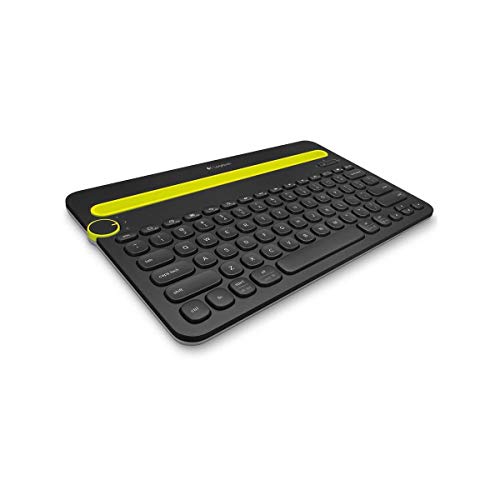
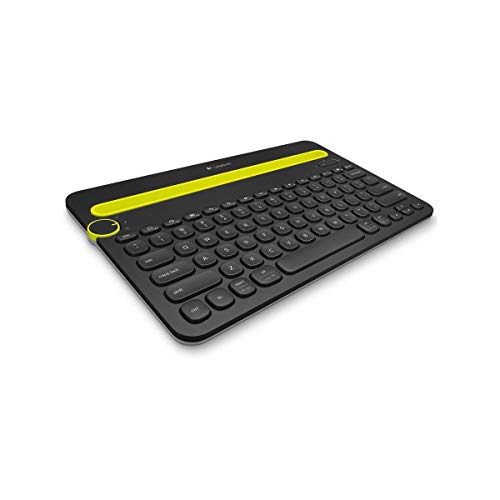
Logitech K480 Wireless Multi-Device Keyboard
The Logitech K480 is a wireless multi-device keyboard for Windows, macOS, iPadOS, Android or Chrome OS, with Bluetooth and a compact design. Its listing states multi-device support, Bluetooth and compatibility with Windows, macOS, iPadOS, Android and Chrome OS, which makes it the most flexible keyboard in this guide.
Key specifications: Wireless multi-device keyboard, Bluetooth, Windows, macOS, iPadOS, Android, Chrome OS, compact.
In daily use, the K480 is the one-keyboard solution. It switches between three devices, so one keyboard can serve a tablet, a phone and a computer, and the built-in cradle holds the tablet at a comfortable reading angle. It suits anyone with a mixed set of devices who wants a single keyboard for all of them.
Pair the keyboard with your tablet over Bluetooth, then pair it with your phone and computer if you use them, using the device switch to move between them. Place the tablet in the cradle and you are ready to type.
Strengths
- Switches between three devices
- Works with Windows, macOS, iPadOS, Android and Chrome OS
- Built-in cradle holds the tablet at a good angle
Trade-offs
- Compact layout is smaller than a full-size keyboard
- No backlighting for dim rooms
- Heavier than the most portable travel keyboards
This keyboard fits anyone with more than one device who wants a single keyboard for a tablet, a phone and a computer.
Best for: Typing across several devices with one keyboard / Not suited for: Anyone who wants the smallest travel keyboard or backlit keys
Check price on Amazon: Logitech K480

Logitech Pebble Keys 2 K380s Wireless Bluetooth Keyboard, Tonal Graphite
The Logitech Pebble Keys 2 K380s is a wireless Bluetooth keyboard in Tonal Graphite, described as slim, portable and compact. Its listing states a slim portable compact Bluetooth keyboard in Tonal Graphite, which makes it the travel keyboard in this guide.
Key specifications: Wireless Bluetooth keyboard, slim, portable, compact, Tonal Graphite.
Day to day, the K380s is the keyboard you forget is in your bag. Its slim, compact body slips into a small bag alongside a tablet, and it pairs quickly whenever you need to type. It suits students and travellers who want a proper keyboard without carrying a heavy one.
Pair the keyboard with your tablet over Bluetooth and it will reconnect automatically next time. There is nothing else to set up, and the compact layout means it is ready to use within seconds of opening your bag.
Strengths
- Slim and portable for travel
- Compact body that fits a small bag
- Quick Bluetooth pairing with tablets
Trade-offs
- Compact keys suit short sessions more than long ones
- No backlighting
- No trackpad or device cradle
This keyboard fits travellers and students who want the lightest possible keyboard for a tablet.
Best for: Light travel typing on a tablet / Not suited for: Long writing sessions and anyone who wants backlit keys
Check price on Amazon: Logitech Pebble Keys 2 K380s

Logitech MK250 Wireless Bluetooth Keyboard and Mouse Combo, Graphite
The Logitech MK250 is a wireless Bluetooth keyboard and mouse combo in Graphite, with Bluetooth connection only and a compact keyboard. Its listing states a Bluetooth keyboard and mouse combo in Graphite, with Bluetooth connection only and a compact keyboard, which makes it the editing setup in this guide.
Key specifications: Wireless Bluetooth keyboard and mouse combo, Graphite, Bluetooth connection only, compact keyboard.
In daily use, the MK250 is the combo for editing. The keyboard handles typing while the mouse handles precise pointing, selecting and scrolling, which makes editing documents and spreadsheets far easier than tapping a screen. It suits tablet owners who do real document work and want a proper pointer alongside the keyboard.
Pair the keyboard and the mouse with your tablet over Bluetooth, and place the mouse on a flat surface beside the tablet. The combo works as a pair, so keep both charged or with fresh batteries.
Strengths
- Keyboard and mouse together for editing
- Bluetooth connection with no dongle needed
- Compact keyboard that travels well
Trade-offs
- Needs a flat surface for the mouse
- Two devices to charge or power
- No backlighting or trackpad
This combo fits tablet owners who edit documents and spreadsheets and want a proper mouse alongside the keyboard.
Best for: Editing documents with a keyboard and mouse / Not suited for: Anyone who only types short notes and never needs a mouse
Check price on Amazon: Logitech MK250

Logitech Combo Touch, Detachable iPad Keyboard Case 10th gen, Oxford Gray
The Logitech Combo Touch is a detachable iPad keyboard case for the 10th generation iPad, in Oxford Gray, with a large precision trackpad and a full-size backlit keyboard. Its listing states a detachable keyboard case for the 10th generation iPad, a large precision trackpad and a full-size backlit keyboard.
Key specifications: Detachable iPad keyboard case, 10th generation, Oxford Gray, large precision trackpad, full-size backlit keyboard.
Day to day, the Combo Touch turns an iPad into a small laptop. The full-size backlit keyboard handles long writing sessions, the precision trackpad handles pointing and scrolling without touching the screen, and the case detaches when you want to use the iPad on its own. It is the most complete tablet typing setup in this guide.
Attach the iPad to the case, which connects and is ready to use, and detach it when you want to hold the tablet on its own. The backlit keyboard and the trackpad need no pairing, and the case protects the iPad in your bag.
Strengths
- Full-size backlit keyboard for long sessions
- Large precision trackpad for laptop-like use
- Detachable case that protects the iPad
Trade-offs
- Made only for the 10th generation iPad
- Adds weight and bulk to the tablet
- Costs more than a standalone keyboard
This case fits 10th generation iPad owners who want a laptop-like setup with a trackpad and a backlit keyboard.
Best for: Turning a 10th generation iPad into a small laptop / Not suited for: Other iPad models, Android tablets and anyone who wants a universal keyboard
Check price on Amazon: Logitech Combo Touch

Arteck Compact Wireless Bluetooth Keyboard for iPad Tablet iPhone PC, Black
The Arteck Compact Wireless Bluetooth Keyboard is a compact wireless Bluetooth keyboard for iPad, tablet, iPhone and PC, in black. Its listing states a compact wireless Bluetooth keyboard for iPad, tablet, iPhone and PC, which makes it the universal budget keyboard in this guide.
Key specifications: Compact wireless Bluetooth keyboard, iPad, tablet, iPhone, PC, black.
In daily use, the Arteck Compact is the simple traveller. It pairs with an iPad, an Android tablet, an iPhone or a PC, and its compact body fits in a small bag without fuss. It suits anyone who wants a straightforward Bluetooth keyboard that works with whatever device is in hand.
Pair the keyboard with your tablet over Bluetooth and it will reconnect automatically next time. Charge it over USB when the battery runs low, and keep it in a sleeve in your bag.
Strengths
- Works with iPad, tablet, iPhone and PC
- Compact body that fits a small bag
- Simple Bluetooth pairing with no fuss
Trade-offs
- Compact keys suit shorter sessions
- No backlighting
- No trackpad or device cradle
This keyboard fits anyone who wants a simple, affordable Bluetooth keyboard for any tablet or phone.
Best for: Simple portable typing on any tablet / Not suited for: Long writing sessions and anyone who wants backlit keys or a trackpad
Check price on Amazon: Arteck Compact Wireless Bluetooth Keyboard

OMOTON Bluetooth Tablet Keyboard Rechargeable with Backlit, Oversize Keycap
The OMOTON Bluetooth Tablet Keyboard is a rechargeable Bluetooth keyboard with backlighting and oversize keycaps, described as ultra-slim and wireless for Samsung tablets. Its listing states a rechargeable backlit keyboard with oversize keycaps, an ultra-slim design and wireless use for Samsung tablets.
Key specifications: Rechargeable Bluetooth keyboard, backlit, oversize keycap, ultra-slim, wireless, Samsung tablets.
Day to day, the OMOTON is the comfortable compact keyboard. The oversize keycaps make typing more accurate than most compact keyboards, the backlighting lets you type in dim rooms, and the ultra-slim body slips into a bag alongside a Samsung tablet. It is the keyboard to choose when key comfort matters more than the smallest possible size.
Pair the keyboard with your Samsung tablet over Bluetooth, charge it over USB when needed, and turn the backlight on in dim rooms. The rechargeable battery means no spare batteries to carry.
Strengths
- Oversize keycaps for accurate typing
- Backlit keys for dim rooms
- Rechargeable with an ultra-slim body
Trade-offs
- Built for Samsung tablets, less suited to other brands
- Compact layout is smaller than a full-size keyboard
- Needs charging over USB
This keyboard fits Samsung tablet owners who want comfortable keys and backlighting in a slim, portable keyboard.
Best for: Comfortable backlit typing on a Samsung tablet / Not suited for: iPad owners and anyone who wants a universal keyboard
Check price on Amazon: OMOTON Bluetooth Tablet Keyboard
Best Keyboards to Attach to Tablet: What Matters Most
Start with compatibility, because a keyboard that does not fit your tablet is useless. A keyboard case is made for one specific tablet model, so check the model number in your tablet settings before you buy. A universal Bluetooth keyboard, like the Logitech K480 or the Arteck Compact, works with almost any tablet, phone or computer that supports Bluetooth, which makes it the safer choice if you own more than one device or plan to change tablets.
Look at the key size and the layout. A compact keyboard saves space in a bag, but keys that are too small or too close together slow you down and cause mistakes. The OMOTON keyboard in this guide lists oversize keycaps, which help with accuracy, while the Logitech K380s is deliberately slim and portable. If you type for hours, prioritise key comfort over the smallest possible size.
Check whether the keyboard is backlit. A backlit keyboard, like the OMOTON and the Logitech Combo Touch, lets you type in a dim lecture hall, on a night flight or in a dark room without a lamp. If you mostly type in daylight, backlighting matters less, but it is a feature you will miss the first time you need it.
Consider the trackpad. A keyboard case with a trackpad, like the Logitech Combo Touch, turns the tablet into a small laptop, letting you point, click and scroll without touching the screen. A standalone Bluetooth keyboard has no trackpad, so you will still reach for the screen to select text or tap a button. If you edit documents all day, the trackpad is worth having.
Think about battery and charging. Most Bluetooth keyboards in this guide are rechargeable or run for months on a set of batteries, and the listing states the power source. A rechargeable keyboard needs a cable in your bag, while a battery keyboard needs spare batteries occasionally. Either way, check the power source before you buy, so you are not caught without a charge.
Finally, think about weight and portability. A tablet keyboard is meant to travel, so it should be light enough to carry alongside the tablet without doubling the weight of your bag. The Logitech K380s and the Arteck Compact are built for travel, while the Combo Touch adds the weight of a case and a trackpad in exchange for laptop-like use. Choose the balance that fits how you travel.
Also consider the shortcuts and function keys. A keyboard that offers the media, brightness and app-switching keys your tablet uses will save you from reaching for the screen constantly, while a keyboard without them leaves you tapping the screen for the simplest actions. The Logitech keyboards in this guide are designed around tablet shortcuts, which makes them feel like a natural part of the tablet rather than an accessory bolted on afterwards.
Buying guide: Choosing a keyboard to attach to your tablet
Match the keyboard to your tablet model first. Check the model number in the tablet settings, then match it against the keyboard listing. A keyboard case made for the wrong iPad generation will not fit, and a keyboard built for a Samsung tablet may not suit an iPad. A universal Bluetooth keyboard avoids this problem entirely, because it pairs with any tablet that supports Bluetooth.
Decide between a standalone keyboard and a keyboard case. A standalone keyboard is more flexible: it works with any tablet, phone or computer, and you can leave it at home when you only need the tablet. A keyboard case is more integrated: it protects the tablet, adds a trackpad and turns the tablet into a laptop, but it only fits one tablet model.
Check the layout and the language. A keyboard with the wrong layout will have keys in unexpected places, which slows you down and causes mistakes. Confirm the layout matches the language you type in, and check whether the keyboard has the function keys and shortcuts your tablet uses.
Look at the key travel and the feel. A keyboard with shallow keys types quietly and fits in a slim bag, while a keyboard with deeper keys feels more like a laptop keyboard. The listings in this guide describe the keyboards as compact, slim or ultra-slim, which gives a sense of the feel, but the real test is typing on it for a week.
Consider multi-device support if you own more than one device. The Logitech K480 switches between three devices, which means one keyboard can serve a tablet, a phone and a computer. If you only ever type on one tablet, multi-device support matters less, but it is a useful feature for anyone with a mixed set of devices.
Think about the mouse. The Logitech MK250 in this guide is a keyboard and mouse combo, which suits tablet owners who want a proper pointer for editing documents and spreadsheets. If you only type and tap, a keyboard alone is enough, but a mouse makes precise editing far easier.
Check the battery situation. A rechargeable keyboard needs a USB cable and a little planning, while a battery keyboard runs for months and needs occasional new batteries. Neither is better in itself; the right choice is the one that fits how you travel and how often you remember to charge things.
Finally, buy from a seller with a straightforward return policy. A keyboard is a personal tool, and the only honest way to know whether the keys, the size and the weight suit you is to type on it for a week of real work. A good return policy turns that trial into a low-risk decision.
Check the warranty and the build quality before you commit. A keyboard that travels every day takes knocks in a bag, and a well-built keyboard with solid keys will last for years while a flimsy one starts to fail within months. Look for a maker with a reputation for durable keyboards, and check the warranty length, because a longer warranty is a sign the maker stands behind the product.
Using and caring for your tablet keyboard
Pair the keyboard with your tablet over Bluetooth the first time you use it, and the tablet will remember the pairing afterwards. Turn the keyboard on, open the Bluetooth settings on the tablet, select the keyboard, and it should connect within seconds. If the connection drops, turn the keyboard off and on again, and check that no other device has taken the connection.
Learn the tablet keyboard shortcuts. Most tablets support shortcuts for switching apps, selecting text, copying and pasting, and going home, and a few minutes learning them will save hours over a semester. The function keys on the Logitech keyboards and the trackpad gestures on the Combo Touch are worth learning too.
Keep the keyboard charged or carry spare batteries. A Bluetooth keyboard that dies in the middle of a lecture is no use to anyone, so charge a rechargeable keyboard overnight and keep spare batteries in your bag if your keyboard uses them. A quick check of the battery indicator before you leave home is a good habit.
Clean the keyboard regularly with a dry cloth. A keyboard that travels in a bag collects dust and crumbs, and a clean keyboard types better and lasts longer. Turn the keyboard off before cleaning, and do not spray cleaner directly onto the keys.
Store the keyboard flat in your bag, with nothing heavy on top of it. A keyboard case protects the tablet and the keys together, while a standalone keyboard should sit in a sleeve or a pocket where the keys will not be pressed by other items. A little care keeps the keys working well for years.
If you use a keyboard case, learn to detach and reattach it cleanly. The Logitech Combo Touch detaches from the iPad when you want to use the tablet on its own, and reattaches magnetically when you want to type. Practice the motion at home so you can do it quickly in a lecture or a meeting.
Update the tablet software regularly, because Bluetooth and keyboard support improve with updates. If a keyboard stops working after an update, remove the pairing and pair it again, which fixes most connection problems without any further trouble.
If you switch between a tablet and a computer, learn the device switch on a multi-device keyboard. The Logitech K480 has a dial or a key that moves the connection between three paired devices, and a moment spent learning it saves the confusion of typing on the wrong screen. Label the devices in your head, or keep the keyboard paired to the tablet you use most and switch only when you need to.
Common mistakes to avoid
Buying a keyboard case for the wrong tablet model is the most common mistake. Keyboard cases are made for one specific model, and a case for the iPad 10th generation will not fit the 9th generation or a Samsung tablet. Check the model number in the tablet settings before you order.
Choosing the smallest keyboard available is the second mistake. A very compact keyboard saves space, but keys that are too small cause mistakes and slow you down. If you type for hours, a full-size or near-full-size keyboard is worth the extra space in your bag.
Forgetting to check the layout is another frequent error. A keyboard with the wrong language layout puts keys in unexpected places, and relearning the layout takes weeks. Confirm the layout matches the language you type in before you buy.
Ignoring the battery is a small mistake with daily consequences. A rechargeable keyboard that is never charged will die at the worst moment, so build charging into your routine or choose a battery keyboard that runs for months.
Expecting a tablet keyboard to replace a laptop entirely leads to disappointment. A tablet with a keyboard is excellent for writing, notes and email, but it is not a full desktop replacement for heavy multitasking or specialised software. Use it for what it does well and keep a computer for the rest.
Pairing the keyboard with the wrong device is a common confusion with multi-device keyboards. The Logitech K480 switches between three devices, and it is easy to type on the phone when you meant to type on the tablet. Check the device switch before you start typing.
Leaving the keyboard loose in a bag without protection damages the keys over time. A sleeve or a case costs little and keeps the keyboard working well for years, so protect it the way you protect the tablet itself.
Budget and value
The Arteck Compact and the OMOTON Bluetooth keyboards are the value picks in this guide, offering compact Bluetooth typing with backlighting on the OMOTON, at a level that suits any tablet owner. They are the sensible choice for students and travellers who want a keyboard that fits in any bag.
The Logitech K480 and the Logitech Pebble Keys 2 K380s sit in the middle, with multi-device support and a slim, portable design. The K480 switches between three devices, while the K380s is built for travel, and either one suits anyone who types on more than one device.
The Logitech MK250 and the Logitech Combo Touch are the most complete options here. The MK250 adds a mouse for precise editing, while the Combo Touch adds a full-size backlit keyboard and a precision trackpad in a detachable case that turns an iPad into a small laptop.
Whatever you spend, remember that the keyboard is a daily-use tool. A modest keyboard that fits your tablet and your hands will serve you better than an expensive keyboard made for the wrong tablet, so check compatibility first and comfort second, and the rest will follow.
Final recommendation
If you want the best keyboard to attach to a tablet for most people, the Logitech K480 is the strongest pick in this guide, with multi-device Bluetooth, a compact layout and compatibility with Windows, macOS, iPadOS, Android and Chrome OS, which means it works with almost any tablet you own now or buy later. If you own a 10th generation iPad and want a laptop-like setup, the Logitech Combo Touch adds a full-size backlit keyboard and a precision trackpad in a detachable case. If your budget is tighter, the Arteck Compact gives you simple, portable Bluetooth typing for any tablet. Whichever keyboard you choose, check the tablet model first, make sure the keys suit your hands, and the tablet will become a proper writing machine.
One last piece of advice: give the keyboard a week of real work before you judge it. Type your notes, answer your email and write a long document, and notice whether your hands get tired or your fingers miss keys. A keyboard that feels right after a week of real use is the right keyboard, and no specification sheet can tell you that in advance.
Frequently asked questions
Will any Bluetooth keyboard work with my tablet?
Almost any Bluetooth keyboard will pair with a tablet that supports Bluetooth, including iPad, Android and Windows tablets. The Logitech K480 and the Arteck Compact in this guide are universal Bluetooth keyboards. Keyboard cases are different: they are made for one specific tablet model, so check the model number before you buy a case.
What is the difference between a keyboard and a keyboard case?
A standalone keyboard pairs over Bluetooth and can be used with any tablet, phone or computer, and you can leave it behind when you do not need it. A keyboard case attaches directly to a specific tablet model, protects the tablet, and often adds a trackpad. The Logitech Combo Touch in this guide is a keyboard case for the 10th generation iPad.
Do I need a trackpad on a tablet keyboard?
Not necessarily. A keyboard alone is enough for typing notes and emails, and you can still tap the screen to select text. A trackpad, like the one on the Logitech Combo Touch, makes editing documents and spreadsheets easier, because you can point, click and scroll without touching the screen. If you edit documents all day, the trackpad is worth having.
Can I use a tablet keyboard with my phone as well?
Yes, if the keyboard is a universal Bluetooth model. The Logitech K480 switches between three devices, so it can serve a tablet, a phone and a computer. The Arteck Compact also works with iPhone and Android phones. A keyboard case made for a specific iPad will not work with a phone.
How do I pair a Bluetooth keyboard with my tablet?
Turn the keyboard on, open the Bluetooth settings on your tablet, and select the keyboard from the list of devices. The tablet will remember the pairing, so next time you only need to turn the keyboard on. If the connection drops, turn the keyboard off and on again and check that no other device has taken the connection.
Is a backlit keyboard worth it on a tablet?
It is, if you type in dim places such as lecture halls, night flights or dark rooms. The OMOTON keyboard and the Logitech Combo Touch in this guide both have backlit keys. If you only type in daylight, backlighting matters less, but it is a feature you will miss the first time you need it.
More guides from KajuanDouglas
Best Bluetooth Keyboard for Android Tablets Best Bluetooth Keyboards for Tablet Best Keyboards for Acer Tablet