The best keyboards for college students are the ones that survive four years of essays, problem sets, late-night study sessions, and life in a shared dorm room. A laptop keyboard is fine for short notes, but hours of typing on a flat, cramped keyboard cause fatigue and errors, and a good external keyboard changes the experience completely. The right keyboard is comfortable, quiet enough for a library, durable enough for a backpack, and affordable enough for a student budget.
Quiet keys matter more in college than anywhere else. A loud, clicky keyboard draws complaints in a library, a lecture hall, or a shared room at midnight, while a quiet keyboard lets a student work anywhere without disturbing anyone. The models in this guide were chosen for quiet, comfortable typing first, because a keyboard that cannot be used in a library is a keyboard that will not be used at all.
Wireless freedom is the second thing that matters. A wireless keyboard works with a laptop on a desk, on a bed, or in a study room, without a cable tying the student to one spot. Bluetooth models connect directly to tablets and phones as well, which is useful for students who take notes on more than one device. Wired models still have a place, since they never need batteries and simply work, and the guide includes one for students who prefer that reliability.
This guide compares six keyboards that suit college life, from the Logitech K270 and K345 to the compact Bluetooth K250, the rechargeable TECKNET, the wired K120, and the retro Nowlike combo. Every pick was chosen for typing comfort, quiet operation, durability, and value, and each one is judged on how it performs during long study sessions rather than on specifications alone.
In this guide
Quick picks: best keyboards for college students
| # | Product | Where to buy |
|---|---|---|
| 1 | Logitech K270 Full Size Wireless Keyboard Black | Check on Amazon |
| 2 | Logitech K250 Compact Wireless Bluetooth Keyboard Graphite | Check on Amazon |
| 3 | Logitech K345 Full Size Wireless Keyboard with Palm Rest | Check on Amazon |
| 4 | TECKNET Bluetooth Keyboard Rechargeable | Check on Amazon |
| 5 | Logitech K120 Full Size Wired Keyboard Black | Check on Amazon |
| 6 | Nowlike Wireless Keyboard and Mouse Combo Retro Typewriter | Check on Amazon |
How the Picks Were Chosen
Typing comfort came first. A keyboard earns a place here only if its keys feel good for hours: full-size layouts with a number pad scored well for students who work with numbers, while compact layouts earned credit for small desks and backpacks. Key travel, spacing, and a comfortable typing angle matter more than any single specification, since the keyboard will be used for thousands of hours.
Noise, connectivity, and durability decided the rest. Quiet keys are essential for shared spaces, so loud mechanical switches were not considered for this guide. Wireless models needed reliable connections and long battery life, while wired models needed a sturdy cable and plug-and-play setup. Finally, each pick had to be tough enough for dorm life, with spill resistance or a sturdy build earning extra credit.
Quick Comparison
| Keyboard | Layout | Connection | Key Feature | Best For |
|---|---|---|---|---|
| Logitech K270 Black | Full-size, number pad | Wireless 2.4G | 8 multimedia keys | Everyday typing and numbers |
| Logitech K250 Graphite | Compact, number pad | Bluetooth | Bluetooth only, no receiver | Tablets and small desks |
| Logitech K345 | Full-size | Wireless 2.4G | Palm rest included | Long typing sessions |
| TECKNET Bluetooth Keyboard | Full-size | Bluetooth, 2.4G | Rechargeable, quiet keys | Multi-device students |
| Logitech K120 Black | Full-size | Wired USB | Spill-resistant | Budget reliability |
| Nowlike Keyboard and Mouse Combo | Full-size, retro | Wireless | Typewriter keycaps | Style and everyday use |
All six keyboards are full-size or compact full-size layouts with number pads unless noted. Battery life varies with use and connection mode.
1. Logitech K270 Full Size Wireless Keyboard Black
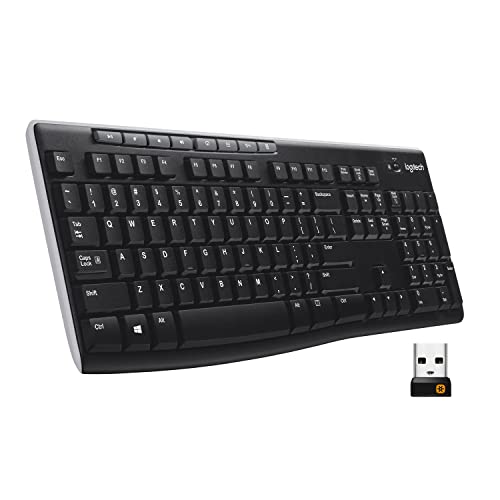
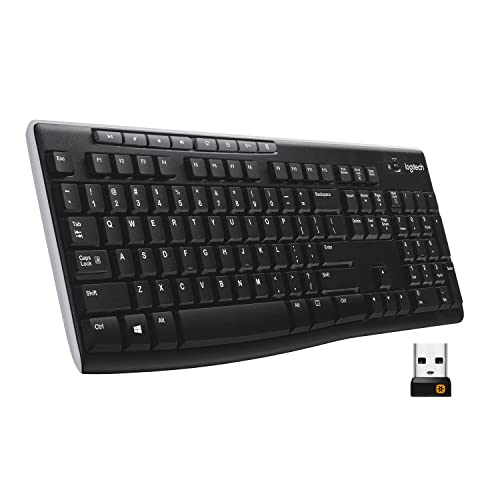
The Logitech K270 is the classic student keyboard, and it is the pick most college students should start with. It is a full-size wireless keyboard with a number pad and eight multimedia keys, it connects with a tiny receiver that stays in the laptop, and its low-profile keys are quiet and comfortable for long typing sessions. It is simple, reliable, and affordable, which is exactly what a student keyboard should be.
Key specifications: Full-size layout, number pad, 8 multimedia keys, wireless connection, low-profile quiet keys, black finish.
Strengths
- The full-size layout with a number pad suits essays, spreadsheets, and data entry alike.
- Eight multimedia keys control volume and playback without leaving the keyboard.
- The wireless connection is reliable and the tiny receiver can stay in the laptop permanently.
Trade-offs
- It uses a replaceable battery rather than a rechargeable cell.
- The design is plain, so students who want a distinctive look should look elsewhere.
- It has no backlight, so late-night typing in the dark needs a light on.
This keyboard fits almost any college student, from business majors writing reports to science students entering data. It is the safest recommendation in this guide and the best all-around choice for a dorm desk.
Best for: everyday college typing, essays, and spreadsheet work. Not suited for: students who need a backlit keyboard for dark rooms.
The K270 has been a favorite for years because it does the basics perfectly. The keys have a comfortable travel that is neither too shallow nor too deep, the layout is standard so there is no learning curve, and the wireless connection simply works. The multimedia keys are genuinely useful during study sessions, controlling music and volume without switching windows, and the number pad is a real advantage for any student who works with figures.
Battery life is generous, and a single set of batteries lasts for months of regular use, which means the keyboard is always ready and never needs a nightly charge. Keep a spare set of batteries in the desk drawer and the keyboard will never interrupt a study session. The low-profile keys are quiet enough for a library, and the full-size layout means no relearning of key positions. For a student buying a first external keyboard, this is the one to get.
2. Logitech K250 Compact Wireless Bluetooth Keyboard Graphite
Check price on Amazon: Logitech K270 Full Size Wireless Keyboard Black

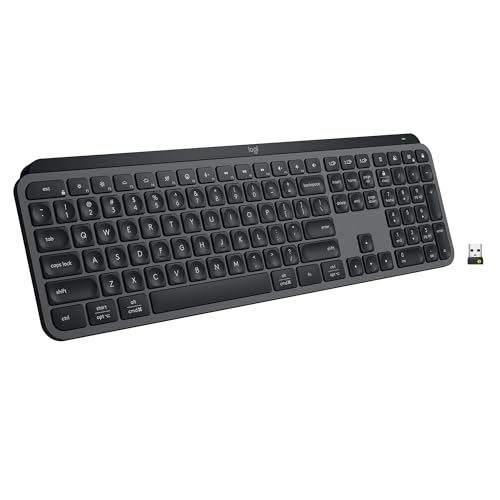
The Logitech K250 is the compact Bluetooth pick in this guide, designed for students who work in small spaces and across several devices. It keeps a number pad despite its compact size, connects by Bluetooth with no receiver to lose, and works with laptops, tablets, and phones. In graphite, it looks smart on any desk, and its quiet keys suit libraries and shared rooms.
Key specifications: Compact layout with number pad, Bluetooth only, no USB receiver, graphite finish, wireless keyboard.
Strengths
- Bluetooth-only connection means no receiver to lose or leave behind.
- The compact size fits small desks and slips easily into a backpack.
- It keeps a number pad, which many compact keyboards drop.
Trade-offs
- Bluetooth can be slightly slower to wake than a dedicated wireless receiver.
- It has no wired fallback if the battery runs out.
- The compact layout may feel tight for users with very large hands.
This keyboard fits students who move between a laptop, a tablet, and a phone, as well as anyone with a small desk or a shared study space. It is a strong choice for library study and for students who carry their keyboard in a bag.
Best for: small desks, libraries, and students who use several devices. Not suited for: users who prefer a wired connection or a full-size layout.
Bluetooth-only design is a deliberate trade that suits student life well. There is no tiny receiver to lose in a dorm room, and the keyboard pairs with any Bluetooth device, so the same keyboard can type an essay on a laptop and then take notes on a tablet. The compact size is a real advantage on crowded library desks and in small dorm rooms, where a full-size keyboard leaves no room for books and papers.
The number pad is the detail that sets this keyboard apart from other compact models, since many small keyboards drop it to save space. For students in business, science, or engineering, a number pad speeds up data entry considerably, and keeping it in a compact body is a genuine achievement. The graphite finish resists visible wear, and the quiet keys keep the peace in shared spaces. It is the best travel-friendly keyboard in this guide.
3. Logitech K345 Full Size Wireless Keyboard with Palm Rest
Check price on Amazon: Logitech K250 Compact Wireless Bluetooth Keyboard Graphite

The Logitech K345 is the comfort pick in this guide, and its built-in palm rest is the reason. Long typing sessions strain the wrists, and a palm rest supports the hands in a neutral position that reduces fatigue. Combined with a full-size layout and a reliable wireless connection, it is the keyboard for students who type for hours every day and want to do it comfortably.
Key specifications: Full-size layout, palm rest included, wireless connection, comfortable typing design.
Strengths
- The built-in palm rest supports the wrists during long typing sessions.
- The full-size layout includes a number pad and standard key spacing.
- The wireless connection keeps the desk tidy with no cable clutter.
Trade-offs
- The palm rest makes the keyboard larger, so it needs more desk space.
- It is less portable than compact models for students who carry their keyboard daily.
- It has no backlight for dark rooms.
This keyboard fits students who write long essays, code, or work with data for hours at a time. It is also a good choice for anyone who has felt wrist strain from a laptop keyboard.
Best for: long writing sessions and students who want wrist support. Not suited for: small desks or students who carry their keyboard everywhere.
Wrist comfort is easy to ignore until it becomes a problem, and the K345 addresses it directly. The palm rest keeps the wrists level rather than bent upward, which reduces strain over hours of typing, and the full-size layout means the hands never need to stretch for a missing key. For a student facing a semester of essays and a thesis, that comfort is worth more than any extra feature.
The K345 is best used as a desk keyboard that stays in one place, since its size rewards a proper setup. Pair it with a chair at the right height and a monitor at eye level, and the whole workstation becomes more comfortable, not just the keyboard. Take short breaks every hour, stretch the hands, and the keyboard will support long study sessions without the ache that a laptop keyboard causes. It is an investment in comfort that pays off every day.
4. TECKNET Bluetooth Keyboard Rechargeable
Check price on Amazon: Logitech K345 Full Size Wireless Keyboard with Palm Rest

The TECKNET Bluetooth Keyboard is the rechargeable pick in this guide, and it is built for students who use several devices and hate buying batteries. It connects by Bluetooth and 2.4G wireless, types quietly with an ergonomic layout, and recharges over a cable rather than needing disposable cells. For a student who moves between a laptop, a tablet, and a desktop, it is the most flexible keyboard here.
Key specifications: Rechargeable battery, Bluetooth and 2.4G wireless, full-size layout, quiet typing, ergonomic design.
Strengths
- The rechargeable battery removes the cost and hassle of disposable cells.
- Dual wireless modes cover laptops, tablets, and desktops from one keyboard.
- Quiet, ergonomic keys suit long sessions in shared spaces.
Trade-offs
- It needs regular recharging, so a dead battery mid-essay is possible without a routine.
- The brand is less established than Logitech, so long-term support is less certain.
- The full-size layout needs a reasonable amount of desk space.
This keyboard fits multi-device students and anyone who prefers rechargeable gear. It is also a good choice for students who want a quiet, comfortable keyboard without the cost of disposable batteries.
Best for: multi-device students who want a rechargeable, quiet keyboard. Not suited for: users who prefer a wired keyboard or a major brand.
Rechargeable design is a practical advantage for students, since batteries are one more thing to buy and to run out of at the wrong moment. This keyboard charges over a standard cable, the same kind used for phones, so topping it up is easy and cheap. The dual wireless modes are equally useful: Bluetooth for a tablet, 2.4G for a laptop, and the freedom to switch between them without repairing each time.
The quiet keys are what make this keyboard suitable for college life. A keyboard that clicks loudly is a keyboard that cannot be used in a library at midnight, while a quiet keyboard works anywhere. The ergonomic layout keeps the hands comfortable during long sessions, and the full-size design means no compromise on the number pad or the key spacing. Charge it weekly, keep the cable handy, and it will serve reliably through the semester.
5. Logitech K120 Full Size Wired Keyboard Black
Check price on Amazon: TECKNET Bluetooth Keyboard Rechargeable

The Logitech K120 is the wired pick in this guide, and it is the most reliable keyboard here in the simplest sense: plug it in and it works, forever, with no batteries, no charging, and no pairing. Its full-size layout is standard and comfortable, its keys are quiet, and it is spill-resistant, which matters in a dorm room where drinks and keyboards share a desk. For students who want zero maintenance, it is the right choice.
Key specifications: Full-size layout, wired USB plug-and-play, spill-resistant design, quiet keys, black finish.
Strengths
- Wired USB means no batteries, no charging, and no connection problems ever.
- The spill-resistant design survives the inevitable drink accident.
- Plug-and-play setup works immediately on any computer with no software needed.
Trade-offs
- The cable ties the keyboard to the desk, so it is less flexible than wireless models.
- It has no multimedia keys or extra features beyond the basics.
- The plain design will not excite anyone looking for style.
This keyboard fits students who want the cheapest reliable option and never want to think about batteries or Bluetooth. It is also a good backup keyboard to keep in a dorm room, and a sensible choice for computer labs and shared desks.
Best for: budget buyers and anyone who wants a keyboard that simply always works. Not suited for: students who need wireless freedom or a keyboard for several devices.
Spill resistance is the feature that earns this keyboard its place, because dorm desks are where drinks get knocked over. A keyboard that survives a spilled coffee is a keyboard that does not need emergency replacement during exam week, and the K120 is designed to handle exactly that. The wired connection is a strength in the same way: there is no battery to die during an exam, no Bluetooth to drop during a timed test, and no setup to fail.
The K120 is also the best value in this guide, and it proves that a good keyboard does not need to be expensive. The keys are comfortable for long sessions, the layout is standard so there is nothing to relearn, and the build is sturdy enough for daily use. Keep the cable tidy, wipe the keys occasionally, and this keyboard will last the whole degree. For a student on a tight budget, it is the smartest money in this guide.
6. Nowlike Wireless Keyboard and Mouse Combo Retro Typewriter
Check price on Amazon: Logitech K120 Full Size Wired Keyboard Black

The Nowlike Wireless Keyboard and Mouse Combo is the style pick in this guide, pairing a full-size ergonomic keyboard with round typewriter-style keycaps and a matching mouse. It is a wireless combo that brings personality to a dorm desk, with a retro look that stands out from plain black keyboards. Beneath the style, it is a practical full-size keyboard with comfortable keys and a matching mouse included.
Key specifications: Full-size ergonomic keyboard, retro round typewriter keycaps, wireless keyboard and mouse combo, blue finish.
Strengths
- The retro typewriter design adds personality to a plain dorm desk.
- The combo includes a matching mouse, so the whole setup is covered in one purchase.
- The full-size ergonomic layout is comfortable for long typing sessions.
Trade-offs
- The round keycaps take a short adjustment period for fast touch typists.
- The retro style will not suit every taste or every formal setting.
- It is a combo, so the mouse cannot be swapped without losing the matching look.
This combo fits students who want their desk to feel personal and enjoy a vintage look. It is also a good gift for a student setting up a first dorm room, since it covers keyboard and mouse together.
Best for: students who want a stylish, matching keyboard and mouse setup. Not suited for: users who need a standard keycap shape for fast touch typing.
The round keycaps are the detail that defines this combo, and they give the keyboard a distinctive feel as well as a distinctive look. They are comfortable to type on once the fingers adjust, and the retro design makes the desk feel like a personal space rather than a generic workstation. The included mouse matches the keyboard, so the whole setup looks coordinated, which matters in a small dorm room where the desk is always visible.
Style aside, this is a practical combo for student life. The wireless connection keeps the desk free of cables, the full-size layout includes everything needed for essays and spreadsheets, and the ergonomic design keeps typing comfortable. Give the round keycaps a week to get used to, since touch typists may type more slowly at first, and then enjoy a keyboard that is as pleasant to look at as it is to use. It is the most fun pick in this guide.
Which Keyboard Fits College Life
Choose the Logitech K270 if the goal is the best all-around student keyboard. It is affordable, reliable, and comfortable, with a full-size layout and a number pad, and it suits almost any major. For most students, the K270 is the right answer and the search can stop there.
Choose the Logitech K345 if long writing sessions are the norm, since its palm rest makes hours of typing noticeably more comfortable. Choose the Logitech K250 for small desks and multi-device use, since its compact Bluetooth design fits anywhere and connects to a tablet as easily as to a laptop.
Choose the TECKNET if a rechargeable, multi-device keyboard is preferred, or the K120 if the budget is tight and reliability matters most. Choose the Nowlike combo if the desk should have personality and a matching mouse matters. When in doubt, pick the keyboard that feels best to type on, since that is the feature that will be used every single day.
Think about the desk as a whole. A keyboard is used with a chair, a screen, and a mousepad, and the whole setup should support good posture. A keyboard at the right height, a screen at eye level, and a chair that supports the back matter as much as the keyboard itself, and a comfortable setup makes long study sessions far more productive.
For students who already own a good laptop, an external keyboard is the single most effective comfort upgrade, more so than a new mouse or a laptop stand. It changes posture, reduces strain, and makes long sessions sustainable. Buy the keyboard first, then add a mouse and a stand if the budget allows, and the whole workstation improves together.
Check price on Amazon: Nowlike Wireless Keyboard and Mouse Combo Retro Typewriter
Buying Guide: Choosing a Keyboard for College
Start with the layout, because it determines what the keyboard can do. A full-size layout with a number pad suits students who work with numbers, such as business, science, and engineering majors, while a compact layout suits small desks and students who carry their keyboard. Tenkeyless layouts drop the number pad to save space, and the choice depends on whether numbers are entered often enough to justify the extra width.
Quiet keys are essential for college, since a keyboard is used in libraries, lecture halls, and shared rooms at all hours. Low-profile keys and quiet switches keep typing discreet, while loud clicky switches draw complaints. Test the noise level if possible, and remember that a keyboard that cannot be used in a library is a keyboard that will not be used when it matters most.
Connectivity should match the devices being used. A wireless keyboard with a receiver suits a laptop that stays on a desk, Bluetooth suits tablets and phones as well as laptops, and dual-mode keyboards cover both. Wired keyboards never need batteries and always work, which is reassuring during exams. Choose the connection that fits the devices, not the one that sounds most advanced.
Battery and power matter for wireless models. Replaceable batteries last for months and are easy to swap, while rechargeable batteries need a regular charging routine but cost nothing extra over time. Check the battery life for the connection mode that will be used, and keep a spare battery or a charging cable handy so a dead keyboard never interrupts a study session.
Durability and spill resistance deserve attention, since dorm life is hard on gear. A keyboard that survives a spilled drink, a drop into a bag, and daily use for four years is worth more than a fragile keyboard with extra features. Sturdy construction, a spill-resistant design, and a reputable brand all help, and a keyboard that lasts the whole degree is the best value of all.
Finally, consider comfort features such as a palm rest, adjustable tilt, and key spacing. A palm rest reduces wrist strain during long sessions, tilt legs let the angle be adjusted to the hands, and standard key spacing avoids relearning. These details seem small, but they are used every day, and they add up to a keyboard that feels good after thousands of hours.
Backlighting is a feature worth considering for students who work late, since a backlit keyboard is usable in a dark dorm room without disturbing a roommate. The keyboards in this guide do not include backlighting, so students who study in the dark should add a small desk lamp or choose a backlit model instead. A lamp is often the simpler solution, since it lights the books as well as the keys.
How to Use and Care for Your College Keyboard
Keep the keyboard clean, since crumbs and dust under the keys cause sticking and missed keystrokes. Shake the keyboard gently upside down once a week, wipe the keys with a dry cloth, and use compressed air for dust that will not shake out. A clean keyboard types better and lasts longer, and it is more pleasant to use.
Protect the keyboard in a bag by placing it keys-down or in a sleeve, since loose items in a bag can press keys and scratch keycaps. A keyboard that travels in a backpack should be packed carefully, with books and chargers kept away from the keys. A simple sleeve is inexpensive and prevents most travel damage.
For wireless keyboards, keep a spare battery or a charging cable in the desk drawer, and replace or recharge the battery before it runs flat. A keyboard that dies during an essay is a frustrating interruption, so make battery checks part of the weekly routine. For Bluetooth models, keep the pairing simple by connecting only the devices that are actually used.
Take breaks during long typing sessions, since no keyboard can replace good posture and rest. Stretch the hands every hour, keep the wrists level rather than bent, and adjust the chair and screen so the whole setup supports the body. A comfortable setup and regular breaks prevent the strain that builds up over a semester.
If a key sticks or stops working, clean under the keycap gently before assuming the keyboard is broken. Dust and debris are the usual cause, and a careful clean often fixes the problem. If a keycap comes off, press it back on firmly and check that it sits level. Most keyboard problems are cleaning problems, not hardware failures.
Keep the keyboard manual and any spare parts, such as the wireless receiver, in a safe place, since a lost receiver can render a wireless keyboard useless. Store the receiver in the laptop USB port or in the keyboard battery compartment when traveling, and label the keyboard if it is used in a shared space so it does not get mixed up with others.
Common Mistakes to Avoid
The most common mistake is buying a keyboard for looks alone, whether that means the flashiest gaming keyboard or the prettiest retro model. Looks matter, but typing comfort, quiet keys, and reliability matter more, since the keyboard will be used for thousands of hours. Try the keys first, then confirm the looks.
A second mistake is ignoring the desk size. A full-size keyboard needs a full-size desk, and a keyboard that leaves no room for books, papers, and a mouse is a keyboard that will be pushed aside. Measure the desk before buying, and choose a compact model if space is tight.
A third mistake is forgetting about noise. A loud keyboard in a library or a shared room at midnight causes complaints and limits where the student can work. Choose quiet keys for college, and save loud mechanical switches for a private room where nobody else is studying.
A fourth mistake is neglecting batteries and charging. A wireless keyboard that dies during an exam or a deadline is a preventable disaster, so keep spares handy and recharge regularly. Make battery checks part of the routine, just like charging a phone or a laptop.
A fifth mistake is poor posture, which no keyboard can fix alone. A keyboard on a bed, a lap, or a too-high desk forces the wrists into bad angles, and the strain builds up over weeks. Set up a proper desk, keep the wrists level, take breaks, and let the keyboard support good habits rather than compensate for bad ones.
Final Recommendation
For most college students, the Logitech K270 is the best overall choice, because it is affordable, reliable, comfortable, and quiet, with a full-size layout and a number pad that suits any major. It is the easiest recommendation in this guide and the keyboard most students should buy.
Students who type for hours should choose the K345 for its palm rest, while those with small desks should pick the K250 for its compact Bluetooth design. Multi-device users will like the rechargeable TECKNET, budget buyers should get the wired K120, and anyone who wants style should enjoy the Nowlike combo. Whichever keyboard is chosen, the rule is the same: comfortable, quiet, and durable beats flashy every time, and a good keyboard makes four years of typing far more pleasant.
Frequently Asked Questions
Do I need a number pad on a college keyboard?
It depends on the major. Business, science, engineering, and accounting students enter numbers often, so a number pad saves real time. Humanities students who mostly write essays may not need one and can choose a compact keyboard instead. If in doubt, choose a full-size keyboard, since the number pad is useful more often than expected.
Is a wireless keyboard better than a wired one for college?
Wireless is more flexible, since it works anywhere without a cable, while wired is more reliable, since it never needs batteries or pairing. For a desk that stays in one place, either works well. For a student who moves between the library, lectures, and a dorm room, wireless is more convenient.
How do I keep my keyboard quiet in a library?
Choose a keyboard with low-profile or quiet keys, type gently rather than pounding the keys, and avoid loud mechanical switches. The keyboards in this guide are all quiet enough for shared spaces. If a keyboard is still too loud, a soft desk mat underneath can reduce the sound further.
Can I use one keyboard with a laptop and a tablet?
Yes, if the keyboard supports Bluetooth, it can pair with a laptop, a tablet, and a phone, switching between them as needed. Dual-mode keyboards offer the most flexibility. Check that the keyboard supports the devices being used, and keep the pairing simple by connecting only what is actually needed.
What is the best keyboard for writing essays?
A full-size keyboard with comfortable, quiet keys and a palm rest is best for long essays, since it supports the hands and reduces fatigue. The Logitech K345 is the top pick for essay writing in this guide, while the K270 is the best all-around choice. A comfortable chair and a good screen matter as much as the keyboard.
How long should a college keyboard last?
A good keyboard should last the full four years of a degree and beyond. Logitech and other reputable brands build keyboards to survive daily use, and a sturdy model with spill resistance will handle dorm life. Keep it clean, protect it in a bag, and replace batteries promptly, and it will serve reliably through graduation.
Are retro typewriter keyboards good for typing?
Retro keyboards with round keycaps look distinctive and are comfortable once the fingers adjust, but they take a short learning period for fast touch typists. The Nowlike combo here is a good example: it types well after a week of use, and it adds personality to a desk. Students who type very fast may prefer standard keycaps.
What should I do if my wireless keyboard stops responding?
First, check the battery and replace or recharge it, since a flat battery is the most common cause. Then check that the receiver is plugged in or that Bluetooth is on, and move the receiver closer to the keyboard. If it still does not respond, re-pair the keyboard and restart the computer, which fixes most connection problems.
Related reading on Kajuandouglas: Best Keyboards for 30 Dollars, Best Reviewed Wireless Tablet Keyboards, and Best Keyboards for Tablet Kindle Fire.