Buying through a link in this guide sends kajuandouglas.com a commission from the seller, at no extra cost to the buyer. The facts below come from Gigabyte’s own model pages and spec sheets, plus roundups that quote maker figures directly. Nothing here rests on a machine the guide itself has handled, and nothing here claims otherwise.
AORUS is the gaming name Gigabyte puts on its own laptops, and the name means something specific: a machine built for play first, with a graphics card, a fast screen, and cooling to match. The six laptops in this guide are all AORUS-branded and all current, each from a different line — Master 16, Elite 16, 16X, 17X, 15, and 15X. No Gigabyte-branded laptop appears here, and no desktop, screen, or component does either. The Gigabyte-branded machines have their own guide on another site, and the line between the two brands is drawn hard in both directions.
Choosing among the six is mostly a graphics and size decision, not a brand decision, because the brand is the same on all six. A buyer who plays at high resolution needs a stronger graphics card; a buyer who carries the machine needs a smaller one; a buyer who edits video as well as playing games needs a screen with accurate colour. The six picks below cover those choices one by one, from the flagship Master 16 with its OLED screen down to the compact 15-inch models that travel best.
The brand-axis format deserves a word of its own, because it shapes how a buyer should read this guide. A brand-axis roundup ranks machines from one maker against each other, which means the differences between picks are differences of tier and size rather than differences of brand. The Master 16 and the 15 are both AORUS machines, and the choice between them is a choice of graphics and screen, not a choice of maker. That is why the decision axes in this guide are graphics, size, and screen, and why the brand itself is never one of the axes. A buyer who understands the format will read the guide faster: find the tier, find the size, find the screen, and the pick follows.
Every number below comes from Gigabyte’s own product page or spec sheet, checked on 27 November 2026. Where the maker states a figure, this guide repeats that figure. Where the maker leaves a figure unpublished, the guide states the gap openly rather than filling it with a guess. The six laptops are the ones that passed that screen: current AORUS machines, sold new, with their maker documentation stating the facts.
Codes matter more here than in most roundups, because a single letter can change the machine. Every laptop in this guide carries a code that Gigabyte prints on the product page — BYH for the Master 16, BWH for the Elite 16, ASG for the 16X, AZG for the 17X, BSF for the 15, and ASF for the 15X — and that code belongs to the model itself. A suffix can mean a different graphics card, a different processor, or a different machine entirely. The 15 BSF is not the 15 BKF, which carries an RTX 4060, and the 17X AZG is not any other 17X. Each pick below shows its full code, so a buyer can hold the listing up against the code and pass on any listing that leaves it out.
In this guide
Quick picks: best aorus laptops
| # | Product | Where to buy |
|---|---|---|
| 1 | AORUS MASTER 16 Gen 2 (BYH) | Check on Amazon |
| 2 | AORUS ELITE 16 AE6H (BWH) | Check on Amazon |
| 3 | AORUS 17X (AZG) | Check on Amazon |
| 4 | AORUS 15 (BSF) | Check on Amazon |
| 5 | AORUS 15X (ASF) | Check on Amazon |
What to look for in an AORUS laptop
Graphics first. The graphics card sets the ceiling for everything else in a gaming laptop. The Master 16 carries an RTX 5080, the Elite 16 carries an RTX 5070, and the 16X, the 17X, the 15, and the 15X carry an RTX 4070 or an RTX 4090, with the 17X holding the 4090. A buyer who plays at high resolution or with demanding settings should settle the graphics question before anything else, because it splits the six into three tiers at once: the 5080 at the top, the 5070 in the middle, and the 4070 and 4090 below. The 17X deserves a note of its own here: its graphics card is the RTX 4090, matched to the AZG SKU, and claims of a 5090 in that machine come from poor-quality roundups and should not be believed. A buyer should match the AZG code and the 4090 figure on the listing, and walk away from any listing that claims otherwise.
A word on resolution and settings will help a buyer use the graphics tiers well. A higher tier does not only mean higher frame rates; it means the freedom to raise the resolution and the detail settings together without the machine slowing down. A buyer who plays on an external monitor at high resolution needs the higher tier more than a buyer who plays on the laptop’s own screen. A buyer who plays older or less demanding games will find the 4070 tier more than enough, and the money saved can go toward a better screen or more memory. The tier should match the games, not the ego, and a buyer who is honest about what is actually played will choose the right tier first time.
Size second. A gaming laptop is a compromise between a screen big enough to play on and a body small enough to carry. The 17X has the largest screen of the six at 17.3 inches, which suits a buyer who uses the laptop as a desktop replacement and rarely moves it. The Master 16, the Elite 16, and the 16X share a 16-inch screen, which suits a buyer who moves between a desk and a bag. The 15 and the 15X share a 15.6-inch screen, which suits a buyer who carries the machine every day. A buyer should think about where the laptop will live before choosing the size, because a 17-inch machine that never leaves a desk is a different purchase from a 15-inch machine that rides in a bag.
A word on the desk and the bag will help a buyer use the size tiers well. A 17-inch laptop needs a desk with room for the machine and a power outlet nearby, because the battery will not carry a full day of heavy play. A 16-inch laptop needs a bag with a padded sleeve and a desk at the other end, because the machine is portable but not light. A 15-inch laptop needs only a bag and a charger, because the machine is built to travel. A buyer should picture the laptop in its daily place — the desk, the bag, the library table — before choosing the size, because a machine that does not fit its place will spend its life in a cupboard.
Screen and use third. The screen decides what the laptop is good for beyond games. The Master 16 is the only pick with an OLED screen, at 240Hz, which suits a buyer who plays games and edits video or photos, because the colours are richer and the contrast is deeper than an IPS panel can offer. The other five picks use IPS screens at 165Hz or 240Hz, which suit a buyer who plays games and does ordinary work, because the panels are bright, quick, and honest about colour without the OLED price. A buyer who plays only games can choose on graphics and size alone; a buyer who also makes content should weigh the OLED screen before settling.
A word on refresh rates will help a buyer use the screen tiers well. A 240Hz screen redraws the image 240 times a second, which keeps fast motion smooth for a buyer who plays competitive games. A 165Hz screen redraws 165 times a second, which is still far quicker than an ordinary office screen and more than enough for most games. The difference between the two is real but small, and a buyer who plays single-player games or works with documents will not notice it. The difference between OLED and IPS is larger, because it changes the colour and the contrast of everything on the screen, not just the smoothness of motion. A buyer should weigh the panel type before the refresh rate, because the panel changes the picture more.
A word on cooling and battery life will help a buyer use the whole machine well. A gaming laptop that runs hot will slow its own graphics to stay cool, which is why the cooling system matters as much as the graphics card. A buyer should keep the vents clear, use the machine on a hard surface, and let the fans do their work. Battery life is the other half of the same question: a buyer who plays on battery power will drain the charge quickly, because a graphics card draws far more power than an office workload. The cooling and the battery are not the headline figures, but they decide how the headline figures feel in daily use.
Two neighbouring guides on this site cover the same shape of decision for other makers. The guide to MSI gaming laptops ranks a brand-axis roundup from MSI, with the same structure — one maker, several lines, a graphics tier at the centre — and no pick in common with this one. The guide to Alienware gaming laptops does the same for Alienware, and the two guides together show how the brand-axis format works: the same kind of buyer, choosing by maker, with a different set of machines in each guide.
The Alienware guide is the closer neighbour of the two, because Alienware and AORUS both sit at the premium end of gaming laptops, where the graphics card and the screen matter more than the price. This guide ranks the AORUS side of that comparison, with six current AORUS machines and no Alienware pick anywhere in it.
The six AORUS laptops
The six laptops below share one rule: a current AORUS machine, sold new, documented by Gigabyte. No two picks share a line, and no pick repeats another’s role — the flagship with the OLED screen, the only RTX 5070, the most affordable 16-inch machine, the largest screen, the most portable 15-inch machine, and the strongest processor in the 15-inch group. The picks below run in the same order as the decision axes above, from the flagship down to the compact pair.

AORUS MASTER 16
The AORUS MASTER 16 Gen 2, model code BYH, is the flagship of this guide and the only pick with an OLED screen. It carries an RTX 5080 graphics card, a 16-inch OLED display at WQXGA resolution and 240Hz, and a Core Ultra 9 275HX processor. No other laptop in this guide pairs a 5080 with an OLED panel, and no other pick in this guide sits at the top of the range in the same way. A buyer who wants the strongest AORUS laptop that Gigabyte currently sells, with the richest screen in the guide, starts here and compares everything else against it.
The OLED screen is the reason this pick costs more than its siblings and the reason a buyer should choose it over the Elite 16. An OLED panel shows deeper blacks and richer colours than an IPS panel, which matters for a buyer who edits video or photos as well as playing games. The 240Hz refresh keeps motion smooth at high frame rates, and the WQXGA resolution gives the screen more detail than a plain 1080p panel. The RTX 5080 is the strongest graphics card in this guide, and the Core Ultra 9 275HX is the strongest processor tier in the guide as well, shared only with the Elite 16. Taken together, the three parts — graphics, screen, and processor — make this the machine for a buyer who wants the best of everything and is willing to pay for it.
The cooling system deserves a mention, because a flagship that runs hot is a flagship that slows down. The Master 16 carries the cooling to match its 5080 and its Core Ultra 9, with fans and heat pipes sized for the top tier. A buyer who plays for hours should keep the vents clear and the machine on a hard surface, because a laptop that cannot breathe will throttle its own graphics to stay cool. The OLED screen deserves the same care: keep the brightness moderate for ordinary work, and the panel will serve for years. The flagship also suits a buyer who wants one machine for everything, because the graphics, the screen, and the processor are all at the top of the range together, and there is no weak part for a demanding task to find.
Strengths: The OLED screen is the clearest advantage in this guide: no other pick offers it, and the difference in colour and contrast is visible from the first minute of use. The RTX 5080 is the strongest graphics card of the six, which gives the machine the most headroom for demanding games at high settings. The Core Ultra 9 275HX processor matches the Elite 16 at the top of the range, so the flagship is not held back by its processor. The 16-inch size is the middle of the range, which keeps the machine portable enough to carry while giving the screen room to breathe. A buyer who wants the flagship AORUS machine will not meet another pick in this guide that does what this one does.
Trade-offs: A flagship costs more than its siblings, and a buyer who plays only at modest settings will not use the full strength of the 5080. The OLED screen, while richer than IPS, is a premium panel that a buyer should handle with the care any OLED deserves, and a buyer who wants the most durable screen for rough daily use may prefer the IPS panels of the other five picks. The 16-inch body is also larger than the 15-inch pair, so a buyer who carries the machine every day should weigh the size against the screen. None of these are faults in the machine; they are the costs of a flagship, and a buyer should count them before choosing.
Who it suits: This laptop suits a buyer who wants the strongest AORUS machine Gigabyte currently sells, with an OLED screen for games and content work alike. It suits a desk that doubles as a studio, a buyer who edits video between games, and a household where the laptop is the main machine. A buyer who plays at modest settings or carries the machine daily should look at the Elite 16 or the 15-inch pair instead, because this pick is built for the top of the range and knows it.
For the flagship AORUS laptop, with an RTX 5080 and the only OLED screen in this guide, check price on Amazon.
Check price on Amazon: AORUS MASTER 16 Gen 2 (BYH)

AORUS ELITE 16
The AORUS ELITE 16 AE6H, model code BWH, is the only Elite in this guide and the only pick with an RTX 5070 graphics card. It carries a 16-inch IPS display at WQXGA resolution and 165Hz, and the same Core Ultra 9 275HX processor as the flagship Master 16. The Elite sits one step below the flagship: the same processor, a step down in graphics, and an IPS screen instead of OLED. A buyer who wants near-flagship strength without the flagship price starts here.
The Elite is the pick that rewards a buyer who reads the spec sheet carefully. The processor is the same Core Ultra 9 275HX as the Master 16, which means the machine is not held back on processor-heavy work. The graphics card is an RTX 5070, which is a step below the 5080 but still far above the 4070 cards in the rest of the guide, and it suits a buyer who plays at high settings without chasing the very top tier. The IPS screen at 165Hz is bright and quick, and while it does not match the OLED panel for colour depth, it is a durable, honest panel that suits daily use. Check the code before buying. The AE6H is a distinct SKU, and a buyer who wants this exact machine should read the full code, AE6H suffix included, on the listing.
The value question is the one that decides this pick for most buyers. The Elite costs less than the Master while keeping the same processor, which means a buyer pays less and loses only the OLED screen and one graphics tier. A buyer who plays games and does ordinary work will not miss the OLED panel, because the IPS screen is bright and quick and the processor is the same. A buyer who edits video should think twice, because the OLED screen is the one thing the Elite cannot offer, and the colour difference is real. The Elite is the pick for a buyer who wants the balance: near-flagship strength, a durable screen, and a price that leaves room for a monitor, a headset, or a library of games.
Strengths: The processor is the clearest advantage after the flagship: the same Core Ultra 9 275HX as the Master 16, at a lower price. The RTX 5070 is the only card of its tier in this guide, which gives the machine a graphics strength that the 4070 picks cannot match. The IPS screen is durable and bright, and the 165Hz refresh keeps motion smooth for the games this machine is built to play. The 16-inch body sits between the compact pair and the desktop replacement, which keeps the machine easy to move while giving the display room to work. A buyer who wants near-flagship strength will find this the most balanced pick in the guide.
Trade-offs: The screen is IPS rather than OLED, so a buyer who edits video or photos and wants the richest colour should look at the Master 16 instead. The graphics card is a step below the 5080, so a buyer who plays at the very highest settings will find the flagship stronger. The 16-inch body is larger than the 15-inch pair, so a buyer who carries the machine every day should weigh the size. None of these are faults; they are the costs of a machine that sits one step below the flagship, and a buyer who values the balance will call the exchange fair.
Who it suits: This laptop suits a buyer who wants near-flagship strength — the same processor as the Master 16, a strong graphics card, and a durable IPS screen — without paying for the OLED panel. It suits a desk that serves as both a gaming station and a work machine, and a buyer who plays at high settings but does not chase the very top tier. A buyer who edits video professionally should look at the Master 16 instead, because the OLED screen is the one thing this pick cannot offer.
For near-flagship strength with the same processor as the Master 16 and the only RTX 5070 in this guide, check price on Amazon.
Check price on Amazon: AORUS ELITE 16 AE6H (BWH)
AORUS 16X
The AORUS 16X, model code ASG, is the only 16X in this guide and the most affordable 16-inch machine of the six. It carries an RTX 4070 graphics card, a 16-inch IPS display at WQXGA resolution and 165Hz, an i7-14650HX processor, and 32GB of memory. The 16X is the entry point to the AORUS 16-inch range: the same screen size as the flagship and the Elite, with a graphics card and a processor from the tier below, at a price that opens the range to a wider set of buyers.
The 32GB of memory is the detail that sets this pick apart from its price. A buyer who runs games alongside other software — a browser full of tabs, a chat app, a music player — will find the memory keeps the machine smooth where a smaller amount would stutter. The RTX 4070 is the graphics card shared by three other picks in this guide, and it suits a buyer who plays at high settings without chasing the top tier. The i7-14650HX is a strong processor in its own right, even though it sits below the Core Ultra 9 chips in the flagship and the Elite. Read the code on the listing first. The ASG is a distinct SKU, and only the full code tells this machine apart from the 16X in other configurations.
The memory is the detail that makes this pick work for more buyers than its price suggests. Thirty-two gigabytes keeps the machine smooth when a buyer runs games alongside a browser, a chat app, and a music player, which is how most people actually use a laptop. The graphics card is the same 4070 that the 15 and the 15X carry, which means the machine plays at high settings without apology. The processor is an i7 HX, which is strong enough for games and ordinary work, even though it sits below the Core Ultra 9 chips. A buyer who wants into the 16-inch range without paying for the top tier should start here, because the 16X is the pick that gives the most for the least in this guide.
Strengths: The price of admission is the clearest advantage in this guide: the most affordable way into a 16-inch AORUS laptop, with the same screen size as the flagship and the Elite. The 32GB of memory is generous for the tier and keeps the machine smooth under a heavy load. The RTX 4070 is a capable graphics card that plays at high settings, and the 165Hz IPS screen is bright and quick. The 16-inch body is the middle of the range, which keeps the machine portable enough to carry. A buyer who wants into the AORUS 16-inch range without paying for the top tier will find this the most sensible pick in the guide.
Trade-offs: The graphics card is a tier below the 5070 and two tiers below the 5080, so a buyer who plays at the very highest settings will find the Elite and the Master stronger. The processor is an i7 HX rather than a Core Ultra 9, so a buyer who does heavy processor work alongside games should weigh the difference. The screen is IPS rather than OLED, so a buyer who edits video and wants the richest colour should look at the Master 16 instead. None of these are faults; they are the costs of the most affordable 16-inch pick, and a buyer who values the price will take the exchange as fair.
Who it suits: This laptop suits a buyer who wants a 16-inch AORUS machine at the most affordable price in the range, with enough memory and graphics strength to play at high settings. It suits a student, a first gaming laptop, or a household where the machine is shared between games and work. A buyer who chases the top tier should look at the Elite or the Master instead, because this pick is built for value and knows it.
For the most affordable 16-inch AORUS laptop, with 32GB of memory and an RTX 4070, check price on Amazon.

AORUS 17X
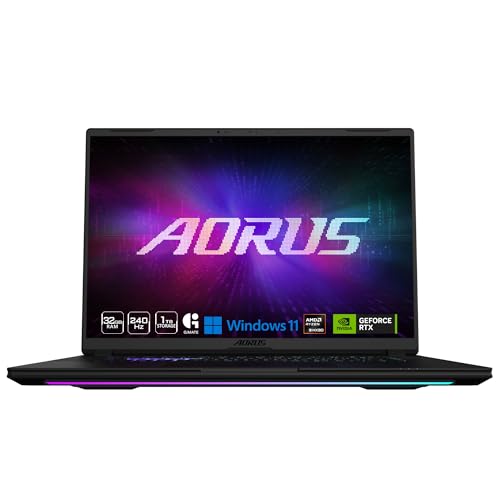
The AORUS 17X, model code AZG, is the only 17X in this guide and the largest laptop of the six, with a 17.3-inch screen. It carries an RTX 4090 graphics card, a QHD display at 240Hz, and an i9-14900HX processor. The 17X is the desktop replacement of this guide: the biggest screen, a graphics card from the tier below the flagship, and a processor built for heavy work. A buyer who wants a laptop that stays on a desk and replaces a desktop should start here.
The graphics card deserves a plain statement, because poor-quality roundups have attached the wrong figure to this machine. The 17X AZG carries an RTX 4090 — not a 5090, and not any other card. A buyer should match the AZG code and the 4090 figure on the listing, and walk away from any listing that claims a 5090 for this model, because that claim comes from roundups that did not check the maker documentation. The QHD screen at 240Hz is the other half of the machine’s character: a large, quick panel that suits a buyer who plays at high settings and wants the screen to keep up. The i9-14900HX processor is the strongest HX chip in this guide, which suits a buyer who runs heavy software alongside games.
The desk setup deserves a word, because a 17-inch laptop rewards a proper place to sit. Give the machine a desk with room for the screen to open fully, a power outlet nearby, and space for a mouse, and it will serve as a desktop in every way that matters. The 240Hz screen is quick enough for competitive play, and the QHD resolution gives games and work alike more detail than a plain 1080p panel. The i9 processor handles heavy software without fuss, which suits a buyer who runs demanding programs alongside games. The 17X is the pick for a buyer who wants a large machine that stays put, and the desk is part of the purchase as surely as the laptop itself.
Strengths: The screen size is the clearest advantage in this guide: 17.3 inches is the largest display of the six, and it gives games and work alike more room than any other pick. The RTX 4090 is the second-strongest graphics card in this guide, behind only the 5080, which gives the machine the strength for demanding games at high settings. The i9-14900HX processor is the strongest HX chip here, so the machine is not held back on processor-heavy work. The 240Hz refresh keeps motion smooth at high frame rates. A buyer who wants a desktop replacement will find this the most capable large laptop in the guide.
Trade-offs: A 17.3-inch laptop is not a machine to carry every day, and a buyer who travels with the laptop should look at the 15-inch pair instead. The screen is QHD rather than WQXGA, so a buyer who wants the most detail per inch should compare the 16-inch picks before choosing. The graphics card is a 4090 rather than a 5080, so a buyer who wants the very strongest card should look at the Master 16 instead. None of these are faults; they are the costs of a large desktop replacement, and a buyer who plans to leave the machine on a desk will see the exchange as fair.
Who it suits: This laptop suits a buyer who wants the largest screen in this guide and plans to leave the machine on a desk, using it as a desktop replacement. It suits a home office, a gaming room, or a buyer who plays at high settings and wants the screen to match the graphics card. A buyer who carries the machine daily should look at the 15-inch pair instead, because this pick is built for a desk and knows it.
For the largest screen in this guide, with an RTX 4090 matched to the AZG SKU, check price on Amazon.
Check price on Amazon: AORUS 17X (AZG)

AORUS 15 (BSF)
The AORUS 15, model code BSF, is the only 15 in this guide and the most portable pick of the six, with a 15.6-inch screen. It carries an RTX 4070 graphics card, a QHD display at 165Hz, and an i7-13700H processor. The 15 is the travel machine of this guide: the smallest screen, the most portable character, and the longest battery life of the six. A buyer who carries the laptop every day and wants an AORUS machine that travels well should start here.
The battery life is the detail that sets this pick apart, because it is the longest of the six. A buyer who works away from an outlet — in a library, on a train, in a café — will find the machine lasts longer between charges than its siblings. The RTX 4070 is the same graphics card as the 16X and the 15X, which means the machine plays at high settings despite its smaller size. The i7-13700H is a strong processor for games and ordinary work, even though it sits below the HX chips in the 16X and the 15X. Match the code before paying. The BSF is a distinct SKU, and the listing must show the full code, because the 15 in other configurations — the BKF with an RTX 4060, the BMF with an RTX 4050 — is a different machine.
The battery habits of a buyer matter more for this pick than for any other in the guide, because the 15 is the machine that travels. Keep the brightness moderate, close the apps that are not in use, and the machine will last longer between charges than its siblings. The RTX 4070 plays at high settings, which means the machine does not trade graphics strength for portability — a rare combination in this range. The 15.6-inch screen fits in bags that the 16-inch and 17-inch machines do not, which matters for a buyer who carries the laptop every day. The 15 is the pick for a buyer who wants an AORUS machine that goes everywhere, and the battery life is the feature that makes the travel possible.
Strengths: The portability is the clearest advantage in this guide: the smallest screen of the six, the most compact body, and the longest battery life. The RTX 4070 is a capable graphics card that plays at high settings, and the QHD screen at 165Hz is bright and quick. The i7-13700H processor handles games and ordinary work without fuss. The 15.6-inch size is the most portable of the range, which keeps the machine easy to carry in a bag. A buyer who travels with the laptop will find this the most practical pick in the guide.
Trade-offs: The screen is the smallest of the six, so a buyer who wants a large display for games should look at the 16-inch or 17-inch picks instead. The processor is an i7 H chip rather than an HX chip, so a buyer who does heavy processor work should weigh the difference against the 15X. The graphics card is a 4070 rather than a 5070 or 5080, so a buyer who plays at the very highest settings will find the Elite and the Master stronger. None of these are faults; they are the costs of the most portable pick, and a buyer who values portability will accept the exchange as fair.
Who it suits: This laptop suits a buyer who carries the machine every day and wants the longest battery life in this guide, with a graphics card strong enough to play at high settings. It suits a student, a traveller, or a buyer who works away from an outlet and plays games in between. A buyer who wants the largest screen or the strongest processor should look at the 17X or the 15X instead, because this pick is built for travel and knows it.
For the most portable AORUS laptop, with the longest battery life of the six, check price on Amazon.
Check price on Amazon: AORUS 15 (BSF)

AORUS 15X
The AORUS 15X, model code ASF, is the only 15X in this guide and the strongest processor in the 15-inch group. It carries an RTX 4070 graphics card, a QHD display at 165Hz, an i9-13900HX processor, and DDR5-5600 memory. The 15X is the compact powerhouse of this guide: the same 15.6-inch screen as the 15, with a processor from the tier above and memory to match. A buyer who wants a small laptop with a strong processor should start here.
The processor is the reason this pick exists. The i9-13900HX is an HX chip, built for heavy work, and it sits above the i7-13700H in the 15 by a clear margin. A buyer who runs demanding software — video editing, code compiling, heavy multitasking — alongside games will feel the difference every day. The DDR5-5600 memory is the other half of the machine’s character: quick memory that keeps the processor fed, which matters most when the machine is working hard. The RTX 4070 is the same graphics card as the 15 and the 16X, which means the machine plays at high settings, and the QHD screen at 165Hz is bright and quick. Look at the code, not just the name. The ASF is a distinct SKU, and the full code is what separates this machine from the 15 BSF with its i7 H chip.
The processor-heavy work is the reason this pick exists, and a buyer should understand what the i9 HX chip does before choosing it. Video editing, code compiling, and heavy multitasking all lean on the processor, and the i9-13900HX handles them without the slowdowns that a weaker chip would show. The DDR5-5600 memory keeps the processor fed, which matters most when the machine is working hard on more than one task at once. The graphics card is the same 4070 as the 15, which means the machine plays at high settings, and the QHD screen is bright and quick. The 15X is the pick for a buyer who works hard and plays in between, and the processor is the feature that makes the work possible.
Strengths: The processor is the clearest advantage in this guide: the i9-13900HX is the strongest chip in the 15-inch group, and it handles heavy work alongside games without slowing down. The DDR5-5600 memory is quick and generous, which keeps the machine smooth under a heavy load. The RTX 4070 handles high settings with ease, and the QHD panel at 165Hz stays bright and quick through long sessions. The 15.6-inch size is the most portable of the range, which keeps the machine easy to carry. A buyer who wants a small laptop with a strong processor will find this the most capable compact pick in the guide.
Trade-offs: The 15.6-inch display is the most compact here, so a buyer who wants a big screen for games should consider the 16-inch or 17-inch machines instead. The graphics card sits a tier below the 5070 and two below the 5080, so a buyer who chases the top settings will find the Elite and the Master stronger. The battery life is shorter than the 15’s, because a stronger processor draws more power, so a buyer who works away from an outlet all day should weigh the difference. None of these are faults; they are the costs of a compact powerhouse, and a buyer who values the processor will judge the exchange fair.
Who it suits: This laptop suits a buyer who wants a 15-inch machine with the strongest processor in the group, for heavy work alongside games. It suits a buyer who edits, compiles, or multitasks hard and plays in between, and who carries the machine daily. A buyer who wants the longest battery life should look at the 15 instead, because this pick trades battery for processor strength and is honest about the trade.
For the strongest processor in the 15-inch group, with DDR5-5600 memory in a portable body, check price on Amazon.
Check price on Amazon: AORUS 15X (ASF)
How to choose between the closest pairs
The Master 16 and the Elite 16 are the two top-tier machines, and the choice between them turns on the screen against the price. The Master has the OLED panel and the 5080; the Elite has the IPS panel and the 5070; the processor is the same Core Ultra 9 275HX in both. A buyer who edits video or photos should take the Master, because the OLED screen changes the colour of everything on it. A buyer who plays games and does ordinary work should take the Elite, because the IPS screen is durable and bright and the processor is the same. The price gap between the two buys the screen and one graphics tier, and a buyer who does not need either should keep the money.
The 15 and the 15X are the compact pair, and the choice between them turns on the battery against the processor. The 15 lasts longer between charges, because its i7 H chip draws less power than the i9 HX chip in the 15X. The 15X works harder, because its i9-13900HX handles heavy software that the i7-13700H would slow down on. A buyer who works away from an outlet all day should take the 15, because the battery is the feature that makes the travel possible. A buyer who edits, compiles, or multitasks hard should take the 15X, because the processor is the feature that makes the work possible. The screen and the graphics card are the same in both, so the choice is a clean one: battery or processor.
The 16X is the value comparison in this guide, and the choice between it and the Elite comes down to the memory against the graphics. The 16X carries 32GB of memory, which keeps the machine smooth under a heavy load of apps and tabs. The Elite carries the 5070, which plays at a higher tier than the 4070 in the 16X. A buyer who runs many apps at once should take the 16X, because the memory is the feature that keeps the machine smooth. A buyer who plays at the highest settings should take the Elite, because the graphics card is the feature that sets the ceiling.
Side by side
The table below puts the six laptops on the same axes, so a buyer can compare the graphics card, the screen, and the processor of each machine in one look. The gaps look narrow in the table and wide in daily use: the graphics tier alone splits the six into three groups, and the screen size splits them again.
| Model | Graphics | Screen | Processor | Standout |
|---|---|---|---|---|
| MASTER 16 (BYH) | RTX 5080 | 16-inch OLED, WQXGA, 240Hz | Core Ultra 9 275HX | Flagship; only OLED |
| ELITE 16 (AE6H) | RTX 5070 | 16-inch IPS, WQXGA, 165Hz | Core Ultra 9 275HX | Only RTX 5070 |
| 16X (ASG) | RTX 4070 | 16-inch IPS, WQXGA, 165Hz | i7-14650HX, 32GB | Most affordable 16-inch |
| 17X (AZG) | RTX 4090 | 17.3-inch QHD, 240Hz | i9-14900HX | Largest screen |
| 15 (BSF) | RTX 4070 | 15.6-inch QHD, 165Hz | i7-13700H | Most portable; longest battery |
| 15X (ASF) | RTX 4070 | 15.6-inch QHD, 165Hz | i9-13900HX, DDR5-5600 | Strongest 15-inch processor |
Two rows in the table are worth a closer look. The Master 16 is the only pick with an OLED screen and the only pick with a 5080, which makes it the flagship in every sense of the word. The 17X is the only pick with a 4090, and the AZG code with the 4090 figure is the detail a buyer should check first, because poor-quality roundups have attached a 5090 to this machine and that claim should not be believed. The rest of the table is a question of degree: the Elite is the balanced middle, the 16X is the value entry, and the 15 and the 15X are the compact pair with different processors.
Questions buyers ask
What is the difference between an RTX 4070, a 5070, and a 5080?
The three cards sit in three tiers, and the tier sets the ceiling for the games a laptop can play at high settings. The 5080 in the Master 16 is the strongest card in this guide, the 5070 in the Elite 16 sits in the middle, and the 4070 in the 16X, the 15, and the 15X is the capable entry tier. The 4090 in the 17X sits between the 5070 and the 5080 in strength, even though it comes from the generation before. A buyer who plays at high resolution or with demanding settings should choose the highest tier the budget allows; a buyer who plays at modest settings will find the 4070 more than enough.
Is the OLED screen worth it?
The OLED screen in the Master 16 shows deeper blacks and richer colours than the IPS screens in the other five picks, which matters most for a buyer who edits video or photos as well as playing games. For a buyer who plays only games, the IPS screens at 165Hz or 240Hz are bright, quick, and honest about colour, and the difference is smaller than the price gap suggests. A buyer who makes content should weigh the OLED screen before settling; a buyer who only plays should choose on graphics and size instead.
A second point about screens is worth adding. An OLED panel shows its advantage most in dark scenes and colourful work, where the deeper blacks and richer colours are easy to see. An IPS panel shows its advantage most in bright rooms and long sessions, where the brightness and the durability matter more than the colour depth. A buyer who works in a bright office should lean toward IPS, while a buyer who edits in a dim room should lean toward OLED.
Which AORUS laptop is best for carrying every day?
The AORUS 15 is the most portable pick in this guide, with the smallest screen, the most compact body, and the longest battery life of the six. The 15X shares the same 15.6-inch screen but trades some battery life for a stronger processor, so a buyer who works away from an outlet all day should choose the 15, while a buyer who needs the processor should choose the 15X. The 16-inch picks are the middle of the range, and the 17X is a desktop replacement that a buyer should not plan to carry daily.
Can I upgrade the memory or storage later?
The 16X already carries 32GB of memory, and the 15X carries DDR5-5600 memory, which gives both machines room for heavy multitasking from the start. A buyer who plans to upgrade should check the maker documentation for the exact model before buying, because the upgrade path differs by model and by SKU, and a listing that does not state the memory configuration should not be taken at face value. The graphics card and the processor cannot be upgraded in any of these laptops, so a buyer should choose those two parts as if they were permanent — because they are.
A second point about upgrades is worth adding. A buyer who plans to add memory or storage later should buy the machine with the upgrade in mind, because the upgrade path is part of the purchase. Look at the maker page for the exact model before paying, and make sure the listing spells out the memory and storage figures. A listing that stays silent on those figures should not be taken at face value, and a buyer should ask the seller for the exact numbers before paying. The memory and the storage are the parts a buyer can change later, so they deserve a check now, while the purchase is still open.
How is AORUS different from Gigabyte?
AORUS is the gaming sub-brand that Gigabyte puts on its own laptops, while Gigabyte-branded laptops carry the Gigabyte name. The two brands share a parent company, but they are different product lines with different models, and the Gigabyte-branded machines have their own guide on another site. A buyer who wants an AORUS machine should match the AORUS name and the model code on the listing, and a buyer who wants a Gigabyte-branded machine should look at the Gigabyte guide instead. The two guides together cover the whole range, with no pick in common.
Of the six, the Master 16 is the machine that shows what AORUS can do at its best — but the right AORUS laptop is the one whose graphics, screen, and size match the games its owner actually plays, in the place where it will actually sit.