Disclosure: This article contains affiliate links. If you buy through links on this page, we may earn an affiliate commission at no extra cost to you.
Why Alienware still earns its place on a gaming desk
Alienware has been building gaming machines longer than most of its rivals have existed, and that history shows in the details that matter once a laptop leaves the spec sheet and lands on your desk. The current lineup is split into two families with genuinely different personalities. The m Series is the performance-first line: thicker chassis, bigger cooling hardware, higher-wattage graphics, and screens that go up to 18 inches. The x Series is the design-first line: slimmer aluminum bodies, more refined finishes, and a focus on machines you would not be embarrassed to open in a client meeting, while still carrying serious graphics hardware. Sitting underneath both is Dell’s mainstream G Series, which borrows some of the same components and software at a softer price tier, and which we include once in this roundup as an honest alternative for buyers who want the Dell ecosystem without the Alienware premium.
Choosing between these machines is less about finding a “best” laptop and more about matching three variables: the graphics tier your games actually need, the display you will stare at for years, and the weight you are willing to live with. An 18-inch m18 with a flagship GPU is a desktop replacement that happens to have a hinge. A 14-inch x14 is a travel machine that happens to play modern games well. Both are legitimate answers, but they are answers to different questions, and this guide is organized to help you figure out which question you are asking.
Every model below is a real, currently recognizable configuration family from Alienware’s recent generations. Specs vary by configuration — Alienware sells most of these machines with several CPU, GPU, memory, and panel options — so treat the guidance here as a map of what each chassis does well rather than a promise about one exact SKU. Where a detail matters, we say which configuration it applies to.
In this guide
The short list
If you are in a hurry, here is the shape of the lineup. The m18 R2 is the flagship: the biggest screen, the highest GPU wattages, the most cooling headroom. The m16 R2 is the balanced one, redesigned with a stealthier look and a footprint that actually fits in a backpack. The x16 R2 is the premium thin machine, with the best materials and keyboard options in the range. The x14 R2 is the portable outlier, a 14-inch laptop that still games credibly. The m17 R5 represents the previous generation’s larger m chassis and the AMD Advantage route, often the smart buy when it is discounted. And the Dell G16 is the value play from the same parent company — not an Alienware, and we flag it as such — for buyers whose budget stops short of the badge.
Quick comparison
| Model | Screen | GPU range | Character | Weight class | Best suited to |
|---|---|---|---|---|---|
| Alienware m18 R2 | 18-inch QHD+ or FHD+ | Upper tier, up to flagship | Desktop replacement | Heaviest in the range | Stationary setups, maximum frame rates |
| Alienware m16 R2 | 16-inch QHD+ | Mid to upper tier | Balanced all-rounder | Mid-weight | One-laptop households, mixed work and play |
| Alienware x16 R2 | 16-inch QHD+ | Upper tier | Premium thin and light (for its class) | Lighter than m16 | Buyers who want design and power together |
| Alienware x14 R2 | 14-inch QHD+ | Mid tier | Ultraportable gaming | Lightest Alienware here | Frequent travelers, students, commuters |
| Alienware m17 R5 | 17.3-inch, several panel options | Mid to upper tier, AMD options | Previous-generation big chassis | Heavy | Discount hunters, AMD fans |
| Dell G16 (7630) | 16-inch QHD+ | Mid tier | Mainstream value (not Alienware) | Mid-weight | Tighter budgets inside the Dell ecosystem |
Two patterns in that table are worth noticing before we go deeper. First, screen size and weight track together almost perfectly in this lineup, so your portability decision is really a screen decision. Second, the GPU ranges overlap heavily — you can buy an m16 and an x16 with the same graphics chip and get meaningfully different experiences, because chassis thickness determines how much power that chip is allowed to draw and how quietly it can do it. That is the central trade-off in Alienware’s current catalog, and it runs through every pick below.
What to look for in an Alienware gaming laptop
GPU tiers decide more than anything else
The graphics processor is the single most consequential choice in a gaming laptop, and Alienware’s lineup spans NVIDIA’s GeForce RTX 40-series from the RTX 4050 and 4060 at the entry end through the 4070 in the middle, the 4080 in the high tier, and the 4090 at the flagship level. The practical differences are straightforward. The 4060 is the sweet spot for 1080p and lighter QHD play, especially with DLSS upscaling doing the heavy lifting in supported titles. The 4070 adds headroom for native QHD in most games at high settings. The 4080 is where high-refresh QHD and entry-level 4K-on-an-external-monitor play become comfortable, and the 4090 is the no-compromises option for ray tracing at native resolution, content creation with heavy GPU acceleration, and buyers who intend to keep the machine for five or more years.
Just as important as the chip name is its power limit, often listed as TGP. A laptop GPU’s performance depends heavily on how many watts the chassis feeds it, and the same RTX 4070 can behave like two different cards in a thin chassis versus a thick one. This is precisely where Alienware’s two families diverge: the m Series generally allows higher sustained wattage, while the x Series trades a slice of that ceiling for thinness. When you compare configurations, compare the wattage alongside the chip name, and be suspicious of any listing that hides it.
Displays: QHD+ is the natural resolution for this lineup
Most current Alienware laptops are built around 16:10 QHD+ panels (2560 × 1600), and that is not an accident. QHD+ is sharp enough that individual pixels disappear at normal viewing distances, it suits productivity work better than 16:9, and it is a resolution the mid and upper GPU tiers can actually drive at high frame rates. Refresh rates on these panels run from 165Hz up to 240Hz, with fast response times and, on many configurations, NVIDIA G-Sync and Advanced Optimus so the machine can switch between integrated and discrete graphics without a reboot.
The exceptions are worth knowing. The m18 offers an FHD+ (1920 × 1200) panel with an extremely high refresh rate aimed at competitive esports players who value frame rate over pixel density, alongside its QHD+ option. The m17 R5 generation offered a wider spread, including UHD options on some configurations, which suit creators more than gamers. Whichever model you choose, check three display details in the configuration: refresh rate, whether the panel covers a wide color gamut if you do photo or video work, and brightness, because a dim panel is the one compromise you will notice every single day.
Cryo-Tech cooling and the noise question
Alienware’s Cryo-Tech is the umbrella name for its cooling architecture: vapor chamber designs on the higher-end models, multiple heat pipes, dual fans with thin blades, and thermal interface materials that vary by tier — Element 31 gallium-silicone compound on flagship configurations, more conventional compounds lower down. The engineering goal is sustained performance: a gaming laptop that boosts hard for ninety seconds and then throttles is worse than one that holds a slightly lower clock indefinitely, and the m Series’ thicker chassis exist largely to give this system room to breathe.
Cooling also determines noise, and noise determines where you can actually use the machine. Under full gaming load, every laptop in this roundup is audible — that is physics, not a flaw — but the character differs. Larger chassis with bigger fans tend to produce a lower, less intrusive whoosh, while thin machines spin smaller fans faster and produce a higher-pitched note. Alienware Command Center offers thermal profiles from Quiet through Balanced to Performance and Overdrive-style modes, and the honest advice is to live in Balanced for everyday gaming: the frame rate cost versus the loudest mode is usually small, and the quality-of-life gain is large. If you play in shared spaces, a good headset matters more than any fan curve.
Weight is a lifestyle specification
Spec sheets list weight almost as an afterthought, but with gaming laptops it shapes your relationship with the machine. The m18 R2 sits at the top of the range in every sense — it is a machine that moves between rooms, not between cities, and its large power adapter adds meaningfully to the carry total. The x14 R2, at the other extreme, slips into bags that would reject every other laptop in this article and can charge over USB-C in a pinch, which changes how you travel with it. The 16-inch machines split the difference and are the realistic choice for people who carry their laptop daily but still want a big screen at home.
Do not forget the adapter when you do this math. High-wattage gaming laptops ship with substantial power bricks, and the all-in travel weight of an m Series machine plus its adapter can surprise buyers who only read the laptop’s own figure. If your routine involves a train, a campus, or a carry-on, weigh the whole kit in your head before you fall in love with an 18-inch screen.
Keyboards, ports, and the details you touch daily
Alienware offers per-key RGB mechanical keyboards with CherryMX ultra-low-profile switches on select x Series and m Series configurations, and they are genuinely good — crisp, tactile, and a clear step above the membrane boards on cheaper machines. Standard keyboards in the lineup are fine rather than memorable. On ports, the bigger chassis are generous: multiple USB-A and USB-C ports, HDMI output, Ethernet on the models that still include it, and full-size SD card readers on the m18, which creators will appreciate. Rear-facing ports on several models keep cables off your mouse area, a small design decision you will appreciate every day you use a desk setup. Wi-Fi 6E or better and Bluetooth are standard across the range, and webcams sit at 1080p on most current configurations — adequate for calls, unremarkable for streaming.
Processors: HX muscle versus Ultra efficiency
Alienware’s current machines split between two Intel philosophies. The m18 uses HX-series processors, which are essentially desktop-class chips adapted for laptops: many cores, high sustained power limits, and performance that suits CPU-heavy strategy games, simulation titles, compiling, and streaming while you play. The m16 R2 and x Series use Core Ultra processors, which trade some of that all-out multi-core muscle for efficiency, integrated AI acceleration hardware, and better manners on battery. For gaming specifically, both families are more than adequate — modern games at QHD+ are GPU-bound far more often than CPU-bound — so let the choice follow your other work. Video editors, developers, and heavy multitaskers benefit from the HX chips; everyone else will find the Ultra machines quieter, cooler in light use, and easier to live with away from the desk.
Memory and storage: the two specs to get right at purchase
Sixteen gigabytes of RAM is the realistic floor for a gaming laptop bought today, and 32GB is the comfortable recommendation for anyone who keeps a browser, a voice chat, and a game open at once — which is to say, most players. The good news is that the m Series generally lets you upgrade memory later with standard SO-DIMM modules, so a 16GB configuration is not a life sentence. The x Series, and the x14 especially, should be configured closer to your long-term needs at checkout, because thin designs are less forgiving about after-the-fact upgrades.
Storage follows the same logic. A 1TB SSD is the sensible starting point in an era when a single flagship game can claim a tenth of that, and the m Series’ extra M.2 slots make adding a second drive later a realistic afternoon project rather than a replacement decision. Faster PCIe Gen4 drives are standard across the range, load times are a solved problem at this level, and the real question is capacity discipline: buy for the library you have plus the two or three big releases you know are coming, and you will not be deleting games to make room for patches.
Reading the price tiers without a price tag
Because configurations shift constantly, the useful way to think about this lineup is in tiers of commitment rather than numbers. The G16 anchors the accessible tier: real QHD gaming, mainstream materials. The m16 R2 and x14 R2 occupy the middle, where most of the performance most people need lives, differentiated by whether you value screen size or portability. The x16 R2 and well-configured m18 models form the premium tier, where you are paying for flagship graphics, the best displays and keyboards, and materials that feel special every time you open the lid. Money spent climbing GPU tiers buys measurable frame rates; money spent climbing from m to x buys daily pleasure and portability. Both are legitimate purchases — just know which one you are making.
best laptops under 400 for gaming
The picks in detail

Alienware m18 R2 — the flagship desktop replacement
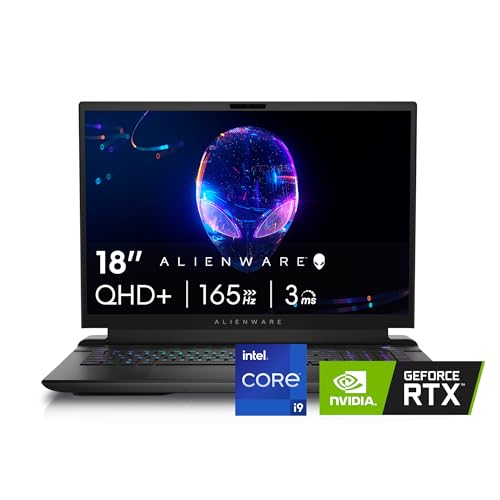
The m18 R2 is what happens when Alienware stops compromising. The 18-inch display gives you a genuinely desktop-like canvas, the chassis has room for the highest-wattage versions of NVIDIA’s flagship GPUs, and the cooling system has the volume and fan size to sustain that hardware through long sessions. Configurations pair Intel’s high-end Core i9 HX-series processors with graphics up to the RTX 4090, memory and storage capacities scale well beyond what thinner machines offer, and the whole package is aimed at buyers who would otherwise be pricing a desktop tower and a monitor.
On screen choices, the m18 offers two distinct philosophies. The QHD+ 165Hz panel is the sensible default: sharp, fast enough for all but the most serious competitive play, and well matched to what even a 4090 can deliver in demanding titles. The FHD+ 480Hz option exists for esports specialists who play competitive shooters at low settings and want every frame the hardware can produce; for everyone else it trades away too much sharpness. Either way, the sheer size of the panel changes the experience — strategy games, flight sims, and sprawling RPGs feel materially more immersive at 18 inches, and split-screen productivity work stops feeling cramped.
Strengths: the highest sustained GPU performance in the Alienware laptop range; a big, immersive display with a genuine esports alternative; extensive ports including a full-size SD reader; roomy keyboard deck with numpad space; strong upgradeability for memory and storage. Trade-offs: this is the heaviest machine here by a wide margin, the power adapter is correspondingly large, fan noise under full load is present even if it is lower-pitched than thin rivals, and flagship configurations sit in the premium tier of the entire gaming laptop market. It suits the buyer who has a desk, a good chair, and no intention of carrying their gaming PC anywhere — for that person, it is the most complete Alienware you can buy. Check the current configuration options and check price on Amazon.

Alienware m16 R2 — the balanced one most people should buy
The m16 R2 is the Alienware we would point most buyers toward, because it gives up the least. Its redesign trimmed the rear shelf that made the previous generation awkward in backpacks, added a Stealth Mode that tones down the lighting and fan behavior for professional settings, and kept the essentials intact: a 16-inch QHD+ 240Hz display, Intel Core Ultra processors, and graphics options running through the RTX 4060 and 4070 — the two tiers that make the most sense for QHD gaming in the real world.
The interesting thing about the m16 R2 is how it repositions the m Series. Earlier m16 models were unapologetically gamer-styled; this one can pass in an office, which matters for the large group of buyers who need one machine to be both their work laptop and their gaming rig. The performance story remains honest: the chassis is thick enough to feed its GPUs properly, the Cryo-Tech system holds clocks well in long sessions, and the 240Hz panel means the display will never be the bottleneck in fast games. What you give up versus the m18 is the flagship GPU tier and the giant screen; what you give up versus the x16 is some thinness and material flourish.
Strengths: the best balance of performance, size, and price tier in the lineup; an excellent QHD+ 240Hz display; a more professional design than its predecessor; Stealth Mode for shared and work spaces; strong port selection. Trade-offs: no RTX 4080 or 4090 option, so it is not the choice for native-resolution ray tracing maximalists; it is still a mid-weight machine with a substantial adapter; the design, while cleaner, is less striking than the x Series. It suits the buyer who wants one high-quality laptop for everything and does not need the absolute top GPU tier. See the available configurations and check price on Amazon.
Availability note: the current listing for this pick is a renewed unit, professionally inspected and restored rather than factory-new.

Alienware x16 R2 — premium design, serious power
The x16 R2 exists for the buyer who refuses to choose between a beautiful laptop and a fast one. Its all-metal chassis in Lunar Silver is thinner and lighter than the m16’s, the fit and finish are a clear step up, and it offers the lineup’s most desirable options list: a CherryMX ultra-low-profile mechanical keyboard with per-key RGB, a glass touchpad with haptic feedback on configured models, and graphics running up to the RTX 4090 — remarkable hardware to find in a chassis this slim. The 16-inch QHD+ panel runs at up to 240Hz, and Intel Core Ultra 9 processors handle the CPU side.
The physics of thinness still apply. The x16’s GPUs operate within a slimmer cooling envelope than the m18’s, so in sustained, fully-loaded workloads the big m chassis keeps an edge, and the x16’s fans work harder to stay in the same neighborhood. In practice, for gaming sessions of normal length at QHD+, the experience is excellent and the difference is smaller than the spec-sheet anxiety suggests — but buyers who run overnight renders or marathon sessions at maximum settings should understand which side of the trade they are on. What the x16 gives back is daily pleasure: it looks and feels like a premium object, it travels noticeably easier than the m Series, and its keyboard is the best in this roundup.
Strengths: the finest materials and finish in the lineup; optional mechanical keyboard that genuinely improves typing and gaming feel; flagship GPU availability in a slim chassis; strong QHD+ high-refresh display; the Alienware most likely to be complimented by non-gamers. Trade-offs: premium-tier pricing, especially with the desirable options ticked; slimmer cooling means slightly lower sustained ceilings and more fan presence than the m18; fewer and less varied ports than the big chassis. It suits the design-conscious buyer with a healthy budget who wants one machine for the boardroom and the battlestation alike. Compare the trim levels and check price on Amazon.

Alienware x14 R2 — the Alienware that actually travels
Every lineup has a machine that breaks the pattern, and in Alienware’s range it is the x14 R2. At 14 inches and roughly the weight of a mainstream ultrabook, it is the Alienware you can throw in a messenger bag, use on a train tray table, and charge from USB-C when its adapter is in another room. Yet it remains a real gaming laptop: a QHD+ 165Hz display, Intel Core i7 processing, and RTX 4060 or 4070 graphics in a chassis barely thicker than the port selection requires.
Expectations need calibrating rather than lowering. The x14’s GPUs run at modest wattages appropriate to its size, so its natural habitat is 1080p-to-QHD gaming with DLSS enabled, esports titles at high frame rates, and slightly older or less demanding AAA games at sensible settings — a description that covers most of what most people actually play. Thermals are well managed for the class, but a 14-inch chassis under load will make itself heard in a quiet room, and the smaller screen asks you to sit closer or scale the interface up. In exchange, you get the only Alienware in this roundup whose portability is a headline feature rather than an apology.
Strengths: genuinely portable at a size and weight no other Alienware matches; USB-C charging flexibility; a sharp, fast 14-inch QHD+ panel; build quality well above typical thin gaming laptops; ideal second machine for desktop owners. Trade-offs: mid-tier GPU ceilings mean it is not a native-QHD ultra-settings machine; smaller screen is a real compromise for strategy and productivity work; premium pricing for its performance class, because miniaturization costs money. It suits frequent travelers, students moving between classes and dorms, and anyone whose gaming happens in more places than one desk. Look at the current configurations and check price on Amazon.
best lightweight laptops for travel

Alienware m17 R5 — the previous-generation value route, AMD included
The m17 R5 represents the generation before the current 16- and 18-inch redesigns, and that is exactly why it earns its place here. Previous-generation Alienware hardware has a habit of becoming the smart buy: the chassis is proven, the reviews and long-term reports are all in, and pricing softens as newer models take the spotlight. The m17 R5 pairs Ryzen 6000-series processors with either NVIDIA RTX 30-series graphics or, in its AMD Advantage configurations, an all-AMD setup headlined by the Radeon RX 6850M XT — a configuration that delivered excellent rasterized gaming performance and still holds up well in modern titles.
The 17.3-inch display came in several flavors, including fast FHD options for competitive play, QHD panels that suit most buyers best, and higher-resolution variants aimed at creators, so a used or remaining-stock m17 R5 demands a closer read of its exact panel than the current models do. The chassis is unapologetically large, with the rear thermal shelf design of its era, generous ports, and cooling built for sustained loads. What you give up against the R2 generation is the newer 16:10 QHD+ standard, the latest GPU features such as DLSS 3 frame generation on NVIDIA models (the RTX 30-series supports DLSS upscaling but not frame generation), and a degree of future-proofing.
Strengths: strong performance per dollar when discounted; the AMD Advantage configuration is a distinctive, capable option; big screen and big cooling; a well-documented machine with no surprises left. Trade-offs: previous-generation platform and panels; heavy, with the older shelf-style design; RTX 30-series models lack frame generation; availability comes and goes as stock clears. It suits the patient buyer who watches for a deal and values proven hardware over having the newest badge. When it appears in stock, check its exact configuration carefully and check price on Amazon.

Dell G16 (7630) — the same-family alternative that is not an Alienware
One clarification up front: the G16 is a Dell, not an Alienware, and we include it because a meaningful number of shoppers start their search with Alienware, discover the premium tier is beyond their budget, and are better served by Dell’s mainstream gaming line than by a compromised no-name alternative. The G16 (7630) offers a 16-inch QHD+ display at up to 240Hz, Intel Core i7 processors, and RTX 4050, 4060, or 4070 graphics, in a chassis that borrows Alienware’s thermal thinking — its design language and cooling layout echo the m Series it sits beneath.
The differences are the ones you would predict. Materials step down from the x Series’ machined metal to more conventional construction, the lighting and design flourishes are restrained, keyboard and touchpad feel are a tier below, and maximum GPU configurations stop at the mid tier. What does not step down is the software ecosystem: Alienware Command Center runs the G16’s thermal and performance profiles too, so the ownership experience — driver updates, profile switching, system monitoring — feels familiar. For gaming at QHD with DLSS, an RTX 4060 G16 delivers the great majority of the real-world experience of its pricier siblings.
Strengths: the most accessible price tier in this roundup while keeping a QHD+ high-refresh screen; solid mid-tier GPU options; thermal design inherited from the Alienware side of the family; Command Center software parity. Trade-offs: it does not carry Alienware design, materials, or the flagship GPU options; heavier and plainer than its price rivals from some competing brands; speakers and webcam are unremarkable. It suits the budget-conscious buyer who wants Dell support and a big fast screen more than they want the Alienware badge. See how the configurations stack up and check price on Amazon.
How to configure each model: where to spend, where to save
Alienware sells every machine in this roundup in several configurations, and the difference between a smart build and a wasteful one is knowing which upgrades compound and which merely decorate. The rules generalize well. Spend first on the GPU, because it is the one component you can never upgrade in a laptop and it defines the machine’s ceiling for its entire life. Spend second on the display, because it is the component you interact with constantly and it is equally permanent. Spend third on storage capacity, because it is cheap at purchase and annoying later. Be more conservative with processor upgrades within the same family — the gaming difference between adjacent CPU tiers is small — and with memory beyond 32GB unless your work genuinely uses it.
Applied to the m18 R2, that logic says: choose the GPU tier for the next five years, take the QHD+ panel unless esports is your profession, and let the generous expansion slots carry your storage growth. On the m16 R2, the RTX 4070 configuration is the one we would build for ourselves — it is the point where QHD+ performance, the 240Hz screen, and the mid-tier price all line up — while the 4060 build suits buyers who mostly play competitive titles. For the x16 R2, the mechanical keyboard is the option with the highest daily return, and the flagship GPU makes sense precisely because this chassis is bought as a long-term premium object. On the x14 R2, configure memory generously at purchase and favor the 4070 if your games lean AAA, because neither can be revisited. For the m17 R5, the configuration discipline matters most of all: verify the exact panel refresh rate and resolution, the exact GPU, and the memory configuration in the specific unit, since that generation’s menu was wide and the difference between its best and weakest builds is larger than the model name suggests. And on the G16, the 4060 build is the value peak — the 4070 upgrade is worthwhile, but resist spending G16 money up into m16 territory, because at that point the m16 itself is the better buy.
One more configuration habit worth adopting across the whole lineup: check what is soldered and what is socketed on the specific model you are buying, and check the wattage of the specific GPU configuration rather than assuming it from the chip name. Five minutes with the configuration page and the model’s support documentation will tell you more about the machine you will actually own than an hour of comparing headline specs.
GPU tiers in practice: matching the chip to your games
Abstract tiers become clearer when you attach them to the games people actually play. Competitive titles — the shooters, MOBAs, and battle royales that dominate playtime statistics — are deliberately engineered to run on modest hardware, and everything in this roundup, x14 included, will drive them at high frame rates on the panels offered. If your library leans that way, your decision should be made on screen size and weight, not graphics silicon, because the GPU will not be your bottleneck.
Modern single-player AAA games are the opposite case. Ray tracing, dense open worlds, and unoptimized launch builds can humble any laptop GPU, and this is where the tiers earn their keep. At the 4060 level, expect to use DLSS Quality or Balanced modes and high (not ultra) settings at QHD — an experience that still looks excellent. The 4070 buys you more native-resolution play and more generous settings. The 4080 is the point where ray tracing at QHD stops being a negotiation, and the 4090 is for buyers who intend to enable everything, possibly on an external 4K monitor, and not think about settings menus for years. Creators should read the same tiers through a different lens: video export, 3D rendering, and AI-assisted workloads scale with GPU memory and raw throughput, which is another argument for the upper tiers if the laptop doubles as a work machine.
One generation note for m17 R5 shoppers: RTX 30-series cards support DLSS upscaling but not the frame generation added with the 40-series, and AMD’s RX 6850M XT relies on FSR for its upscaling path. Both remain effective — upscaling quality matters more than frame generation for most players — but it is a real feature difference worth knowing before you choose the value route.
Living with the thermals: heat, noise, and where you play
Every gaming laptop is a negotiation between performance, heat, and noise, and Alienware’s Cryo-Tech systems give you more control over that negotiation than most. The thermal profiles in Command Center are not marketing garnish: Quiet mode meaningfully caps fan speed and power for late-night or shared-room play, Balanced is the right default for almost everyone, and the Performance modes exist for benchmarks and the most demanding scenes rather than everyday use. Learning to switch profiles per situation is the single easiest quality-of-life upgrade available to an Alienware owner, and it costs nothing.
Placement matters too. These machines intake air from underneath and exhaust it out the back and sides, so a laptop stand that lifts the rear of the chassis genuinely helps sustained performance, and soft surfaces like beds and couches are the enemy of any model in this roundup. The m Series’ rear exhausts have a second benefit: hot air goes behind the machine rather than across your mouse hand. Over months and years, dust is the silent variable — fan noise that creeps upward over a year of ownership usually means the intakes and fans want a careful clean with compressed air, a maintenance ritual worth putting on your calendar regardless of which model you choose.
Ownership details: software, upgrades, battery, and your desk
Alienware Command Center is the control hub for performance profiles, AlienFX lighting, and game library management across the lineup, including the G16. Its recent versions are cleaner than the software’s earlier reputation suggests, and per-game profiles — quiet settings for a strategy title, full performance for a shooter — are the feature owners actually use. Dell’s update cadence for BIOS and drivers is steady, and keeping the BIOS current matters on gaming laptops because fan curves and power tables are refined over a model’s life.
On upgrades, the m Series is the friendliest: memory and storage are typically serviceable with standard SO-DIMM and M.2 components, and the m18 in particular offers generous expansion room, which extends the useful life of a flagship purchase. The x Series trades some of that openness for thinness, so x16 and especially x14 buyers should configure memory and storage generously at purchase. Battery life across the range should be understood honestly: these are desktop-first machines. Expect a few hours of light work from the larger models and somewhat better from the x14, treat the battery as a bridge between outlets rather than a workday supply, and use the integrated-graphics modes and Stealth-style profiles to stretch it when you must.
Finally, think about the desk the laptop will live on. An external monitor turns the m18 or m16 into the heart of a setup that rivals a tower, the rear ports keep that setup tidy, and a single-cable dock can make the 16-inch machines genuinely one-plug workstations. Buyers planning that life should favor the models with the strongest port selections and the highest GPU tiers they can justify, because the laptop’s panel stops being the limiting factor the day a 4K monitor arrives.
Mistakes Alienware buyers commonly make
The most common mistake is buying the flagship GPU for a competitive-games library. If your year is shooters, MOBAs, and sports titles, an m18 with the top graphics tier is money spent on headroom you will never see, while its weight is a cost you will pay daily. The second mistake is the mirror image: buying the thinnest machine for a stationary setup, then living with fan noise and a small screen at a desk where neither compromise was necessary. The x14 and x16 earn their compromises through movement; if the laptop will not move, let the m Series’ size work for you instead of against you.
A third mistake is ignoring the adapter and the ecosystem. High-performance configurations need their full-wattage adapters to perform as advertised; running an m Series machine on a small USB-C charger is a recipe for wondering why frame rates disappoint. Similarly, buyers who plan a docked desk setup should confirm the ports and display outputs of their specific configuration before purchase rather than after the monitor arrives. Finally, there is the warranty question: gaming laptops run hot, get carried, and live hard lives, and Dell’s extended coverage and accidental-damage options are worth a deliberate decision — in either direction — rather than a default click at checkout. Read what is included, decide how long you will keep the machine, and choose accordingly.
Support, longevity, and resale
One understated reason to buy from this family at all is the infrastructure behind it. Dell’s support network, parts availability, and documentation for Alienware models are extensive and stay available for years after a model leaves the store, which matters for machines designed to be kept half a decade. BIOS and driver support for the R2 generation is active and will remain so; the m17 R5, as a previous-generation model, still receives support but on a slower cadence, which is the normal and acceptable pattern — just factor it into the value calculation. Resale values for Alienware machines hold up comparatively well, helped by the brand recognition and the upgradability of the m Series, and a well-kept m16 or x16 with its original adapter and packaging will find a second owner quickly when your upgrade day comes. Longevity, in other words, is part of what the premium buys, and it is rational to count it.
How to choose: a decision path
Start with where the laptop will live. If the honest answer is “one desk, forever,” the m18 R2 is the flagship for a reason, and its size stops being a drawback the moment you stop moving it. If the answer is “one desk, but it also comes to work,” the m16 R2’s balance of a 240Hz QHD+ screen, proper GPU wattage, and newly professional manners makes it the default recommendation of this entire guide. If design and feel rank alongside frame rates — and for many buyers spending at this level, they legitimately do — the x16 R2 is the machine you will enjoy owning most. If your gaming happens in airports, lecture halls, and other people’s houses, the x14 R2 is the only Alienware built for that life. If your budget is the binding constraint, watch the m17 R5 for discounts first and consider the G16 as the same-family fallback. None of these is a wrong answer; each is the right answer to a different set of priorities, stated honestly.
The everyday experience: speakers, webcams, and idle manners
Reviews obsess over benchmarks, but you will spend half your time with any of these machines doing ordinary things — calls, videos, writing, browsing — and the everyday details deserve a verdict. Speakers across the lineup are competent rather than spectacular: the larger m Series chassis produce the fullest sound simply because they have the most internal volume, dialogue and game audio are clear at desk distances, and most owners will still reach for headphones for music and competitive play. Webcams sit at 1080p on current models and are perfectly serviceable for work calls, with the usual caveat that low light flatters nobody. Microphones are adequate for voice chat, though serious streamers will want a dedicated microphone regardless of laptop.
Idle manners have improved the most in this generation. With integrated graphics engaged, quiet profiles selected, and lighting toned down, the m16 R2 and the x Series machines behave like civilized laptops in a library or an office — fans near-silent, surfaces cool, nothing announcing that a gaming GPU lives inside. The m18 remains the exception in spirit: it can be quiet, but its size announces itself in every room. Trackpads are large and accurate across the range, with the x16’s haptic glass option a genuine luxury. These are not the specs that sell gaming laptops, but they are the ones that decide whether you still like the machine in month eighteen, and on balance this lineup scores well.
Choosing the display by the games you play
Because the panel is permanent, it deserves one more pass through the lens of genre. Competitive players should optimize for refresh rate and response time above all: the m18’s high-refresh FHD+ option and the 240Hz QHD+ panels on the 16-inch machines exist for them, and the difference between 165Hz and 240Hz, while subtle, is real in fast shooters once your eyes adjust. Story-driven and open-world players should optimize for resolution, contrast, and color: QHD+ at 165Hz is the sweet spot, and these players gain more from a GPU tier that can hold native resolution than from refresh rates they will rarely reach. Simulation and strategy players should optimize for size and aspect ratio — the m18’s 18-inch 16:10 canvas shows more of a cockpit, a battlefield, or a spreadsheet than any smaller panel here, and that physical space is a feature no setting can replicate. Creators who game should add color gamut coverage and brightness to the checklist and read the exact panel specification of their configuration, since coverage varies between options that share a model name.
The first week with your Alienware: a setup that pays off
A few hours of deliberate setup in the first week will improve the next several years. Start with updates: run Dell’s update tool and Windows Update until both report nothing left, because fresh machines routinely ship with older BIOS and driver versions, and fan behavior in particular improves with BIOS revisions. Then spend real time in Alienware Command Center — set your thermal profiles, build one quiet profile for shared spaces and one full-performance profile for demanding games, and assign them per game so the machine adapts without your attention. Calibrate the display to your room, set a comfortable scaling level, and decide on a refresh-rate strategy: leave fast panels at their maximum for simplicity, or step down on battery to save power.
Next, sort the physical setup. Elevate the rear of the chassis with a stand, confirm the exhausts have clear space behind them, and route cables through the rear ports where your model offers them so the desk stays clean. Install your core library, move your save files and settings over, and test your most demanding game early — while return windows and support are freshest — with an eye on temperatures and noise rather than frame rates alone. Finally, register the machine, note the warranty end date somewhere you will find it, and photograph the configuration label. None of this is glamorous, but owners who do it describe their machines differently a year later: fewer annoyances, fewer mysteries, and a laptop that feels set up rather than merely unboxed.
A note on timing your purchase
Gaming laptop pricing moves in predictable rhythms, and a little patience is worth real money in this category. New generations push the previous ones into clearance, which is precisely the mechanism that makes the m17 R5 interesting, and major shopping seasons reliably soften the premium tiers. The counterweight is configuration availability: the exact GPU, panel, and keyboard combination you want sells out faster than the odd configurations do, and waiting for the perfect moment can mean settling for your second-choice build. The balanced approach is to decide your model and configuration first, set the tier you are willing to pay, and buy when a promotion brings that configuration into your tier — rather than letting a promotion choose a different machine for you.
Frequently asked questions
Is the m Series or the x Series better for gaming?
For pure sustained performance, the m Series — its thicker chassis give the same graphics chips more power and cooling headroom, and the m18 offers the highest configurations Alienware sells. For the overall ownership experience, many buyers prefer the x Series’ materials, keyboards, and portability. In real gaming sessions at QHD+, the gap is smaller than the spec sheets imply, so choose based on whether the machine mostly sits on a desk (m) or moves through your life (x).
How much GPU do I actually need for QHD+ gaming?
An RTX 4060 with DLSS handles QHD+ gaming well at high settings in most current titles, the 4070 adds comfortable headroom, and the 4080 is the tier where ray tracing at native QHD+ becomes a set-and-forget experience. Buy one tier above what your current library needs if you keep laptops for four or more years; buy exactly what you need if you upgrade often.
Can an Alienware replace a gaming desktop?
The m18 R2 comes closest: flagship GPU wattages, a big screen, strong upgradeability, and ports for a full desk setup mean most owners never miss a tower. The honest caveats are noise under load, the impossibility of upgrading the GPU later, and a price premium over an equivalent desktop. If your desk has room for a tower and you never move your setup, a desktop remains the better value; if space or flexibility matters, the m18 is a legitimate replacement.
Do these laptops work for school or office use?
Yes, with eyes open about battery life and weight. The m16 R2’s Stealth Mode and cleaner design make it the easiest to carry into professional settings, and the x14 R2 is the only model here that suits all-day carrying. Use the quiet thermal profiles and integrated graphics for classes and meetings, keep the adapter with you, and every model in this roundup will handle documents, calls, and coursework without complaint.
Should I buy the previous-generation m17 R5 or a current model?
Buy the m17 R5 when its discounted price undercuts a current m16 configuration with similar real-world performance — that happens regularly as stock clears, and its AMD Advantage variant is a genuinely distinctive machine. Choose a current model when you want the 16:10 QHD+ display standard, DLSS frame generation, the newest processors, and the longest support runway. Either way, verify the exact panel and GPU in the specific configuration you are buying, because the m17 generation offered an unusually wide spread of options.
Whichever Alienware ends up on your desk, buy the configuration that matches the games you play and the rooms you play them in — and the right one will still feel like the right one years from now.