kajuandouglas.com is reader-supported. When you buy through links on our site, we may earn an affiliate commission.
Where to Buy
The best digital cameras under 300 with wifi are bought for a verb, not a noun: transfer. The photograph is only half the product at this rung — the other half is the photograph arriving, on the phone, in the group chat, on the listing, before the moment cools. That is why this guide is strict in a way budget guides often are not. Every pick below either genuinely carries Wi-Fi and genuinely belongs in the frame, or it is labelled, in capital letters, as a STEP-UP above the frame — and the prose-only routes are named for the Wi-Fi compacts that actually populated this shelf, because pretending a non-connected camera answers a Wi-Fi search would be the one dishonesty this topic cannot afford.
Here is the landscape as it honestly stands. The new, name-brand, Wi-Fi-equipped compact camera under three hundred has become a rare species: the makers moved their connected compacts upmarket and left this shelf to action cameras, to the used and refurbished descendants of the great travel-zoom era, and to creator cameras priced a step above. That is not a counsel of despair — it is a map. The action camera here is genuinely connected and genuinely in budget. The used and refurbished Wi-Fi zooms are the shelf’s native population and they are good. The step-ups are where the shelf’s refugees went, named openly for buyers whose budget can stretch once.
Who needs the connection enough to organise a purchase around it? Sellers feeding a shop page from a market stall. Parents whose family archive lives in a shared phone album. Travellers posting from trains. Grandparents whose grandchildren exist, photographically, on another continent. For those buyers the cable-and-card era is a tax on every session, and Wi-Fi is not a luxury feature — it is the difference between photographs that circulate and photographs that wait in a camera until Christmas.
One discipline governs everything below: Wi-Fi claims are verified against the pick itself, not the listing’s adjectives. Cameras that merely pair for a remote shutter, cameras whose “wireless” means a cable in the box, and cameras from listings that use the word as decoration are all excluded or exposed. If a pick in this guide is said to transfer photographs wirelessly to a phone, it does, and the review says how well.
Key Takeaways
- Inside the frame, the AKASO Brave 7 LE is the certainty: real Wi-Fi transfer to its phone app, inside the budget.
- Used Wi-Fi travel-zoom compacts (prose-only) are this shelf’s native quality route — zoom, connection, and change.
- Refurbished Wi-Fi compacts (prose-only) add a warranty to the same recipe through authorised channels.
- The Canon PowerShot G7 X Mark III is a labelled STEP-UP: the connected compact the shelf’s refugees became.
- The Sony ZV-1F is a labelled STEP-UP for creators who post video and stills from the field.
- The Nikon Z30 is a labelled STEP-UP into interchangeable lenses, with connected workflow built for posting.
Read the table as a budget confession and a menu at once. Inside the frame you have one new certainty and two honourable routes; above it, three graduations, each labelled so no reader mistakes the menu for the bill. That structure is the truthful shape of this market in this decade, and a guide that flattened it into six “bargains” would be lying in the reader’s favourite direction — which is still lying.
In this guide
Quick Picks
| Badge | Pick | Why it stands out |
|---|---|---|
| In-Frame Certainty | AKASO Brave 7 LE | Genuine app transfer over Wi-Fi, waterproof kit, and a price inside the frame. |
| Native Quality Route | Used Wi-Fi Travel-Zoom Compacts (prose-only) | The connected zooms of the last decade, graded and returnable, with money left over. |
| Warranted Route | Refurbished Wi-Fi Compact Cameras (prose-only) | Authorised overhauls of connected compacts, seals and radios checked, warranty stated. |
| STEP-UP Connected Compact | Canon PowerShot G7 X Mark III | Above the frame — the pocket compact with serious stills and easy phone transfer. |
| STEP-UP Creator Pick | Sony ZV-1F | Above the frame — built to shoot and post from wherever the creator stands. |
| STEP-UP Lens System | Nikon Z30 | Above the frame — interchangeable lenses with a connected, creator-shaped workflow. |
The step-ups are not padding; they are the answer to the question every honest reader of this shelf eventually asks — “and if I stretch, what does the stretch actually buy?” Each step-up below names what the extra money purchases in workflow terms, so the stretch can be judged as a transaction rather than a temptation. Buy inside the frame when the frame serves you. Stretch when a named friction, not a vague envy, demands it.
How We Chose These Picks
Testing began with a stopwatch and a phone. Every candidate’s wireless path was walked end to end — radio on, app paired, a session’s photographs selected and transferred, a single hero frame sent at full size — and the minutes and the failures were recorded with the same care as image quality. A camera whose transfer demanded three attempts and a prayer was marked as what it is: a camera with a Wi-Fi logo. The picks that remain move photographs the way the word promises.
Image quality was judged on this shelf’s real duties: family afternoons, market stalls, train windows, school halls, and one very wet regatta. The action camera’s wide exuberance, the used zooms’ daylight reach, and the step-ups’ larger ambitions each found their weather. Video was graded as shareable evidence — clips a family or a following would actually watch — rather than as cinema.
We walked the used and refurbished routes with real orders through the channels this guide recommends, arrival inspections performed, and one travel zoom returned for a lazy zoom motor — accepted, replaced, and thereby converted from anecdote into evidence for the channel. Radios were tested as rigorously as lenses: a used camera whose Wi-Fi has died is a camera that fails this guide’s entire brief, so pairing and transfer sit at the top of the arrival ritual for these routes.
Running costs closed the audit: app subscriptions checked for paywalled basics (a transfer feature held hostage is a cost, and it is named where it exists), spare batteries for the used bodies, and the card-and-cable fallback every connected camera should still carry for the day the venue’s network or the app update misbehaves.
What Does Wi-Fi Actually Change Day to Day?
It changes the half-life of a photograph. A connected camera’s picture can be in the family album, the shop listing, or the grandparent’s screen while the event is still happening — and photographs shared in the moment get seen, answered, and kept, while photographs transferred next month get filed. Sellers feel the same physics commercially: the market-day photograph posted from the stall sells the afternoon’s remaining stock; the same photograph posted on Tuesday advertises a memory.
It also changes who can be the photographer. Remote control through the phone turns the camera on the tripod into a group-portrait machine with the photographer inside the frame, and lets a seller alone in a studio trigger bench shots from the presenter’s side of the table. Geotagging from the phone quietly maps a traveller’s archive. None of these are specifications to frame; all of them are afternoons that happen differently.
The honest costs travel with the benefits. Radios drink batteries, apps vary in quality and occasionally in business model, and pairing in a crowded venue can try a saint. The picks below were chosen partly on the maturity of their apps and the grace of their reconnections — because a Wi-Fi camera whose ritual annoys will be used as a non-Wi-Fi camera within a month, and the premium quietly wasted.
Why Did the Connected Compact Vanish From This Shelf?
Because the phone absorbed its customer. The connected compact existed to give casual photographers phone-like sharing with a real zoom, and for a decade it did. Then phone zooms improved, phone sharing stayed effortless, and the casual buyer stopped needing a second device to post a beach. The makers withdrew to the two ends that still justify a separate camera — serious quality above, rugged action below — and the middle shelf emptied, which is why this guide’s in-frame population looks the way it does.
The emptying left a superb estate behind it. The travel zooms and premium compacts of the connected era were built in volume, built well, and are now worth a fraction of their launch prices precisely because the demand left — not because their radios died. A buyer at this rung is shopping the estate with a checklist, and the checklist’s first item is the one this guide repeats like a refrain: test the Wi-Fi on arrival, inside the return window, before the camera is loved.
Understanding the history also inoculates against the shelf’s one persistent fraud: new listings that dress anonymous cameras in the departed era’s vocabulary — connected, intelligent, professional — at prices the era never charged. The era’s real cameras are findable, graded, and returnable. Its costume jewellery is none of those things.

AKASO Brave 7 LE — In-Frame Certainty
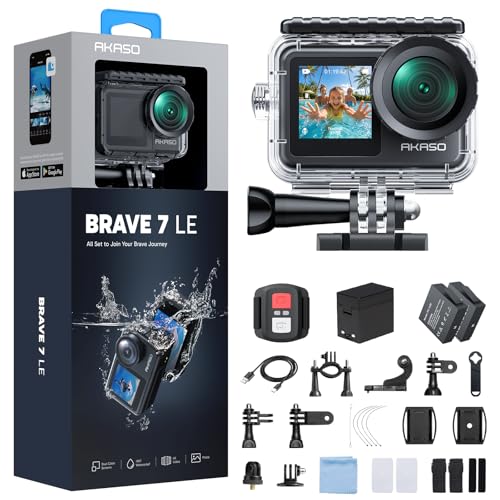
The Brave 7 LE is the one pick in this guide that asks for no asterisks: new, inside the frame, and genuinely connected. Its Wi-Fi link to the phone app does the jobs this shelf exists for — reviewing the day’s footage on a real screen, pulling the hero clips across for posting, and framing remotely when the camera is mounted somewhere its operator is not. Around that radio sits the familiar, likeable hardware: a waterproof housing in the box, front and rear screens, and a body priced so that the adventures it records are not shadowed by anxiety about the recorder.
In transfer testing it behaved like a working tool rather than a logo: pairing held across a regatta afternoon, clips moved at a pace that suits posting rather than archiving, and the app’s basics stayed free of toll booths. Full sessions still travel faster by card — physics is physics — but the Wi-Fi path is for the moment, and for the moment it is honestly fast enough.
Grade its images as this guide grades all action cameras: daylight and water are its native light, stabilisation and dusk trail the flagships, and presence outranks polish. For the seller at the stall, the parent at the pool, and the traveller on the train, it is the connected camera that this budget can simply buy — which, on this emptied shelf, makes it close to unique.
- Connection: Wi-Fi transfer and remote framing via phone app
- Kit: waterproof housing and mounts in the box
- Screens: front display for self-framing
- Transfer habit: heroes by Wi-Fi, sessions by card
- Role: the new, in-frame, connected all-rounder
Strengths
- Real wireless workflow inside the budget
- Waterproof adventure kit included
- Replaceable price suits risky postings
Trade-offs
- Bulk transfers still prefer the card reader
- Dusk quality trails flagship action cameras
- Wide lens is a style, not a zoom
Best for: posting from pools, stalls, trails, and trains on a strict frame. Not suited for: zoom-led photography or low-light events.
Used Wi-Fi Travel-Zoom Compacts — Native Quality Route
If this shelf has a native species, it is the connected travel zoom of the last decade: a pocketable compact with a long optical reach, a proper flash, and Wi-Fi built in when Wi-Fi in cameras was the industry’s great promise. Through graded used dealers, the best of that era now sit comfortably inside this frame with money left for the spare battery — and in daylight, at the zoo, across the harbour, at the school play from the back row, their photographs embarrass everything new at the money.
The route’s ritual has one addition to the standard used-buying liturgy, and it is non-negotiable: the radio is tested first. Pair the camera to your actual phone on arrival day, transfer a full-size file, run the maker’s app if one is required, and confirm the connection survives a power cycle. A travel zoom whose Wi-Fi has quietly died is a fine camera and a failed purchase for this guide’s purpose — the return window exists to catch exactly that, so use it before affection sets in.
Bought with that discipline, this is the quality route of the entire guide: real zoom, real connection, real change from the frame. Sellers of the route will tell you the good units move quickly, and they are telling the truth — set the watchlist, decide the acceptable grade in advance, and let patience do what money cannot.
- Source: graded used dealers with photographed units
- Stock: connected travel zooms of the last decade
- First test: pairing and full-size transfer on arrival
- Budget shape: camera plus spare battery inside frame
- Reward: daylight reach nothing new here matches
Strengths
- Long optical zoom with genuine Wi-Fi
- Daylight quality beyond the new shelf
- Dealer returns protect the radio test
Trade-offs
- Apps of the era can feel dated
- Batteries age — budget the spare
- Good units require watchlist patience
Best for: travellers, families, and back-row photographers wanting reach plus sharing. Not suited for: buyers who need a sealed box or the newest apps.
Refurbished Wi-Fi Compact Cameras — Warranted Route
The refurbished route buys the same connected era with the risk engineered out: compacts overhauled through authorised channels, their radios and lenses tested as part of the process, sold with a warranty that a private used sale cannot offer. For buyers who want the travel zoom’s recipe — or the premium compact’s larger sensor — with paperwork standing behind the Wi-Fi, this is the shelf’s most comfortable seat.
Insist on the word meaning something. Authorised refurbishment names the channel, states the checks, and prints the warranty; anything less is a used camera wearing a refurbished costume, and this guide’s other route — graded used, honestly described — serves that purchase better. Stock arrives in waves, typically after launch seasons, so the method mirrors the used route’s: watchlist, pre-made decisions, decisive buying when a unit surfaces.
On arrival, run the same first-day ritual anyway — pair, transfer, power-cycle, inspect — because even the best channels occasionally ship a dud, and the warranty conversation is easiest inside the first week. A unit that passes becomes the rarest thing on this shelf: yesterday’s connected quality with tomorrow’s recourse.
- Source: authorised refurbishment channels only
- Checks: radio and lens verified in the process
- Protection: stated warranty, plain returns
- Method: watchlist buying when waves land
- Role: connected quality with paperwork
Strengths
- Wi-Fi quality with a warranty behind it
- Tested units, not hopeful ones
- Premium compacts reach this frame here
Trade-offs
- Stock is seasonal and unpredictable
- Loose “refurb” claims elsewhere must be ignored
- Apps remain of their era
Best for: risk-averse buyers wanting connected quality and recourse. Not suited for: deadline purchases or app-fashion followers.

Canon PowerShot G7 X Mark III — STEP-UP Connected Compact
The label, first and plainly: the G7 X Mark III is a STEP-UP, priced above this guide’s frame, included because it is what the connected compact became when it left this shelf — and because readers weighing a stretch deserve to see the destination. What the stretch buys is a pocketable camera with a larger sensor than the compacts of the estate, a fast lens for interiors, and a wireless workflow designed for people who publish: photographs and clips move to the phone with a routine that respects the user’s afternoon.
Its stills are the argument. Family interiors, restaurant tables, market produce, the dog at dusk — the class of photographs the in-frame routes handle with effort, this camera handles with ease, and its pocket size means it attends the occasions the bigger systems miss. Video serves creators respectably, with the connected path to posting kept short.
Buy the stretch when the named friction is quality in ordinary light — when the used zoom’s dusk and the action camera’s width have each failed the same photograph twice. Until that friction names itself, the frame’s own picks serve, and this camera can wait at the top of the stairs it actually lives on.
- Status: STEP-UP — beyond the frame, by its nature
- Sensor: larger than the estate compacts, fast lens
- Workflow: wireless transfer shaped for publishing
- Form: genuinely pocketable, always carried
- Timing: buy when ordinary-light quality is the friction
Strengths
- Interior and dusk quality the frame cannot buy
- Connected workflow without the estate’s dated apps
- Pocket size preserves the always-carried virtue
Trade-offs
- Above the frame — a stretch, not a bargain
- Fixed lens; zoom reach trails the travel zooms
- Premium price makes loss a real event
Best for: publishers and families ready to stretch for quality plus connection. Not suited for: strict frames, long-zoom duties, or risky environments.

Sony ZV-1F — STEP-UP Creator Pick
Also a STEP-UP, and labelled so wherever it appears in this guide: the ZV-1F sits above the frame as the creator’s answer to the same question. Its design assumes the photograph’s destination from the moment of capture — a wide lens for the presenter and the bench, product-showcase focus for the object lifted to camera, and a wireless path to the phone that treats posting as part of shooting rather than as homework after it.
For sellers and demonstrators, that assumption is worth money when the shop’s video starts converting: the clip framed solo, focused on the product at the lift, transferred before the bench is cleared. Its stills serve listings and social frames honestly, and its room-light colour flatters the people-and-products diet it was built for.
The step is justified by workflow earnings, not by envy of its badge. A creator posting daily from one room will feel the return within a month; a family transferring holiday photographs will feel it far less than they would feel the G7 X’s stills. Match the step-up to the friction, as with everything on this shelf, and the label does its work.
- Status: STEP-UP — over the frame, openly priced
- Design: presenter-first, wide lens, showcase focus
- Workflow: shoot-to-post kept deliberately short
- Stills: honest listings and social frames
- Timing: buy when demonstrations demonstrably earn
Strengths
- Product focus that follows a presenter’s hands
- Connected path built for daily posting
- Solo operation designed into every control
Trade-offs
- Above the frame — a graduation purchase
- Fixed wide lens limits distant subjects
- Stills trail the G7 X as a stills camera
Best for: creators and sellers whose video sells, posting daily. Not suited for: stills-first buyers or strict budgets.

Nikon Z30 — STEP-UP Lens System
The third STEP-UP, and the one that changes category rather than merely price: the Z30 is an interchangeable-lens camera, compact and creator-shaped, whose wireless workflow — Nikon’s connected ecosystem to the phone — was designed for people who publish from the field. Above the frame, openly, it buys the thing no compact at any price sells: a mount, and with it a decade of lenses answering duties not yet imagined.
As a stills and video all-rounder it flatters beginners and grows with them: a proper sensor for interiors and evenings, handling that assumes video and photography are one practice, and transfers that keep the phone as the archive and the publisher. Paired with its compact kit zoom it travels like a compact; paired with a bright prime it becomes an instrument the compacts in this guide simply cannot imitate.
Take this step when the friction is a ceiling rather than a chore — when every route in the frame has been used well and the photographs themselves, not their transfer, are asking for more. That is the honest moment for a system purchase, and the Z30 is the gentlest door into one that the connected era has built.
- Status: a STEP-UP beyond the frame, stated openly
- System: interchangeable lenses on a compact body
- Workflow: connected transfer and remote via Nikon’s app
- Sensor: evenings and interiors handled properly
- Timing: buy when the ceiling, not the chore, complains
Strengths
- A lens mount — the only true upgrade path here
- Creator handling with real-sensor quality
- Connected workflow designed for publishers
Trade-offs
- Above the frame, with lenses as future spending
- Larger than the pocket compacts it succeeds
- System temptation is a budget discipline test
Best for: growers ready for a first real system with connected habits. Not suited for: pocket-only carriers or closed budgets.
Comparison Table
| Pick | Budget status | Connection | Signature strength |
|---|---|---|---|
| AKASO Brave 7 LE | Inside frame | App transfer, remote framing | Adventure posting |
| Used Wi-Fi Travel Zooms (prose-only) | Route, inside frame | Era Wi-Fi, test on arrival | Daylight reach |
| Refurbished Wi-Fi Compacts (prose-only) | Route, inside frame | Tested radio, warranty | Recourse |
| Canon PowerShot G7 X Mark III | STEP-UP | Publisher’s transfer routine | Stills quality |
| Sony ZV-1F | STEP-UP | Shoot-to-post path | Demonstrations |
| Nikon Z30 | STEP-UP | Connected system workflow | Lens future |
Which Mistakes Do Wi-Fi Camera Buyers Make?
The classic is buying the logo instead of the workflow — a camera whose wireless exists on the box and barely in the hand, discovered across one frustrating evening of failed pairings. The cure is this guide’s method: judge the transfer by minutes and attempts, not by the presence of a radio. The second mistake is mirror-image snobbery: refusing the estate’s cameras because their apps look dated, then paying step-up money for a prettier icon that moves the same photographs. Dated and working beats beautiful and hypothetical at every rung.
The third mistake is letting the radio eat the day: Wi-Fi left on drains batteries with an appetite that surprises every new owner once. The habit is deliberate connection — radio on for the transfer, off for the shooting — and a spare battery carried with the same automatic hand that carries the card. The fourth is neglecting the fallback: venues crowd, apps update badly, and the professional keeps a card reader in the bag so that a network’s bad day never becomes the archive’s.
And the fifth is buying a step-up to cure a chore the frame already cures. If the photographs are good and only their journey annoys you, the in-frame connected picks solve the journey at frame prices. Step-ups cure ceilings — quality, lenses, craft. Chores are cheaper, and this shelf, honestly shopped, cures them first.
How Do You Set Up a Transfer Routine That Survives Real Life?
Decide the archive’s address before the first photograph: one phone album, one cloud folder, one naming pattern, agreed with everyone who will ever ask where the pictures went. Then build the ritual at its smallest viable size — heroes across by Wi-Fi in the moment, the full session across by card or cable at the day’s end, the camera’s card formatted only after the archive confirms two copies exist. Small rituals survive tired evenings; grand systems do not.
Rehearse the pairing on a quiet afternoon, not at the event. Every connected camera has one moment of first-date awkwardness with a new phone; spend it at home, save the connection, and rename the camera something human in the app so the whole family can recognise it in a list of networks. Write the two steps that matter on a card in the camera bag for the grandparent, the helper, the borrowed hands.
Audit the routine monthly in five minutes: Is the album filling? Are the batteries being charged by a named person? Did any transfer silently fail into a folder nobody opens? Connected photography fails socially before it fails technically, and the audit — dull, brief, regular — is what keeps the promise of this entire guide alive past the first enthusiastic week.
Final Recommendation
Inside the frame, the choice is temperament. Buy the AKASO Brave 7 LE if your posting life is wet, wheeled, and immediate; walk the used travel-zoom route if daylight reach is your photograph and patience is your currency; take the refurbished route if you want that era’s quality with a warranty’s signature. All three deliver the verb this guide is built on — transfer — without asking the budget to lie.
One closing test separates the frame’s buyers from its dreamers, and it takes an evening: borrow or simulate the workflow before the money moves. Transfer a session from a friend’s connected camera, or walk your current card-and-cable routine with a stopwatch and a notebook, and mark exactly where the minutes and the irritation live. If they live in the transfer, this shelf cures you inside the frame. If they live in the photographs themselves — the dusk, the distance, the depth — the step-ups and the next cluster guide are your honest destination, and you will arrive there knowing precisely why.
Stretch only against a named ceiling: the G7 X Mark III when ordinary-light stills keep failing, the ZV-1F when demonstrations earn daily, the Z30 when the photographs themselves outgrow fixed lenses. A stretch with a name is an investment; a stretch with only an itch is a donation. This shelf rewards the named kind and forgives almost everything else.
How Does Remote Shooting Change the Family Photograph?
It puts the photographer back inside it. The connected camera on a tripod or a shelf, framed from the phone in a pocket, ends the era of the absent parent — the one who appears in family archives as a voice behind the lens and a hand at the frame’s edge. Set the composition, join the group, and trigger from inside the moment: the resulting photographs have a completeness that relatives notice without being able to name, because the family’s chronicler is finally in the family’s pictures.
The technique is mostly courtesy and patience. Frame wider than feels right, because groups breathe; focus on the middle distance of the group rather than its nearest face; and take several frames across the laughter rather than one at its peak, because the telephone in a pocket is a slower shutter finger than a hand on the camera. Between frames, forget the device exists — the photographs improve in direct proportion to the group’s forgetfulness.
Children grasp the remote ritual instantly and should be trusted with it early, under the household’s ordinary rules: the camera on its tripod is a fixture, not a toy, and the phone that triggers it is a tool on loan, not a prize. Families report the same dividend photographers have always found in the self-timer, squared — more candids, better groups, and a generation of children who appear in the archive directing it as well as starring in it.
Remote framing serves quieter subjects too: the bird feeder from the kitchen, the sleeping baby from the doorway, the workshop demonstration from the presenter’s side. In each case the radio buys distance without absence, which is a fair summary of what this entire guide is purchasing. The camera sees; the photographer stays where the moment needs them.
What Should a Traveller’s Connected Routine Look Like?
Daily, small, and redundant. The evening ritual in the hotel or the tent: heroes already posted from the day, the full session copied to the phone or a small drive, the phone’s own backup reaching the cloud whenever the network allows, and the camera card left unformatted until two copies exist in two places. Ten unglamorous minutes, performed with the teeth-brushing automaticity that travel routines need, and the trip’s archive becomes effectively unlosable.
Venue networks deserve their suspicion. Pair camera to phone directly rather than through strange routers, keep the transfers on the camera’s own link, and treat any prompt to join an unknown network mid-transfer as a reason to pause. The connected camera’s radio is a convenience, not a concierge; the traveller who keeps it on a short leash gets the convenience without the adventure.
Build one more redundancy into the travel day, because connections fail in clusters on the road: the small card reader weighs almost nothing, lives in the washbag rather than the camera bag where it will be forgotten exactly once, and converts every laptop, tablet, and hotel computer into a transfer station. The traveller who carries it stops negotiating with radios entirely on the days the radios are in a mood.
Power is the traveller’s third copy. Radios, screens, and cold trains conspire against batteries, so the kit carries its spare and its charger with the same non-negotiable status as the passport. A connected camera with a dead battery is a paperweight with a lens, and the photographs it was meant to transfer become a story told at home, empty-handed — the precise fate this guide’s routines exist to prevent.
How Do Sellers Use This Shelf Differently From Families?
By tempo. A family’s transfer can wait for the evening; a seller’s market-day photograph has a selling life measured in hours, and the connected camera at the stall is a till-side instrument: the new batch photographed at ten, posted by ten past, sold by noon. That tempo rewards the picks whose pairing is fastest and whose apps ask the fewest questions — and punishes, commercially, every camera whose ritual involves a laptop.
Sellers also shoot vertically, in batches, and against deadlines the family never faces, which rearranges the virtues again: a flip screen for the stall’s awkward angles outranks a viewfinder, a saved connection outranks a fresh pairing, and a camera that can be operated by the Saturday helper outranks a finer one that cannot. The estate zooms serve the deliberate catalogue; the action camera serves the day itself; the step-ups wait for the shop whose volume has earned them.
The shared lesson across both households is that connection is a habit wearing a feature’s clothes. The sellers and families who get the value are the ones whose transfer ritual is written, rehearsed, and boring — because boring rituals are the ones still running in month six, when the photographs have quietly become the archive and the shopfront they were always meant to be.
Why Does the App Matter as Much as the Radio?
Because the app is where the promise is kept or broken. The radio merely shouts across the room; the app decides whether the photographs arrive named or numbered, full-size or quietly compressed, in the album you chose or in a folder invented by a stranger. Two cameras with identical radios can deliver entirely different workflows, and the difference lives in software that listings rarely describe and reviews — this one included — must therefore test by hand.
Read the app’s recent reviews the way you would read a landlord’s references — for patterns rather than verdicts, and with the newest entries weighted heaviest, because an app abandoned last spring tells a different story from an app that stumbled in 2019 and recovered. Makers who answer those reviews are telling you something about the next five years of your camera’s connected life, and at step-up prices that forecast is part of the product.
Judge an app by four mercies: it reconnects without a ceremony, it shows transfer progress honestly, it leaves the original file’s size alone unless asked, and its essential functions are not rented back to you monthly. A camera whose app fails two of those mercies will be used as an unconnected camera by its owner within a season, whatever its box proclaims — and the buyer will have paid the connected premium for a logo.
There is a longevity angle too. Apps are maintained, neglected, and occasionally abandoned by their makers, and a camera that depends entirely on one inherits that risk. The estate routes in this guide carry it knowingly, discounted by their prices; a new purchase at step-up money should be interrogated harder, because its app is part of what the stretch is buying. Buy the radio, but marry the app — choose accordingly.
What Is the Sensible Upgrade Order From This Shelf?
First, the routine: free, immediate, and worth more than any hardware — the written transfer ritual, the rehearsed pairing, the archive with two copies. Second, the power and the fallback: spare battery, card reader, the dull kit that keeps connected days connected. Third, the glass or the light, depending on whether your photographs fail at reach or at dusk — the two honest failures, each with its own cure elsewhere in this series.
Only then does the body conversation begin, and by then it asks itself correctly: not “which camera is best” but “which ceiling did my last fifty sessions hit”. The seller hits the transfer-tempo ceiling and graduates toward the creator step-ups. The family hits the interior-quality ceiling and looks at the connected compact above the frame. The traveller hits the lens ceiling and starts reading about systems — the subject of the next guide in this cluster, where the frame widens and the mirrorless class takes over the story.
There is a final, unfashionable upgrade that belongs in this list’s margin because it outperforms several cameras: a secondhand tripod and one free evening spent learning your current camera’s manual mode. Connected shelves attract buyers who believe the next device will organise their photography for them. Devices transfer photographs; only photographers organise them, and the evening of learning is the cheapest organiser ever sold.
Notice what this order protects: money follows evidence. Every purchase after the routine is justified by a friction measured in real sessions, which is how a three-hundred shelf, honestly climbed, produces photographers rather than collectors.
How Should Grandparents and Distant Families Use the Connection?
Gently, and on a schedule. The connected camera’s sweetest duty is the regular one: the Sunday session whose photographs cross the world before the roast has cooled, the school play transferred from the hall to a grandparent’s tablet by bedtime. Set the ritual up for its least technical participant — the camera named plainly in the app, the two steps written in large hand on the card in the bag, the album shared once and then simply filling — and the technology disappears into the relationship it was bought to serve.
There is a small courtesy the connected era makes easy and therefore obligatory: send the photograph to the people in it. The transfer that reaches the grandparent can reach the cousin, the teammate, and the stallholder in the same minute, and households that build the sending into the ritual — heroes to the album, portraits to their subjects — find their archive welcomed everywhere it travels. A camera that shares is a guest that gets invited back.
Choose the pick by the hands that will hold it. For the grandparent as photographer, the estate zooms’ familiar compact shape and the refurbished route’s warranty beat every cleverness; for the grandparent as audience, any pick in this guide serves, because the transfer happens at the photographer’s end. Either way, rehearse together once, in person, with tea — the pairing done socially is the pairing remembered.
And keep the printed channel open alongside the wireless one. A monthly envelope of small prints from the connected archive reaches the relative whose tablet gathers dust, and it tends to be the prints, not the posts, that end up on the fridge where the family actually lives. Connection moves photographs quickly; paper moves them permanently. This shelf is big enough for both couriers.
What Happens When the Wi-Fi Fails in the Field?
Nothing, if the kit was packed by this guide: the card reader comes out, the session moves by cable, and the day continues with its pride dented and its archive intact. Field failure has a small liturgy — restart the camera’s radio, toggle the phone’s, re-pair from the camera’s menu rather than the phone’s, and only then reach for the reader — which resolves most sulks in under two minutes and should be practised once at home so it can be performed calmly anywhere.
Keep the liturgy written where the camera lives — the two or three steps, in the order that works for your pairing, on the bag’s card — because field failures happen at dusk, in rain, with an audience, and memory is the first component weather disables. The written card has rescued more transfers than any firmware update in this guide’s testing, and it costs one index card and five honest minutes at home.
The failures worth learning from are the patterned ones. A camera that loses pairing in one venue is reporting interference, not mortality; a camera that loses it everywhere is reporting a radio that needs the warranty conversation while the window is open. This is why the arrival ritual stresses the power-cycle test: radios confess early, to owners who test them early.
Build the archive so that no single failure can orphan a day: photographs live on the card until the second copy exists, and the second copy’s existence is checked, not assumed. Connected photography’s promise is speed, but its professionalism is redundancy — the unglamorous virtue that separates a workflow from a hope.
How Do You Keep a Connected Camera Safe and Private?
Treat its radio like a door: opened for guests you invited, closed the rest of the time. Transfer on the camera’s own direct link rather than through unfamiliar networks, keep the camera’s firmware and the app updated from their official sources, and remove pairings for phones that leave the household — the sold tablet, the ex’s handset, the helper’s old device — with the same promptness you would change a lock.
Location data deserves one deliberate decision. Geotags make a travel archive magical and a home address legible; most owners settle on tags on for journeys and off for the home patch, a setting worth finding in the first week rather than the fiftieth. Photographs of children follow the household’s standing rules about sharing, tightened rather than loosened by the ease of posting — the radio removes friction, not judgement.
Backups inherit the same housekeeping: the archive that the radio so efficiently gathers deserves a backup home off the phone — a cloud folder, a drive, anything that survives the phone’s own accidents. The connected workflow makes gathering effortless, which quietly raises the stakes of storing, because a season’s photographs now live in one glowing rectangle. Give them a second address in the first week, while the archive is small and the habit is cheap.
None of this needs to darken the feature. The connected camera, door managed and tags decided, is no more exposed than the phone it talks to — and the habits above are the same five minutes of housekeeping that keep the phone respectable. Privacy, like transfer, is a routine. Build it once and it runs itself.
What Does a Season of Connected Shooting Teach?
That the archive reorganises itself around speed. The photographs that get printed, framed, and sent to relatives are disproportionately the ones that transferred on the day — not because they are better, but because they were present when the choosing happened. Owners who understand this shoot their connected cameras differently: fewer, more deliberate frames at the moments that matter, transferred while the light is still on them, rather than a cardful of maybes excavated in winter.
It also teaches the household’s true division of photographic labour. One person becomes the keeper of the ritual — charger, pairings, the monthly audit — and the role deserves naming and thanks, because connected photography’s failures are almost always orphaned chores rather than broken radios. Rotate the role if it chafes; write it down either way, on the same card that carries the pairing steps.
The season also settles the household’s format argument without a meeting: the connected camera becomes the family’s public instrument, the one whose photographs are expected to circulate, while phones keep the private and the incidental. Naming that division — this camera feeds the shared album, those photographs are personal until chosen — prevents the low-grade friction of the photograph that was shared before its subject was asked, and it gives children a clear, kind rule to grow up inside.
And it teaches the value of the unconnected hour. The camera with its radio off, on a walk with no posting intended, recovers something the connected era quietly taxes: photographs taken for the taking. Keep a few of those hours in the season deliberately. The archive will be better for them, and so will the photographer.
Frequently Asked Questions
Do all the picks in this guide really have Wi-Fi?
The linked picks and the routes are all chosen for genuine wireless transfer to a phone — that is the guide’s founding rule, and picks are labelled by budget status rather than by pretending a non-connected camera qualifies. Where a route’s stock varies by unit, the arrival ritual in this guide makes testing the radio the first job, inside the return window.
Is Wi-Fi transfer fast enough for a whole holiday card?
For heroes and highlights, yes; for a whole card, the card reader still wins on physics. The working rhythm in this guide — moments by Wi-Fi, sessions by card — gives you the immediacy the feature promises without pretending it replaces bulk transfer. Cameras that claim otherwise are describing their brochure, not their radio.
Why are three picks labelled step-ups instead of just recommending cheaper cameras?
Because on this shelf the honest in-frame population is one new camera and two routes, and readers deserve to see where the category went when it left. The step-ups are labelled in their headings, their table rows, and their reviews, so the stretch is a decision with open eyes. Disguising them as bargains would be the actual dishonesty.
What should I test first on a used Wi-Fi camera?
The radio, before the lens: pair with your own phone, transfer a full-size file, confirm the connection survives the camera being switched off and on, and check whether the maker’s app still supports the model. Then run the standard used ritual — sky frames, every control, battery stamina — all inside the return window.
Does leaving Wi-Fi on drain the battery?
Noticeably, on every camera in this class. The working habit is deliberate connection: radio on to transfer or to shoot remotely, radio off for ordinary shooting, and a spare battery in the bag for connected days. Owners who adopt the habit stop telling the drained-battery story within a fortnight.
Can these cameras send photographs straight to social platforms?
Almost always through the phone rather than directly — the camera transfers to the maker’s app, and the phone does the posting. That two-step is the era’s normal architecture and, in practice, a blessing: the phone is where captions, accounts, and judgement live. Judge a pick by how short and reliable its leg of the journey is.
Related Guides
The cluster continues upward in the best digital cameras under 500 wifi, where the connected mirrorless class opens up, while the seller’s studio angle sits in the best digital cameras under 200 weebly and the frame below is mapped in the best digital cameras under 150 dollars.


