kajuandouglas.com is reader-supported. When you buy through links on our site, we may earn an affiliate commission.
Where to Buy
The best desk mount ip cameras for home earn their place by solving a problem wall cameras create: height lies. A camera screwed near the ceiling sees the tops of heads, the layout of a room, and very little of what anyone’s face is doing — while a camera sitting on a desk, a shelf, or a sideboard sits at the height of the life it watches. It sees the dog’s expression and the toddler’s reach, the front door’s visitor at eye level through the hallway, the elderly parent’s wave that says the morning routine happened. Desk placement is not the budget compromise of home cameras. For most rooms, it is the correct geometry, and it comes with a second virtue no drill can offer: you can move it in ten seconds when the room’s life moves.
This guide judges six indoor cameras specifically as desk and shelf citizens. That means their mounts are judged as furniture behaviour — stability on a sideboard, the cable’s reach to the socket the room actually has, the grace with which they survive being knocked by a duster and re-aimed by a guest. It means their pan and tilt are judged at desk height, where a turning head covers a room differently than it does from a cornice. And it means privacy is judged as a household matter, because a camera that lives at eye level in the rooms where people relax is a guest in those rooms, and guests need manners: shutters, indicator lights you can trust, and off switches that are really off.
All six picks come from this site’s verified camera pool and carry their purchase links, so the guide can be specific where the dash camera guides had to be general. Each review separates the desk virtues from the spec-sheet virtues, names the subscription or storage arrangement in plain terms — because an indoor camera’s footage has to live somewhere, and the differences between a memory card in the camera and a cloud plan are the real long-term price of the device — and states who in the household the camera will suit and whose eyebrows it will raise.
One orientation before the picks: a desk camera is a watching tool, not a security system by itself. It will show you the dog on the sofa and the toddler at the bookshelf with wonderful clarity; it will not, alone, deter a burglar or summon help. Households building genuine security should treat these as the eyes of a larger arrangement — locks, lights, alarms — and households building awareness, which is most of us, will find the eyes are exactly what they wanted.
Key Takeaways
- Desk height is an advantage, not a compromise: faces, pets, and daily life read better at furniture level than from a ceiling corner.
- The TP-Link Tapo C210 is the all-round desk pick — pan and tilt coverage, local card storage, and no subscription standing between you and your footage.
- The Wyze Cam v4 is the value pick, with colour night vision that flatters dim living rooms and a card slot for local recording.
- The eufy Indoor Cam E220 keeps footage local and speaks fluently to Apple households.
- The Ring Indoor Cam (2nd Gen) brings a physical privacy cover and the Ring ecosystem’s polish, with recording that lives in its subscription.
- The Blink Mini 2 is the simplest desk camera here — small, cheap to run in pairs, and content with basic duties.
- The Arlo Essential Indoor Pan Tilt is the premium desk presence, with the widest manners and the ecosystem to match.
In this guide
Quick Picks
| Badge | Pick | Why it stands out |
|---|---|---|
| Best All-Round Desk Camera | TP-Link Tapo C210 | Pan-and-tilt room coverage with local storage and no forced subscription. |
| Best Value Desk Camera | Wyze Cam v4 | Colour night vision and a card slot at a multi-room price. |
| Best for Local Storage and Apple Homes | eufy Indoor Cam E220 | On-device recording and HomeKit friendliness in a pan-and-tilt body. |
| Best Privacy Manners | Ring Indoor Cam (2nd Gen) | A physical cover that closes over the lens — privacy you can see. |
| Best Simple Second Camera | Blink Mini 2 | Tiny, simple, and easy to scatter around the house. |
| Best Premium Desk Camera | Arlo Essential Indoor Pan Tilt | Polished pan-and-tilt coverage inside Arlo’s mature ecosystem. |
Notice the storage divide running through the table, because it is the decision that outlives the unboxing. Half these cameras will record happily to a card in their own base with no monthly anything; the other half treat the cloud plan as part of the product. Neither school is dishonest, but they suit different households, and the reviews keep the divide visible in every verdict.
How We Chose These Picks
Evaluation lived in real rooms rather than on a bench. Each camera spent its days on the furniture this guide is about — a living-room sideboard, a kitchen worktop’s end, a nursery dresser, a hall console — and was judged first on placement reality: the footprint it occupied, the stability of its base when the furniture was bumped or dusted, the honesty of its cable length against the distance to the room’s actual free socket, and the field of view it achieved from sitting height rather than from the ceiling-corner positions most marketing photographs assume.
The second examination was the daily-life test, which is the desk camera’s true profession. Cameras were asked to follow a dog’s afternoon across a room, to keep a toddler’s expedition in frame, to show a face at the front door clearly enough to name it, and to make a two-way conversation with a child or an elderly parent feel like a conversation rather than an interrogation from a loud hailer. Audio quality in both directions, the latency of the live view, and the app’s speed at answering the only question that matters — show me the room, now — were scored as primary features, because at desk height a camera is a communications device as much as a recorder.
Night behaviour was judged in the rooms’ own darkness, not in a laboratory black: the hallway’s night-light gloom, the nursery at bedtime, the living room lit by a television. Colour night vision, infrared range, and the click-and-glow manners of switching between them were all noted, because a camera that announces itself with a loud click and a red constellation at 2 a.m. will be unplugged by the household it was meant to reassure.
The final filter was household politics. Each camera’s privacy apparatus — shutters, covers, indicator lights, scheduling, the truthfulness of its off state — was tested against a sceptical partner’s standard, and each ecosystem’s storage terms were read as a contract rather than a feature list. The six picks are the cameras a household can live with at eye level, which is a stricter test than any specification sheet sets.
Why Do the Best Desk Mount IP Cameras for Home Work at Desk Height?
Geometry first. From a ceiling corner, a camera’s view is a map: excellent for where things are, poor for what they mean. Faces tilt up rarely; expressions, name badges, the title of the book, the contents of the bowl — the semantic layer of a room — all face horizontally, toward other furniture-height eyes. A desk camera lives in that horizontal world. It identifies the visitor rather than counting him, reads the dog’s body language rather than tracking its dot, and frames a video conversation at the angle conversation actually happens, which is why relatives on the other end of a desk camera’s call consistently report that it feels like visiting, while ceiling cameras feel like surveillance.
The trade is coverage. Height buys breadth — one ceiling camera can survey a whole open-plan floor — while a desk camera sees a room and a bit of the next doorway, and its view can be blocked by the ordinary archaeology of furniture life: the plant that grew, the stack of books, the seasonal decoration. Pan and tilt, which three of this guide’s picks carry, is the desk camera’s compensation: a head that turns converts one seated position into most of a room, and it is at desk height — where the interesting things happen at several compass points — that the turning head earns its cost most honestly.
The second change is social. A ceiling camera is infrastructure; a desk camera is an occupant. It is noticed, negotiated with, occasionally addressed, and — in the guest room, the teenager’s room, the home office during a call — occasionally resented. This is not a reason to avoid desk cameras; it is a reason to choose them with their manners in mind and to place them with the household’s consent rather than by stealth. The cameras below were selected partly on how gracefully they handle being known about, because a desk camera’s working life is lived in the open.

TP-Link Tapo C210 — Best All-Round Desk Camera
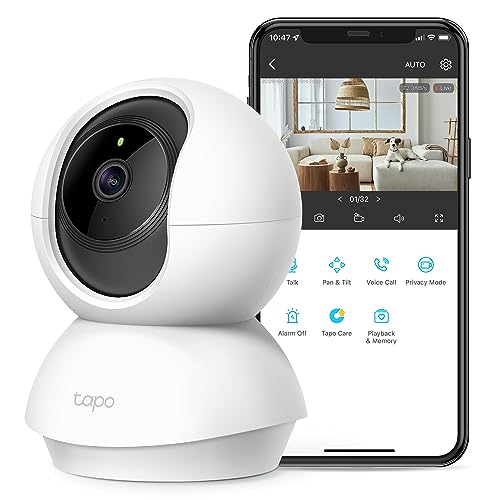
The C210 is the camera this guide would hand to a household that asked for one desk camera, well chosen, with no homework attached. Its pan-and-tilt head sweeps the room from a sideboard with the unhurried confidence of a lighthouse, its footage is clear and honestly coloured in daylight and serviceable in its infrared night mode, and — the decision that shapes its whole ownership — it records to a memory card in its own base, so the footage of your living room can live in your living room, retrievable through a capable app, with no subscription interposed between you and your own hallway.
As furniture, it behaves. The base is stable, the body turns without the grinding commentary cheaper motors provide, and the camera’s person-and-pet detection thinking happens with a maturity that keeps alerts meaningful rather than meteorological — a desk camera that cries wolf at every curtain sway will be muted by Friday, and a muted camera is furniture. Two-way talk is clear enough for the dog, the child, and the delivery driver at the door in relay, and the Tapo app’s multi-camera view means the second and third rooms join the household’s awareness without a second learning curve.
Its compromises are the all-rounder’s: the design is functional rather than beautiful, the ecosystem is TP-Link’s rather than the smart home’s aristocracy, and owners invested in a rival platform’s automations will feel the seams. Households starting fresh, or valuing local storage and pan-and-tilt coverage over platform pedigree, will not find a more complete desk answer at its level — it is the guide’s first recommendation precisely because it asks the household for the least faith.
- Movement: motorised pan and tilt from a stable desk base
- Storage: local memory card recording, subscription optional
- Detection: person and pet alerts tuned to stay meaningful
- Audio: two-way talk for family and pet duty
- Character: the complete, low-homework desk camera
Strengths
- Room-sweeping coverage from one furniture position
- Footage stays in the house on its own card
- Alerts that respect the household’s attention
Trade-offs
- Design is practical rather than decorative
- Ecosystem polish trails the premium brands
- Night footage is infrared monochrome
Best for: most households wanting one capable desk camera per main room. Not suited for: deep single-platform smart homes wanting native integration above all.

Wyze Cam v4 — Best Value Desk Camera
Wyze built its name on the suspicion that home cameras cost too much, and the Cam v4 is that suspicion in its most mature form: a compact cube that sits anywhere, sees in colour after dark by gathering what light the room offers, and records locally to its own card while offering a cloud layer for those who want one. On a desk its virtues compound — the small footprint fits the crowded surfaces where cameras actually live, the magnetic-and-stand base arrangements forgive imperfect furniture, and the price invites the multi-room thinking that changes a camera from a gadget into a household sense.
Colour night vision is its party trick and deserves both praise and calibration. In a room with any ambient light at all — a hallway lamp, streetlight through curtains, the glow of a router’s constellation — the picture stays in colour and reads more naturally than infrared monochrome, faces and clothing keeping their identities. In true darkness it falls back to infrared like everyone else, and owners should expect that honest boundary rather than the marketing’s midnight noon. Daylight footage is crisp, the app is feature-rich to a fault, and the two-way talk handles pet and child duty adequately.
The Wyze bargain has always included the company’s restless software: features evolve, some migrate between free and plan tiers across the product’s life, and the app asks for more attention than the Tapo’s. Owners who enjoy a gadget’s evolving abilities will call this vitality; owners who want an appliance should note it and perhaps look at the picks above and below. As value measured in rooms covered per pound or dollar of outlay, though, nothing else in this guide is close, and a pair of v4s watching two rooms will teach a household more about its own life than one premium camera watching one.
- Night: colour night vision while ambient light lasts
- Storage: local card recording plus optional cloud
- Form: compact cube for crowded desks and shelves
- App: feature-rich and frequently evolving
- Character: the multi-room value instrument
Strengths
- Covers several rooms for one premium camera’s outlay
- Colour after dark flatters real living rooms
- Local recording keeps footage in the house
Trade-offs
- Features shift between tiers over time
- App demands more attention than rivals
- True darkness still means infrared monochrome
Best for: households covering several rooms on a budget. Not suited for: owners who want set-and-forget software stillness.

eufy Indoor Cam E220 — Best for Local Storage and Apple Homes
The E220’s argument is that a camera inside your home should keep its seeing inside your home. It records locally, performs its person and pet recognition on the device rather than in a distant data centre, and integrates with Apple’s HomeKit world in a way that makes it the natural desk camera for households whose phones, televisions, and routines already speak that language. Its pan-and-tilt head covers the room from the dresser, its footage is sharp, and its manners — a camera that can be told, by schedule or by the household’s presence, when its watch is wanted — suit the rooms where families actually relax.
The on-device intelligence changes the alert experience in a way owners feel daily. Because the camera itself decides whether the moving shape is a person, a pet, or the curtain’s afternoon performance, the notifications arrive pre-filtered and the phone stays quiet for the right reasons. Sound detection joins the repertoire — a baby’s cry, a dog’s distress — making the E220 a credible nursery-desk citizen, where its height on a dresser looks across the cot at the angle a parent would choose, rather than down from a corner like a hospital monitor.
Ecosystem honesty requires the counterweight: households outside Apple’s orbit get a very good local camera rather than a smart-home native, eufy’s own app carries the load competently, and the company’s broader cloud offerings sit alongside the local story for those who want them. None of that dents the core proposition. For the privacy-leaning household — the one that asks where footage sleeps at night and prefers the answer “in the camera, in the nursery” — the E220 is the desk camera that was designed by people who expected the question.
- Intelligence: on-device person and pet detection
- Storage: local recording as the foundation
- Integration: HomeKit-friendly for Apple households
- Movement: pan and tilt for dresser and sideboard duty
- Character: the privacy-leaning household’s camera
Strengths
- Footage and recognition stay in the home
- Alerts filtered by the camera, not the cloud
- Natural fit for Apple-centred households
Trade-offs
- Best experience assumes Apple’s ecosystem
- Cloud options exist but are not the point
- Design is tidy rather than invisible
Best for: privacy-conscious and Apple households, nurseries included. Not suited for: Google- or Alexa-first homes wanting native voice-platform depth.

Ring Indoor Cam (2nd Gen) — Best Privacy Manners
Ring’s second-generation indoor camera makes its argument with a piece of plastic. A swivelling privacy cover closes over the lens — physically, audibly, visibly — and cuts the microphone with it, giving the household a state of off that requires no faith in software. On a desk in a living room, a bedroom, or a home office that hosts confidential calls, that cover changes the camera’s social contract: guests can see that it is not watching, the household can close it for the evening as naturally as drawing curtains, and the camera’s presence stops being a standing negotiation. No other pick in this guide offers privacy you can verify from across the room with your own eyes.
Open, it is a polished mainstream camera inside the most established of the app ecosystems here: tidy live view, dependable alerts, two-way talk that behaves, and integration with the doorbells and alarms that many households already run under the same app roof. Its fixed view — no pan and tilt — is the honest limitation, and at desk height a fixed lens must be aimed with more care than a turning head demands; placed on a console facing the room’s life rather than its geometry, it covers a living room’s meaningful arc, but a wide or L-shaped room will argue for the Tapo or the Arlo instead.
The storage arrangement must be stated plainly, because it is the Ring school: recording lives in the subscription, and without the plan the camera is a live-view device rather than a recorder. Households already paying for a Ring doorbell will feel that as a small increment; households starting from zero should price the camera and its plan together, across years, against the card-based picks. Judged whole — cover, ecosystem, plan — it remains the desk camera for households whose first question is not what the camera sees, but how surely it can be made not to.
- Privacy: physical swivelling cover over lens and microphone
- View: fixed lens — placement carries the coverage
- Storage: recording through the Ring subscription
- Ecosystem: the established Ring app and device family
- Character: manners first, in the best sense
Strengths
- Privacy that guests can see and trust
- Polished app and household-wide ecosystem
- Dependable alerts and two-way talk
Trade-offs
- No pan and tilt to widen the view
- Recording requires the ongoing plan
- Fixed lens punishes careless placement
Best for: bedrooms, offices, and Ring households valuing visible privacy. Not suited for: wide rooms or subscription refusers.

Blink Mini 2 — Best Simple Second Camera
The Mini 2 understands a truth the premium picks sometimes forget: many rooms need only a glance. The hallway’s question is whether the parcel arrived; the garage’s is whether the door was left up; the spare room’s is whether the cat has staged another incident. Blink’s small camera answers glances with the least apparatus in this guide — a compact body that sits on any shelf edge, a straightforward app, and an ownership style so undemanding that households scatter two or three of them the way they scatter clocks. As a desk camera it is deliberately basic: a fixed view, honest daylight footage, infrared after dark, and two-way talk for the occasional intervention.
That simplicity is a designed position within Amazon’s Blink ecosystem, where the camera’s siblings guard doors and gardens and the app gathers them into one household picture. Recording follows the Blink pattern — cloud plans for the full archive, with local storage arrangements available through the ecosystem’s sync hardware — and the buyer should choose the arrangement consciously rather than discovering it. Set up knowingly, the Mini 2’s economics shine: the second and third cameras in a house deliver most of the awareness of the first at a fraction of the deliberation.
What it will not do is equally clear. There is no turning head, no colour night flourish, no on-device cleverness of the eufy’s order; a face at distance in a dim room will be a face suggested rather than proven. Households should deploy it where the question is presence rather than identity — the glance rooms — and let the guide’s stronger picks hold the rooms where faces matter. Used within its brief, the Mini 2 is the camera most likely to multiply, and a house with three glances available is, in daily practice, a better-watched house than one with a single masterpiece.
- Role: the glance camera for secondary rooms
- Form: compact and shelf-friendly anywhere
- Storage: cloud plans, local via ecosystem hardware
- View: fixed lens, infrared night
- Character: simplicity as a deliberate feature
Strengths
- Cheap and easy to deploy in multiples
- Undemanding app and ownership
- Honest performance for presence questions
Trade-offs
- No pan, tilt, or colour night vision
- Faces at distance are suggested, not proven
- Recording arrangement needs conscious setup
Best for: hallways, garages, and second-room glances. Not suited for: nurseries or rooms where identification matters.

Arlo Essential Indoor Pan Tilt — Best Premium Desk Camera
Arlo brings its outdoor pedigree indoors and adds a turning head, and the result is the desk camera for households that want the category’s polished end: a pan-and-tilt view that sweeps the room under app control or follows the action, footage with the brand’s characteristic clarity, and an ecosystem whose alerts, automations, and multi-camera composure are the most finished in this guide. On the sideboard of a large living room — the wide, L-shaped, through-dining space that defeats fixed lenses — its sweep is not a luxury but the difference between a camera and a witness.
The premium register shows in the small courtesies. The camera’s privacy behaviour includes an automated shield thinking in the Arlo tradition, its night footage holds detail with unusual composure, and its two-way audio carries the least of the tinny loudhailer character that marks cheaper talk. For the household that checks on a dog walker at noon, a teenager’s homework hour at four, and a sleeping house at midnight, the Arlo’s app answers each summons with the same unhurried competence, and competence, summoned daily, is what premium actually means.
The bill matches the polish: Arlo’s full recording and intelligence live in its subscription plans, and the camera should be priced as hardware plus plan across the years of its service, in honest comparison with the card-based Tapo and eufy. Households already inside Arlo’s fence — doorbell, outdoor cameras, the app on every phone — will find the increment natural and the integration worth it. Households starting cold should buy the Arlo for its sweep and its finish with their eyes open about the meter running, because a premium camera unsubscribed is a beautiful live view and little else.
- Movement: pan and tilt with action-following composure
- Ecosystem: Arlo’s mature app, alerts, and automations
- Night: composed detail in the premium register
- Storage: recording centred on Arlo’s plans
- Character: the polished end of the desk category
Strengths
- Sweeps large and awkward rooms completely
- The most finished app experience here
- Strong night footage and two-way audio
Trade-offs
- Full value requires the ongoing plan
- Hardware-plus-plan cost leads the guide
- Richness exceeds what small rooms need
Best for: large living spaces and households already in Arlo’s ecosystem. Not suited for: small rooms or subscription-free households.
Where on the Desk — or Shelf, or Dresser — Should It Actually Sit?
Placement is the desk camera’s whole craft, and it obeys three rules that outrank every feature in this guide. The first is height with intent: the camera should sit near the height of the faces it exists to see — a metre to a metre and a half covers seated adults, standing children, and the dog’s whole biography — on the furniture the room already has, rather than perched on a teetering stack assembled for the purpose. The second is the corner that is not a corner: a position a little inside the room’s edge, angled across the space’s life, sees faces rather than the backs of heads and survives the door’s swing and the vacuum’s rounds.
The third rule is the window’s veto. A desk camera aimed across a bright window will expose for the daylight and render the room’s occupants as courteous silhouettes; the same camera repositioned so the window is behind it or beside it sees the same room in full identity. Before fixing any placement, view the live picture at the room’s brightest hour and its darkest, and move the camera rather than forgiving it — the freedom to move is the desk format’s founding advantage, and the first week should be spent spending it: three evenings, three positions, one honest comparison of the footage each produced.
Cables close the subject. The camera’s reach is the socket’s geography, and the elegant solution is usually the boring one — the sideboard against the wall with the socket behind it, the dresser whose cable drops straight down — rather than an extension lead’s safari across the skirting. A camera whose cable invites a trip or a toddler’s curiosity will be unplugged by the household’s safety instinct, correctly, and an unplugged camera is a paperweight with a lens. Place for the socket, aim for the life, verify at noon and midnight: that is the whole of the art.
How Should a Household Handle the Privacy of a Camera at Eye Level?
With rules agreed while everyone is calm, written by the household rather than imposed by the camera’s purchaser. The sensible constitution has four articles. First, known placement: everyone who lives with the camera knows where it is and what it can see — no covert angles, ever, because a discovered secret camera costs a household more trust than any footage is worth. Second, defined hours: many of these cameras can schedule their watch or be given privacy modes, and a living-room camera that sleeps during the evening’s family hours and wakes when the house empties reconciles awareness with relaxation better than any argument about trust.
Third, guests get the truth and a choice: the camera is pointed out, its cover closed or its watch paused where the pick allows, and the guest room and bathroom are simply not camera rooms, in this guide’s household or any other it would recommend. Fourth, access is a household decision: whose phones may view, whether grandparents have the nursery feed, when access is reviewed — decided deliberately, because the app makes sharing effortless and effortlessness is not consent. Teenagers, in particular, are owed a negotiation rather than an announcement; a camera accepted under agreed rules keeps a household’s peace, while a camera discovered keeps nothing.
The picks above were chosen partly for how well they support this constitution — the Ring’s visible cover, the eufy’s scheduling and local keeping, the ecosystems’ differing answers to who may watch. Technology supplies the switches; the household must still supply the manners. A desk camera governed by manners becomes, within a month, as unremarkable as the clock on the same shelf — which is the precise definition of a home camera that has succeeded.
Local Card or Cloud Plan — Which Storage School Suits Your Home?
The divide deserves its own examination because it is really three decisions wearing one coat. The first is custody: a card in the camera keeps the footage of your home inside your home, under your hand, vulnerable to the camera itself being taken but answerable to no company’s servers, policies, or solvency. The cloud keeps footage beyond the reach of a stolen camera and a house fire alike, at the price of trusting a provider’s stewardship and paying its rent. Neither answer is naive; they are different theories of which loss a household fears more.
The second decision is retrieval over years. Card footage is reviewed in the app like cloud footage while the card is young, but cards fill, overwrite, and eventually fail, and a household that wants an archive — the first steps, the incident for the insurer — must export deliberately. Cloud archives persist by subscription’s arithmetic: stop paying and the past evaporates on the provider’s schedule. The third decision is the honest total: card cameras cost their card and nothing monthly, forever; cloud cameras cost a plan per household or per camera, compounding quietly into the most expensive line of the purchase across five years. Price the camera you are actually buying — hardware plus its storage theory, across its life — and the table in this guide sorts itself by household temperament as much as by money.
A hybrid peace is available and underused: several picks record locally while offering cloud plans for alerts and clips, letting the household keep custody of the whole record and rent convenience for the highlights. Households unsure of their theory should start there, live with both for a season, and let their own reviewing habits — how often they look back, how far, and for what — cast the deciding vote.
What About the Kitchen, the Office, and Other Rooms With Opinions?
Each room cross-examines a desk camera differently. The kitchen adds steam, grease carried on air, and the busiest traffic in the house; a camera there should sit back from the hob’s weather, accept that its lens will need a monthly wipe to stay honest, and expect its detection to work for a living among cooks, children, and the dog’s optimism. Its reward is the household’s true control room — the room where parcels are opened, homework is supervised, and every family negotiation of consequence eventually convenes — and a well-placed kitchen camera earns its keep in pure awareness per day more than any other in the house.
The home office adds confidentiality. A camera in the room where calls discuss other people’s business should be chosen from the manners end of this guide — the Ring’s closable cover, the eufy’s scheduling — and governed by the simplest rule of all: covered or off during work, awake when the house is empty. The office is also where the camera most often serves double duty as the household’s window on deliveries and the dog’s midday, which argues for a pan-and-tilt pick that can hold two aims — the desk’s sanctity and the door’s approach — and be swung between them by schedule rather than by memory.
The hallway, finally, is the desk camera’s natural harbour and its sternest aim test: a long, narrow view in which faces arrive at speed and at every height from toddler to delivery driver. A console-table camera there should be angled slightly down its length rather than square across it, so visitors are in frame for the walking seconds rather than a single passing instant. Get the hallway right and the household’s comings and goings — the data of daily reassurance — are covered by the cheapest pick in this guide; get it wrong and no premium placed elsewhere will compensate, because the hallway is where the house actually happens.
How Many Desk Cameras Does a House Actually Need?
Fewer than the multipacks imply, placed better than the multipacks suggest. The honest unit of planning is not the room but the question: the household’s awareness usually reduces to three questions — who came to the door and hallway, what is happening in the main living space, and is everything well in the one vulnerable room, be it nursery, parent’s annexe, or the garage with the good tools. Three cameras answer those questions completely in most houses, and a fourth adds a view that will be checked twice and forgotten. Start with the questions, buy to them, and let a month of living with the first cameras argue for any addition — the desk format’s movability means the argument can be tested by relocating before it is settled by spending.
Do Desk Cameras Belong in a Rented Home?
They are, in fact, the renter’s native camera: no drilling, no adhesive scars, no landlord negotiation — a camera that arrives in a suitcase and leaves in the same suitcase, having watched from the bookshelf throughout. Renters should simply add two courtesies to the household constitution from this guide: a camera that can be packed is also a camera that can be pointed out to the landlord or the flatmate as temporary and furniture-borne, and its placement should respect the tenancy’s other occupants exactly as an owned home’s would. The desk format’s founding virtue — movability — was always, quietly, a renter’s virtue.
What Should You Check Again After the First Month?
That the camera is still aimed at the life it was placed for — furniture migrates, plants grow, the household’s centre of gravity shifts a room at a time — and that its alerts still mean something to someone. A month is also when the storage theory meets reality: check how much of the card the month consumed, whether the cloud window still holds the day you might need, and whether the household’s constitution survived contact with guests, teenagers, and the cleaner’s rounds. Cameras reviewed at a month become fixtures; cameras never reviewed become archaeology.
Comparison Table
| Pick | Movement | Storage school | Night character | Best room |
|---|---|---|---|---|
| TP-Link Tapo C210 | Pan and tilt | Local card first | Infrared | Living room, all-round |
| Wyze Cam v4 | Fixed | Local card + optional cloud | Colour while light lasts | Several rooms at once |
| eufy Indoor Cam E220 | Pan and tilt | Local, on-device smarts | Infrared | Nursery, Apple homes |
| Ring Indoor Cam (2nd Gen) | Fixed | Subscription cloud | Infrared | Bedroom, office, Ring homes |
| Blink Mini 2 | Fixed | Cloud, local via hub | Infrared | Hallway, garage, spare room |
| Arlo Essential Indoor Pan Tilt | Pan and tilt | Subscription cloud | Composed infrared | Large open-plan living |
Which Desk Camera Mistakes Do Households Make First?
The window silhouette, already confessed, leads the list — followed closely by the camera aimed at the room’s geography instead of its life: the beautiful wide shot of the sofa’s back, the door’s edge, the television’s glow, while the dog’s water bowl, the toddler’s bookshelf, and the visitor’s face all live outside the frame. Aim at the biography, not the floor plan. The third mistake is alert gluttony: every detection switched on, every sensitivity at maximum, until the phone buzzes forty times a day and the household mutes the camera into decorative status. Tune alerts down to the events that would change your behaviour — a person in an empty house, a sound in the nursery — and let the recording, not the notification, carry the rest.
The fourth mistake is the password and account shrug: a camera is a computer with a lens in your living room, and it deserves the household’s serious account hygiene — a unique password, two-factor protection where offered, firmware updates accepted rather than postponed forever. The fifth is the orphaned camera: bought for the puppy, forgotten by the puppy’s first birthday, still watching a room whose household has stopped governing it. The privacy constitution in this guide exists to prevent orphanhood; a camera reviewed seasonally, its placement and access re-agreed, stays a tool. Unreviewed, it becomes an heirloom nobody chose.
The last mistake is expecting the desk camera to be the security system. It will not call anyone, deter anyone who has already decided, or see through the front door it is not aimed at. Households that need security should let these cameras do the seeing inside a larger arrangement and should be suspicious of any product — in this guide or out of it — that promises a lens is a lock.
How Do Desk Cameras Earn Their Keep With Pets, Children, and Parents?
By answering the small questions that constitute a household’s peace of mind, at the moment they are asked. The dog’s afternoon: alone and asleep, or alone and redecorating — a distinction the Tapo’s pet alerts and the Wyze’s colour view settle from a phone at work, and two-way talk settles further when the redecoration is live. The child’s hour after school: home, friend in tow, homework allegedly begun — answered at desk height with faces and context, not by a ceiling’s anonymous choreography. The elderly parent’s morning: kettle on, wave given, routine intact — the check-in that preserves independence precisely because it is lightweight, a glance rather than a visit, arranged with the parent as a participant rather than a subject.
Each of these uses has its camera in the picks: the nursery’s E220 listening for the cry, the hallway’s Blink noting the arrival, the living room’s Arlo sweeping from the dog’s sofa to the teenager’s desk in one motion. What they share is a register — awareness in service of care, at furniture height, inside rules the household agreed. Set up in that register, desk cameras stop being surveillance equipment that happens to be at home and become what their owners actually bought: a way of being gently present in rooms you cannot be in, for the creatures and people who are.
Final Recommendation
Most households should start with the TP-Link Tapo C210: one per main room, local footage, a turning head, and no rent — the complete desk camera with the least faith requested. Households covering many rooms on a budget should multiply the Wyze Cam v4 and enjoy its colour nights. Privacy-first and Apple households should choose the eufy E220 and keep the seeing in the home; Ring households and privacy-cover believers should take the Ring Indoor Cam with its plan priced in; glance rooms should take the Blink Mini 2 without a second thought; and the big open-plan room, or the Arlo household, should take the Arlo Pan Tilt and its polished sweep.
Whichever name leaves this page with you, spend the first week as this guide prescribes: three positions, noon and midnight checks, alerts tuned down to meaning, and the household’s constitution agreed while everyone is calm. A desk camera’s quality is decided less by its sensor than by its placement and its manners — and those, happily, are the parts the household controls for free.
Frequently Asked Questions
Can a desk camera replace a baby monitor?
For many households, functionally yes — the picks here with sound detection and two-way talk, the eufy especially, cover the nursery’s real duties: hearing the cry, seeing the cot at a parent’s angle, speaking or soothing from the next room. Dedicated monitors retain two honest advantages: they work when the internet does not, on a closed link with a parent unit that asks nothing of a phone, and they carry no account, app, or subscription into the nursery. Households comfortable with app-based life will find a desk camera entirely sufficient and useful long after the cot years; households who prize a device that cannot be affected by a router’s mood should keep the dedicated monitor and let the camera serve the wider house.
Will a desk camera work during an internet outage?
The local-storage picks keep recording to their cards through an outage — the Tapo, Wyze, and eufy continue their watch and the footage waits for the connection’s return — though live viewing and alerts pause, since those travel through the internet by definition. Cloud-centred cameras can typically buffer little or nothing without their connection and should be understood as online devices. Households whose internet is unreliable, or whose concern peaks during storms that take connections down, should weight the card-based school heavily and test the behaviour deliberately: pull the router’s plug for an hour and see what your camera did with the hour. The answer is a property of your house, not of a brochure.
How much bandwidth do indoor cameras use?
Live viewing and cloud uploading are the appetites; a card-recording camera sitting quietly uses very little, while several cameras streaming live views to several phones, or uploading every motion clip to a cloud, can make a modest connection feel crowded. The practical habits are simple: view in the app’s standard quality when checking in casually, let detection rather than continuous upload decide what travels, and place the router or a mesh point within honest reach of the camera’s room — a camera at the edge of Wi-Fi’s patience produces the stuttering live view and delayed alerts that owners then blame on the camera. Desk cameras, mercifully, can be moved toward the signal as easily as toward the view; use the freedom.
Is it legal to record audio with a home camera?
The video of your own home is broadly your affair; audio is where jurisdictions begin to differ, because recording conversations engages consent laws that vary by place and by who is recorded — household members, guests, cleaners, carers. Many households settle the matter by disabling audio recording while keeping two-way talk available for live conversations, a configuration most of these cameras allow and one that loses little of the camera’s awareness value. Where a camera watches over a carer arrangement or a rented space, the duties sharpen and local advice is worth taking before recording begins. When in doubt, the lens is the tool and the microphone is the liability; configure accordingly.
Can these cameras see through windows to watch a driveway or garden?
Poorly, and owners should not plan around it. Glass reflects the camera’s own infrared back at it after dark, turning the night window into a mirror of the lens’s glow, and daylight views through glass inherit reflections and the window’s own dirt. A desk camera pressed to the glass in a dark room can manage a daylight watch of a porch or drive, and some households use a spare Blink or Wyze exactly so — but a genuine outdoor view deserves an outdoor camera, of which this site’s wider guides make their own recommendations. Let the desk camera govern the rooms; the garden has its own instruments.
How long do the memory cards in these cameras last?
A card recording motion events in a quiet room can hold weeks; the same card in a busy living room, or set to record continuously where the model allows, may cycle in days. The cycle itself is the point — the card overwrites its oldest footage as it fills, which is why incidents worth keeping must be exported promptly rather than admired in the app for a month. Cards also wear: continuous writing is hard labour, and a card that begins producing gaps or errors after a year or two of service should be replaced without sentiment, with an endurance-rated successor. Buy the generous size, export what matters, and treat the card as a consumable with a pension plan.
Related Guides
When a desk camera’s card fills with the moment that matters, the best data recovery software for cameras explains the rescue workflow. For the viewing side of a multi-camera home, the best device computer for viewing cameras compares the screens and systems that gather every room into one watch. And drivers extending the same awareness to the street will find the best dash cameras for night security applies this guide’s night thinking to the car.


