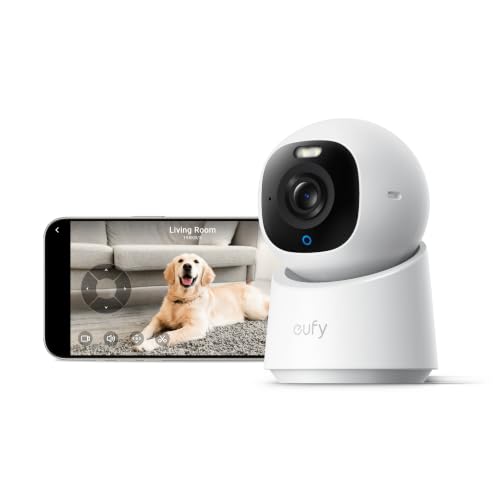
kajuandouglas.com is reader-supported. When you buy through links on our site, we may earn an affiliate commission.
Where to Buy a Camera as a New Mom, and Why You Actually Need Two Kinds
The best cameras for new mom life solve two completely different problems that happen to share a name. The first is watching: a nursery camera that lets you check a sleeping baby from the kitchen, hear the stirring before it becomes crying, and reclaim the evening hours that new parenthood otherwise spends tiptoeing to a doorway. The second is remembering: a real camera for the first year itself — the hospital bracelet still on the wrist, the first bath, the gummy grin — photographs that a phone takes adequately and a proper camera takes beautifully. This guide covers both jobs honestly, with three picks for the nursery wall and three for your hands.
Start with the watching, because that purchase is usually made tired, quickly and under the influence of a registry checklist. Forgive yourself the haste in advance: the watching camera is the most forgiving purchase on the baby list, because its job is narrow, its lifespan is short and its price, in the company of prams and car seats, is mercifully small. The three watchers below were chosen so that a decision made at midnight, one-handed, during a feeding session, is still a good decision at the six-month review. The qualities that matter in a nursery camera are unglamorous: reliable night vision, sound and motion alerts that wake you for a baby rather than for a curtain, a feed that loads fast at 3 a.m., and privacy you can reason about clearly. Notice what is not on that list — a camera is a convenience for checking, never a safety device, and nothing in this guide should be read as a substitute for safe-sleep guidance or for being there. The best nursery camera is the one that reduces your doorway trips and your anxiety, in that order.
The remembering camera is bought in the opposite emotional weather, and it deserves the opposite advice: slow down. The first year moves at a speed no parent believes until it has passed, and the photographs become family infrastructure — printed, framed, sent to grandparents, argued over at future birthdays. A camera with a real sensor, a lens that loves indoor light and handling you can manage one-handed while the other hand holds the baby will pay its cost back in a single December.
It is worth pausing on how recently this two-camera answer became the obvious one. A generation ago the nursery had, at most, an audio monitor, and the first year lived in a film camera’s thirty-six frames a month. The modern arrangement — a tireless watcher for the nights, a serious camera for the days, instant prints for the fridge — is genuinely better, but only when each tool is kept to its own job. The confusion this guide exists to prevent is the single expensive device that promises all three and delivers a compromise with a touchscreen.
Budget-wise, the two purchases split naturally. Nursery cameras are inexpensive, replaceable and outgrown in a few years; the three below are chosen to be excellent without being precious. The memory cameras cost more and stay for a decade. Spend accordingly, and be suspicious of any product that tries to be both at a premium — the combined devices in this category historically do neither job as well as the separate specialists.
Key Takeaways
- New-mom camera needs split in two: a nursery watcher and a first-year memory maker.
- The eufy E30 and Wyze Cam v4 watch the nursery without locking you into subscriptions.
- The Blink Mini 2 is the gentle-budget way to cover a nursery and a playroom at once.
- The Canon EOS R50 and Sony ZV-E10 II turn indoor baby light into photographs worth framing.
- The Fujifilm Instax Mini 12 prints the first year physically, for fridges and grandparents.
- No camera replaces safe-sleep practices or supervision — buy for checking in and for remembering, never for guarding.
In this guide
Quick Picks
| Camera | Badge | Why a new mom reaches for it |
|---|---|---|
| eufy 4K Indoor Camera E30 | Best nursery watcher | 4K detail, pan-and-tilt following and local recording with no required subscription. |
| Wyze Cam v4 | Best value nursery camera | Colour night vision and sound alerts in a tiny camera that later becomes a playroom or porch camera. |
| Blink Mini 2 | Best for two-room coverage | Cheap enough in pairs to watch the nursery and the living room from one simple app. |
| Canon EOS R50 | Best first-year camera | A real mirrorless camera that masters indoor light and grows with your family for years. |
| Sony ZV-E10 II | Best for video of the milestones | Beautiful 4K video and eye autofocus for first steps, first words and everything between. |
| Fujifilm Instax Mini 12 | Best instant keepsakes | Point, shoot and hold the photograph — the first year as physical prints, instantly shareable. |
How Did We Choose the Best Cameras for a New Mom?
The nursery picks were judged at 3 a.m., in spirit if not in fact. How fast does the live feed open from a phone lock screen? How intelligible is a small cry through the speaker and microphone? Does the night vision show a sleeping face clearly without flooding the room with light or clicks? And can the alerts be tuned so that a parent is woken by the baby and only the baby — because a camera that cries wolf nightly trains exhausted people to ignore it, which is the one outcome worse than no camera at all.
We also listened for the nursery’s acoustic reality, a factor spec sheets ignore. A camera’s night-mode click, its motor’s whisper, a status light that cannot be dimmed — in a room where a light sleeper is the entire point, these are not trivia. The watchers below were checked for quiet manners and dimmable lights, and the memory cameras for shutters and screens that will not wake a baby who has just, finally, been photographed asleep.
Privacy and running costs carried unusual weight in this category. Nursery footage is among the most intimate video a household produces, so we favoured cameras with local recording options, clear account security practices and no compulsory cloud. Subscription-optional beat subscription-required throughout, because a baby already provides a family with quite enough monthly commitments.
The memory cameras were judged on indoor light, because that is where the first year happens: living rooms, kitchens, hospital wards, grandparents’ houses. Large sensors, lenses that open wide, autofocus that finds a baby’s eye and stays there, and video that makes a first-steps clip look like a film rather than a security recording. One-handed operation was scored explicitly — a camera that needs two free hands and a menu dive will miss the moment it was bought for.
Finally, longevity. The nursery cameras were chosen to have second lives — playroom, porch, pet duty — once the crib years end. The memory cameras were chosen as decade purchases, with systems and handling that a growing family will not outgrow before the child is asking to borrow them.
What Should a Nursery Camera Do — and What Should It Never Promise?
A nursery camera’s honest job description has four lines: show you the crib clearly in the dark, tell you promptly when sound or motion suggests the baby needs you, let you speak or play a sound through it if your household finds that soothing, and keep a short history so you can answer the eternal question of when the nap actually began. Every pick in the watching half of this guide does those four things well, and the differences between them are differences of polish, ecosystem and price.
The promises to refuse are equally clear. No consumer camera monitors breathing or health in a way you should rely on, whatever the marketing implies, and this guide makes no such claims for any pick. Safe sleep — a clear crib, the baby on their back, a room at a sensible temperature — comes from guidance and habit, not from a lens. Treat the camera as a window, not a guardian: it extends your eyes into the room so your body can rest in another one.
Placement follows from that modesty. Mount or set the camera where it sees the whole crib from a safe distance, with its cable entirely out of reach — cables and cribs are a combination to engineer away completely, with the camera on a shelf or wall mount beyond any future standing-and-grabbing range. Check the view at night, not just at setup o’clock, because the infrared picture is the one you will actually live with.
Travel deserves a planning sentence, because babies visit grandparents early and often. The watchers here are all small enough to pack for a holiday nursery — the Wyze and Blink especially — and setting one up on a relative’s network for a fortnight is a kindness to everyone’s sleep. The memory cameras travel lighter still. A family that equips its travel routine once, in the first year, will reuse that routine for a decade of trips.
And agree the household rules early: who has the app, whether grandparents get viewing access, and when the camera leaves the child’s room as they grow. The nursery camera years are short; the habits of respect around a child’s image are the permanent part, and they start with the first device pointed at the crib.
Why Does the First Year Deserve a Real Camera?
Because phone photographs of babies are good, and these photographs deserve to be better than good. They are also, though nobody says it at the time, the raw material of every future family argument about who the baby looked like, every slideshow at every milestone birthday, every photograph a grown child will one day hold of themselves being held. The archive of a life starts here, in this year’s light, and the camera that gathers it is making decisions on behalf of people who have not been born yet. That is not a reason for anxiety; it is a reason for a real sensor and a little care, which is all this guide is asking. The phone’s small sensor struggles exactly where babies live — in warm, dim, indoor light — and renders those scenes with a processed flatness that looks fine on a screen and thin on a wall. A real camera’s larger sensor drinks the same light and returns skin tones, window light and tiny detail — the eyelashes, the milk-drunk expression, the hospital blanket’s weave — with a depth that reads, years later, as memory rather than as documentation.
There is also the matter of presence. A camera in the hand changes the photographer’s behaviour in a useful direction during the first year: you compose, you wait for the expression, you take twelve frames instead of one — and among twelve frames of a baby, one is always the one. The R50 and ZV-E10 II below both find the baby’s eye automatically and hold it, which quietly removes the technical anxiety from those attempts and leaves only the looking.
Video argues the same case in motion. First steps are thirty seconds long and happen once; the ZV-E10 II’s eye-autofocus video turns them into footage that looks intentional, while the R50 covers families who lean photographic. And the Instax makes the opposite, equally valid argument — that some first-year photographs should exist as objects immediately, stuck to a fridge, mailed to a grandmother, tucked into a hospital bag — rather than as files in a library of ten thousand.
None of this requires becoming a photographer. It requires owning a tool whose automatic modes are genuinely good, which is the design brief all three memory picks were chosen against: a tired parent, one hand free, thirty seconds of something unrepeatable happening on the rug. The camera that serves that moment serves the year.
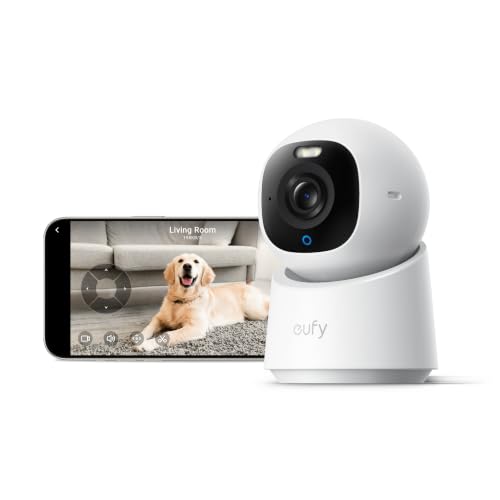
eufy 4K Indoor Camera E30 — Best nursery watcher
The eufy 4K Indoor Camera E30 earns the nursery’s top spot by understanding the assignment’s two halves: vigilance and restraint. Its 4K sensor and pan-and-tilt head cover the whole room — crib, chair, door — from one shelf position, and it can follow motion, which in the toddler sequel to the baby year becomes following a small explorer’s patrol route. At night the infrared picture is crisp enough to answer the only question that matters — asleep, stirring, or sitting up with intent — without a trip down the hall.
Eufy’s local-first design suits this room particularly. Recording lives on a memory card in the camera, smart detection happens on the device, and no subscription is required for the core job — a posture that respects both the footage’s intimacy and the household’s budget. Sound and motion alerts are tunable in the app, two-way talk is clear enough for a soothing word from downstairs, and the camera integrates with the major smart-home platforms for families who want the feed on a kitchen display.
The compromises are gentle ones. A pan-and-tilt camera is a visible piece of technology in a room many parents decorate for softness, and its motor, while quiet, is not silent in a hushed nursery at midnight — though in practice it moves when the baby moves, not before. The 4K detail is more than a crib strictly needs; its value arrives when you zoom into a corner of the frame, or in the camera’s second life watching a whole playroom. As the set-and-forget nursery watcher for parents who want the best picture with the least ongoing entanglement, the E30 is the guide’s clear first recommendation.
One practical note from the night shift: pair it with the app’s notification discipline from day one. Set the sound sensitivity to the baby’s actual cry rather than the house’s ambience, draw the motion zone tightly on the crib, and let the camera’s intelligence do the filtering. Tuned that way, the E30’s alerts become what they should be — rare, accurate and worth waking for — and the camera fades into the nursery’s background, which is the highest compliment nursery technology can earn.
- Coverage: pan-and-tilt with motion following
- Video: 4K with infrared night vision
- Storage: local microSD, no subscription required
- Extras: on-device detection, two-way talk, smart-home support
Strengths
- Whole-nursery coverage from a single shelf position.
- Local recording keeps intimate footage in the house.
- Alerts tune down to the baby, not the building.
Trade-offs
- The motor is faintly audible in a silent room.
- It looks like technology in a soft-furnished nursery.
- 4K detail exceeds the crib’s needs — a future-proofing tax.
Best for: parents wanting the strongest subscription-free nursery watch. Not suited for: anyone wanting a camera that disappears visually into the room.

Wyze Cam v4 — Best value nursery camera
The Wyze Cam v4 approaches the nursery with a different and equally lovable philosophy: be inexpensive, be tiny, and be so capable that the expensive options have to justify themselves. Its colour night vision is the headline for this room — instead of the infrared grey of most nursery cameras, the v4 can render the crib in gentle colour under very low light, which makes the 3 a.m. check feel less like reviewing security footage and more like looking in on your child. A small spotlight provides the light when the room offers none, adjustable so it need not startle.
Sound detection is the second nursery-specific gift. The camera can alert on sound as well as motion, with sensitivity you tune to your baby and your building, and its two-way talk handles the downstairs reassurance. Local recording to a memory card keeps the core function free of subscriptions, while an optional plan adds smarter person detection for the camera’s later lives at doors and driveways. The whole device is small enough to sit on the nursery’s bookshelf without rearranging it.
The v4’s limits are the budget’s fingerprints: the app is busy, the smartest detection lives behind the optional plan, and the fixed lens cannot follow a mobile toddler the way the eufy can. But as the camera for the crib years specifically — stationary baby, dark room, tired parents, tight budget — it is arguably the smartest money in this entire guide, and its afterlife as a playroom or porch camera is already mapped by thousands of households.
There is a psychological benefit to its price that deserves naming. New parenthood makes conscientious people anxious about buying the wrong thing, and the v4 removes that anxiety from the nursery decision: if it turns out your household prefers a different angle, a second room covered, or a dedicated monitor as well, the v4’s cost leaves room for all of it. Low-stakes, high-competence purchases are rare in the baby aisle; this is one.
- Coverage: fixed wide view, freestanding cube
- Video: 2.5K with colour night vision and spotlight
- Storage: microSD local plus optional cloud plan
- Extras: sound and motion alerts, two-way talk, siren for later lives
Strengths
- Colour night picture that feels like looking, not surveilling.
- Sound alerts tuned for a baby’s cry reach.
- Price leaves budget for the rest of the nursery list.
Trade-offs
- Fixed view cannot follow a roaming toddler.
- The app experience is busier than premium rivals.
- Smartest detection sits in the optional plan.
Best for: budget-conscious parents covering the crib years beautifully. Not suited for: tracking a mobile toddler across a whole room.

Blink Mini 2 — Best for two-room coverage
The Blink Mini 2’s nursery argument is arithmetic: babies colonise more than one room, and this camera is inexpensive enough to colonise back. One in the nursery, one where the daytime naps and playmat hours happen, both in a single simple app, both armable on a schedule — the two-room setup that premium single cameras cannot match at anything like the total. For apartment families especially, where the living room is also the playroom, office and dining room, that spread matters more than any single camera’s brilliance.
Each unit is a tiny plug-in camera with a wide view, an LED spotlight for colour night footage and two-way talk. The app experience is deliberately plain — live view, clips, alerts — which at 3 a.m. is a genuine virtue: there is nothing to learn and nothing to mis-tap. Motion detection is adjustable, and the cameras can be armed and disarmed as a system, so the household’s rhythm — cameras awake when the baby sleeps, resting when the rooms are full of family — is one tap rather than a settings expedition.
The costs of the arithmetic are recorded honestly: the picture is 1080p where the eufy offers 4K, the richest features assume Blink’s subscription or a Sync Module for local clips, and there is no pan or tilt. For the crib itself, many families will prefer the Wyze’s colour night subtlety. But as the coverage layer of a new-mom household — nursery plus everywhere else the baby’s day unfolds — the Mini 2 pair is the pragmatic champion of this list.
Grandparent logistics give it one more quiet win. The Blink app’s sharing is simple enough to extend a viewing invitation to a grandmother without a technical support call, and equally simple to revoke when the arrangement outgrows itself. In the social economy of a new baby — where relatives are hungry for a glimpse and parents are hungry for rest — a camera that lets the family look in, on the parents’ terms, earns its shelf space twice over.
- Coverage: fixed wide view, miniature plug-in body
- Video: 1080p with LED spotlight colour night vision
- Storage: cloud plan or local via Sync Module
- Extras: system arming, simple app sharing
Strengths
- Two rooms covered for one premium camera’s budget.
- An app a sleep-deprived parent cannot misoperate.
- Easy, revocable sharing for grandparents.
Trade-offs
- 1080p detail trails the eufy’s 4K nursery picture.
- Full features lean on the subscription or extra hardware.
- No movement — placement must cover the crib completely.
Best for: families wanting nursery-plus-playroom coverage simply. Not suited for: parents who want one maximal camera over two good ones.

Canon EOS R50 — Best first-year camera
Now the remembering begins. The Canon EOS R50 is the camera we would put in a new parent’s hands for the first year itself, because it removes every technical excuse between a parent and a beautiful photograph. Its sensor is many times a phone’s size, so the warm dim light of real homes — the light babies actually live in — becomes rich, clean and printable. Its autofocus finds the baby’s eye and holds it through the wriggles, and its automatic modes are good enough that the learning curve can wait until the child is sleeping through the night, which is to say, until roughly the era this camera will still be serving.
The details of new-parent photography shaped this choice. The vari-angle screen allows the low, baby-level angles that make first-year photographs intimate rather than documentary — the world seen from the rug. The body is light enough for the one-handed shooting that feeding-arm reality imposes. Canon’s colour renders skin — all the skin tones of an extended family — with a warmth that flatters everyone at the christening. And the lens system waits patiently for the family’s ambitions: a brighter prime for indoor portraits is the classic second purchase, and it transforms the camera again.
Video is fully capable for milestone clips, and the camera’s connectivity moves photographs to a phone for the grandparents’ group chat without a computer ceremony. Its honest limits are a starter body’s: battery life measured in a day’s shooting rather than a weekend’s, and kit lenses that begin the story rather than finish it. As the first-year camera — the one whose files become the framed prints — the R50 is the safest, warmest recommendation in this guide.
Think about the tenth birthday for a moment, because that is this camera’s real timescale. The R50 that photographs the first steps will photograph the first day of school, the lost teeth, the holidays — and will likely be handed, eventually, to the subject of its earliest photographs, as a first real camera of their own. Purchases that become heirlooms of a sort are rare in technology. A family’s first mirrorless camera, bought at the beginning of everything, is one of them.
- Sensor: APS-C mirrorless, interchangeable lenses
- Autofocus: eye detection for people, fast and sticky
- Screen: vari-angle for rug-level angles
- System: Canon RF lenses, bright primes for portraits
Strengths
- Indoor baby light becomes printable, frameable photographs.
- Eye autofocus removes the technical worry from the moment.
- A system the family grows into for a decade.
Trade-offs
- Kit lens is the beginning, not the portrait endgame.
- Battery suits a day’s shooting, so spares help.
- Bigger than a phone — it must be deliberately carried.
Best for: parents who want the first year photographed properly. Not suited for: anyone who knows they will only ever use a phone.

Sony ZV-E10 II — Best for video of the milestones
Some firsts are photographs and some are films, and the film ones — the first steps crossing the rug, the first word arriving mid-babble, the laugh that becomes the family’s reference laugh — deserve a camera that treats video as a first language. The Sony ZV-E10 II is that camera in a new parent’s price and size range: an APS-C sensor shooting beautiful 4K, eye autofocus that tracks a crawling, cruising, toddling subject with eerie loyalty, and colour that makes home light look like the way it felt.
Sony built this line for creators, and the inheritance shows in the parenting details. The screen flips fully for the parent-in-frame videos — the birthday song filmed from inside the circle. The microphone options cover the kitchen-table interview with a grandparent. The body is small enough for the diaper bag’s outer pocket, which is where milestone cameras either live or do not exist. Battery performance, a weakness of the model’s ancestors, is substantially improved, and the whole package asks so little setup that the camera can be recording within seconds of a first step’s wobble beginning.
Stills are strong — this is a real camera, not a camcorder with delusions — though the stills-first parent may prefer the Canon’s handling and viewfinder; the ZV-E10 II composes on its screen, a vlogger’s layout that video families will not notice and traditionalists will. Interchangeable lenses open the same growth story as the R50’s. Choose the Sony when your family’s memory is primarily moving, and the first-year film will look like it was made on purpose.
There is a forward-looking argument too: the child will grow into a performer. School concerts, kitchen dance routines, the dramatic retelling of a dream at breakfast — the ZV-E10 II’s video craft scales with all of it, and its creator features (product showcase focus, background blur control) turn out to serve family filming as happily as they serve influencers. The camera bought for first steps becomes the camera of the first recital without breaking stride.
- Sensor: APS-C mirrorless, interchangeable lenses
- Video: 4K with eye-autofocus tracking
- Screen: fully articulating for family filming
- Audio: strong built-in and external microphone options
Strengths
- Milestone video with autofocus that follows the child.
- Home light rendered like memory, not surveillance.
- Small enough to live in the diaper bag.
Trade-offs
- No viewfinder — composition is screen-based.
- Stills handling is a step behind the Canon for purists.
- The best video settings reward a little learning.
Best for: families whose first year will be a film. Not suited for: stills-only traditionalists who compose through an eyepiece.

Fujifilm Instax Mini 12 — Best instant keepsakes
The Fujifilm Instax Mini 12 is the joyful dissent in this guide: the argument that not every first-year photograph should be a file. It is an instant camera of disarming simplicity — point it, press, and a small physical photograph develops in your hand. In the maternity ward, at the first family gathering, on the fridge door within the hour, those little prints do something no cloud library can: they exist, immediately, in the physical world the baby has just joined, ready to be handed to a grandmother who does not do apps.
Its operation is designed for people with no free attention. Automatic exposure handles the light, a selfie mirror and close-up mode handle the compositions new parents actually attempt, and the whole camera is light, rounded and unintimidating — it gets passed around a room of relatives in a way a mirrorless camera never will, and the photographs it gathers are the more candid for it. The first year, documented by everyone who loved the baby, in prints that live on fridges and in wallets: that is a different archive from the camera roll, and for many families a treasured one.
The honesty paragraph: the prints are small, the film is a running cost, and the image quality is charm rather than resolution. The Instax is not a replacement for the R50 or the phone; it is a complement with a philosophy. Families who buy it tend to describe the same discovery — that a household can be rich in photographs and poor in prints, and that the baby’s first year deserves at least one album you can hold. For the price of a modest dinner out, the Mini 12 starts that album on day one.
It also grows a ritual, which may be its deepest value. The Sunday print, the monthly growth photo stuck in a row along the nursery wall, the duplicates mailed to the far-away grandparents on a rhythm — instant photographs invite ceremonies that digital files, for all their quality, rarely inspire. A new mom does not need another system to manage; she may, however, love a ritual that makes the year’s speed visible on a wall, one small white frame at a time.
- Format: instant film, credit-card-sized prints
- Exposure: fully automatic, beginner-proof
- Extras: selfie mirror and close-up mode
- Power: AA batteries, no charging routine
Strengths
- Physical photographs in hand within minutes.
- Simple enough for every relative to use.
- Creates rituals and albums, not just files.
Trade-offs
- Film is an ongoing cost per photograph.
- Prints are small and quality is charm-first.
- No digital copy exists unless you scan the print.
Best for: families who want the first year on the fridge, not just in the cloud. Not suited for: anyone seeking one camera to do everything.
How Does the Camera Story Change From Newborn to First Birthday?
Months zero to three are the watching months, the era of the two-hour cycle and the whispered household, when the nursery’s camera earns its keep nightly and the memory cameras gather the small, still, astonishingly photogenic evidence of a person who has just arrived and is mostly asleep for their portraits. The baby sleeps in supervised stillness, the parents sleep in fragments, and the nursery camera does its purest work: the check without the doorway creak, the nap timed honestly, the evening reclaimed in the next room. The memory cameras, in these months, photograph a person who mostly sleeps — beautifully, in window light, in the crook of arms — and the Instax begins its wall of small white frames.
Months four to eight add motion and personality, and the balance shifts. Rolling, sitting, the first foods and their facial reviews: the nursery camera starts following a mover rather than watching a sleeper, which is where the eufy’s pan-and-tilt foresight pays, while the memory cameras meet their favourite subject — a baby who now performs. Eye autofocus earns its keep in this act; expressions arrive faster than any manual focus ever learned.
Months nine to twelve are the milestone rush the whole kit was bought for. Cruising becomes steps, babble becomes a word with intent, and the ZV-E10 II’s video and the R50’s burst of stills divide the honours while the nursery camera quietly retires toward the playroom door. Planning the purchases against this calendar — watcher first, rememberer before month four, Instax whenever joy suggests — spreads the cost across the year and puts each camera in your hands before its act begins.
How Do the Six New-Mom Cameras Divide the Work?
| Camera | Job | Where it lives | Ongoing cost | Signature strength |
|---|---|---|---|---|
| eufy 4K Indoor Camera E30 | Watching | Nursery shelf | None required | Whole-room 4K coverage |
| Wyze Cam v4 | Watching | Nursery shelf | Optional plan | Colour night vision |
| Blink Mini 2 | Watching | Nursery and playroom | Plan or Sync Module | Two-room value |
| Canon EOS R50 | Remembering | Your hands | Lenses over years | First-year stills |
| Sony ZV-E10 II | Remembering | Diaper bag | Lenses over years | Milestone video |
| Fujifilm Instax Mini 12 | Remembering | Kitchen counter | Film packs | Instant physical prints |
Notice the ongoing-cost column, because it is where baby budgets quietly leak. The watching half can run at zero monthly cost if you choose it to — local recording sees to that — while the remembering half’s costs are the honest, optional kind: a lens in year two, film for the album, a spare battery before a holiday. Neither half requires a subscription to be itself, and that was a deliberate filter in a category whose customers are already buying everything else on earth.
The table makes the guide’s thesis visible: three watchers, three rememberers, and no pretence that one device does both well. Most families will buy one from each half — a nursery watcher now, a memory camera before the first birthday — and the pairings mix freely. The eufy with the Canon is the premium household; the Wyze with the Instax is the joyful budget one; every combination in between is defensible.
How Should You Set Up the Nursery Camera in the First Week?
Position before features, and test the position like a sceptic rather than like an installer who wants to be finished. Place the camera where the whole crib is visible — a shelf or wall mount at a safe distance, angled down — and route the cable so that no part of it can ever reach the crib, remembering that the baby who cannot reach it today is training to reach everything. Then view the night picture, because that is the service you are buying: if the infrared or colour night image does not show the baby’s face and chest clearly, move the camera before you tune anything else.
Tune the alerts in the second step, against real nights rather than guesses. Expect the first settings to be wrong in one direction or the other — every house has its own soundscape of pipes, pets and passing traffic, and every baby has their own volume of complaint — and treat the adjustments as a normal part of the first fortnight rather than as a product failure. Keep a rough note of what woke you and whether it should have; three nights of notes produce settings that a month of guessing will not. Start with sound sensitivity at the level that catches your baby’s cry from the next room and ignores the house’s ordinary noises, and draw any motion zone tightly around the crib so the mobile above it does not file a report every hour. Live with the settings for three nights before judging them; the goal is an alert stream so trustworthy that you can sleep through its silence.
Finish with the account housekeeping that tired people postpone: a unique password, two-factor sign-in where offered, the app shared deliberately with exactly the people you chose, and a note of when you will revisit the arrangement. Nursery cameras live in the most private room of the house; ten minutes of security hygiene in week one is the cheapest peace of mind in this entire guide.
How Can Partners, Grandparents and Caregivers Share the Cameras Well?
Decide the sharing map before the baby arrives, while everyone is still sleeping normally, thinking clearly and treating goodwill as the abundant resource it will shortly stop being at four in the morning. The nursery feed’s audience should be small, named and revocable — typically the parents, optionally the grandparents, carefully the regular caregiver — and every pick in the watching half supports invitations you control rather than passwords you circulate. A shared password is a decision you cannot take back; an invitation is one you can.
For the memory cameras, sharing means the opposite discipline: make contributing easy, make the cameras findable, and make the family’s standing rule that anyone may pick one up and nobody apologises for the results. The Instax passes hand to hand by design. The mirrorless pair should live where any family member can grab them, set to an automatic mode that forgives the grabber, because the photograph of the baby laughing at her grandfather, taken by her grandmother, is exactly the archive the year is for. A camera that only one parent dares to touch produces a one-sided record, and the missing parent in the photographs is the absence families regret at the decade mark.
Solve that absence directly, too: get in the frame, in your dressing gown, with the unwashed hair and the real expression, because the child will one day look for exactly that unposed evidence of how it was. Tripod, timer, a handed-over camera, a grandparent deputised — the mechanism hardly matters. The first-year album in which mom appears only as the photographer’s shadow is a known and avoidable sorrow, and every camera in this guide is simple enough, on its automatic settings, to be operated by whoever you hand it to. Hand it over weekly.
What Mistakes Do New Parents Make With Cameras?
Buying the nursery camera as a safety device is the foundational mistake, because it quietly relocates responsibility from habits to hardware. The camera checks; it does not protect. Families who keep that sentence straight use their cameras happily for years, while the marketing-led expectation that a lens is watching over the baby sets everyone up for a betrayal the product never agreed to.
Overtuning the alerts runs second. A camera that buzzes for every stir teaches exhausted parents to silence it entirely by week two. The settings exist to be adjusted downward until only the baby gets through — patience with that tuning, across the first fortnight, is the difference between a tool and a noise machine in a drawer.
On the remembering side, the classic error is the camera that never leaves its box because the phone is easier. The cure is ritual, not guilt: the real camera lives charged, by the changing table or the front door, with a card inside and the strap on — present-tense equipment, not stored equipment. The second error is its opposite, documenting so relentlessly that the parent watches the first year through a screen. The cameras here are good enough to work fast; take the twelve frames, then put the camera down and be in the thirteenth moment yourself.
Registry-thinking deserves a mention, because cameras are classic registry items bought by committee. A registry that asks for the flagship everything teaches relatives to buy the expensive combined unit this guide warned against. Ask instead for the watcher you chose, the memory camera you chose, or contributions toward them — and for film, batteries and a photo book voucher, the unglamorous consumables the year actually consumes. Precision in asking is how a new mom ends up with a kit instead of a pile.
Finally, printing nothing. A first year that exists only as files on a phone one drop away from disaster is an archive at risk. Back the files up once, automatically, and let the Instax philosophy — physical copies in the world — cover at least the greatest hits.
Which Cameras Should a New Mom Actually Buy?
Buy the watcher first, because the nights are now: the eufy E30 if you want the strongest subscription-free nursery coverage, the Wyze Cam v4 if the budget is doing triage, the Blink Mini 2 if two rooms need eyes. Set it up with the discipline of the section above, and let it give you back your evenings.
A last reassurance for the overwhelmed, because this guide has asked a tired reader to absorb a great deal: every decision here is reversible or survivable. The watcher can move rooms, the memory camera can be learned slowly, the Instax cannot be operated wrongly. Perfection is not available in new parenthood and is not required in its cameras either. Choose the pair that fits your home and your heart, set them up on a good afternoon, and let them get on with their two quiet jobs — watching the crib, and keeping the year.
Buy the rememberer before the milestones start arriving, because they do not wait for a convenient shopping weekend: the Canon EOS R50 for the photographic family, the Sony ZV-E10 II for the filming family, and the Instax Mini 12 alongside either — or instead of everything — if what your heart actually wants is photographs you can hold. The first year is short. Equip both halves of it, and be in the pictures as often as you take them.
Related guides
- Best DSL Cameras for Travel — DSLR Kits That Earn Their Space in the Bag
- Best Cameras to Take High Definition for Travel: 6 Picks That Earn Their Pocket Space
Frequently Asked Questions
Is a Wi-Fi camera safe to use in a nursery?
With ordinary hygiene, yes: keep the firmware updated, use a unique password and two-factor sign-in, place the camera on your home network rather than an open one, and choose brands with clear privacy practices — the watchers here were picked partly on that basis, with local-recording options that keep footage in your house. No connected device is risk-free, which is why the guide favours cameras that still work fully when you choose local-only operation.
Can a nursery camera replace a baby monitor?
It can replace the video-monitor function for many families, with the caveat that a phone-based feed depends on your network and your phone’s battery at 3 a.m. Some households run both for a while — the camera for its picture and history, a simple audio monitor as the always-on backup — and retire the duplicate when confidence settles. What neither replaces is safe-sleep practice and your own checking; they are windows, not guardians.
When should I stop using a camera in my child’s room?
There is no universal age, but the direction of travel is set by the child’s own privacy: as children grow, the watching should shrink — from crib view, to a playroom check-in, to retirement or a move to shared spaces — and the conversation about it should happen with the child as soon as they can join it. Many families find the nursery camera’s natural end arrives with the toddler bed and the open door.
Is it worth buying a real camera if I have a good phone?
For the first year, we believe yes — not because phone photos are poor, but because these particular photographs are unrepeatable and disproportionately printed, framed and inherited. The gap between a phone and an APS-C camera is largest exactly where babies live: dim, warm, indoor light. If the budget forces a choice, the Instax is the budget philosopher’s answer — it adds the one thing the phone cannot do at all, which is hand you the photograph.
Do I need a camera in the nursery and the living room?
Only if the baby’s day genuinely lives in both and the checking need follows. Many families start with the nursery alone, discover that daytime naps migrate to wherever the parent is, and add the second room then — which is precisely the expansion the Blink pair, or a second Wyze, makes painless. Buy for the routine you have this month; the cameras here are priced so that next month’s routine can be equipped when it announces itself.
What lens should I add first to the R50 or ZV-E10 II?
A bright prime in the portrait range is the classic first addition for baby photography: it opens wide enough to keep indoor light honest without flash, and it blurs a cluttered living-room background into something gentle. It turns either body from a good family camera into a portrait instrument, and it is the purchase parents most often describe, a year later, as the one that changed their photographs.
Related Guides
The new-mom camera shelf connects to several neighbouring topics in our library, from the family photography that follows the first year to the small-home camera setups many nurseries are part of, and the instant-print world that turns a camera roll into a wall. Continue with our guide to cameras for family photography as the milestones widen, compare options in the best cameras for an apartment if the nursery is one room of a small home, and read our introduction to instant cameras and film before starting the print album.


