kajuandouglas.com is reader-supported. When you buy through links on our site, we may earn an affiliate commission.
Where to Buy a Camera for HD Video, and Why HD Is Still the People’s Format
The best cameras for making hd videos share a secret the spec sheets bury: high definition is not a compromise in 2026, it is a sweet spot. A well-made 1080p video from a good sensor looks clean on every television, laptop and phone it will ever meet, uploads fast, edits on modest computers, and forgives a beginner’s lighting in ways that ultra-high resolutions do not. This guide is for the general filmmaker — the family documentarian, the small-business owner, the hobbyist, the student — who wants videos that simply look and sound good.
Where to buy: every linked camera name below opens that model’s Amazon listing, where you can compare kits and creator bundles. Keep the budget honest, though: for HD filming, a modest camera with a decent microphone and a small light will embarrass an expensive camera with neither. This guide will repeat that heresy in several forms, because it is the most useful sentence a general buyer can read.
Notice what kind of guide this is. It is not about cinema, and it is not about a niche. It treats HD video as the everyday craft it is: birthdays and business explainers, travel diaries and training clips, school projects and listings videos. The six picks were chosen for reliability in ordinary hands — autofocus that forgives, stabilisation that rescues walking shots, sound that does not embarrass, and files that behave in simple editors.
One reassurance before the details. Every camera here can also shoot higher resolutions, and a few shoot them beautifully; we judge them on their HD because that is the question asked. A camera whose 1080p is an afterthought — soft, cropped or noisy — fails this guide no matter how glorious its 4K, and a camera whose HD is oversampled and rich passes with honours. That single test rearranged the usual rankings in ways the reviews will explain.
Treat the recommendations that follow as a map of temperaments rather than a league table. Each of the six is the best camera in this guide for somebody’s actual life, and the reviews work hard to describe whose. Read them with your own most-filmed days in mind — the school gate, the workshop bench, the holiday walk — and the right name will keep surfacing, which is how honest buying decisions usually announce themselves.
Key Takeaways
- Good HD is a quality, not a leftover: the best picks oversample their 1080p from a richer capture, and it shows.
- The Canon EOS R50 is the friendliest all-round HD camera here; the DJI Osmo Pocket 3 is the one that makes walking footage look planned.
- Autofocus and stabilisation matter more to general filmmakers than resolution — they rescue real life, which never sits still.
- Sound decides whether an HD video feels amateur: every pick here either sounds decent alone or accepts a proper microphone.
- The Nikon Z30 and Sony ZV-E10 II are the creator-leaning picks for channels filmed in HD and uploaded the same day.
- Buy the microphone and the small light in the same season as the camera; HD rewards them more than a body upgrade.
In this guide
Quick Picks
| Camera | Badge | Why it makes HD well |
|---|---|---|
| Canon EOS R50 | Best all-round HD camera for most people | Oversampled, colour-rich HD, autofocus that forgives, and stills for the photos that share the memory card. |
| DJI Osmo Pocket 3 | Best for smooth HD on the move | A gimbal that turns walks, markets and travel days into floating, watchable HD without any skill at holding a camera. |
| Sony ZV-E10 II | Best HD camera for starting a channel | Creator-first autofocus, product focus tricks and a lens mount that grows from first uploads to a serious channel. |
| Nikon Z30 | Best simple creator camera with a viewfinder-free design | A compact mirrorless body made for video-first creators: long recording, clean HD and Nikon’s calm colour. |
| Canon PowerShot G7 X Mark III | Best pocketable HD camera with a zoom | A true pocket camera whose zoom, Canon colour and streaming support cover more general filming than any compact here. |
| GoPro HERO13 Black | Best HD camera for action and weather | Waterproof, mountable everywhere and stabilised beyond reason — the HD camera for the parts of life other cameras cannot attend. |
How Did We Choose the Best Cameras for Making HD Videos?
We filmed the generalist’s actual week: a child’s football match from the touchline, a kitchen explainer, a walk through a market, a grandparent interview, a product clip for a small shop. Cameras were scored on how much of that week survived contact with real conditions — mixed light, moving subjects, no rehearsals, an operator who is also a participant. Laboratory resolution charts were consulted last, and mostly to confirm what the week had already decided.
HD quality itself was judged strictly. Several modern cameras treat 1080p as a checkbox and deliver a soft, mushy version of it; the picks here were required to produce HD that is genuinely detailed, whether by oversampling from a higher-resolution capture or by a well-engineered dedicated mode. If a camera’s HD looked like a smaller camera’s HD, it did not matter what badge it wore.
Forgiveness was the third test, in three forms: autofocus that re-finds a face without drama, stabilisation that turns a walking shot from seasick to smooth, and exposure behaviour that handles a subject walking from shade into sunlight without the picture collapsing. General filming is unrepeatable by definition, so a camera’s rescue abilities are its real specifications.
Finally, the file’s journey home. HD’s promise is simplicity — modest file sizes, easy editing, fast uploads. Cameras whose HD files dropped straight into basic editors and uploaded without conversion earned their place; anything demanding a professional workflow to produce a birthday video was marked down, however lovely the result.
Why Does Some HD Look Rich and Some Look Like a Webcam From 2009?
The difference is oversampling. A camera that captures far more detail than HD needs and then scales down produces a 1080p picture with fine texture, clean edges and low noise — the image looks expensive because, informationally, it is. A camera that reads only the pixels HD needs, or skips and bins them crudely, produces the soft, smeared HD that gives the format its undeserved reputation among enthusiasts. When you read the picks, the oversampling notes are the image-quality story in one word.
Bitrate and colour carry the other half. HD compressed too hard turns moving water, confetti and crowd scenes into blocks; the better picks here give their HD room to breathe. Colour, meanwhile, is where general viewers actually judge: skin that looks healthy, skies that stay blue rather than cyan, and indoor light that does not turn everyone tangerine. A camera can win every resolution argument and lose the family vote on colour alone.
There is also a mercy built into HD that general filmmakers should exploit without shame: at 1080p, small focus errors, modest noise and gentle camera shake all shrink toward invisibility. The format hides the sins that higher resolutions prosecute. Filming a wedding speech or a school play in beautiful HD is not settling; it is choosing the format whose forgiveness matches the event’s chaos.
What Actually Makes a Home Video Feel Professional?
Ask editors what separates the home videos people finish watching from the ones they abandon, and resolution never tops the list. Steadiness does: a shot the eye can rest in. Sound does: voices clear enough that the brain stops working. Light does: faces lit from the front by something soft, not silhouetted against a bright window. And restraint does: shots held a breath longer than instinct suggests, pans slow enough to follow. Every one of those is a technique or a modest accessory, not a camera tier.
The cameras in this guide were chosen to make those four virtues easy. Stabilisation systems that genuinely work, microphone inputs or honest built-in arrays, screens you can judge exposure on, and autofocus that lets the operator watch the moment instead of the machinery. A general filmmaker’s attention is the scarcest resource at any family event; the right camera spends almost none of it.
The final professional touch is the edit’s mercy: HD files from these cameras cut quickly on ordinary computers, so the general filmmaker actually finishes the video. The masterpiece that stays unedited on a card because the files are enormous is, in every way that matters to the family, a video that was never made.
Which Six Cameras Make HD Video Best? The Picks in Detail
Judge each pick against your own most-filmed subjects — children, rooms, walks, work — rather than against a cinema camera. The best HD camera is the one whose footage of your actual life looks considered rather than captured by accident.

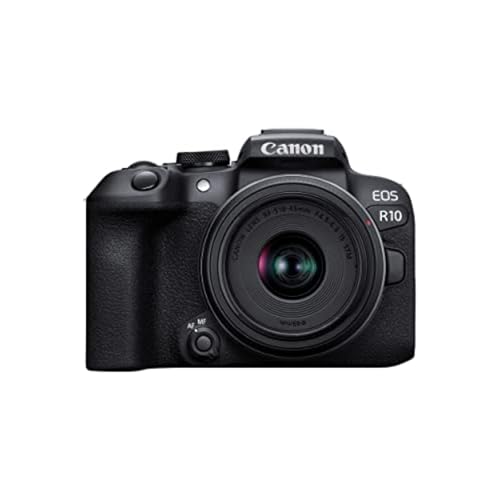
Canon EOS R50 — Best all-round HD camera for most people
If one camera in this guide had to serve a whole household’s filming — birthdays, holidays, the business explainer, the school project — it is the Canon EOS R50. Its HD is the good kind, derived from a richer capture, so faces carry texture and colour that make footage look a class above its price. Canon’s colour flatters everyone in the frame without a grading session, and the autofocus quietly does the job general filmmakers actually need: find the face, keep the face, ignore the chaos behind the face.
The body respects the non-specialist. Menus read plainly, the articulating screen serves both filming the family and filming yourself, and the same camera takes the still photographs that fill the frames on the wall — for most households, one device doing both jobs well beats two devices doing them brilliantly. The RF kit lens is a fair start, and a small fast prime later transforms indoor filming. It is not the stabilisation champion here, so walking shots ask for a steady hand or a gimbal, but at rest — which is where most family filming honestly happens — it is superb.
Longevity argues for it too. A household camera is bought for a decade of first days and last days, and the R50’s combination of a current lens mount, strong video and strong stills means it will not be the weak link in any of those years. It is the pick we would hand a friend with the words ‘start here, and only upgrade when you can name the exact shot this camera cannot give you’ — a day that, for general HD filming, may simply never arrive.
- Video: detailed HD oversampled from higher-resolution capture
- Colour: Canon skin tones that flatter without grading
- Autofocus: face and eye tracking that forgives busy scenes
- Dual role: strong stills for the household’s photographs
Strengths
- The easiest recommendation in this guide
- HD quality a class above its price
- One camera for the family’s video and photos
Trade-offs
- Stabilisation trails the DJI for walking shots
- Kit lens is a beginning, not an end
- Advanced video tools are present but not class-leading
Best for: households and general creators who want one camera for everyday HD filming. Not suited for: filmmakers whose work is mostly moving, walking footage.

DJI Osmo Pocket 3 — Best for smooth HD on the move
The Pocket 3 solves the general filmmaker’s most common failure — the shaky walk — so completely that it changes what people bother to film. Its gimbal irons movement into a glide: through a market, along a cliff path, following a child down a garden. The HD it records is clean and colourful, its face tracking keeps a walking presenter framed, and its rotating screen flips between filming the world and filming yourself with a speed no conventional camera matches. For travel diaries and day-out films, it is simply the most watchable footage per gram in this guide.
Its larger sensor gives it a low-light grace that surprises everyone who files it mentally as a gadget: evening streets, restaurants and indoor attractions come home usable rather than grainy. The built-in audio is respectable, and DJI’s wireless microphone pairing makes it a serious interview tool when needed. The limits are a fixed lens — you frame with your feet — and a delicacy around water and knocks that a holiday camera must be forgiven carefully. Treat it as the movement specialist in a kit, or as the only camera of a traveller who values smoothness over flexibility.
What the Pocket 3 really sells is finished films. Because the footage arrives home already smooth, already level, already watchable, the edit shrinks to choosing moments rather than rescuing shots — and general filmmakers finish edits that are short. Count the travel videos you have actually completed against the ones still sitting as raw clips; the camera that tilts that ratio is worth more than any resolution figure, and no pick here tilts it further.
- Stabilisation: 3-axis gimbal, glide-smooth walking footage
- Sensor: large for its size, kind to evening light
- Screen: rotating, selfie and scene framing in a flick
- Audio: good built-in sound, wireless mic pairing available
Strengths
- Walking footage that looks professionally planned
- Travel-day films that actually get finished
- Low-light HD beyond its pocket size
Trade-offs
- Fixed lens — framing is done with your feet
- Gimbal needs care around water and drops
- No viewfinder for bright, reflective days
Best for: travellers and walkers who film days out, tours and moving diaries. Not suited for: filmmakers who need zoom reach or interchangeable lenses.

Sony ZV-E10 II — Best HD camera for starting a channel
For the general filmmaker whose HD videos have an audience — a channel, a business page, a course — the ZV-E10 II is the purposeful pick. Its autofocus performs the creator’s choreography natively: face locked while presenting, focus gliding to a raised product, back to the eyes for the verdict. Its HD is detailed, its colour can stay friendly out of camera or open up for grading later, and the whole body is designed around a person filming alone at a desk, in a workshop or on a small set.
The lens mount is the long-term argument. Start with the kit zoom; add the fast prime that transforms indoor pieces to camera; add a wide lens for room tours. Each step visibly improves the channel without replacing the camera, which is how sustainable creator kits are actually built. It leans on a tripod — there is no in-body stabilisation — and its menus reward a weekend of learning. For a hobbyist filming only family life, the Canon above is kinder; for anyone publishing on a schedule, this Sony is the working tool.
Same-day workflow is its quiet superpower. Files transfer easily, the look is consistent from video to video, and the camera’s creator touches — a product mode, a background-defocus shortcut, clear audio options — compress the distance between filming and uploading. Channels are marathons of small frictions, and a camera that removes three frictions per video removes hundreds per year. That arithmetic, more than any single clip’s quality, is why this body anchors so many working HD channels.
- Autofocus: eye focus plus product showcase focus shifts
- Mount: Sony E, the deepest lens shelf in this guide
- Video: detailed HD with friendly or gradeable profiles
- Design: built for solo creators filming at a desk
Strengths
- Creator choreography handled automatically
- Lens growth without body changes
- Consistent look across a whole channel
Trade-offs
- No in-body stabilisation
- Menus take a weekend to learn
- Over-specified for purely family filming
Best for: channel creators and businesses publishing HD video on a schedule. Not suited for: households wanting a camera that needs no learning at all.

Nikon Z30 — Best simple creator camera with a viewfinder-free design
The Nikon Z30 is the quiet professional of this group: a small body designed video-first, without a viewfinder it does not need, recording long takes without the time anxiety that haunts cameras adapted from stills. Its HD is clean and its colour has Nikon’s characteristic calm — skin and scenery rendered without the saturation push some rivals apply — which suits explainers, lessons and business videos that should look trustworthy rather than vivid. For long-form general filming, reliability is a picture quality of its own, and the Z30 has it deeply.
Handling is its other virtue. The grip fits a real hand, the screen flips for presenting, the microphone input is present and sensibly placed, and the controls stay out of the way of a person who is thinking about their subject. Nikon’s Z lens shelf covers the creator essentials, though third-party choice is thinner than Sony’s, and the lack of in-body stabilisation means the tripod or a stabilised lens does the steadying. As a desk-and-tripod HD camera for a one-person production, it is arguably the most grown-up tool here.
Choose it when your HD work is long and spoken: the training series, the podcast-with-video, the workshop course, the church or community recording that must simply work for two hours. Cameras with flashier tricks falter in that territory on heat, limits or fuss; the Z30 was drawn for it. It will not win a travel-walk comparison against the DJI or a spec duel against the Sony, and it does not try to — it wins the afternoon-long recording session, which is where a great deal of the world’s useful HD is actually made.
- Video: long, reliable HD recording for spoken formats
- Colour: calm Nikon rendering for trustworthy explainers
- Body: compact, strong grip, flip screen for presenting
- Audio: microphone input for proper spoken sound
Strengths
- Long-take reliability for lessons and talks
- Calm colour that suits business and education
- Grown-up handling in a small body
Trade-offs
- No in-body stabilisation
- Lens ecosystem thinner than Sony’s
- No viewfinder for bright outdoor judging
Best for: teachers, trainers and speakers filming long HD pieces to camera. Not suited for: walk-and-talk travel filming without a gimbal.

Canon PowerShot G7 X Mark III — Best pocketable HD camera with a zoom
Sometimes the best camera for making HD videos is the one that fits the pocket of the coat you are already wearing. The G7 X Mark III is that camera with unusual completeness: a zoom lens for framing a stage, a face or a view; Canon colour that makes people look like their best photograph of themselves; and HD that holds up because the sensor behind it is larger than pocket cameras usually get. It films the school concert from row nine and the interview in the café with the same unobtrusive competence.
Its streaming support and microphone input extend it beyond snapshots-with-motion into genuine general production: a small business’s product demos, a community group’s live talks, a creator’s second angle. The compromises are generational — autofocus that occasionally breathes during a lean, battery life measured in events rather than days, and a body that warms on very long recordings. None of them matters much at the scale of general filming, where the alternative to this camera is usually not a better camera but a phone and a shrug.
There is a social grace to a compact that rigs cannot buy. People behave naturally in front of a small camera: grandparents do not perform, children do not mug, interviewees forget to be nervous. The G7 X III’s footage often has a truthfulness that technically superior cameras, bristling with intent, scare out of the room. For the family historian especially, that invisibility is an image quality, and it is why this little Canon keeps a place in a guide that also contains far more powerful machines.
- Lens: zoom in a pocket body, stages to selfies
- Colour: Canon rendering that flatters everyone
- Streaming: live support plus microphone input
- Sensor: larger than typical compacts, kind HD in low light
Strengths
- Real capability in a coat pocket
- People relax in front of it
- Streams as well as it records
Trade-offs
- Battery life needs spares at events
- Autofocus occasionally breathes
- Warms on marathon recordings
Best for: general filmmakers who want quality that travels in a pocket. Not suited for: all-day event filming on a single battery.

GoPro HERO13 Black — Best HD camera for action and weather
Every general guide needs the camera for the footage nobody else can get: the kayak run, the cycling descent, the pool party from inside the pool. The GoPro HERO13 Black films those worlds in HD that stays eerily smooth — its stabilisation turns a bouncing chest mount into something resembling a drone shot — and it does so in a body that shrugs off water, dust, drops and freezing mornings. Mounted on a helmet, a handlebar, a dog or a dashboard, it is less a camera than a witness you can bolt to life.
Its HD mode deserves specific praise: at 1080p the HERO13 is efficient, cool-running and long-lived on a battery, which makes it a practical dash-cam, time-lapse and second-angle tool long after the action is over. The ultra-wide lens that defines its look is also its limit — faces distort at the edges, indoor scenes feel cavernous, and it will never be the camera for a gentle interview. Audio improves greatly with its media accessories; bare, it is serviceable rather than lovely. None of that dents its role: when the filming gets physical, this is the pick, full stop.
Think of it as the household’s specialist rather than its main camera, and its value clarifies. The ski trip, the boat day, the renovation time-lapse, the child’s first solo bike ride filmed from the handlebars — a year of family filming contains a dozen days that belong to the GoPro and defeat everything else here. Households that own one find uses multiplying: it is the camera that gets lent, mounted, drowned and forgiven, and its HD files drop into the same family edits as the Canon’s without a workflow hiccup.
- Body: waterproof and rugged, mounts almost anywhere
- Stabilisation: class-defining smoothness for action HD
- Lens: ultra-wide for immersive point-of-view footage
- Modes: efficient HD, time-lapse and second-angle duty
Strengths
- Films where no other pick can go
- Stabilisation that defies the mounting
- Efficient, cool HD for long captures
Trade-offs
- Ultra-wide look distorts faces at edges
- Audio is only serviceable without accessories
- Not an interview or indoor camera
Best for: action, travel punishment and mounted point-of-view HD. Not suited for: gentle indoor filming of people talking.
How Do the Six Compare for Everyday HD?
| Camera | HD strength | Best use | Watch out for |
|---|---|---|---|
| Canon EOS R50 | Oversampled richness | Household all-rounder | Walking shots need care |
| DJI Osmo Pocket 3 | Gimbal smoothness | Travel and walking days | Fixed lens, delicate gimbal |
| Sony ZV-E10 II | Creator autofocus | Channels and business video | Tripod-dependent |
| Nikon Z30 | Long-take calm | Lessons, talks, courses | No stabilisation in body |
| Canon PowerShot G7 X Mark III | Pocket convenience | Events and everyday carry | Battery and warmth limits |
| GoPro HERO13 Black | Action toughness | Mounted and outdoor extremes | Wide distortion, plain audio |
Sort the six by your dominant filming day. A household’s everything-camera is the Canon R50; a traveller’s is the Pocket 3; a publisher’s is the Sony or the Nikon depending on whether the videos are short and product-led or long and spoken; a pocket loyalist’s is the G7 X Mark III; and an adventurer’s second camera is the GoPro. The wrong purchase is almost never a bad camera — it is a good camera matched to a day you rarely live.
How Do You Film an Interview That Sounds as Good as It Looks?
The interview is general filming’s highest-value format — grandparents’ stories, customer testimonials, the expert explaining the thing — and it is won or lost on sound. Get the microphone close: a small wireless or wired lavalier on the speaker transforms any camera here, and even a phone in a breast pocket recording audio beats a fine camera’s distant built-in microphone. Film the picture with the camera; capture the voice like you mean it, and sync the two in the edit with a clap.
Light the face from the front-side with the softest source available — a window with a net curtain is a studio softbox that costs nothing — and sit the subject far enough from the background that the room stops competing. Frame at the eyes’ level, slightly off centre, with the subject looking near the lens at their interviewer rather than into it, which keeps the result human rather than interrogational. Every camera in this guide can produce a beautiful interview under those rules; none can rescue one that breaks them all.
Ask less, listen longer. The camera’s stillness teaches the subject to relax into real sentences; the operator’s patience is a filming technique. Keep recording through the pauses and the afterthoughts, because the sentence a person says while relaxing after the ‘real’ answer is frequently the one the film gets remembered by. HD’s modest files make that generosity cheap — another quiet way the format serves the general filmmaker.
Which Settings Should a Beginner Lock In and Forget?
Set the camera to its best HD mode, frame rate matched to your region’s lighting standard, and resist the menu for a month. Choose auto exposure with exposure compensation on a dial you can reach, autofocus set to face priority, and white balance on auto for mixed everyday light or a fixed preset for a controlled room. The beginner’s enemy is not a wrong setting; it is forty half-understood settings changing at once, which makes every video a new experiment and improvement impossible to trace.
Two settings deserve early promotion to manual. Focus, when filming a still subject like an interview or a product, should be locked once it is right, so the camera cannot wander to the background mid-sentence. And audio levels, where the camera allows, should be set by a test sentence at the real distance, not trusted to a meter watched during the take. Those two locks remove the majority of beginner disasters while leaving the camera’s helpful automation everywhere it genuinely helps.
Write your working settings on a card in the camera bag. When a well-meaning relative, a curious child or your own experimentation scrambles the camera, the card restores your known-good filming state in a minute. Professionals call this a baseline; households call it the difference between filming the moment and missing it while spelunking a menu.
How Do You Edit HD Without Turning It Into a Second Job?
Edit like a gardener, not a sculptor: cut the dead time, keep the life. The general filmmaker’s edit is mostly removal — the walk to the camera, the repeated question, the minute where nothing happens — plus three kindnesses: titles that name people and places for future viewers, a gentle consistency of volume so nobody rides the remote, and an ending that stops rather than fades into the next clip by accident. HD files from every pick here cut happily in free editors on ordinary laptops, which is the format’s founding promise kept.
Resist the effects drawer. Transitions, filters and animated text age faster than the footage and tax the modest computers HD was chosen for. A clean cut, an honest colour balance and clear sound will look professional in twenty years; the spinning star wipe will look like a cry for help by Christmas. If a clip needs rescuing, crop slightly or stabilise gently — the oversampled HD from the better picks tolerates both — and let the moment carry the film.
Finish and file the same week. Name the video for the future — people, place, year — and store it in two places, because the family archive is the real product of general filming and hard drives are mortal. A finished, findable HD video of an ordinary afternoon will be treasured in thirty years in a way no raw card of a spectacular one ever will be.
What Should You Carry for a Day of General Filming?
The day kit is small enough to forget you are carrying it: the camera, one versatile lens or none, a spare battery, a spare card, a cloth, and the microphone if voices matter that day. Everything beyond that list must argue its way into the bag against the day’s actual plan, because every extra kilogram is paid for in footage not taken when the bag stayed in the car. The Pocket 3 and G7 X owners in this guide will smile here — their whole kit is the list, worn in a pocket.
Two accessories punch absurdly above their size. A mini tripod turns any camera into a patient observer — group shots that include the filmmaker, steady low angles, a stable interview frame on a café table. And a small LED panel, dimmable and warm-to-cool, rescues the evening half of any day, which is when families actually gather. Both cost less than a camera strap from a fashion brand and both appear in more good footage than any lens upgrade.
Prepare the night before, in five minutes: batteries charged, cards cleared and backed up, settings returned to your baseline card, the bag by the door. General filming’s great enemy is the thirty-second delay at the moment itself — the flat battery, the full card — because life does not repeat its best lines. The five-minute ritual is the cheapest professional habit a household filmmaker can adopt.
How Do You Film Children and Pets Without Directing Them?
Children and pets share a directing style: none. The technique is environmental — put the camera where the life will happen, at their eye level rather than yours, and let the afternoon flow past it. A camera on a mini tripod at skirting height filming a toddler’s kingdom, or the GoPro mounted where the dog’s adventures begin, gathers footage no amount of ‘do that again for the camera’ ever will. The operator’s job shrinks to starting, stopping and staying interestingly absent.
Autofocus earns its money here, and the picks divide honestly: the Canon and Sony face systems track a darting child with real tenacity, the DJI follows a presenter but not a pet’s chaos, and the GoPro simply includes everything in its wide, deep focus. Choose by subject as much as by spec — a household filming toddlers and a household filming teenagers are buying different rescues from the same shelf.
Film shorter than feels polite. Twenty honest seconds of a child’s concentration outweigh four minutes of her performing for the lens, and short clips edit into the films families actually rewatch. The general filmmaker’s discipline is to stop while the moment is still itself — a skill no camera in this guide can supply, and the one that most improves with practice.
How Do You Film a Whole Day Trip Without It Becoming a Film About Filming?
The day-trip film fails when the camera becomes the day’s organiser — stops chosen for footage, companions waiting for setups, the filmmaker experiencing the place through a screen. The discipline is ratio: film in short, deliberate bursts at the moments that carry the day, then put the camera away and be present for the hour between them. Ten clips of fifteen seconds, gathered at the day’s true peaks, edit into a film that feels like the trip felt; two hours of anxious coverage edits into a chore.
Choose the day’s camera by the day’s shape. A walking city day belongs to the Pocket 3 or the G7 X in a pocket; a base-camp day of family and food belongs to the R50 on a mini tripod; a day with water, bikes or heights belongs to the GoPro and nothing else need be carried. Deciding the night before — one camera, no maybes — removes the bag of options that turns a holiday into a production.
End the day with the sixty-second backup: cards copied to a laptop or drive while the day is still being retold at dinner. Travel footage is lost to the small accidents of the road far more often than to bad filming, and the ritual takes less time than the story of the day’s best moment. The film you bring home is the one that was backed up, not the one that was best exposed.
What Does HD Teach a Filmmaker That 4K Cannot?
Constraint is a teacher. HD’s modest files make a filmmaker finish things — edit the day, share the film, learn from the audience’s reaction — and finishing is where skill actually grows. The 4K beginner often drowns in unfinished projects of magnificent resolution; the HD beginner accumulates a shelf of completed small films and, with them, judgement. Every pick in this guide can outgrow HD when its owner can name the reason, and that naming is the education.
HD also teaches economy of shot. Because the format forgives less zooming-in-later than a huge file does, the HD filmmaker learns to frame in the moment — to walk closer, to wait for the subject to enter the light, to hold the shot. Those habits transfer upward forever; the filmmaker who learned them on HD and later moves to a cinema camera carries a discipline that resolution-first shooters often never acquire.
None of this is nostalgia. It is the practical observation that general filming is a practice, like playing an instrument, and practices thrive on low friction and frequent completion. Choose the camera and the format that maximise your finished films per month, and let the spec sheets argue among themselves.
How Should a Small Business Film Itself in HD Without a Crew?
A small business needs three films on rotation: the explainer (owner to camera, ninety seconds, one idea), the proof (the work being done, hands and process, minimal talking), and the answer (the question customers always ask, answered plainly). Every camera here can shoot all three; the Nikon and Sony serve the spoken pieces best, the DJI glides beautifully through proof footage of a workshop or kitchen, and the Canon R50 covers the whole set with one body if the budget allows only one.
The set is a corner, not a studio: a clean background that is the business’s real wall, one soft light, the microphone close, the camera at the customer’s eye height. Consistency across the three films — same corner, same light, same framing — reads as professionalism more strongly than any single film’s polish, because customers experience the set as a place they recognise and trust.
Publish on the business’s rhythm, not the algorithm’s: one honest film a fortnight, answering real questions, beats a month of frantic posting followed by silence. HD serves this perfectly — quick to film at closing time, quick to edit, quick to upload — and the archive of answers compounds into the most persuasive page the business owns.
How Do You Keep a Household Archive That Future You Can Actually Find?
The archive’s enemy is not decay; it is the unnamed folder. Adopt a naming habit the day the camera arrives — year, month, people, place, in the file or folder name — and the archive becomes searchable by memory itself. Ten seconds per filming day, spent at the moment of backup, buys back hours of future hunting, and it is the difference between a family library and a family landfill of clips nobody dares open.
Keep the finished films separate from the raw clips, in a folder a non-technical relative could navigate. The finished film is the artefact; the clips are its quarry. When storage forces choices — and it always eventually does — the finished films are untouchable and the clips are negotiable, a triage that is only possible if the two were never mixed.
Review the archive once a year, briefly, the way you would flip a photo album. You will find the mislabelled treasure, the duplicate to delete, and the reminder of what this year’s filming should capture before it changes — the grandmother’s recipes, the house before renovation, the child’s current voice. An archive that is visited stays alive; the cameras in this guide are merely how it gets fed.
When Should a General Filmmaker Finally Upgrade Beyond This Guide?
Upgrade when you can finish this sentence with a specific shot: ‘I keep trying to film X, and this camera cannot give it to me.’ X might be a stage in a dark hall, a bird at the field’s far edge, a product film a client is paying cinema money for. Until that sentence exists, an upgrade buys specifications, not footage — and the wiser purchase is the microphone, the light, the tripod, or simply the free time to film more.
When the sentence does exist, this guide’s structure tells you where to climb: the creator picks scale into their makers’ larger bodies with lenses intact, which is one more argument for starting inside a system rather than with a sealed compact if publishing ambitions are real. The household that starts on the R50 and grows into Canon’s bigger bodies keeps every lens and every habit — the upgrade becomes a continuation rather than a restart.
And keep the old camera. The household’s second angle, the child’s first real camera, the backup that saves the one unrepeatable day — a retired general camera has a decade of second careers in it. The best HD camera you own in ten years may be the one you almost sold.
What Are the Most Common HD Filming Mistakes?
The classic is filming everything in the camera’s highest mode ‘just in case’, then never editing the enormous files, so the footage effectively does not exist. HD chosen deliberately, edited promptly and shared easily beats archival ambition that collapses under its own weight — the finished video is the only kind there is. Match the format to the life you will actually give the footage.
Second, the backlit family: every gathering filmed against the bright window because that is where the sofa faces, producing silhouettes with voices. Turn the people, or turn yourself, so the light falls on faces — a ten-second rearrangement that no camera setting can imitate. Third, the seasick walk: unstabilised wandering footage that viewers abandon in seconds, curable by the DJI’s gimbal, the GoPro’s stabilisation, or the oldest technique of all — standing still and letting the world move.
Fourth, sound treated as the camera’s problem. A distant built-in microphone in a echoing kitchen makes every video feel amateur regardless of the picture, and the fix — a small microphone, close to the voices — costs less than any camera upgrade in this guide. Buy it before the second lens; your future viewers, straining to hear a grandparent’s punchline, will thank you in the only currency filming has.
Final Recommendation
Start where your filming actually lives. Most households should start with the Canon EOS R50 and a small microphone, and stop shopping. Travellers and walkers should take the DJI Osmo Pocket 3’s smoothness seriously, publishers the Sony ZV-E10 II or the Nikon Z30 depending on their format’s length, pocket loyalists the Canon G7 X Mark III, and anyone whose life gets wet, fast or airborne should add the GoPro HERO13 Black as the witness. Film in HD without apology, finish the edits, and name the files for the grandchildren. One closing thought for the hesitant: the general filmmakers whose archives we envy did not wait for the perfect camera — they filmed birthdays on whatever they owned, finished the little films, and let the habit compound across decades. Any of the six cameras above is more than sufficient to start that compounding this weekend, and the first finished HD film you make will teach you more about your own filming than another month of comparison pages, including this one. Buy once, film often, and let the archive — not the equipment shelf — be the thing that grows. If two finalists remain tied after all this, choose the one that fits the bag you already carry — a camera that travels becomes a camera that films, and a camera that films becomes the archive.
Related guides
Frequently Asked Questions
Is HD really enough in the age of 4K televisions?
For almost all general filming, yes. A well-made HD image from the oversampling cameras here looks clean on large screens at normal viewing distances, and it uploads, edits and stores with a fraction of the friction.
Which camera here is easiest for a complete beginner?
The Canon EOS R50 for a system camera, the DJI Osmo Pocket 3 for pure point-and-film. Both forgive the beginner’s two big errors — focus and shake — better than anything else in this guide.
Do I need a separate microphone for family videos?
For anything where words matter — speeches, interviews, grandparents’ stories — yes, a small one. It is the cheapest transformation in all of video, and this guide recommends it ahead of any second lens.
Can these cameras live-stream in HD?
Several can: the G7 X Mark III builds it in, the Nikon Z30 and Sony ZV-E10 II stream over USB or HDMI with varying ease, and the webcams in our tutorial guide exist for it. Check your platform’s specifics before a paid event.
What frame rate should I film HD at?
Match your region’s standard for everyday filming — the rate your camera suggests for your country’s lighting — and use higher rates only when you intend to slow the footage down, such as sports or splashes.
Why does my HD look soft compared with these cameras’ demos?
Usually light and lens, not the badge: a dim room forces noise and slow shutters that smear motion. Add light, hold the camera steadier, and confirm you are in the camera’s best HD mode rather than a low-quality economy one.
Should I film vertically or horizontally?
Horizontally for anything destined for a television or an archive; vertically for clips made only for phone feeds. When in doubt, film horizontal — it crops down more gracefully than vertical stretches up.
How long will HD files stay watchable in the future?
HD is a mature, universally supported standard; files made today will play on effectively everything for decades. The greater risk to your archive is storage, not format — keep two copies.
Can I use one of these cameras as a webcam for calls?
Most can, over USB or with a capture device, and the picture will shame any laptop camera. The Nikon Z30 and Sony ZV-E10 II are particularly at home in that role, and our tutorial guide covers two dedicated webcams if calls are the main job.
Related Guides
When the everyday filming grows ambitions, continue with best cameras for making short films, best cameras for vlogging and best cameras for family videos.


