kajuandouglas.com is reader-supported. When you buy through links on our site, we may earn an affiliate commission.
Where to Buy
Shoppers hunting for the best app for wifi cameras cloud storage are really shopping for a memory. The cameras themselves sit on the usual online shelves, but the question that decides satisfaction arrives weeks later, at a kitchen table, when someone asks: can we still see the clip from the night the fence was climbed? This guide is organised around that moment. It compares wifi camera apps by how they keep recordings — how long clips live, whether the camera records through a broadband outage, how evidence is exported, and what happens to your archive if you ever cancel.
A necessary honesty first: for most wifi cameras, the app and the cloud are married. A camera records into its own maker’s service, viewed through its own maker’s app, under that maker’s current plan terms. So the six picks below are camera-and-cloud pairings, judged as archives as much as as cameras. Four are linked models from this site’s verified pool. Two are prose-only routes — a network-recorder path and a local-first path — included because some readers asking about cloud storage actually want an escape from it, and deserve the comparison in the same room.
Plan terms in this category move like weather, so this guide prints no prices and no retention promises as eternal facts. Where a pick’s character depends on its maker’s plan, that dependence is named plainly, and the durable advice is architectural: choose the recording system whose failure modes you can live with, because you will meet them all eventually.
Key Takeaways
- With wifi cameras, the app is the archive’s front door — judge cloud storage by retention, export and outage behaviour, not by live view.
- The Google Nest Cam Indoor (Wired, 3rd Gen) offers the most polished event-history experience in this guide for households already living in Google’s home app.
- The Wyze Cam v4 is the value archivist: strong cloud options with a local-recording safety net when broadband sulks.
- Battery cameras like the Blink Outdoor 4 and REOLINK Argus PT Ultra record in events, not continuously — their clouds are diaries, not tapes.
- Every cloud archive should be tested with an export drill before an incident tests it for you.
- If the footage must survive cancellation, theft of the camera itself or a dead router, read the two prose-only routes carefully before buying anything.
In this guide
Quick Picks
| Pick | Badge | Why it earns its place |
|---|---|---|
| Google Nest Cam Indoor (Wired, 3rd Gen) | Best Polished Cloud Event History | A mains-powered indoor camera whose app presents kept events as a calm, searchable household timeline. |
| Wyze Cam v4 | Best Value Cloud With a Local Safety Net | Cloud event keeping with local recording underneath, so an outage does not blind the archive. |
| Blink Outdoor 4 | Best Battery-Camera Cloud Diary | Wire-free event clips filed in one diary across a whole Blink system — an archive of moments, honestly labelled. |
| REOLINK Argus PT Ultra | Best Cloud for a Camera That Watches a Wide Yard | A pan-and-tilt battery camera whose event cloud suits big outdoor views where wiring never stood a chance. |
| A Home Network Recorder Route | Best for Continuous Recording Without a Camera-Maker Cloud | A recorder on your own network keeps footage in the house — the archive answer for readers who distrust subscriptions. |
| eufy Indoor Cam E220 | Best Local-First Camera With Cloud as the Guest | Local recording is the foundation and cloud is the optional extra — the reverse of the usual wifi camera marriage. |
How Did We Choose These Picks?
We judged archives, not advertisements. Each pairing was asked the same five questions a real incident asks. How far back can I look when I finally hear about the event — days later, usually, when a neighbour mentions the ladder? What exactly is kept: continuous tape, or events the camera decided mattered? Does recording survive the two classic failures, a broadband outage at home and a camera unplugged by the person it was filming? Can I export a clip into a form an insurer, a landlord or a police officer can open without joining my ecosystem? And what happens to the archive the month I stop paying?
Those questions sorted the field brutally, and they explain the shape of the six. Cloud polish won one pick. Value with a local net won another. Two battery cameras earned places as event diaries, with their limits printed on the label rather than discovered at the kitchen table. A network-recorder route represents the continuous-recording answer that no camera-maker cloud in this guide truly offers. And a local-first camera closes the list for readers whose instinct is ownership.
Camera choices were restricted to this site’s verified pool, linked with their pool names and ASINs; the recorder route is prose-only because it is a pattern of equipment rather than one product. Throughout, plan-dependent details — retention depths, smart-detection tiers, household sharing terms — are described as belonging to each maker’s current terms. That is not evasion; it is the only honest way to write about services whose terms have changed before and will change again.
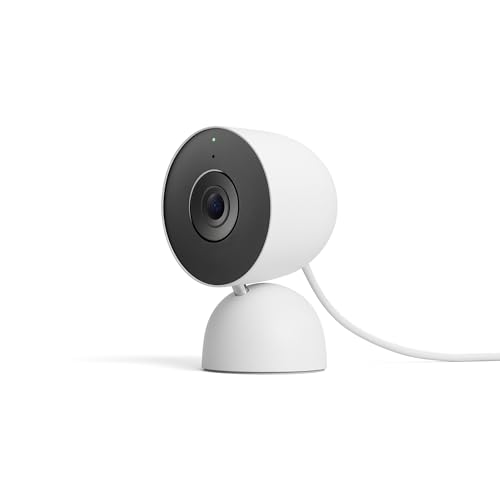
Google Nest Cam Indoor (Wired, 3rd Gen) — Best Polished Cloud Event History
Some camera apps feel like filing cabinets; this one feels like a diary that wants to be read. The Nest Cam’s home is Google’s home app, and its cloud keeping is organised around events with faces, motion and sound sorted into a timeline a tired human can search at midnight. The camera is wired, always awake, and indoors by design, so its archive has the continuity that battery diaries cannot promise: the evening unfolds as a sequence of happenings rather than a handful of postcards.
The experience that earns the badge is retrieval under mild stress. A sound in the night, a dog accused of a crime, a visitor whose arrival time is disputed — the timeline answers in gestures: scrub to the hour, recognise the event type by its label, open, share. Familiar-face and smart-alert behaviours belong to the maker’s subscription world and are described here as plan-dependent by design, but even the free shape of the history shows the design priority: the past should be browsable, not merely stored.
Choose this pairing when the household already lives partly in Google’s home ecosystem and the camera’s post is the home’s social centre — hall, living room, the door everyone actually uses. Its archive rewards that centrality daily, in small questions answered in seconds.
- Type: wired indoor smart camera with maker’s cloud event history (pool pick, linked)
- App home: Google’s home app ecosystem
- Recording style: event-based history on a continuous powered watch
- Archive character: searchable timeline; depth and smart features follow current plan terms
- Power: mains — no sleep, no battery rationing
Strengths
- The calmest, most searchable event timeline in this guide
- Always-awake wired watch makes its archive feel complete
- Sharing a clip with family is a few taps, not a project
Trade-offs
- Deepest history and smartest alerts live in the maker’s plan world
- Indoor and wired — one room, chosen well
- Leaving the ecosystem means leaving the archive’s front door
Best for: households already using Google’s home app who want the archive they will actually enjoy searching.
Not suited for: anyone wanting wire-free placement, outdoor duty, or an archive independent of a maker’s subscription.

Wyze Cam v4 — Best Value Cloud With a Local Safety Net
The v4’s archival personality is belt and braces, and for most homes that is the wisest personality on this page. Its maker’s cloud keeps the events and presents them in the app with the usual conveniences, while local recording on the camera gives the footage a second home that does not care whether your broadband had a bad night. When the router sulked through the very evening the gate was tried, cloud-only households own a gap; this household owns a card to check.
That duality also changes the cancellation question, which cloud shoppers forget to ask until they are angry. If the plan lapses, a cloud-only archive becomes a memory of a memory. Here, the local habit persists — recordings continue to be kept at the camera, viewable through the app on the home network, while the household decides whether the cloud tier earns its return. It is an unusually honest arrangement, and it suits the camera’s broader character: inexpensive, capable, and unbothered by doing two jobs at once.
Buy the v4 when the budget is real and the footage matters — the small-business back door, the rental’s entrance, the home whose owner reads terms. Its app’s cloud tiers follow the maker and are flagged plan-dependent throughout this guide; the local net underneath is the reason it outranks prettier archives for careful people.
- Type: compact mains-powered smart camera with cloud plus local recording (pool pick, linked)
- App home: maker’s own app
- Recording style: cloud events with local continuous or event recording beneath
- Archive character: two homes for footage — service and camera
- Power: mains, suited to long indoor or sheltered posts
Strengths
- Local recording keeps filming through broadband outages
- Archive survives a lapsed plan better than cloud-only rivals
- Strong value makes multi-room archives affordable
Trade-offs
- Best cloud conveniences sit within the maker’s optional tiers
- Two storage homes mean two things to manage
- Local footage retrieval is less instant than pure cloud browsing
Best for: careful households and small businesses that want evidence kept twice without paying twice over.
Not suited for: readers who want one archive, in one place, with no cards or settings to think about.

Blink Outdoor 4 — Best Battery-Camera Cloud Diary
Judge this archive as a diary and it is excellent; judge it as a tape and you will be disappointed in ways this guide refuses to let you discover late. The Outdoor 4 sleeps to survive, wakes for motion, files a clip to the system diary in its maker’s app, and sleeps again. A household of these — gate, drive, garden — produces a single chronology of happenings across the property, and for the questions battery cameras exist to answer, that chronology is precisely the evidence required.
The cloud’s role here is unification. Clips from every Blink camera in the system line up in one list, shareable with the household, searchable by the simple act of scrolling a day that has been pre-digested into events. There is no dead footage to scrub because the camera never recorded any — which is also the limitation, stated as plainly as the strength: what happened between events is not in the archive, because it was never filmed. Between-event blindness is the battery bargain, and owners who accept it knowingly tend to keep these cameras for years.
A local-storage route exists within this ecosystem through its sync hardware, and households allergic to cloud dependence should weigh it; but the cloud diary is the experience most owners live in, and its plan terms are the maker’s to set and reset. Buy the Outdoor 4 for posts wires cannot reach, tune its zones until its diary entries deserve reading, and let its archive be what it is: brief, honest, and there when the gate matters.
- Type: wire-free outdoor smart camera with system cloud diary (pool pick, linked)
- App home: maker’s app, shared across the whole camera system
- Recording style: motion-event clips only — no continuous tape
- Archive character: one chronology across every camera in the system
- Power: battery — the archive’s gaps are the price of its freedom
Strengths
- One diary gathers a whole property’s events calmly
- Wire-free posts can be archived without any wiring at all
- Tuned zones make its entries worth a household’s trust
Trade-offs
- Nothing exists between events — the camera was asleep
- Cloud depth follows the maker’s current plan terms
- Live view spends the battery the archive depends on
Best for: drives, gates and gardens where events matter and wires cannot go.
Not suited for: any post needing continuous footage, or evidence of what happened between motions.

REOLINK Argus PT Ultra — Best Cloud for a Camera That Watches a Wide Yard
A fixed camera files the view it was given; this one files the view it chose. The Argus PT Ultra pans and tilts on its mount, follows the geometry of a yard rather than a doorway, and can turn toward motion — so its event cloud reads like a patrol log from a large, awkward outdoor space: the far gate, the side path, the outbuilding door, each visited and filed in turn. For big plots and small farms, that breadth is the archive’s whole value.
Reolink’s ecosystem offers both cloud keeping and local habits, and this camera’s owners should decide deliberately which temperament they are buying, because the two archives behave differently on the bad day. The cloud route files events away from the premises — valuable when the camera itself is the thing a visitor might take — while local keeping survives connectivity failures. Many owners will run the maker’s cloud as the diary and treat local as ballast, checking current plan terms in the app, since the maker’s arrangements evolve.
Placement is this pick’s tuition. A pan-and-tilt battery camera spends energy on movement as well as watching, so its post should overlook the yard’s genuine crossroads, with its patrol habits tuned to the gates and doors rather than the ornamental middle. Set that way, its cloud diary becomes the property’s memory — wide, eventful and honestly outdoors, where the indoor archives in this guide cannot follow.
- Type: wire-free pan-and-tilt outdoor camera with maker’s cloud options (pool pick, linked)
- App home: maker’s app
- Recording style: motion events across a patrolled wide view
- Archive character: patrol log for large outdoor spaces; cloud and local routes both exist
- Power: battery — movement and watching share the budget
Strengths
- One camera archives a yard too wide for fixed views
- Cloud filing protects footage from the camera’s own theft
- Pan-and-tilt follows events a fixed lens would crop
Trade-offs
- Movement spends battery — patrol habits need tuning
- Cloud terms and tiers are the maker’s moving target
- Too much camera for a small, simple doorway
Best for: large yards, smallholdings and outbuildings where one wide watch must serve.
Not suited for: a narrow hall, a small flat, or any post a fixed camera covers completely.
A Home Network Recorder Route — Best for Continuous Recording Without a Camera-Maker Cloud
Every other pick in this guide keeps footage in somebody else’s building or in event-shaped pieces. This route keeps everything, continuously, in a recorder humming on your own network — a box with a hard drive, fed by compatible cameras, indifferent to subscriptions, cancellations and makers’ fortunes. For readers whose question behind the cloud question is really about control, this is the answer the rest of the page is measured against.
The archive it produces is the old-fashioned kind: a tape. Scrub to 3 a.m. last Thursday and the tape shows 3 a.m. last Thursday, whether or not anything moved, which settles a class of disputes event diaries cannot touch — the slow leak, the gradual trespass, the vehicle that waited. Storage is physical and finite, so the tape eats its own tail on a rhythm you choose by drive size and retention settings; the arithmetic is yours, printed on no maker’s pricing page.
The costs are equally old-fashioned. Somebody must set the system up, keep its clock honest, back up the clips that matter and accept that an archive inside the house shares the house’s risks unless a copy leaves it. This route suits the technically settled household — the small business with a back office, the home whose owner already maintains a network — and it flatters nobody else. But for continuous truth without a camera-maker cloud, nothing else in this guide is even pretending.
- Type: on-premises network video recorder pattern with compatible cameras (prose-only route)
- App role: recorder’s own viewer at home and remotely
- Recording style: continuous tape, retention set by your drive and settings
- Archive character: total ownership — and total responsibility
- Power: mains, with the recorder as a small always-on load
Strengths
- Continuous footage settles disputes events cannot
- No subscription stands between you and your archive
- Retention arithmetic belongs to you, not a pricing page
Trade-offs
- Setup and maintenance are genuinely yours
- An on-site archive shares the site’s risks
- Hardware cost arrives all at once, not monthly
Best for: technically settled households and small businesses wanting a continuous, owned archive.
Not suited for: anyone hoping the archive will simply look after itself.

eufy Indoor Cam E220 — Best Local-First Camera With Cloud as the Guest
Most wifi cameras in this guide treat local recording as the understudy; this one gives it the lead. The E220 records to storage at the camera as its founding habit, pans and tilts to cover a room from one post, and offers its maker’s cloud as an optional guest rather than the landlord. For the reader whose cloud-storage question is really a sovereignty question — where does my family’s footage live? — that inversion is the entire appeal.
The local-first archive behaves accordingly. Footage is browsable in the app without asking a distant service’s permission, the camera keeps its habits through broadband tantrums, and the household’s recordings sit in the household. Pan-and-tilt coverage means one camera’s archive covers a room’s corners rather than a fixed slice, which matters in the rooms this camera is bought for — nurseries, living rooms, the hall where life crosses. Its maker’s wider ecosystem can add cloud and hub options on current terms, for owners who later want a copy kept elsewhere.
The sovereignty has the standard price: an archive at the camera can leave with the camera, and a single local copy is a single point of failure. Owners who choose this pick knowingly usually accept a small ritual — exporting the clips that matter — as the rent on ownership. Choose the E220 when the footage is family life and your instinct says home; add the cloud later, as a guest you invited, if distance ever argues for it.
- Type: indoor pan-and-tilt camera with local-first recording (pool pick, linked)
- App home: maker’s app and wider home ecosystem
- Recording style: local recording as foundation; cloud optional on maker’s terms
- Archive character: footage lives at home unless you invite it elsewhere
- Power: mains — always awake for its room
Strengths
- Family footage stays in the family home by default
- Pan-and-tilt archive covers a whole room from one post
- Keeps recording through internet outages
Trade-offs
- A local-only archive can leave with the camera
- Important clips need a deliberate export habit
- Cloud extras follow the maker’s changing terms
Best for: nurseries and living rooms where footage should live at home first.
Not suited for: empty properties where the archive must survive the camera’s theft.
Cloud, Diary or Tape: The Six in One View
| Pick | Badge | What defines it |
|---|---|---|
| Google Nest Cam Indoor (Wired, 3rd Gen) | Best Polished Cloud Event History | A mains-powered indoor camera whose app presents kept events as a calm, searchable household timeline. |
| Wyze Cam v4 | Best Value Cloud With a Local Safety Net | Cloud event keeping with local recording underneath, so an outage does not blind the archive. |
| Blink Outdoor 4 | Best Battery-Camera Cloud Diary | Wire-free event clips filed in one diary across a whole Blink system — an archive of moments, honestly labelled. |
| REOLINK Argus PT Ultra | Best Cloud for a Camera That Watches a Wide Yard | A pan-and-tilt battery camera whose event cloud suits big outdoor views where wiring never stood a chance. |
| A Home Network Recorder Route | Best for Continuous Recording Without a Camera-Maker Cloud | A recorder on your own network keeps footage in the house — the archive answer for readers who distrust subscriptions. |
| eufy Indoor Cam E220 | Best Local-First Camera With Cloud as the Guest | Local recording is the foundation and cloud is the optional extra — the reverse of the usual wifi camera marriage. |
How Much Upload Bandwidth Does a Cloud Camera Household Burn?
Cloud archives are paid for twice: once to the maker, and once to your broadband, in the upstream direction most home connections are worst at. A wired camera uploading event clips is a modest citizen. Several cameras uploading eagerly through a busy evening — arrivals, departures, a garden party the motion zones were never told about — can saturate a weak uplink and make the household’s video calls sound like they are conducted from a submarine. The symptom arrives disguised as a work problem, and the cause sits on the wall, filing the driveway.
The remedies are architectural rather than technical. Reduce event generosity where the footage is worthless: the camera facing the street does not need to upload every passing car to a distant archive at full enthusiasm. Schedule the busiest posts’ sensitivity around the household’s working hours. And where a camera’s archive matters more than its immediacy, favour systems whose local recording carries the load and whose cloud receives the chosen events rather than the whole diary.
Households on capped or rural connections should do this arithmetic before choosing a cloud temperament at all. An archive that assumes metropolitan broadband will behave like a guest who assumes metropolitan everything — fine until the weather turns, then quietly impossible.
Who Can See Your Cloud Footage, and How Is It Protected?
An honest answer has three floors. The ground floor is your household: everyone with the app and a sign-in, which is why sharing discipline — individual accounts, reviewed when life changes — is archive security and not admin fussiness. The first floor is the maker’s service itself, whose encryption and access practices are described in its own policies; footage encrypted in transit and at rest is the industry expectation, and end-to-end arrangements, where a maker offers them, trade convenience features for stronger privacy in ways worth reading about before choosing.
The top floor is compulsion and accident: accounts fall to reused passwords more often than to any exotic attack, so the archive’s real lock is your account hygiene — a unique password, the maker’s two-step sign-in switched on, and a recovery email you actually control. Cameras record the home’s life; their archives deserve the same seriousness as the banking app and rarely receive it.
None of this argues against cloud keeping, which for many posts is the safest copy of all. It argues for choosing the maker whose policies you have read once, at the kitchen table, before the footage exists — because afterwards, the policies are no longer the subject. The footage is.
Can One App Hold an Archive for Two Homes?
Second homes, rental units and the parent across town all ask the same question, and most makers’ apps answer it structurally: cameras group by home or system, archives stay with their group, and the viewer switches between households rather than merging their diaries. That separation is a feature disguised as friction — a rental’s footage and a family’s footage should never share a timeline, a sharing list or a fate.
Plan arithmetic follows the grouping. Whether a maker’s plan covers one home, one camera or a household of devices is a terms question that decides real money across two properties, and it belongs on the comparison list beside retention. Households running two homes often settle on one maker for both, accepting one app and one set of terms, even where a different camera might win a single-home contest — because the archive’s manageability across properties outranks any single camera’s charm.
Sharing then becomes the delicate part. The cleaner at the rental, the neighbour at the second home, the adult child at the parent’s house each need a view scoped to one property and revocable in one gesture. Set those scopes at installation, while goodwill and attention are both high, rather than during the first incident.
What Should Happen to the Archive When You Change Camera Brands?
Assume, because it is nearly always true, that the archive does not move. Cloud histories live inside their makers’ apps; a new brand starts an empty diary while the old one ages out under its plan’s remaining terms. The households that change brands gracefully treat the transition as an export season: incidents and keepers downloaded, filed with dates and sentences, before the old plan lapses — a weekend of housekeeping that converts a hostage archive into a owned folder.
The deeper lesson is to buy archives the way you buy roofs, expecting to live under them longer than the device that sold them. Cameras will be replaced on a fashion cycle; the footage of a child’s first years at a front door, or a business’s first incident, should not be on that cycle. Where a maker’s export tools are strong and ordinary, changing brands is an errand. Where export is grudging, the first camera is quietly a marriage.
Local-recording habits soften every version of this story, which is one more reason this guide keeps returning to them. A camera that kept a copy at home leaves you something when the service and you part ways — not the whole diary, perhaps, but the raw material of it.
How Do Free Cloud Tiers Differ From the Real Thing?
Mostly in time and in labels. A free tier typically keeps events for a short window and labels them coarsely — motion, perhaps sound — while the maker’s fuller service extends the window and sharpens the labels into people, vehicles, pets and parcels. Neither is a scam; they are different archives wearing one app’s clothes. The buyer’s error is auditioning the free tier’s behaviour and imagining the keeper archive, or the reverse: dismissing a camera whose paid archive is excellent because its free diary is brief.
Decide which archive you are actually buying before the camera is mounted. If the free window covers your discovery habits — you check events the same day, always — the free archive may genuinely be the product. If your life reports incidents late, the extended window is not an upsell but the entire point, and its cost belongs in the camera’s price from the first comparison.
And re-audition yearly, on a calendar note rather than a grievance. Makers adjust tiers; households adjust habits; the archive that fit last year may be quietly wrong in both directions, keeping too little of what matters or paying to keep what nobody will ever watch.
Should a Nursery or a Bedroom Ever Record to the Cloud?
These rooms ask the archive question in its most intimate form, and the guide’s answer is deliberately unhurried: only with the household’s informed agreement, and usually with the local-first temperament in front. A nursery’s footage is a family’s tenderest data. Keeping it at home — the eufy pattern in this guide, or a recorder route — preserves the camera’s usefulness while the archive stays where the life it records is lived.
Where cloud keeping is chosen for such a room, choose it actively: the maker’s privacy policies read, the sharing list at its minimum, the retention at its shortest useful depth, and the camera’s schedule matched to the room’s real use rather than its theoretical one. A nursery camera armed for naps and nights is a tool; the same camera archiving a family’s whole domestic life to a distant service by default is a habit nobody chose.
Guests’ rooms sharpen the rule to a point: no archive, no camera, no exceptions worth arguing. The rooms in a home divide into those where watching protects the household and those where it merely observes it, and the cloud question is simply where that line gets enforced — in the settings, on purpose, before the first clip exists.
How Do Weather, Seasons and Spiders Rewrite an Outdoor Archive?
An outdoor camera’s cloud fills with the year’s autobiography whether you plan it or not. Autumn brings the hedge’s shadow dancing across the zone at the hour the sun drops; winter brings rain that motion detection reads as a crowd; spring brings the spider who builds across the lens and stars, enormous and nightly, in her own archive. Each season’s false chapter costs the same things — upload, retention space, and the owner’s faith in the alert that finally matters.
The countermeasures are seasonal chores, like gutters. Re-draw zones when the garden changes; drop sensitivity a step when the rains arrive; clean the lens when the diary’s pictures go soft at the edges. Households that put a five-minute archive review on the calendar each season — scroll the week, count the lies, tune once — keep outdoor clouds honest for years. Households that tune once in June own a diary that by November is mostly weather and arachnids, and an owner who has stopped reading it, which is the one archive failure no plan tier can fix.
What Does a Good Archive Look Like on the Morning After an Incident?
Calm, mostly. The owner opens the app with coffee rather than adrenaline, because the drill was rehearsed on a nothing clip in a quieter week. The event is findable by its label and hour; the clip opens without negotiation; the export lands in a folder whose name makes sense; the second copy exists because the system was built with two homes for footage. Nothing about the morning is impressive, which is the point — archives earn their keep by being boring under load.
Contrast the unrehearsed morning, which this guide has now described from several angles because it is the most common scene in consumer security: the expired window, the unlabelled scroll, the clip that needs a player nobody has, the discovery that the camera everyone trusted was asleep between events. Every pick and principle on this page exists to move a household from the second morning to the first. Choose the archive whose failure modes you have met in rehearsal, and the real morning holds no surprises — only evidence.
How Should Landlords and Tenants Split the Cloud Question?
Rented homes hold two households’ interests in one hallway, and the archive makes the split concrete. A landlord’s camera at a shared entrance protects the building; its footage, kept in the landlord’s cloud, is the landlord’s responsibility and should be declared as plainly as the camera itself. A tenant’s own indoor cameras are the tenant’s archive entirely — their app, their plan, their footage — and a tenancy that ends should end the landlord’s access to any shared view as cleanly as it returns the keys.
The practical courtesies are small and early. Put the arrangement in writing while everyone is friendly: which cameras exist, where their footage lives, how long it is kept, who can see it. Agree the discovery window — how far back either party may reasonably ask the other to look — and the export ritual for incidents that involve both. Most disputes in this territory are not about malice; they are about an archive nobody described until the day it was needed, by which time description sounds like excuse.
One Archive or Several: Should Every Camera Share One Cloud?
A single maker’s system gives the household one diary, one plan and one set of terms — an archive with a single front door, which is why the Blink and Nest patterns in this guide feel so calm. The price is captivity: every future camera must be that maker’s, or start a second diary. Mixed households gain the best camera for each post and pay in fragmentation — two apps, two retention clocks, two export rituals to rehearse, and an incident at the boundary between systems that must be assembled from both.
Neither shape is wrong; the error is drifting into one. Decide at camera two, not camera six, whether the household is a single-archive home or a best-camera home, and write the decision into how the next purchase is judged. Archives compound like interest — quietly, and mostly in the direction of whichever choice you made first.
How Long Should a Home Actually Keep Camera Footage?
Longer than feels tidy, shorter than feels safe — and the honest number comes from your life, not from a plan brochure. Most incidents are reported late: the scratch on the car noticed at the weekend, the neighbour’s account of Tuesday arriving on Friday, the insurer’s letter a fortnight on. An archive that keeps a few weeks of events forgives that lateness; one that keeps only days punishes it. Households with holiday patterns need more — the archive must span the trip plus the week of denial after it.
Against that stands a privacy arithmetic nobody prints. Every week of kept footage is a week of your household’s comings, goings and visitors held in a form that can be subpoenaed by circumstance — a breach, a borrowed phone, a relationship change. Keeping everything forever is not caution; it is hoarding with a lens. The settled households pick a retention that covers their realistic discovery window, set it, and let the archive prune itself without grief.
Whichever depth you choose, rehearse retrieval at that depth. Ask the app, on a quiet evening, for the oldest event it claims to hold, and open it. Archives fail silently at their edges first, and the edge is exactly where the incident you care about will be sitting.
What Happens to Your Archive When the Internet Goes Down?
Three different failures hide inside that one question, and your pick decides which you suffer. When broadband dies but the home network lives, cloud-only cameras keep watching a house they cannot report from — some buffer a little, many simply miss the evening. Local-recording cameras and recorder routes keep filing happily and show you everything when the connection returns, which is why the Wyze and the recorder route wear their safety nets proudly in this guide.
When the camera’s power or the camera itself is the failure, the direction reverses: footage already sent to a cloud survives the camera’s unplugging, theft or drowning, while a local archive can leave in the thief’s pocket. Empty properties therefore argue for cloud even when their owners dislike subscriptions; occupied family homes argue the other way, since the likeliest disaster is a router, not a burglar with a step-ladder and a plan for your nursery camera.
The mature systems in real homes are quietly hybrid: events copied away, a local copy underneath, each covering the other’s classic failure. If your pick forces a single home for footage, choose by naming your likeliest bad day out loud — outage or theft — and let that sentence, not a feature list, sign the decision.
How Do You Export a Clip So It Is Actually Useful as Evidence?
Export on the day you notice, in the app’s most ordinary format, and keep the export boring. A clip that needs a special player is a story, not evidence; the file you want opens on any laptop an insurer, landlord or officer owns. Save it twice — once with your documents, once somewhere off the device you exported to — and rename it with the date, the camera and one plain sentence about what it shows, written while your memory is still a witness rather than a rumour.
Resist improving the footage. Trimming for length is defensible if you keep the original untouched beside the trim; filters, zooms and edits belong to a copy clearly labelled as such. Note, in the same folder, the boring corroboration: the camera’s clock was correct, the timezone the house lives in, who else was told. Evidence is mostly housekeeping performed early.
Then test the chain once with a nothing clip — a delivery, a cat — from export to a second person’s screen. Every household that has done this drill owns an archive; every household that has not owns a hope with an app icon.
Why Do Smart Alerts Change What an Archive Is Worth?
Because an archive you cannot search is a warehouse, and smart detection is the shelving. Person, vehicle, pet and sound labels turn a month of events into answerable questions — show me people at the side gate — and the cameras in this guide differ less in whether they record than in how well their apps label what was recorded. The deepest labelling generally lives in each maker’s plan world, which is why this guide keeps repeating the unfashionable sentence: check the current terms, because the archive you are buying is partly a labelling service.
False labels are the tax. A system that files the hedge’s shadow as a person nightly teaches its owner to ignore the shelf marked people, and the archive’s worth collapses to its raw footage. Spend the tuning evening — zones, sensitivity, camera angle across the path of travel — and the labels become trustworthy enough to build habits on.
Judge demos accordingly. A maker’s film of perfect detection shows the shelving in a warehouse built for filming. Your archive will be built in rain, at angles, by a camera a spider has adopted. The picks above were chosen for how their systems behave in that warehouse instead.
What Mistakes Do Cloud Camera Buyers Make?
The classic is buying the camera and discovering the archive: a household mounts four cameras, lives happily for a month, then learns at the first incident that the history they assumed existed had expired under terms nobody read. Read the archive’s terms before the camera’s specifications — retention, export, cancellation — because the camera is a purchase and the archive is a relationship.
Second is the continuous-recording assumption, the belief that wifi cameras tape everything like the shop systems of childhood. Most record events, and the difference matters precisely in the slow, quiet incidents — the leak, the loiterer who never crossed a zone — that produce no event at all. If your risk is slow and quiet, buy the recorder route or accept event logic with open eyes.
Third is single-copy faith: footage in exactly one place, whether that place is a distant service whose account you might lose, or a card in a camera a thief can pocket. Fourth is the unwatched archive — months of recording nobody can retrieve from, discovered during the export drill nobody ran. The drill is in this guide twice because it is the cheapest sentence in it: export a nothing clip today, and your archive becomes real.
Final Recommendation
For most households, start with the Wyze Cam v4’s belt-and-braces archive — cloud events for convenience, local recording for the bad night — and add the Google Nest Cam Indoor where a polished, searchable timeline will be lived in daily. Battery posts belong to the Blink Outdoor 4’s honest diary and the REOLINK Argus PT Ultra’s wide patrol. Readers who want footage at home on principle should build on the eufy Indoor Cam E220, and readers who want a continuous owned tape should skip cameras’ clouds entirely and take the recorder route.
Whichever you choose, sign the decision with the drill: record an event, export it, open it on another screen. An archive you have rehearsed is security. An archive you have only read about is literature.
A final small habit protects every archive in this guide: once a season, open the app and scroll to the oldest clip it holds, and simply confirm it plays. That ten-second check verifies retention, account health and retrieval in a single gesture, and it turns the archive’s far edge — the place real incidents always seem to land — from a rumour into a known country.
Keep the season’s check on the same calendar note as the lens cleaning and the battery glance, and the whole camera system gets reviewed in one unhurried pass, four times a year, for less time than one incident would cost.
Frequently Asked Questions
Do wifi cameras record continuously to the cloud?
Most record events — clips triggered by motion or sound — rather than an unbroken tape, and battery cameras record only events by necessity. Continuous recording exists in some makers’ higher plan tiers for wired cameras and in on-premises recorder systems. If continuous footage matters, verify it explicitly for your exact camera and plan before buying.
What happens to my cloud clips if I cancel the plan?
Typically the archive stops growing and existing clips age out or become inaccessible under the maker’s terms — which is why this guide treats cancellation behaviour as a buying criterion. Export anything that matters before cancelling, and favour cameras with a local-recording habit if you dislike hostage arrangements.
Can a camera keep recording when my internet is down?
Only if it has somewhere local to put the footage. Cameras with local recording and recorder-based systems keep filing through an outage; cloud-only cameras generally cannot upload and may miss events entirely. The camera’s live view will also be unreachable from outside until the connection returns.
Which is safer for evidence — cloud or local storage?
Each survives the disaster the other dies in. Cloud footage survives the camera’s theft or destruction; local footage survives outages, cancellations and account problems. For posts where evidence genuinely matters, the honest answer is both: events copied to the cloud, a local copy underneath.
How far back should my camera archive reach?
Cover your discovery window: the gap between an incident and your hearing of it. For most homes that argues for a few weeks of event history; for holiday homes and rentals, span the longest absence plus a week. Test the edge of the archive occasionally by opening its oldest clip.
Can family members view the same cloud archive?
Generally yes, through each maker’s household sharing, with the account owner controlling who sees what. Share deliberately under each person’s own sign-in rather than lending a password, and review the sharing list when household circumstances change — an archive is a view into the home’s life, not just its incidents.
Related Guides
Continue with our guides to turning a spare phone into a security camera, viewing several camera brands without the makers’ apps and the best app for monitoring security cameras day to day.