Disclosure: As an Amazon Associate, kajuandouglas.com earns from qualifying purchases. Links on this page are affiliate links; they cost you nothing extra. Prices and availability change often, so check the current Amazon listing before you buy.
The best mechanical keyboard gifts succeed where most tech gifts fail: they are used every day, by hands, for years — and they are personal in a way a gadget cannot fake, because a keyboard is chosen for one person’s desk, games and typing habits. The seven gifts in this guide cover the whole giving map. Four are complete keyboards at different sizes and temperaments, for the person who needs a first board or a better one. One is a designer keycap set, the gift for the enthusiast who already owns a board they love. And two are the accessories that keyboard people genuinely want and rarely buy themselves: a proper wrist rest and a hard travel case. Every one of them was chosen to be unwrappable with delight and usable the same evening.
Gifting a keyboard has one rule that outranks all others: buy for the recipient’s desk, not for your own taste. Their layout, their switch tolerance, their household’s noise rules and their computer’s operating system are the specifications that matter, and this guide flags them in every review — which board suits a Mac household, which is safe for a shared flat, which is the enthusiast’s upgrade and which is the beginner’s open door. Read the recipient sections as carefully as the product sections; in a gift guide, they are the same section wearing different clothes.
Key takeaways: Gift for the recipient’s desk: their layout habits, their household’s noise rules, their operating system. Hot-swappable boards are the safest keyboard gifts because a wrong switch feel can be corrected later. Keycaps and accessories are the connoisseur’s gifts — they upgrade a beloved board without replacing it. And the beginner’s board should be complete, forgiving and good-looking out of the box, because a gift that needs accessories to work is a errand, not a present.
Where to buy and how this guide handles best mechanical keyboard gifts
Every item linked below was confirmed in this site’s verified catalogue data, and each review ends with a Check price on Amazon link to that exact listing. Gift buyers should apply the variant discipline twice over: several boards here are sold in multiple switch and colour options under one page, and the difference between a linear and a clicky variant is the difference between a triumph and a tactful exchange. Each review names the variant its listing describes — check the selected option matches before the gift is wrapped, because the recipient’s unboxing should not begin with a settings problem.
A note on prices, in keeping with this site’s practice: none are printed here, because they move with seasons and sales and a gift guide read in December should not quote October. The picks are positioned qualitatively — the friendly tier, the mid tier, the connoisseur’s tier — so you can match the gift to the occasion honestly: the workplace exchange, the birthday of a person you know well, the milestone that deserves the best object in the guide. Generosity is measured in fit, not in figures, and a well-matched mid-tier gift beats a mismatched flagship every time it is opened.
In this guide
Quick picks: Best Mechanical Keyboard Gifts
Seven gifts for the keyboard people in your life — and for the people about to become keyboard people. If you know your recipient, the shortlist resolves by relationship: beginner, gamer, enthusiast, traveller. The reviews underneath argue each gift’s case for its person, and the framework that follows covers the etiquette and the traps of giving hardware by hand.
- Keychron V1 — the beginner’s perfect first board: QMK layers, hot-swap sockets and a translucent glow.
- RK ROYAL KLUDGE RK68 — the wireless all-rounder gift: 65 percent, Bluetooth and dedicated arrow keys.
- Drop GMK Godspeed keycap set — the enthusiast’s gift: a designer colourway that upgrades the board they already love.
- EPOMAKER EK68 — the gamer’s gift: gasket-mounted, knobbed, tri-mode and ready to play out of the box.
- GLORIOUS wrist rest — the thoughtful accessory: comfort for the board they already own.
- GEEKRIA hard case — the traveller’s gift: armour for a 75 percent board that goes places.
- Ducky One 3 Mini — the connoisseur’s compact: hot-swap, PBT tripleshot caps and Ducky’s build in 60 percent.
How the picks were chosen
The shortlist was built by recipient first and product second. For the beginner, the gift had to be complete and forgiving — hot-swappable, standard enough to learn on, attractive enough to delight on sight. For the gamer, it had to arrive ready: wireless where the desk demands it, a knob or arrows where the games do, nothing to build before playing. For the enthusiast — the hardest person on any list — the guide refuses the obvious trap of a replacement board and offers the upgrade instead: a designer keycap set that honours the board they chose for themselves. And for the practical souls, the accessories were held to a strict standard: things keyboard owners demonstrably want, demonstrably use daily, and demonstrably underbuy for themselves.
Two gift-specific filters ran across all seven. The first is household safety: no clicky switches anywhere in this guide, because a gift that annoys the recipient’s family is a gift that gets quietly retired. The switches here are linears and quiet tactiles — the variants that survive shared rooms and open microphones. The second is return-proofing by design: hot-swap sockets on the boards, standard MX stems on the keycaps, mainstream sizes on the accessories, so that even an imperfect guess remains correctable or universally fittable. A gift should open doors for its person; these seven were chosen so that every door they open stays open.
The picks in detail
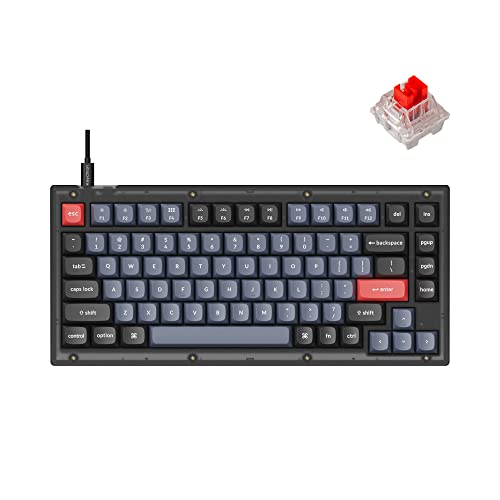
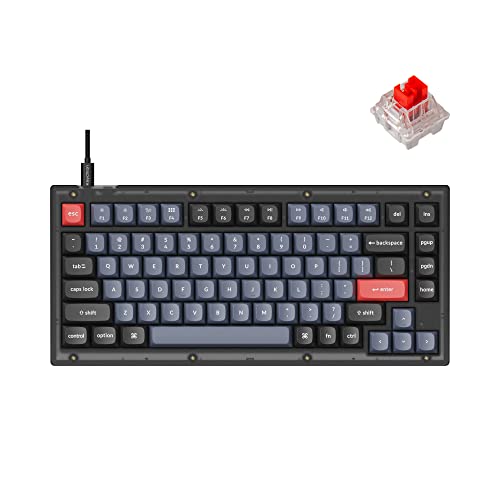
Keychron V1 — Best gift for a beginner
At a glance: 75 percent wired layout; QMK/VIA programmable; hot-swappable Keychron K Pro Red linear switches in this variant; translucent frosted case with backlight glow; Mac and Windows compatible.
The V1 is the gift for the person whose interest is real but whose desk still runs a bundled membrane board — the student, the new gamer, the colleague who lingers at your keyboard. It succeeds as a first board on every axis a gift can be judged. It looks the part on unboxing: a frosted translucent case with the backlight glowing through it, modern and a little magical. It works the part immediately: a 75 percent layout with a function row and arrows, so nothing about their current habits breaks. And it grows the part for years: QMK/VIA layers to discover, hot-swappable sockets so the switch feel can evolve, and the full open-firmware education waiting whenever curiosity arrives.
The Red linear variant listed here is the gift-safe switch choice — smooth, quiet enough for any household, and the feel most beginners picture when they imagine a mechanical board. Because the sockets are hot-swappable, even that choice is provisional: the recipient who falls for tactiles next year changes the board’s character with a puller and a podcast’s worth of time, and your gift becomes the platform of their hobby rather than a snapshot of your guess. Mac and Windows legends and the hardware toggle cover the household operating systems without a settings expedition.
The honest notes are small: wired only, and a plastic case that keeps the price giftable by keeping the board light. Neither matters to its recipient, for whom the comparison is not against aluminium flagships but against the membrane board this replaces — a comparison the V1 wins so completely that it has started a significant share of the hobby’s current population. If one person on your list is keyboard-curious, this is the gift that converts curiosity into a pastime, and it does it at the friendly tier.
Strengths
- A complete, delightful first board out of the box
- Hot-swap sockets make the gift correctable forever
- QMK/VIA layers give the hobby room to grow into
- Gift-safe linear switches suit any household
- Translucent case makes unboxing a moment
- Mac and Windows ready with a hardware toggle
Trade-offs
- Wired only
- Plastic case — light rather than luxurious
- 75 percent layout omits the number pad
Best for: Beginners and the keyboard-curious: students, new gamers, upgrading colleagues.
Not suited for: Number-pad professionals and wireless-only desks.
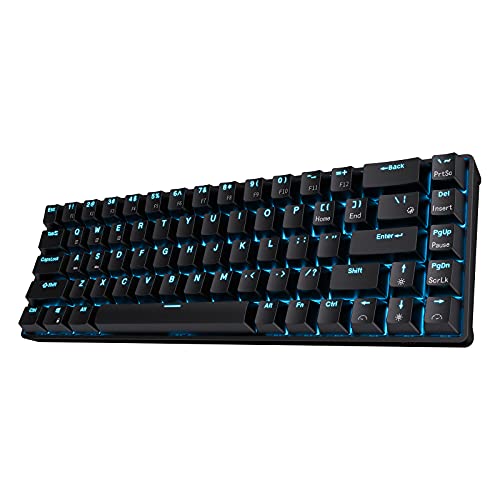
RK ROYAL KLUDGE RK68 — Best wireless gift
At a glance: 65 percent layout with standalone arrow and control keys; Bluetooth 5.0 wireless plus wired; hot-swappable sockets; blue backlight; software support for remapping.
The RK68 is the gift for the person whose desk you have seen — tidy, cable-averse, possibly shared with a laptop that comes and goes. Its 65 percent layout is the compact size that keeps its promises: dedicated arrow keys stand alone rather than hiding on a layer, so the recipient’s existing habits survive the upgrade, while the board’s footprint frees the desk the way compact boards promise. Bluetooth connects it to the laptop, the tablet or the desktop without a receiver to lose, and wired mode waits for gaming or a flat battery’s afternoon.
As a gift it has the great virtue of thoughtfulness made visible. Wireless says you noticed their desk. Hot-swappable sockets say the board can become theirs — switches changed, feel personalised — long after the wrapping is recycled. The blue backlight gives it a calm, single-colour glow that suits more rooms than a rainbow does, and the software support lets the tinkering kind remap while the non-tinkering kind never needs to open it. It is the all-rounder gift: no strong wrong answer for any recipient whose work does not demand a number pad.
Set expectations at its tier: the case is light plastic, the backlight is blue rather than full RGB, and the stock switches are the brand’s own — competent, and replaceable by design. For a workplace gift exchange, a sibling’s birthday or a partner’s desk upgrade, those are the right compromises, because the gift’s job is to be opened, used that evening and kept. The RK68 does all three with the ease of a board that has been given, successfully, very many times.
Strengths
- Wireless freedom suits tidy and laptop-centred desks
- Dedicated arrow keys — no habit-breaking layers
- Hot-swappable sockets personalise the gift over time
- Calm blue backlight suits shared rooms
- Compact footprint frees any desk it lands on
- An all-rounder with no wrong recipient in its class
Trade-offs
- Plastic case at a gift-friendly tier
- Single-colour backlight rather than RGB
- No number pad for data-heavy work
Best for: Partners, siblings and colleagues with tidy, wireless desks.
Not suited for: Number-pad users and full-RGB gamers.
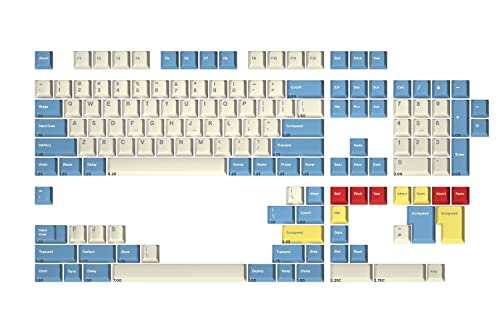
Drop + MiTo GMK Godspeed Keycap Set — Best gift for an enthusiast
At a glance: Designer keycap set by MiTo; doubleshot ABS; Cherry profile; Armstrong kit; fits MX-style stems and layouts from 60 percent to full-size.
Every gift list has one impossible person: the enthusiast who already owns exactly what they want. The Godspeed set is how you gift that person well. Rather than replacing the board they chose with your guess, it upgrades the board they love — a complete designer colourway by MiTo, themed on the space programme’s golden age, manufactured as doubleshot keycaps whose legends can never fade. On their existing keyboard, in ten minutes with a puller, your gift becomes the surface their fingers read every day. It is the rare present that says you understand their hobby rather than merely funding it.
The set’s quality is the hobby’s reference class: GMK-grade doubleshot construction, Cherry profile, and the Armstrong kit’s coverage across the mainstream layouts — 60 percent through full-size — so it will fit the board they own now and most boards they buy next. The colourway itself is a connoisseur’s palette: deep space blues and warm retro accents that photograph beautifully and, more importantly, type beautifully, the legends crisp under the fingers at any hour. Enthusiasts collect colourways the way readers collect editions; Godspeed is a first-edition kind of gift.
Two gift-giver’s checks before ordering. Confirm their board uses standard MX-style stems and a layout the kit covers — a photograph of their keyboard settles both. And know that GMK’s ABS develops a gentle shine on the hardest-used keys over the years, which enthusiasts read as patina on a kept object rather than wear on a consumable. Given with those facts known, Godspeed is the gift in this guide most likely to be talked about at next year’s gathering — by the recipient, at length, with the board in hand.
Strengths
- Upgrades the board they love instead of replacing it
- Designer colourway with a space-age story
- Doubleshot legends — permanence worthy of a keeper gift
- Covers 60 percent to full-size layouts
- Cherry profile suits enthusiast boards
- A collector-grade object from a named designer
Trade-offs
- Requires an MX-stem board they already own
- ABS shine over years — patina to fans, wear to others
- You must quietly verify their layout first
Best for: Enthusiasts, collectors and anyone whose board is already chosen.
Not suited for: People who do not yet own a mechanical keyboard.

EPOMAKER EK68 — Best gift for a gamer
At a glance: 65 percent gasket-mounted layout with knob; tri-mode 2.4 GHz, Bluetooth 5.0 and USB-C; hot-swappable; Gateron Pro Yellow linear switches; south-facing RGB; 3000mAh battery.
The EK68 is the gift for the gamer whose current board came free with something. It arrives as a complete little event: a gasket-mounted 65 percent deck — the soft, quiet landing that makes a board feel expensive — with a metal knob for volume, tri-mode connectivity that covers the gaming PC on its 2.4 GHz receiver and the laptop on Bluetooth, and Gateron Pro Yellow linears, the smooth mid-weight linear the community recommends to people who have never heard of it, because it simply feels right under game and chat alike. Unboxed in the evening, it is on the desk and in the game within the hour, which is the tempo a gamer’s gift should keep.
The details keep giving after the unboxing. Hot-swappable sockets and south-facing LEDs — the orientation that makes keycap sets glow properly — mean the board accepts the hobby’s whole wardrobe when its owner starts browsing. The knob becomes the hand’s favourite resident within a day. The battery is sized for real use between charges, and the wired mode covers the tournament-serious sessions. For a teenage gamer, a partner who plays, or a friend whose setup is one peripheral behind, the EK68 is the upgrade that reorganises their desk’s centre of gravity.
Its tier’s honest notes: the case is not the aluminium of flagships, and the software is functional rather than famous. Neither will cross its recipient’s mind. What will cross their mind, nightly, is that someone noticed their old board and replaced it with the board the hobby itself would have chosen at this tier. That noticing is the gift; the EK68 is just very good at carrying it.
Strengths
- Gasket mount and Pro Yellow linears feel premium instantly
- Tri-mode wireless covers gaming PC and laptop
- A knob gamers actually use, from the first evening
- Hot-swap and south-facing LEDs welcome future keycaps
- Complete and ready — no accessories needed to play
- The upgrade that reorganises a gaming desk
Trade-offs
- Case materials a tier below aluminium flagships
- Software is functional rather than polished
- 65 percent layout layers the function row
Best for: Gamers of any age whose board came with the computer.
Not suited for: Number-pad professionals and full-size loyalists.
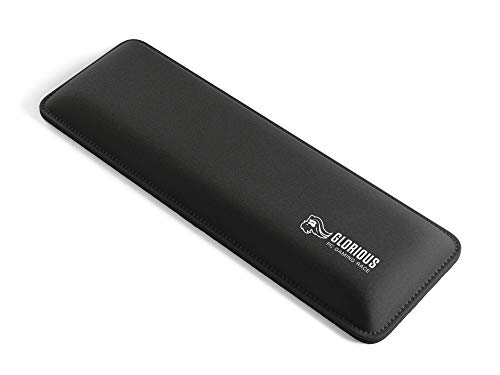
GLORIOUS Compact Keyboard Wrist Rest — Best comfort accessory gift
At a glance: Compact-size wrist rest, 12 by 4 by 1 inches; foam interior with medium firmness; stitched anti-fray edges; nonskid rubber base; black.
The wrist rest is the gift that says you have watched the recipient work. Keyboard people spend their upgrade money on switches and keycaps and chronically underbuy the thing their palms meet for eight hours — and a good rest, used properly, changes the end of the working day. Glorious’s compact rest is the category done right: a medium-firm foam that supports without swallowing, stitched edges that will not fray into tat within the year, a rubber base that stays where it is put, and the compact 12-inch width sized for the tenkeyless and smaller boards most enthusiasts actually run.
The proper use is part of the gift’s value, and worth a sentence in the card: the rest is for pauses — reading, thinking, watching — with wrists floating while typing, palms settling onto support when the hands rest. Given to a typist or gamer whose current setup is a folded towel or a book’s edge, it lands as an immediate, daily comfort. It also travels between boards without compatibility questions, which makes it the safest gift in this guide for the person whose setup you cannot inspect: if they own a compact board, this fits its front edge like it was measured there.
Size is the one check: this is the compact model, and a full-size board’s owner needs the larger sibling from the same range — verify against the recipient’s board width, or choose this for the tenkeyless majority with confidence. Beyond that, the gift has no failure modes: no switches to guess, no software, no operating system, nothing to return. In a guide of considered purchases, the wrist rest is the one you can buy in five minutes and be right about for years.
Strengths
- Daily comfort for the board they already own
- Medium-firm foam supports without swallowing the palms
- Stitched edges and a nonskid base — built to last
- Compact size fits the tenkeyless majority perfectly
- No compatibility risks: no switches, software or OS
- The gift that shows you noticed their working day
Trade-offs
- Compact width — full-size owners need the larger model
- A rest must be used correctly: pauses, not typing
- Black only in this listing
Best for: Any keyboard owner whose palms currently rest on a desk edge.
Not suited for: Full-size board owners, unless you size up within the range.

GEEKRIA 75% Keyboard Case — Best gift for a travelling keyboard
At a glance: Hard-shell travel case for 75 percent, 84-key keyboards; extra internal space for cable and accessories; compatibility listed for popular 75 percent boards including Keychron K2 and Aula F75 families.
Some keyboard people take their board with them — to the office, to tournaments, to the other house, to the café where the good chapters happen — and they carry it in tote bags and hope. The GEEKRIA case is the gift that ends the hope: a hard shell sized for the 75 percent, 84-key boards that dominate the travelling population, with room inside for the cable and the small accessories, and a structure that shrugs off the bag’s other contents. It is the kind of gift whose value is proven the first time a water bottle shares the bag, which is to say within the month.
The fit list matters and this case publishes a useful one, naming popular 75 percent families it accommodates; the giver’s job is the two-minute check that the recipient’s board is in that class — 84-key, 75 percent — or close enough in dimensions that the shell’s extra space absorbs the difference. Inside that check, the gift is foolproof: it asks nothing of the recipient’s taste in switches or layouts, it protects the board they already love, and it upgrades every journey that board makes from a risk to a routine.
It is also, quietly, an enthusiast’s signal: only someone who knows that keyboards travel buys the case. For the student whose board commutes between dorm and home, the hybrid worker whose 75 percent lives in two offices, the tournament player whose board has a passport — this is the accessory they would eventually buy themselves, which is the definition of a good gift arriving early. Pair it with nothing; it pairs itself with the board in their bag.
Strengths
- Hard-shell protection for the board that travels
- Sized for the popular 75 percent, 84-key class
- Extra space swallows the cable and accessories
- No taste risks — it protects their board, not replaces it
- Publishes a real compatibility list to check against
- Proves its value the first wet commute
Trade-offs
- Fits the 75 percent class — other sizes need other models
- You must know their board’s size class
- A purely practical gift — romance sold separately
Best for: Students, hybrid workers and tournament players with travelling boards.
Not suited for: Desk-only owners and full-size board users.

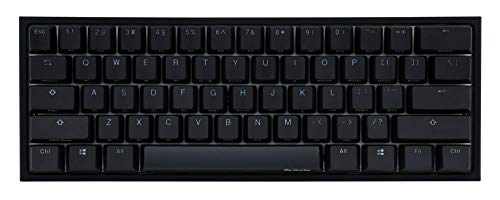
Ducky One 3 Mini — Best connoisseur compact gift
At a glance: 60 percent layout; hot-swappable sockets; Cherry MX Red linear switches in this variant; PBT tripleshot keycaps; RGB; detachable USB-C; Quack Mechanics platform.
The One 3 Mini is the gift for the keyboard person whose taste has already formed — the one who speaks of their current board in sentences with opinions in them. Ducky’s flagship miniature packs the enthusiast checklist into 60 percent: hot-swappable sockets on the Quack Mechanics platform, PBT tripleshot keycaps — a manufacturing flourish beyond doubleshot, with legends and accents moulded in three layers — per-key RGB, a detachable cable, and the dense, tuned build that made the One series the compact standard. In Cherry MX Red, this variant is the smooth linear all-rounder: quiet in the household, quick in the game, safe for any recipient whose switch taste you know runs linear — and correctable via the sockets if it does not.
As a gift it lands differently from the beginner boards here: it is a connoisseur’s object, the board enthusiasts buy each other when the occasion justifies the best small thing rather than a bigger thing. Its 60 percent layout is the enthusiast’s size — layers assumed, desk space celebrated — and its recipient will read the choice as fluency: you knew the size, the brand and the platform. For the person whose hobby this is, that fluency is half the present.
The cautions are the size’s own: a 60 percent board is the wrong gift for a recipient who has never used layers, however fine the board — give them the V1’s 75 percent instead and let them arrive at sixty by choice. The One 3 Mini also rewards the tinkerer’s hand, so its ideal recipient is the one who will enjoy the platform rather than be puzzled by it. Matched correctly, it is the finest compact gift in this guide, and the one most likely to still be on the desk, evolved and personalised, at the decade’s end.
Strengths
- The enthusiast compact: hot-swap, tripleshot PBT, dense build
- Cherry MX Red linears are gift-safe and game-ready
- Per-key RGB and a detachable cable
- A connoisseur’s object that signals fluency
- Sockets let the recipient evolve its feel
- Ducky’s compact pedigree is the category standard
Trade-offs
- 60 percent layers are an enthusiast’s commitment
- Premium positioning among these gifts
- Wired — by design, for its class
Best for: Formed-taste enthusiasts and compact-board devotees.
Not suited for: First-time users who have never lived with layers.
The gift matrix: who gets what, and why
Read the seven as a map of relationships. The keyboard-curious — identifiable by their lingering at your desk — get the V1, the complete open door. The tidy wireless soul gets the RK68. The gamer with the bundled board gets the EK68 and its knob. The enthusiast, impossible by reputation, gets Godspeed for the board they already chose, which is the only move that respects their expertise. The worker whose palms you have seen on a desk edge gets the wrist rest. The traveller gets the case. And the formed-taste devotee, on the occasion that warrants it, gets the Ducky. Every gift on the map shares one property: it will be used the week it is given, because each was matched to a desk that already exists rather than a hobby you are trying to start for someone.
The map has a negative space worth naming: the gifts not here. No clicky board, because households vote. No soldering kit, because a gift should not assign homework — its own guide exists elsewhere for the person who asks for one by name. No replacement flagship for the enthusiast, because replacing a chosen board is a judgement disguised as generosity. And no novelty board whose charm expires by January: every pick here is a tool first, which is why they will still be on desks when the novelty gifts are in the drawer they were always headed for.
Switch safety: the giver’s one technical duty
If you learn one technical fact for keyboard gifting, learn this: switches divide into linear (smooth), tactile (a bump) and clicky (a bump with a voice), and only the first two are safe gifts. The boards here run linears — Pro Red, Pro Yellow, Cherry Red — because linears are the median preference, quiet in every household, and correct in every game. Hot-swappable sockets are the insurance policy behind the choice: three of the four boards let the recipient change the feel entirely later, so your linear guess can mature into their tactile preference without a new keyboard. When you cannot verify a recipient’s taste at all, linear plus hot-swap is not a compromise; it is the professionally correct answer.
Timing, wrapping and the unboxing standard
Keyboards are unusually satisfying objects to unwrap — weight, texture, a first keystroke within minutes — and the picks here were partly chosen for that moment: the V1’s glow, the EK68’s knob, the Godspeed box’s design pedigree, the Ducky’s density in the hand. Help the moment along with the giver’s small disciplines: remove nothing the recipient should unbox themselves, include the receipt quietly rather than ceremonially, and — for the boards — resist pre-configuring anything. A gift keyboard should be met factory-fresh; its first layer, its first switch swap and its first desk position belong to its owner, and that ownership is the actual present.
Timing has one keyboard-specific wrinkle: buy close enough to the occasion that the return window covers the recipient’s first fortnight with the board, because fit — layout, switch feel — declares itself in use, not at unboxing. A gift that can be exchanged without embarrassment is a gift given with confidence, and the standard-layout, mainstream picks here were chosen partly so that any exchange is a variant swap rather than a research project. Generosity and logistics are not opposites; in hardware gifting, logistics is how generosity survives contact with reality.
Gifting across the aisle: Mac households, offices and dorms
Three recipient environments deserve the giver’s specific attention. The Mac household: the V1’s hardware toggle and Mac legends make it the safe board, while Windows-first boards will still type but may carry the wrong modifier names — a daily pebble in a gift’s shoe. The office gift: the RK68’s calm blue glow and wireless manners suit shared professional space, and the wrist rest suits every office ever built. The dorm: compact sizes, hot-swap durability and the case for the journey home — the V1, the EK68 and the GEEKRIA are the dorm’s natural citizens, sized for desks measured in centimetres and lives measured in semesters.
How to choose: a buyer’s framework
Interrogate the desk, not the person
Good keyboard gifting is reconnaissance, and the desk confesses everything: photograph it on your next visit. Note the board’s size class — full, tenkeyless, compact — because recipients’ habits live in their layout and a gift that changes it must do so as an upgrade they would choose. Note the cable or its absence, the operating system’s logo, the mouse’s elbow room, the palms’ resting place. Every pick in this guide maps to something a desk photograph reveals, and the two minutes of looking will outperform an hour of asking, because people describe the keyboard they imagine owning and use the one in the photograph.
Set the tier by the relationship and the occasion
This guide’s qualitative tiers exist for matching, not ranking. The friendly tier — RK68, wrist rest, case — covers workplace exchanges, siblings and the thoughtful-but-casual occasion, and covers them well enough that none reads as an economy. The mid tier — V1, EK68 — is the birthday-and-partner band, where a complete board is the right weight of gift. The connoisseur’s tier — Godspeed, the Ducky — belongs to milestones and to recipients whose hobby you are honouring rather than starting. A gift one tier above the occasion feels like pressure; one below feels like an afterthought. The middle of each band is where gratitude lives.
When to give the accessory instead of the board
Accessories win in three situations: when the recipient’s board is newer than your knowledge of it, when their taste is formed enough that any board is a guess, and when the occasion is small but the noticing should be large. The wrist rest and the case share the accessory’s great virtue — they attach to the recipient’s existing choices instead of competing with them. Enthusiasts, in particular, experience a well-chosen accessory as respect: you saw their setup accurately enough to improve it without presuming to replace it. When in doubt between a board and an accessory for a formed-taste person, doubt correctly: accessorise.
The card matters: what to write inside
A keyboard gift improves with three sentences in the card. Why this one — the desk detail you noticed, which tells the recipient the gift was aimed. One piece of permission — the switch can be changed, the layout can be remapped, the receipt is kept — which converts any imperfect fit from a disappointment into a project. And one piece of knowledge — the wrist rest’s pause rule, the case’s journey purpose, the knob’s existence — because a feature discovered is a second gift, and you are entitled to give both. Hardware gifting at its best is a small act of attention with a product attached; the card is where the attention is documented.
Giving the keyboard: a giver’s checklist from purchase to Boxing Day
The steps below run from reconnaissance to the moment after unboxing. They are written for the giver, not the recipient — the one part of the keyboard hobby where the work is social — and they end with the only metric that matters: the board still on the desk, evolved and personal, at the next occasion.
Step 1: Reconnoitre: the desk photograph and the three facts
On your next visit — or from the video call’s background, or the photograph they posted of their setup — capture the three facts that decide everything: the current board’s size class, the operating system, and the household’s noise situation. Add the fourth if you can: whether a board travels. These facts map directly onto this guide’s shortlist, and collecting them discreetly is the difference between a gift that fits and a gift that is merely expensive. If the desk cannot be seen, the safe universal answers are the hot-swappable linears — V1 for a static desk, RK68 for a wireless one — chosen precisely because they forgive incomplete intelligence.
Step 2: Buy the variant, not the family
At the listing, slow down for the option selectors. The gift you researched is a specific variant — this switch, this colour, this layout — inside a product family that may also contain its opposites. Read the selected options aloud from the page and compare them with the review above before paying; a clicky variant arriving in a quiet household is the classic gifting own-goal, and it is scored entirely at this step. Confirm the delivery timing against the occasion, keep the receipt and its window in mind, and let the board arrive sealed: the factory state is part of the present.
Step 3: Wrap it like the object it is
Keyboards are dense, rectangular and satisfying to wrap; do it properly rather than defaulting to a bag, because the unboxing is the gift’s first impression of itself. Include the card with its three sentences — why this one, the permission, the knowledge — and nothing else in the box: no extra accessories you are tempted to bundle, because a keyboard gift should be one clear idea. If the gift is the keycap set or the case, the same rule sharpens: these are precision gifts, and their wrapping should say so.
Step 4: Be present for the first evening, lightly
If you are there at the unboxing, your job is appreciation, not instruction. Let the recipient drive the setup; answer the question they ask, not the five you have prepared. The one intervention worth making is logistical — where the receipt lives, what the exchange window is — delivered as housekeeping rather than doubt. A recipient who sets up their own board owns it by bedtime; a recipient who was set up for owns a demonstration. The distinction decides whether the board is on the desk in a year, which is the gift’s actual deadline.
Step 5: Follow up once, at the fortnight
A single message, two weeks later, asking how the board is settling — that is the giver’s final step, and it does real work. It opens the door for the honest answer (the switch they swapped, the layer they built, the case’s first journey) and, in the rare wrong-fit case, it makes the exchange a shared project rather than a private disappointment. Most of the time it returns the giver’s favourite sentence in this entire hobby: that the old board is in the drawer and yours is the desk now. Give well, ask once, and let the keyboard do the rest of the talking for years.
Common mistakes to avoid
Giving your taste instead of theirs
The classic gifting failure is a superb keyboard for a person who does not exist: the clicky board for the night-shift household, the 60 percent for the spreadsheet professional, the gaming flagship for the novelist. Each is a fine product and a poor gift, because a gift is graded at the recipient’s desk. The reconnaissance in this guide’s how-to exists to prevent exactly this — their layout, their noise rules, their system. When your taste and theirs conflict, theirs wins by definition; you are not buying a keyboard, you are buying their next three years of mornings.
Replacing the enthusiast’s chosen board
Enthusiasts choose their boards the way writers choose pens — personally, recently and with opinions. A replacement board, however excellent, asks them to retire a decision they enjoyed making, and it usually loses to the incumbent within the month. The correct enthusiast gifts orbit the chosen board: the Godspeed set that re-skins it, the case that protects it, the rest that serves it. Orbiting gifts get used daily and credited forever; replacement gifts get compared, and comparisons are where generosity goes to be graded. Know which person you are buying for, and orbit when orbiting is right.
Buying the variant you did not research
A product family is not a product. The same listing that sells the gift-safe linear board may default to a clicky variant, a different colourway or a layout for another language, and the box that arrives will be exactly what the selector said and nothing like what the photograph promised. Givers score this own-goal more than any other because the research felt finished at the family name. It is finished at the variant. Read the options aloud at checkout — the habit takes twenty seconds and has saved more occasions than any other sentence in this guide.
Forgetting the household in the gift
A keyboard is heard and seen by everyone who shares the recipient’s space, and a gift that ignores the household recruits it as an opponent. The clicky board in the shared flat, the rainbow board in the minimalist’s study, the full-size board on the dorm desk with no room for it — each fails socially before it fails technically. This guide’s picks were filtered for household safety on purpose: quiet switches, sane sizes, calm lighting options. Keep that filter on any gift you substitute from elsewhere, because the household’s vote is counted nightly and it does not abstain.
Final recommendation
Match the gift to the person with the map this guide drew: the V1 for the curious beginner, the RK68 for the tidy wireless desk, the EK68 for the gamer, Godspeed for the enthusiast’s beloved board, the wrist rest for the worker whose palms you have seen suffer, the case for the traveller, and the Ducky for the devotee on the milestone occasion. Each is a complete, verified, household-safe answer to a real person’s desk — which is all a great gift has ever been.
Do the reconnaissance, buy the variant, write the card’s three sentences, and let the board be met fresh by its owner. A year from now the successful gift will not look like a present any more; it will look like their keyboard, evolved and personal and entirely theirs. That transformation — from your taste in giving to their fact of life — is the whole art, and these seven were chosen to complete it.
Frequently asked questions
What is the safest keyboard gift for someone whose taste I do not know?
A hot-swappable board with linear switches in a mainstream layout — in this guide, the Keychron V1 for a wired desk or the RK68 for a wireless one. Linears are the median preference and quiet in every household; hot-swap sockets let the recipient correct the feel later without replacing your gift; and a 65-to-75 percent layout with real arrow keys breaks none of their current habits. That combination is not a timid choice — it is the professionally correct answer to incomplete information, and it converts more beginners than any other specification in the hobby.
Should I give a keyboard or keycaps to an enthusiast?
Keycaps, almost always. An enthusiast’s board is a chosen object, and replacing it asks them to retire their own judgement; a designer set like Godspeed upgrades the board they love and is used at every keystroke. The checks are small — confirm MX-style stems and a covered layout from a photograph of their board — and the effect is large: your gift becomes the visible surface of their hobby. The exceptions are the devotee whose board is genuinely failing, and the milestone occasion where the Ducky’s connoisseur compact is given as an addition, not a replacement.
How do I find out their switch preference without spoiling the surprise?
Listen for complaints rather than preferences: a household that mentions hearing their typing has told you to buy quiet linears; a recipient who praises a friend’s clicky board has told you the opposite — though for a gift, still weight the household’s ears over the recipient’s romance. If they own a mechanical board already, its switch is often named in their own posts, messages or the board’s listing history. And when the evidence runs out, remember the insurance: hot-swappable boards make the switch a first draft rather than a verdict, which is why they dominate this guide’s board picks.
Is a wrist rest or case too practical to be a good gift?
Practicality is the point of both, and recipients grade them accordingly. The wrist rest is used for every working hour and noticed at every day’s end; the case proves itself at the first wet commute and every journey after. What makes a practical gift succeed is the noticing it demonstrates — you saw the folded towel under their palms, the board riding unprotected in a tote — and noticing is the rarest ingredient in gifting at any price. For a formed-taste keyboard person, the practical gift is frequently the most respectful one on this page.
What if they do not like the keyboard I give?
Then the system this guide built absorbs it gracefully: you bought inside a return window, chose a mainstream specification whose exchange is a variant swap, and wrote a card that gave permission in advance. A fortnight follow-up turns the exchange into a shared errand rather than a private verdict. And the base rates are kind — a hot-swappable linear board in a sane layout is liked by the overwhelming majority of recipients, because it was designed here to be. Give with the logistics handled and the odds stacked, and the what-if becomes a footnote instead of a fear.
When should a keyboard gift be given assembled or configured?
Essentially never, with one family exception. A recipient should meet their board factory-fresh — the first configuration is part of ownership, and a pre-set board is a demonstration rather than a possession. The exception is the gift to a parent or a resolutely non-technical recipient, where pairing the Bluetooth and setting the obvious options beforehand is kindness rather than interference. Even then, configure the connection and nothing else: leave the layers, the lighting and the switch choices to the person whose desk it is, because those choices are the hobby arriving, and the hobby is the real gift.
Related guides
Gift-buying touches the whole hobby — layouts for the recipient, accessories for their board, and the soldering bench for the one who asks by name. These guides cover the giver’s most useful further reading.
- building a first custom keyboard, for the recipient who catches the bug
- the 65 percent layout behind the RK68 and EK68
- keycaps explained through the ABS and PBT question
- keyboards for writers, for the author on your list
- travel keyboards that pair with the case gift
- five easy modifications a new owner will enjoy
- the Akko range, another beginner-friendly gift family