Affiliate disclosure: this article contains affiliate links. If you buy through a link on kajuandouglas.com, the site may earn a commission at no extra cost to you.
This keyboard latency input lag explained guide takes the most marketed and least understood number in the keyboard world and gives it back its meaning. Latency — the time between your finger pressing a key and the computer acting on it — is real, measurable and worth caring about at the margins of competitive play. It is also routinely exaggerated by product pages that quote the smallest component of the chain as if it were the whole, and feared by ordinary typists who could not perceive a tenfold change in it. Both errors cost money: one buys specifications that cannot be felt, the other ignores the settings that genuinely matter.
What follows decomposes the chain link by link — the switch’s actuation, the board’s scanning and debouncing, the connection’s polling, the operating system and the game’s own processing — and puts honest magnitudes on each, so the reader can see where milliseconds actually live. It then separates the audiences: what competitive players should optimise, what typists can safely ignore, and how the modern technologies (high polling rates, Hall-effect rapid trigger) change the arithmetic. Verified fast boards are reviewed in the middle, and the closing sections cover measuring your own setup, the mistakes that waste money on imaginary lag, and the questions that survive every spec sheet.
Key takeaways
Total keyboard latency is a chain: switch and scan (sub-millisecond to a few ms), debounce (often the largest board-side term, roughly 1–10 ms by design), connection polling (8 ms at 125 Hz, 1 ms at 1000 Hz, 0.125 ms at 8000 Hz), then USB/OS/game processing beyond the board’s control. Humans perceive differences in the tens of milliseconds; below roughly 10 ms of total input lag, returns diminish steeply for everyone but elite competitive players. For typists, latency is effectively a solved non-issue on any modern board.
In this guide
The Chain, Link by Link
A keystroke’s journey begins with physics: your finger travels, the switch’s mechanism closes or its sensor trips, and the board’s controller must notice. Modern controllers scan the switch matrix hundreds to thousands of times per second, so the noticing itself costs well under a millisecond on competent hardware. The first honest term in the budget is debounce — the deliberate wait, described in this cluster’s keyboard chattering double typing fix guide, during which the firmware confirms the press is real rather than contact bounce. Debounce is latency bought intentionally, priced in single-digit milliseconds, and its tuning is the board-side variable with the largest real effect: aggressive firmware debounces in a millisecond or two, conservative firmware takes five to ten, and the difference is the largest latency gap between two otherwise identical boards.
The connection is the second link, and the one marketing quotes: polling rate, the frequency at which the computer asks the keyboard for news. At the legacy 125 Hz the wait averages 4 ms and worst-cases 8; at 1000 Hz — the modern wired and 2.4 GHz standard — the figures are a tenth of that; at 8000 Hz they shrink to near-irrelevance, as the keyboard polling rate explained companion in this cluster works through in full. Wireless adds its own terms: Bluetooth’s connection intervals make it the slowest respectable link (fine for typing, disfavoured for competition), while modern 2.4 GHz implementations poll at wired speeds and add only their small radio overhead.
Beyond the board, the chain leaves the keyboard maker’s control entirely — and this is the part the spec sheets omit. The operating system’s input stack, the game’s engine and its frame timing, and above all the display’s refresh and response compose the majority of what a player actually experiences as input lag: a keystroke that arrives mid-frame waits for the frame, so a 60 Hz pipeline quantises all input into 16.7 ms steps regardless of how fast the keyboard spoke. The keyboard’s honest share of a typical gaming system’s total lag is a minority — often a small one — which is why this explainer insists on the chain: optimising one link while ignoring the others is how budgets die.
Perception: What a Millisecond Is Worth to a Human
Human timing perception sets the exchange rate for everything above. In controlled studies, people begin to notice input delays somewhere in the low tens of milliseconds for direct manipulation tasks, with trained competitive players pushing sensitivity lower — particularly for the consistent, rhythmic inputs of rhythm games and fighting games, where timing windows are the sport itself. Typing is the forgiving extreme: the feedback loop is loose, the brain predicts the text, and typists work happily on systems whose total lag would be a scandal in an arena shooter. This is not a counsel of indifference but of allocation: the same money and attention buy wildly different amounts of felt improvement depending on where a user’s perception actually lives.
Consistency deserves its own sentence, because players often mean it when they say latency: a system with a steady 20 ms feels better than one oscillating between 8 and 30, since muscle memory calibrates to a constant and is betrayed by variance. Much of what is praised as ‘low latency’ in gaming gear is, on inspection, stable latency — high polling’s under-sold virtue is not merely speed but the tightening of the arrival distribution, the removal of the occasional long wait that the average conceals. When this guide’s measurement section teaches readers to test their own chains, variance is the number to watch, because it is the number their hands have been complaining about all along.
The conclusion for the two audiences can now be stated plainly. For typists and general users: any modern board, wired or decent wireless, sits so far below your perception threshold that latency should never decide a purchase — choose by size, switches and firmware, per the how to choose a mechanical keyboard the buyers guide. For competitive players in fast genres: the board’s contribution is worth optimising after the display and the game’s settings are right, through the technologies the next section examines — and even then, in milliseconds counted on one hand.
The Modern Technologies: High Polling and Rapid Trigger
High polling rate is the first technology, and its arithmetic is simple: an 8000 Hz board reports every 0.125 ms, reducing the connection link’s average wait to a rounding error. Its costs are also real — more CPU work for the host, more battery drain on wireless models, and compatibility quirks on some systems — and its benefit exists only when the rest of the chain can honour it, which is why the keyboard polling rate explained explainer treats it as a system decision rather than a board specification. For the elite player on a high-refresh display, it is a genuine final-percent optimisation. For everyone else it is a number that photographs well.
Rapid trigger, the second technology, attacks a different link entirely: not how fast a press is reported, but when a key’s release and re-press register. Hall-effect and optical switches sense the key’s position continuously rather than at a fixed actuation point, so a key can reset the instant it begins rising — a hair’s travel instead of a full return past a fixed reset point. In genres built on rapid repeated inputs and counter-strafing, that difference is mechanical and feelable in a way polling microseconds are not, which is why the competitive market reorganised around it with unusual speed. The are wireless keyboards good for gaming analysis on this site tracks what these boards mean for the wireless question as well.
The explainer’s duty is to place both technologies on the honest scale: they are the two real advances in keyboard input speed in a decade, they matter intensely to a small audience, modestly to a larger one, and not at all to the typist whose chain is dominated by a word processor’s own rhythms. Buying them for the right reasons — a genre that rewards them, a perception trained to use them — is money well spent. Buying them as insurance against a lag you have never measured is the mistake section’s first entry, and it is the most common purchase in the category.
Keyboard Latency Input Lag Explained: The Shortlist
Verified boards representing the fast end of the market: a Hall-effect rapid-trigger board, an 8K polling model, and the mainstream flagship whose latency is already below most players’ thresholds — included so the comparison has a control. The boards used as evidence below were drawn from listings this site verified in its Amazon catalogue check.
Wooting 60HE
The rapid-trigger reference
- 60 percent layout, Hall-effect switches
- Rapid trigger with adjustable actuation
- High polling support
- Analogue input capability
The 60HE is the board that made rapid trigger the competitive standard, and it remains the reference implementation: magnetic switches whose actuation and reset points are set in software to fractions of a millimetre, so a key re-arms the instant its direction changes. In the genres that reward it — tactical shooters’ counter-strafing, rhythm games’ streams — the advantage is not a benchmark abstraction but a mechanic players reorganise their movement around. Its analogue capability, reading key travel as a variable input, is the technology’s second act, still waiting for games to deserve it.
The board around the switches is deliberately plain — a 60 percent plastic-case design that spends its budget on the sensing — and its audience should be equally deliberate: this is a competition instrument whose layout and feel serve its one purpose. Typists will find better keyboards for typing at half its price throughout this cluster. Players in its genres will find nothing else quite as purpose-built, which is the definition of a reference product.
Strengths
- Rapid trigger done best
- Per-key actuation adjustment
- Proven at the highest competitive levels
Trade-offs
- 60 percent layout limits general use
- Typing feel is not its priority
- Premium price for a single purpose
Best for: Competitive players in rapid-input genres.
Not suited for: Typists, writers and general users.

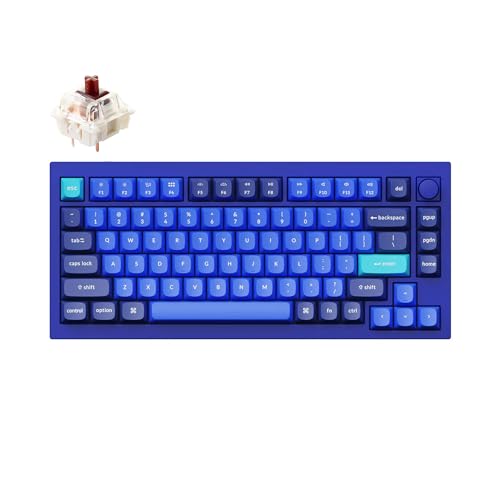
Keychron Q1 HE
Rapid trigger, full keyboard
- 75 percent aluminium case
- Hall-effect switches with rapid trigger
- High polling rate support
- Tri-mode wireless on the HE line
The Q1 HE answers the question the Wooting leaves open — what if rapid trigger came in a complete, premium keyboard rather than a competition appliance? Its magnetic switches bring adjustable actuation and rapid trigger to a gasket-mounted aluminium 75 percent board with a knob and tri-mode wireless, so the same desk can compete in the evening and work in the morning without the board feeling like a compromise in either role. For the player whose gaming is serious but whose keyboard must also be a keyboard, this is the category’s most grown-up answer.
Wireless rapid trigger carries the battery and polling caveats the technology sections describe — the fastest modes are wired or dongle modes, and the battery pays for high polling — and the listing’s exact configuration is recorded in the sources file. Judged against its brief, though, it is the board that moved Hall-effect sensing from the arena to the study, and its existence recalibrates what ‘gaming keyboard’ means for everyone shopping after it.
Strengths
- Rapid trigger in a full-featured board
- Premium case and mount
- Wireless versatility alongside speed
Trade-offs
- Fastest modes favour wired/dongle use
- Battery drains at high polling
- Price reflects both halves of its nature
Best for: Serious players who also work at the same desk.
Not suited for: Pure typists, or pure competitors on a budget.

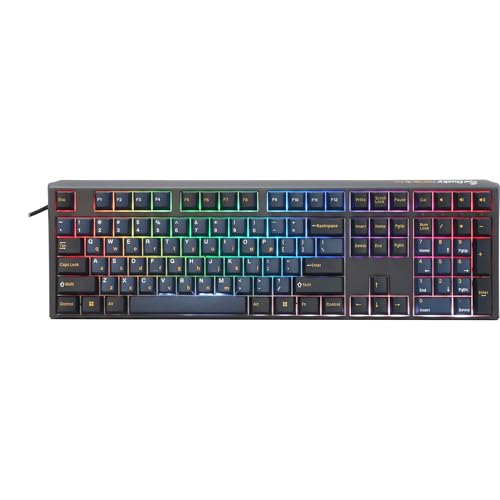
Ducky One 3 Pro Nazca 8K
The polling-rate play
- 8000 Hz polling over wired/2.4 GHz
- Gaming-focused switch options
- High-scan-rate controller
- Performance-first feature set
This class of board — the high-polling specialists from the gaming-focused makers — exists to minimise the connection link to its physical floor, and within a properly matched system (high-refresh display, a game engine that samples input at full rate) it delivers the tightest, most consistent arrival times wired keyboards can currently offer. The consistency is the real product, per this guide’s perception section: the distribution’s tail shrinks, and with it the occasional late input that muscle memory cannot forgive.
The class’s honesty requirements are the system’s: on a 60 Hz display or a game with a slow input pipeline, the board’s advantage evaporates into the chain’s larger terms, and the buyer has optimised the link that mattered least. Purchased as the final component of a fast system, it is a rational finishing touch; purchased as a first upgrade for a slow one, it is the category’s canonical misallocation. The verified listing in the sources file records the specific model this article examined.
Strengths
- The fastest, most consistent reporting available
- Noticeable in matched high-end systems
- Gaming feature sets are mature
Trade-offs
- Invisible in unmatched systems
- Higher host CPU load
- Battery cost on wireless models
Best for: High-refresh competitive systems’ final link.
Not suited for: General systems and typists.
Measuring Your Own Chain Without a Laboratory
Precise latency metrology needs high-speed cameras and oscilloscopes, but useful measurement needs only method. The accessible instrument is the human-plus-software loop: online input-latency testers that timestamp key events against a known clock can compare two boards or two settings on your own system, and while their absolute numbers carry the browser’s own overhead, their comparisons are valid — the overhead is constant, so differences belong to the gear. Test each configuration thirty times, record the spread as well as the average, and change one variable at a time: cable versus dongle, polling setting, debounce setting. What emerges is not a laboratory figure but something more useful — your chain’s ranking of its own links, which is the knowledge purchasing decisions actually need.
The other accessible instrument is the game itself. Most competitive titles expose frame times, and several have practice ranges where input feel can be A/B tested against a stopwatch of repeated drills. The drill method — the same flick, the same strafe, fifty repetitions per configuration — converts perception from anecdote into data at exactly the sensitivity that matters, which is yours. Owners who measure before they buy discover, with metronome regularity, that their chain’s largest term was the display or a software setting all along. That discovery is the explainer’s whole business model: it is free, and it routinely saves the price of a keyboard.
Latency in Typing, Music and Other Non-Gaming Lives
Gaming owns the latency conversation, but other disciplines keep quieter stakes in it. Music production is the serious one: a keyboard used as a MIDI controller inherits the chain’s delays into the instrument’s response, and while the DAW’s audio buffer usually dominates, a slow Bluetooth board can push a playable setup into an unplayable one — wired or 2.4 GHz is the musician’s rule, for reasons the best keyboards for music production audio engineers guide on this site approaches from the studio side. Accessibility is the other quiet stake: switch users and alternative-input typists sometimes depend on timing windows that debounce and scan settings directly govern, and for them the firmware’s configurability — the keyboard firmware QMK VIA guide again — is not a hobby feature but the difference between a board that fits and one that does not.
For the general typist, the section’s message is permission to relax, stated with numbers rather than vibes: the chain from a modern board, even over Bluetooth, totals well under the threshold at which typing feedback feels detached, and the word processor’s own rendering will contribute more delay than the keyboard ever will. Spend the attention this topic frees on the things typing actually feels — switches, layout, sound — and let the arena optimise itself. Latency is a real engineering quantity with a real audience. Knowing whether you are in that audience is the explainer’s final deliverable.
Measuring Latency Without a Laboratory
The main explainer gives the latency chain; this expansion gives the home measurement, because an owner who cannot measure is at the mercy of every claim in this article — including this article’s. The honest home instruments measure differences, not absolutes, and differences are what decisions need. The high-speed camera in a modern phone — its slow-motion mode at 240 frames per second or better — resolves events to about four milliseconds per frame, which is enough to grade the chain’s large links: film the key and the screen together, strike, and count the frames between the switch’s bottom-out and the character’s appearance or the crosshair’s jump. The method’s error bars are honest and its verdicts on ten-millisecond questions are reliable; on two-millisecond questions it abstains, and so should its owner.
The second instrument is the controlled comparison: two boards, two connections or two settings, alternated in the same game or the same test, with the owner’s scores or the test’s numbers logged rather than remembered. Human latency perception is trainable and suggestible in equal measure — a player who expects the new setting to be faster will feel it faster at differences far below perception — and the log is the discipline that separates the chain’s physics from the owner’s hopes. The keyboard polling rate explained explainer’s validation method is this instrument applied to one link; the method generalises to all of them, and its cost is an evening of structured play that most owners find, to their surprise, enjoyable in itself.
The third instrument is scepticism toward everyone else’s measurements, including manufacturers’ and reviewers’. Latency figures are measured at different points in the chain by different definitions — switch-to-USB, keypress-to-photon, firmware timestamps — and a figure without its definition is a number in search of a meaning. When two sources disagree about a board’s latency by an order of magnitude, they are almost certainly both honest and measuring different things. The explainer’s chain diagram is the reader’s defence: locate each claim on the chain, and the claims stop contradicting each other and start composing a picture. Measurement literacy, in this domain, is mostly geography.
The Human End of the Chain
Every latency budget ends at a person, and the person’s own latencies dwarf the hardware’s in a way that reframes the whole pursuit — without dismissing it. Simple reaction time to a visual event runs near two hundred milliseconds in a healthy adult; the choice reactions of actual gameplay are slower; and both improve with practice, sleep and familiarity far more than any hardware term in the chain. Against that background, the keyboard’s contribution — single-digit milliseconds in a modern wired or dongle connection — is a rounding term, and the honest explainer must say so before it says anything else. The player who sleeps, practises and learns the game’s timings will gain more than the entire hardware market can sell them, by an order of magnitude, and any guide that omits this is an advertisement wearing an explainer’s clothes.
And yet the hardware term is not nothing, and its real nature deserves precise statement. Latency’s cost in games is rarely the average — it is the variance and the threshold crossings: the input that lands one frame later than its twin, the counter-strafe whose timing window is a handful of milliseconds wide at the highest level of a tactical shooter, the rhythm game’s judgement window that grades perfection in units the chain’s sum can genuinely consume. At those margins, for those players, the chain’s small links are the game. The explainer’s sorting question — is your play at the margin where milliseconds are spent? — is therefore not a dismissal of casual players but a map of where the money works. The are wireless keyboards good for gaming guide on this site reaches the same allocation from the connection side.
There is also the feel of latency, distinct from its measurement: a chain can measure well and feel vague if its variance is high, and feel crisp while measuring ordinary if its response is consistent. Players describe this as a board being ‘direct’ or ‘floaty’, and they are reporting jitter — the chain’s consistency — with their hands. The purchasing consequence is that consistency deserves the weight owners instinctively give it: a boringly stable 1000 Hz chain will feel faster, and at the margins play faster, than an erratic chain whose peaks are higher. Specifications quote peaks; hands grade distributions; the explainer’s job is to keep both in view and let neither impersonate the other.
Rapid Trigger’s Real Ledger
Since rapid trigger is the era’s flagship latency technology, its ledger deserves an auditor’s pass beyond the main explainer’s summary. The credit side is mechanical and real: a key that can reset within a fraction of a millimetre of travel, and actuate again without returning to a fixed point, removes the dead travel that mechanical switches impose between repeated inputs. In counter-strafing — where the technique is literally a race between two keys’ release and press — the technology changes what the hands can execute, and the professional scene’s migration to Hall-effect boards is the market’s verification, conducted with prize money as the auditor. The lemokey keyboards guide in this cluster prices the technology’s arrival at value tiers; this section prices its effect, which is confined, real and genre-shaped.
The debit side is subtler and mostly about the rest of the keystroke. An analog switch’s actuation point is a software decision, and software decisions can be wrong at speed: accidental actuations from resting fingers, double inputs from a key grazed in a flurry, the bottom-out’s absence as a tactile landmark. Players adapt — the technology’s technique is a small curriculum — but the adaptation is a cost, and for typing it is a cost without a compensating credit, which is why the dual-life boards in this cluster’s guides are compromises their owners choose knowingly. The ledger’s balance is thus player-shaped: for the movement-genre competitor, heavily positive; for the typist who games socially, negative at the flagship’s price and neutral at the value tier’s.
And the ledger has a third column, the future’s: analog sensing’s other capabilities — per-key actuation depth, keys that report how far they are pressed, inputs with two stages in one stroke — are latency-adjacent powers whose genres are still being invented. Buying rapid trigger today buys an option on those genres at no extra premium, which matters to how a young player’s purchase should be framed: not as the acquisition of a current advantage only, but as membership in the platform where the next advantages will appear. Technologies should be bought the way this cluster buys everything — by the census of present use, with the option value counted honestly as a bonus rather than as the argument.
Displays, Frames and the Chain’s Other Half
The keyboard’s half of the chain gets the articles; the display’s half gets the milliseconds. A keystroke’s effect must wait for the game’s next frame and the display’s next refresh, and at 60 Hz those waits average over sixteen milliseconds — more than every keyboard term in this explainer combined. The upgrade order that follows is the explainer’s most valuable practical content, and it is worth restating as a sequence: display refresh first, because it taxes every input; the game’s own settings second (its internal buffering and frame caps), because they tax every frame; the connection third, because a dongle’s advantage over Bluetooth is real and cheap; the board’s polling and switch technology last, because their terms are the smallest and their prices, at the flagship end, are not. Owners who buy in the explainer’s order get a fast system; owners who buy in the marketing’s order get a fast keyboard attached to a slow one.
The frame’s role has a nuance the sequence should not flatten: input sampled at a frame’s boundary means the effective latency of any press is a lottery across the frame’s duration, and higher polling genuinely improves the lottery’s odds by delivering the press earlier within the frame’s window — one of the mechanisms by which the keyboard polling rate explained rates pay inside a fast system. The chain is a system of interacting terms, not a row of independent taxes, and the interactions are why the explainer insists on the whole diagram: a link optimised in isolation can be nullified by the link beside it, and the system’s speed is set by their composition, never by its best component’s specification.
For the non-gaming reader, the display half carries a different lesson: the typing latency you feel at a document is dominated by the application’s rendering and the display, which is why the same board feels crisp in one program and syrupy in another, and why no keyboard purchase will fix a word processor’s lag. The chain absolves as often as it accuses. Knowing which link owns your delay is the difference between an upgrade and a superstition, in latency as in sound, in sound as in everything this cluster measures.
Wireless Latency’s Three Technologies, Compared Honestly
The connection link deserves its comparison in full, because ‘wireless’ names three different systems with three different latency characters. Bluetooth is the compatibility king and the latency laggard: its connection intervals and power management impose delays in the tens of milliseconds under adverse conditions, its behaviour varies by host implementation, and its virtues — every device speaks it, no dongle, multi-device pairing — are conveniences, not speeds. The proprietary 2.4 GHz dongle systems are engineered for the one job: fixed, short intervals, latency in the low single digits on modern implementations, at the cost of the dongle, the port and a battery taxed by the radio’s vigilance. The wired connection remains the reference — the simplest physics, no battery, no radio negotiation — and its modern deficit against a good dongle system is small enough that the choice between them is made on desk grounds (the cable’s presence) rather than on the stopwatch, for all but the margin players the ledger describes.
The honest comparison must include the failure modes, because latency’s average matters less than its worst minute. Bluetooth’s worst minutes come from interference and host sleep states; the dongle’s from distance, obstruction and a crowded spectrum; the cable’s from a failing connector, which announces itself as disconnection rather than delay. A competitive player choosing a connection is choosing which worst minute they prefer to risk, and the dongle’s — mitigated by placement, per the setup disciplines in this cluster — is the one with the most owner agency in it. Agency, again: the chain rewards the links the owner can govern, and connection placement is governable in a way Bluetooth’s host stack is not.
And the three technologies are converging in a pattern worth watching: the dongle systems’ polling climbs, Bluetooth’s newer revisions narrow their intervals for gaming-class devices, and the wired connection’s remaining advantage narrows to certainty itself. The buyer choosing today should choose by today’s measurements and their own worst-minute preference; the buyer choosing for a decade should weight the dongle’s current maturity and the cable’s eternal simplicity, and treat every technology’s roadmap as the marketing it is. The chain does not care about roadmaps. It cares about the next frame, and so, at the margin, do you.
Latency Myths, Retired in Order
A closing catalogue of the domain’s persistent myths, each retired with its reason, because explainers owe their readers a bestiary. The first myth: that a keyboard’s advertised latency is a property of the keyboard. It is a property of a measurement, taken under conditions the advertisement omits, of one link of a chain whose other links the reader owns. The second myth: that the human cannot perceive differences below some threshold, quoted variously at 10, 50 or 100 milliseconds. Perception of latency in interactive tasks is not a threshold but a gradient, trained by practice and exposed by consistency; the same player who cannot name a five-millisecond difference will reliably choose the lower-latency setup in blind alternation, because the hands grade distributions the tongue cannot report. The third myth: that more polling is always better, retired by the polling explainer’s system law — a rate the host and game cannot honour is a battery tax wearing a specification’s clothes.
The fourth myth: that wireless can never be competitive, a truth from a previous decade preserved as a slogan. Modern dongle systems measure within the margin where other links dominate, and professional players have won on them in public, which is the only retirement a myth of this kind accepts. The fifth myth is the mirror: that wired is obsolete, retired by the cable’s certainty, its zero battery and its immunity to the spectrum’s weather. The sixth and deepest myth: that latency is the keyboard’s most important gaming property. It is the most measurable, which is a different thing — consistency, reliability, the board’s fit to the hands across a six-hour session all grade higher in the results that matter, and they resist the stopwatch that makes latency famous. The explainer’s final position is the one its chain diagram teaches: respect every link, worship none, and spend where the milliseconds actually live.
Which returns the reader to the chain itself, the article’s real content. A keystroke’s journey — switch, scan, debounce, connection, host, engine, frame, photon — is a small epic of engineering that completes fifty times a minute at a typist’s desk and a thousand times a second inside a polling specification. Understanding it converts a market of slogans into a system with addresses, each address improvable at its price, each price gradeable against the player’s actual margins. That conversion — from slogan to system — is the entire purpose of this cluster’s explainers, and latency, the most sloganised number in the industry, is where the conversion pays best.
Latency in the Rest of Life: Typing, Music and the Studio
The latency conversation belongs to gamers in the marketing, but the chain governs every keystroke everywhere, and two other populations live closer to its margins than most players do. Musicians first: the keyboard as a MIDI controller, the computer keyboard as an instrument’s poor relation, and the studio’s own latency stack — audio buffers measured in the same milliseconds, against a performer’s threshold that is stricter than any gamer’s, because rhythm is judged by the ear at resolutions the eye never attempts. The keyboard musician who wonders why a passage feels behind the beat is reading the same chain this explainer draws, with an audio interface’s buffer appended, and the remedies rhyme: shorten the chain’s governed links, measure the sum, and respect the threshold where the hands stop believing the instrument is theirs. The best keyboards for music production audio engineers guide on this site serves that desk directly; this section merely notes that its latency is this explainer’s latency, wearing headphones.
Typists second, and their case is subtler: the document’s latency is dominated by the application’s rendering, as the main explainer notes, but there is a threshold phenomenon in fast typing that writers recognise — the moment, past a hundred words a minute in a laggy editor, when the screen’s echo falls far enough behind the hands that the typist begins, unconsciously, to type to the echo rather than to the thought. The cure is not a keyboard; it is the editor, the machine, the rendering path — but recognising the phenomenon as latency, with a chain and an owner, converts a vague dissatisfaction with ‘this app feels heavy’ into a diagnosis with remedies. That conversion is the explainer’s gift to its non-gaming readers, and it may be the most valuable one it gives, because it is spendable every day at every desk, in applications no gaming budget would ever be aimed at.
And the chain’s universality is the section’s point: wherever a human presses and a machine answers — the instrument, the document, the game, the studio’s console — the same physics composes the answer’s timing, and the same literacy reads it. Learn the chain once, on the gaming desk where it is loudest, and you own it everywhere it whispers. That is a larger promise than this article’s title makes, and it is the true one.
Optimising a Gaming Chain in the Right Order
Work down the list; each step is larger than the ones after it, which is the point of the order.
- Set the display first: highest stable refresh rate, the game’s low-latency mode enabled, and frame rates matched to the panel. The display quantises every input; nothing downstream can recover time lost here.
- Configure the game’s own input path: raw input where offered, no software overlays re-processing the stream, and the frame-rate cap set with the display’s sync strategy in mind.
- Connect the keyboard by its fastest respectable link: wired, or the 2.4 GHz dongle on its own port — not through a busy hub, and not Bluetooth for competition.
- Set the board’s polling to the highest rate the system sustains stably, and test stability rather than assuming it: a dropped or stuttering 8000 Hz is worse than a metronomic 1000.
- If the firmware exposes debounce, lower it cautiously toward the responsive end, then validate with a typing session — the chatter threshold is the floor, and the fix guide in this cluster is what lies beneath it.
- Only now consider hardware changes, in the order of the chain’s measured weaknesses: rapid trigger if your genre rewards it, a faster board if the board is provably the largest remaining term. Measure again after each change and keep the numbers.
Latency Mistakes Bought With Real Money
Quoting the polling interval as the keyboard’s latency.
A 0.125 ms polling interval sits inside a chain whose other links are ten to a hundred times larger. Sellers quote it because it is the smallest number they own. Buyers who repeat it as ‘the keyboard’s latency’ have been handed a numerator and sold it as the sum — the chain diagram in this guide is the correction, and it should be applied to every product page in the category.
Upgrading the keyboard on a 60 Hz system.
The display’s frame step alone exceeds the entire keyboard-side budget several times over. On such a system, every keyboard from a budget board to the fastest specialist delivers its inputs into the same 16.7 ms quantisation. The display is the upgrade; the keyboard is, at that point, furniture for a future system — which may be a fine reason to buy it, provided it is known to be the reason.
Chasing debounce to zero and meeting chatter.
Debounce exists because contacts bounce; firmware set below the switches’ settling time manufactures double inputs, the fault this cluster’s fix guide treats. The floor under latency tuning is a hardware fact, and the correct procedure — lower gradually, validate by typing — finds the fastest stable setting instead of the fastest advertised one.
Testing latency by feel in a single session.
Expectation is a powerful peripheral: a new board feels faster because it is new, and the feeling survives exactly until the drill numbers are counted. Measure with repetitions and records, or do not claim the measurement. The hands are the ultimate judge of the result, but they deserve evidence gathered honestly enough to overrule a honeymoon.
Ignoring variance while celebrating averages.
A chain whose inputs arrive at 5 ms ninety times and 40 ms ten times plays worse than a steady 15 ms, and the average of the first chain is the better number in every advertisement. Watch the spread in your own tests. Consistency is the spec your muscle memory actually ordered.
Upgrading the keyboard to fix a display’s latency.
The chain’s most expensive misdiagnosis: a 60 Hz display taxes every input with a frame’s wait, and no board, at any polling rate or price, can refund it. Diagnose with the chain in order — film the key and screen together if in doubt — and spend the flagship’s price on the link that owns the delay, which in this pattern is the panel, after which the old board will feel reborn for free.
Frequently asked questions
How much latency does a typical mechanical keyboard have?
Board-side — switch, scan, debounce and a 1000 Hz connection — a typical modern board totals in the low single-digit to around ten milliseconds, dominated by its debounce design. The system’s total, through the operating system, application and display, is larger and mostly not the keyboard’s doing. Both numbers sit below typing perception thresholds and near the floor of what even players can use, which is why the chain, not the board, is the unit of honest discussion.
Is 8000 Hz polling worth it?
For an elite player on a high-refresh system whose other links are already optimised: yes, as a final consistency improvement. For everyone else: the improvement is real but lands below perception, while its costs — CPU load, battery drain, occasional compatibility quirks — are entirely perceptible. It is a finishing specification, and should be bought in that order: last, for a system that can honour it.
Is Bluetooth latency bad?
For typing, no — modern Bluetooth keyboards are comfortably below perception for text work, and their convenience is honestly bought. For competitive gaming, yes, relatively: Bluetooth’s connection intervals make it the slowest link class, and its variance is its worst feature. The technology is neither villain nor hero; it is a link with a magnitude, suited to the audiences whose thresholds it clears.
Does a wired keyboard always beat a wireless one for latency?
Against Bluetooth, yes. Against a good 2.4 GHz implementation polling at 1000 Hz or above, the difference shrinks to the radio’s small overhead — below most players’ usable perception and measurable mainly in the variance column. The bluetooth vs 2.4GHz keyboards tri-mode explainer on this site separates the two wireless worlds properly; ‘wireless’ is not one latency but two technologies with different physics.
What is rapid trigger and do I need it?
Rapid trigger uses position-sensing switches (Hall-effect or optical) to reset a key the moment it starts rising, rather than at a fixed point — enabling faster repeated inputs and movement techniques in the genres built on them. You need it if your game’s mechanics reward it and your level can spend the advantage. If neither clause applies, it is a fascinating technology to leave to its audience, at no cost to your own results.
Can I reduce latency on the keyboard I already own?
Often, yes: use its fastest connection, raise its polling setting if it offers one, lower debounce cautiously through its firmware or configurator if exposed, connect directly rather than through hubs, and optimise the display and game settings that dominate the chain. Owners who work the how-to list in order routinely find their existing board was never the problem — the most satisfying outcome this explainer can produce.
Is 8000 Hz polling worth it for casual gaming?
For casual play, almost certainly not as a purchase reason: the rate’s benefit concentrates at high-refresh, high-frame-rate margins that casual systems and casual genres rarely visit, while its costs — battery on wireless, CPU on the host, the flagship’s price — are paid unconditionally. If a board you otherwise want includes it, treat it as a bonus and run it at the rate your system sustains stably. Buy boards for fit, switches and reliability; let polling be the tiebreaker it deserves to be, not the headline it is marketed as.
Why does my keyboard feel laggier on my laptop than my desktop?
The chain changed around it: the laptop’s display is likely slower to refresh, its power management naps the USB bus and the Bluetooth radio, its integrated graphics render the interface with more buffering, and its keyboard polling may share a bus with a crowd of devices. Test the board wired, on the laptop’s high-performance power plan, and you will usually recover most of the difference — the board was the chain’s most innocent link, accused because it is the one your hands touch.
Does latency matter for ordinary typing and office work?
Only at the extremes: a healthy modern setup’s total is far below the threshold where typing feels disconnected, and office dissatisfaction that blames the keyboard usually belongs to the application’s rendering or a wireless connection in distress — both diagnosable with this explainer’s chain. If a document lags, test the board wired in a plain text editor; the board that is crisp there is innocent, and the chain has pointed at the software, where the remedy lives.
Latency, explained honestly, turns out to be a story about a chain and a threshold: a chain of small delays, most of them outside the keyboard, and a threshold of human perception below which further optimisation is numerology. The keyboard’s own links — scan, debounce, polling — are worth understanding because two of them are adjustable for free and the third is the most misquoted number in the industry. Beyond them, the display and the software rule, and the budget follows the magnitudes or it follows the marketing.
Measure your chain, optimise it in the order of its terms, and buy speed only where your genre and your perception can spend it. The typist who relaxes about latency and the player who optimises it correctly are the same person at different desks: someone who knows what a millisecond is worth to them, personally, and declines to pay more. That knowledge — not any keyboard in this guide — is the fastest input device you will ever own.