Disclosure: As an Amazon Associate, kajuandouglas.com earns from qualifying purchases. Links on this page are affiliate links; they cost you nothing extra. Prices and availability change often, so check the current Amazon listing before you buy.
A keyboard and mouse combo is the first purchase many PC builders make and the last one they think carefully about — which is a shame, because the two devices in the box are the two you will touch every minute the machine is on. This havit keyboard and mouse combo review takes the category seriously: it examines what Havit’s combo sets set out to do at the budget end of the gaming market, teaches the only sane method for judging a bundle — grade each half separately, then grade the pairing — and, because Havit’s combo could not be matched to a confident listing in the current catalogue through this site’s verification, presents four catalogue-verified alternatives that between them cover the gaming desk, the office desk and everything between.
The transparency rule of this review is the same as its method: the Havit combo is covered without a link, on its documented design proposition, with no purchase link and no invented specifications. The four alternatives carry full verification — real listings, real images, real links — because a bundle recommendation moves your money, and money should only be pointed at things that demonstrably exist.
Havit Keyboard And Mouse Combo Review: The Proposition
Havit’s combo sets belong to a recognisable school: a full-size, backlit, gaming-styled keyboard paired with a matching LED gaming mouse, sold as one box at a budget-tier price, aimed squarely at the first gaming setup, the spare-room PC, and the buyer who wants the desk to look coordinated tonight rather than component by component over months. The keyboard half of such sets is typically a membrane board styled after mechanical gaming keyboards — full layout, multimedia keys, rainbow backlighting — and the mouse half a lightweight wired gaming shape with DPI switching and lighting to match. Judged as esports equipment, that recipe is modest. Judged as what it is — a complete, coordinated input setup for the price of a single mid-range mouse — it answers a real and common brief honestly. The sections that follow grade the idea the way this site grades every bundle: the keyboard on typing, the mouse on tracking and comfort, and the pairing on whether the two halves’ compromises are the ones your desk can live with.
In this guide
How to Judge a Combo: Two Halves and a Marriage
The bundle’s oldest trick is averaging: a good keyboard hides a poor mouse, or a flashy mouse distracts from a mushy keyboard, and the box’s single price forbids you from fixing the weak half without waste. The defence is a grading discipline. Grade the keyboard first, alone, as if the mouse were not in the box: layout complete for your work, key feel you can type on for an hour, backlighting that serves legibility rather than merely glowing. Grade the mouse second, alone: shape against your grip and hand size, sensor behaviour at the DPI you actually use, click and wheel quality, cable drag if wired. Then grade the marriage: do the two halves share a connection philosophy your desk supports, does the combined footprint suit your space, and — the question that decides most bundle regrets — if one half died in a year, would you replace the set or the half? A combo whose honest answer is “the half” is a sensible bundle. A combo that only works as an inseparable unit is a future compromise with a ribbon on it.
wrist rests for keyboard and mouse
The Keyboard Half: What Budget Gaming Boards Actually Deliver
The keyboard in a budget gaming combo should be judged against office reality, not tournament fantasy, because that is where it will live. The full-size layout is the school’s genuine virtue — number pad, navigation cluster, function row, nothing exiled to layers — and for the mixed workload of a home PC (documents by day, games by night) it remains the most forgiving map. Membrane key feel is the honest compromise: quieter than mechanical, softer at the bottom of the stroke, and less precise in its actuation point, which typists feel as a slight vagueness during fast work and gamers feel mainly in rapid repeated keys. Backlighting in this class is zone or rainbow lighting rather than per-key RGB — a legibility aid and a style statement, not a customisation platform. Multimedia keys, often dismissed as garnish, earn their place on a shared family PC more than on any battlestation. None of this is damning. It is a profile — complete, quiet, undemanding — and desks whose brief matches that profile are legion.
The Mouse Half: The Half That Decides Regret
Ask combo owners a year later which half they replaced, and the mouse wins the dishonour most of the time — because the mouse is the half in constant motion, under constant load, judged by the least forgiving critic you own: your hand, mid-game. The specifications that matter are not the ones on the box’s front. DPI headlines are nearly meaningless beyond a sane ceiling; what matters is whether the sensor tracks without visible jitter or angle-snapping surprises at your settings, whether the shape fills your grip style — palm, claw or fingertip — without forcing it, and whether the primary clicks stay crisp when they are being struck hundreds of times an evening. Weight is the sleeper specification: a light mouse flatters fast games and tires nobody, while a heavy one can feel planted for slow work and punishing in a shooter. Cable drag, on wired sets, is managed by routing and a few centimetres of slack — a setup detail this article returns to in its how-to section, because half of all “bad mouse” verdicts are actually bad cable management wearing a disguise.
The Verified Alternatives: Four Ways to Fill the Same Box
Four catalogue-verified combos follow, chosen to span the decision space a Havit-combo shopper actually faces: two Redragon gaming sets at different feature levels, a wired gaming set from BlueFinger, and Logitech’s wireless office benchmark. Read them with the two-halves discipline fresh in mind.

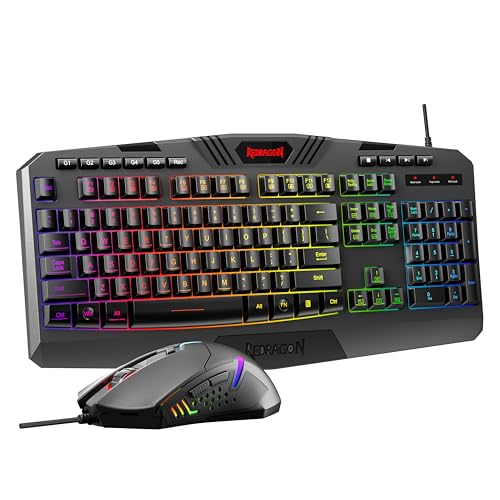
Redragon S101-3 PRO Gaming Keyboard and Mouse — the programmable gaming set
The S101-3 PRO is the overachiever of the budget combo shelf: its listing describes an RGB backlit keyboard-and-mouse set with programmable keys and software support — features that most bundles at this level omit entirely. Programmability is the dividing line in this class, because it converts a fixed product into an adaptable one: macros for the game or the spreadsheet, lighting under your control, a mouse whose buttons can be assigned rather than merely used. For a buyer graduating from a first combo toward a setup that grows with them, this is the direction of travel.
Spec snapshot
- Set: gaming keyboard and mouse combo
- Backlighting: RGB, per the listing
- Features named in listing: programmable keyboard and mouse, software support
- Connection: wired set
Strengths
- Software programmability at the bundle tier — rare and genuinely useful
- Coordinated RGB across both halves
- A set designed to be customised rather than merely used
Trade-offs
- Software is another layer to learn and maintain
- Gaming styling will not suit every desk
- Membrane-class keyboard feel, as with the school generally
Best for: gamers and power users who will actually program macros and lighting. Not suited for: buyers who want to plug in and never open a settings panel.

Redragon S107 Gaming Keyboard and Mouse — the updated all-rounder set
The updated S107, per its listing, pairs an RGB gaming keyboard with a 10,000 DPI mouse and advertises 25-key anti-ghosting on the keyboard — the two headline numbers aimed at the two halves’ classic bundle anxieties: will the mouse keep up, and will the keyboard register busy gaming inputs. Anti-ghosting deserves its sentence of respect: in fast games where several keys live down at once, ghosting is the failure that feels like the keyboard ignoring you, and a set that engineers against it is answering a real complaint. As a whole, the S107 reads as the safe mainstream gaming bundle — no software ambitions, no exotic claims, both halves specified against the failures buyers actually report.
Spec snapshot
- Set: gaming keyboard and mouse combo, updated model
- Mouse: 10,000 DPI stated in the listing
- Keyboard: RGB backlit; 25-key anti-ghosting stated in the listing
- Connection: wired set
Strengths
- Anti-ghosting specification aimed at real gaming inputs
- High-DPI mouse ceiling covers any sensitivity preference
- Mainstream, well-understood bundle recipe
Trade-offs
- No software programmability headline — what you see is what you get
- DPI ceiling far exceeds what most players use; shape matters more
- Wired halves need desk routing discipline
Best for: the first gaming setup and the family gaming PC. Not suited for: buyers wanting per-key customisation or wireless freedom.

BlueFinger RGB Gaming Keyboard and Mouse Combo — the straightforward wired set
BlueFinger’s set is the bundle in its simplest honest form: a USB wired RGB gaming keyboard with a backlit mouse, described in its listing for laptop and PC gaming alike. Its appeal is the absence of ceremony — one box, two cables, a coordinated look, and a brief that a spare-room PC, a child’s first gaming desk or a console-adjacent setup can be completed in an evening. In a category that sometimes over-promises, a set that promises exactly a working, good-looking input pair and delivers it has a integrity worth naming.
Spec snapshot
- Set: gaming keyboard and backlit mouse combo
- Connection: USB wired, per the listing
- Keyboard: RGB gaming keyboard
- Stated use in listing: laptop and PC gaming
Strengths
- Simple, complete, coordinated — the bundle idea undiluted
- Wired reliability with no batteries or pairing
- Equally at home on a laptop dock or a desktop
Trade-offs
- Feature-light next to the programmable Redragon set
- Membrane-class feel, as with the school
- Two cables to route on a tidy desk
Best for: first setups, spare PCs and anyone buying completion over customisation. Not suited for: enthusiasts who will outgrow a fixed feature set within the year.

Logitech MK270 Wireless Keyboard and Mouse Combo — the office benchmark
Every gaming-combo shopper should be shown the other pole of the category, and the MK270 is it: a full-size wireless keyboard and mouse set whose listing leads with spill-resistant design and office virtues rather than lighting. Its keyboard is quiet, its mouse is a simple ambidextrous workhorse, and its wireless connection frees the desk entirely — the correct answer for the home office, the shared family computer and the meeting-room PC. It will not pretend to gaming ambitions it does not have, and in exchange it offers the deepest support ecosystem and the most proven reliability story in this entire article. If your “gaming” is an hour a week and your typing is forty hours, this is not the compromise option. It is the right one.
Spec snapshot
- Set: full-size wireless keyboard and mouse combo, black
- Keyboard: full-size, spill-resistant design stated in the listing
- Connection: wireless — one receiver for the set
- Orientation: office and home productivity
Strengths
- Wireless freedom for both halves from a single receiver
- Spill-resistant, quiet, office-proven design
- Logitech’s support and documentation depth
Trade-offs
- No gaming features — no RGB, no macros, no anti-ghosting headlines
- Batteries to manage, eventually
- Membrane feel tuned for quiet, not for play
Best for: home offices, shared PCs and productivity-first desks. Not suited for: gaming-first setups, which are the other three sets’ home ground.
Setting Up a Combo Properly: The Twenty-Minute Discipline
A combo’s first evening decides more of its reputation than its spec sheet does, so spend the twenty minutes. Route the cables first — or, on the wireless set, place the receiver with a clear line to the desk, ideally on a short extension rather than buried behind a metal tower. Set the mouse’s DPI in deliberate steps: start lower than instinct suggests, play or work for ten minutes, and adjust in small increments toward the setting where your cursor lands where your eyes aimed without correction; that landing quality, not the headline number, is your DPI. On the keyboard, test the multimedia keys against your actual applications, set the backlight to the lowest level that keeps legends legible in your evening light, and run one honest typing paragraph to learn the key feel while your expectations are still adjustable. Then the marriage checks: slide the mouse through its full arc to confirm the cable — or the wireless link — never snags at the extremes, and confirm the keyboard’s footprint leaves that arc intact. Twenty minutes of this converts a bundle of compromises into a configured workstation, and most “disappointing combo” stories are, on inspection, unconfigured ones.
are wireless keyboards good for gaming
Wired Sets, Wireless Sets, and the Desk Between Them
The combo category’s deepest fork is not brand or lighting but connection, and it deserves a decision rather than a default. Wired sets — three of the four alternatives above, and the Havit school generally — offer permanent readiness: no batteries, no pairing, no sleep delays, and latency that is a solved problem. Their cost is paid in cable management and desk geography, both manageable and both permanent. The wireless set pays the opposite ledger: total desk freedom and a board that can serve the couch or the meeting room, against batteries that die at inopportune moments and a receiver that wants a sensible home. The mature buyer’s rule is to choose by desk reality rather than ideology: a fixed workstation that never moves gains little from wireless and loses nothing to cables, while a multi-purpose room where the PC serves work, film and games from one screen gains daily from the freedom. Hybrid desks exist too — a wired gaming set for the main machine and a wireless set for the household PC is not indecision but correct tool allocation, twice.
Care and Keeping for Two Devices at Once
Combos double the devices and roughly halve the attention each receives, so their care should be systematised rather than remembered. Weekly: shake and brush the keyboard — crumb accumulation in a family PC’s board is a force of nature — and wipe the mouse’s feet and sensor window, because a sensor reading through dust is the cheapest performance loss in computing. Monthly: the cable inspection, both ends of both cables, looking for the fray that precedes the intermittent fault; and on wireless sets, a glance at battery state before it becomes a mid-meeting event. Quarterly: a real keyboard clean, caps off if the design allows, and a review of the marriage itself — is one half being quietly hated? The bundle’s economics forgive replacing a single half when the other still serves; loyalty to a box is not a virtue your hands recognise. Kept this way, a budget combo’s service life stretches well past the point its price predicted, which is the quiet punchline of the whole category: inexpensive and short-lived are cousins, not synonyms.
fixing a keyboard that stops working
The Verdict
Havit’s combo proposition — a coordinated, backlit, full-size gaming input set at a budget price — is an honest answer to a common brief, and this review’s assessment is that the school it belongs to serves first setups and family PCs genuinely well, provided the buyer grades the mouse as sternly as the keyboard and accepts membrane feel as the tier’s terms. The model’s absence from the verified catalogue is why this page links elsewhere, and the alternatives map the territory completely: the programmable S101-3 PRO for the customiser, the S107 for the mainstream gaming desk, the BlueFinger set for completion without ceremony, and the MK270 for the productivity desk that games occasionally and types constantly. Choose by workload, set the combo up with the twenty-minute discipline, and the humblest purchase in the PC build becomes what it should have been all along — the two devices you never have to think about.
Mouse Fit: Grip Styles and Hand Sizes, Taken Seriously
Since the mouse is the half that decides regret, its fit deserves the fullest treatment this article can give. Begin with grip, honestly observed rather than aspirationally claimed: watch your hand during an ordinary session. Palm grip rests the whole hand on the shell and moves from the arm — it rewards a larger, supportive mouse and punishes small ones with cramped fingers. Claw grip arches the fingers and contacts with fingertips and palm heel — it suits medium shells with a defined hump. Fingertip grip floats the mouse on the fingers alone — it wants the lightest, smallest shell available and is the first style to suffer from a heavy bundled mouse. Hand size compounds the geometry: a large hand on a small mouse produces the claw whether you chose it or not. Bundle mice are designed to offend none of these constituencies, which means they thrill none either — an acceptable settlement for shared and starter desks, and the precise reason a serious player eventually buys a mouse by fit. When you grade any combo, spend your sternest minute on this: hold the shape in your mind against your actual grip, and let the keyboard’s charms wait their turn.
Reading Combo Listings: The Specification Traps
Combo listings are written to be skimmed, and the skimming reader is their target. The traps repeat across brands, so learn them once. DPI numbers quoted to five figures describe a sensor’s ceiling, not its quality, and say nothing about tracking at sane settings. “Mechanical-feel” is a membrane keyboard wearing a costume — the words exist precisely to blur the distinction this article has kept clear. Backlight photographs are taken in darkened rooms at maximum brightness; your lit office will tell a dimmer story. “Gaming” in a title is a styling claim, not a performance certification, and the honest gaming specifications — anti-ghosting counts, programmability, switch type — are stated in plain words when they exist, as the better listings in this article demonstrate. Battery-life claims on wireless sets assume usage patterns gentler than yours. And the bundle’s oldest trap is photographic: the keyboard and mouse photographed together always look like a designed pair, because they are photographed that way; the pairing’s quality lives in the specifications, not the portrait. Read every combo listing with the two-halves discipline, translate its adjectives into the plainest possible nouns, and the traps disarm themselves.
keyboards for accountants and finance work
Two Buying Occasions the Combo Owns
The first PC is the combo’s finest hour, and it is worth understanding why the bundle beats separate purchases there even for buyers who will eventually upgrade. A new builder’s budget is besieged from all sides — the machine itself, the screen, the desk — and the combo converts two peripherals into one solved problem with a coordinated result, freeing money and attention for the components that cannot be upgraded cheaply later. When the upgrading season arrives, it arrives one half at a time, and the surviving half of the original combo serves on honourably. The gift is the second occasion: a combo is the rare tech gift that is complete in itself, needs no sizing beyond hand generalities, and transforms a recipient’s desk in one unboxing. Its failure mode as a gift is also known and avoidable — do not gift a gaming-styled set to a productivity desk or an office set to a teenager’s battlestation, because the styling is half the present. Match the set’s school to the recipient’s desk, and the humble combo becomes the gift that gets used every single day, which is the highest praise any object can earn.
Growing Out of a Combo Gracefully
Every combo is eventually outgrown by someone, and the graceful path out is worth planning at purchase rather than improvising at frustration. The usual sequence is mouse first — fit and ambition both point there — and the liberated budget mouse transforms the setup while the combo’s keyboard serves on, which is why the keyboard half’s completeness matters more at purchase than its flair. The keyboard’s own upgrade moment arrives when typing feel becomes a hobby rather than a utility, and at that point the combo mouse often still serves a second desk. Keep the original box if storage allows; a complete, clean set resells or hand-me-downs as a unit far better than orphaned halves, and the household’s spare-PC drawer is where good combos go to be useful for a second decade. The category’s economics are forgiving at every stage — buy matched, upgrade singly, retire jointly — and a buyer who understands the whole arc at the start will spend less across it than the bargain-hunter who treats each purchase as an isolated duel.
The Shared Family PC: A Combo’s Hardest Posting
No posting tests a combo like the household machine, and the test deserves a section because so many of these sets will serve exactly there. The family PC’s users span every hand size, grip style and standard of care; its keyboard absorbs homework, spreadsheets, games and the occasional crumb avalanche; its mouse is borrowed, dropped and occasionally missing. Against that reality, the virtues reorder themselves: durability and cleanability outrank customisation, a full-size layout outranks compact chic because every user already knows it, quiet keys outrank exciting ones in a shared room, and wireless — the MK270’s proposition — trades cable chaos for a battery routine that one nominated household member must own. The gaming sets serve this posting better than their styling suggests when the household includes a young gamer, provided the programmable features are treated as a bonus rather than a requirement. The buying error specific to this posting is purchasing for the most demanding user and taxing everyone else; the family combo should be specified for the median user and forgiven by the extremes, which is, not coincidentally, exactly how the best sets in this category are designed.
Desk Geometry for Two Devices: Comfort as Arrangement
A combo is two devices sharing one posture, and their arrangement — adjustable tonight, free of charge — matters as much as their specifications. The keyboard belongs centred on the body’s midline at the alphas, not on the box’s centre: on a full-size board that means the letter keys, not the whole footprint, align with your sternum, and the mouse then sits at the same depth as the keyboard’s home row, close enough that the elbow stays near the body. Mouse height should match the keyboard’s plane so the hand travels level between them; a mouse skating on a thick pad beside a thin keyboard creates a small cliff your wrist crosses a thousand times a day. Monitor distance completes the triangle, close enough that neither device’s use leans you forward. None of this is medical advice — it is furniture arrangement, offered in the comfort-and-wellness spirit this site keeps — but households routinely buy a second combo chasing a comfort that the first combo’s arrangement was withholding. Arrange first, judge second, replace last: the order saves money in every category of desk equipment, and combos are no exception.
What the Office Benchmark Teaches the Gaming Sets
The MK270’s presence in a gaming-combo article is not a courtesy; it is a standard the gaming sets should be measured against in the dimensions where it leads. Its first lesson is restraint: a set that does its job quietly, without demanding software, attention or admiration, respects its owner’s hours. Its second is environmental honesty — spill resistance is a feature written by people who have met real desks, and gaming sets that ignore the coffee variable are designing for a showroom. Its third is support depth: documentation, replacement receivers, and a manufacturer that will exist in five years are specifications too, invisible in photographs and decisive in ownership. None of this makes the office set the better gaming purchase — it is not one — but a gaming combo that matches the benchmark’s restraint, honesty and support while adding its own legitimate play features is the complete product, and buyers should grade gaming sets partly on how much of the benchmark’s discipline they kept while adding their lights.
Troubleshooting the Pair: Faults and Their Usual Culprits
Combo faults announce themselves ambiguously — “the computer feels laggy” — so a small fault tree earns its place. If the keyboard drops characters under fast typing, suspect the connection first (reseat, change port, clear the receiver’s path on wireless sets), then debris under the caps, then the board itself. If the mouse stutters, clean the sensor window before touching a single setting — dust is the champion culprit — then test on a plain, matte surface, then revisit DPI and cable routing. If both halves misbehave together, the fault is almost never both devices: it is the shared port, hub, receiver or the machine’s own load, and swapping one variable at a time finds it. Backlight faults are usually modes, not failures, and the manual’s lighting table is faster than any forum. The deepest troubleshooting virtue a combo offers is its interchangeability — any spare keyboard or mouse in the house can isolate a fault in two minutes — and owners who keep the old set in a drawer, as this article’s upgrade section advised, own a diagnostic kit as well as a spare.
The Four Alternatives, Graded by the Method
Reviews that present products serially owe the reader one comparative pass, so here are the four verified sets graded by this article’s own discipline — keyboard alone, mouse alone, marriage. The S101-3 PRO’s keyboard grades highest on adaptability: programmability gives a membrane board a second life as its owner grows, while its feel stays in class. Its mouse grades as a competent gaming shape whose programmable buttons extend the set’s thesis. The marriage is the strongest for a single-user gaming desk that wants one software world. The S107’s keyboard grades on reliability features — anti-ghosting is a working specification, not a garnish — and its mouse on ceiling and conventionality; the marriage suits the family gaming PC, where several users need the set to simply work. The BlueFinger set’s halves grade plainly and honestly — a complete keyboard, a serviceable backlit mouse — and its marriage is the simplest: the set you buy when the desk must be finished tonight. The MK270 inverts the grading: its keyboard leads on quiet completeness and environmental sense, its mouse on unobtrusive competence, and its marriage — one receiver, no cables, total freedom — is the best in the article for any desk that is not gaming-first. Four sets, four different winners, each crowned by a different desk: that is not indecision, it is the category working as it should.
The Value Ledger of Bundling, Honestly Kept
A combo’s economics deserve one clear-eyed paragraph, because the bundle discount is real but so is its shadow. The credit side: one purchase, one delivery, one warranty conversation, matched styling, and a per-device cost that separate purchases at the same quality rarely meet — manufacturers price bundles to move as systems, and the saving is genuine. The debit side is subtler: the bundle’s price is set by its stronger half’s ambitions, so a buyer who needs only a basic keyboard subsidises a gaming mouse they will never stress, and the replacement asymmetry — one half dying young — can strand the survivor’s value if the set was bought as an inseparable aesthetic unit. The ledger balances in the buyer’s favour when the two halves’ quality is genuinely matched to the buyer’s two needs, which is, for the fourth time in this article, the two-halves discipline wearing its accountant’s hat. Bundling is neither a trick nor a gift. It is a pricing structure that rewards buyers who know what each half is worth to them — and this article’s entire method exists to make you one.
The Buying Sequence, in Order
Close the decision the way this article opened its method: in sequence, so no step’s answer contaminates an earlier one. First, name the desk — gaming-first, productivity-first, family-shared, or first-ever — because the desk disqualifies half the shelf before any specification is read. Second, choose the connection philosophy by the desk’s reality: wired for the fixed workstation, wireless for the roaming room. Third, grade the keyboards that remain on completeness and feel, in that order, because a missing key taxes you daily and a perfect feel is a pleasure you will adapt around. Fourth, grade the mice on fit against your actual grip — the sternest minute of the whole purchase. Fifth, grade the marriage: footprint, styling peace with the room, and the replace-one-half answer. Sixth and last, check the listing against the specification traps — mechanical-feel language, DPI theatre, dark-room photographs — and only then let price arbitrate among the survivors. Run in that order, the Havit school’s proposition and its four verified rivals sort themselves with almost no residual doubt, and the two devices you will touch all day stop being the build’s afterthought and become its foundation — which is where this review came in.
Backlighting in Bundles: What the Glow Is Actually For
Lighting is the feature every bundle photographs and few reviews interrogate, so it gets its own audit here. On the keyboard, backlighting’s honest jobs are two: legibility in dim rooms, where a lit legend ends the hunt-and-squint cycle, and orientation — the WASD cluster and the board’s edges found by peripheral vision in a dark gaming room. Per-key RGB adds a third, expressive job — zones, game profiles, personal colour — which is real value to the owners who use it and pure overhead to those who do not, and the sets in this article divide exactly on whether they sell the third job or stop at the first two. On the mouse, lighting’s job is mostly marital: it makes the pair read as a pair, which is a legitimate aesthetic service in a coordinated setup and should be admitted as such rather than dressed as performance. The disciplines are shared: brightness set to the room rather than the photograph, colours that do not fight the monitor’s light at night, and the humility to switch it off in daylight, where it contributes nothing but power draw. Judged this way, lighting stops being a spec-sheet arms race and becomes what it is — a working feature with an aesthetic dividend, worth having, rarely worth leading a purchase.
Beyond the PC: Laptops, Consoles and the Second Screen
A wired combo’s second career often happens away from the desktop tower, and the alternatives in this article were partly chosen with those postings in mind. On a laptop dock, a combo converts a portable into a workstation — the BlueFinger set’s listing names laptop use outright — and the buying criteria shift subtly: cable length becomes a real specification, the keyboard’s footprint must respect a smaller desk, and the whole set should ideally live in a drawer between dockings. On consoles that accept keyboard and mouse input, a wired set is the plug-and-play route to genres that controllers serve poorly, with the caveat that support is per-title and the set’s gaming styling finally comes home. On the living-room PC, the wireless philosophy wins its clearest victory, because a keyboard that must cross a room should not drag a cable behind it. The mature household often ends up owning the category twice — a wired set married to the main machine, a wireless set roaming the rest of the house — and recognising that destination early lets the first purchase be made as the foundation it is, rather than as a compromise regretted at the second.
Support and the Life After the Sale
The least photographed specification in any bundle is what happens when something goes wrong in month nine, and combo buyers — often first-time builders with the least troubleshooting capital — should weight it more heavily than veterans do. The practical questions are concrete. Does the set’s maker publish real documentation — the lighting table, the macro software, the pairing procedure — where a search can find it at midnight? Is the warranty claimed as a set or per device, and does a dead mouse mean shipping a working keyboard away with it? Are the perishables obtainable: a replacement receiver for the wireless set, a cable, a set of feet? The alternatives in this article were not chosen on support grounds, but they illustrate the spectrum honestly — a global brand’s documentation depth at one end, value brands’ thinner but generally functional support at the other — and the buyer’s task is to price the difference against their own self-sufficiency. A confident tinkerer can rationally buy the thinner support and pocket the saving. A first-time builder, buying for a household that will look to them when the cursor stutters, is buying the support as surely as the hardware, and should pay for it with open eyes.
Where the Combo Sits in the Whole Build’s Budget
Finally, the perspective that keeps the whole category sane: in a complete PC setup, the input pair is a small line item with an outsized daily presence, and budget logic should reflect that asymmetry. The classic error is the inverted build — a fortune on the tower, pennies on the devices actually touched — which produces a fast machine that feels cheap every minute it is used. The combo category exists partly to correct that error at low cost: for the price of a modest component upgrade, a matched set lifts the entire machine’s perceived quality, because perception lives at the fingertips. The counter-error is over-buying inputs against a struggling machine, where the money belonged in the tower. The balanced rule this article leaves you with is proportional: inputs should cost enough that neither half embarrasses the machine, and no more than the point where the next unit of currency would serve you better elsewhere in the setup. Every set in this article, and the Havit school behind the keyword, lives inside that proportion for its intended desk — which is the last and simplest reason the humble combo, chosen by method rather than by photograph, remains one of the soundest purchases in personal computing.
The Return-Window Audit: Testing a Combo While You Still Can
A new combo deserves a deliberate audit inside its return window, because bundle faults are cheapest while the box is still openable. Work the keyboard first: type a fast paragraph and listen for the keys that sound or feel unlike their neighbours, then hold the gaming clusters — WASD and the modifiers around them — in combinations to feel for ghosting or missed registrations in the inputs your games actually use. Check every multimedia key once against its legend, and run the backlight through its modes in your real evening light, not the showroom darkness of the listing photographs. Work the mouse second: draw slow diagonal lines in any paint program and look for jitter or staircase artefacts at your chosen DPI, click each button fifty times in the course of normal use and note any change in sound or feel, and scroll a long document to learn whether the wheel is notched, smooth, or — the fault worth returning for — inconsistent between directions. Finally, the marriage audit: an hour of your real mixed workload, watching for the moment either device asks for attention it should not need. A set that passes this audit in week one will very likely serve for years; a set that fails it has told you so at the only moment when the information is free. Keep the packaging until the audit closes — the humblest sentence in this article, and the one that saves the most money.
A Parent’s Note: The Combo as a Young Gamer’s First Set
A significant share of these sets are bought by parents for a child’s first gaming desk, and that purchase has its own criteria, which this article records rather than leaving the buyer to improvise. Durability outranks features, because young hands are honest but not gentle; a wired set outranks wireless, because batteries and receivers have a way of vanishing from children’s desks into the household’s general entropy; and a full-size keyboard outranks a compact fashion piece, because the same desk will host homework for years and the number pad will earn its keep in mathematics long after the first game’s lights are forgotten. The gaming styling that adults sometimes apologise for is, in this purchase, a genuine feature — the desk should feel like the child’s own ambition, not like a hand-me-down office — and the sets in this article deliver it without the price of the enthusiast shelf. Set the DPI with the child, run the return-window audit together, and the combo becomes a small education in owning equipment properly: chosen by method, tested on arrival, kept with care. That is a better gift than the hardware, and it is included in every box.
One Sentence of History
The keyboard-and-mouse set predates the gaming era entirely — it was the standard way a personal computer arrived for decades, two input devices in the machine’s own box, unremarkable as a pair of hands. The modern combo market, Havit’s school included, is that old utility wearing new light: the same insight that the two devices belong together, restated for desks that care how they look at midnight. Remembering the lineage is useful when the marketing swells — a combo is not a revolution, it is a staple — and staples should be bought the way this article has bought them throughout: by method, by halves, and by the desk they will actually serve.
Related guides
Frequently Asked Questions
Are keyboard and mouse combos worth it, or should I buy separately?
Combos are worth it when your needs are mainstream and matched: a first setup, a family PC, a spare desk — anywhere one coordinated purchase beats months of component shopping. Buy separately when one half matters disproportionately to you — a competitive mouse, a specific keyboard feel — because a bundle’s single price makes upgrading the weak half wasteful. The grading method in this article — each half alone, then the pairing — tells you which situation you are in.
Why is there no purchase link for the Havit combo?
Havit’s combo could not be matched to a confident listing in the current Amazon catalogue verification, so it is covered without a link — its design proposition assessed, no link offered, no specifications invented. The four alternatives in this article are catalogue-verified with links and images, covering the gaming and office versions of the same brief.
What DPI should I actually set on a gaming combo mouse?
Far lower than the box’s headline suggests, for most players. What matters is the setting at which your cursor or crosshair lands where your eyes aimed, without conscious correction — found by starting low and adjusting in small steps during real play, as the setup section describes. A 10,000 DPI ceiling, like the S107’s, is headroom, not a recommendation; shape, sensor cleanliness and cable management will affect your aim more than the number does.
Is a membrane keyboard in a gaming combo a problem?
For mainstream use, no. Membrane boards are quiet, complete and undemanding, and for mixed home workloads they serve well for years. The compromises are real but specific: a softer, less precise key feel during fast typing, and less durability under tournament-grade hammering. If your desk is gaming-first and hours are long, a mechanical keyboard bought separately is the upgrade path; if your PC serves the whole household, membrane is often the sensible engineering.
Wired or wireless combo — which should I choose?
Choose by desk reality. A fixed workstation gains permanent readiness from wired sets and loses nothing; a multi-purpose room or couch-serving PC gains daily freedom from wireless, at the price of battery management. Many households correctly own both philosophies on different machines. What you should not do is choose by fashion — the cable you never notice and the battery that dies mid-meeting are both lifestyle facts, not specifications.
How long should a budget combo last, and what usually fails first?
With the care rhythm in this article — weekly brush and sensor wipe, monthly cable checks — a budget combo should serve for years. The mouse is the usual first casualty, through switch wear on its primary clicks or cable fatigue at the strain relief; the keyboard’s most common failure is a cable or a spill, which is one reason the spill-resistant office set earns its place in this article. Replacing one half when the other still serves is normal, economical ownership, not bundle betrayal.