Disclosure: As an Amazon Associate, kajuandouglas.com earns from qualifying purchases. Links on this page are affiliate links; they cost you nothing extra. Prices and availability change often, so check the current Amazon listing before you buy.
The epomaker rt100 this keyboard has some crazy options, and this review takes that claim literally: we are going to walk through the option list one item at a time and decide which of them are substance, which are charm, and which are both. The RT100 — now in its Pro generation — is a retro-styled, near-full-size board with a detachable screen, a metal knob, tri-mode wireless, hot-swap switches, a gasket-cushioned creamy voice and a design that evokes vintage terminals and typewriters. In a market of sensible rectangles, it is a deliberate event. This review covers the design, the screen system, the switch options, the sound, the software, and the two verified RT100 Pro configurations, with two calmer alternatives for readers who want the substance without the show.
Key takeaways: The crazy options are real: a 1.54-inch smart screen (detachable on the RT line’s design), a machined knob, tri-mode connection, hot-swap everything, and switch options from creamy linears to the Sea Salt Silents. The fundamentals underneath — gasket sound, PBT caps, NKRO, Mac/Windows manners — are sound. The screen is charm with utility garnish; the knob is utility outright. Buy it for a desk that wants a centrepiece; the calmer alternatives at the end serve desks that do not.
Epomaker Rt100 This Keyboard Has Some Crazy Options: The Design: Retro as a Deliberate Act
The RT100’s styling is not nostalgia-washing; it is a committed design language — rounded retro casework, a colour palette drawn from vintage terminals, and keycaps that complete the period illusion while being thoroughly modern PBT underneath. The Pro generation keeps the language and enlarges the screen. What makes the design work, where lesser retro boards fail, is that nothing functional was sacrificed to it: the layout is a practical near-full-size with a numpad, the switches are current, the radios are tri-mode, and the board types with the creamy composure of the house’s modern line. It is a costume worn by a competent instrument, which is the only kind of costume worth buying. The board is large and unapologetically present — a centrepiece in the literal sense — and buyers should measure their desks and their taste for attention with equal honesty before purchase.
In this guide
The Two Verified Configurations
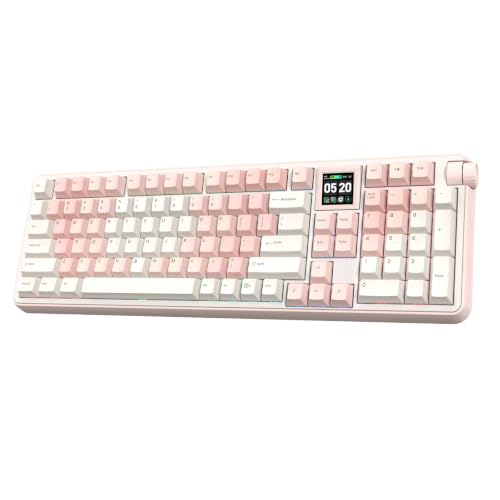
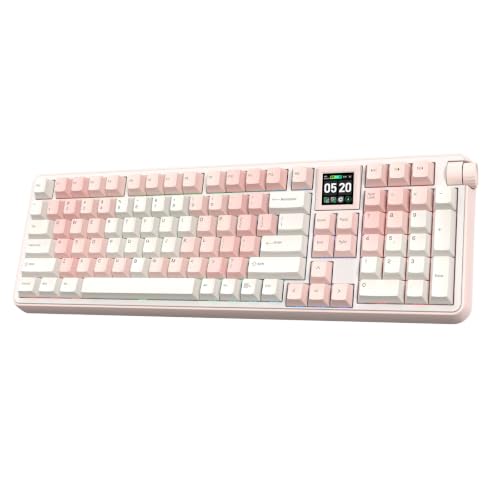
EPOMAKER RT100 Pro (Pink, Sea Salt Silent) — the quiet showpiece
Badge: Best RT100 for shared rooms and streams
- Layout: near-full-size, retro design
- Features: 1.54-inch screen, knob
- Connection: 2.4 GHz, Bluetooth, USB-C
- Switches: Sea Salt Silent, hot-swap
- Battery: 5,000 mAh (listing)
The pink Sea Salt Silent configuration is the RT100’s most distinctive proposition: a board that looks like a desk event and sounds like a library. The silent switches suit streamers (microphone diplomacy), shared rooms and offices with a sense of humour, and the colourway is the retro design at its most committed. For the buyer who wants the show and the hush in the same object, this is the configuration — and it is the one this review would put on a creator’s desk.
- Strengths: silent switches in a showpiece
- Strengths: full screen and knob theatre
- Strengths: creamy, composed sound
- Trade-offs: pink is a commitment
- Trade-offs: large desk footprint
- Trade-offs: silent feel divides typists
Best for: creators and retro romantics in shared spaces. Not suited for: minimalists.
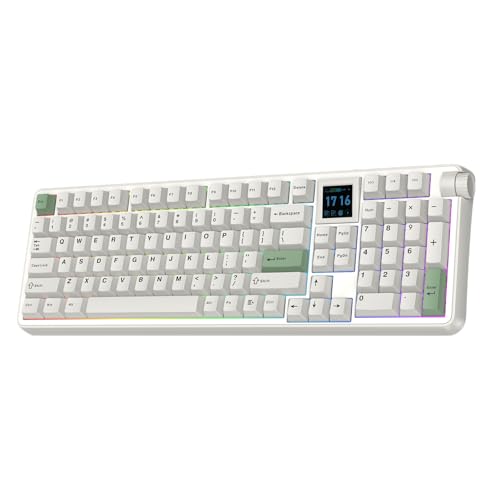
EPOMAKER RT100 Pro (White, Creamy Jade) — the classic configuration
Badge: Best RT100 for most buyers
- Layout: near-full-size, retro design
- Features: 1.54-inch screen, knob
- Connection: 2.4 GHz, Bluetooth, USB-C
- Switches: Creamy Jade, hot-swap
- Battery: 5,000 mAh (listing)
The white Creamy Jade configuration is the RT100 in its classic voice: smooth creamy linears under the retro caps, the full screen-and-knob presentation in the colourway that reads as vintage terminal rather than as novelty. It is the configuration for the buyer who wants the board’s whole argument — retro outside, modern inside, creamy throughout — without the silent switches’ particular feel. This review’s default RT100 recommendation wears this badge.
- Strengths: the classic RT100 experience
- Strengths: creamy linear stock sound
- Strengths: timeless colourway
- Trade-offs: linears are audible in quiet rooms
- Trade-offs: large footprint again
- Trade-offs: screen charm not for everyone
Best for: retro desks and creamy-sound seekers. Not suited for: compact or quiet-room desks.

Keychron K8 Pro — the calm alternative
Badge: Best alternative for open-firmware buyers
- Layout: tenkeyless
- Firmware: QMK/VIA
- Connection: Bluetooth, wired
- Switches: Gateron G Pro Brown, hot-swap
- Lighting: RGB
For the reader who likes the RT100’s substance — hot-swap, wireless, a quality stock board — but not its show, the K8 Pro is the standing alternative: QMK/VIA depth the Epomaker’s driver does not attempt, a tenkeyless footprint, and a design that disappears into a professional desk. It lacks the numpad, the screen and the retro soul; it gains firmware openness and calm. The comparison is really about what a desk is for.
- Strengths: QMK/VIA openness
- Strengths: professional restraint
- Strengths: hot-swap and wireless
- Trade-offs: no numpad
- Trade-offs: no screen or knob theatre
- Trade-offs: less creamy stock sound
Best for: professionals and firmware lovers. Not suited for: centrepiece seekers.
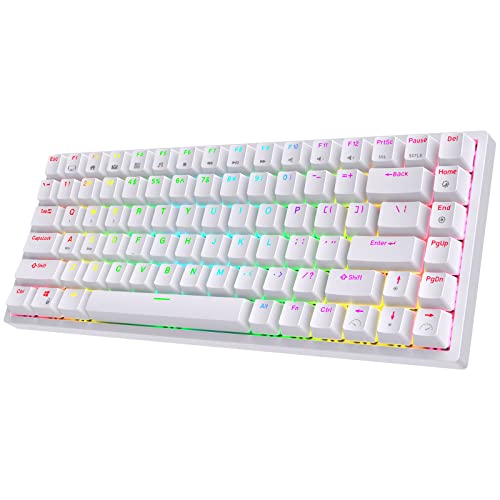
RK Royal Kludge RK84 — the budget alternative
Badge: Best alternative for value buyers
- Layout: 75 percent, 84 keys
- Connection: Bluetooth 5.0, 2.4 GHz, USB-C
- Switches: hot-swap
- Lighting: RGB
- Character: the tri-mode value standard
The RK84 is the other direction of alternative: tri-mode, hot-swap and compact at a budget the RT100 does not approach. It gives up the screen, the knob, the retro design and the creamy depth, and keeps the modern essentials. For a buyer whose “crazy options” budget is zero but whose tri-mode requirement is real, it remains one of the category’s defining value boards.
- Strengths: tri-mode at a budget price
- Strengths: compact footprint
- Strengths: hot-swap flexibility
- Trade-offs: no theatre at all
- Trade-offs: plainer sound and caps
- Trade-offs: smaller battery class
Best for: value tri-mode buyers. Not suited for: centrepiece desks.
The Crazy Options, Audited One by One
The screen. The RT line’s signature: a smart display showing connection, battery, time and custom content, detachable in the line’s design language so the board can be dressed down. Verdict: charm with genuine garnish — the status information is real, the custom images are joy, and neither justifies the board alone. The knob. Machined, satisfying, and useful every day for volume and media. Verdict: substance. Tri-mode. Dongle, Bluetooth and cable, the full modern settlement. Verdict: substance. Hot-swap with named switches. Sea Salt, Creamy Jade and friends, pre-lubed and swappable. Verdict: substance wearing poetry. The retro case and caps. Pure design — and the reason the board exists. Verdict: the honest kind of theatre, the kind that admits it. The battery. A 5,000 mAh cell by the listings — weeks of disciplined use, days of festival lighting. Verdict: adequate, honestly framed. The audit’s total: one charm, one design act, and four substance — a ratio that separates the RT100 from the gimmick boards its silhouette might suggest. The full house context is in the Epomaker keyboards guide.
Sound: The Retro Body With a Modern Voice
The RT100’s most pleasant surprise is acoustic. A board styled like a vintage terminal might be forgiven a vintage voice — bright, hollow, rattly — and instead it speaks in the house’s modern creamy register: gasket-cushioned landings, layered padding, pre-lubed switches and PBT caps composing a deep, soft sound that belongs to the current decade. The silent configuration goes further, into genuine hush, without the mush that lesser silent switches impose. The juxtaposition is the board’s party trick and its quality certificate: close your eyes and it is a modern gasket board; open them and it is 1983. Buyers choosing between configurations should choose by ear first — the Creamy Jade’s smooth music versus the Sea Salt’s diplomacy — because the voice is the part of the board the owner will perceive most, long after the screen’s novelty has settled into furniture. Sound tests of the exact variant, as always in this cluster, are the buyer’s best pre-purchase instrument.
The Screen, Lived With for a Month
Novelty features should be reviewed at month scale, and the screen’s month has a recognisable arc. Week one is play: custom images, GIFs, the small ceremony of the board greeting its owner. Week two is utility’s turn — the battery glance before a trip, the connection check that ends a pairing mystery in one look, the clock that is simply there. Weeks three and four are the settlement: the screen becomes furniture, glanced at rather than watched, its value converted from delight to information. That arc is the honest case for the feature — it does not stay a toy, because the status information is genuinely the information a tri-mode board most often makes its owner hunt for. The counter-case is equally honest: a wired-desk owner with one device gains almost nothing from a status panel, and for that desk the screen is a ornament pure and simple. Both cases are in this review because both desks exist, and the RT100, to its credit, serves the first without insulting the second — the detachable design lets the board be dressed down when the theatre is not wanted.
Typing Feel and the Working Day
Beneath the theatre, the RT100 must survive the working day, and its ergonomics are the modern standard’s: a full-height board with a gentle typing angle, a numpad for the spreadsheet hours, and switch options that span the room’s tempers. The gasket mount’s softer landing registers across long sessions as a mild kindness in the fingers. The retro keycaps are proper PBT with legible legends — touch typists will never look, and hunt-and-peck typists should confirm the colourway’s contrast suits their light, because retro palettes occasionally privilege mood over contrast. The board’s size is its main bodily fact: it fills a desk the way its ancestors filled desks, and the mouse hand travels accordingly — the posture arithmetic of the full-size class, unchanged by the costume. Pair it with a wrist rest if your palms plant rather than float, keep the angle low, and the RT100 works an eight-hour day as competently as it charms in the first eight minutes. That dual competence is, in the end, the review’s whole thesis.
Gaming on a Retro Board
The RT100’s gaming credentials are the modern standard’s rather than the frontier’s: NKRO, a 2.4 GHz link with gaming-grade latency, hot-swap linears for the season’s taste, and a numpad that macro-heavy genres can conscript. It does not offer rapid trigger or 8K polling, and the competitive FPS specialist should shop the magnetic boards in this cluster instead. For the broad middle of play — RPGs, strategy, casual ranked, the couch session over Bluetooth — the board is entirely sufficient, and its theatre adds something the frontier boards cannot: a rig with a personality. The knob, mid-session, turns out to be a gaming feature in disguise — volume under a fingertip without an alt-tab — and the screen’s battery warning has saved more than one wireless session whose owner would otherwise have learned about the battery from the board’s silence. Crazy options, it turns out, occasionally moonlight as practical ones.
Software, the Screen’s Content, and the Driver Reality
The screen’s content and the board’s remapping run through Epomaker’s own driver, and the review should set expectations in the cluster’s usual terms. The driver handles key remaps, macros, lighting and the screen’s images and information pages; it is capable in scope and workmanlike in polish, a step behind the open VIA ecosystem the K8 Pro alternative offers. Owners who configure once — a few remaps, a screen image, a lighting mood — will exhaust its duties in an evening and never feel its limits. Owners who live in their configurator should weigh the alternative’s firmware seriously, because the RT100’s software is a utility, not a playground. Archive the installer at purchase, as this cluster advises for every proprietary driver, and the arrangement is stable for the board’s life. The screen’s content, once set, needs no further attention — which is the correct relationship between a keyboard and its software, however charming the screen that prompted the session.
The Verification Drill for This Exact Board
The RT line’s listings multiply by generation, colourway and switch, and this review’s drill is specific. Generation: RT100 and RT100 Pro are different boards at different prices — the Pro’s enlarged screen is the visible tell, the title’s suffix the legal one. Switch: Sea Salt Silent and Creamy Jade are different typing experiences wearing the same costume; the specification block names the one in the box. Colourway: pink, white and the retro palettes photograph similarly under marketplace lighting — confirm the name, not the thumbnail. Screen: confirm the display’s presence and size on the variant, since the line’s trims vary. Four checks, and the board that arrives is the board this review audited. Skip them, and the “crazy options” may include the surprise of the wrong generation — the one option nobody ordered.
Who This Board Is For, and Who It Is Not
The review’s sorting, plainly. The RT100 is for the creator whose desk is content, the retro romantic whose taste runs to terminals and typewriters, the multi-device professional who wants the numpad and the radios in one theatrical object, and the gift-giver shopping for the keyboard person who has everything sensible. It is not for the minimalist, whose desk it will colonise; the competitive specialist, whose frontier it does not contest; the open-firmware devotee, whose playground it is not; or the budget engineer, whose money the theatre visibly spends. Both lists are compliments in their way — a board with a clear constituency is a board designed on purpose — and the reader who finds themselves in the first list with a desk that can host the footprint has this review’s unqualified encouragement.
Longevity: Will the Theatre Age Well?
A fair question for any design-led board is whether its charm survives its novelty, and the RT100 has structural advantages in the wager. Its retro language is drawn from objects that have already aged once — terminals and typewriters are classics, not fads — so the design quotes permanence rather than chasing the season. Its fundamentals are standard-parts modern: switches, caps and cable from the open ecosystem, so maintenance never depends on the costume’s survival. Its screen, the most perishable element, detaches — the board can be dressed down to a handsome retro deck if the display’s era passes. And its resale market is fed by the same retro culture that bought it new. None of that guarantees a decade of delight, but it stacks the wager the right way: the parts most likely to date are the parts most easily retired, and the parts certain to endure — the typing, the sound, the radios — are the parts the owner touches daily. Design-led boards usually invert that stack. This one, unusually, does not.
The Two Configurations, Compared Head to Head
Because the review’s two RT100s differ only in dress and switch, their bout deserves a clean scoring. Sound: the Silent wins in company, the Jade wins in private — its creamy music is the board’s voice at full expression. Feel: the Jade’s smooth linear travel is the classic gasket pleasure; the Silent’s dampened travel is softer at the landing and preferred by the heavy daily typist more often than expected. Presence: the pink is the bolder object and the stronger photograph; the white is the longer-lived aesthetic, the one least likely to fight a future desk’s palette. Audience: streamers and shared rooms take the Silent for reasons that have nothing to do with taste; solo desks take the Jade for reasons that have everything to do with it. The bout’s lesson generalises across this whole cluster: when two configurations share a platform, the decision is never about the platform — it is about the room, the microphone and the owner’s relationship with their own colour choices, in that order.
The Price, Framed
The RT100 Pro sits in the modern mid-premium band, and its price decomposes honestly. The base layer buys the platform — gasket board, tri-mode, hot-swap, PBT — at the going rate for that specification anywhere in this cluster. The premium layer buys the theatre: the screen system, the knob’s machining, the retro casework and caps as a designed set. A buyer auditing the purchase should price the layers separately, because the verdict differs by layer: the platform is competitively priced, and the theatre is priced like the design object it is — cheaper than a limited edition, dearer than a rectangle. Buyers who value only the first layer should buy the TH line and bank the difference. Buyers who value both are paying a fair rate for each, which is all a review can certify about a price it is forbidden to print. The board’s resale, fed by the retro community, softens the theatre layer’s cost further for owners who rotate — a final line in the ledger that the sensible rectangles cannot offer.
Accessories and the Desk Around It
A centrepiece board reorganises its desk, and the review’s last practical chapter concerns the neighbourhood. The board’s height and retro stance pair naturally with a wrist rest in a matching palette — the house and the aftermarket both oblige — and the pairing is functional as well as visual for palm-down typists. Its cable, when the wired mode is used, deserves the routed, strain-relieved run the cable guides prescribe, ideally exiting where the retro silhouette is least interrupted. Its screen invites a small discipline: a default status page for work hours and the playful content for the rest, set once in the driver. And its size argues for the monitor’s position to be settled first, because the board will claim the desk’s centre and everything else arranges around the claim. None of this is burden; it is the ordinary choreography of owning a statement object, and owners consistently report it as part of the pleasure — the desk, for once, was designed rather than accumulated.
Troubleshooting the Theatre
The RT100’s fault list adds two theatrical entries to the standard tri-mode one, and the review records their first aid. A screen that will not update is a driver conversation first — reconnect wired, let the software find the board, re-send the content — and a firmware matter second, with the archived installer the standing precaution. A knob that misbehaves is usually a mode setting rather than a mechanism, resolved in the driver’s function assignment. The standard faults keep their standard remedies: pairing by the mode discipline, a misbehaving key by the hot-swap swap, battery drama by the lighting audit, and anything deeper by this cluster’s fix keyboard not working troubleshooting guide. The board’s architecture is forgiving — three connections, swappable switches, a detachable screen — so nearly every fault is an errand with a known address rather than a tragedy with a support ticket.
The RT100 Among Its Stablemates
A buyer cross-shopping within the house deserves the short map. Against the TH80 V2 Pro, the RT100 trades compactness for the numpad and the retro soul — same creamy voice, same radios, opposite desk philosophies. Against the Galaxy100, it trades aluminium and VIA for theatre and charm — the customiser and the romantic part ways here. Against the TH108, it is the same full-size brief answered by a personality instead of a professional. And against its own predecessor, the Pro is the refinement: bigger screen, fresher switches, the design’s confidence grown. The house’s breadth means the RT100’s real competition is internal, which is why this review has spent its alternatives section on calmer philosophies rather than on spec-sheet rivals: the buyer choosing the RT100 has already chosen Epomaker’s value system, and is really choosing which of its expressions their desk will wear. The Aula keyboards guide covers the house’s collaboration wing for the buyer whose shortlist runs that way instead.
What the Crazy Options Teach About the Market
The review’s last analysis steps back, because the RT100’s option list is a document of its moment. A decade ago a keyboard’s options were switches and lights; the RT100’s list — screens, radios, detachable modules, named switch poetries, retro industrial design — records a market that has absorbed the smartphone’s lesson: a personal device is a platform for expression as much as a tool. The interesting question is which of the crazy options are the future’s standards and which are the moment’s fireworks. The knob has already become a standard. Tri-mode is a standard. Hot-swap is a standard. The screen is mid-verdict — genuinely useful as a status panel, genuinely delightful as a canvas, and cheap enough now to spread. The retro wave is a taste cycle, but taste cycles in keyboards have a way of leaving classics behind them, as the traditionalist guides in this cluster attest. The RT100, read this way, is a well-hedged bet on the moment: standards underneath, fireworks on top, and a detachable screen for the day the verdict lands. Few boards document their era this honestly, and fewer still type this well while doing it.
A Streamer’s Week With the Silent Configuration
One constituency’s diary, because the pink silent board’s use case is specific enough to narrate. Monday’s recording session is where the configuration earns its keep: the Sea Salt Silents keep the microphone’s noise floor clean while the board, on camera over the shoulder, does its visual work — the rare board that serves the audio and the video of the same stream. Tuesday’s editing marathon tests the numpad and the knob, both of which pass into reflex by midday. Wednesday’s community game night runs the 2.4 GHz link without a dropped input worth mentioning. Thursday is the battery’s reminder, delivered politely by the screen in time for the cable to spend the night attached. Friday’s desk photograph — the one the channel posts — is the board’s second job performing itself. The diary’s point is not that every buyer streams; it is that the configuration’s apparently whimsical combination — pink, silent, screened — resolves, in a real workflow, into a set of answers to real constraints. Crazy options, properly audited, keep turning out to be somebody’s exact requirements wearing a costume.
The Verdict, Compressed
The review in its shortest honest form. The RT100 Pro is a retro centrepiece built on a modern gasket platform: creamy or silent by configuration, tri-mode, hot-swappable, numpad-complete, with a screen that informs and charms and a knob that simply works. Its costs are size, theatre-tax pricing, and a proprietary driver of ordinary polish. Its alternatives are the calm professional (K8 Pro) and the budget essentialist (RK84), both honourable and neither remotely similar in spirit. Buy the RT100 when the desk wants a protagonist; buy its configurations by the room’s ears — Silent for the shared and the streamed, Creamy Jade for the private and the musical. And run the generation drill before checkout, because the craziest option of all would be receiving the wrong one.
Care and Keeping of a Showpiece
A design object invites a slightly more deliberate housekeeping, and the review’s last practical notes oblige. The retro caps wash like any good PBT — warm soak, soft brush, full dry — and their legends are printed to the standard the house’s other boards keep. The case’s matte retro finishes prefer a microfibre to a solvent, and the screen a lens cloth to anything else. The detachable display should live, when detached, somewhere safer than a drawer of cables — its connector is small and its face is glass-adjacent. The knob’s machining shrugs off ordinary life. None of this exceeds five minutes a month, and all of it protects the specific asset the buyer paid the theatre premium for: the way the board looks in year three. A sensible rectangle can be neglected into mere shabbiness; a centrepiece neglected becomes a shabby centrepiece, which is worse. The care is the premium’s maintenance schedule, and it is cheap at the price.
One More Audit: The Numpad and the Layout
The layout deserves its own paragraph because near-full-size frames make compromises that full-size boards do not. The RT100 keeps a genuine numpad — the accountants and editors in its audience are served — inside a frame tightened toward the retro silhouette, which means the navigation cluster is arranged with some period-flavoured economy. Touch typists adapt within days; the layout’s logic is consistent and the legends are honest. The arrow keys and their neighbours should be located by the specification diagram rather than assumed from a standard board, because compacted right-hand clusters are where muscle memory goes to be retrained. None of this is a defect; it is the standing price of the near-full format, charged by every house that builds one, and the RT100 charges it fairly. Buyers whose work is navigation-key intensive at speed should simply budget the retraining week the format always asks for.
The Gift and the Second Desk
Two ownership patterns complete the review’s map. As a gift, the RT100 is the category’s showstopper — the board a giver chooses when the recipient is a keyboard person whose sensible needs are already met, because what remains to give is delight with a warranty of usefulness underneath. The giver’s drill is the recipient’s desk size and switch temper, both knowable, and the colourway chosen as the sentence it is. As a second desk’s board — the studio, the stream room, the weekend setup — it performs the rotation’s favourite trick: a different personality from the main desk’s board with the same modern manners, so the hands commute without relearning radios or rituals. Both patterns exploit the board’s defining trait, that its theatre is load-bearing rather than decorative: it gives the desk a protagonist, and protagonists are what gifts and second desks are for.
Postscript: In Defence of Crazy Options
The review that began by auditing the craziness should end by defending the category, because the RT100’s real significance is what it proves about its market. Keyboards spent a decade converging on the perfected rectangle — and the rectangle, perfected, turned out to be the beginning of the conversation rather than its end. The crazy options are the market remembering that a keyboard is the object a knowledge worker touches most, looks at most, and keeps longest, and that such an object is allowed — is perhaps obliged — to have a personality. Epomaker’s contribution is discipline inside the personality: the options are audited in this review and most of them pass as substance, and the ones that are pure charm are honest about it and detachable when unwanted. That is the mature form of the crazy option, and it is why this board, rather than a dozen louder novelties, became its line’s flagship. The rectangle had a good decade. The RT100 suggests the next one will be more interesting.
Before the Questions: The Thirty-Second RT100 Test
The review compressed into the four questions that decide it. Does your desk have the width and the wish for a centrepiece? Does your work want a numpad in the same object as your play? Do your room’s ears want the Silent, or your own ears the Jade? And can your workflow live happily with a capable proprietary driver rather than VIA? Four yeses — with the switch answer either way — and the RT100 is your board, with the generation drill as the only remaining step. Any no routes you, respectively, to the TH80’s compactness, the TKL alternatives, the other configuration, or the Galaxy and Keychron islands of open firmware. The test is short because the board is honest: everything it is, it is visibly, and a buyer who answers four questions truthfully cannot buy it wrong.
The Comparison the Photographs Cannot Make
One last piece of evidence belongs in the review because it is the one the product pages cannot supply: the RT100 next to an ordinary board, in an ordinary room, at an ordinary hour. The ordinary board disappears into the desk’s administration; the RT100 remains a presence — in peripheral vision, in the room’s conversation, in the owner’s mood at the day’s tired end. That presence is either the purchase’s whole point or its whole problem, and no specification can decide which for a given buyer. The review’s consistent advice is to decide it before the feature audit, because the audit will pass either way: the fundamentals are sound, the options are audited, the price is fair for its layers. What remains is the oldest question in designed objects — do you want to live with it? — asked of a keyboard that, to its great credit, makes the question fun to answer.
And the Answer to the Title
The keyword that commissioned this review claims the keyboard has some crazy options, and a review owes its title a verdict. The claim is true, and more interesting than it sounds: the options are crazy the way a well-stocked workshop is crazy — everything within reach, each tool with a job, the whole arrangement reflecting a personality rather than a pathology. Screen, knob, radios, switches, retro soul: audited above, they resolve into a board that is maximalist in its furniture and conservative in its engineering, which is the only direction of maximalism that survives contact with a working week. Buyers frightened by the title can be reassured by the audit; buyers attracted by it can be reassured by the same document. The crazy, it turns out, was load-bearing all along.
The Owner’s Report, Imagined at Year One
Reviews end; ownership reports are the genre’s conscience, and this one closes by imagining the RT100’s, honestly, at the year mark. The screen still greets, its novelty converted to furniture exactly as predicted. The knob is a reflex. The switches — whichever poetry was chosen — are broken in and beloved or else swapped, in twenty minutes, for the season’s new taste, because the sockets made the experiment cheap. The retro case has gathered the small archaeology of a year’s desk life and wears it as patina rather than damage. The battery is charged on a rhythm so habitual it is no longer noticed. And the board’s owner, asked the review’s opening question — was the craziness worth it? — gives the answer the sales figures keep giving: the fundamentals were the purchase and the theatre was the dividend, and both are still paying. A keyboard that can be imagined, credibly, at year one with every system intact is a keyboard a review can recommend at day one without crossing its fingers.
One Sentence for the Fence-Sitter
Every long review owes the undecided a single sentence unhedged by its own analysis, and this one’s is: if the photographs of this board make you happy and your desk has the room, buy it — the engineering underneath the happiness is sound, the options audit clean, and a keyboard that makes its owner happy at 9 a.m. on a February Monday is performing the oldest function a designed object has. The hedges all live above, in their proper places, and they amount to variant-checking rather than doubt. Happiness, verified by an audit, is a rational purchase. The fence, in this case, is the only uncomfortable seat available.
The Fine Print, Gathered in One Place
For the record-keeper, the review’s caveats collected: the screen’s utility is real but modest, and wired single-device desks gain least from it; the battery’s endurance is theatre-dependent and should be budgeted in days at festival settings; the driver is a utility, not a VIA-class playground; the layout’s compacted navigation cluster asks a retraining week of fast nav-key users; the footprint is a centrepiece’s, with the mouse-travel arithmetic that implies; and the listings demand the generation-and-switch drill because the line iterates. Six caveats, none disqualifying, all priced into the verdicts above. A review that gathers its fine print in one place respects its reader’s time — and a board whose fine print fits in one paragraph has, by the standards of theatrical keyboards, very little to hide.
Envoi: The Board as a Small Daily Event
The last thing a review can say about a centrepiece is the thing its owners say first: the board makes sitting down at the desk a small event. That is a trivial-sounding property with non-trivial arithmetic — multiplied by every working day of a keyboard’s years, the small event compounds into a real quantity of pleasure, purchased once. The RT100’s engineering ensures the event never curdles into irritation, which is the whole difference between a centrepiece and a nuisance. Buy it, configure it once, keep its little archive, and let the desk’s smallest daily ceremony be a pleasant one. The crazy options will take care of themselves; they were designed to.
Really the Last Word: Who Regrets This Board?
Regret analysis is a review’s final duty, and the RT100’s regret profile is instructive because it is so narrow. Owners regret the footprint when the desk was smaller than their estimate — a measurement failure, not a product failure. They regret the switch when the drill was skipped and the room’s ears outvoted the listing’s poetry — a reading failure. They regret the screen when they bought it as a utility rather than as charm with garnish — an expectation failure this review has tried to prevent at some length. Nobody, in the pattern of owner reports, regrets the typing, the sound, the radios or the build — the fundamentals simply do not generate regret, which is the strongest sentence a review of a theatrical product can print. Measure the desk, read the switch line, price the charm as charm, and the regret profile closes to zero.
Appendix for the Thorough: The Option List as a Checklist
For the buyer who wants the audit as a pocket list: screen — charm plus status utility, detachable; knob — daily utility; tri-mode — dongle for performance, Bluetooth for devices, cable for certainty; hot-swap — the switch as a season, not a sentence; gasket and padding — the creamy voice, stock; PBT retro caps — the look, with the substance; numpad — the professional’s non-negotiable, present; battery — mid-sized, theatre-taxed, honestly framed; driver — capable, proprietary, archived on day one. Nine lines, and the board is fully described. Any rival theatrical board can be audited against the same nine lines in five minutes, and the comparison will usually end the argument before the price is even discussed.
Sign-Off
Reviews of sensible boards end with a recommendation; reviews of boards like this one end with a recognition. The RT100 Pro is the rare maximalist product whose maximalism is organised — every crazy option catalogued, most of them useful, the rest honestly delightful and one of them detachable. It will not suit the minimalist, the competitor or the monk, and it was never addressed to them. To its own audience — the romantics, the creators, the multi-device professionals with a sense of theatre — it is one of the most complete keyboards of its moment. This review recommends it to them without reservation, and the audit above is the reservation’s paperwork, for anyone who wants to check.
One truly final observation, offered to the reader who has followed the audit to its end: the RT100’s craziest option may be the one nobody lists — the permission it gives its owner to enjoy a tool. Keyboards are bought with budgets and justified with specifications, but they are lived with in moods, and a board that improves the mood of the desk’s first minute improves, in aggregate, a working life. The audit stands; the fundamentals stand; and on top of them, permitted and unembarrassed, stands the fun. That is the whole review.
Who Should Actually Buy the Screen Board
The RT100’s audience sorts itself by a single question: does your desk want a character or a tool? Character-seekers — the gift buyer, the retro romantic, the streamer whose background is half the broadcast — get their money’s worth from the screen and knob before the first switch is judged, and the two colourway listings exist precisely for them. Tool-seekers should read the same board as a competent silent-or-tactile 96% whose price carries a display tax, and compare it honestly against the screenless value in the Durgod keyboards guide before paying for charm they will stop seeing in a month. Between the poles sits the switch-curious: for them the RT100’s hot-swap sockets make the spectacle board a legitimate laboratory, spectacle and experiment in one purchase. And if the whole category of personality hardware is new to you, the wrist’s supporting cast gets its own treatment in this cluster’s Glorious wrist rest review — because a desk with this much character deserves its comforts curated too.
Frequently Asked Questions
Is the Epomaker RT100 worth it?
For the buyer it was designed for — a retro-loving, multi-device typist who wants a desk centrepiece with real fundamentals — yes, emphatically. The screen and design are the purchase; the gasket sound, hot-swap switches and tri-mode connection are the justification, and both halves are genuinely delivered. Buyers indifferent to retro design should spend the same money on the house’s TH line or a calmer rival, where the theatre budget converts into other virtues.
What does the RT100’s screen actually do?
It displays the working status a wireless board otherwise hides — connection mode, battery level, time and date — plus custom images and GIFs through the software, and on the RT design it detaches, so the board can be run in a cleaner configuration. It is best understood as a status panel with a personality, not as a second monitor.
Is the RT100 good for typing and office work?
Yes — underneath the costume it is a near-full-size board with a numpad, quality PBT caps, a composed gasket voice and full Mac/Windows manners. The Sea Salt Silent configuration is genuinely office-safe. The considerations are desk space and the retro keycap legends’ readability for hunt-and-peck typists, which touch typists will never notice.
RT100 or RT100 Pro — what changed?
The Pro is the refreshed generation: an enlarged 1.54-inch screen specification in the current listings, updated internals and switch options, and the line’s design carried forward. Because the names are close and the listings numerous, verify the generation in the title and specification block before buying — the drill this cluster prescribes for every fast-iterating house.
Does the RT100 work with Mac?
Yes — the listings state Win/Mac compatibility, the tri-mode radios pair with Macs over Bluetooth or dongle, and the board’s manners are the house’s usual dual-system standard. Verify the keycap modifier provision on the specific variant if Mac legends matter to you.
How is the battery life in real use?
With the screen awake and RGB lit, think in days of heavy use; with lighting moderated and the screen disciplined, in weeks. The 5,000 mAh cell is mid-sized for the class, and the board’s theatre is its main consumer — the standing physics of every screen-bearing board in this cluster’s wireless guides.
Crazy options, audited: a screen with charm, a knob with purpose, radios with discipline, switches with poetry, and a retro body with nothing to apologise for. Buy the configuration your room’s ears choose, verify the generation like the drill prescribes, and give the board the month its theatre deserves before judging — centrepieces, like the instruments they also are, reveal themselves on a schedule that unboxings cannot rush. The review’s confidence in that sentence is the product of its method — every option interrogated, every caveat gathered, every alternative given its honest paragraph — and the sentence survives the method, which is all a recommendation can ever claim. If this review has a method worth stealing, it is the audit itself — take any theatrical board’s option list, price each item as substance, charm or both, and refuse to let the charm items borrow the substance items’ credibility or vice versa. The RT100 survives that audit with its reputation enhanced, which is more than most maximalist products in any category can say, and is the real reason it anchors its line. The RT100 is a centrepiece that types like an instrument — buy it for a desk that wants both, and it will not disappoint either half of the wish.
A final administrative blessing, in keeping with every guide in this cluster: keep the box, the cable and the screen’s little module together, archive the driver on the first evening, and photograph the label that names your exact generation and switch. The RT100’s listings will keep multiplying after your purchase, and your own archive is the only record that will always describe the board actually on your desk. Owners of theatrical boards owe themselves that one untheatrical habit — it is what separates the collector from the merely surprised, three variant-generations from now.