Disclosure: As an Amazon Associate, kajuandouglas.com earns from qualifying purchases. Links on this page are affiliate links; they cost you nothing extra. Prices and availability change often, so check the current Amazon listing before you buy.
This das keyboard complete guide model s vs 4 vs mactigr comparison untangles one of the most confusing lineages in mechanical keyboards. Das Keyboard — the American brand that helped start the modern mechanical revival with blank keycaps and Cherry MX switches — has sold the Model S, the 4 series, the 5Q and 6 series, the X50Q, and Mac editions whose names overlap across two decades. (The “MacTigr” of the keyword is the Mac-edition line as shoppers search for it — Das’s Mac models are the Model S for Mac and the 4 Professional for Mac covered here.) This guide lays the family out in order, explains what each generation changed, reviews the five listings that best represent the line today — each verified against Amazon catalogue data — and finishes with a clear answer to which Das belongs on which desk.
Key takeaways: The Model S is the classic — wired, Cherry MX, USB hub, no backlighting theatre. The 4 Professional adds the aluminium top, the oversized volume knob and the ruler-footbar that became the brand’s signatures. The 4 Ultimate is the 4 with blank keycaps, for touch-typists and the confident. The 5Q/5QS line added smart RGB notifications; the 6 Professional is the modernised flagship with Cherry MX2A switches and USB-C. Mac buyers have dedicated editions of the Model S and the 4. Every Das is wired, full-size and built like office equipment — that consistency is the brand.
Das Keyboard Complete Guide Model S vs 4 vs Mactigr: The Family Tree, in Order
Das Keyboard’s history compresses into four eras. The Model S era established the formula: a full-size wired board, genuine Cherry MX switches, a built-in USB hub, laser-etched keycaps and a professional black slab of a case — the keyboard that told a generation of office workers that mechanical feel was not a gaming affectation. The 4 era refined the object: an aluminium top panel, the famous oversized volume knob (a design flourish you operate with the side of a finger, and the brand’s most copied idea), media keys, an instant sleep button, and the footbar — a magnetic ruler that doubles as the board’s riser, still one of the industry’s most charming pieces of industrial design. The Q era — 5Q, 5QS, X50Q — chased the connected desk: RGB keys as notification channels, applets for weather and alerts, the keyboard as a dashboard. The 6 era modernised the flagship for the current decade: Cherry’s MX2A switch generation, shine-through keycaps, a USB-C hub and backlighting, in the same professional silhouette. Through all four eras the constants hold: wired, full-size, Cherry switches, and a build that assumes the buyer will keep the board for a decade. Buyers comparing Das against the custom world should read this guide alongside the Ducky keyboards complete guide — the two brands are the traditionalist wing of the market, and they divide it by philosophy.
In this guide
The Five Listings That Represent the Line

Das Keyboard Model S for Mac — the classic, Mac edition
Badge: Best Das for Mac traditionalists
- Layout: full-size 104, Mac edition
- Switches: Cherry MX Blue (listing)
- Connection: wired, 2-port USB hub
- Keycaps: laser-etched
- Extras: Mac key legends and layout
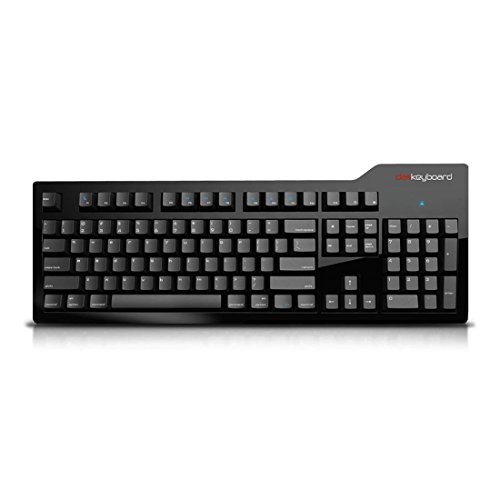
The Model S for Mac is the founding formula wearing Apple legends: Cherry MX Blue switches with their click and tactility, a two-port USB hub in the board, laser-etched caps and the full-size Mac layout that Mac professionals of a certain era treated as the only serious option. It has no backlighting, no software, no wireless — a purity that is either its charm or its disqualification depending on the buyer, and this guide respects it as the former for the traditionalist desk it was built for.
- Strengths: genuine Cherry MX switches
- Strengths: proper Mac layout and legends
- Strengths: built-in USB hub
- Trade-offs: wired only, no backlight
- Trade-offs: clicky Blue switches are a room decision
- Trade-offs: design is from an earlier era
Best for: Mac professionals who value the classic formula. Not suited for: shared quiet rooms (in Blue) or feature seekers.

Das Keyboard 4 Professional — the signature model
Badge: Best Das for most buyers
- Layout: full-size 104
- Switches: Cherry MX Brown (listing)
- Build: aluminium top panel
- Extras: oversized volume knob, 2-port USB 3.0 hub
- Signature: magnetic footbar riser
The 4 Professional is the Das most buyers mean when they say the brand’s name: the aluminium top, the great wheel of a volume knob, Cherry MX Browns in the listing verified here (Blue is the sibling variant), a USB 3.0 hub, and the footbar under the desk edge. It is a complete professional instrument with no software dependency and no lighting theatre — the board that made Das the default recommendation for writers, programmers and finance desks for a decade. If this guide must choose one Das for the median professional, it chooses this one without drama.
- Strengths: the volume knob is genuinely great
- Strengths: aluminium build, professional finish
- Strengths: Cherry MX Brown versatility
- Trade-offs: wired only
- Trade-offs: no backlighting
- Trade-offs: full-size footprint
Best for: professionals wanting the definitive Das. Not suited for: wireless or compact desks.

Das Keyboard 4 Ultimate — the blank-keycap statement
Badge: Best Das for touch-typists
- Layout: full-size 104
- Switches: Cherry MX Blue (listing)
- Keycaps: completely blank
- Build: aluminium top panel
- Extras: volume knob, USB 3.0 hub
The Ultimate is the 4 Professional with its legends removed — the product that made Das famous as a philosophy. Blank keycaps force and certify touch-typing; they also end every hunt-and-peck habit in a household within a month, which owners report as either liberation or grounds for divorce. As an object it is the most striking board in this guide: a black slab with a great aluminium wheel, saying nothing. Buy it if your fingers already know the map, or if you are willing to learn it the honest way.
- Strengths: the ultimate touch-typing trainer
- Strengths: iconic minimalist object
- Strengths: same 4-series hardware quality
- Trade-offs: blank caps are a real commitment
- Trade-offs: guests and colleagues will struggle
- Trade-offs: Blue click in the listed variant
Best for: confident touch-typists and minimalists. Not suited for: shared desks or legend-dependent users.

Das Keyboard 6 Professional — the modern flagship
Badge: Best Das for modern desks
- Layout: full-size
- Switches: Cherry MX2A Brown, tactile (listing)
- Keycaps: shine-through, backlit
- Hub: 2-port USB-C
- Extras: media controls, volume knob, aluminium enclosure
The 6 Professional is Das answering the current decade: Cherry’s refined MX2A switches, backlighting with shine-through caps, a USB-C hub and full NKRO, inside the brand’s durable aluminium enclosure with the signature knob intact. It concedes nothing of the formula — wired, full-size, professional — while removing the two objections modern buyers raised against the 4: no light and an ageing hub. For a buyer who wants the brand’s virtues without its museum pieces, this is the Das of the present tense.
- Strengths: MX2A refinement
- Strengths: backlighting and USB-C hub
- Strengths: the knob and build endure
- Trade-offs: flagship pricing
- Trade-offs: still wired, still full-size
- Trade-offs: less iconic than the 4’s purity
Best for: modern professionals wanting Das without compromise. Not suited for: traditionalists who prefer the 4’s austerity.
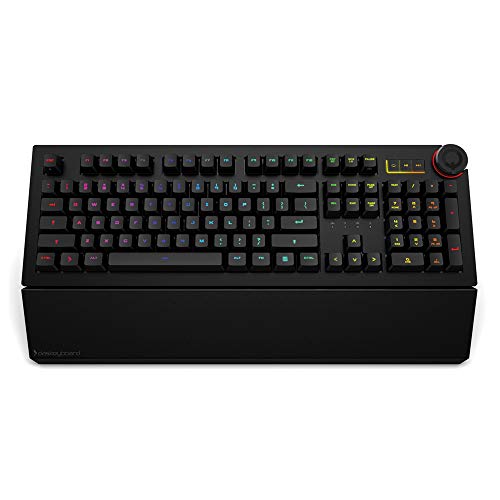
Das Keyboard 5QS — the smart-notification experiment
Badge: Best Das for dashboard devotees
- Layout: full-size 104
- Switches: soft tactile mechanical
- Feature: smart RGB — keys as notification channels
- Extras: palm rest, volume knob, aluminium top
- Software: Q applets ecosystem
The 5QS represents the Q era’s wager: that a keyboard’s RGB should carry information — build statuses, alerts, weather — and not merely glow. Its soft tactile switches, palm rest and aluminium build keep the professional base, while the applet ecosystem turns the number row into a dashboard. History’s verdict on the wager is mixed, and this guide reports it honestly: the concept charmed its devotees and the ecosystem never became an industry standard. Buy the 5QS if the dashboard idea genuinely delights you and the price reflects its era; buy the 6 if you want the same desk with the modern, simpler answer.
- Strengths: unique notification concept
- Strengths: palm rest included
- Strengths: full Das build quality
- Trade-offs: applet ecosystem is a niche
- Trade-offs: software dependency the 4 avoids
- Trade-offs: superseded by the 6 for most buyers
Best for: notification-dashboard enthusiasts. Not suited for: buyers wanting the longest-supported simplicity.
Model S vs 4 vs the Mac Editions: The Decision, Stated Plainly
The keyword’s triangle resolves by era and by operating system. Between the Model S and the 4, the 4 is the better object in every measurable way — aluminium top, superior hub, the knob, the footbar — and the Model S survives as the purist’s and the historian’s choice, plus the Mac edition’s vehicle. Between the Windows and Mac editions, the decision is made by your machine and nothing else: the Mac boards carry the correct legends, the correct layout and the correct modifier manners, and a Mac professional should buy them without converting a Windows board in software and living with the wrong legends for a decade. And across the whole line, the 6 Professional is the answer for the buyer with no era loyalty: it is the current flagship, with the current switches and hub. The Das decision is therefore unusually clean for a lineage this long — Mac or Windows first, modern or classic second, switch colour third — and the switch question, Blue’s click against Brown’s tactility, is the household decision this cluster always flags: clicky switches are a roommate referendum, as the accountants’ and editors’ guides in this cluster also warn.
The Volume Knob and the Footbar: Two Ideas Worth Their Fame
Das’s two signature flourishes deserve engineering appreciation rather than mere mention, because both solve real problems with unusual elegance. The oversized volume knob on the 4 and its descendants is large enough to operate with the side of a finger or the edge of a palm, without looking, mid-sentence or mid-call — a control designed around the actual gesture humans make when a meeting suddenly gets loud. Most keyboard media controls are buttons you hunt for; the Das wheel is a handle you already hold. The footbar is the quieter genius: a magnetic bar that serves as the board’s riser, lifting the rear to a typing angle, and detaches to work as a ruler — a wink at the drafting-table heritage of serious desk work, and a genuinely useful object in a papered office. Together they explain the brand’s professional loyalty better than any switch specification: Das designs for the working day as it is actually lived, in gestures and interruptions, and the 6 Professional’s retention of the knob — even as it modernised everything else — is the brand admitting which of its ideas were load-bearing.
The Switch Question Inside Das: Blue, Brown and the MX2A Generation
Das has always been a Cherry house, and its switch menu is a study in a few well-chosen options. MX Blue is the classic Das sound — clicky, tactile, unmistakable — and the switch the brand’s reputation was built on; it is also a household negotiation, as this guide has flagged. MX Brown is the professional’s compromise: the tactile confirmation without the click, suitable for shared rooms and calls, and the variant in the 4 Professional listing verified here. The soft tactile switches of the Q era tuned the same idea quieter still. And the MX2A generation in the 6 Professional is Cherry’s own refinement of its classics — smoother, factory-lubricated, the same characters with better manners. Das’s restraint here is the point: where the custom world offers forty switches, Das offers a considered few, each matched to a working context, and the buyer who wants a switch adventure should honestly shop elsewhere — Das sells the destination, not the journey.
Das Against the Custom World: The Appliance Argument
The deepest question a Das buyer faces in the current market is not which Das, but whether the whole philosophy still holds against the custom world’s modularity — and the argument deserves both sides. For the custom world: hot-swap freedom, gasket softness, wireless, programmability, and a feel that can be tuned to a single pair of hands; a modern Keychron or a planned build can be made more comfortable, quieter and more personal than any fixed board. For Das: zero configuration, zero firmware, zero decisions after the purchase; a build quality and switch pedigree that need no tuning to be excellent; and a decade-scale service life with nothing to go stale, because there is no software to abandon it. The honest resolution is biographical rather than technical. The buyer whose keyboard is a hobby should build. The buyer whose keyboard is a tool — whose evenings are spoken for, whose desk is a workplace, whose satisfaction is a board that vanishes into the work — is the buyer Das has served for twenty years, and the service record is the argument. Neither reader is wrong; they are simply different people, and this guide’s last service is to let each recognise themselves.
Longevity and the Used Market
Das boards age in public, and their ageing is the brand’s best advertisement: the used market is full of Model S and 4 series boards a decade old, still tight, still typing, their Cherry switches rated for lifetimes that office use barely dents. A used Das is therefore one of the safest second-hand purchases in keyboards, with a short checklist — every key tested, the hub’s ports verified, the cable and footbar present, the keycaps’ legends honest about their years. The boards’ fixed nature helps here: there is no firmware to be orphaned, no battery to be tired, no software licence to transfer. Buy a used 4 Professional in good order and you own, functionally, the same instrument its first owner bought — a property almost no other technology category can claim, and the material proof of the appliance philosophy this guide has described.
The X50Q and the Rest of the Extended Family
Completeness requires a register of the relatives not reviewed in full. The X50Q is the Q era’s other flagship — the 5Q’s notification concept in a slightly different chassis, with the same applet ecosystem and soft tactile switches; it shares the 5QS’s verdict, charming concept and all. The 4Q brought the smart-RGB idea to the 4’s body for buyers who wanted the classic object with the dashboard inside. The Prime 13 and other compact experiments tested whether Das’s audience wanted smaller boards, and the market’s answer — the full-size line’s endurance — is why this guide’s five are all 104-key instruments. The DeltaForce 65, a recent compact gaming-leaning model with hot-swap and gasket mounting in the catalogue, is the brand’s most surprising modern gesture: Das, cautiously, trying the custom world’s clothes. It does not change this guide’s map — the line’s centre remains the professional full-size — but it signals a brand still willing to experiment at its edges, which is what healthy institutions do.
Who Buys a Das in the Wireless Era: Three Portraits
The lineage makes most sense with its owners in view. The novelist-programmer — one desk, one machine, ten thousand words or lines a day — buys the 4 Professional in Brown and thinks about the purchase never again, which is precisely the product being sold. The Mac studio professional buys the Model S for Mac or the 4 for Mac, because the legends match the machine and the click or tactility matches the room, and because a keyboard that predates the current fashion will also postdate it. The touch-typing teacher, the competitive memorist, the household’s designated purist buys the Ultimate, and the blank slab becomes a piece of family theatre — guests baffled, children educated, the owner’s fingers quietly superior. Against these portraits, the buyers who should not buy Das are equally clear: the multi-device wireless nomad, the compact-desk gamer, the tuner and the remapper. A brand guide that can name both its people and its non-people has done its work, and Das — unusually among keyboard brands — makes the naming easy, because it has never pretended to be for everyone.
Sound and Feel: The Das Character at the Desk
A Das board’s sensory signature is the professional era’s: a firm, plate-mounted typing feel with no flex and no cushion, and a voice that is the switches’ own, unfiltered by gaskets or foam. In Blue that voice is a bright, deliberate click that carries across a room — the sound of an office that means it. In Brown it is a muted tactile report, office-safe and still unmistakably mechanical. In the 6’s MX2A generation both characters arrive smoother, the edges sanded by factory lubrication. Buyers formed by the custom world’s soft, deep builds should calibrate honestly: a Das will feel harder and sound sharper than a gasket board, and that is not a defect but a different school — the school of the typewriter’s direct descendants, where the keystroke’s information is delivered without upholstery. Many typists type faster and more accurately on the firmer instrument; many others prefer the cushioned one. The guide’s only insistence is that the choice be made knowingly, ideally with an hour’s typing on each school before a decade’s commitment to either.
The Hub, the Cable and Other Professional Details
Das’s professional identity lives in details that gaming boards treat as afterthoughts, and a complete guide should inventory them. The built-in USB hub — two ports across the line, USB 2.0 in the Model S era, USB 3.0 in the 4, USB-C in the 6 — turns the keyboard into the desk’s docking point for the dongles, drives and security keys of a working life, and its placement means the ports you use most are the ones nearest your hands. The cable is long, braided on the flagships, and routed for desks where the machine lives under or behind. The sleep button on the 4 is a small masterpiece of office empathy — one press, the machine naps, the professional leaves. The NKRO across the line means the board never drops a chord, which matters to the fastest typists and to no one’s marketing. And the weight — these are heavy boards that stay where they are put, through enthusiastic typing and desk bumps alike. None of these details headlines a listing. All of them together are why the line’s owners describe their boards the way tradespeople describe tools: without excitement, and without any intention of replacing them.
Price Tiers Across the Line, Framed
Without figures that would stale, the line’s price architecture maps cleanly by era. The Model S sits at the entry of the brand — the classic formula at the classic price, and the Mac edition’s home. The 4 Professional occupies the professional heartland tier, priced as serious office equipment and routinely discounted in the cycles of office retail. The Ultimate shares the 4’s tier, its blank caps costing confidence rather than money. The 5QS and its Q-era siblings sit in the experiment tier, their prices reflecting both their technology and their vintage — the used and remaining-stock market is often the honest place to buy the dashboard idea. The 6 Professional holds the flagship tier, priced against the modern professional flagships of every brand, and justifying it with the current switches, hub and lighting. Read as a whole, the ladder is unusually legible: each step buys an era’s idea, not a vague increment of quality, and a buyer can therefore choose by belief — in purity, in the classic object, in the dashboard, in the modern synthesis — rather than by budget alone. Few lineages in this cluster make their philosophy so easy to price.
Care and Keeping of a Das
The appliance philosophy extends to maintenance, which on a Das is mercifully brief. The boards ask for what all mechanical keyboards ask — a brush for the daily archaeology, compressed air for the seasonal depths, a keycap wash when the legends’ matte dulls — and nothing that they do not: no firmware rituals, no battery stewardship, no software updates to chase. The aluminium tops wipe clean and forgive coffee-adjacent incidents better than most; the footbar’s magnet keeps it attached through moves and cleanings where lesser risers get lost. The one component with a true lifespan conversation is the cable, captive on the classics, and it rewards the strain-relief discipline this cluster teaches for every wired board: no sharp desk-edge bends, no hanging weight, no yanking by the run. Kept so, a Das’s maintenance calendar is measured in minutes per year — which is, in the end, the entire brand proposition expressed as housekeeping. The custom world maintains instruments; Das owners merely dust theirs, and both groups believe, correctly, that they have chosen the wiser relationship with objects.
The Verdict Table
The lineage compressed to its decisions. For the classic formula on a Mac: the Model S for Mac. For the classic formula perfected: the 4 Professional, in Brown for shared rooms and Blue for solo click. For the statement and the skill: the 4 Ultimate. For the modern desk that wants the brand without the museum: the 6 Professional. For the dashboard experiment: the 5QS, bought knowingly. For everyone else — the wireless, the compact, the tuners — the neighbouring brands in this cluster, with Das’s blessing implied by its own clarity about who it serves. A lineage that can be tabled in five lines after two decades is a lineage that knew its mind, and the buyer who matches one of the five lines to their desk will understand, within a week of mornings, why the brand’s owners so rarely shop again.
Das in the Wider Traditionalist Landscape
Das does not occupy its philosophy alone, and the buyer comparing traditionalists should know the neighbouring houses’ tempers. Ducky, covered in its own complete guide in this cluster, shares the fixed-instrument faith but expresses it with colour, annual editions and a gamer’s accent. Leopold brings a Korean engineer’s austerity — superb stock keycaps, sound-dampened cases, Topre and Cherry alike — for the buyer whose traditionalism runs to refinement. Filco, the Japanese elder in this cluster’s guides, is the purest of all: no hub, no knob, no light, nothing but the board. Das’s distinct place in that company is the professional-systems one: the hub, the wheel, the footbar, the Mac editions — the traditionalism of the office rather than of the arcade or the laboratory. A buyer choosing among the four is choosing a flavour of permanence, and Das’s flavour is the one that tastes of work. That is not a limitation. For the desks this guide was written for, it is the recommendation itself.
Buying Notes: Variants, Listings and Traps
The Das catalogue’s age creates listing hazards that a buyer’s checklist dissolves. Switch variants share model names: a “Das Keyboard 4 Professional” may be Blue or Brown, and the variant — not the model — decides your room’s next decade, so verify the switch in the listing’s specification rather than its title photograph. Mac and Windows editions share silhouettes: confirm the edition by its legends description, especially in marketplace listings where photographs are recycled across variants. Generations share vocabulary: “Professional” appears in the Model S era, the 4 and the 6 with different hubs and switches; the generation number is the specification. Remaining stock and renewed units circulate for the older eras — legitimate value when the seller and the return terms are real, since the boards themselves age so gracefully. And the footbar and accessories should be confirmed in the box for used purchases, because the bar is both essential to the 4’s stance and charmingly losable. Five checks, one minute each, and the lineage’s only real trap — buying the right brand in the wrong variant — is disarmed.
A Word on the Blank Keycaps, From the Other Side
The Ultimate’s blank keycaps earn one more section, because they are the rare product feature that changes the user more than the desk. The first week on blanks is humbling in a specific, diagnostic way: the keys you miss are a map of exactly which legends your eyes had been secretly reading for years, and the map is always more extensive than the typist believed. The second week is the correction — the fingers, denied their cheat sheet, finally learn the territory — and the third week brings the strange, durable pleasure the board exists for: typing as a purely tactile act, faster for the absence of glances, with the desk’s visual noise reduced by one entire layer of print. The costs are real and should be weighed without romance: symbols and rare chords remain slower to find for months; passwords typed in company become a performance; and the board is genuinely hostile to any second user. Das sells the Ultimate as a professional tool, and the honest summary is that it is one — for the professional whose instrument is text itself, and whose household has been consulted. Everyone else should buy the legended 4 and enjoy the same hardware with the training wheels the rest of humanity uses.
The First Month With a Das: What Owners Report
Lineage guides deal in decades; ownership is lived in weeks, so here is the first month as the brand’s owners consistently narrate it. Week one is the adjustment of scale — the board is bigger, heavier and more present than whatever it replaced, the knob becomes a reflex by the third meeting, and the hub quietly absorbs the desk’s dongles. Week two is the switch verdict: Blue owners have made their household peace or their household mistake, Brown owners have stopped noticing the board at all, which is the brand’s intended effect. Week three is the discovery of the small systems — the sleep button’s convenience, the footbar’s double life, the way the board’s weight ends the slow migration across the desk that lighter boards perform. Week four is the month’s summary and the brand’s whole argument in miniature: nothing has been configured, updated, paired or tuned, and the keyboard has simply been there, working, every morning. Owners of more temperamental instruments describe that uneventfulness with something like wonder. It is the sound of the appliance philosophy keeping its promise.
Ergonomics and the Full-Size Question
A complete guide owes the full-size layout its ergonomic paragraph, because Das’s commitment to it is total and the buyer’s desk must consent. A 104-key board pushes the mouse hand wide, and for mouse-intensive work that width is a real postural cost — the reason compact layouts conquered the gaming and custom worlds. Das’s answer is the professional’s traditional one: the number pad and the navigation cluster are instruments of the work itself, the mouse excursion is the price of the full console, and the board’s typing angle — set by the footbar or the rear feet — should be kept flat or gently raised, never steeply tilted, in line with the posture guidance in this cluster’s flat vs angled keyboard for typing comparison. Buyers whose shoulders object to full-size width have the market’s many compact answers; buyers whose work lives in spreadsheets and code navigation will find the Das stance not a cost but a homecoming. Either way, the decision belongs to the body’s evidence, taken over a week of real work, and not to any guide’s preference — including this one’s evident respect for the big board’s virtues.
What Das Teaches the Rest of the Market
The guide closes its analysis with the brand’s influence, because Das’s ideas have a way of surfacing in other makers’ boards. The oversized, finger-side volume control — now a knob on half the custom world’s 75 percent boards — was Das’s gesture first, scaled down and made rotary by its descendants. The keyboard-as-professional-appliance positioning, against gaming’s theatre, created the market segment that Leopold, Filco and the office lines of every major now serve. Even the blank keycap, the Ultimate’s manifesto, echoes in the minimalist sets and the touch-typing pedagogy of the present. And the hub in the board — a Das signature from the Model S forward — persists wherever a keyboard is designed as a desk’s centre rather than its edge. Influence is the sincerest metric in a lineage guide, and by that metric Das is one of the most consequential keyboard brands of the mechanical era, quite apart from the boards it still sells. Buying one is buying into that lineage knowingly — the ideas, the austerity, the wheel — and for the professional desks it serves, the lineage is not history. It is Tuesday.
A Final Note on Choosing Between Eras
Readers who have followed the lineage this far sometimes stall at the last step, because each era’s idea is genuinely attractive — purity, the classic object, the dashboard, the synthesis — and the stall deserves a tiebreaker with a human scale. Ask which morning you want. The Model S morning is the historian’s: the original instrument, the click, the hub, no light and no apology. The 4 morning is the professional’s classic: the wheel under your finger at the first loud meeting, the footbar’s ruler in the first papered afternoon. The 5QS morning is the tinker’s dashboard, glowing with the day’s data. The 6 morning is the present tense: backlit, USB-C, MX2A-smooth, the brand’s virtues without its archaeology. The mornings are all good; they are simply different decades of the same desk. Choose the decade you want to live in, verify the switch and the edition in the listing, and let the board do what Das boards have done for twenty years — disappear into the work, one unconfigured, unupdated, entirely reliable morning at a time.
Das Keyboard in the Wild: Who Actually Types on Them
The line’s ownership pattern is itself a review, and the complete guide should report it. Das boards recur in the desks of professional writers, programmers of the old school, and finance and legal offices where the full-size layout and the blank option carry professional meaning — the writer whose board is a tool with a decade’s service, the developer whose Ultimate’s blank caps are a quiet credential, the office whose Model S units have outlasted three generations of computers. They recur in Mac studios in their Mac editions, where the correct legends and media manners spared a generation of users the Windows-keyboard translation tax. And they recur, tellingly, in second purchases: the brand’s owners replace a Das with a Das at a rate the industry’s churn rarely produces, because the ownership experience is an absence — of software nagging, of shine, of drama — and absences are only valued once experienced. A buyer choosing a first serious board is choosing, among other things, which absence they want to live inside; Das’s particular absence, engineered in Austin over two decades, is the one this guide has been describing.
The Das Ownership Decade: Maintenance and Milestones
A Das is bought for a decade, and the decade has a maintenance shape worth describing so the buyer can recognise a healthy one. Year one asks nothing but the occasional dusting. The middle years ask for the keycap wash — the ABS sets clean up well, and the ritual reveals how much of a board’s apparent ageing is merely grime — and, on the high-wear legends of the printed variants, the honest assessment of whether the wear matters (to most typists it does not; to the blank-curious it is a graduation invitation). The cable, captive on the classics, is the one component whose fatigue deserves an eye at the decade’s turn, inspected at its strain reliefs. Switches, rated in the tens of millions of keystrokes, simply continue. The decade’s milestone is therefore psychological rather than mechanical: the moment the owner realises the board has become the desk’s constant — the object that has watched computers, jobs and operating systems rotate beneath it. That constancy is the product Das actually sells, and every model in this guide, from the Model S to the 6 Professional, is a differently-featured denomination of it. The best keyboards for accountants and finance professionals guide reaches the same conclusion from the spreadsheet side.
Das Against the Modern Professional Field
The professional keyboard market Das helped create now crowds with wireless, low-profile and software-rich rivals, and the guide’s last comparison scores the house’s position honestly. The modern field wins mobility and desk minimalism — a wireless low-profile board is a genuinely better travel and hot-desk instrument. It wins feature breadth, with multi-device pairing and app ecosystems Das deliberately declines. Das wins the typing instrument itself: full-height Cherry switches with their travel and tactility undiluted, cases built to a decade’s standard, keycap options from the blank discipline to the 6 Professional’s PBT, and a configuration philosophy that never asks the owner to maintain an app to keep a keyboard working. The professional buyer is really choosing a theory of tools — the connected appliance versus the durable instrument — and the healthiest sign in the market is that both theories now have excellent manufacturers. Das is the durable instrument’s most articulate defender, and a buyer who shares the theory will find no better-executed version of it at any point in this guide’s five listings.
The Switch Decision, One Last Time
Because Das’s classics ask the switch question in its least forgiving form — soldered, permanent, chosen once — the complete guide ends its analysis where the purchase is actually decided. The evidence to gather is not more reviews but three honest self-observations: the rooms the board will type in across a working week, including the calls and the evenings; the hands’ own weight, judged by whether laptop keyboards feel cramped-light or pleasantly crisp; and the typist’s sound conscience, the difference between enjoying a click in a shop and enjoying it in month four. Browns remain the answer when the evidence is mixed, because their compromise is engineered rather than accidental — tactile enough to feel mechanical, quiet enough to live anywhere, and the temper the line’s professional majority has standardised on across two decades. Blues are the answer when the room is private and the click is the point. And the modern line’s hot-swap safety net, on the 6 Professional and X50Q, exists precisely for the buyer whose evidence refuses to settle — the house’s own acknowledgement that its oldest question deserved a more forgiving answer.
A Note on Names: Model S, the 4, and the Mac Question Resolved
The keyword that summoned this guide pairs three names, and its third deserves a final clarification for the searcher who arrived with it. There is no single Das model called MacTigr on the current catalogue; the name belongs to the wider Mac-typing conversation, and the Das answer to it is the Mac edition line — boards built with Mac legends, Mac media behaviour and the Command and Option keys in their rightful places, represented in this guide’s verified listings by the Model S for Mac. A Mac user shopping the brand should therefore search by edition rather than by that name, verify the Mac legends in the listing’s specification, and expect the full Das experience — Cherry switches, the professional build, the decade’s constancy — translated completely into their operating system’s dialect. The clarification matters because the Mac buyer is one of the brand’s most loyal constituencies, and they deserve to find their board by the name it actually carries.
The Buying Moment: New, and the Question of the Older Stock
One practical wrinkle completes the guide: the classic models’ long production lives mean the market holds both current production and older stock, sometimes at noticeably different prices under near-identical names. The discipline is the cluster’s standing one — read the specification block for the exact model and switch, treat a suspiciously gentle price on a classic as a prompt to verify rather than a gift, and remember that a Das’s longevity cuts both ways in the used market: a well-kept five-year-old board is a rational purchase in a way few electronics are, provided its cable and legends pass inspection. Bought new from a current listing, the five boards in this guide need no such archaeology — which is, in the end, what the listings are for.
Frequently Asked Questions
What is the difference between the Das Model S and the Das 4?
A generation of refinement. The 4 adds an aluminium top panel, the oversized volume knob, media controls, a USB 3.0 hub (against the Model S’s USB 2.0 hub) and the magnetic footbar riser, in the same full-size wired Cherry MX formula. The Model S remains the classic, simpler board — and the one with a dedicated Mac edition in the listings verified here.
What is the MacTigr / Mac edition of Das Keyboard?
Shoppers searching “MacTigr” are looking for Das’s Mac line: the Model S for Mac and the 4 Professional for Mac, which carry Mac legends, layout and modifier keys in place of the Windows arrangement. They are full members of their respective generations — same switches, same build — retuned for macOS desks.
Are Das keyboards good for typing?
They are one of the reference answers to that question: genuine Cherry MX switches, a rigid professional build, a full-size layout with honest spacing, and — in the Ultimate — the blank keycaps that made the brand a touch-typing manifesto. Writers and programmers have used them as daily instruments for well over a decade, which is the strongest evidence typing quality can offer.
Do Das keyboards have backlighting?
The classic line — Model S and 4 — does not; their era predates the expectation and their design ignores it. The Q-era boards added RGB for notifications, and the 6 Professional brought full backlighting with shine-through keycaps to the flagship. Buyers who need light should start at the 6.
Which Das should I buy in the current market?
The 6 Professional for a modern Windows desk, the 4 Professional for the classic experience at its best, the Model S for Mac or 4 for Mac for Apple desks, and the 4 Ultimate if blank keycaps are the point. The 5QS is the specialist’s dashboard experiment. Every one is wired and full-size — if either fact disqualifies a board for your desk, Das is not your brand, and the Ducky vs Leopold vs Varmilo comparison covers the neighbouring traditionalists.
Are Das keyboards hot-swappable or programmable like custom boards?
No — and that is a philosophy, not an omission. Das boards are fixed instruments: soldered Cherry switches, no remapping ecosystem beyond the Q line’s applets, nothing to configure and nothing to go stale. Buyers who want the custom world’s modularity should build instead, with this cluster’s custom mechanical keyboard building guide as the map; buyers who want an appliance that simply endures are Das’s people.
Das Keyboard’s line, untangled, is a single idea refined across four eras: a wired, full-size, Cherry-switched professional instrument, built to be kept. If this guide’s sprawling lineage still leaves a reader hesitating between two adjacent models, the hesitation itself is the answer’s last refinement: adjacent Das boards differ by an era’s idea, not by quality, and no choice between them can be a mistake of consequence — only a preference of mornings. Buy the one whose idea you believe in, verify its switch and its edition with the checklist, and join the quietest ownership club in keyboards: the people who bought a Das, and then, for a very long time, bought nothing at all.
A closing word about the keyword that brought many readers here: lineages with nicknames like “MacTigr” accumulate because brands outlive their own naming discipline, and the shopper’s confusion is rarely the shopper’s fault. Das’s names are a palimpsest — Model S under Professional under 4 under Q under 6, Mac editions interleaved — and this guide’s family tree is offered as the permanent translation. Bookmark the tree, and the next Das listing you meet, in whatever era’s vocabulary it speaks, will read as plainly as this page has tried to. Choose the era that matches your desk — classic S, signature 4, smart 5Q, modern 6 — choose the Mac edition if your machine asks for it, choose Brown over Blue if your room asks for that, and the board will repay the clarity with a decade of mornings.