Disclosure: As an Amazon Associate, kajuandouglas.com earns from qualifying purchases. Links on this page are affiliate links; they cost you nothing extra. Prices and availability change often, so check the current Amazon listing before you buy.
This aula keyboards guide exists because Aula’s catalogue confuses almost everyone who meets it for the first time: dozens of listings, near-identical model names, switch names that sound like poetry, and colourways multiplying faster than the models themselves. Underneath the noise is a simple story. Aula is a value-focused keyboard brand that adopted the enthusiast formula early — gasket mounting, factory-lubed hot-swappable switches, five layers of case foam, tri-mode wireless and PBT keycaps — and sells it at prices the big gaming brands treat as a rounding error. This guide decodes the naming system, explains the switches, walks the current line-up board by board, and tells you which Aula makes sense for which desk.
Key takeaways: The F75 family is the heart of the range and the default recommendation for most buyers. Model numbers encode layout size, so learn the code once and the whole catalogue opens up. Aula’s own pre-lubed switches are good enough that you should not budget for an immediate swap. And watch the variants: the same board appears in several switch and colour configurations, so check the exact listing title before you buy.
Aula Keyboards Guide: Who Aula Is and Why the Brand Blew Up
Aula is a Chinese peripherals brand that spent years in the budget gaming wilderness — wired boards, membrane-adjacent designs, typewriter-styled novelties like the F2088 that still sells on retro looks alone — before pivoting hard into the enthusiast mainstream. The pivot worked because Aula read the market correctly. Buyers wanted the sound and feel of a custom build — the deep, muted “creamy” or “thocky” typing character that foam-filled gasket boards produce — without building anything, and they wanted it wireless, hot-swappable and cheap enough to buy on curiosity. Aula’s F-series boards delivered exactly that combination, and the F75 in particular became one of the most recommended budget boards in online keyboard communities.
The formula deserves spelling out because it repeats across the range. A gasket-mounted plate floats the typing assembly on soft strips so the board flexes slightly and sounds deeper. Multiple foam layers — Poron-style case foam, switch pads, PET sheets — absorb the ping and hollowness that make cheap boards sound cheap. Switches arrive factory-lubed and sit in hot-swap sockets, so changing feel later is a two-minute pull-and-push job with no soldering. Connectivity is tri-mode almost everywhere: Bluetooth, 2.4 GHz and USB-C wired. Keycaps are PBT. Any single one of those features used to be a premium upsell; Aula’s trick was shipping all of them at once in the budget tier.
The trade-offs are equally consistent. Aula’s software is functional rather than beautiful. Documentation can be thin, and the sheer number of variants means listings occasionally disagree about small details — which is why this guide leans on Amazon catalogue data verified through the site’s Creators API connection for every linked board, and treats anything unverifiable in prose only. Availability also fluctuates: colourways and switch variants drift in and out of stock, so the exact configuration you want may need a short wait or a flexible second choice.
In this guide
The Naming System, Decoded Once and For All
Aula model names look random until you see the pattern, and then they are almost helpful. The leading letter is the series — F is the mainstream custom-style line. The number approximates the layout size or key count family: the 60s are compact boards, 75 is a 75 percent board, 87 is a tenkeyless-style 87-key layout, and 98/99 are near-full-size layouts that squeeze a number pad into a shorter case. A “Pro” suffix adds features — typically a knob, side-printed keycaps or a higher-spec switch — and a “Max” suffix, seen on the EPOMAKER collaboration line, adds a screen. Letters after the number, where they appear, denote switch or edition variants rather than different boards.
| Model family | Layout | Number pad? | Typical extras | Who it fits |
|---|---|---|---|---|
| F65 | 65 percent | No | Gasket, tri-mode, deep foam stack | Small desks, arrow-key minimalists |
| F75 / F75 Pro | 75 percent | No | Knob on Pro, F-row retained | Most buyers; the default choice |
| F87 / F87 Pro | 87-key TKL-style | No | Roomier spacing, knob on Pro | Typists who find 75 percent cramped |
| F99 / F99 Pro | 96–99 key near-full-size | Yes | Knob on Pro, big battery options | Spreadsheet users who want the Aula sound |
| WIN68 HE | 60 percent, Hall effect | No | Magnetic switches, rapid trigger | Competitive shooter players |
| S75 Pro | 75 percent with screen | No | Display plus knob | Buyers who want the screen gimmick done well |
Two cautions belong with that table. First, percentages in keyboard marketing are vibes, not standards: Aula’s “75 percent TKL” phrasing on the F87 shows brands mixing terms loosely, so count keys and check the layout photo rather than trusting the label. Second, the same model ships with different switches in different listings — Reaper, Greywood, Star Vector and various generically-named linear switches all appear under the F75 name alone. The switch is half the typing feel, so the variant is not a detail; it is the product. The switch section next explains what those names mean in practice.
Aula’s Switch Zoo, Translated Into Feelings
Aula’s switch naming is where buyers most need a translator, because the names describe sound and feel in marketing language. The Reaper switch is the line’s signature: a pre-lubed linear switch tuned for the deep, creamy sound the F75 became famous for, smooth through the stroke with a soft bottom-out helped by the foam stack around it. If you want the sound in the review videos, Reaper is usually the switch making it. Greywood switches, offered on some F75 variants, lean quieter and softer — a more muted, office-safe character for shared rooms. Star Vector and the various unbranded “linear” listings are conventional smooth linears: perfectly pleasant, slightly less distinctive, and sometimes the only variant in stock.
What matters more than the name is the category. Nearly all Aula switches are linear — no tactile bump, no click — because the creamy-sound formula depends on a smooth stroke. Tactile fans should know this before ordering: the Aula experience is a linear experience, and if you need a bump you will be swapping switches (easy, thanks to hot-swap sockets) or shopping elsewhere. The exception that proves the rule is the WIN68 HE, which abandons conventional switches entirely for magnetic Hall effect switches with adjustable actuation and rapid trigger — a gaming board wearing the family name, aimed at a completely different buyer.
One practical note on the factory lube: it is genuinely good on current F-series boards, consistent enough that hand-lubing is a hobby choice rather than a fix. If a switch feels scratchy out of the box, it is more likely a single dud in a batch of eighty than a systemic problem, and a hot-swap board makes the cure trivial — pull it, drop in a spare, and move on. This is also where the enthusiast on-ramp begins: the guide to building your first custom keyboard starts from exactly this point, with boards like these as the starting hardware.
The Line-Up, Board by Board
Five boards carry this guide’s links, each verified in Amazon’s catalogue data before inclusion, and together they cover the range’s real decision points: the flagship 75, the base 75, the roomier 87, the number-pad 99, and the compact collaboration 65. Everything else in the catalogue — the Pro variants of the F99, the screen-equipped S75 Pro, the Hall effect WIN68 — is discussed in prose around them, so you can place those models too without pretending they were independently verified here.

AULA F75 Pro — the one most people should buy
Badge: Best overall Aula
- Layout: 75 percent with knob
- Connection: 2.4 GHz, Bluetooth 5.0, USB-C wired
- Switches: pre-lubed Reaper, hot-swappable
- Keycaps: side-printed PBT
- Extras: gasket mount, RGB backlighting
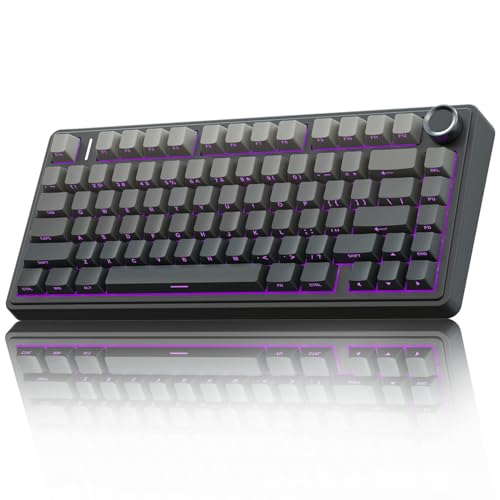
The F75 Pro is the fullest expression of the Aula formula. The 75 percent layout keeps the function row and arrow keys while trimming the desk footprint, the knob handles volume without a function layer, and the side-printed PBT keycaps give it a clean top face with legends that glow from the side — a look buyers either love immediately or not at all. Under the fingers it is the creamy board of reputation: deep, soft, quiet-ish, with the Reaper linears doing exactly what the foam stack asks of them. As a gaming board it is entirely respectable on its 2.4 GHz link; as a typing board it is the budget benchmark.
The Pro premium over the base F75 buys the knob, the side-printed caps and usually the nicer switch tune. Whether that is worth it depends on how much you use a volume knob — media-heavy users will touch it fifty times a day, and everyone else will touch it twice and forget it exists. Either way, this is the Aula to recommend to a friend without caveats, and the board against which the rest of the range is priced.
- Strengths: the complete formula in one board — gasket, foam, lubed linears, tri-mode
- Strengths: knob and side-printed caps give it a distinct identity
- Strengths: typing sound and feel punch far above the price tier
- Trade-offs: linear-only feel; tactile fans must swap switches
- Trade-offs: side-printed legends are harder to read in the dark for touch-typist beginners
- Trade-offs: variant sprawl makes the exact listing worth double-checking
Best for: first-time Aula buyers who want the definitive version. Not suited for: buyers who never use a knob and would rather save the difference.

AULA F75 — the value original
Badge: Best value in the range
- Layout: 75 percent
- Connection: 2.4 GHz, Bluetooth 5.0, USB-C wired
- Switches: pre-lubed Reaper, hot-swappable (variant-dependent)
- Keycaps: PBT, colourway-dependent legends
- Extras: gasket mount, RGB backlighting
The base F75 is the board that built the reputation, and it remains the value anchor of the line: same layout, same gasket-and-foam construction, same tri-mode connectivity, in a rotating cast of colourways — white and blue, white and brown, cool black, pink — with switch options that vary by listing from Reaper to Greywood to Star Vector. The typing experience is ninety percent of the Pro’s for noticeably less money, and for buyers who plan to change keycaps anyway, the base board is the smarter starting point.
Its section in this guide doubles as a buying warning. Because the F75 name covers so many variants, the listing title is the specification: read it fully, confirm the switch named is the switch you want, and confirm whether the keycaps are side-printed or top-printed. Two buyers can both “buy an F75” and receive meaningfully different boards. That is not a defect in the product — it is a defect in how the catalogue presents it, and an informed buyer routes around it in thirty seconds.
- Strengths: the famous sound and feel at the range’s friendliest price
- Strengths: huge colourway choice; easy to find one that suits a setup
- Strengths: identical modding platform to the Pro — same sockets, same caps compatibility
- Trade-offs: no knob on most variants
- Trade-offs: switch and keycap specs vary by listing; homework required
- Trade-offs: popular colourways sell out and restock unpredictably
Best for: value hunters and modders who will personalise the board anyway. Not suited for: buyers who want a knob included and a single unambiguous configuration.

AULA F87 Pro — the roomier alternative
Badge: Best for typists who find 75 percent cramped
- Layout: 87-key tenkeyless-style
- Connection: Bluetooth 5.0, 2.4 GHz, USB-C wired
- Switches: pre-lubed, hot-swappable
- Keycaps: side-printed PBT
- Extras: gasket mount, RGB backlighting
The F87 Pro answers the one consistent complaint about the F75: that a compressed 75 percent layout crowds the right-hand cluster, squeezing arrows and navigation keys into shared space. The 87-key layout restores a conventional tenkeyless arrangement — proper spacing, a familiar navigation cluster — while keeping everything else about the formula: gasket mounting, foam, pre-lubed switches, tri-mode wireless and the Pro’s side-printed keycaps. If you type for a living and your fingers know where Home and End live, this is your Aula.
It gives up a little desk space to earn that familiarity, and mouse users with small desks will feel the difference on the right side. It also shares shelf space with the plainer F87 (no Pro), which drops the side-printed caps and some trim for a lower price; the Pro is the one verified and linked here. For the mount terminology used throughout this section — what “gasket” actually means mechanically — the comparison of gasket mount vs top mount keyboards is the clearest explainer in this cluster.
- Strengths: conventional TKL spacing suits trained typists immediately
- Strengths: same sound-tuned internals as the F75 family
- Strengths: side-printed PBT caps and full tri-mode connectivity
- Trade-offs: wider footprint than the F75; less mouse room
- Trade-offs: fewer colourways than the F75 line
- Trade-offs: still linear-first; no factory tactile option
Best for: full-time typists upgrading from a standard tenkeyless board. Not suited for: small-desk gamers who chose 75 percent on purpose.

AULA F99 — the number-pad answer
Badge: Best Aula for spreadsheet work
- Layout: near-full-size with number pad
- Connection: Bluetooth 5.0, 2.4 GHz, USB-C wired
- Switches: pre-lubed linear, hot-swappable
- Keycaps: PBT
- Extras: gasket structure, RGB backlighting, large-battery variants exist
Every compact-keyboard trend eventually meets the person who enters numbers all day, and the F99 is Aula’s answer for them: a 96-to-99-key layout that keeps a real number pad while trimming the case to noticeably less than a traditional full-size board. The gasket structure and pre-lubed linears carry over intact, so data entry gets the same soft, deep sound as the gaming boards — a small daily luxury that spreadsheet-heavy users appreciate more than they expect.
The family around the linked F99 is worth mapping. The F99 Pro adds a knob and, in some listings, positions itself as the flagship of the big boards; silent versions exist with damped switches for open offices; and certain variants advertise very large batteries for long wireless stretches. All of that is prose-level guidance — the linked board is the standard F99 — but it tells you the platform is healthy: if you like the concept, there is a trim level for you. Finance users comparing across brands should also read the dedicated roundup of the best keyboards for accountants and finance professionals, where the F99’s layout philosophy meets its full-size rivals.
- Strengths: a real number pad without a full-size footprint
- Strengths: the creamy gasket feel survives the size increase
- Strengths: tri-mode wireless suits hot-desking with a laptop
- Trade-offs: heaviest and widest board in this guide
- Trade-offs: compressed right side takes a day of adjustment
- Trade-offs: Pro and silent variants fragment the buying decision
Best for: number-crunchers who refuse to give up the pad. Not suited for: minimalists, travellers, or anyone whose desk is measured in centimetres.

EPOMAKER x Aula F65 — the compact collaboration
Badge: Best small Aula
- Layout: 65 percent
- Connection: Bluetooth 5.0, 2.4 GHz, USB-C wired
- Switches: Reaper, hot-swappable
- Sound: five-layer dampening padding
- Extras: gasket mount, RGB backlighting
The F65 comes from Aula’s collaboration with EPOMAKER, the retailer-brand that co-develops several of the F-series’ most polished variants, and it shrinks the formula to 65 percent: arrow keys survive, the function row does not. The five-layer dampening stack is the headline — this small board sounds disproportionately deep — and the Reaper switches keep family continuity. It is the Aula for a small desk, a laptop-first setup, or a traveller who wants a real mechanical board in a bag.
The collaboration context matters for buyers. EPOMAKER x Aula boards (this F65, the F75 collaboration edition, and the screen-equipped F75 Max) are tuned and sold through EPOMAKER’s channels with their own listings and support path, while carrying the same underlying platform. Neither route is “the real one” — but warranty and returns follow the seller, so buy the listing, not the logo. The wider collaboration range is mapped in the companion Epomaker keyboards guide.
- Strengths: deepest sound in the range relative to size
- Strengths: keeps dedicated arrows unlike 60 percent boards
- Strengths: full tri-mode wireless in a travel-friendly case
- Trade-offs: no function row; media and F-key users live on layers
- Trade-offs: collaboration support path differs from Aula direct listings
- Trade-offs: small case means a smaller battery than the F99 family
Best for: compact-desk and laptop-first users who want the Aula sound small. Not suited for: F-key-heavy workflows or number-pad users.
The Models This Guide Discusses in Prose Only
F99 Pro. The knob-equipped flagship of the big boards. If the F99 appeals and you live on a volume knob, this is the trim to hunt for; it was not independently verified for a link in this pass, so check its listing details with the same care described in the F75 section. S75 Pro. A 75 percent board with a small screen beside the knob — the screen shows connection status, battery and a clock, and can display images. It is the Aula for buyers who enjoy a dashboard on their desk. WIN68 HE. The outlier: a 60 percent wired board with magnetic Hall effect switches, adjustable actuation and rapid trigger, built for competitive shooter players rather than sound enthusiasts. It shares almost nothing with the F-series formula except the logo, and should be judged against other Hall effect boards, not against the F75. F2088. The typewriter-styled wired board with round keycaps is a legacy design from Aula’s earlier era — a novelty and décor piece, not a competitor to the modern line, and a useful reminder of how far the brand has travelled.
The EPOMAKER collaboration F75 and F75 Max deserve a sentence of their own, because buyers constantly ask how they relate to the standard F75. They are the same platform in EPOMAKER’s tuning and trim, with the Max adding a TFT screen and knob combination. If you find the collaboration edition in the colourway you want at a fair price, there is no wrong choice between it and Aula’s own listing — decide by variant, switch and seller, in that order.
Which Aula for Which Buyer: A Decision Walk-Through
Start with the number pad, because it eliminates half the range. If your work involves daily numeric entry, you are choosing between the F99 family and leaving Aula for a traditional full-size board — and the F99’s compressed take on the layout is good enough that most people stay. If you do not need the pad, move to the spacing question. Do your fingers expect a conventional tenkeyless cluster? Then the F87 Pro. Are you comfortable with the tighter 75 percent arrangement, or actively want the desk space back? Then the F75 family, which is where most buyers should land. Within it, the Pro is the default, the base is the value play, and the collaboration editions are the colourway-and-screen play. Finally, the specialist exits: the F65 if 65 percent is your size, the WIN68 HE if rapid trigger is your sport, and the S75 Pro if a screen makes you happy. Every other consideration — switches, caps, colour — is a variant choice inside those decisions, not a separate decision.
One buyer deserves a specific warning: the gift buyer. Aula boards make excellent gifts because they feel expensive, but the variant sprawl makes them treacherous to buy blind. If you are purchasing for someone else, buy the F75 Pro in a mainstream colourway with Reaper switches — the configuration least likely to be wrong — and keep the receipt path simple by choosing a listing sold with clear returns.
Setup, Software and the First Week With an Aula
Unboxing an F-series board, the first-week routine is short. Charge it fully. Decide your primary connection — the 2.4 GHz dongle for a desktop, Bluetooth for a laptop that moves — and put the dongle in a front or desk-level port, not the back of a tower. Learn the mode-switch key combination from the manual before you need it, because the day the board “stops working” is usually the day a mode key was pressed accidentally; the general rescue steps in the keyboard not working troubleshooting guide start from that same insight. Set the RGB to a brightness you can live with permanently, because lighting is the battery budget. Then type on it for a week before changing anything: the foam-and-gasket feel is different from a conventional board, and most early impressions — “too soft”, “too quiet” — resolve into preference within days.
Aula’s driver software handles remapping, macros and lighting profiles on supported models. It is serviceable rather than slick, and the boards remember their core settings onboard, so the software is a tool you visit rather than a landlord you live under. Mac users should check the specific listing for the Mac/Windows toggle and any included Mac legends; most F-series boards handle both operating systems, but the keycap printing varies by variant. Firmware updates arrive occasionally through the software — install them, particularly in the first months of a model’s life, when radio and sleep fixes are most common.
Ownership Notes: Sound, Keycaps and the Modding On-Ramp
The sound these boards are famous for is a system, not a switch: gasket flex, foam layers, lubed linears and PBT caps all contribute, which is why changing one element changes the character more than new owners expect. Swap the PBT caps for a thin ABS set and the board brightens; swap the linears for a clackier switch and the foam can only do so much. This is not fragility — it is the hobby working as intended — but it means your first keycap purchase should be a considered one. Profile matters as much as material: most Aula boards ship with Cherry-profile-ish caps, and the differences between profiles are laid out in Cherry vs OEM keycaps compared, while the premium end of the keycap world is surveyed in the GMK keycaps guide.
Side-printed keycaps, fitted to the Pro models, deserve an ownership note of their own. The clean top face looks superb on a desk and photographs beautifully, and the legends remain readable in normal room light. In a dark room with the backlight low, however, hunt-and-peck typists can struggle, because the legend is viewed at an angle rather than from above. Touch typists will never notice. Know which typist you are before choosing the Pro for its looks.
As an on-ramp to the wider hobby, an Aula is close to ideal: hot-swap sockets invite a first switch experiment, standard keycap compatibility invites a first set, and the case opens with ordinary tools when you are ready to try tape mods or foam changes. The deeper end of that road — full kits, barebones builds, lubing stations — is mapped in the custom mechanical keyboard building guide. Many owners never go there, and the board’s achievement is that they never need to: it arrives already sounding like the finished project.
Common Mistakes When Buying an Aula
The first mistake is buying the name instead of the variant — ordering “an F75” and receiving Greywood switches when you wanted Reapers, or top-printed caps when you wanted side-printed. Read the full listing title; it is the true product name. The second is assuming Pro always means better for you: the Pro premium buys a knob and cosmetics, and a buyer who will swap keycaps immediately is paying for caps they will remove. The third is judging the board in the first hour — gasket boards feel unfamiliar to fingers trained on rigid tray-mount decks, and returns filed on day one often become regrets by day seven. The fourth is mismatching the layout to the work: no enthusiasm for a creamy sound survives a month of missing a number pad you needed. And the fifth is buying a second Aula to get a feature your first one already had hidden in a function layer — read the manual’s layer map before assuming a key does not exist.
A Sound Primer: What “Creamy” Actually Means and Why Aula Chases It
Keyboard sound vocabulary sounds like parody until you have heard the difference side by side, and then it becomes the only language available. “Creamy” describes a deep, smooth, low-pitched typing sound with no sharp edges — each keystroke lands like a soft knock rather than a click or a clack. “Thocky” is its close cousin: deep and rounded, with a slightly more pronounced low-end thump. “Clacky” is the opposite pole — bright, high-pitched, percussive — and “marbly” sits between, with a rounded but present top note. Aula’s F-series is engineered single-mindedly toward the creamy-thocky end of that spectrum, and every element of the formula serves it: linear switches because a smooth stroke has no tactile event to sharpen the sound, factory lube because friction is audible as scratch, foam layers because a hollow case rings, a gasket mount because a rigid mount transmits impact as a ping, and PBT keycaps because their density deepens the note a key produces.
Understanding this explains both the brand’s fans and its detractors. If the creamy sound is what you want, an Aula delivers it out of the box at a price that used to require a custom build and a weekend of assembly. If you prefer a bright, clacky board — and many typists genuinely do, finding deep boards muffled or “muddy” — then Aula’s entire design direction is pointed away from you, and no variant change will fix that, because the foam and gasket are doing their job correctly on the wrong target. Sound preference is the real first filter for this brand, ahead of layout, ahead of price. Watch typing tests with headphones, listen for the pitch of the spacebar and the consistency across the alpha cluster, and decide which family your ears belong to before you decide anything else.
One more honest point about sound: recordings flatter every board. Microphone placement, desk material and room acoustics all push recordings toward the deep end, and your Aula on your desk will sound a little brighter and a little thinner than the video that sold it. It will still sound like itself — the character survives — but buyers chasing an exact recorded tone should know the last ten percent of that tone lives in the room, not the keyboard. A desk mat, incidentally, is the cheapest sound upgrade in the hobby: a soft surface under any board deepens it noticeably, and Aula boards on a mat get closer to their recorded selves than Aula boards on bare laminate.
Aula Against Its Real Competition
Aula does not compete with Logitech and Razer so much as it competes with the buyer’s hesitation — and with a handful of brands fishing the same value waters. Royal Kludge is the closest traditional rival: similar tri-mode budget boards, a longer track record, slightly more conservative designs, and a range that stretches from 60 percent to full-size with the same everyman logic. Keychron is the step-up rival: better software through QMK and its web launcher, cleaner documentation, a more professional aesthetic, and prices that sit a tier above Aula for comparable layouts — the Keychron V-series is what you buy when the Aula formula appeals but you want the grown-up version of it. EPOMAKER, beyond collaborating with Aula, sells its own competing boards in the same creamy idiom, which makes the category pleasantly confusing. And the big gaming brands hover above all of this, offering better support networks, better software and worse value per feature.
Where does Aula win? On the sound-per-dollar equation, decisively: nothing at its prices sounds like an F75 without modification. Where does it lose? On everything that happens after the sale — support responsiveness, documentation depth, software refinement, and the confidence that a specific variant will still be sold next year. Buyers should price that honestly. If you are comfortable being your own support department — and keyboard enthusiasts, by definition, are — Aula’s equation is unbeatable. If a keyboard is an appliance you never want to think about, the step-up brands earn their premium. Neither answer is wrong; they are answers for different owners, and this guide’s linked boards were chosen to be the Aula configurations least likely to need support in the first place.
There is also a generational story worth noting. The F75’s success forced the entire budget tier to respond: foam stacks, gasket mounts and pre-lubed switches are now standard expectations at prices where they were novelties two product cycles ago, including from brands that once sold bare, pingy boards without embarrassment. Buying an Aula today means buying into a category the brand helped create and still leads on value — but it also means the alternatives have never been closer behind it, which is good news for every buyer regardless of which badge they choose.
Long-Term Ownership: Batteries, Wear and What Ages Well
A year into ownership, what do Aula owners actually report living with? The typing hardware ages well: PBT keycaps resist shine far longer than ABS, the lubed switches stay smooth, and the gasket-and-foam interior has nothing to wear out. The battery is the component with a lifespan — like all lithium cells it will hold less charge in year three than in year one — but because every F-series board also works wired, an aging battery degrades the board from “wireless for weeks” to “wireless for days” rather than to a paperweight. The wireless radios have proven unremarkable in the best sense: they connect, they stay connected, and the 2.4 GHz link that matters for gaming is the same technology the major brands use.
The realistic failure points are mundane. A switch that develops chatter or dies is a thirty-second hot-swap fix and the single best argument for the socket design. A knob that gets scratchy, a USB-C port stressed by a stiff cable at a bad angle, a dongle lost in a move — these are the actual risks of ownership, and they are the same risks every brand carries. The brand-specific risk remains catalogue churn: if you fall in love with an exact colourway, understand that it may not be restocked, and if matching a second board later matters to you — a home and office pair, for instance — buy both while the variant exists.
Resale and hand-me-down value follow the enthusiast pattern: Aula boards hold a respectable fraction of their modest price because the community knows them, and they make unusually good first boards to pass to a friend or a teenager, since the new owner inherits a moddable platform rather than a sealed gadget. For a budget brand, that is a genuinely unusual ownership arc — most cheap boards are landfill in waiting, and these are not.
Aula for Gaming: An Honest Assessment
Because Aula boards wear “gaming keyboard” in their listing titles, they deserve a gaming verdict separate from the typing verdict — and the verdict is: good, with the right expectations. On the 2.4 GHz connection, an F75 or F87 keeps pace with mainstream gaming boards for the overwhelming majority of play; the polling and latency story is the standard modern one covered in depth in the explainer on whether wireless keyboards are good for gaming. The linear switches suit fast repeated inputs, the layouts keep the keys games need, and the wireless freedom is real. Where Aula does not compete is the esports edge: no rapid trigger, no adjustable actuation, no 8000 Hz polling theatre on the F-series, and software that handles macros adequately rather than brilliantly. The WIN68 HE exists precisely to cover that gap in the catalogue, and a competitive player choosing within the brand should choose it — while a competitive player choosing across brands will find the dedicated Hall effect boards from the gaming majors a tier more refined, at several times the price.
For the far larger population of people who game seriously but not professionally — ranked ladders, co-op nights, MMOs, single-player everything — an Aula on its dongle is not a compromise at all. It is a comfortable, good-sounding board that happens to game well, and for MMO players in particular the combination of programmability-by-layer, wireless freedom and all-evening comfort is arguably better matched to the genre than a stripped esports deck. Judge the board by your actual play, not by the spec sheet of the most extreme player you know.
Choosing a Switch Variant When You Cannot Try One First
Most Aula buyers order blind, so here is the decision procedure that replaces a showroom. First, identify your sound environment: if anyone sleeps, studies or takes calls within earshot of your desk, weight the quieter variants — Greywood where offered, or the silent F99 trims — because the standard Reaper tune is soft but not silent, and a mechanical board at midnight carries further than new owners expect. Second, identify your typing weight: heavy-handed typists bottom out linear switches hard, and on a foam-filled board that produces a deep, satisfying thud — good — while light typists float across linears and may find the lack of tactile confirmation causes more typos for the first week. Third, accept the adjustment curve honestly: any switch change feels wrong for three days and right by day seven, so do not judge a variant by the first evening. Fourth, remember the escape hatch: the sockets mean a wrong switch is a small follow-up purchase of a switch pack and ten minutes with a puller, not a wrong keyboard. That reversibility is the deepest reason Aula’s blind-buying risk is low — the board forgives.
If, after all that, you remain torn between two variants of the same board, choose by keycaps rather than switches: the switch is swappable in minutes, while the side-printed versus top-printed decision shapes how the board looks and reads every day, and keycap sets cost more to replace than a handful of switches. It is a small heuristic, but it orders the decision by permanence, which is how most ownership regrets are avoided.
How the F75 Became a Phenomenon: A Short History
It is worth understanding how one budget board became a reference point, because the story explains the current catalogue. The F75 arrived at the moment when custom-keyboard aesthetics — the sound-tuned, foam-filled, gasket-mounted build — had been perfected by hobbyists but remained locked behind group buys, waitlists and assembly. Typing-test videos had taught a generation of buyers exactly what a “good” keyboard sounded like, and most of them had no intention of soldering anything. Aula’s insight was industrial rather than creative: take the hobbyist recipe, standardise it, and manufacture it at scale with wireless and hot-swap included, at a price that made it an impulse purchase rather than a project. The board did not win by being the best keyboard in the world. It won by being ninety percent of the custom experience for a small fraction of the custom cost and none of the custom effort.
The consequences rippled outward in ways still visible in the listings this guide navigated. Every budget brand now ships a foam-filled gasket board; the words “creamy” and “thocky” appear in mass-market product titles; and the variant explosion — the colourways, switch options and collaboration editions that make Aula’s catalogue confusing — is the direct result of success: when a platform sells, the rational move is to sell it in every configuration anyone might want. The confusion this guide exists to decode is, in other words, the tax on a hit product. Buyers who understand that can navigate it calmly: underneath every variant sits the same well-understood platform, and the platform is the thing that earned the reputation.
The phenomenon also reset expectations for what a first mechanical keyboard should be. A decade ago, a first board was a plain wired deck from a gaming brand, and modding it meant keycaps at most. Today a first board is expected to be wireless, hot-swappable, sound-tuned and personal — expectations set largely by Aula and the wave it led. Whether the brand holds its lead as rivals close in is an open question, but its place in the category’s history is already secure, and the F75 remains the board against which every new budget release is measured.
Who Should Not Buy an Aula
A guide earns its recommendations by naming its exclusions. Skip Aula if you need a tactile or clicky switch from the factory and have no interest in swapping — the range is linear-first by design. Skip it if your work depends on polished companion software with cloud profiles and per-game automation; the big gaming brands and Keychron both serve that need better. Skip it if you are buying for a workplace that requires a single accountable vendor with formal support channels, because a value import brand is not that vendor. Skip the compact models if your hands are large and your typing is fast — the compressed right cluster on 65 and 75 percent boards punishes wide keystrokes regardless of brand. And skip the whole creamy category, Aula included, if bright and clacky is the sound in your head when you imagine typing happily. Within its intended territory — sound-tuned, wireless, moddable boards at budget prices — Aula is the benchmark. Outside that territory, buy the board that was designed for yours.
Compatibility Notes: Keycaps, Switches and Layouts
A few compatibility facts will save Aula owners money and returns. The F-series uses standard Cherry MX-style switch stems and sockets, so the vast majority of aftermarket switches and keycap sets fit without drama — the exceptions are the usual ones in this hobby: low-profile switches do not fit standard sockets, and a handful of exotic keycap sets assume a full-size board’s worth of keys, leaving compact layouts short of the right sizes for the right-hand cluster. The 75 and 65 percent boards use a compressed right side, so before ordering a keycap set, confirm it includes the smaller right Shift and the 1u keys the cluster needs; enthusiast sets almost always do, while the cheapest generic sets often do not. The knob on Pro models is not a keycap and cannot be restyled with standard parts, though the community sells replacement knobs for popular models for owners who want the accent. Stabilisers on these boards are plate-mounted and factory-lubed; they are the one component most owners never touch, and the spacebar’s sound — the make-or-break key in every typing test — depends on them more than on the switch beneath it. If a future Aula sounds perfect except for a rattly spacebar, the stabiliser, not the board, is the conversation to have, and the fix is a well-documented evening project rather than a return.
Frequently Asked Questions
Are Aula keyboards good quality for the price?
By the standards of their price tier, yes — the F-series combines gasket mounting, foam dampening, pre-lubed hot-swappable switches, PBT keycaps and tri-mode wireless in a package that would have been considered premium not long ago. The compromises are in software polish, documentation and variant clarity rather than in the typing hardware itself.
What is the difference between the Aula F75 and F75 Pro?
The Pro adds a control knob, side-printed PBT keycaps and typically the range’s preferred switch tune, on the same 75 percent platform. The base F75 offers the same layout, gasket construction and connectivity in more colourways and switch variants at a lower price. Choose the Pro for the knob and the look; choose the base for value or if you plan to change keycaps anyway.
Which Aula keyboard is best for office work?
For general office typing, the F87 Pro’s conventional spacing is the easiest transition, and the F99 serves anyone who enters numbers daily. If your office is open-plan, look for the silent variants in the F99 family or the Greywood switch option on the F75, both of which keep the sound profile muted.
Do Aula keyboards work with Mac?
Most F-series boards support both Windows and Mac modes with a toggle, and connect to a Mac over Bluetooth or cable happily. Check the individual listing for included Mac-specific keycaps, since printed legends vary by variant; the function and media keys work either way, but the printed labels may follow the Windows layout on some versions.
Can I change the switches and keycaps on an Aula?
Yes — hot-swap sockets across the F-series accept standard mechanical switches without soldering, and the keycaps use standard mounts and spacing for their layouts. That moddability is a core part of the brand’s appeal: the board you buy is a starting point you can retune, not a sealed appliance.
Why are there so many listings for the same Aula model?
Because each combination of colourway, switch and keycap style becomes its own listing, and both Aula and its collaboration partners sell overlapping versions of the same platform. Treat the full listing title — model, switch, keycap style — as the product name, and you will always know exactly what you are ordering.
Aula’s rise makes sense once the catalogue is decoded: one strong formula, executed at budget prices, stretched across every layout a buyer might want. Learn the naming code, pick your size by your work, choose the variant by its full title, and the F75 Pro in particular will show you why this brand became the default recommendation for a first “creamy” keyboard.