Disclosure: As an Amazon Associate, kajuandouglas.com earns from qualifying purchases. Links on this page are affiliate links; they cost you nothing extra. Prices and availability change often, so check the current Amazon listing before you buy.
This akko keyboards guide explains the brand the way a buyer actually meets it: a wall of similar model numbers, pretty special editions, and switch names that mean nothing until someone decodes them. Akko built its reputation on value — hot-swappable boards, PBT keycaps and multi-device wireless at prices the big gaming brands rarely match — and then complicated its own catalogue with themed editions, regional variants and several switch families. This akko keyboards guide sorts the range by layout first, then by switch, then by use, so you can land on the right board without memorising the whole lineup. Every board linked below was verified against the site’s own Amazon catalogue data first; models that could not be verified confidently are discussed in prose only, so you can still use the guidance without a link pretending to be a promise.
Key takeaways: Choose the layout before the colourway — Akko sells the same internals in several sizes and the wrong size in a beautiful edition is still the wrong board. Akko’s own switches are a genuine strength, especially its creamy linear options, so do not budget for an immediate switch swap. Tri-mode wireless (Bluetooth, 2.4 GHz and wired) is common across the range and is the feature to insist on if the board will move between a PC, a laptop and a tablet. And buy the standard edition of a board you like unless the themed keycaps are the entire point, because the themed premium buys looks, not better typing.
Akko Keyboards Guide: Who Akko Is and Where the Brand Fits
Akko sits in the enthusiast-adjacent tier of the keyboard market: more design-led and better specified than generic budget boards, far less expensive than the flagship gaming brands, and friendlier to modding than either. The typical Akko formula is a hot-swappable PCB, factory-lubed switches of the company’s own design, PBT keycaps in a shaped profile, a knob on many larger models, and connectivity that treats wireless as standard rather than an upgrade. That formula is why Akko shows up in so many first-custom-board stories: you can use it exactly as it arrives, then open it, film or swap switches, and change keycaps as your taste develops, without the board fighting you.
The trade-offs are equally consistent. Akko’s software is functional rather than beautiful, its special editions can be hard to find again once a run sells through, and model naming mixes sizes, switch types and themes in ways that make two listings look different when the boards are near-identical — or identical when the boards differ in a switch you would care about. None of that should scare a buyer off. It just means the buying skill with Akko is reading the listing carefully: layout, switch name, keycap material and connection types, in that order, before the artwork seduces you. If you are still deciding which size suits your desk at all, read this alongside the 75 percent keyboard layout guide and the 65 percent keyboard layout guide, because Akko’s range is best understood layout by layout.
Akko, MonsGeek and the wider family
Shoppers comparing Akko boards often meet MonsGeek, the sister line aimed more squarely at kit builders, with aluminium cases and barebones options. Think of it as a spectrum rather than two unrelated brands: Akko proper covers ready-to-type boards with strong theming and value, while the kit-leaning side of the family offers heavier cases and more assembly. If you want a finished board on your desk this week, stay with Akko. If this guide leaves you wanting a metal case and a build project, that sibling direction is the natural next step — and the techniques in the advanced keyboard modding techniques guide are exactly the skills that kind of kit rewards.
In this guide
The Akko Range by Layout: Pick Your Size First
Full-size and 96–98 percent boards: everything, compactly
Akko’s full-size and near-full-size boards serve spreadsheet users, data entry, and gamers who refuse to lose the number pad. The condensed 96–98 percent formats squeeze the pad against the main cluster, saving desk width while keeping dedicated number keys; the cost is a week of mistyping while your hand relearns the compressed spacing, and occasional odd-sized keys that limit keycap set compatibility. If your work is number-heavy, this is Akko’s home turf — the value formula shines brightest in big boards, where big-brand equivalents cost dramatically more for the same switch and keycap quality.
75 percent boards: the sweet spot of the range
The 75 percent format — function row kept, navigation cluster folded in, often with a knob — is where Akko is strongest and where most buyers should start. You keep F-keys for games and work shortcuts, lose little desk space, and gain the knob, which turns out to be the feature people use most after volume: media control, scrolling in timelines, brush sizes in creative apps once remapped. Akko’s 75 percent boards are also its most mod-friendly mainstream models, commonly gasket-mounted with layered foam, so they respond well to the tuning path in the modding guide. Compare formats in 96 vs 1800 keyboards explained if you are torn between this and the condensed full-size layout.
65 percent and 60 percent boards: small desks, layer discipline
Akko’s smaller boards suit minimal desks, travel setups and players who move the mouse in wide arcs. You trade the function row and dedicated arrows (on true 60 percent models) for space, and you live on layers for F-keys and navigation. That trade is painless for gaming and surprisingly manageable for writing, but programmers and spreadsheet users who live on F-keys and arrows should try a 65 percent board with dedicated arrows before going smaller. The format logic is covered in depth in the 40 percent keyboard guide for the extreme end; Akko’s small boards are the gentler version of the same idea.
Special and themed editions: buy them for the right reason
Akko’s collaborations and themed editions — anime art, city themes, colour stories — are the brand’s loudest marketing and a perfectly good reason to buy, as long as you know what you are paying for: keycap artwork and case colours over the same internals as a standard edition. Two practical notes. Themed keycaps are sometimes a taller sculpted profile that feels different from the standard set, so check the profile name if you are picky about feel. And themed editions are produced in runs; if you will want matching spare keycaps or a second board later, standard editions are the safer long-term bet.
Akko Switches, Decoded
Akko’s own switch line is large, colour-coded and genuinely good, with factory lube that has improved steadily. Rather than memorising every name, learn the families. The Creamy line — smooth linears with a deep, soft sound signature — is the current crowd favourite for typing feel and the switch most of the linked picks below use. Piano switches are a lighter, crisper linear aimed at a brighter sound. Rose Red and similar earlier linears are lighter-force options for people who type all day and prefer minimal resistance. Tactile options in the range give a rounded bump without harshness, suited to writers who want feedback without noise. Silver-style speed switches with short travel exist for competitive players who value fast actuation over feel. Two rules cut through the noise. First, force and travel numbers in a listing tell you more than the colour story; a switch you will press ten thousand times a day should be chosen by weight first. Second, because every board here is hot-swappable, a switch choice is a starting point, not a sentence — you can change the feel later for the cost of a switch pack, which is the entire point of buying into a hot-swap ecosystem.
The Verified Akko Picks
Each board below was matched against the site’s own Amazon catalogue data before it earned a link, and each fills a different layout role so the set works as a shortlist rather than five versions of the same board. Read the verdict lines honestly: the best Akko for a number-pad worker is a poor choice for a small gaming desk, and the guide says so in each case.
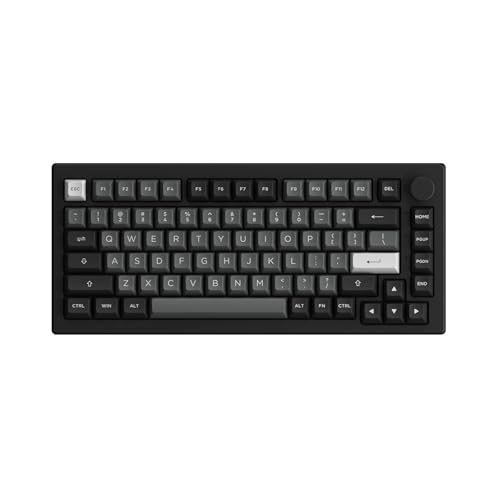
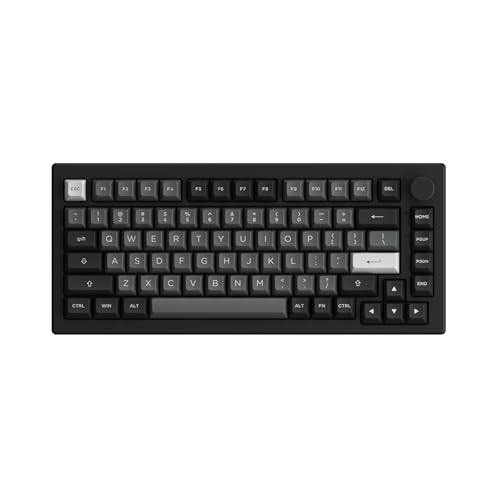
Akko 5075B Plus — the 75 percent default recommendation
Badge: Best all-round Akko for most buyers. This is the formula at its best: a 75 percent board with a knob, hot-swap sockets, PBT double-shot keycaps in the ASA profile and the V3 Creamy Yellow Pro linear switch that shows off Akko’s factory lubing. If the five-minute method in this guide leaves you at 75 percent with a medium linear, start and very possibly finish here.
- Layout: 75 percent with knob
- Switches: V3 Creamy Yellow Pro linear, hot-swappable
- Keycaps: PBT double-shot, ASA profile
- Backlight: RGB
Strengths
- The creamy linear tuning most buyers picture when they hear Akko praised
- Knob, PBT keycaps and hot-swap in one value-tier package
- Mod-friendly platform if you later follow the tuning path
Trade-offs
- Plastic case, so less heft and acoustic depth than metal rivals
- ASA profile is taller than standard — lovely for many, an adjustment for some
- Themed sibling editions can tempt you to pay for artwork over this standard spec
Best for: first-time Akko buyers and mixed work-and-play desks. Not suited for: buyers who specifically want a metal case or a number pad.

Akko 3098B — the number-pad worker’s Akko
Badge: Best Akko for number-heavy work. The 3098B keeps a full number pad in a condensed footprint, with PBT keycaps, hot-swap sockets and RGB, in a black-and-gold finish that looks at home on an office desk. It is the clearest example of Akko’s value argument: this much board, with these materials, is where the big brands charge a clear tier more.
- Layout: condensed full-size with number pad (98-key class)
- Switches: hot-swappable
- Keycaps: PBT
- Backlight: RGB
Strengths
- Real number pad without full-size desk width
- PBT keycaps and hot-swap at a value tier
- Understated styling suits shared and office desks
Trade-offs
- Condensed spacing takes a week of number-pad relearning
- A few non-standard key sizes limit some replacement keycap sets
- Too wide for small gaming desks where mouse room matters
Best for: spreadsheets, finance, data entry and pad-loyal gamers. Not suited for: minimal desks or low-sensitivity FPS players.

Akko MU01 Mountain Seclusion — the character pick
Badge: Best Akko for a desk with a point of view. A 65 percent board in a walnut wooden case with PBT dye-sub keycaps and tri-mode connectivity, the MU01 is the board that proves Akko’s design ambition is not only about anime editions. The wood gives it a warmer look and a softer acoustic character than plastic boards in the range.
- Layout: 65 percent, 68 keys
- Case: walnut wood
- Connectivity: 2.4G wireless, Bluetooth and wired
- Keycaps: PBT dye-sub
- Switches: hot-swappable
Strengths
- Genuinely distinctive case material at this tier
- Full tri-mode connectivity in a compact travel-friendly size
- PBT keycaps included, matching the board’s premium feel
Trade-offs
- No function row — layer discipline required
- Wood needs gentler handling than plastic or aluminium
- You are paying a design premium over plainer 65 percent boards
Best for: design-led desks, writers and compact setups. Not suited for: F-key-heavy workflows or buyers who want the cheapest path to 65 percent.

Akko 5098B Prunus Lannesiana — full-size with a screen
Badge: Best Akko statement board. The flagship-flavoured end of the range: a full-size wireless board with a display screen and scroll wheel, in the Prunus Lannesiana colourway, hot-swappable with the brand’s current creamy tuning. Choose it when you want Akko’s extras — screen, wheel, full layout — in one board rather than the range’s value basics.
- Layout: full-size
- Extras: display screen and scroll wheel, per the verified listing
- Switches: hot-swappable
- Connectivity: wireless
Strengths
- Screen and wheel add real everyday convenience for media and system glances
- Full layout with no condensed-spacing compromise
- The Prunus colourway is one of Akko’s prettiest standard themes
Trade-offs
- Top of Akko’s own tiers — compare it against other brands’ flagships too
- Full-size footprint is the opposite of a space-saving buy
- Screen features are a want, not a need, for most typists
Best for: full-size loyalists who want Akko’s extras in one purchase. Not suited for: small desks or strict value shoppers.
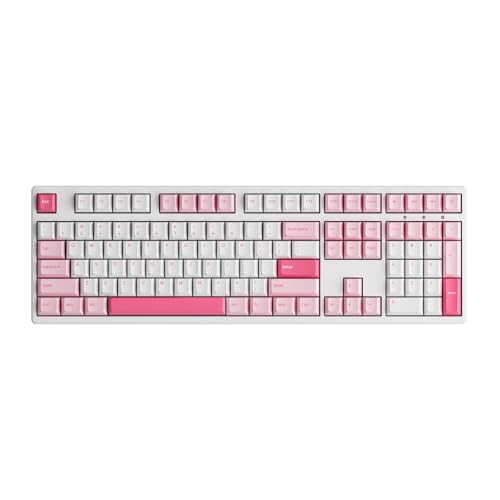
Akko 3108 V3 Prunus Lannesiana — the wired full-size value
Badge: Best wired Akko for a fixed desk. Not every desk needs wireless. The 3108 V3 is a full-size, wired, hot-swappable board with PBT double-shot keycaps in a Cherry profile and the same Prunus artwork, at the straightforward end of the range. For a permanent workstation it removes battery management from your life entirely.
- Layout: full-size
- Connectivity: wired
- Switches: hot-swappable
- Keycaps: PBT double-shot, Cherry profile
- Backlight: white LED
Strengths
- Simple, dependable wired connection with zero charging routine
- Standard Cherry-profile PBT keycaps suit long typing days
- Full layout with a proper number pad at a value tier
Trade-offs
- Wired only — the wrong choice for a multi-device or couch setup
- White backlight rather than full RGB
- Large footprint, like every honest full-size board
Best for: fixed workstations, offices and anyone tired of charging keyboards. Not suited for: multi-device switchers or minimal desks.
Two more range notes in prose, because they could not be verified confidently enough to link at checking time: Akko’s MOD-series boards are the kit-leaning step toward the MonsGeek side of the family and are worth a look for builders, and the brand’s themed full-size editions, such as the Bun Wonderland 5108 design, sell the same internals with statement artwork — buy those for the art, with your eyes open, exactly as the themed-edition section advises.
How to Choose Your Akko: A Five-Minute Method
Step one: measure your desk space and decide the largest layout you will tolerate; then go one size smaller if you game with low sensitivity, because mouse room is the constraint people discover last. Step two: pick your switch family by force — light linears for long typing days and fast gaming, medium linears as the all-round default, tactiles if you type by feel and work around other people who tolerate a little sound. Step three: confirm the connection set. Tri-mode is the standard to want; Bluetooth-only boards are fine for a tablet desk but the 2.4 GHz dongle is what makes a board feel wired in games. Step four: check the keycap profile name and material — PBT for durability, and a profile height that suits you, since tall sculpted profiles change both sound and finger travel. Step five: ignore the edition artwork until the first four steps leave you two finalists; then, and only then, let the pretty one win. This order — size, switch, connection, keycaps, looks — is the whole guide in one paragraph, and it works because it spends your attention on the things you cannot change later.
Setting up an Akko board properly
Out of the box, do four things. Charge it fully before judging the wireless. Update the firmware through Akko’s own tool if one is offered for your model, before you customise anything. Set the operating-system switch or mode correctly — several Akko boards ship with a Mac/Windows toggle that remaps modifier keys, and half of all “my keyboard is broken” reports are that toggle in the wrong position. Finally, type for two full days before changing switches or keycaps; factory lube settles, your hands adapt to the profile, and the board you judge on day two is the board you actually bought. Remapping, macros and lighting live in Akko’s driver software; it is less polished than the big brands’ suites but covers the essentials, and most boards also behave well as plain plug-and-play devices if you never install it.
Common Akko Buying Mistakes
The classic mistake is buying the edition instead of the board: paying a themed premium for internals you could have had for less, in a layout you did not check. The second is confusing near-identical model numbers — a single letter often separates a wired board from a tri-mode one, or one switch family from another, so read the connection and switch lines of the listing character by character. The third is assuming all Akko keycaps are standard: condensed layouts use a few non-standard key sizes, which matters the day you want a new keycap set. The fourth is judging wireless latency by Bluetooth in a game and blaming the board; use the 2.4 GHz dongle or the cable for play, Bluetooth for the tablet. The fifth is skipping the manual’s note about the mode switch and concluding the board is faulty. Every one of these is a reading mistake, not a product flaw — which is, in the end, the fairest summary of buying Akko: the boards reward a careful buyer more than almost any brand at their tier. If your Akko will share a desk with a tablet, the best wireless keyboard for tablets is a useful cross-check of what good multi-device behaviour looks like.
Keycap Profiles Across the Akko Range, Explained
Akko sells more keycap profiles than most brands, and the profile name in a listing changes the board’s feel as much as the switch does. ASA, Akko’s own sculpted profile, is tall with rounded, spherical tops — it cups the fingertip, deepens the sound and gives Akko boards much of their signature cushioned character, at the cost of a slightly longer finger travel that touch typists either love or spend a week adjusting to. Cherry profile is the low, familiar standard: shorter travel, a crisper sound, and the safest choice for someone coming from a gaming board. OSA is a taller OEM-style sculpt with a different top shape, and MDA is a mid-height spherical profile that splits the difference for people who find ASA too tall and Cherry too flat. The practical rule is simple. If you type all day and like a low, fast board, filter for Cherry. If you want the deep, soft Akko sound people describe in reviews, that sound is half ASA profile and half switch, so buy the ASA board. If you are unsure, choose the board whose switch and layout are right and treat the profile as the variable you can change later — a replacement keycap set is the cheapest experiment in this hobby, and every board in the verified shortlist above accepts standard sets in its size class, subject to the condensed-layout key sizes noted earlier.
Connectivity in Depth: What Tri-Mode Really Gets You
Tri-mode appears in almost every Akko listing, and it is worth understanding as three different tools rather than one bullet point. The wired connection is the reference: zero latency concerns, zero battery, and the connection to use while updating firmware or diagnosing a wireless problem. The 2.4 GHz dongle connection is the gaming and daily-driver mode — low latency that feels wired in play, with the freedom to keep the desk clear and move the board between a PC and a laptop by moving one small receiver. Bluetooth is the convenience mode: slower, perfectly fine for typing, tablets, phones and a television, and the mode that lets one board serve three devices from a couch. Akko boards typically remember multiple Bluetooth hosts, and switching between them is a key combination rather than a re-pairing ritual. Two ownership habits follow. Keep the dongle in the board’s storage slot or the same USB port, because a lost dongle is the most common way a tri-mode board becomes a two-mode board. And judge a new board’s wireless on the dongle first; Bluetooth behaviour varies with the host device far more than with the keyboard, and many a good board has been returned for a laptop’s Bluetooth quirks.
Sound and Construction: Why Akkos Sound the Way They Do
New buyers often ask why Akko boards sound softer and deeper out of the box than the gaming boards they are used to. The answer is a stack of small decisions rather than one feature: factory-lubed switches with smooth stems, foam layers between plate and PCB and inside the case on most current models, gasket or softened mounting on the tuning-focused boards, and those tall, dense PBT keycaps trapping sound at the top. None of this is accidental, and it explains both the brand’s following and its limits. If you like that tuned, muted character, Akko delivers it without a single mod. If you prefer a bright, clacky, high-energy sound, you will be fighting the board’s design with every change — thinner keycaps, removed foam, stiffer mounting — and a different brand’s starting point would serve you better. Construction follows the same logic: plastic cases dominate the value range and are honestly finished, metal belongs to the kit-leaning side of the family, and the wooden MU01 in the shortlist shows the brand experimenting at the edges. Judge an Akko by whether its stock character matches your taste, because the brand’s whole value proposition is how much tuning arrives already done.
Akko for Different Kinds of Play
Gaming advice for Akko splits by genre more than by skill. For competitive shooters, the recipe is a 65 or 75 percent board, the dongle or cable connection, and the lightest, fastest linear switch in the listing — and the honest ceiling is that Akko does not offer the rapid-trigger analogue technology of the esports flagships, so a player whose game rewards that feature should read the verdict logic in are Razer keyboards worth it before deciding where the money goes. For MOBA and RTS players, a 75 percent board with its function row intact is the sweet spot, and switch choice matters less than keycap profile comfort over long sessions. For MMO players, the full-size and 98 percent boards earn their width with number-pad keybinds and room for macros through the driver software. For simulation and strategy players at a relaxed pace, any layout works and the themed editions become a legitimate joy rather than a compromise. Single-player and story-game players should simply buy the board that types best, because they will spend as many hours in menus, journals and dialogue as in combat — which is a roundabout way of saying the typing-first advice in the rest of this guide applies to most gamers most of the time.
Ownership Over Years: Batteries, Spares and Support Realities
A realistic ownership picture helps more than another feature list. The battery in a wireless Akko is a wear item measured in years, and its working life depends on backlight habits more than anything else — RGB at full brightness is the single biggest drain on any wireless board, this brand included. Switches and keycaps are consumables you control: a tired switch is a ten-second swap on a hot-swap board, and keeping the spare switches that ship in many Akko boxes covers the first failures free. Stabilizers are the part most likely to need attention over time, and the stabilizer techniques in the modding guide linked earlier transfer directly. Support is the honest weakness to plan around: Akko’s documentation and driver downloads live on its own site, community knowledge is extensive because the boards are popular, but you should download your model’s manual and firmware the week you buy it rather than the week you need them. None of this is unusual for a value-enthusiast brand, and none of it undermines the purchase — it simply means the Akko owner is a light-touch maintainer rather than a sealed-box consumer, which, for the kind of buyer this guide is written for, is usually the point.
Decoding an Akko Model Number in Ten Seconds
Akko names look like licence plates until you learn the grammar, and then they become genuinely informative. The leading digits usually encode the key count or layout class: a 3-series number in the three thousands points at full-size boards, a 5-series number signals the 75 percent family, and a 98 or 08 ending hints at the condensed number-pad formats. The trailing letter carries the connection story — a B in the name is the range’s customary marker for the wireless, Bluetooth-capable variant — which is why two boards that look identical in photographs can differ in the one feature a travelling user cares about most. Letters and words after the number describe the edition, the colourway or a special feature such as a screen, and switch information, when it is not in the name, lives in the listing’s switch line, which is therefore the second thing to read after the layout. None of this is documented as an official cipher, and Akko does rename lines as generations turn over, so treat the grammar as a strong hint rather than a guarantee: use it to sort a search-results page into piles in seconds, then confirm layout, switch, connection and keycap profile on the listing itself before money moves. That two-step habit — decode fast, verify slowly — is the entire skill of shopping this brand, and it transfers to every other enthusiast brand whose naming is equally dense.
Akko Against Its Neighbours: Keychron and the Value Brands
Most Akko buyers are cross-shopping two other shelves, and the honest comparisons are these. Against Keychron, Akko trades blows on value and theming and usually concedes software polish and the premium metal lines; a buyer choosing between equivalent boards should decide by switch family and keycap profile first, because those are the differences your hands will report daily, while the software difference is one your hands will never notice. Against the aggressive value brands — the Royal Kludges, Aulas and Ajazzes of the world — Akko’s case is consistency: more predictable factory lubing, better-documented models, themed design that is actually designed, and a switch line with a reputation to protect. The value brands occasionally beat a specific Akko on a specific feature for less money, and their best boards are genuinely good; what they do not offer is the same confidence that the next model you buy will match the last one. Against the big gaming brands, Akko’s argument is the whole guide: more keyboard, in materials and tuning, for a tier less money, in exchange for esports technology most players never use. There is no universal winner in that triangle, and any guide that names one is selling something. There is only the match between a specific buyer’s genre, desk and taste and a specific board’s strengths — which is why the shortlist above is organised by role rather than ranked by score.
Troubleshooting the Five Akko Questions Every Owner Asks
Ownership questions cluster, and the answers are reassuringly mundane. If the modifier keys seem swapped, the board is in the wrong operating-system mode — find the mode switch or the mode key combination in the manual before anything else. If a wireless board lags in a game, check which connection you are actually on; Bluetooth is the usual culprit, and the dongle or cable restores the board’s real performance. If one key double-types or drops, pull the switch and reseat it, then swap it with a little-used key to learn whether the fault follows the switch or stays with the socket — the same isolation test the modding guide teaches. If the knob stops controlling volume, it has been remapped or the driver profile changed; the knob is programmable, which is a feature until it surprises you. If battery life disappoints, turn the backlight down before blaming the battery, because lighting is the dominant drain on every wireless board. Notice the pattern: none of these is a defect, all of them are configuration, and a ten-minute manual read at setup prevents most of them. Keep the manual file with the firmware download from your first week, and an Akko is among the easiest boards to live with in its class.
Buying an Akko for Someone Else, or for the Office
Gift and office purchases invert some of this guide’s priorities. For a gift, the themed editions stop being a trap and become the point — a board that matches the recipient’s favourite colours or series is a better present than a marginally better switch — but keep the layout conservative, because a 65 percent board is a taste the recipient may not share, while a 75 or full-size board suits almost everyone. For an office, choose the quiet end of the range: a creamy linear board with the backlight low, a standard colourway, and wired or dongle connectivity that will not fight the company’s Bluetooth policies. For a shared or hot-desking setup, the tri-mode boards earn their keep by remembering several hosts, and a board that can be wiped clean and re-paired in a minute is worth more than any switch nuance. In all three cases the verified shortlist still applies; you are simply weighting its verdict lines differently, which is what verdict lines are for.
One Akko, Three Machines: The Multi-Device Workflow in Practice
The tri-mode pitch becomes concrete in a real week. The dongle lives in the gaming PC, where latency matters and the board wakes the machine from across the room. Bluetooth slot one belongs to the work laptop, slot two to the tablet that turns the board into a writing machine on the sofa, and the cable comes out only for firmware updates and the occasional week when charging was forgotten. Switching is a key combination and a second of patience, and the habit that makes it work is unglamorous: always return the board to the same mode at the end of the day, so tomorrow’s first keystroke goes to the machine you expect. Two friction points deserve honesty. Operating-system mode and Bluetooth mode are separate settings on many models, and confusing them produces the swapped-modifier puzzle the troubleshooting section solves. And a board shared between a Windows PC and a Mac will occasionally need its legends forgiven, since the printed modifiers cannot be both — a small set of replacement modifier keycaps, which many Akko boxes include, ends that friction permanently. Set up once with that care, a mid-range Akko quietly replaces two or three lesser boards, which reframes its price entirely: the comparison is not one Akko against one rival, but one Akko against the stack of single-purpose keyboards it retires.
The Second-Board Strategy: How Akko Owners Grow a Collection Sensibly
Akko boards have a way of becoming first boards rather than only boards, and there is a sensible order to the growth. The pattern that works is contrast, not duplication: if the first board is a 75 percent creamy linear for the main desk, the second earns its place by being different on purpose — a wired full-size for the number-heavy project desk, a wooden 65 percent for the writing corner, a themed edition bought purely because it brings joy to a visible shelf. The pattern that disappoints is the near-duplicate: a second 75 percent board a half-step away from the first, which splits your affection and answers no new need. Budget follows the same logic — the second board is where trying a new switch family costs the least regret, because the first board remains the reference your hands trust. Owners who follow the contrast rule end up with a small, deliberate rotation in which every board has a job; owners who chase listings end up with a shelf. This guide’s shortlist was built with jobs in mind for exactly that reason, and its verdict lines are the questions to ask of any future addition: what job does this board do that the current ones do not?
Generations and Version Numbers: Buying the Current Board
One last piece of Akko literacy protects every purchase in this guide: the version markers. Akko revises models in generations, and a V3 or V5 suffix marks a board that has absorbed several rounds of quiet improvement — better factory lubing, revised foam stacks, updated firmware and connectivity — over the board that first carried the name. Listings for older generations linger at tempting tiers, and they are not scams; they are simply yesterday’s tuning at yesterday’s standard, which matters most in exactly the areas this brand competes on. The buyer’s habit is to read the generation marker as part of the model name, confirm the switch name belongs to the current family, and treat a suspiciously cheap listing for a famous model as a generation question before treating it as a bargain. The same caution applies in reverse to the newest releases: a just-launched generation has the best specification and the least owner history, and a buyer who values proven behaviour over novelty is rational to choose the mature generation while it remains stocked. Neither instinct is wrong. What is wrong is buying blind — and after the model-number grammar, the profile guide and the five-minute method above, no reader of this guide needs to.
Buying the Exact Akko You Researched: Versions, Variants and Revisions
Akko’s range moves quickly, and that pace creates a specific buying risk the earlier sections only touch on: the board that arrives can differ in small, legitimate ways from the board you researched. None of this is deception — it is what fast product cycles and regional distribution do to any brand — but it rewards a buyer who verifies the details that matter to them at the moment of ordering rather than assuming them from a review written about an earlier run.
Why the same model name can hide small revisions
Manufacturers revise running products constantly: a switch generation changes, a keycap legend is corrected, a cable or a receiver is updated, a firmware baseline moves. Akko’s naming keeps the model identity stable across those changes, which is good for finding the board and unhelpful for knowing precisely which iteration a given listing describes. The practical defence is to shop from the specification lines rather than the headline: confirm the switch name in full, the keycap material and profile, and the connection modes on the specific listing you are buying from, and treat photographs of the exact variant — colourway, layout and legend set — as part of the specification. Where a detail you care about is not stated, ask the seller rather than inferring it from a sibling model; Akko’s range is wide enough that inference between models is where most ordering mistakes are born.
Regional layouts and legend variants
The same board may be sold with different physical layouts and legend sets in different regions, and a bargain imported across that boundary can arrive with a layout your hands — and your keycap spares — were not expecting. Check the layout designation in the listing, look at the Enter key’s shape and the bottom row in the photographs, and confirm whether the legends match your operating system’s conventions if you rely on printed symbols. None of these variants is inferior; they are simply different, and they are only a problem when discovered at unboxing. This check matters doubly for themed editions, whose legend artwork is part of their appeal: confirm the artwork shown is the artwork shipping, in your region’s layout, before the edition sells through and the question becomes academic.
The checkout checklist for Akko specifically
Compress the habit into five confirmations. Model and size, stated in full rather than as a family name. Switch, named completely, because near-identical switch names describe different feels. Connection set, including whether the wireless modes your desk needs are present on this variant. Keycap material and profile, which decide both sound and your spare-set compatibility. And the return route, because a board whose feel is not yours is a logistics question, not a tragedy, provided the route exists. Run those five against any Akko listing — marketplace, brand store or retailer — and the gap between the board you researched and the board that arrives closes to nearly nothing. It is two minutes of reading that protects the entire purchase, and it generalises: every fast-moving brand rewards exactly the same discipline.
A short note on gift-buying an Akko
Akko’s themed editions make the brand a tempting gift, and the checklist above matters doubly when the buyer is not the typist. Buy the layout the recipient’s desk and habits suggest, not the layout the artwork looks best on; confirm their computer’s connection needs if the board will be wireless; and where the choice between two switch feels is genuinely open, prefer the middle of the range — the switch a newcomer is least likely to find extreme in either direction. Keep the receipt’s route back open until the board has survived a week of real use, because feel verdicts arrive on day four, not at unboxing. A themed board chosen with that much care lands as both an object and a compliment: it says the giver noticed how the recipient actually works and plays.
Keep the box and its inserts until the return window closes, whichever brand store or retailer supplied the board. Akko’s packaging carries the variant’s exact specification in print, and having it to hand settles most questions a support conversation will ask — model revision, switch name, included accessories — without a search through order emails. After the window closes, the box still earns its shelf space the day the board travels or is sold on.
Frequently Asked Questions
Are Akko keyboards good for gaming?
Yes, with the right connection. Use the 2.4 GHz dongle or a cable and Akko’s boards are responsive, well-built gaming keyboards with fast linear switch options; Bluetooth is the only mode to avoid for competitive play. You do not get the rapid-trigger analogue features of flagship esports boards, so tournament-level players chasing that specific technology should look at that specialist tier — everyone else is well served.
Are Akko switches good enough to keep?
For most buyers, yes. Akko’s current linears in particular are smooth, consistently factory-lubed and pleasant enough that a switch swap is a taste upgrade, not a rescue. Keep the stock switches for at least a few weeks; if you still want a different feel after that, the hot-swap sockets make the experiment cheap and reversible, and you will know exactly what you want to change.
What is the difference between Akko’s 75 percent and 96 percent boards?
About twenty keys and one decision: the number pad. The 96 percent format keeps a condensed pad for number-heavy work in near-75-percent width, at the cost of compressed spacing and a few non-standard key sizes. The 75 percent board is cleaner, more standard for keycap sets and better for gaming desks. Choose by whether numbers are your job or an occasional guest.
Do Akko keyboards work with Mac?
Most models do, typically with a hardware mode toggle and Mac modifier keycaps included or printed as secondary legends. Set the toggle before you judge anything, because in Windows mode the board will appear to have its Command and Option keys swapped. Bluetooth pairing with Apple devices is standard fare across the tri-mode range.
Akko or Keychron — which should a first-time buyer pick?
Both are safe first enthusiast boards. Akko usually wins on value, theming and out-of-box sound tuning; Keychron usually wins on software polish, Mac-first details and the breadth of its aluminium premium lines. If the same money buys you one layout step up or a switch family you prefer in an Akko, take the Akko; if deep remapping software is your priority, lean the other way. Either way you are inside the hot-swap ecosystem, which is the decision that matters most.
How long do Akko boards last, and can they be repaired?
The construction is conventional and serviceable: hot-swap sockets mean the most common failure — a single tired switch — is a ten-second swap rather than a repair bill, keycaps are replaceable, and batteries in wireless models are the only true wear item over years of use. Treat the board as a platform you maintain rather than a sealed gadget, and there is no reason it should not serve for many years. Start that maintenance habit with how to clean a tablet keyboard — the cleaning discipline transfers directly to a full mechanical board.
Do Akko keyboards receive firmware updates, and should I install them?
Many models do, through Akko’s own software channels, and the sensible policy is calm rather than eager. Install an update when it addresses something you have actually encountered — a connection quirk, a lighting behaviour, a compatibility fix for your system — or when it adds a feature you intend to use. Read the update’s notes before applying it, keep the board wired and undisturbed during the process, and note your current settings first if you have customised lighting or key assignments, because updates occasionally return settings to defaults. What updates almost never do is change a board’s fundamental feel, so a board you love does not need chasing, and a board whose switches displease you will not be rescued by software. Treat firmware the way you would on any tool you depend on: maintained, not fiddled with.
Can I use Akko switches in a non-Akko keyboard?
Generally yes — Akko’s switches follow the widespread MX-style pattern that most hot-swappable boards are built around, which is one of the quieter advantages of the brand’s ecosystem: switches bought for one board can serve in another. Two checks keep the swap honest. Confirm the receiving board’s sockets accept the switch’s pin arrangement, since a minority of boards are built for switches with a different pin count and the mismatch is physical, not a matter of force. And if the destination board has north-facing sockets or unusually tight plate cutouts, confirm the switch housing clears them, as a few combinations interfere with certain keycap profiles. Beyond those checks, mixing is normal hobby practice: an Akko linear in a board from another maker, or the reverse, is simply parts being parts — which is rather the point of the hot-swap era.