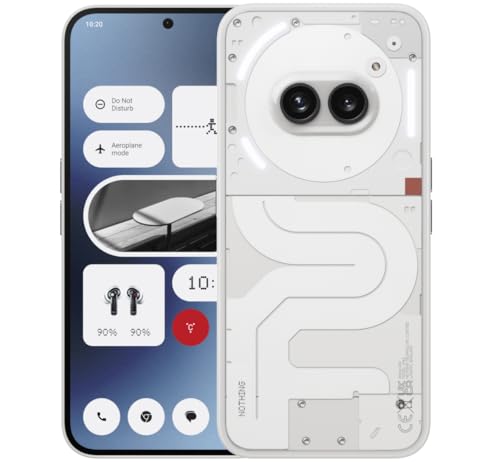
Looking up how to fix a slow phone usually follows a moment of pure frustration: the camera opens after the moment has passed, the keyboard lags behind your thumbs, or an everyday app takes so long to load that you put the phone down and pick it up again. Slowness like this is a symptom with many possible causes, and the good news is that the most common ones are free to fix.
This guide works like a diagnosis: it lists the likely causes in the order they actually occur, then gives step-by-step fixes in safe order, from restarts and storage to updates and background apps. A checklist table helps you match your phone’s behaviour to its most probable cause before you start changing things.
Disclosure: As an Amazon Associate, kajuandouglas.com earns from qualifying purchases. Links to Amazon on this page are affiliate links; they cost you nothing extra. Listing details such as price and availability change often, so check the current Amazon listing before you buy.
The Short Answer
Restart the phone, then check storage — a nearly full phone is the most common cause of severe slowness, so free space until at least a tenth is empty. Update the system and apps, remove apps you no longer use, and restrict background activity for greedy ones. If slowness began right after an update, give it a day or two of normal use first, because background optimisation after updates is temporary.
In this guide
Gear for This Guide
If the diagnosis ends at storage or age, fast external storage or a current mid-range replacement are the two honest exits.

Samsung T7 Portable SSD 1TB Titan Gray, USB 3.2 Gen 2, Up to 1,050MB/s — A fast portable SSD for offloading years of photos and videos, the storage that slow phones are usually choking on. Check price on Amazon.

Nothing Phone (2a) — A current mid-range phone whose modern processor and storage show how much everyday speed has improved at sensible prices. Check price on Amazon.
Likely Causes, Most Common First
Nearly full storage leads the list by a wide margin. Phones need free space to breathe: the system writes caches, updates apps and manages memory using storage, and flash memory itself slows as it fills. A phone down to its last few hundred megabytes can feel catastrophically slow while being mechanically perfect. Check storage before anything else; it is the two-minute test that solves the majority of cases.
Next come accumulated apps and background load. Every installed app can run background tasks, and after years of installs the combined load — syncing, indexing, pre-loading, tracking — competes with whatever you are trying to do. Closely related are skipped updates: old apps running against a newer system, or an old system missing years of performance fixes.
After software causes come physical ones: a degraded battery that can no longer supply peak power, which some phones compensate for by reducing performance; heat, which throttles the processor during long sessions; and, on phones several years old, hardware that modern apps have simply outgrown. The fixes below are ordered to eliminate the free causes before you conclude the phone itself is finished.
How to Fix a Slow Phone: Step-by-Step Fixes
Step 1: Restart the phone completely
Power it fully off, wait half a minute, and turn it back on. This clears stuck processes and temporary memory states that build up over weeks of standby. If the phone has not been restarted in months, this alone can be transformative.
Step 2: Free up storage until a tenth is empty
Open storage settings and attack the largest items: video files, downloaded media, unused large games and messaging app caches. Move photos and videos to a computer or cloud library. Aim for at least ten percent free, then restart again so the system can reorganise with room to work.
Step 3: Update the operating system and all apps
Install pending system updates, then update every app from the store. Mismatched old apps are a classic source of stutters and crashes. Turn on automatic updates afterwards so the phone maintains itself.
Step 4: Remove or disable unused apps
Uninstall anything you have not opened in months. For pre-installed apps that refuse uninstalling, disable them where the option exists. Each removal cuts background work, update traffic and storage pressure simultaneously.
Step 5: Restrict background activity for heavy apps
In battery settings, find the apps consuming the most background energy and restrict those that do not need to be live, such as retail and news apps. Leave communication apps unrestricted. This reclaims memory and processor time for the apps you are actually using.
Step 6: Clear the cache of the worst offenders
Media and social apps can accumulate gigabytes of cache. Clearing an individual app’s cache from its settings is safe — you stay signed in — and often restores that app’s responsiveness immediately.
Step 7: Check battery health
If your phone offers battery health information, look at it. A badly degraded battery can cause shutdowns and, on some models, reduced performance. A battery replacement is far cheaper than a new phone and can restore both speed and endurance.
Step 8: Factory reset only with a verified backup
If nothing else works, a factory reset followed by a fresh setup — reinstalling only what you use — removes years of accumulated conflicts. Back up completely first, verify the backup, and treat this as the final step, because it erases the phone.
Diagnostic Checklist
Match the pattern of slowness to its likely cause.
| Symptom Pattern | Likely Cause | Best First Fix |
|---|---|---|
| Everything slow, storage nearly full | Storage exhaustion | Free at least ten percent of storage |
| Slow right after a system update | Background re-optimisation | Wait a day or two of normal use and charging |
| One app slow or crashing | That app’s cache or a bad update | Clear its cache; update or reinstall it |
| Slow when hot or during games | Thermal throttling | Remove the case while gaming; avoid charging while playing |
| Slow with random shutdowns | Degraded battery | Check battery health; consider replacement |
| Slow since new apps were installed | Background load from new apps | Restrict or remove the greedy apps |
When to Get Professional Repair or Replace It
Seek professional help when slowness pairs with physical symptoms: random shutdowns, a battery that swells or a screen lifting, charging problems, or a phone that overheats during trivial tasks. These point to battery or hardware faults that settings cannot fix, and a swollen battery in particular should be serviced promptly rather than used.
Replacement is the honest answer when the phone no longer receives security updates, when a healthy battery and a clean factory reset still leave everyday apps struggling, or when combined repair costs approach the price of a current mid-range phone — which, it is worth remembering, will feel faster than your phone did when it was new.
If you replace the phone, migrate with a full backup and keep the old phone, wiped and updated as far as it goes, as a household spare. Many ‘too slow’ phones serve perfectly well as a dedicated music player, sat-nav or child’s first device once their workload shrinks.
Preventing the Slowdown From Returning
Keep storage below about eighty-five percent full permanently by letting photos back up automatically and reviewing large files every few months. Restart the phone weekly; it is the cheapest maintenance there is. Be selective with new apps, because each one is a permanent background tenant, and uninstall in the moment you realise an app has become clutter.
Keep updates automatic for both system and apps, and replace the battery when its health fades rather than tolerating throttled performance. A phone maintained this way stays close to its out-of-box speed for most of its supported life, and the slow decline that people accept as inevitable turns out to be mostly optional.
Measuring Before and After: Prove Your Fixes Worked
Subjective speed is treacherous — a phone feels faster after any attention simply because you are watching it hopefully. Anchor your diagnosis with three simple timings before you change anything: how long the camera takes from tap to ready, how long your most-used heavy app takes to open fully, and how long a restart takes from power-off to usable. Write the numbers down; they take two minutes and convert the whole exercise from folklore into measurement.
Apply the fixes in this guide in order, restarting after the major ones, then repeat the same three timings under the same conditions. Storage relief and background discipline show up plainly in camera and app launch times. If the numbers barely move while the phone still feels slow in scrolling and typing, the bottleneck is likely the processor and graphics hardware itself, which no setting can upgrade — evidence that replacement, when the budget allows, is a rational conclusion rather than a surrender.
Repeat the timings every few months as part of maintenance. A slow drift upward in launch times is your early warning that storage is filling or a new app is misbehaving, arriving while the fixes are still small. Phones rarely collapse suddenly; they erode, and erosion caught early is a five-minute job instead of an afternoon’s project.
Special Cases: Work Phones, Old Phones and Hand-Me-Downs
A phone managed by an employer carries extra software — security agents, managed profiles, enforced encryption policies — that legitimately consumes resources, and slowness there may be policy rather than fault. Before applying consumer fixes, check with your IT department: some steps in this guide, like disabling apps or resetting, can breach management requirements or lock you out of work systems. They can also tell you whether the device is due a managed refresh, which solves the problem at the root.
Hand-me-down phones given to children or parents deserve a specific preparation: a factory reset before handover, so the new user starts clean rather than inheriting years of accumulated accounts and clutter, followed by setup of only the apps they need, automatic updates on, and storage checked. An older phone set up lean will serve a light user happily for years; the same phone handed over full and unmaintained teaches its new owner that all technology is miserable.
For phones kept as spares — the drawer phone for emergencies and travel — keep them charged to roughly half, powered off, and wake them every few months to update and recharge. A spare that is flat, unpatched and signed out of everything when the emergency arrives is not a spare at all, and its slowness on that day will be the least of its problems.
Understanding What Your Phone Is Doing in the Background
A modern phone is never truly idle, and understanding its background economy explains most mysterious slowness. Behind your apps, the system indexes photos for faces and places, backs up data, syncs accounts, scans for security threats, optimises app code after updates and maintains the thousand small databases your apps depend on. This work is scheduled for idle, charging moments, but on a phone that is rarely idle, rarely charged for long, or short of storage, the background debt accumulates until it competes with you for the processor in broad daylight.
This is why slowness often arrives in waves — worst in the morning after a night of partial charging, or for two days after a major update — and why the remedies in this guide work: a long, uninterrupted charge on Wi-Fi with storage headroom lets the phone pay its background debts in full, after which the foreground feels faster because it finally has the machine to itself. Treating the phone to one such night is a legitimate diagnostic step, not a superstition.
It also explains why the nuclear options disappoint when aimed wrongly. A factory reset erases the debt but not the habits that created it; without storage discipline and app discipline, the same slowness reassembles itself within months, and the owner concludes the phone is cursed when it is merely full. The reset is a tool for corrupted systems, not a substitute for housekeeping.
Developers share the blame honestly: apps grow heavier each year, and an app that ran lightly on your phone when new may demand twice the resources after three years of feature additions. When a single beloved app becomes unusable on an older phone, its web version is often the pragmatic answer — the browser carries no background tenant and asks for nothing while closed.
The background economy is not your enemy; it is what makes search instant, backups automatic and photos findable by a word. The goal of this guide is not to stop it but to fund it properly — with storage, with charge, with a sensible number of tenants — so it works for you in the night instead of against you in the day.
Common Mistakes to Avoid
- Installing a cleaner or speed-booster app. These typically add their own background load and ads while duplicating built-in tools. The fixes in your phone’s own settings are safer and work better.
- Killing all apps from the recent-apps screen constantly. Reloading apps from scratch is slower and uses more power than resuming them. The system manages memory; your job is storage and problem apps.
- Factory resetting as the first step. A reset is disruptive and often unnecessary. Storage, updates and background apps fix most cases without erasing anything.
Pro Tips
- Time the camera: if it opens slowly, storage or a degraded battery is usually why, and both are checkable in minutes.
- After freeing storage, restart and use the phone normally for a day before judging — systems re-index after big clean-ups.
- If one app is always the problem, its reviews in the store often reveal a bad recent update; waiting for the fix beats endless tinkering.
Separating the Four Different Problems All Called Slow
Owners use one word, slow, for at least four distinct faults, and each has a different cure. The first is launch slowness: apps take long to open but run fine once open, which usually implicates storage pressure or an ageing battery limiting peak bursts. The second is stutter: scrolling and animations judder even in light apps, which points at background load, heat, or a system struggling after an update. The third is network slowness wearing a disguise: apps open instantly but content crawls, because the connection, not the phone, is slow. The fourth is single-app slowness, where one bloated or buggy app misbehaves while the rest of the phone feels healthy.
Ten minutes of observation separates them. Time an app launch with a full and then a cleared storage state. Scroll a long page in the browser and in an offline document to compare. Run the same task on Wi-Fi and on mobile data. Note whether the keyboard lags everywhere or only inside one messaging app. Write the pattern down in one sentence, because that sentence is your diagnosis, and every fix in this guide works when it is matched to the right pattern and disappoints when it is applied at random.
Age must be judged fairly inside this process. A several-year-old budget phone asked to run this year’s heaviest apps will feel slow in ways no maintenance can fully cure, because the apps themselves grew. That is not failure and not a sales pitch; it is arithmetic. The goal of diagnosis is to recover all the speed your hardware can honestly give, and to know clearly when the remaining gap is the hardware’s ceiling rather than your neglect, so you can decide about upgrades with evidence instead of frustration.
Storage, Caches and the Mythology of Cleaning Apps
Nearly full storage slows a phone through simple mechanics: the system needs free space to write temporary files, update apps, save photos and let the storage controller reorganise itself. When free space collapses, everything that writes data waits. The remedy is genuine removal, not ritual cache-clearing. Find the real weight first: downloaded videos and podcasts, messaging media that auto-saved for years, offline maps of countries you have left, games untouched since last summer, and duplicate cloud apps each holding a local copy of the same library. Deleting one forgotten video folder often frees more than a hundred anxious cache clears.
Caches themselves are widely misunderstood. A cache is a store of things the app expects to need again; clearing it forces re-downloads and rebuilding, which makes the app slower and hungrier for a while, not faster. Clear a cache when one specific app is corrupted, bloated beyond reason, or behaving strangely, and treat it as surgery on that app rather than vitamins for the phone. The cleaner apps that promise sweeping speed gains mostly automate this misunderstanding, add advertising and background processes of their own, and in the worst cases churn apps closed so the system wastes power reopening them. The built-in storage screen is the only cleaning tool most phones need.
Photos and videos deserve a system rather than a purge. Confirm they are safely backed up, then use the platform’s free-up-space tools to remove local originals while keeping them reachable in the cloud, or move originals to a computer in dated folders if you prefer local control. Set messaging apps to stop auto-downloading every image and clip into your storage. These two habits attack the problem at its source, because for most owners the camera and the group chat are the two taps filling the bucket that every other fix is trying to empty.
A one-evening triage you can do on the sofa
- Check free storage and remove or offload until a comfortable margin returns.
- Sort apps by size and by last used, and delete the large and forgotten.
- Restart the phone and give it an hour of normal use before judging.
- Update the system and your ten most-used apps, then restart once more.
- Test your original slow task and compare it with your written pattern.
Accounts, Sync and the Background Economy
A phone that stutters in bursts is often a phone doing too many jobs at once for other people. Every account you add brings sync, notifications, indexing and backup traffic. Old work accounts, a second cloud photo service duplicating the first, shopping apps polling for deals, news apps fetching all morning, and social apps pre-loading video all bid against your scrolling for the same processor and radio. The fix is an audit with a simple rule: anything that syncs should be something you would miss if it stopped. Everything else can fetch when opened, which for most apps is exactly when you wanted it anyway.
Notifications are part of the same economy and part of the felt speed of a phone. A device that buzzes, wakes and lights its screen a hundred times a day feels frantic and drains the battery that its performance depends on. Prune notifications to people and events that matter, and the phone immediately feels calmer and, because the screen is its largest power draw, often lasts longer too. Perceived speed is partly real speed and partly the absence of interruption, and both are worth having.
Widgets, live wallpapers and always-refreshing home screens are the visible tip of background load. Keep the widgets you genuinely read, remove the ones you installed during a hopeful week two years ago, and let the launcher be boring. A plain, static home screen is not a surrender; it is a performance decision that pays out every single time you unlock the phone, which is hundreds of times a week.
When the Answer Is a Battery, a Reset, or a New Phone
Some slow phones are power-starved rather than overloaded. As a battery ages it cannot deliver peak voltage cleanly, so the system protects itself by capping performance, producing a phone that is mysteriously sluggish under load yet fine in light use, and that improves while plugged in. Battery health figures in settings, shutdowns with charge remaining, and a back that warms during simple tasks all point the same way. A reputable battery replacement is the single most effective paid intervention for an older phone, restoring both stamina and the performance the system was withholding.
The factory reset is the last software resort and should be treated with respect: a full backup first, a list of accounts and authenticators ready, and time set aside to restore selectively rather than cloning every old problem back onto a clean system. A reset cures corrupted settings, years of accumulated experimental apps, and update-on-update cruft. It does not cure failing storage, a dying battery, or hardware that has simply been outgrown, which is why diagnosis comes first; a reset performed on a hardware problem costs you an evening and returns the same slow phone with your photos temporarily in the cloud.
If storage is healthy, the battery is sound, the background is pruned and a clean reset still leaves your core tasks crawling, the phone has told you its truth. Upgrade on that evidence, choosing the new device for the tasks that defeated the old one, and your money goes exactly where your frustration lived. Until that point, work the patterns in this guide in order, and most slow phones will give back more speed than their owners expected to find.
Games, Video and Creative Apps: Heavy Work on Ageing Hardware
Begin where the strain is greatest, because heavy apps expose a tired phone first and their stutter deserves separate investigation from everyday lag. When calls, messages and the camera still respond promptly yet a recent game drops frames, treat the phone as healthy and the game as oversized: step its graphics down until frame delivery steadies, shut the heaviest background apps before you play, keep enough free storage for the game to breathe, and avoid playing while the phone charges and warms. Game modes offered by many phones genuinely help by prioritising resources and muting interruptions, provided their promises are tested rather than trusted.
Recording and editing punish a separate trio: storage that fills mid-capture, a hot chassis, and a processor that cannot hold top speed for long. Short clips may fly while a ten-minute export crawls and warms the phone into throttling, which is thermal behaviour, not corruption. Work in shorter segments, export at the resolution your audience actually watches, keep free storage generous because editing apps need workspace, and let the phone cool between heavy passes. Creators on older phones routinely produce excellent work with these habits, because the limitation is pace, not capability.
The honest boundary is worth restating for heavy users. If your central hobby or job is the application your phone can no longer run acceptably, and settings, storage and battery work have all been done, the phone has not failed you; it has been outgrown by the software you love, which is the most respectable reason to upgrade that exists. Buy the replacement for that application’s demands, with headroom, and the cycle restarts at a higher level. Until that point, the targeted fixes in this section will usually recover a season or two of perfectly playable, exportable life.
After an Update: Why Phones Slow Down and When It Passes
The first days after a major update are a rigged trial, because the phone is quietly rebuilding indexes and optimising apps behind your back. Indexing of photos and files, app optimisation, machine-learning housekeeping and a hundred small migrations run in the background, often only while the phone is idle and charging, so a device can feel busy and warm for two or three days through no fault of its own. Owners who panic in that window perform resets that restart the very processes causing the slowness, extending their own misery. The correct response to post-update slowness is patience plus power: keep the phone charged overnight, keep storage comfortable, and judge again after several days of normal use.
Genuine update regressions do happen, and they have a recognisable shape: a specific function breaks or slows identically for many owners of the same model at the same time. Look up the pairing of your model and your symptom before you touch a reset button: a slowdown reported identically across a model’s owners is a known regression awaiting its fix, not a private failure of your handset. Interim measures, clearing the one affected app’s cache, restarting, or in stubborn cases a backup and reset, are reasonable while you wait, provided your backup is verified first, as it should be before any major change.
Prevention for the next update is simple and effective. Update on a night when the phone can sit charging for hours, ensure generous free storage before starting, and avoid updating the day before travel or an important event, when a surprise regression would matter most. Check whether the update notes mention your model by name, and if this handset cannot be out of action, give other owners a few days to surface problems before you install it yourself. Updates remain essential for security and should never be refused out of fear; they should be scheduled like the maintenance they are, by an owner who understands the settling period that follows them.
Helping Someone Else’s Slow Phone: A Kind, Methodical Approach
Fixing a parent’s or friend’s phone is a social task wearing technical clothes. Begin by asking what slow means to them and watching them use the phone, because their bottleneck is often one app, one account, or one terrifying storage warning they have been dismissing for a year. Work in the order of this guide, storage, background, battery, but explain each change in plain language and write down what you altered, because a phone that returns mysteriously different from how it left creates anxiety that outlasts the speed you won.
Resist the temptation to perform a factory reset on someone else’s life as a shortcut. Their photos, messages, authenticators and half-remembered passwords are not your collateral, and a reset without a verified backup and their informed agreement can convert a slow phone into a genuine crisis. If a reset truly is the answer, do it together, slowly, with accounts and codes gathered first, and stay until the phone is recognisably theirs again, apps signed in and photos visible. The hour you spend is the difference between a rescue and a betrayal.
Leave behind a small system rather than a memory of magic. Show them the storage screen and the one number to watch, agree which apps should never be installed, set updates to automatic, and note the date of your visit and what you changed on a card kept with their documents. A slow phone in a family is rarely a one-time event, and the relative who documents kindly becomes the relative whose help actually lasts. That, more than any single fix, is the spirit of this entire guide: diagnose honestly, change one thing at a time, and leave the phone, and its owner, better than you found them.
Helping Someone Else’s Slow Phone: A Kind, Methodical Approach
Fixing a parent’s or friend’s phone is a social task wearing technical clothes. Begin by asking what slow means to them and watching them use the phone for five minutes, because their bottleneck is often one app, one account, or one terrifying storage warning they have been dismissing for a year. Work in the order of this guide, storage first, then background load, then battery, but explain each change in plain language as you make it and write down what you altered on paper they keep, because a phone that returns mysteriously different from how it left creates an anxiety that outlasts the speed you won for them.
Resist the temptation to perform a factory reset on someone else’s life as a shortcut. Their photos, messages, authenticators and half-remembered passwords are not your collateral, and a reset without a verified backup and their informed agreement can convert a slow phone into a genuine crisis at their kitchen table. If a reset truly is the answer, do it together, slowly, with accounts and codes gathered first, and stay until the phone is recognisably theirs again, apps signed in, photos visible, messages intact. The hour you spend is the difference between a rescue and a betrayal, and they will remember which one it was long after they forget the phone was ever slow.
Leave behind a small system rather than a memory of magic. Show them the storage screen and the one number to watch, agree which apps should never be installed and why, set updates to automatic so security and fixes arrive without decisions, and note the date of your visit and what you changed on a card kept with their important documents. A slow phone in a family is rarely a one-time event, and the relative who documents kindly becomes the relative whose help actually lasts between visits. That, more than any single fix, is the spirit of this entire guide: diagnose honestly, change one thing at a time, and leave the phone, and its owner, better than you found them.
Storage Habits for People Who Hate Housekeeping
Some owners will never do monthly maintenance, and a good system respects that instead of lecturing it. Set the phone to help itself: enable automatic offloading of unused apps where the platform offers it, set messaging apps to limit how long media is kept and to stop saving every forwarded video automatically, and turn on the cloud photo library’s space-saving mode so originals live safely elsewhere while the phone keeps light copies. Configure downloads in streaming apps to a sensible quality and a capped quantity, because offline video at maximum quality is the silent tenant in more full phones than any other single cause.
Buy your way out of the chore where the option exists. When you next choose a phone, the storage tier above your current usage is the single most effective speed purchase you can make, because it converts a monthly discipline into a non-event for the life of the device. Owners who chronically fight storage are not careless; they are under-provisioned, and no cleaning ritual fixes arithmetic. Until that upgrade, an annual rather than monthly purge, timed to a holiday clear-out or a new year, catches most of the accumulation with a fraction of the willpower, especially if photos are confirmed backed up first so deleting feels safe.
Teach the household the one diagnostic that matters and let everything else be occasional. If the phone slows, look at free storage first, because it is the cause more often than all others combined and the only one whose cure is free, instant and reversible. A family that shares that single habit will solve most of its own slow-phone evenings without a technician, a cleaner app or a reset, and will recognise the rarer faults, battery, heat, a broken app, precisely because the common one has already been ruled out in the first minute.
Measuring Success: How to Know Your Phone Is Actually Faster
Feelings about speed are unreliable narrators, especially after an evening of effort that the owner wants to believe was worthwhile. Measure instead, simply: time the three tasks that frustrated you, opening your heaviest app from cold, searching your photos, and typing a message with the keyboard under load, and write the times down before you change anything. After your fixes, repeat the same three timings in the same conditions. Numbers protect you from both despair and self-deception, and they tell you which of your changes earned its place, information that matters the next time the phone slows and you reach for the fix that worked rather than the whole list.
Give every verdict a settling period. A phone that has just been purged, updated and restarted will spend a day re-indexing and re-caching, during which it may feel no better or even busier, and owners who judge in that window undo good work with unnecessary resets. Judge on the third day of normal use, on your normal networks, doing your normal tasks. If the timings improved and stayed improved, the fix was real. If they drifted back, the cause is something that regenerates, a sync, an app, a filling storage, and your timings have told you to look for a process rather than an event.
Accept the endpoint with the same honesty. A maintained older phone should feel responsive in the tasks that fill most days, and that is a victory worth having at no cost. Where it remains slow, in the heaviest current apps and games, you have measured the true boundary of its hardware with your own stopwatch, and any upgrade decision made from those numbers will be a good one. Speed, in the end, is not a feeling a shop can sell you; it is your tasks, timed, on your phone, and now you know how to read them.
Related Guides
- best smartphones under 300
- best smartphones under 500
- best smartphones for business
- best smartphones under 600
- best smartphones for seniors
- how to speed up a smartphone
- how to fix phone battery draining fast
- how to back up a smartphone
Frequently Asked Questions
Why did my phone suddenly become slow overnight?
Sudden slowness usually has a trigger: a system or app update that is still optimising in the background, storage finally crossing the nearly-full threshold, a new app misbehaving, or a battery reaching the point where it can no longer sustain peak performance. Check what changed most recently — update dates, new installs, storage level — and address that first. Gradual slowness is ageing and accumulation; overnight slowness is an event, and events can usually be undone.
Can a virus make my phone slow?
It is possible but uncommon for phones that install apps only from official stores and keep the system updated. More typical causes are storage, background apps and battery condition. If you suspect malware — perhaps after sideloading apps or seeing strange pop-ups outside the browser — remove recently installed apps, run the platform’s built-in scan such as Play Protect, and update everything. A factory reset clears stubborn cases, with a backup made carefully first.
Does clearing RAM speed up a phone?
No, and habitually doing it can slow things down. Phones are designed to keep recent apps in memory so they resume instantly; empty memory is wasted memory. When you force-close everything, the phone spends processor time and battery reloading apps from storage. The genuine fixes are removing problem apps, restricting background activity for greedy ones, freeing storage and keeping software updated — changes that reduce real work rather than reshuffling it.
How do I tell if the battery is causing the slowness?
Look for the pattern: performance that improves while plugged in, shutdowns with charge remaining, a battery percentage that jumps around, or battery health shown as significantly degraded in settings. Some phones explicitly note when performance management is active due to battery condition. If those signs fit, a battery replacement at an authorised service centre is the correct fix and is far cheaper than replacing the phone.
Will more storage space really make the phone faster?
If storage is nearly full, yes — often dramatically. The operating system needs free space for caches, updates and memory management, and flash storage slows as it fills because it has fewer empty blocks to write to. Freeing space until at least ten percent is available is the single most effective speed fix for older phones. If storage is already half empty, the cause lies elsewhere and more free space will not help.
When is a slow phone not worth fixing?
When it no longer receives security updates, when a battery replacement plus other needed repairs approach the cost of a newer phone, or when a clean factory reset with a healthy battery still leaves basic apps struggling. At that point the phone’s hardware has been outgrown by modern software, and a current mid-range replacement will feel like a revelation while costing less than the flagship your old phone once was.
How long should I wait after a system update before judging speed?
Give it two or three days of normal use, with the phone charging overnight, before you judge. Indexing, photo analysis and app optimisation run quietly in the background after a major update, mostly while the phone is idle and powered, and they make any device feel busy in the short term. If a specific function is still broken or slow after several days, and other owners of your model report the same, you are looking at a genuine regression that a patch will likely address. If only your phone suffers, work the diagnosis in this guide in order.
Can a virus make my phone slow?
It is possible but far less common than the ordinary causes in this guide, provided your apps come from the official store and your system is updated. Malicious or simply abusive apps usually arrive disguised as free utilities, cleaners or too-good offers from outside the store. If slowness arrived suddenly with a new app from an unusual source, remove that app first, run the platform’s built-in security scan, and review the permissions you granted in haste. In the great majority of cases, though, the culprit is storage, background load or an ageing battery wearing a scarier costume.
When is a slow phone actually a broken phone?
When the pattern stops making sense as software: shutdowns with charge remaining, a screen that lifts or a back that bulges, one stripe of the touchscreen that never responds, storage that reports impossible figures, or a phone that grows hot doing nothing at all in a cool room. Those are hardware speaking, and no reset will answer them. Back up immediately while the phone still works, because a failing device gives you a closing window rather than a schedule, and take it to a reputable repairer with your notes on when each symptom began.