With smartphone camera megapixels explained properly, the biggest number in camera marketing loses its power over your buying decisions. A megapixel is simply one million pixels, the tiny light-recording dots on the camera sensor, and phone makers advertise sensors with dozens or even hundreds of them. Yet the best-reviewed phone cameras are rarely the ones with the highest counts, which tells you the number alone is not measuring quality.
This explainer covers what megapixels actually do, why phones combine pixels through a process called pixel binning, how sensor size matters more, and which camera specifications deserve your attention instead. By the end you will read any phone camera spec sheet with a sceptic’s eye.
Disclosure: As an Amazon Associate, kajuandouglas.com earns from qualifying purchases. Links to Amazon on this page are affiliate links; they cost you nothing extra. Listing details such as price and availability change often, so check the current Amazon listing before you buy.
The Short Answer
Megapixels measure resolution — how many pixels the sensor records — not image quality. Quality comes mainly from sensor size, lens quality and processing. Most high-megapixel phones combine groups of pixels into larger ones for everyday photos, so a headline sensor often produces standard-resolution images with better light capture. Judge cameras by sensor size, stabilisation, lens options and sample photos, not by the megapixel figure.
In this guide
Gear for This Guide
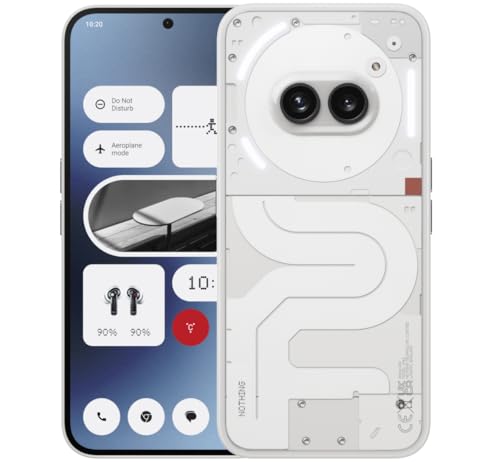
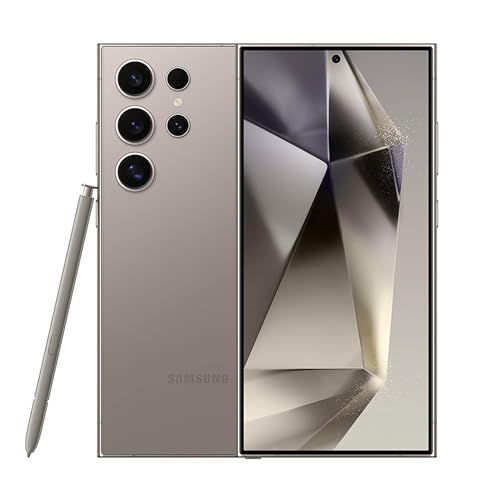
Both of these verified phones advertise serious camera hardware; their spec sheets are perfect examples of why the sensor and lenses matter more than the count.

Samsung Galaxy S24 Ultra Cell Phone, 256GB AI Smartphone, Unlocked Android, 200MP, 100x… — A flagship whose camera system pairs high-resolution sensors with multiple dedicated lenses, including long zoom — a system, not a number. Check price on Amazon.

Apple iPhone 15, 128GB, Black – Unlocked (Renewed Premium) — An iPhone whose cameras use moderate megapixel counts with large pixels and heavy processing, regularly praised for photo quality. Check price on Amazon.
Smartphone Camera Megapixels Explained: What a Megapixel Actually Is
A pixel is a single light-sensitive site on the camera sensor. When you take a photo, each pixel records the brightness and colour of one tiny part of the scene, and the image is the grid of those recordings. A twelve-megapixel sensor records twelve million of them, arranged, for example, as roughly four thousand pixels across by three thousand down. Print that image at typical photo quality and it covers a generous print size, which is why even modest counts suffice for most uses.
More pixels mean more potential detail: finer textures, more freedom to crop, and larger possible prints. That potential is real, and for landscape or architecture photography in good light, a high-resolution mode can capture genuinely finer detail. But potential detail is not the same as a better photograph, because each pixel on a tiny phone sensor is minuscule and collects very little light.
That trade-off is the heart of the matter. On a sensor of fixed size, dividing it into more pixels makes each pixel smaller, and smaller pixels gather less light, which means more noise and worse low-light performance if nothing else changes. Camera design is the art of balancing resolution against light gathering, and the megapixel race only tells you one side of that balance.
Pixel Binning: Why High-Megapixel Phones Output Smaller Photos
Phone makers solve the trade-off with pixel binning: the sensor groups neighbouring pixels — four, nine or sixteen of them — and treats each group as one large pixel for the final photo. A very high-resolution sensor therefore produces a standard-resolution everyday photo, but with the light-gathering benefit of much larger effective pixels, plus improved dynamic range and lower noise.
This is why the headline number misleads twice over. First, the photo you actually get is usually the binned resolution, not the advertised count, unless you deliberately select a full-resolution mode. Second, that is a good thing: the binned photo is the better photograph in most conditions, especially indoors and at night. The high count is really a flexibility feature, enabling both binned low-light shots and occasional full-resolution daylight detail.
Full-resolution modes still have their place. In bright light, with a steady hand, they capture fine detail for cropping or large prints. They also produce huge files, process more slowly and perform poorly as light falls. Knowing when to use each mode is worth more than the sensor’s maximum number.
Sensor Size: The Specification That Matters More
Sensor size decides how much light the camera can gather in total, and light is the raw material of image quality. Phone sensors are described with inch-style fractions that confuse everyone, but the principle is simple: a physically larger sensor, with pixels of a healthy size, produces cleaner images with better dynamic range and more natural background blur. When two phones advertise the same megapixels, the one with the larger sensor almost always takes the better photos.
This is also why dedicated cameras with modest megapixel counts outperform phones in demanding conditions: their sensors are many times larger, so each pixel drinks in light. Within phones, flagship models distinguish themselves with the largest sensors the body can fit, which is a specification worth hunting for in detailed spec sheets and reviews.
Lens quality partners with the sensor. A bright lens with a wide maximum aperture passes more light to the sensor, and optical image stabilisation steadies the shot so slower shutter speeds stay sharp. These two features, aperture and stabilisation, predict low-light results better than any megapixel figure.
What Actually Decides Phone Photo Quality
Processing is the third pillar. Modern phones merge multiple frames for every photograph, balancing highlights and shadows, reducing noise and sharpening detail computationally. Two phones with identical hardware can produce visibly different photos because their processing makes different choices about colour, contrast and texture. This is why sample photos in reviews tell you more than specifications: they show the whole system, hardware and software together.
The lens selection matters as much as the main camera. An ultrawide lens changes what scenes you can capture indoors and in landscapes; a telephoto lens with optical zoom preserves detail at distance where digital cropping smears it. A phone with three well-chosen lenses is a more capable camera than one with a single spectacular sensor, for most people’s real photography.
Finally, consistency counts. The best phone cameras produce good results across all their lenses and in video as well as stills, in daylight and at night. Marketing leads with the main sensor’s biggest number; ownership is lived across the whole system. Judge the system.
Common Misconceptions About Megapixels
The first misconception is that more megapixels always means sharper photos. Beyond the point where the lens and light can feed them, extra pixels record noise and lens softness in finer detail, not more real information. Sharpness in real photos is limited by focus accuracy, hand movement, lens quality and light — rarely by pixel count on any modern phone.
The second is that a high-megapixel front camera guarantees better selfies. Front cameras live or die by processing, screen-flash quality and how they handle skin tones and backlight. Their pixel counts are the least informative number on the sheet.
The third is comparing counts across different sensor sizes, as if fifty megapixels on a small sensor equal fifty on a large one. They do not: the large sensor’s pixels are bigger, cleaner and better fed by its lens. Always read megapixels together with sensor size, or do not read them at all.
A Worked Example: Two Sensors, Same Count
Imagine two phones, each advertising a fifty-megapixel main camera. The first spreads those pixels across a large flagship sensor; the second squeezes them onto a sensor half the area. In bright daylight both record fine detail, and a casual comparison might call them equal. Move indoors, though, and the difference wakes up: each pixel on the smaller sensor received half the light, so its image carries more noise, its shadows block up sooner, and its night mode must work far harder to produce a clean photograph.
Now apply pixel binning. Both phones group four pixels into one for everyday shots, emerging at roughly twelve megapixels. The large sensor’s binned pixels are still physically larger, still gathering more light each, so its everyday photos stay cleaner — the binning narrows the practical gap in resolution to nothing while preserving the gap in light. This is why spec-sheet equality dissolves in real photographs, and why reviewers who publish sensor sizes perform a public service.
The example generalises into a reading skill: whenever a specification is advertised loudly, ask what it is paired with. Megapixels with sensor size, zoom figures with optical range, brightness with sustained full-screen figures. Marketing selects the number that flatters; your job as a buyer is to restore the context the number was removed from.
How Many Megapixels Do Different Uses Need?
Match the count to the destination and the mystery dissolves. A photo destined for social media will be displayed at a few megapixels at most, and platforms compress it further; the standard binned output of any modern phone overshoots that requirement comfortably. A photo for a family album print at typical sizes needs only modest resolution to look sharp at reading distance, well within the same standard output.
Cropping is where resolution earns its keep. Reframing a photo by cutting away half its width quarters its pixel count, so a photographer who crops habitually — wildlife and sports shooters above all — genuinely benefits from high-resolution modes and sensors. Large wall prints are the other honest use: viewed from a normal distance they are more forgiving than folklore suggests, but fine detail in a big landscape print rewards every real pixel the lens and light could feed.
The pattern across all uses is that resolution is a means, sized to a purpose, not a score. Decide your destinations first — screens, albums, crops, walls — and the megapixel requirement follows quietly behind, usually landing far below the numbers on the box. What never becomes optional, at any destination, is light: sensor size and a good lens serve every use on the list.
Megapixels in the Wider Camera World
Step outside phones and the megapixel story clarifies further. Dedicated cameras for professionals commonly offer resolutions in the same broad territory as phone sensors — sometimes lower than a flagship phone’s headline count — on sensors many times larger, and their images are unambiguously superior in difficult light. Nobody in that world shops by megapixel count, because the profession learned long ago that the number describes only how finely the image is divided, not how well it is captured.
Cinema makes the point from the other direction: films shot for the largest screens are captured at resolutions that correspond to single-digit or low-double-digit megapixel counts per frame, yet no viewer complains of softness, because the sensors are large, the lenses superb and the light abundant. Resolution is the last ingredient audiences notice; light, lens and craft are the first.
Even within phones, history testifies: some of the most praised phone cameras of past years used modest counts on large pixels and defeated higher-count rivals in every comparison that mattered, particularly at night. The industry’s own reviewers, given two phones, reach for the one with the larger sensor and better processing when the light fails, whatever the boxes claim.
None of this makes resolution worthless — cropping freedom and large prints are real benefits, and modern high-resolution sensors with binning genuinely offer both worlds. It makes resolution a supporting specification, to be read after sensor size, aperture, stabilisation and processing have had their say.
Carry that order of reading to every camera purchase and you will never be misled by the loudest number again. The megapixel is a measure of division. Photographs are made of light.
Common Mistakes to Avoid
- Choosing a phone by its megapixel count. Sensor size, stabilisation, lenses and processing decide photo quality. Use the count only as a minor detail within that bigger picture.
- Shooting everything in full-resolution mode. Full-resolution files are huge and weaker in low light. The default binned mode is the better photograph in most situations.
- Expecting digital zoom to match a telephoto lens. Cropping a high-megapixel image helps a little, but a real optical telephoto preserves detail digital zoom cannot recover.
Pro Tips
- In reviews, look for full-size sample photos taken indoors and at night; that is where sensor and processing differences live.
- Use full-resolution mode deliberately: bright light, static subjects, and when you plan to crop or print large.
- A previous flagship with a large sensor often out-photographs a new mid-range phone with a higher megapixel count.
Pixel Binning: Why Your High-Megapixel Phone Shoots Smaller Photos by Default
Open the camera on a phone advertised with a very high megapixel count and you will usually find it saving images at a much lower resolution unless you dig into settings. This is pixel binning at work: the sensor groups neighbouring pixels, commonly four or nine of them, into one larger effective pixel for the final image. The group collects more light than any single tiny pixel could, which improves brightness and reduces noise, while the resulting file stays a sensible size for sharing and storage. The headline number describes the hardware; the default output describes what the manufacturer believes you actually want.
Understanding binning resolves most megapixel confusion. Those tiny individual pixels are not useless; they give the system flexibility. In bright light, the phone can use more of the sensor’s native detail for cropping or for a sharper image. In darkness, it bins aggressively for a cleaner result. Some phones also use the extra pixels for zoom, cropping the centre of a high-resolution sensor to simulate a longer lens with more real detail than a simple digital zoom from a low-resolution image. The megapixels earn their keep as raw material for computation, not as a promise that bigger files are better photos.
The practical advice follows naturally. Leave the default binned mode on for everyday shooting, because it is faster, smaller and better in mixed light. Switch to full resolution deliberately for the shots that justify it: a landscape you may print, a document or sign you need to read later, a group photo you expect to crop. Then switch back, because full-resolution files fill storage quickly, save more slowly, and can disable some processing features you rely on without warning you prominently.
Sensor Size, Pixel Size and the Numbers That Predict Low-Light Quality
If megapixels are the marketing number, sensor size is the engineering one. A larger sensor spreads its pixels over more area, so each pixel can be physically bigger, and bigger pixels collect more light and produce a cleaner signal. This is why two phones with identical megapixel counts can perform very differently at night, and why a lower-megapixel camera with a large sensor can embarrass a high-megapixel rival indoors. When you compare cameras, the sensor dimension quoted as a fraction is worth more of your attention than the megapixel headline, even though it is printed smaller.
Lens aperture is the third member of the team. A wider aperture, shown by a smaller f-number, lets more light reach whatever sensor is behind it, and it also affects how shallow the depth of field can be. Stabilisation completes the picture by letting the phone use slower shutter speeds handheld without blur, effectively buying more light-gathering time. A phone with a modest megapixel count, a large sensor, a bright lens and good stabilisation is a formula for excellent everyday photos, while the reverse combination is a formula for impressive specifications and disappointing evenings.
Demos and reviews can mislead here because they favour daylight, where every modern camera looks strong. When you evaluate a phone camera for yourself, test it where your life happens: a dim living room, a restaurant table, a child who will not sit still. Zoom into the results and look at faces, hair and text in the background. Noise reduction that turns detail into smooth smearing is the signature of a sensor being asked to do more than its size and light allow, and no megapixel count printed on a box will rescue it.
Reading a camera spec sheet in the right order
- Sensor size for the main camera first, because it sets the low-light ceiling.
- Lens aperture and stabilisation next, because they decide how much light you gather.
- Pixel size and binning behaviour, because they explain the default output resolution.
- Processing reputation for skin tones and night scenes, from full-size sample photos.
- Megapixel count last, mainly as an indicator of cropping and zoom flexibility.
Zoom, Cropping and Printing: Where Resolution Genuinely Pays
There are three honest uses for abundant megapixels. The first is cropping freedom. A high-resolution capture lets you reframe after the moment, straighten a horizon, or pull a distant detail closer while retaining a usable image, which is invaluable for wildlife glimpsed briefly, architecture you could not approach, and candid moments you dared not interrupt. The second is sensor-crop zoom, where the phone uses the centre of its sensor at full resolution to produce a genuine quality step between its optical lenses, narrowing the dead zone where neither lens is ideal.
The third is printing. Screens forgive almost anything; prints do not. A photo destined for a large wall print benefits from real resolution, careful exposure and a steady hand far more than the same scene needs for a phone screen. If you print big, shoot the camera’s full-resolution mode for those specific images, keep the originals, and avoid recompressing them through messaging apps that shrink files for sending. If you never print beyond small sizes and view everything on screens, you can safely stop worrying about resolution almost entirely and choose your camera on colour, consistency and low-light behaviour instead.
Video follows different rules and should not be confused with the stills discussion. Video resolutions describe frames of a set size, and higher video resolution demands more light, more storage and more processing heat. A phone boasting extreme video modes may limit their duration or disable stabilisation options within them. For most family and travel video, the standard high-quality mode with stabilisation on produces the most watchable results, and chasing the maximum mode is another case of a headline number outrunning the situations it actually improves.
Myths That Refuse to Die, and What to Believe Instead
The oldest myth is that more megapixels automatically means sharper photos. Sharpness in practice comes from lens quality, focus accuracy, shutter speed, stabilisation and processing, with resolution setting only the maximum possible detail. A shaky, poorly focused high-resolution photo contains more pixels of blur, not more detail. The second myth is that manufacturers are lying when default output is lower than the headline count; as the binning section explains, that default is usually the honest engineering choice for the light most photos are taken in.
A third myth claims professional cameras prove high megapixels are everything, while in reality professionals choose resolution for their output: high counts for commercial and landscape work that will be printed huge or cropped hard, and more modest counts for sports and low-light work where speed and clean high-sensitivity files matter more. Phones are following exactly the same logic at a smaller scale. The count is a tool with a purpose, not a score in a contest.
Believe instead in evidence from your own subjects. Download full-size sample images rather than compressed social posts, view them at the size you will actually use, and compare the cameras on the scenes that defeated your current phone. Megapixels explained honestly are neither magic nor fraud; they are one ingredient, and once you understand binning, sensor size and processing, you will never be sold a camera by a single number again.
How Processing Uses Megapixels You Never See
Modern phone photography is a negotiation between the sensor’s raw material and the processor’s judgement, and megapixels are the currency of that negotiation. When you press the shutter in poor light, the phone may capture several frames and combine them, using the sensor’s dense pixel grid to align the frames precisely, reject noise, and recover detail in shadows while holding highlights that a single exposure would lose. The final image may carry a modest resolution, yet its quality was bought with all those pixels working as sensors of light and position rather than as dots in the file. Judging the hardware by the output file’s dimensions alone misses most of what the hardware did.
Depth effects use the same surplus. Portrait modes estimate which parts of a scene are near and far, and a dense sensor helps map edges, hair and glasses more convincingly, though software still fails on transparent objects, intricate jewellery and chair backs. Zoom enhancement similarly draws on the full pixel count to reconstruct detail as you move between lenses. Each generation, more of what owners call camera quality is actually this invisible arithmetic, which is why two phones sharing similar sensors can produce noticeably different photographs, and why a maker’s processing reputation deserves a place in your buying decision beside every hardware number.
This also explains why camera performance can improve, or occasionally worsen, with software updates after you buy the phone. The hardware and its megapixels stay fixed; the interpretation of their data evolves. Long-term camera reviews, revisited months after launch, are therefore more trustworthy than launch-day shootouts, and a maker with a record of improving its processing over a model’s life is offering a camera that gets better in your pocket, a quality no specification sheet can promise in numbers.
Comparing Cameras Fairly: A Method for Your Own Tests
If camera quality drives your purchase, run your own small trial rather than trusting any gallery, including the ones in reviews. Photograph the same five scenes with each candidate: faces indoors under warm light, a backlit portrait against a window, a detailed scene at dusk, a subject at the distance you typically shoot from across a room or a pitch, and a close object with fine texture such as fabric or foliage. Use each phone’s default mode, because that is how you will actually shoot, and view the results at your real output size: the family television, the printed page, the group chat, not a magnified crop unless cropping is genuinely your habit.
Score the results on what your eyes report rather than what numbers suggest. Which faces look like the people you love, with believable skin and eyes? Which camera kept the window scene’s faces visible without turning the view outside into white fog? Which dusk scene kept its mood instead of brightening midnight into noon? Note also the experience: which phone focused without hunting, saved without pausing, and produced the good result on the first attempt rather than the fourth? Reliability of outcome is a camera quality, and for family photography it may be the quality, because moments do not repeat themselves for a second take.
Keep the trial honest about lenses. Test the ultra-wide and the zoom you will actually use, not only the main camera that every maker polishes for reviewers. Many buying regrets live in the second lens: the group shot in a small room, the stage across the hall. A phone whose main camera wins your test but whose other lenses disappoint your real scenes is the wrong phone, however many megapixels its headline advertises, and discovering that in a shop costs nothing compared with discovering it at a wedding.
File Sizes, Storage and Living With High-Resolution Photos
Resolution has a household cost that appears months after purchase, when storage fills and backups swell. Full-resolution images can be several times larger than the default binned files, and a holiday shot enthusiastically at maximum settings can consume the space of a week of normal photography, slow cloud uploads on hotel Wi-Fi, and inflate the backup that your storage plan must hold. None of this forbids full-resolution shooting; it argues for using it as a deliberate mode for the images that justify it, exactly as photographers have always reserved their finest film for the frames that mattered.
Sharing pipelines quietly resize your work in any case. Messaging apps compress, social platforms recompress, and email shrinks, so the masterpiece you send a friend usually arrives at a fraction of its captured resolution regardless of your settings. Keep originals of the images you care about in your proper backup, send copies freely, and do not mistake the compressed version a platform shows you for the quality your camera captured. Arguments about cameras conducted over social media images are arguments about compression algorithms wearing the cameras’ names.
The storage lesson generalises into the guide’s closing advice: buy the phone’s storage tier for your real habits, including a camera you intend to use enthusiastically. A high-resolution camera paired with a cramped phone teaches its owner to stop photographing, which is the saddest outcome in this entire subject. Megapixels, understood properly, are a resource to be spent on the moments that deserve them, with the defaults trusted for everything else, and that understanding, not any number, is what separates camera buyers who are happy from those who are merely equipped.
How Processing Uses Megapixels You Never See
Modern phone photography is a negotiation between the sensor’s raw material and the processor’s judgement, and megapixels are the currency of that negotiation. When you press the shutter in poor light, the phone may capture several frames and combine them, using the sensor’s dense pixel grid to align the frames precisely, reject noise, and recover detail in shadows while holding highlights that a single exposure would lose. The final image may carry a modest resolution, yet its quality was bought with all those pixels working as sensors of light and position rather than as dots in the file. Judging the hardware by the output file’s dimensions alone misses most of what the hardware actually did for you in that fraction of a second.
Depth effects use the same surplus. Portrait modes estimate which parts of a scene are near and far, and a dense sensor helps map edges, hair and glasses more convincingly, though software still fails on transparent objects, intricate jewellery and chair backs placed behind a subject. Zoom enhancement similarly draws on the full pixel count to reconstruct detail as you move between lenses, which is why the steps between a phone’s cameras feel smoother than they once did. Each generation, more of what owners call camera quality is actually this invisible arithmetic, which is why two phones sharing similar sensors can produce noticeably different photographs, and why a maker’s processing reputation deserves a place in your buying decision beside every hardware number printed on the box.
This also explains why camera performance can improve, or occasionally worsen, with software updates after you buy the phone. The hardware and its megapixels stay fixed for the life of the device; the interpretation of their data evolves with every update. Long-term camera reviews, revisited months after launch, are therefore more trustworthy than launch-day shootouts, and a maker with a record of improving its processing over a model’s life is offering a camera that gets better in your pocket, a quality no specification sheet can promise in numbers and no rival can copy overnight.
Comparing Cameras Fairly: A Method for Your Own Tests
If camera quality drives your purchase, run your own small trial rather than trusting any gallery, including the ones in reviews. Photograph the same five scenes with each candidate: faces indoors under warm light, a backlit portrait against a window, a detailed scene at dusk, a subject at the distance you typically shoot from across a room or a pitch, and a close object with fine texture such as fabric, food or foliage. Use each phone’s default mode, because that is how you will actually shoot on the day, and view the results at your real output size: the family television, the printed page, the group chat, not a magnified crop unless cropping is genuinely your habit rather than a reviewer’s ritual.
Score the results on what your eyes report rather than what numbers suggest. Which faces look like the people you love, with believable skin, eyes and teeth? Which camera kept the window scene’s faces visible without turning the view outside into white fog? Which dusk scene kept its mood instead of brightening midnight into a grey noon? Note also the experience of shooting: which phone focused without hunting, saved without pausing, and produced the good result on the first attempt rather than the fourth? Reliability of outcome is a camera quality in its own right, and for family photography it may be the quality, because moments do not repeat themselves for a second take while you adjust a setting.
Keep the trial honest about lenses. Test the ultra-wide and the zoom you will actually use, not only the main camera that every maker polishes for reviewers and launch events. Many buying regrets live in the second lens: the group shot in a small room that needed the ultra-wide, the stage across the hall that needed the zoom. A phone whose main camera wins your test but whose other lenses disappoint your real scenes is the wrong phone, however many megapixels its headline advertises, and discovering that in a shop costs nothing compared with discovering it at a wedding, a graduation or a once-in-a-decade holiday.
File Sizes, Storage and Living With High-Resolution Photos
Resolution has a household cost that appears months after purchase, when storage fills and backups swell. Full-resolution images can be several times larger than the default binned files, and a holiday shot enthusiastically at maximum settings can consume the space of a week of normal photography, slow cloud uploads on hotel Wi-Fi to a crawl, and inflate the backup that your storage plan must hold every night. None of this forbids full-resolution shooting; it argues for using it as a deliberate mode for the images that justify it, exactly as photographers have always reserved their finest film and their slowest, most careful technique for the frames that mattered most.
Sharing pipelines quietly resize your work in any case. Messaging apps compress, social platforms recompress, and email shrinks, so the masterpiece you send a friend usually arrives at a fraction of its captured resolution regardless of your settings or your pride. Keep originals of the images you care about in your proper backup, send copies freely, and do not mistake the compressed version a platform shows you for the quality your camera captured. Arguments about cameras conducted over social media images are, on inspection, arguments about compression algorithms wearing the cameras’ names, and they have misled more buyers than any advertisement ever managed.
The storage lesson generalises into this guide’s closing advice: buy the phone’s storage tier for your real habits, including a camera you intend to use enthusiastically and well. A high-resolution camera paired with a cramped phone teaches its owner to stop photographing, which is the saddest outcome in this entire subject and the most common. Megapixels, understood properly, are a resource to be spent on the moments that deserve them, with the defaults trusted for everything else, and that understanding, not any number, is what separates camera buyers who are happy for years from those who are merely equipped for a season.
A Word on Comparing Your Next Phone’s Camera
When you next stand in a shop comparing cameras, ignore the largest number on the shelf card and run the smallest honest test instead. Photograph the shop assistant’s colleague, with permission, across the room; photograph a detailed display in the darkest corner the shop allows; and photograph something at the distance of a school stage. Look at faces, edges and shadows rather than at file dimensions. The phone whose default mode handles your three scenes gracefully, at the output sizes your life uses, has the camera you need, whatever its megapixel count claims, and you will have chosen it the way photographers choose: by looking at photographs.
Related Guides
- best smartphones for photography
- best smartphones for pictures
- best smartphones for photos
- best camera phones for photography
- best smartphones under 500
- phone camera sensor size explained
- what is computational photography
- how to choose a camera phone
Frequently Asked Questions
How many megapixels do I actually need?
For photos viewed on screens, shared online and printed at normal sizes, the standard output of any modern phone — typically around twelve megapixels after binning — is more than sufficient. Higher counts help when you crop significantly, print very large, or shoot detailed subjects in bright light. Treat anything beyond that as flexibility rather than quality, and spend your attention on sensor size and lenses instead.
Why do phones advertise huge megapixel counts but save smaller photos?
Because of pixel binning: the sensor combines groups of small pixels into fewer, larger effective pixels for the saved photo, improving light capture, dynamic range and noise. The full resolution is available in a special mode for bright conditions. The advertised count describes the sensor’s hardware; the saved size describes the mode the phone judges best for everyday photography, and it is usually right.
Does a bigger sensor always beat more megapixels?
In low light and for editing flexibility, generally yes: a larger sensor gathers more light per photo and produces cleaner files. In bright light with static subjects, a high-megapixel smaller sensor can record finer detail for cropping. For the way most people photograph — mixed light, moving subjects, screens as the destination — sensor size and processing are the safer predictors of satisfaction.
Are megapixels important for video?
Barely. Video resolutions correspond to modest pixel counts: even high-end 4K video uses roughly eight megapixels per frame. What matters for video is stabilisation, sensor readout speed, autofocus and processing. A phone’s still-photo megapixel headline tells you almost nothing about its video quality, so judge video by samples and by features like stabilisation and microphone quality.
What does pixel binning do to photo quality?
It improves the qualities most photos need: better low-light performance, less noise, wider dynamic range and more forgiving exposures, at the cost of maximum resolution. Since most photos are viewed on screens at modest sizes, that trade is strongly in the photographer’s favour. Pixel binning is the main reason modern phones with small sensors produce low-light photos that would have been impossible a few years ago.
Should I avoid phones with very high megapixel counts?
No — the count itself is not a flaw, and the sensors behind big numbers are usually the maker’s best, paired with large sensor sizes and good lenses on flagships. The mistake is only in choosing by the number. A high-megapixel flagship is an excellent camera for many reasons; the megapixels are simply the least important of them.
Should I always shoot at the highest megapixel setting?
No. The default setting exists because it is the best balance for most light and most subjects, using pixel binning to produce cleaner, smaller files that save quickly and share easily. Reserve full resolution for the shots that justify it: a landscape you may print, a scene you expect to crop, a document you need to read later. Shooting everything at maximum fills storage, slows saving, can disable some processing features, and delivers files whose extra detail your audience, viewing compressed copies on phones, will never see.
Why do my photos look worse than the megapixel count promises?
Because megapixels set only the maximum possible detail, while light, lens quality, focus, shutter speed and processing decide how much of that detail survives into the file. A shaky, poorly lit, missed-focus photograph contains millions of pixels of blur and noise. Improve the light or the steadiness before blaming the sensor: move the subject toward a window, steady the phone against something solid, tap to focus on the subject’s face, and let night mode finish. Those four habits will do more for your photographs than any specification upgrade.
How many megapixels do I need for printing?
For the prints most households make, small albums, framed desk photos and modest wall sizes, the default output of any modern phone is comfortably sufficient, because printing forgivingly at those sizes needs far less resolution than screens have trained us to fear. Large wall prints reward genuine resolution, careful exposure and a steady hand, in that order. If you print big regularly, shoot those specific images at full resolution and keep the originals uncompressed in your backup, and you will have all the megapixels the wall can use.