Knowing how to choose a camera phone means ignoring most of what the adverts shout about. Megapixel counts and lens counts dominate the marketing, yet real photo quality comes from sensor size, lens quality, stabilisation and processing working together. Two phones with identical headline numbers can produce photographs that are not even close, especially once the light gets difficult.
This guide gives you a photographer’s checklist for phone shopping: what to look for in the main camera, which extra lenses are genuinely useful, how to judge low-light and video ability, and how to use sample photos to make the final call. It applies whether you photograph family, travel, products for a small business or content for an audience.
Disclosure: As an Amazon Associate, kajuandouglas.com earns from qualifying purchases. Links to Amazon on this page are affiliate links; they cost you nothing extra. Listing details such as price and availability change often, so check the current Amazon listing before you buy.
The Short Answer
Prioritise a large main sensor with optical image stabilisation, then judge the lens set by your subjects: an ultrawide for interiors and landscapes, a real optical telephoto for people and distance. Check low-light samples and video stabilisation in reviews, choose storage for a photographer’s appetite, and ignore megapixel counts except as a minor detail. The best camera phone for you is the one whose weaknesses never intersect with what you shoot.
In this guide
Gear for This Guide
These verified flagships show the two philosophies of phone photography: a multi-lens zoom system and a consistency-first approach.

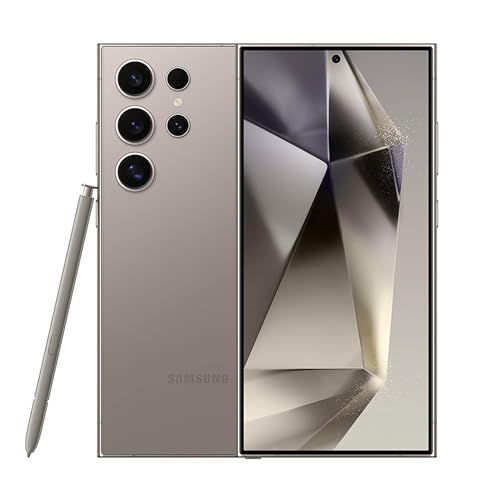
Samsung Galaxy S24 Ultra Cell Phone, 256GB AI Smartphone, Unlocked Android, 200MP, 100x… — A flagship with multiple dedicated lenses including long optical zoom and a stylus, built for photographers who shoot at every distance. Check price on Amazon.

Apple iPhone 15, 128GB, Black – Unlocked (Renewed Premium) — An iPhone whose cameras emphasise consistency, colour and class-leading video across its lenses. Check price on Amazon.
Start With the Main Sensor and Stabilisation
The main camera takes the overwhelming majority of your photos, so it deserves the overwhelming majority of your attention. Look for the largest sensor you can find at your tier, because sensor area decides how much light the camera gathers, and light decides cleanliness, dynamic range and low-light ability. Detailed reviews list sensor sizes even when manufacturers bury them; that number predicts more than any other on the sheet.
Optical image stabilisation on the main lens is the second essential. It physically steadies the lens or sensor against hand movement, enabling slower shutter speeds that stay sharp, which transforms indoor and evening photography and steadies video. A camera phone without stabilisation on its main camera is working with one hand tied, whatever its megapixel count.
Aperture completes the trio: a wider maximum aperture, shown by a smaller f-number, passes more light to the sensor. Together — big sensor, stabilisation, bright lens — these three specifications tell you most of what reviews will confirm with sample photos.
How to Choose a Camera Phone Step by Step
Step 1: List your real subjects
Family indoors, landscapes, concerts, sport, products, street photography — your subjects decide which lenses and features matter. Write the list before reading a single review, because it converts vague camera quality into specific requirements.
Step 2: Judge the lens set against that list
An ultrawide earns its place for interiors, architecture and sweeping landscapes. A telephoto with genuine optical zoom earns its place for portraits, events and anything distant. Ignore decorative extra lenses; a phone with two excellent lenses beats one with four mediocre ones.
Step 3: Study low-light samples
Find reviews with full-size sample photos taken indoors and at night, ideally of people. This is where sensor size and processing separate phones most clearly, and where marketing claims go to be tested.
Step 4: Check video as its own discipline
If you record video, judge stabilisation, autofocus reliability and microphone quality separately from stills. Some phones are stills champions and video disappointments, and the reverse also happens.
Step 5: Size storage like a photographer
Photos and especially video devour storage, and high-resolution modes multiply file sizes. Choose at least double your current usage, and confirm how the phone handles backup, because a camera phone without a backup routine is a loss waiting to happen.
Step 6: Handle the phone as a camera
Check how it feels to hold for shooting, how fast the camera opens from locked, and whether there is a quick-launch gesture. The best camera phone is partly the one that is ready before the moment passes.
Processing: The Invisible Half of the Camera
Modern phone photography is half optics and half computation. The processing pipeline merges frames, balances exposure across bright skies and dark faces, reduces noise and applies the maker’s taste in colour and sharpening. This is why two phones with near-identical hardware produce recognisably different photographs, and why brand preferences in phone photography are legitimate rather than fan loyalty.
Look for processing that suits your subjects. Skin tones are the classic test: some pipelines flatter portraits, others render them harshly. Night modes vary in how natural their results look. If you edit your photos, check whether the phone offers a raw or pro mode that saves less-processed files, which give editing software far more to work with.
Consistency across lenses is processing’s other job. On the best camera phones, switching from main to ultrawide to telephoto keeps colour and exposure coherent. On weaker systems each lens looks like a different camera. Reviews that shoot the same scene on every lens reveal this instantly.
Features That Matter and Features That Decorate
Genuinely useful features include a capable portrait mode with adjustable blur after the shot, reliable autofocus that tracks moving subjects and pets, a night mode that works on more than the main lens, and burst shooting that keeps up with children and sport. For creators, log or flat video profiles, external microphone support and high-quality slow motion separate tools from toys.
Decorative features include extreme digital zoom figures, which crop and upscale rather than truly zoom; very high megapixel counts used as the main selling point; and extra low-resolution lenses added to inflate the lens count. None of these is harmful, but none should influence your decision or your budget.
Battery and screen belong in a camera phone decision too. Shooting drains batteries quickly, and the screen is your viewfinder and editing desk: brightness for outdoor shooting and colour quality for judging photos both matter. A camera phone you cannot see in sunlight or that dies by mid-afternoon on a photo walk fails as a camera however good its sensor is.
Testing a Camera Phone Before You Buy
Shops will let you handle live demo phones, and five disciplined minutes with the camera tells you more than an hour of spec sheets. Shoot the same four test scenes on each candidate: a person near a window for skin tones and backlight, the shop’s darkest corner for low-light behaviour, a distant sign across the street for the telephoto’s honesty, and a close product on a shelf for focus reliability. Then zoom into each photograph on the phone’s own screen and look at edges, faces and shadow detail rather than the overall impression.
Pay attention to the experience between photographs as much as the results: how fast the camera opens from the lock screen, whether switching lenses is instant or hesitant, whether the phone second-guesses your lens choice in dim light, and how the shutter feels. A camera that is slow to be ready loses photographs no sensor can recover, and a camera whose character annoys you in the shop will annoy you for years.
Finish by checking the unglamorous specifications that shape ownership: how much storage the demo configuration actually has free, whether high-resolution and raw modes exist and what they cost in file size, and how the phone’s photo backup integrates with the library you already keep. The best camera phone is a system you will live inside, and the test should judge the system, not just the sensor.
Camera Phones for Specific Photographers
Parents photographing children should weight autofocus reliability, burst speed and indoor processing above all else, because their subjects move, their light is domestic and their moments are unrepeatable. A phone praised for serene landscapes may hunt and smear through a living room; the reviews to trust are the ones with family photographs in ordinary rooms. Portrait mode quality matters here too, since grandparents’ gifts are made of these pictures.
Travellers should weight the lens range and battery: an ultrawide for interiors and squares, a real telephoto for details and distant scenes, and the endurance to shoot all day alongside maps and translation without rationing. Weight and size matter more than travellers expect — the camera phone carried comfortably on a ten-mile walking day beats the marginally better one left at the hotel by the third day.
Content creators should weight video as heavily as stills: stabilisation, microphone quality and options, front camera capability, and storage in the largest sizes, since video devours it. Sellers photographing products should weight colour accuracy, close-focus ability and consistency under artificial light. In every speciality the method is identical — name the photographs you actually take, then let them, not the launch keynote, rank the phones.
The Camera Phone as a System: Storage, Backup and Display
Choosing a camera phone on its cameras alone is like choosing a car on its engine: necessary, thrilling and incomplete. The photographs a camera phone makes must live somewhere, be viewed somewhere and survive the phone itself, and the wise buyer specifies those parts of the system with the same care as the lenses. Storage comes first, because a photographer’s phone fills at a photographer’s pace and a full phone stops being a camera at the worst possible moment — mid-holiday, mid-wedding, mid-everything.
Backup is the system’s conscience. Automatic cloud backup that runs at full quality, on a plan with room for years of photographs, converts the phone from a single point of failure into a capture device whose work is already safe elsewhere. Buyers who prefer local libraries should cost the drives and the discipline honestly. Either way, the camera phone decision includes a line for protecting its output, or it is not finished.
The display is the system’s darkroom. You will judge focus, exposure and colour on that screen, often in sunlight at the scene and always at the edit. Brightness for outdoor judgement, colour quality for editing trust, and size for reviewing detail are camera specifications in every practical sense, and they separate phones whose spec sheets tie on lenses. A camera phone with a dim screen is a darkroom with the lights off.
Battery completes the system, because shooting is among the most demanding work a phone does — screen bright, processor merging frames, radios uploading. A camera phone that fades by mid-afternoon on a photo walk fails as a camera whatever its sensor, which is why this guide’s checklists keep returning to endurance alongside optics.
Specify the whole system — lenses, sensor, storage, backup, display, battery — and the camera phone you choose will serve the photography, not just advertise it.
Common Mistakes to Avoid
- Choosing by megapixel count. Sensor size, stabilisation and processing decide quality. The count is the least informative number in camera marketing.
- Counting lenses instead of judging them. Decorative low-resolution lenses pad spec sheets. Two excellent lenses outperform four mediocre ones in every real photograph.
- Testing only daylight samples. Every phone photographs well in sunshine. Judge cameras by indoor, evening and backlit samples, where the differences live.
- Forgetting storage and backup. A photographer’s phone fills fast and holds irreplaceable work. Storage headroom and automatic backup are camera features in practice.
Pro Tips
- Download full-resolution sample photos from reviews and view them on the largest screen you own; phone-sized previews hide every flaw.
- If you shoot people most, prioritise portrait processing and a portrait-friendly telephoto over ultrawide heroics.
- A small tripod and a phone with a good night mode will transform your travel photography more than one tier of phone upgrade.
Worked Examples: Matching a Phone to Three Real Photographers
Abstract criteria become clearer attached to people. Consider a parent whose camera roll is ninety percent children, much of it indoors, much of it in motion. Their phone lives or dies on shutter reliability, autofocus that finds small faces fast, and processing that rescues warm, dim living-room light without turning skin waxy. A long telephoto is a luxury for them; a fast, honest main camera and painless sharing are the product. Every purchasing conversation for this photographer should start with indoor samples of moving subjects, because that is the hardest ordinary photography there is.
The traveller and the concert-goer
A traveller’s priorities invert: versatility across landscapes, architecture, food and street scenes, in weather and glare, with battery to survive a day away from sockets. An ultra-wide earns its place, optical zoom earns its place, and a screen readable in bright sun matters more than laboratory dynamic range. The concert-goer, meanwhile, is a zoom and stabilisation specialist shooting in the worst light consumer photography offers; for them, a genuinely capable telephoto and video that stays steady and clean in darkness outweigh almost everything else on the specification sheet.
Notice what these examples do: they rank features before brands are mentioned, and they expose which specification battles are irrelevant to the buyer in question. Write your own version — your subjects, your light, your patience for editing — before reading comparisons, and the comparisons become tools instead of weather. Most disappointed camera-phone buyers did not choose a bad phone; they chose someone else’s priorities, beautifully reviewed.
Video as a Separate Purchase Decision
Stills and video share hardware but diverge in what excellence means. For video, stabilisation quality, autofocus smoothness, microphone quality, heat behaviour over long clips and the ability to keep recording at high resolution without throttling decide the experience. A phone that shoots glorious thirty-second clips but overheats, dims its screen or drops resolution at minute ten is a poor tool for a school play, a wedding speech or a small business owner filming products. Test durations, not just specifications, whenever long-form video matters to you.
Sound, storage and the unglamorous video truths
Audiences forgive imperfect picture sooner than bad sound, yet microphones are the least marketed part of any camera phone. Wind handling outdoors, clarity of voices at a distance and how the phone treats music at high volume separate serious video phones from stills champions moonlighting. Storage follows: high-resolution video consumes space at a rate stills never approach, so the video-led buyer should size storage generously, confirm what quality the phone defaults to, and plan offloading — cloud, computer or drive — as part of the purchase rather than as a crisis when the phone refuses to record a birthday.
Also check how the phone handles switching lenses while recording, whether focus hunts visibly, and whether the front camera’s video quality respects the creator who films themselves. These behaviours appear in good long-form reviews and in your own hands during a shop test if you record a walking, talking minute rather than a static ten seconds. Video excellence is a set of behaviours over time, and time is exactly what a specification cannot show you.
The Second-Hand and Previous-Generation Route
Camera phones improve incrementally, and last year’s flagship often out-photographs this year’s mid-range phone while costing a similar amount. The trade-offs are known and checkable: battery health on a used device, remaining years of software updates, and warranty status. A manufacturer-refurbished flagship with a fresh battery and warranty is one of the smartest buys in photography, full stop, because camera hardware ages slowly while prices fall quickly.
What to verify on a used camera phone
Inspect every lens for scratches and internal dust, shoot a plain bright surface with each camera to reveal spots or sensor issues, and test autofocus at close and far distances. Check the battery health figure where the system reports it, confirm the phone is not locked to another account, and verify the charging port and speakers, which live hard lives. Photograph a detailed scene and examine the corners at full size; a phone that has been dropped may carry a decentered lens that only corner inspection betrays.
For previous-generation new phones, confirm the update horizon: a camera phone is also your bank, your keys and your correspondence, so remaining years of security updates are a safety feature, not a footnote. Balance a shorter update future against the camera advantage honestly, and the previous generation often still wins — but it should win with your eyes open, at the right tier, rather than by default because a headline discount flattered it.
Accessories That Change What the Camera Can Do
A modest accessory budget can outperform a model upgrade. A small tripod or grip transforms night, group and video work. A clip-on light flatters video calls and product shots. A good case with a raised lip protects the lenses that make the phone worth owning, and a wrist strap has saved more phones — and therefore more photographs — than any software feature. Buyers comparing two phones a tier apart should price the humbler phone plus the accessories that fix its real weaknesses before assuming the dearer phone wins.
Lenses, filters and the honest limits of add-ons
Clip-on lenses and filters occupy a spectrum from genuinely useful to novelty. The useful end solves specific problems: a polariser for reflections in product or car photography, a protective filter for hostile environments like beaches and workshops. The novelty end duplicates what software already does or degrades the excellent optics you paid for. Add accessories to answer a named problem from your own shooting, one at a time, and keep the kit small enough that it actually travels with you; the best accessory is the one in your pocket when the moment happens.
Finally, budget attention for backup. An external drive, a cloud plan, or a simple weekly habit of copying photographs somewhere else protects the entire output of the camera you chose so carefully. A camera phone is a single point of failure carried over pavements and water; the photographers who never lose pictures are not luckier, they are merely the ones who treated backup as part of the camera system from the day of purchase.
Making the Final Decision Without Regret
Narrow to two phones, then decide by handling both with your own test: the same indoor scene, the same moving subject if the shop allows, the same short video walk. Compare the results on a larger screen if you can, because phone screens flatter their own output. Sleep on it if the tier is significant; camera phones are bought in excitement and lived with for years, and the morning-after ranking is usually the honest one.
The three-year test
Ask which phone you will still be pleased with in three years. That question favours update support, battery longevity, storage headroom and a camera system balanced across lenses rather than one spectacular lens and two passengers. It also favours the phone whose photographs you liked unedited, because you will shoot thousands and edit dozens. Choose the camera whose default output pleases your eye, whose handling fits your hand, and whose weaknesses live in subjects you rarely photograph — that alignment, not a specification crown, is what a good camera phone purchase actually is.
Low Light, Taken Apart: What Good Night Photography Requires
Night is where camera phones separate, and the separation is a system property. The sensor gathers what it can, the lens must feed it generously, stabilisation must hold the phone’s side of the bargain, and processing must merge frames without smearing the life out of the scene. Judge night performance by scenes with people in them, not only by the neon cityscapes manufacturers favour, because skin, movement and mixed artificial light expose weaknesses that a static skyline forgives. A phone that renders a pub garden, a birthday cake and a street after rain with faces intact and colours believable owns the night in the only sense that matters to most photographers.
Flash, and the honest alternatives
Phone flashes are small and close to the lens, which makes their light direct and their reputation poor, but used knowingly — close subjects, a step back, expectations set to documentation rather than art — flash rescues moments that merging cannot, because it freezes motion outright. The alternatives are environmental: move the subject to the doorway light, the window, the street lamp’s edge, and let the scene’s own light do what the flash does badly. Skilled night photographers on any camera think about where the light is before how the camera is set, and phone photographers who adopt that order find their night results transform before any upgrade is considered.
Screen brightness is a night specification too: reviewing a photograph on a screen set searingly bright lies about its exposure, and a phone whose display behaves sensibly in the dark, and whose camera interface dims intelligently, helps its owner judge correctly in the field. Small, unlisted, and worth more than a megapixel increment — night photography is full of such truths, which is why hands-on testing in genuine darkness outranks every specification in this category.
Zoom, Honestly: Optical, Cropped and Imagined
Zoom claims need translating before they can be compared. True optical zoom comes from a lens built for that focal length. High-quality cropping from a large, detailed sensor can rival a modest optical lens across part of the range, and good phones now blend the two so smoothly that the joins are hard to find. Beyond both lies digital enlargement dressed in processing, which can be surprisingly presentable at moderate levels and falls apart exactly when the subject is distant, dim and moving — which is to say, in most of the situations that made you want zoom in the first place.
Testing zoom with your own subjects
Test zoom on the subjects you will actually zoom towards: a child’s face on a stage, a bird on a feeder, a sign across a square, a player on a pitch. Read the detail at the size you will view it, and look at edges, text and faces rather than at overall impression. Decide the longest distance at which results please you, and treat that, not the headline maximum, as the phone’s zoom for your purposes. A phone whose honest zoom ends where your subjects live is a better purchase than one whose spectacular maximum dissolves into watercolour at exactly your distance.
Also weigh how the phone behaves between its lenses: the colour and exposure jumps as it switches, the minimum distances at which each lens can focus, and whether video zoom is smooth or a series of small lurches. Zoom is a system of lenses pretending to be one, and the quality of the pretence — the consistency that lets a set of photographs from one outing look like one photographer’s work — is a mark of the serious camera phones.
The Front Camera and the Photograph You Are In
For many owners the front camera is the most-used camera they own, and the least examined at purchase. Its virtues are its own: a field of view that fits a group at arm’s length, autofocus that not all front cameras offer and that matters more than resolution, processing that flatters without erasing the person, and video good enough for calls and content. Test it in a dim room, because that is where it will live, and test the screen-flash behaviour, the portrait mode’s edges around hair, and how it handles glasses, which defeat more front cameras than any other accessory a face can wear.
Video calls as photography
The modern front camera’s second job is presence: work calls, family calls, the daily theatre of remote life. How a phone presents you — its colour under household lighting, its behaviour when you move, its microphone’s share of the bargain — is a legitimate buying criterion that camera reviews undervalue because it cannot be scored from a test chart. If your working life is substantially on camera, audition the front camera as seriously as the rear, on a real call, in your real room, and let that evidence sit alongside the landscape samples.
Software Futures: Updates, Features and Abandonment
A camera phone is a promise about software as much as a slab of hardware. Makers differ in how long they refine a model’s camera after launch, whether new computational features travel backwards to older models, and how quickly they fix the processing excesses that early reviews identify. A phone whose camera improves across its first year rewards patience; a phone abandoned at launch keeps whatever flaws it shipped with. Research the maker’s record with the previous generation — did its photographs improve, stagnate or occasionally worsen under updates? — because that record is the best available evidence about the phone in your hand.
Your library’s future, too
The photographs will outlive the phone, so choose with their custody in mind: formats your other software can read, a backup path you trust, and an exit route from any ecosystem you join, tested before you need it. Export a month of photographs to a neutral home — a drive, a computer — as a drill. The camera phone that wins your three-year test should also pass the thirty-year test: that its photographs remain findable, openable and yours, long after the phone itself is a museum of obsolete connectors in a drawer.
Durability and Repairability: The Camera You Still Own in Year Four
A camera’s specifications describe its first day; its durability describes its thousandth photograph. Lens glass and its coatings face pockets, keys and a thousand small abrasions, and models differ in how gracefully they age: sapphire and hardened glass covers, recessed lens designs that keep glass off flat surfaces, and cases that genuinely protect the camera plateau all belong in a photographic buying decision. Water and dust resistance matters to photographers disproportionately, because cameras are used in rain, at beaches and beside sinks, and a rating that lets you shoot in weather without anxiety expands the photographs you will take across the phone’s life more than a marginal sensor gain does.
Repairs, batteries and the long tail
Ask about the repair path before you need it: whether the maker publishes repair options for camera glass and modules, whether independent repairers can source parts, and what a battery replacement involves, because the battery is the component that will end the phone’s useful life if nothing else does, and a replaceable battery at a fair cost converts a dying phone back into a fully serviceable camera. Photographers keep phones longer than most users when the camera still delights them, so the economics of year four — a battery, perhaps a screen — belong in the year-one decision for anyone whose history says they keep devices.
Storage permanence joins the same long view: a phone filled to its limit in year two, with no expansion and a camera that refuses to shoot at the worst moments, fails as a camera however fine its lenses. Buy storage for the photographer you will become, not the one you are, because libraries grow in one direction and the photographs you will take next year are, by the evidence of every photographer’s life, more numerous than this year’s.
Ergonomics of Shooting: Buttons, Grips and One Hand
Photographs are taken by hands, often one hand, often in a hurry, and the phone’s shooting ergonomics decide how many of the moments you see become photographs you keep. A dedicated camera button or a reliable volume-key shutter, a camera that launches instantly from the lock screen by a gesture you can perform without looking, and a body whose size and texture sit securely in your grip are camera features as real as any lens. Test them in the shop with the phone in one hand and your attention half elsewhere, because that is the honest simulation of life, and the phone that fumbles there will fumble at the birthday.
Size, weight and the photographer’s pocket
The largest phones carry the largest cameras and the smallest likelihood of being carried everywhere, and photography’s first law is presence. Be honest about your pockets, your bags and your patience: a slightly lesser camera that is always with you will out-photograph a flagship left at home on the walks where life happens. Photographers who happily carry big phones should enjoy their advantage without apology; photographers who know they will not should choose the smaller excellence and never look back, because the archive does not record specifications, only presence.
Screen size cuts both ways in the same decision: a large display is a finer viewfinder and a better editing surface, and a worse one-handed camera. Judge the balance by shooting, not by reading — compose, focus and review on the candidate phones — and let your hands vote with the same authority as your eyes, since in practice they will be casting the deciding vote every day for years.
The Ecosystem Around the Camera: Editing, Sharing and Printing
A camera phone is the front end of a pipeline that ends in other people’s eyes, and the pipeline deserves a place in the choice. Editing tools differ in power and in how they treat your files; sharing flows differ in whether your photographs arrive whole or compressed into softness; printing services differ in how faithfully they honour a phone file. If you already live inside one ecosystem happily, its camera phones inherit that happiness, and a rival must win by a visible margin in the photographs themselves to justify disturbing a working pipeline. That is not brand loyalty; it is systems thinking, and it is how most satisfied long-term owners actually chose.
Colour consistency across your devices
Households with several photographers and several phones face a quiet aesthetic problem: photographs from different makers render the same family in different colour languages, and albums assembled from both can feel subtly incoherent. It is rarely decisive, but families who print books and build shared archives sometimes standardise deliberately, the way wedding photographers match their cameras. If that is your household, the camera choice is partly a family decision, and the phone that matches the archive you are building has a claim beyond its own specifications.
A Final Walk-Through Before You Commit
On the day of decision, run the complete rehearsal one last time with the finalist: hold it, launch the camera as you would at a sudden moment, photograph something near, something far, something dim and something moving, film a short walk, review everything at the size you will actually view it, and send one photograph through your real sharing path to see what arrives. Then ask the three-year question and the pocket question, and listen to which phone your hands and your eyes keep agreeing on. That agreement — not a chart, not a launch event, not this guide — is the sound of the right camera phone being chosen, and it is recognisable the moment it happens.
Trade-In Timing and the Photographer’s Calendar
One last practical art: timing the change. Camera phones launch on cycles, prices soften on schedules, and a photographer who buys the outgoing flagship in the weeks after its successor appears often captures nearly the same camera for a tier less — a strategy that suits anyone whose ego can survive owning last season’s excellence. Conversely, buying at launch buys the longest software future and the full arc of the model’s improvements. Either timing is defensible; the indefensible timing is the panic purchase, mid-crisis, after a loss or failure, when any phone will do and the wrong one usually does. Keep a note of your shortlist while your current phone is healthy, and the emergency replacement, if it ever comes, will already have been researched by a calmer version of you.
The Last Filter: Regret-Proofing the Purchase
Before paying, run the regret audit. Name the photograph this phone will take worst — every camera has one, in your subjects, in your light — and confirm you can live with it weekly. Name the feature you are paying for that you may never use, and confirm the price still makes sense without it. Confirm the return window and what it requires, because a phone trialled at home in your real light is worth more than a month of research. Then buy, unbox it like an instrument rather than a gadget — set it up by the photography guide’s lights, cloth in the case from day one — and go and take the photograph you bought it for, that same day, while the choosing is still warm. Cameras justify themselves in archives, not in baskets, and the first frame is the down payment on the whole argument.
Related Guides
- best camera phones for photography
- best phones for camera and video
- best phones for camera and battery life
- best camera phones under 500
- best camera phones under 300
- best smartphones for photography
- phone camera sensor size explained
- what is computational photography
- iphone vs samsung camera phone
Frequently Asked Questions
What makes a phone camera genuinely good?
Four things working together: a large main sensor that gathers plenty of light, optical stabilisation, quality lenses suited to your subjects, and processing that handles mixed light and skin tones well. Remove any one and results suffer in some condition. This is why spec sheets mislead — they advertise the sensor’s pixel count while the system’s quality hides in sizes, lenses and software that take a review to judge.
Do I need a telephoto lens on my phone?
If you photograph people at events, children performing, wildlife, sport or architecture details, yes — a real optical telephoto preserves detail and gives flattering portrait perspective that cropping cannot match. If your photography is groups, interiors, landscapes and food, an ultrawide will serve you more and the telephoto money is better spent on storage. Match the lens set to your subjects rather than collecting lenses for their own sake.
How important is the front camera?
For video calls, any modern front camera is adequate. For selfies and front-camera content creation, look beyond its megapixel count to processing, autofocus — which better phones offer — and how it handles backlight and skin tones in samples. Creators who film themselves should also check front-camera video resolution and stabilisation, which vary more than the stills specifications suggest.
Should I choose a phone or a dedicated camera for photography?
Choose the phone if photography is woven into daily life and sharing matters, because it is always with you and its processing makes good results easy. Add a dedicated camera when you want optical zoom reach, larger-sensor quality for printing and editing, or the handling of a real camera. Many photographers use the phone as their everyday camera and a compact or mirrorless camera for deliberate outings; the two complement rather than replace each other.
Does more RAM or a faster processor improve photos?
Indirectly, a capable processor enables the multi-frame processing modern phone photography depends on, and flagship chips process night modes and high-resolution shots faster. But beyond a competent level, extra speed does not improve the photographs themselves — sensor, lenses and software tuning do. Do not pay a gaming-tier premium expecting better pictures; pay for camera hardware and check samples.
How much storage does a camera phone need?
More than you think. Photographers shooting regularly, and anyone recording video, should treat 256GB as a sensible floor and consider 512GB for a phone kept several years, especially since high-resolution and slow-motion modes produce large files. Pair the phone with automatic cloud or computer backup from day one; storage size protects your shooting, and backup protects the results.
Should I prioritise the main camera or a full set of lenses?
For most people, the main camera, because it takes the large majority of photographs and carries the biggest sensor and best processing. A complete lens set matters when your subjects genuinely span wide scenes and distant detail. A superb main camera with a modest ultra-wide will serve a typical photographer better than three mediocre lenses chosen for the count.
How much does the brand of my current phone matter?
Practically, more than photographically. Staying within an ecosystem preserves accessories, learned habits and easy data transfer, and both major ecosystems offer excellent cameras. Switch when the other side’s camera genuinely suits your subjects better, not for a marginal specification win, because switching costs in time and accessories are real and recur with every future upgrade.
Is a camera phone enough for printing large photographs?
For well-lit, carefully shot images, modern flagship main cameras print surprisingly large with pleasing results, especially after sensible editing. For dim light, fast action or distant subjects printed big, a dedicated camera still holds clear advantages. Match the tool to the wall: family albums and moderate prints are phone territory; exhibition ambitions deserve dedicated glass.