Learning how to choose a smartphone matters more than it used to, because a phone is now the camera, wallet, map, office and entertainment screen most people rely on all day. The good news is that the gap between a well-chosen mid-range phone and a flagship has narrowed a lot, so a careful buyer can get excellent everyday performance without paying for features they will never open.
This guide walks through the decision in the order that actually affects daily life: your carrier and network first, then the operating system, screen, performance, cameras, battery and storage. By the end you will have a short checklist you can apply to any model, plus a clear sense of which specifications are worth paying for and which are mostly marketing decoration.
Disclosure: As an Amazon Associate, kajuandouglas.com earns from qualifying purchases. Links to Amazon on this page are affiliate links; they cost you nothing extra. Listing details such as price and availability change often, so check the current Amazon listing before you buy.
The Short Answer
Start with your carrier and the operating system you prefer, because those two choices narrow the field fastest. Then pick the screen size you can hold comfortably, enough storage for at least two years of photos, and a battery that comfortably lasts your longest day. Cameras and processors matter, but for most people reliability, update support and battery life matter more.
In this guide
Gear for This Guide
These verified listings show the spread of sensible choices, from a rugged budget phone to a full flagship, so you can compare what each tier actually gives you.

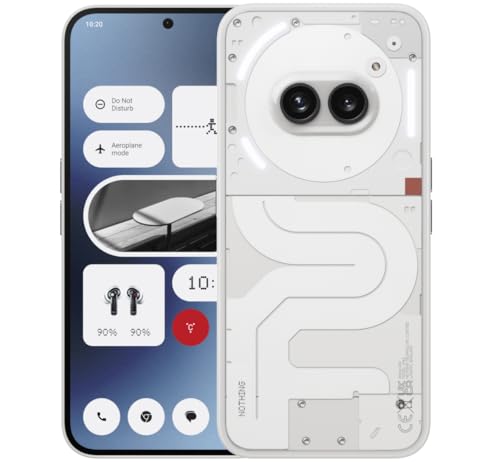
Nothing Phone (2a) — A distinctive mid-range Android phone with a clean software experience and a bright display, aimed at buyers who want something different from the default options. Check price on Amazon.

OnePlus 12R, 8GB RAM+128GB, Dual-SIM, US Factory Unlocked Android Smartphone, 5500 mAh… — A performance-focused Android model with fast charging and a large battery, suited to gamers and heavy users who still want to stay below flagship territory. Check price on Amazon.

Samsung Galaxy S24 Ultra Cell Phone, 256GB AI Smartphone, Unlocked Android, 200MP, 100x… — A full flagship Android phone with the most capable camera system and stylus support in its line, for buyers who want one device to do everything. Check price on Amazon.

Apple iPhone 15, 128GB, Black – Unlocked (Renewed Premium) — A recent iPhone in renewed premium condition, a sensible route into the Apple ecosystem for buyers comfortable with a certified refurbished handset. Check price on Amazon.
Start With Your Carrier and Network
Before comparing a single specification, confirm which networks the phone supports. In the United States the three national carriers use overlapping but not identical frequency bands, and an unlocked phone that works beautifully on one network can lose 5G coverage or even basic calling features on another. Check the exact model number against your carrier’s compatibility list, because the same phone name can hide regional variants with different radios.
Decide also whether you want an unlocked phone or a carrier model. Unlocked phones cost more up front but can move between carriers, avoid carrier bloatware and usually receive updates on the manufacturer’s schedule rather than the carrier’s. Carrier models often come with installment deals and Wi-Fi calling or visual voicemail tuned to that network. Neither is automatically better; the right answer depends on whether you value flexibility or a subsidised monthly deal.
If you travel internationally, look for broad band support and eSIM capability. Dual SIM support, whether through two physical slots or a physical slot plus eSIM, makes it far easier to add a local data plan abroad without losing your home number. Frequent travellers should treat this as a core feature rather than a bonus.
Pick an Operating System You Will Enjoy Living With
The Android versus iPhone decision shapes everything from which apps you can install to how your phone talks to your computer, watch and car. iPhones offer long software support, a tightly controlled app store and seamless pairing with other Apple devices, but limited customisation. Android offers far more hardware choice at every price, deeper customisation and, on many models, expandable storage or dual SIM slots that iPhones lack.
Think about the services you already pay for. If your household runs on iMessage, FaceTime and iCloud, switching to Android means migrating habits and group chats. If you rely on Google services, sideloading apps or a specific Android-only tool, the reverse applies. Most people are happiest staying in the ecosystem they already know unless a specific feature pulls them across.
Also check the update promise. Modern flagships from the major brands now commit to many years of operating system and security updates, while cheap phones may receive only one or two years. A phone that stops receiving security patches becomes a liability for banking and work apps long before its hardware wears out, so update support is a genuine buying criterion, not fine print.
Choose the Screen Size and Type That Fit Your Hands
Phone screens cluster between about six and just under seven inches measured diagonally, and the difference between the ends of that range is the difference between one-handed use and a two-handed device. If you read, watch video or play games for long stretches, the larger panel is worth it. If you use your phone one-handed on a train or while carrying shopping, a compact model will annoy you far less over two or three years of ownership.
Panel technology matters too. OLED screens produce perfect blacks and better contrast, and they sip power when showing dark interfaces. LCD panels on cheaper phones can still look perfectly good in daylight but wash out at angles and cannot match OLED contrast. Refresh rate is the other headline number: a 90Hz or 120Hz display scrolls noticeably more smoothly than a standard 60Hz panel, and once your eyes adjust, going back feels sluggish.
Brightness is the specification people underestimate. A screen that peaks at a modest brightness is fine indoors but becomes a mirror outside on a sunny day. If you use your phone for navigation, photography or work outdoors, prioritise a bright panel over a marginal resolution increase you will never see.
How to Choose a Smartphone Step by Step
Step 1: Write down your three real priorities
List what you actually do most: photography, gaming, battery endurance, compact size, work apps or simply calls and messaging. This list decides where your money goes and stops you paying for a headline camera you will use twice a year.
Step 2: Set your storage floor
Check how much storage your current phone uses, then buy at least double. Photos, videos and app caches grow every year, and a phone that fills up in month ten will frustrate you for the rest of its life. Cloud storage helps, but local space is what keeps the phone fast and your camera always ready.
Step 3: Compare processors by generation, not just name
A recent mid-range chip usually beats a flagship chip from several years ago in efficiency and modem quality. Look up which generation a phone’s processor belongs to and favour newer silicon, especially if you plan to keep the phone for three years or more.
Step 4: Check battery capacity and charging speed together
A large battery with slow charging can still leave you stranded if you forget to charge overnight, while a slightly smaller battery with genuinely fast charging recovers most of a day’s power during breakfast. Consider both numbers alongside your routine.
Step 5: Read the update policy before you buy
Confirm how many years of operating system and security updates the manufacturer promises for that exact model. This single check predicts how long the phone stays safe and compatible with banking and work apps.
Step 6: Handle the size class in a shop if you can
Weight and width matter more than diagonal inches on paper. Even five minutes holding a similar-sized phone tells you whether it will disappear into your pocket or fight you every day.
Cameras: Look Past the Megapixel Count
Camera marketing leads with megapixels, but sensor size, lens quality and image processing decide real results. A phone with a large main sensor and good optical stabilisation will take cleaner night photos than a higher-megapixel rival with a tiny sensor. Look for optical image stabilisation on the main camera, a genuinely useful ultrawide, and a telephoto lens if you photograph people, events or wildlife at a distance.
Video shooters should check stabilisation quality and maximum recording resolution they will realistically use, plus microphone quality, which budget phones often neglect. If you mostly share photos to social apps, almost any modern mid-range phone is already good enough, and you are better off spending the difference on storage and battery.
The most honest test is sample photos in the conditions you shoot: indoor family photos, evening streets, pets that will not sit still. Reviews that include full-resolution samples in mixed light tell you far more than specification tables.
Battery Life, Charging and Build Quality
Battery capacity measured in milliamp hours is a rough guide only, because screen size, processor efficiency and software tuning change real endurance dramatically. Independent battery tests that loop video, browsing and calls are a better predictor than the raw number. As a rule, heavy users should favour phones praised for two-day potential, because batteries degrade and a phone that barely lasts a day when new will not last a day in year three.
Build quality shows up in water resistance ratings, frame materials and how the phone survives drops. An IP-rated phone shrugs off rain and splashes that can kill an unrated one. Glass backs enable wireless charging but crack more readily than plastic, so decide whether you will use a case from day one; if you will, back material matters much less.
Finally, check repair options. Screens and batteries are the two parts most likely to need service, and a phone from a brand with local authorised repair and available parts will be cheaper to keep alive than an obscure import, however impressive its specification sheet looks.
Worked Examples: Matching Phones to Real People
Consider a parent who photographs children constantly, uses the phone for school and work communication, and keeps phones for four years. Their priorities rank camera consistency and update support first, battery second, and gaming performance nowhere. The right choice is a flagship or upper mid-range phone with a proven main camera, at least 256GB of storage for years of family video, and the longest update commitment available — even if its processor is not the absolute fastest, because their bottleneck is photographs and longevity, not frame rates.
Contrast a delivery driver who navigates all day, works outdoors in all weather and charges in short bursts between jobs. Their ranking inverts completely: screen brightness and battery endurance first, fast charging second, durability and water resistance third, camera a distant fourth. A rugged or battery-focused mid-range phone serves them better than any flagship, and the money saved buys a quality vehicle mount, a second charger for the cab and a case built for site work.
A student presents a third pattern: messaging, social media, music, lectures and the occasional photo, on a tight budget, with a high statistical chance of a cracked screen. Their best buy is an honest mid-range phone with a good screen and battery, bought with a case and protector on day one, where the update promise is checked carefully because a phone abandoned by its maker in year two is no bargain at any price. The lesson across all three: the correct phone is a function of a life, not of a ranking table.
The Two-Minute Shop Test
When you are holding candidate phones, run the same quick routine on each. Open the camera and take three photos: a person, a detailed scene and the brightest window in the shop, then zoom into each result. Type a sentence on the keyboard to feel the size and the vibration feedback. Play thirty seconds of a video you know well and listen to the speakers. Scroll a long web page quickly to judge screen smoothness, then hold the phone one-handed and reach for the top corner with your thumb.
This routine tests the four things you will experience thousands of times — camera, keyboard, screen and speakers — in the proportions you will actually experience them. Specification differences that survive this test are real; those that vanish were marketing. Shops expect this behaviour from serious buyers, and five honest minutes per phone prevents years of low-grade dissatisfaction.
Finally, before paying, confirm three facts in writing for the exact model: the update commitment in years, the storage size you are actually buying rather than the range’s headline, and the return window. Phones are kept too long and used too hard for buyer’s remorse to be an acceptable strategy, and every one of those facts is checkable in the moment and painful to discover later.
Understanding the Specification Sheet Without Fear
A phone specification sheet looks intimidating because it mixes the vital with the decorative in a single list, presented as if all entries were equal. They are not. Sort them into three piles as you read. The first pile decides ownership: network bands, operating system, storage size, update commitment in years, and battery test results from independent reviews. A failure in this pile disqualifies the phone no matter how it performs elsewhere, because these are the things you cannot change, upgrade or work around after purchase.
The second pile shapes daily experience: screen brightness and refresh rate, the camera system’s sensor sizes and lens set, processor generation, and charging speed. These deserve comparison between your final candidates, ideally through hands-on time and measured reviews rather than headline figures. This is the pile where spending a little more is often genuinely felt, and where the differences between adjacent models in a range actually live.
The third pile is decoration: extreme megapixel counts quoted without sensor sizes, digital zoom figures, peak brightness numbers that apply to a tiny patch of screen for seconds, and trademarked names for ordinary features. Decoration is not harmless — it exists to move phones from the second pile’s honest comparison into impulse — but once recognised it loses its power. Read every spec sheet with the three piles in mind and the document transforms from a blizzard into a checklist.
One more habit protects you: verify the exact model number’s specifications rather than the range’s. Manufacturers sell the same phone name with different storage, memory, chipsets and even band support in different regions and channels, and the sheet you read online may describe a sibling rather than the unit in the box in front of you. The model number on the packaging is the phone; everything else is a description of its family.
Finally, remember that specifications describe a phone on its first day. Ownership is measured in years, and the specifications that predict year three — update commitment, battery size headroom, storage headroom, build quality — are systematically underweighted by buyers dazzled by day-one performance figures. Choose for the phone’s whole life and the specification sheet becomes what it should have been all along: a servant to the decision, not its master.
Common Mistakes to Avoid
- Buying on megapixels alone. Camera quality comes from sensor size, lenses and processing. A well-reviewed mid-range camera beats a high-megapixel budget sensor in almost every real photo.
- Choosing too little storage. Storage cannot be added to most modern phones. Running out mid-holiday or being forced to delete apps is the most common regret among phone buyers.
- Ignoring the update promise. A cheap phone abandoned after one year of patches is not a bargain if you bank or work on it. Update support is part of the price.
- Skipping carrier compatibility checks. An imported or wrong-variant phone may lose 5G bands or calling features on your network. Verify the exact model number first.
Pro Tips
- Buy the previous flagship generation after a new launch if you want flagship cameras and build for mid-range money, but check how many update years remain.
- If you keep phones for four years or more, prioritise battery size and update support over small performance differences you will never feel.
- A good case and screen protector bought on day one cost far less than one screen replacement; factor them into your budget from the start.
Matching the Display to How You Actually Read, Watch and Play
A specification sheet lists size and resolution, but your eyes experience brightness, refresh behaviour and outdoor legibility. If you read news on a train platform in full sun, peak brightness outdoors matters more than a small jump in resolution you will never notice at arm’s length. Hold two candidate phones side by side, open the same white web page, and turn both to maximum brightness near a window. The phone that stays readable without squinting is the one you will thank yourself for on holiday, at a festival, or while following walking directions in a bright city centre.
Refresh rate deserves the same practical test. A higher refresh panel makes scrolling through long articles, social feeds and maps feel smoother, and it can make supported games feel more responsive. It does not make a slow processor fast, and it costs battery when left at its highest setting all day. Many phones now adjust the rate automatically, dropping it for static reading and raising it for scrolling or gaming. If you mostly read, message and take photos, treat a high refresh rate as a pleasant extra rather than a reason to stretch your budget. If you play fast-paced games daily, put it near the top of your list and check that the games you play actually support higher frame rates on that model.
Colour behaviour is the third display trait people overlook. Some panels are tuned for vivid, saturated colour that makes video look dramatic but shifts skin tones; others offer a natural mode that photographers prefer because what they see while editing matches what they later print or share. Check whether the phone lets you switch colour profiles, schedule a warmer night mode, and dim comfortably for reading in bed without flicker discomfort. People who are sensitive to screen flicker should look for high-frequency dimming information in detailed reviews and, better still, spend ten minutes reading on the exact model in a dim corner of a shop before deciding.
A quick display checklist you can use in a shop
- Open a white page and a dark page to judge brightness, contrast and any tint at low brightness.
- Scroll a long article quickly and slowly to feel whether motion stays smooth or judders.
- Type a paragraph to check touch response at the edges, especially on curved screens.
- Play a short video with faces in it to see whether skin tones look natural or pushed.
- Turn on the blue-light or night mode and confirm text stays sharp rather than muddy.
Performance in Year Three, Not Just Week One
Almost every new phone feels fast on the day you unbox it. The honest question is how it will feel after two years of app updates, a photo library that has doubled, and an operating system that has grown heavier. Processor generation matters here because newer chips do the same work with less heat and less battery, and they usually receive driver and feature support for longer. A slightly older flagship chip often ages better than a brand-new entry-level chip, even when their benchmark headlines look close, because the flagship part has stronger graphics, faster storage support and better sustained performance under load.
Memory works the same way. More RAM keeps more apps alive in the background, so switching between maps, messages, a browser and a camera feels instant instead of restarting each app. Too little RAM shows up first as small annoyances: a podcast app reloading, a form losing its contents when you switch away to check a code, or the camera taking a moment longer to open. You do not need the maximum configuration, but buying one step above the base memory tier is one of the cheapest forms of future-proofing, particularly if you keep phones for three years or longer.
Storage speed is the quiet third factor. Faster storage makes large games load sooner, makes burst photo saving feel seamless, and speeds up the indexing that happens after a big system update. When you compare two phones that look equal on paper, prefer the one with the newer storage standard and the newer processor generation over the one that wins only on a single headline number such as camera megapixels or battery capacity measured in isolation.
Camera Systems: Judging the Whole Kit, Not One Lens
Modern phones carry several cameras, and the weakest one is usually the one you end up disappointed by. The main camera gets the best sensor and stabilisation, while the ultra-wide and telephoto modules often use smaller sensors that struggle indoors. Before you buy, decide which lens matches your life. Parents photographing school plays from the back of a hall need genuine optical reach. Travellers who love architecture and landscapes will use an ultra-wide every day. Friends who mostly shoot birthdays, food and pets at home need a main camera that handles warm indoor light and moving subjects without turning faces into watercolour smears.
Video deserves a separate decision because it stresses a phone differently. Long clips at high resolution generate heat, fill storage quickly and reveal weak stabilisation the moment you walk while filming. If you record concerts, sports or family events, look for reports of how long the phone can record before it warns about temperature, how clean the audio sounds in wind, and whether stabilisation stays smooth when you pan. A phone that shoots beautiful ten-second clips but overheats at minute eight is the wrong tool for a graduation ceremony.
Finally, consider the front camera and the software around it if you take video calls for work. A front camera that handles a bright window behind you without turning your face into a silhouette will make you look more professional than any background blur effect. Test it facing a window, check how quickly it focuses when you move, and confirm the microphone picks up your voice clearly at a normal laptop distance, because colleagues will judge that combination every single day.
Ownership Costs and Habits Nobody Mentions at the Till
The purchase price is only the start of what a phone costs you. Cases and screen protection for unusual or curved designs can be harder to find and slower to arrive, which matters the first time you crack a screen far from home. Repair pricing also varies sharply between brands: a mainstream model with widely available parts can often be fixed locally in a day, while an exotic import may need to be posted away for weeks. Before you commit, search for the cost and availability of a screen replacement and a battery replacement for your exact model in your country.
Your habits are the other half of ownership. If you routinely charge overnight on a slow charger, keep the phone out of direct sun in the car, and store it with some charge rather than empty when it sits in a drawer, the battery will age gracefully. If you game while charging in a hot room every evening, even the best battery chemistry will fade early. Choosing a phone with sensible charging controls, such as an option to limit the maximum charge or to slow charging overnight, gives you tools to match the phone to your routine instead of fighting it.
Resale and trade-in value complete the picture. Popular models from major brands hold value because demand for them second-hand is strong and parts remain available. A niche model may be wonderful to use yet worth very little in three years, which changes the true cost of your next upgrade. None of this should scare you away from a phone you love, but it should be priced into the decision alongside the camera samples and benchmark charts that dominate most reviews.
Accessories, Ecosystem and the Second Devices in Your Life
A phone rarely lives alone. It pairs with earbuds on the train, a watch on your wrist, a tablet on the sofa, a laptop at work and a television in the evening, and the smoothness of those relationships is a real feature that no specification table captures well. If you already own wireless earbuds, a smartwatch or a computer from one maker’s ecosystem, a phone from the same family will usually connect faster, share files more easily, hand off calls and messages between devices, and unlock or authenticate its companions with less friction. None of that makes the rival phone bad; it simply means switching ecosystems costs more than switching handsets, and the price of that friction should be counted honestly alongside the camera and the screen when you compare two otherwise equal models.
The same logic applies to the small accessories you will buy in the first month. Cases, screen protectors, magnetic mounts, car holders, charging stands and spare cables are all cheaper and easier to find for mainstream models, and they arrive faster when something breaks far from home. A phone with an unusual shape, a rare size or a short production run can leave you waiting weeks for a simple case or paying a premium for the one seller who stocks it. Before you fall for an exotic model, spend two minutes checking that the three accessories you know you will need actually exist for it at sensible prices, because that small check predicts a surprising amount of your ownership satisfaction over the next three years.
Smart home control is the newest member of this ecosystem family. If your home runs on a particular assistant, lighting system or security platform, confirm that the phone you are considering supports its apps fully, including background permissions, notification reliability and widget behaviour. A phone that handles your home beautifully is worth more to you than a technically superior rival that needs workarounds to dim the lights, and these daily micro-interactions, repeated hundreds of times, are what ownership actually feels like once the excitement of a new device has faded into routine.
Reading Reviews Without Being Misled by Them
Reviews are essential and treacherous in equal measure, because every reviewer tests a phone against their own life and then reports universal-sounding conclusions. A reviewer who games heavily will call a phone slow that a messaging-and-photos owner would call instant. A photographer reviewer will forgive a mediocre battery that a travelling salesperson would call a deal-breaker. The defence is to read reviews for evidence rather than verdicts: look at the full-size camera samples of scenes like yours, the battery test that resembles your usage, and the specific complaints in long-term reviews written months after launch, when software updates have either fixed the launch problems or revealed the permanent ones.
Pay particular attention to what reviewers mention only in passing, because those asides are often the ownership truths. A sentence about a fingerprint reader failing with wet hands matters if you cook, swim or work outdoors. A remark about a phone being slippery without a case matters if you dislike cases. A note that a maker’s software shows promotional notifications matters if advertising on your own device offends you, as it reasonably should. Collect these details across several reviews and a pattern emerges that no benchmark chart can provide: whether people who live with this phone still like it in month six, when the launch excitement is a memory and the phone has become furniture in their lives.
Finally, distrust any single number that claims to summarise a phone. Benchmark scores measure one kind of speed under laboratory conditions, camera scores compress art into arithmetic, and battery tests standardise a day that resembles nobody’s actual day. Use the numbers to eliminate the genuinely weak, then decide among the survivors with your hands, your eyes and your own list of priorities. That order of operations, evidence first and scores last, is how experienced buyers consistently end up with phones they keep happily for years rather than phones that won arguments on the internet.
The Final Decision: A Calm Method for Choosing Between Two Good Phones
Most buyers do not fail by choosing a bad phone; they stall by trying to choose perfectly between two good ones. When your shortlist is down to two, list the five moments in your week when a phone matters most: perhaps the school run photographs, the long commute, the video calls with family abroad, the navigation on work trips, and the evening reading in bed. Score each phone informally against those five moments using everything you have learned, and notice that one phone usually wins three or more of them clearly. That phone is your answer, even if the other wins a benchmark or carries a more impressive number somewhere you will never look again.
Then check the exit ramps before you commit. Confirm the return window and test the phone inside it in your real environments. Confirm the update end date one final time from the maker’s own published policy rather than a shop’s summary. Confirm the total price with the storage tier, case and charger you actually need, so the comparison that decided you was the honest one. These three confirmations take minutes and protect years, and they are the difference between a decision you can relax into and one you keep reopening every time a rival phone appears in an advertisement.
Once you have chosen, stop researching. Every phone you did not buy will win some comparison somewhere every week for the entire time you own yours, and reading those comparisons is a tax on satisfaction with no possible benefit. A well-chosen phone disappears into your life and becomes a tool you trust, which was the entire purpose of the careful process this guide has walked through. Choose by your life, verify by your environments, and then go and live the life the phone was bought to support, because that life, not the handset, was always the point.
Size, Weight and One-Handed Life: The Ergonomics Nobody Reviews Properly
Phones are held for hours, yet size is usually reduced to a screen measurement in a table. What matters is the combination of width, weight, balance and surface finish in your actual hand, with your actual case, during your actual longest sessions. A narrow phone that is slightly taller is often easier to live with than a shorter, wider one, because thumbs travel vertically more willingly than they stretch horizontally. Weight distribution matters as much as weight itself: a top-heavy phone tires the fingers that prop it from below during reading, while a balanced one disappears. If you read, browse or message one-handed on trains and in queues, make one-handed reach a headline criterion and test it in the shop with the case you intend to use fitted, because a case changes width, grip and balance all at once.
Small-handed buyers, buyers with arthritis or grip difficulties, and buyers who run or work physically should treat the largest phones as a different product category altogether, not as a default. A phone that must be shuffled in the hand to reach its corners will eventually be dropped by those corners, and its camera and screen advantages are irrelevant in the repair shop. Conversely, buyers with poor eyesight may find a large, bright display genuinely enabling, worth every gram, because text can be larger without becoming cramped. Ergonomics is personal in the literal sense: it is about your body, and no reviewer shares it, so your own ten minutes of handling outweighs a month of other people’s opinions.
Trade-Ins, Timing and Getting the Most From the Moment You Buy
When you buy can be worth as much as what you buy. Prices step down when successors are announced, during the big sale seasons, and quietly a few months into a model’s life when launch demand has faded and retailers compete again. Your old phone is part of the same calculation: trade-in values are highest while it is still a current-feeling model with a healthy battery and an unmarked screen, and they fall off a cliff once its successor’s successor arrives. If an upgrade is coming within the year anyway, selling or trading the old phone at the top of that curve, rather than after it, can fund a storage tier or a better model in the new one.
Prepare the old phone for its valuation the way you would prepare a car for sale. Back it up completely, photograph its condition honestly, gather its box and original accessories if you kept them, and know its battery health figure before a shop tells you their version of it. Unlock it from your carrier if you are entitled to, because an unlocked phone is worth more to every subsequent buyer. Then erase it properly, signing out of accounts before the reset, only after the new phone has been lived with and verified, as the backup guidance insists. A calm, documented hand-over protects your data and maximises your price at the same time.
Finally, resist the launch-day stampede unless your current phone has genuinely failed. The first weeks of a model’s life carry its highest prices, its least-tested software and its scarcest accessories, while the reviews that matter, the long-term ones, have not yet been written. A buyer who waits a season buys the same phone with better information, better prices and a case that actually exists. Patience is the last specification on the sheet, the one no manufacturer prints, and over a lifetime of phones it is worth more than any single feature this guide has discussed.
Related Guides
- best smartphones under 300 for balanced everyday picks
- best smartphones under 500 compared
- best smartphones for photography
- best smartphones for beginners
- best smartphones for seniors
- our smartphone buying guide
- android vs iphone compared
- flagship vs mid range smartphone explained
Frequently Asked Questions
How much storage do I really need on a smartphone?
For most people 128GB is the sensible minimum and 256GB is the comfortable choice for a phone kept three years or more. Heavy photo and video shooters, and anyone who downloads lots of offline media or large games, should look at 512GB or choose a model with expandable storage. Check your current phone’s usage in settings and buy at least double that figure to leave room for growth.
Is a flagship phone worth it over a mid-range one?
A flagship buys you the best cameras, the brightest screen, the fastest processor, premium materials and the longest update support. For everyday messaging, browsing, social apps and casual photos, a good mid-range phone feels nearly identical in use. The flagship premium makes sense if you photograph a lot, game seriously, or keep phones for four or more years and want the hardware to stay fast throughout.
Should I buy unlocked or through my carrier?
Unlocked phones give you freedom to change carriers, avoid carrier-installed apps and often receive updates sooner, but you pay the full price up front or through the manufacturer’s financing. Carrier phones spread the cost monthly and may include trade-in deals, but lock you into that network’s plans and update schedule. If you travel or switch carriers often, unlocked is the safer long-term choice.
How long should a smartphone last?
With a battery replacement at some point, a well-chosen phone can serve four to five years. The practical limit is usually software: once security updates stop, banking and work apps become risky to use. Choosing a model with a long published update commitment, protecting it with a case, and avoiding chronic full discharges all extend its useful life well beyond the typical two-year upgrade cycle.
Does 5G matter when choosing a phone?
Yes, but not as a headline feature to pay extra for, because nearly every current phone includes 5G. What matters is band support for your specific carrier, since a phone missing your network’s key bands will fall back to slower connections. In areas with strong 5G coverage you will see faster downloads and better capacity in crowded places; in rural areas 4G performance still dominates daily experience.
Are refurbished phones a good idea?
Certified refurbished phones from the manufacturer or a reputable programme can be excellent value, arriving tested, with a warranty and a healthy battery. The risks sit with uncertified sellers: unknown battery wear, non-original screens and no meaningful warranty. If you buy renewed, choose a programme that states its battery health standard and return policy clearly, and check the phone thoroughly during the return window.

