Disclosure: As an Amazon Associate, kajuandouglas.com earns from qualifying purchases. Links to Amazon on this page are affiliate links; they cost you nothing extra. Listing details such as price and availability change often, so check the current Amazon listing before you buy.
Learning how to choose a headset starts with a simple truth: the best headset for a call-centre shift, a competitive shooter and a long-haul flight are three different products, and the marketing on the box rarely tells you which job a model was really built for. Shoppers get lost because headsets are sold on driver size and battery claims, while the things that decide whether you still like the headset in month three are fit, microphone quality, connection type and how the controls behave when you are mid-call or mid-match.
This guide walks through the decision in the order that actually matters. You will first pin down your main use, then work through fit and form factor, connection options, microphone behaviour, sound character and the small quality-of-life details that separate a headset you tolerate from one you reach for every day. By the end you will be able to read any product page and know within a minute whether that headset belongs on your shortlist or not.
Quick answer: Start with your main use (work calls, gaming, or both), then choose the connection that matches your devices (USB for a desk PC, 2.4 GHz wireless for gaming, Bluetooth for phones and laptops), then judge fit and microphone quality before sound. A comfortable headset with a clear mic beats a great-sounding one you cannot wear for an hour.
How to Choose a Headset
In this guide
Gear for This Guide

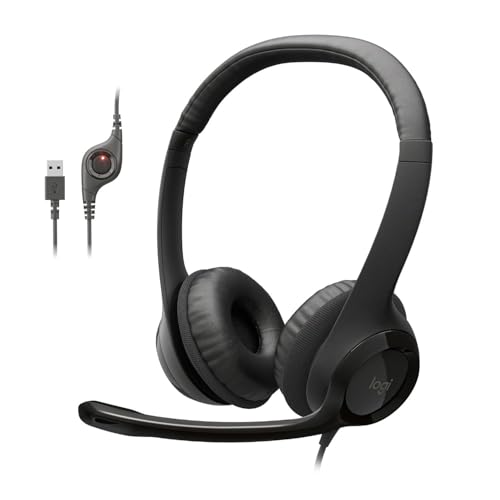
Logitech H390 Wired USB-A Headset — A wired USB option built for calls and desk work, with a noise-cancelling microphone and in-line controls — a sensible reference point for the work-first category. Check price on Amazon.

HyperX Cloud III Wired Gaming Headset — A wired gaming pick with USB-C, USB-A and 3.5 mm connectivity plus memory-foam cushioning, showing how one headset can cover PC and console without a battery to manage. Check price on Amazon.

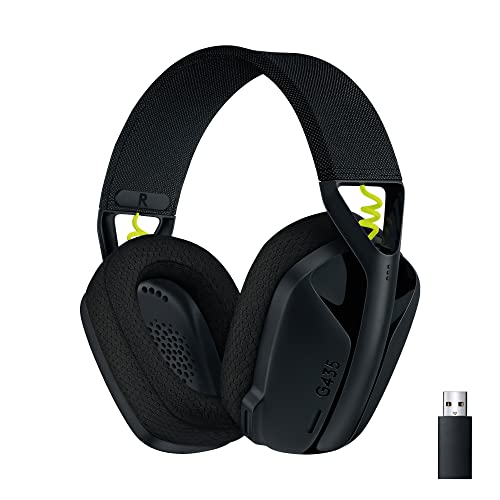
SteelSeries Arctis Nova 7 Wireless — A multi-platform wireless gaming headset that mixes 2.4 GHz and Bluetooth, useful if you want game audio and phone calls in the same pair. Check price on Amazon.

Jabra Evolve2 65 Wireless Headset — An office-focused wireless stereo headset with a USB-A connection for a computer, aimed at people whose day is mostly meetings. Check price on Amazon.
Step 1: Start With Your Main Job for the Headset
Every headset is a compromise, and the compromise only makes sense once you name the main job. A work headset prioritises a microphone that keeps your voice clear in a noisy room, light clamping force for eight-hour wear, and controls you can find without looking. A gaming headset prioritises low-latency audio so footsteps and callouts land in time, a detachable or retractable mic, and software for balancing game and chat volume. A mixed-use headset tries to do both and usually lands in the middle on each — which is fine, as long as you know that is the trade you are making.
Write down your split honestly. If you spend thirty hours a week in meetings and three hours gaming, buy for the meetings and let gaming be the secondary use; the reverse logic applies for a streamer who takes the occasional call. Shoppers who skip this step end up comparing a call-centre headset against a gaming headset on sound quality alone, which is how people end up with a booming, bass-heavy mic sound on work calls. Our roundups are split the same way, so start with our best headsets for work roundup if meetings dominate, or the gaming-focused lists linked further down if play comes first.
Step 2: Pick the Form Factor Your Head and Ears Prefer
Over-ear headsets surround the ear with a cushioned cup. They isolate better, spread pressure over a larger area and usually sound fuller, but they are warmer in summer and bulkier to store. On-ear models rest on the ear itself: lighter and cooler, but they leak more sound and can ache after a couple of hours. Single-ear (mono) headsets, common for driving and dispatch work, leave one ear open to the room — the right call when hearing your surroundings matters more than immersion.
Fit details matter as much as the broad category. Look for a headband with real padding and adjustment range if you have a larger or smaller head, ear cups that rotate to lie flat, and replaceable ear pads, because pads are the first part to wear out. Glasses wearers should favour soft, deep cushions that do not press the arms of the frames into the head. If you can, judge weight in grams rather than adjectives: a headset that feels fine for ten minutes in a shop can become a neck ache at hour six, and lighter models with good weight distribution win long sessions.
Step 3: Choose the Connection That Matches Your Devices
Wired USB is the desk worker’s default: it carries audio and microphone on one plug, needs no charging, and computers handle it predictably. A 3.5 mm plug is the universal fallback — it works with controllers, phones with a jack and older laptops — but some laptops combine mic and headphone into one socket, so a wired headset with a single plug or a splitter may be needed. Bluetooth pairs with almost everything modern and frees you from the desk, though standard Bluetooth adds a little delay that competitive gamers can feel.
For gaming, a dedicated 2.4 GHz USB dongle is the wireless connection to look for, because it is designed for low latency and a stable link across a room. Console support varies more than the boxes suggest: Xbox uses its own wireless protocol, so check that a wireless headset explicitly supports your console rather than assuming Bluetooth covers it. If you move between a PC, a console and a phone, shortlist models that list all three connection paths. The shortlist in the best wireless headsets for PC is a good example of picks built around that flexibility.
Step 4: Judge the Microphone Like It Matters — Because It Does
The microphone is the half of the headset other people experience, and it is where cheap headsets cut corners first. A boom mic positioned near the corner of your mouth almost always beats microphones built into an ear cup, because distance from the mouth is the biggest factor in clarity. Noise-cancelling microphone technology reduces steady background sounds like fans and traffic; it cannot fully remove a barking dog or a keyboard, but a good implementation keeps your voice forward and intelligible.
Practical mic features to look for: a mute you can trigger by flipping the boom up or pressing a button you can find blind, a sidetone or mic-monitoring option so you can hear your own voice and stop shouting, and a detachable boom if you also want to use the headset for music on the move. If your work involves recorded calls or streaming, put microphone quality above sound quality in your budget split — listeners forgive average game audio far sooner than a muffled voice. The picks in headsets with a microphone picked for work were chosen with exactly that priority.
Step 5: Read Sound Signatures Without Falling for Driver-Size Marketing
Driver diameter is the most advertised and least useful sound specification. A well-tuned smaller driver routinely beats a poorly tuned large one, and the number tells you nothing about how the headset balances bass, voices and treble. What you actually want to know is the tuning direction: gaming headsets often lift bass and treble for impact and footstep detail, work headsets tune flatter so voices sound natural over long calls, and music-first headphones aim for a balance that depends heavily on taste.
Virtual surround sound can help with direction in games, but it is processing, not magic, and a good stereo image is more important than a surround badge. If a headset offers an equaliser in its app, that is a genuine plus: a small cut to boomy bass or a lift to voice frequencies fixes most complaints people have in the first week. Be wary of any headset whose reviews all praise ‘huge bass’ if your main use is calls — that tuning is exactly what makes voices sound muddy at low volume.
Step 6: Battery, Controls and the Details You Touch Every Day
Wireless buyers should think in terms of their longest day, not the headline number. If you wear a headset for ten hours, a model that comfortably covers several days between charges changes your routine — you stop thinking about the cable entirely. Also check what happens when the battery does die: some headsets keep working over a cable, others go silent until they have charged, which is a nasty surprise mid-meeting. Charging speed and whether the port is USB-C (the same cable as your phone, most likely) are small details with outsized daily impact.
Controls deserve the same scrutiny. A physical volume dial or wheel beats touch panels for blind adjustment, a dedicated mute button beats a keyboard shortcut, and multipoint Bluetooth — staying connected to your laptop and phone at once — is the single most convenient feature for hybrid workers. Finally, check the warranty and whether ear pads and cables are sold as spares. A headset is a wear item; brands that sell the parts expect you to keep it for years.
Common Mistakes When Choosing a Headset
- Buying for the advertised use instead of your real one — a ‘gaming’ headset for an all-day meeting job usually means a heavy frame and a mic tuned for excitement, not clarity.
- Ignoring console wireless compatibility and discovering at home that Bluetooth does not connect to your controller or console the way you assumed.
- Choosing on driver size or battery headline numbers instead of fit, microphone quality and control layout.
- Forgetting glasses, hairstyles and head size: clamping force that is fine for one person is a headache for another, literally.
- Skipping the return-window test — wear any new headset for a full workday in the first week, while returning it is still easy.
Pro Tips for a Shortlist That Survives Contact With Reality
Narrow to three models, then compare them on the four things you cannot change later: fit, microphone, connection and controls. Sound can be equalised, pads can be swapped, but a headset that hurts or a mic that makes you repeat yourself will annoy you every single day. If two models tie, choose the one with replaceable pads and a cable-in-the-box fallback, because those two features quietly extend a headset’s useful life by years.
Also decide your platform order before you shop: list your devices by hours used, and make sure the headset serves the top two perfectly rather than all four adequately. That one discipline prevents most regret purchases. When you are ready to compare concrete picks by budget and platform, the best headsets under 100 in one list collects the current favourites in one place, and the deeper criteria in our full headset buying guide will help you weigh them.
A Worked Example: Choosing for Three Different Weeks
Consider three buyers. The first works from a small flat, six hours of video calls a day, with a partner working in the next room. Her priorities write themselves: a wired USB or multipoint wireless headset, a strong noise-cancelling boom, light over-ear comfort, and no gaming features at all. The second plays competitive shooters four evenings a week on PC and takes the occasional work call. His list inverts hers: low-latency wireless or wired, game and chat balance, a detachable mic that sounds good enough for calls, and comfort tuned for three-hour sessions rather than eight. The third splits the week evenly and travels: she needs Bluetooth multipoint, a mic that folds away, and a case in the box.
Notice that none of the three lists mentions driver size, and only one mentions sound tuning at all. That is what a mature shortlist looks like: it is built from the texture of an actual week. If your own list still reads like a specification sheet, translate each spec into the moment it serves — ‘multipoint’ becomes ‘the call that arrives on my phone while I am presenting from my laptop’ — and keep only the specs that survive translation.
Trying Before You Commit: the Return-Window Method
Because fit is personal and microphones are room-dependent, the smartest buying tool in this category is a generous return window used deliberately. Order one headset — two at most — and put it through a scripted first week: a full workday of wear, your longest gaming session, a call from your noisiest room, and a call to the friend who will honestly tell you how you sound. Note where it hurts, what you fumbled for, and what you never used. That week of evidence outweighs any review, because it is measured on your head, in your rooms, with your voice.
If the headset passes, keep it and stop shopping; the category will always contain a newer model, and contentment is a feature. If it fails, it will usually fail on one clear criterion, and that failure is the most useful shopping information you will ever get — it tells you exactly which criterion your next choice must fix, and which of your other requirements were already satisfied. Buyers who use the return window this way rarely regret a headset purchase, because the decision ends up evidence-based rather than hope-based.
What About Headsets for Children and Shared Households?
Two special cases deserve a mention. For children, volume-limiting designs and durability outrank everything: look for headsets built for school or family use, with reinforced cables and a fit sized for smaller heads, and accept simpler sound as the right trade. For shared household headsets — the pair by the family PC that everyone borrows — prioritise a wired connection (nothing to pair or charge), a sturdy build, washable pads and a microphone that folds away, because shared gear lives a harder life than any personal headset and gets cleaned less often than it should.
In both cases the framework from this guide still applies; only the weights change. That is the real value of learning how to choose rather than memorising a recommendation: the criteria travel to every future purchase, including the ones nobody has written a roundup for yet.
Headsets for Specific Ears: Hearing, Sensitivity and Volume
A few buyers have requirements that deserve explicit attention rather than a footnote. If you are sensitive to pressure or prone to headaches, weight and clamping force become your first criteria, and the lightest over-ear or a well-designed on-ear model may serve you better than any flagship. If you wear hearing aids, over-ear cups can cause feedback with some aid types, while bone-conduction and single-ear designs sidestep the issue entirely — worth a conversation with your audiologist about what geometry works with your aids. If you listen in loud environments, remember that isolation is a hearing-health feature: a well-sealed closed headset lets you listen at lower volumes than a leaky one fighting the room, and that difference, compounded over years of commutes, matters more than any specification on the box.
Volume limiting is not only for children. Anyone who has caught themselves creeping the volume up through a long day is a candidate for a headset whose maximum output is sane by design, or for the discipline of the seal check: if you need maximum volume to hear clearly, fix the seal or the environment before accepting the level. A headset chosen well protects the hearing it entertains, and the buyers who think about this at purchase time are the ones still enjoying the same headset — and the same hearing — years later.
The Environmental and Practical Footnotes
Two practical matters round out a grown-up shortlist. The first is repairability and support in your country: a headset whose pads, cables and dongles are stocked locally will outlive an exotic import with better specifications, because the parts that fail are mundane and the fix is only easy if the part exists nearby. The second is what happens at the end: headsets contain batteries and electronics that should not go in household waste, and manufacturers and retailers in many regions run take-back schemes. Neither point is glamorous, and both separate a considered purchase from an impulse one.
Your Checklist, Condensed
Name the main job and the hour split. List your platforms and confirm the connection serves the top two. Shortlist three models that fit your head shape and session length. Judge microphones by recordings, not adjectives. Check dead-battery behaviour, spare parts and the return window. Test one headset through a full real week, and keep it if it passes. Six lines, honestly applied, will choose a better headset than any amount of specification comparison — because they describe your life, and the headset has to live in it.
Frequently Asked Questions
Is a gaming headset or a work headset better for hybrid use?
It depends on your hour split. If meetings dominate, choose a work headset with a strong noise-cancelling microphone and light fit; it will still sound perfectly enjoyable for games. If gaming dominates, choose a low-latency gaming headset with a detachable mic. True hybrid models exist, but they cost more because they refuse to compromise on either side, so only pay for one if your week really is split evenly.
Wired or wireless — which should a first-time buyer choose?
Choose wired USB if you sit at one desk: it is simpler, never needs charging and avoids wireless compatibility surprises. Choose wireless if you move around while talking, pace during calls, or game from a couch. The one exception is competitive gaming on a budget, where a wired connection still gives the most predictable latency for the money.
Does driver size tell me how a headset will sound?
No. Driver diameter is a physical dimension, not a quality score. Tuning — how the manufacturer balances bass, midrange and treble — decides the sound far more than size does. Two headsets with identical driver sizes can sound completely different, which is why reviews that describe the sound character are more useful than the specification box.
What makes a microphone sound professional on calls?
Position and noise handling. A boom that sits near the corner of your mouth captures your voice at a consistent level, and microphone noise cancellation suppresses steady room sounds. Speaking at a normal volume, keeping the boom two or three centimetres from your mouth, and muting when you are not talking will make even a mid-range headset sound polished.
How long should a good headset last?
With replaceable ear pads and a replaceable or detachable cable, three to five years of daily use is realistic. Pads typically wear first and are cheap to renew. Wireless models are eventually limited by battery ageing, so a model that also works wired will outlast one that goes silent when its battery fades.
Should I pay extra for active noise cancellation in a headset?
Pay for it if your environment is genuinely noisy — open-plan offices, shared flats, frequent flights. ANC is most effective on steady low sounds like engines and air conditioning. If your room is already quiet, the money usually does more good spent on fit and microphone quality, which you benefit from on every call.
Priorities in the Right Order: a Decision Framework
Choosing well is less about finding a universally best headset — there is not one — than about ranking your own needs correctly before marketing gets a vote. Most disappointed buyers did not choose a bad product; they chose a good product optimised for someone else’s priorities, whether that is a streamer who values microphone polish over marathon comfort or a commuter who needs isolation above all. This section builds the framework the main guide implies but cannot slow down for: how to order the criteria, how to test the claims that matter, and how to recognise the point where spending more stops buying you anything you will actually feel.
First Principles Worth Keeping in View
In the context of choosing a headset you will still like in month six, ear pads as wear parts does more work than most buyers expect. A familiar voice note played back as a reference: it should be budgeted as consumables from the day of purchase, before writing off a headset that only needs new cushions. A torn seam letting the cushion spill its shape: it shows itself only when you stop looking for it.
Pad material is a three-way trade between cooling, seal and durability: fabric breathes, leatherette seals and wipes clean, and velour splits the difference with a softer touch. Cooling-gel pads feel cold for the first minutes and then behave like normal foam, which is still worthwhile for players who overheat early in a session. Rotate a spare set of fabric pads for summer or long sessions if your headset supports quick swaps — it is the cheapest comfort upgrade in audio. No cleaning method reverses foam that has gone flat or crumbly; at that point replacement is the honest fix, not another wash.
Where the Details Start to Matter
Look closely at choosing a headset you will still like in month six and isolation and hearing keeps deciding the outcome. Ear tips or pads that break their seal when you smile — it changes the verdict more often than owners expect, so test it inside the routine it will actually live in. The fit after an hour rather than after a minute: it is worth more on a loud day than any equaliser preset, so test isolation with the room at its noisiest. Passive blocking that works without any battery at all — it shows itself only when you stop looking for it, before crediting the drivers for what the seal achieved.
Look closely at choosing a headset you will still like in month six and isolation and hearing keeps deciding the outcome, under the lighting you actually live with. Ear tips or pads that break their seal when you smile: it is worth checking before the return window closes, so test it inside the routine it will actually live in. A commute where the train sets the listening level — it shows itself only when you stop looking for it, so the decision rests on evidence from your own desk.
The Decision Checklist Before You Spend
There is a practical side to choosing a headset you will still like in month six — the order of checks — that spec sheets never mention. Your seating distance measured honestly: it rewards five unhurried minutes of attention, so the decision rests on evidence from your own desk.
- Primary use, stated plainly: Write down the one job this headset must do brilliantly — calls, competitive play, music, travel — and let every other feature argue for second place.
- Platform inventory: List every device it must serve weekly and check connection support per device, because the least flexible platform in your life sets the real requirements.
- Session length honesty: Estimate your longest typical session truthfully; comfort needs scale with duration, and a headset for forty minutes is a different purchase from one for six hours.
- Environment audit: Decide where it will live — quiet room, shared office, train, gym-adjacent desk — because isolation, leakage and durability needs all flow from the environment.
- Microphone stakes: Ask how much your voice matters: casual chat tolerates almost anything, while work calls, teaching or streaming make microphone quality a first-order criterion.
- Replaceable parts: Confirm pads and cables can be replaced and sourced, because a headset whose wear parts are available is a five-year purchase and one without is a two-year rental.
Soundstage in a headset is mostly an illusion built from tuning and cup design, since the drivers sit centimetres from your ears rather than across a room. If the singer disappears behind the kick drum when you audition with your own music, cross that model off the shortlist, because a choosing test should expose bloated bass before your money does. While you are still choosing, press each cup gently inward as you listen: if the bass suddenly fills out, that model’s pads or your glasses will fight its seal every day you own it.
Four Buyers, Four Different Best Answers
In the context of choosing a headset you will still like in month six, real households does more work than most buyers expect. Take a family sharing one device between homework, calls and films: it is a fairer judge than any showroom loop.
Picture the most common version of this in real life: a remote worker whose headset must survive six hours of calls daily and whose real priorities are microphone clarity, lightness and ears that do not ache by Friday. In this situation the sensible priorities reorder themselves. For six hours of daily calls, a boom that colleagues understand without asking you to repeat yourself matters more than any gaming flourish on the box. The right choice for that worker is the headset that still feels unremarkable at Friday lunchtime, light on the crown and easy on the ears after a week of meetings.
Battery life shapes wireless ownership more than any single specification, because it decides whether the headset is ready whenever you reach for it. A headset used for full workdays plus evening gaming can cycle its battery several times a week, which is why heavy users notice capacity fade a year or two before light users do. Charge little and often rather than running to empty: topping up during a lunch break is kinder to the cell than a nightly full drain and refill.
Picture the most common version of this in real life: a competitive player choosing for a single game and a single platform, where footstep clarity and low latency outrank everything else on the list. In this situation the sensible priorities reorder themselves. For a single-game player, a link that never drops mid-round and a sidetone feed that keeps callouts calm outweigh any extra lighting or surround badge. What keeps that player loyal is a headset that vanishes between matches, so the only thing being judged round after round is positioning and aim.
Judged over months rather than minutes, choosing a headset you will still like in month six turns on charging habits. Take the controls you reach for without looking: it is easy to build into the routine of putting the headset down, so test it inside the routine it will actually live in. A headset left flat for a month in a drawer: it rewards topping up little and often over dramatic rescues.
Consider how this plays out in practice: a student splitting time between lectures, the library and evening gaming, who needs one headset to behave in three very different rooms. There is also a time dimension to this scenario. A term later, the student will judge this purchase by cracked hinges, pads flattened by library marathons and a battery that either survived chaotic charging habits or did not. Choose for that tenth week of term, not for unboxing day, because a student’s headset lives in bags, bedsits and borrowed chargers.
What you hear of yourself — sidetone or monitoring — shapes how you speak, and speaking naturally is half of sounding clear to everyone else. On any model you are considering, check that the boom actually reaches a spot beside your mouth rather than hovering near your cheek, because a short boom cannot be fixed later with settings. Before you buy, make the shop unit or a friend’s headset prove its microphone at your normal speaking volume, since a demo shouted over store noise hides the gain problems you would live with. A better microphone cannot fix a reflective, echoing room; soft furnishings and a little distance from bare walls improve every mic you will ever own.
Consider how this plays out in practice: a music-first listener who games socially at weekends and keeps almost buying a gaming headset for features they will use twice a year. For this listener, the honest question is which headset serves the weekday albums best, not which one impresses a gaming audience they rarely join. Their records, their quiet flat and their occasional weekend squad sessions point to a music-tuned model with a detachable microphone, not the other way round. Buy against that real pattern and a mid-priced music headset will feel tailor-made, while a flagship gaming model would spend its life with its best features switched off.
There is a practical side to choosing a headset you will still like in month six — microphone placement — that spec sheets never mention. A fixed mic on a cable that sits wherever it lands: it can be fixed in seconds once somebody points it out, before upgrading a microphone that was only misaimed. Breath blasting straight across the capsule on plosives — it is the first thing to check when teammates complain.
After the Purchase: the First Fortnight Done Well
One footnote matters for choosing a headset you will still like in month six more than most claims: the settling-in period. Take the adjustment period while your eyes or ears recalibrate: it shows up in little rituals like charging, cleaning and storing.
Fit Considerations in the Long Run
For choosing a headset you will still like in month six, clamping pressure is where theory meets the furniture. Take cups deep enough that ears never touch the driver cloth: it is personal enough that reviews can only hint at it, so judge comfort over a full session, not a first minute. What your ears report the morning after a long session: it tells you more than a specification table ever will, and note exactly where pressure gathers before it becomes pain.
Seasoned owners discussing choosing a headset you will still like in month six tend to raise glasses and the seal early. The controls you reach for without looking: it is worth checking before the return window closes, because the seal is the sound, more often than owners expect. A long call taken while walking between rooms — it separates honest engineering from brochure engineering, which makes pad softness a feature, not a luxury. The case, cable and spares that come in the box — it can be eased by thinner arms or softer pads, so bring your glasses when you audition a headset. Take spectacle arms breaking the cushion’s seal on one side: it is a fairer judge than any showroom loop.
Microphone Considerations in the Long Run
When you compare microphones while choosing, remember that a cardioid boom aimed well will reject a television across the room better than a costlier capsule aimed at it. Keyboard and mouse sounds are the usual giveaway of a badly placed mic, because they sit between the microphone and your mouth in its line of pickup. Record the same sentence on every headset on your shortlist, in the same room and at the same distance, because that side-by-side file ends arguments that specifications start.
Shortlist listening should also weigh how much of your keyboard each candidate lets through, since a boom that rejects typing while you demo it will keep doing so at home. Keyboard and mouse sounds are the usual giveaway of a badly placed mic, because they sit between the microphone and your mouth in its line of pickup. Note which models let you set a sensible level once and forget it during the trial, because a microphone that needs constant nursing in the shop will need it forever.
Connections Considerations in the Long Run
Applied to choosing a headset you will still like in month six, wireless latency repays a closer look. The delay you can hear when a character’s lips move: it changes the verdict more often than owners expect, and keep a wired fallback for the worst offenders. The fit after an hour rather than after a minute: it can be tested with a clap on screen and a careful ear, so the decision rests on evidence from your own desk. Take how the headset behaves on your least favourite platform: it rewards the connection type matched to your main device, so choose the link for your most timing-sensitive use.
There is a practical side to choosing a headset you will still like in month six — cross-platform compatibility — that spec sheets never mention. Take a long call taken while walking between rooms: it is a fairer judge than any showroom loop, and keep the cable even if you never plan to use it. Take a console that accepts the dongle but not the Bluetooth: it is a grid to be filled in, not a tick in a box.
Battery Considerations in the Long Run
Anyone weighing choosing a headset you will still like in month six meets the question of charging habits sooner or later. The cable that lives by the sofa for opportunistic charging — it rewards five unhurried minutes of attention, so treat charging as care, not as an emergency ritual. Take what your ears report the morning after a long session: it rewards topping up little and often over dramatic rescues, and avoid leaving the headset cooking in sunlight while it charges.
A calmer look at choosing a headset you will still like in month six starts with quoted battery figures and what it changes after setup day. A headline figure measured at half volume with processing off — it should be discounted before it is believed, which reframes battery as a routine question, not a spec. The case, cable and spares that come in the box — it rewards reading the test conditions in the small print, so plan around the pessimistic end of the range. The controls you reach for without looking — it separates honest engineering from brochure engineering, before letting a big number close the decision.
Durability Considerations in the Long Run
There is a practical side to choosing a headset you will still like in month six — materials at stress points — that spec sheets never mention. Take the fit after an hour rather than after a minute: it changes the verdict more often than owners expect, which is information no frequency graph can give you. Metal reinforcing the hinge where plastic usually cracks — it predicts the ownership experience better than launch-day feel, because the failure points announce themselves early.
Judged over months rather than minutes, choosing a headset you will still like in month six turns on everyday build quality. What your ears report the morning after a long session: it can be sensed in how evenly parts meet and move, and check whether a broken part ends the whole product. A familiar voice note played back as a reference: it reveals itself in hinges, seams and cable exits, which makes durability a value question, not a luxury. Take the fit after an hour rather than after a minute: it matters more than showroom solidity suggests, before a flimsy joint writes off an otherwise fine headset. The bag it travels in, crushed under books: it can be sensed in how evenly parts meet and move.
Care Considerations in the Long Run
Anyone weighing choosing a headset you will still like in month six meets the question of the little-and-often routine sooner or later. Take a cloth kept where the headset lives, not in another room: it fits real life because it asks so little, which is the cheapest longevity advice in this whole guide. The habit of cleaning hands before a long session — it changes the verdict more often than owners expect.
A small, regular routine beats an annual deep clean for both hygiene and longevity, because grime that never builds up never needs aggressive removal. Makeup and sunscreen transfer is the usual cause of mysterious pad discolouration, and it lifts easily when fresh and barely at all once baked in by weeks of use. Set a monthly calendar nudge for the deeper clean and pad inspection; tying it to an existing routine makes it survive good intentions.
Platform Considerations in the Long Run
Software updates on consoles, PCs and phones periodically reshuffle audio defaults, so a setup that worked for months can change its behaviour overnight. The classic symptom — game sound in the headset but chat through the television — is almost always a routing setting, not a fault, and it takes a minute to fix once you know where the platform keeps it. After any major system update, spend two minutes re-checking your input and output defaults before your first session rather than troubleshooting mid-game with friends waiting. If your shortlist will live inside one particular voice app, audition it through that app before buying, since a model that shines in a system test can disappoint inside the software you actually open daily.
A calmer look at choosing a headset you will still like in month six starts with the platform junction and what it changes after setup day. A PC offering three different places to pick the microphone: it is where most frustrations actually live, so configure the platform as carefully as the headset. What your ears report the morning after a long session — it is worth checking before the return window closes, and screenshot your working settings for future you. The controls you reach for without looking: it is a fairer judge than any showroom loop.
Related Guides
Should I buy one headset for everything or two specialised ones?
One good all-rounder suits most people and keeps habits, settings and fit familiar. Two specialised headsets win when the jobs genuinely conflict — for example, an open, airy home setup and a sealed, rugged travel set — and when the budget would otherwise force a compromise that serves neither job well.
How much should a first good headset cost in tier terms?
Think in tiers rather than figures. The entry tier covers casual use honestly; the mid tier is where comfort, build and microphone quality all become genuinely good at once; the flagship tier buys refinement and features rather than basic competence. For most buyers the mid tier is the value summit.