The wifi vs cellular tablet choice looks simple — do you want the tablet to have its own mobile data connection or not — but it carries a hardware premium, an ongoing data plan, and a few side benefits people often miss, like GPS. Most buyers overthink it in one direction or the other: some pay for cellular they never activate, others save on the Wi-Fi model and then spend two years tethering and draining their phone.
This comparison explains exactly what cellular adds, what tethering from your phone can and cannot do, who genuinely benefits from each option, and the middle paths — portable hotspots and dual-SIM phones — worth considering before you decide. The verdict at the end is organised by how and where you actually use a tablet.
Disclosure: As an Amazon Associate, kajuandouglas.com earns from qualifying purchases. Links to Amazon on this page are affiliate links; they cost you nothing extra. Listing details such as price and availability change often, so check the current Amazon listing before you buy.
Quick Verdict
Buy the Wi-Fi model if the tablet mostly lives at home, school or an office, or if you are happy tethering to your phone occasionally — that covers the majority of owners. Buy cellular if you regularly work or travel where Wi-Fi is absent, unreliable or untrusted, if you use the tablet for navigation, or if you simply want it always connected without touching your phone. The hardware costs more and needs a data plan, so cellular only pays when it is used weekly, not yearly.
In this guide
Gear for This Guide
One verified example of each configuration:

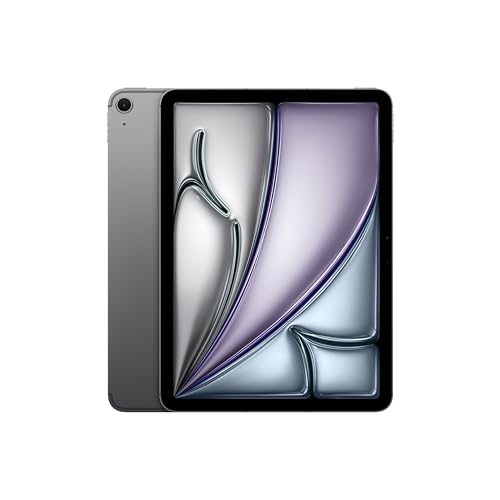
Apple iPad Air 11-inch (M2): Built for Apple Intelligence, Liquid Retina Display, 128GB, 12MP Front/Back Camera, Wi-Fi 6E + 5G Cellular, Touch ID, All-Day Battery Life — Space Gray — this iPad Air configuration is the cellular example: its listing includes 5G cellular alongside Wi-Fi 6E, showing how Apple bundles both radios in one model. Check price on Amazon.
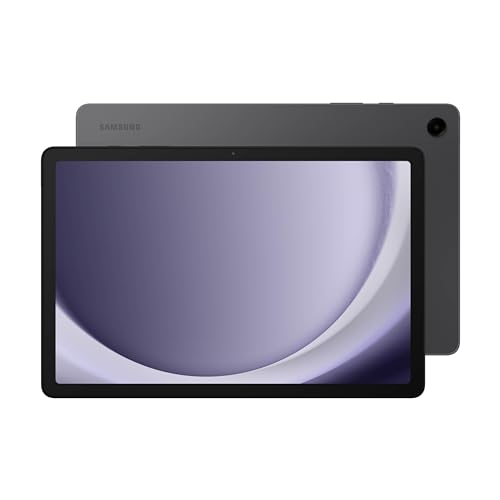
Samsung Galaxy Tab A9+ Plus 11” 128GB Android Tablet, Big Screen, Quad Speakers, Upgraded Chipset, Multi Window Display, Slim, Light, Durable, Kids Friendly Design, US Version, 2024, Graphite — Samsung’s Galaxy Tab A9+ is the typical Wi-Fi mainstream model, built for home, school and office networks. Check price on Amazon.
Wi-Fi vs Cellular Tablet at a Glance
What actually differs between the two versions of the same tablet:
| Criterion | Wi-Fi model | Cellular model |
|---|---|---|
| Internet away from Wi-Fi | Only via phone hotspot or public networks | Own 4G/5G connection, always on |
| Hardware cost | Lower | Higher for the same storage and screen |
| Running cost | None beyond your home broadband | Needs a SIM/eSIM data plan or carrier add-on |
| GPS location | Approximate, from Wi-Fi positioning | True GPS on most cellular models — better for navigation |
| Battery use | Baseline | Slightly higher draw when using mobile data |
| Convenience | Manual step to connect when out | Seamless, like your phone |
| Security on the move | Public Wi-Fi carries some risk | Private mobile connection avoids public networks |
What Cellular Actually Adds
A cellular tablet contains a mobile radio and a SIM or eSIM, letting it join the same 4G and 5G networks as your phone. It gets its own data allowance — either a standalone tablet plan, an add-on to your phone contract, or a prepaid data SIM — and it works anywhere with coverage: trains, parks, building sites, holiday rentals with dreadful Wi-Fi. Two bonuses ride along. Most cellular tablets include a proper GPS receiver, which Wi-Fi models usually lack, making them far better for in-car navigation and location apps. And the connection is private, avoiding the risks and login portals of public Wi-Fi in cafes and airports.
What cellular does not add: it does not make the tablet a phone in most cases — voice calls over the mobile network are typically not supported, though internet calling apps work fine. It also does not help at home, where it will sit on your Wi-Fi like any other model. You are paying entirely for the hours spent away from trusted networks.
The Tethering Alternative, Honestly Assessed
Every modern phone can share its connection as a personal hotspot, which is why Wi-Fi tablets suit most people. For occasional use — an hour in a cafe, a train journey, a hotel with paid Wi-Fi — tethering is painless and free beyond your phone’s data allowance. Its costs show up with heavy use: it drains the phone’s battery quickly, the phone gets warm, speeds can throttle after hotspot allowances are used, and the small ritual of enabling it and reconnecting gets old when you do it five times a day.
Judge by frequency. Tethering a few times a month is a non-issue. Tethering daily for work means you are using your phone as infrastructure, and a cellular tablet (or a dedicated mobile hotspot device shared between tablet and laptop) will feel like a genuine upgrade rather than a luxury.
Battery, Plans and Practical Details
Cellular hardware draws a little more power when actively using mobile data, but in daily mixed use the difference is modest, and on Wi-Fi the two models behave identically. The bigger practical question is the plan: carrier tablet add-ons that share your phone’s data pool are usually the best value, while standalone tablet contracts cost more. Prepaid and travel eSIM data plans suit occasional travellers who only need connectivity on trips. Also check whether your carrier charges an activation or line fee that changes the maths.
One more detail: you cannot add cellular later. The radio is built in at purchase, so this decision is permanent for the life of the tablet — which argues for honesty about your real routine rather than your most adventurous week of the year.
Who Each Option Suits
Wi-Fi suits home and office users, students on campus networks, children (whose tablets should arguably never have open internet everywhere), and anyone whose out-of-home tablet use is media already downloaded. Cellular suits field and site workers, delivery and sales roles, commuters on routes without Wi-Fi, boat and caravan owners, frequent travellers, and people who use a large tablet as their car navigation screen. If you are buying a tablet as a backup internet device for home broadband outages — increasingly common for remote workers — cellular earns its place on that ground alone.
Plans, SIMs and eSIMs Explained Simply
A cellular tablet joins a mobile network through a physical SIM card or an embedded eSIM that is programmed digitally. Carrier tablet plans come in three shapes: add-ons that share your phone plan’s data pool for a modest monthly line fee, standalone tablet contracts with their own allowance, and prepaid data SIMs or travel eSIMs bought for a set amount of data or days. For most owners the phone-plan add-on is the sweet spot, because the tablet’s data simply draws from the pool you already pay for.
Travel eSIMs deserve a mention for Wi-Fi tablet owners too — not for the tablet itself, which cannot use them, but as a reminder that the tethering experience abroad depends on your phone’s roaming arrangement. If you travel often and tether constantly, compare the annual cost of those roaming passes and hotspot allowances against simply owning the cellular tablet on a domestic add-on plan; frequent travellers are often surprised which side wins.
Whichever plan you choose, set a data alert on the tablet. Tablets download updates, sync photos and buffer high-quality video with an appetite that startles people used to phone habits, and a background photo sync over mobile data can consume a small plan in a weekend. Most tablets offer a data-saver mode and per-app mobile-data switches — configure them once, at setup.
Battery and Performance Differences in Real Use
On Wi-Fi at home, cellular and Wi-Fi models are indistinguishable, including battery life. On mobile data, the cellular tablet spends extra energy maintaining its network connection, more in weak-signal areas where the radio works harder — the same effect your phone shows with fewer bars. In practice the difference is a modest percentage across a day, not a different class of endurance, and it buys the freedom from tethering, which was draining your phone’s battery far faster anyway.
Speed deserves a reality check: a modern 5G connection in good coverage rivals home broadband for browsing, documents and standard-quality streaming, and even 4G handles video calls comfortably. The bottlenecks in daily tablet use are rarely the network generation; they are coverage at your specific desk, train carriage or site cabin. If your phone shows strong signal in the places you would use the tablet, the cellular tablet will too — they share the same networks and physics.
One subtle advantage of the cellular model is independence: it keeps working through home broadband outages, router reboots and hotel Wi-Fi failures. For people whose tablet is a work tool — taking payments, showing portfolios, filing reports — that independence is sometimes the entire business case, worth more than the convenience arguments combined.
The Decision, Compressed
Ask three questions. First: in a typical month, how many hours will this tablet be used away from trusted Wi-Fi? Under two, buy Wi-Fi and tether happily. Second: when away, is the use casual (reading, browsing) or consequential (work, navigation, payments)? Consequential use argues for cellular even at moderate hours. Third: will this tablet be your navigation or field device? If yes, the cellular model’s GPS settles it. Score your honest answers and the choice usually makes itself — most home tablets are Wi-Fi, most working tablets earn their SIM.
Resale, Hand-Me-Downs and Second Lives
Cellular models hold a small resale edge in some markets because they suit more second owners, and they make better hand-me-downs for relatives who lack home broadband — an elderly parent’s tablet on a family-plan add-on is a quietly common and kind arrangement, giving them video calls and browsing without a router to manage. Wi-Fi models hand down perfectly well within connected households. Either way, the tablet’s second life argues for buying the configuration your household’s future might want, when the price difference at purchase is small enough to forget.
For children’s progression, the Wi-Fi tablet at home often becomes the travel tablet later, tethered to a parent’s phone in the car — a role that needs no SIM. For a teenager’s first independent device, families split: some prefer Wi-Fi’s natural boundaries, others a cellular tablet on a capped plan as a phone alternative without the phone’s social load. There is no platform answer; there is a parenting answer, and the hardware follows it.
Businesses standardising a fleet should note the management difference: cellular tablets stay reachable for updates, location and support wherever they roam, which IT departments value enough to pay the premium uniformly rather than per-case. A mixed fleet — cellular for field staff, Wi-Fi for office units — is the usual rational endpoint, decided by role rather than by rank.
Myths That Distort This Choice
Myth one: a cellular tablet can replace your phone plan entirely. It cannot make ordinary voice calls on most networks, its number is for data accounting, and carrying a ten-inch phone substitute is a novelty that expires quickly. Myth two: Wi-Fi tablets are useless outside the house. With downloaded media, offline maps and documents, they work all day anywhere — they merely cannot fetch new internet content without a hotspot. Myth three: cellular drains the battery catastrophically. It costs a modest percentage on mobile data and nothing on Wi-Fi. Myth four: public Wi-Fi plus a VPN makes cellular pointless for everyone — for occasional travellers, largely true; for daily field workers, the friction and the phone battery say otherwise. Retire the myths and the decision becomes the calm frequency calculation this guide opened with.
What Cellular Really Does Inside a Tablet
A second radio, a second identity
- A cellular tablet contains a mobile modem and its own identity on a phone network, through a physical SIM or an embedded eSIM. It registers with nearby masts exactly as a phone does, receives its own data connection, and on many models can determine its location precisely using satellite positioning that Wi-Fi-only models often approximate from nearby networks. That independence is the entire product: the tablet stops borrowing connectivity from buildings and phones and carries its own, with the battery and cost consequences that a second radio implies.
- Understanding the identity point matters for setup. A cellular tablet needs a plan in its own right, whether a standalone tablet plan, a shared-data add-on to a phone contract, or a prepaid data SIM for occasional use. It cannot simply borrow your phone’s number, though many carriers let tablet plans share a household data pool. When comparing prices, compare the complete multi-year cost: the cellular model’s higher purchase price plus the plan’s running cost, against the Wi-Fi model’s price alone.
Location services and the hidden advantage
- The positioning hardware that usually accompanies cellular models is an underrated difference. Wi-Fi-only tablets estimate location from nearby networks, which works in towns and fails in the countryside, at sea, and on the road between masts. A cellular tablet typically knows where it is with map-grade precision, which transforms it as a navigation device for driving, boating, hiking, and field work. If your tablet dreams include a dashboard mount or a surveyor’s bag, this difference alone can decide the purchase, and it is rarely printed prominently on the box.
- Precise location also improves smaller things: weather that follows you, photo organisation by place, and finding a lost tablet with useful accuracy. None of these justifies cellular alone, but together with independent data they form the real case for the cellular model, which is not really about browsing in fields. It is about a tablet that is a fully independent device rather than a dependent one.
Tethering, Hotspots, and the Honest Alternatives
How good phone tethering has become
- Modern phones create a hotspot in seconds, and for occasional out-of-home tablet use, an afternoon at a café, a train journey, a holiday week, tethering covers the need completely and costs nothing beyond your phone’s data allowance. The friction that once made tethering annoying has largely gone on recent devices, which reconnect automatically and manage power sensibly. Any honest guide must say plainly: if your away-from-home tablet use is occasional and your phone is always with you, the Wi-Fi model plus tethering is the rational purchase for most people.
- The costs of tethering are cumulative rather than dramatic. Your phone’s battery funds both devices, so a long tethered session can strand the phone you need for calls, payments, and navigation home. Some phone plans limit hotspot data or slow it after a threshold, which matters if your tablet work is heavy. And there is a small daily friction in connecting, which is trivial weekly and genuinely wearing when it happens five times a day, every day, on a commute.
Dedicated hotspots and other middle paths
- Between the two tablet types sits the portable hotspot: a small dedicated device with its own SIM that creates Wi-Fi for your tablet, laptop, and anything else. For households with several Wi-Fi devices that travel, one hotspot plan can serve them all, which changes the economics entirely. The hotspot is one more object to charge and carry, but it frees the phone’s battery and lets the connection stay in a bag or car while devices come and go.
- Public and workplace Wi-Fi is the other free alternative, and its quality varies from excellent to unusable, with security that deserves a moment’s thought. On networks you do not control, use the services you trust, keep the tablet updated, and consider a reputable VPN for sensitive work. Many people find that home, office, and a phone hotspot cover their lives completely, which is why the Wi-Fi model is the default recommendation this guide keeps returning to, with cellular as the deliberate upgrade for specific lives.
- Cellular adds independent data, precise location, and freedom from your phone, at a hardware premium plus a running plan cost.
- Occasional travel use is fully covered by phone tethering on a Wi-Fi model.
- Heavy daily mobile use, field work, and navigation are where cellular earns its cost.
- A portable hotspot can serve several Wi-Fi devices and changes the maths for multi-device travellers.
Battery, Weight, and Day-to-Day Reality
What the cellular radio costs you daily
- The cellular model is typically a little heavier, a little more expensive, and a little hungrier. With a good signal it sips power; with a weak signal it hunts for masts and drinks, which is why a cellular tablet in a rural cottage can drain faster than its Wi-Fi sibling on the same sofa. Sensible settings tame this: the radio can be switched off or set to data-only use at home, where Wi-Fi should carry everything anyway. Owners who manage the radio deliberately report little practical penalty; owners who never think about it occasionally wonder where the battery went.
- There is also a subtle benefit to set against the costs: independence changes behaviour. A cellular tablet gets taken places a Wi-Fi one gets left behind, because there is no calculation about connectivity at the destination. For field workers, salespeople, carers making visits, and anyone whose office is other people’s premises, that taken-everywhere quality is the product, and its value is measured in the work done rather than in specifications.
Plans, eSIMs, and travelling abroad
- Plan structures vary: standalone tablet plans, shared family pools, prepaid data that expires, and travel eSIMs bought for a single trip. The travel eSIM deserves attention from Wi-Fi owners too, since it does not apply to them, which is precisely the point: a cellular tablet can land in a new country, buy local data digitally in minutes, and navigate from the airport, while a Wi-Fi tablet queues for airport networks and hotel passwords. Frequent travellers should weigh that arrival experience honestly, because it repeats every trip.
- Before buying any plan, check the coverage where you will actually use the tablet, using the carrier’s map and, better, the experience of people who live or work there. A generous plan on a network that does not reach your sites, your cottage, or your commute is worth nothing. Coverage, not headline data, is the specification that decides whether cellular fulfils its promise in your geography.
Who Should Pay for Cellular, Decided by Lifestyle
Clear yes, clear no, and the genuine maybes
- Pay for cellular if the tablet works away from buildings daily: field service, site work, community care, sales routes, journalism, boating and car navigation, or a commute where the tablet is your office and the phone must stay fresh for its own duties. Pay also if the tablet is a child’s or relative’s independent device that must be reachable and locatable without depending on networks you do not control, accepting the plan as part of the arrangement’s safety.
- Save the money if the tablet lives at home, works in an office with good Wi-Fi, travels occasionally in your company, and is otherwise a sofa, kitchen, and garden device. That describes most tablets, and their owners will never miss a radio they did not buy. The genuine maybes, regular travellers and hybrid workers, should count their away days honestly for a month before deciding; the diary of real use settles what imagination argues about, and tethering data usage on your phone bill shows exactly how much mobile data your tablet life actually consumes.
Buying the Wi-Fi model without closing doors
- Choosing Wi-Fi today does not strand you. Phone tethering, portable hotspots, and better public networks keep improving, and if your life changes, a hotspot added later replicates most of the cellular experience for your existing tablet. The reverse is not true: the cellular premium and plan are spent from day one whether used or not. That asymmetry is why this guide’s default stands: start with Wi-Fi unless your current, evidenced life already contains the days that cellular exists to serve.
Worked Examples From Real Routines
The community nurse and the site engineer
- Consider two working days. A community nurse visits patients in their homes, needing records, guidance, and communication in places where asking for a Wi-Fi password is neither professional nor practical. A cellular tablet in that bag is not a luxury; it is the difference between a device that works at every door and one that works back at base. The plan cost is a work expense in the plainest sense, and the precise location helps with routing between visits in unfamiliar streets.
- A site engineer splitting days between a connected office and construction sites tells the same story with different props: drawings, inspection forms, and photographs must move now, not at the end of the day, and sites have masts long before they have networks. For both, tethering would technically work and practically fray, through phone batteries dying mid-rounds and connections dropped at the moments of need. These are the lives the cellular model was designed for, and in them its premium disappears into the background of a working tool.
The student and the holidaymaker
- A student’s tablet lives on campus and home networks, among the best-connected environments on earth, with a phone always in the same pocket for the gaps. Cellular would duplicate connectivity the student already stands inside all day, and the money is better spent on storage, a pen, or a keyboard. The holidaymaker’s fortnight of travel is the classic maybe: two weeks of maps, bookings, and translation feel cellular-shaped, until you price a travel router, local tethering from a holiday SIM in the phone, and hotel and café Wi-Fi, which together cover the trip for a fraction of a year of tablet plan payments.
- The pattern generalises: cellular value scales with how often, how professionally, and how independently the tablet must connect. Count your own days against that scale. One or two away-days a month is tethering territory; most working days away from trusted networks, with the tablet earning its keep on them, is cellular territory. Between those poles, let a month of honest observation, not a sales conversation, cast the deciding vote.
Security, Reliability, and the Networks You Do Not Control
Public Wi-Fi and the case for carrying your own connection
- One argument for cellular rarely appears in comparisons: it removes your dependence on networks run by strangers. Hotel, café, conference, and airport Wi-Fi range from professionally managed to casually assembled, and a tablet used for work email, banking, or client material exposes real value on them. Modern systems and encrypted services protect a great deal, and a reputable VPN protects more, but the cleanest protection is a connection you own. For professionals handling sensitive material on the move, that security argument can justify cellular on its own, before convenience enters the discussion.
- Reliability argues the same way at smaller scale. Public networks throttle, expire, demand repeated sign-ins through captive portals, and fail at conference scale precisely when everyone needs them. A cellular tablet simply works through all of that, at meetings, on sites, and in other people’s buildings. If your tablet is a tool of your trade rather than a companion for leisure, price that reliability honestly: it is not a luxury feature but the difference between a device that performs in the field and one that performs near routers.
Households, children, and the always-reachable tablet
- Families use cellular differently: as reachability. A tablet that is a child’s companion on journeys, a relative’s lifeline in a care setting, or the household’s travelling screen for long drives gains from being independently connected and locatable, without depending on a parent’s phone hotspot being enabled, nearby, and charged. The plan becomes part of the family’s safety arrangements, like the case and the controls, and should be set up with the same care: data limits understood, location sharing agreed, and costs predictable.
- For these uses, also weigh the Wi-Fi model’s dependence honestly rather than dismissively. Many families find a parent’s hotspot entirely sufficient, because the tablet is never alone. The cellular case strengthens exactly when the tablet travels independently: with the child, with the grandparent, with the colleague. Independence, once again, is the product being sold, and your household’s real patterns are the only honest measure of its worth.
The resale and hand-me-down angle
- Cellular models hold a particular second life: they make superb hand-me-downs for relatives who lack home broadband confidence, excellent car tablets, and useful emergency devices, because their independence survives the change of owner. A Wi-Fi tablet handed to a grandparent without Wi-Fi is a paperweight with a lovely screen; the cellular one, with a modest data plan, is a working window to the family. If your household’s devices cascade through generations, that future role deserves a line in today’s decision.
- When selling, cellular models address a smaller but motivated market, and unlocked devices with eSIM flexibility travel best between owners and carriers. Whichever model you buy, keep its box, note its exact connectivity variant in your records, and remove your accounts and plans cleanly when it leaves you. A tablet’s connectivity is part of its identity, and the owner who documents it sells it, insures it, and replaces it without archaeology.
The Decision Workshop: Counting Your Own Evidence
A month of data beats a day of debate
- If you remain torn, gather evidence for a month before buying, because the answer is sitting in your current behaviour. Note each time you use, or wish you could use, a tablet away from home and office networks; check your phone’s hotspot usage if you tether already; and look at how much data those sessions consumed. At the month’s end the pattern will be legible: a handful of light sessions argues for Wi-Fi and tethering, while a dense record of working days argues for cellular with the data volumes to size its plan.
- Ask also where those sessions happened. Away time spent inside other connected buildings, clients with guest networks, campuses, hotels on business accounts, is Wi-Fi time wearing a travel costume. Away time in vehicles, sites, homes you serve, and open country is cellular’s true territory. Map your month honestly and the two piles will rarely be equal; one of them will be embarrassingly small, and that embarrassment is the sound of money being saved or well spent.
What to do with a maybe that will not resolve
- Some lives genuinely sit on the line: the hybrid worker whose pattern is still forming, the family whose child is about to start travelling independently, the freelancer whose client mix changes quarterly. For an unresolved maybe, buy the Wi-Fi model and a flexible answer: a phone plan with generous hotspot allowance, or a portable hotspot on a rolling basis that can be cancelled when unused. You preserve the option to adapt quarterly, rather than committing to hardware and a plan sized for a life you have not yet lived.
- If the maybe resolves toward independence later, the hotspot graduates with you, and a future tablet purchase can be cellular with evidence behind it. Decisions made in the right order, reversible ones first, are how careful buyers stay both equipped and unregretful. The worst outcome in this entire comparison is not choosing the wrong model; it is paying for independence every month while living a life that never leaves the Wi-Fi, or strangling a genuinely mobile working life to save a modest premium. Match the tool to the life, with evidence, and either model becomes the right one.
Carrier and Plan Details That Catch Buyers Out
Compatibility, locking, and what unlocked really means
- Not every cellular tablet works on every network. Tablets are built for particular bands and carrier approvals, and a model bought for one network or one country may connect poorly or not at all on another. Before buying, especially second-hand or imported, confirm the exact model variant against your intended carrier’s supported list. A tablet described as cellular but incompatible with your network is a Wi-Fi tablet with extra weight, and this is the single most expensive mistake available in this category.
- Ask also whether the device is locked to a carrier and what unlocking involves if you plan to change networks or travel. eSIM models make switching and travel simpler where carriers support them, but support varies, so check your carrier’s tablet eSIM policy rather than assuming the phone policy applies. These are dull questions with exciting consequences, and five minutes with the carrier’s support pages before purchase is worth more than a month of frustration after it.
Data pools, throttling, and the small print that matters
- Tablet plans advertise data generously and qualify it quietly. Some plans share your phone’s allowance, some are separate buckets, some slow hotspot use from the tablet or deprioritise tablet traffic when the network is busy, and some include roaming while others treat a border crossing as a billing event. Read the four lines that apply to your life: how much data, at what priority, with what hotspot rights, and with what roaming terms. If the tablet will be a child’s or a vehicle’s, data caps and alerts deserve setting on day one, because a streaming passenger can consume a month of data in a weekend of motorway films.
- Finally, calendar a review. Plans improve, carriers reprice, and your usage settles into a pattern that the first month’s guess only approximated. A plan reviewed after three months of real bills is a plan sized to your life; a plan never reviewed is a subscription to your first guess. The same discipline that chose the right tablet, evidence over assumption, should govern the contract that keeps it connected.
Roaming and the travelling tablet, revisited
- International use separates thoughtful buyers from surprised ones. A cellular tablet at home can become expensive abroad if its plan’s roaming is priced for phones’ light use rather than a tablet’s appetite for maps, media, and cloud sync. The defences are simple and must be applied before departure: check the plan’s roaming terms, set data limits, download media and maps at home, and consider a local or travel eSIM for longer stays, which cellular tablets accept gracefully and Wi-Fi tablets cannot accept at all.
- That last point is cellular’s quiet trump card for the frequent traveller: the ability to arrive, buy local connectivity digitally, and be independent within minutes, in country after country, without hunting networks or depending on a phone’s battery for the whole party’s navigation. If your year contains many arrivals, price that experience honestly against the plan’s cost. Independence, bought knowingly and used weekly, is not an extravagance; it is the product working exactly as designed.
A Short History of Your Future Regrets, Avoided
The two ways this purchase goes wrong
- Regret in this category has only two shapes. The first is the cellular tablet on a homebound life: a premium paid, a plan renewing monthly, and a radio that has connected to a mast eleven times in a year, each renewal a small reminder of an imagined life. The second is the Wi-Fi tablet in a genuinely mobile life: the daily hotspot ritual, the phone dying at the day’s critical moment, the client site where nothing could be sent, repeated until the owner buys the cellular model anyway and owns two tablets, one of them a monument.
- Both regrets are avoided by the same act of honesty at the start: describe your actual last month, not your aspirational next one, and buy for the life in the description. Lives change, and when yours does, hotspots and later purchases adapt with you. But the tablet bought for the evidenced present almost never becomes a monument, because the present, unlike the brochure, is where tablets are actually used.
If you buy cellular, set it up like you mean it
- Cellular owners should finish the job at setup: activate the plan, test the connection away from home on the first day rather than discovering a provisioning problem on the first working trip, set data alerts at levels that match the plan, and confirm the tablet prefers Wi-Fi at home so the plan is spent only where it earns. Save the carrier’s support route and the tablet’s SIM or eSIM details with your purchase records, because connectivity faults are diagnosed through those details and no others.
- Then use the independence you bought. Take the tablet to the places that justified it, let it navigate, let it work in the field and on the road, and review the first bills against your expectations. A cellular tablet used fully is one of the most satisfying tools in modern working life; a cellular tablet used timidly is a Wi-Fi tablet with a subscription. The purchase only makes sense in the using, so use it.
One Last Consideration: The Network Itself Is Improving
Why waiting is also a strategy
- Connectivity does not stand still while you deliberate. Home and public Wi-Fi grow faster and more widespread, phone hotspot allowances grow more generous, and carriers compete on tablet plans in ways that periodically change this comparison’s arithmetic. A decision that is finely balanced today may be obvious in a year, in either direction, which is one more reason to prefer the reversible choice when torn: the Wi-Fi model plus flexible tethering can be revisited at every contract renewal, while money spent on an unused cellular radio cannot be unspent. Buy for the evidenced present, review at each renewal, and let the improving networks argue their case annually rather than demanding your faith today.
Related Guides
- best tablets for travel
- best tablets under 300
- best tablets for work
- best tablets for students
- how to choose a tablet
- tablet vs laptop
- what is a good tablet screen size
Frequently Asked Questions
Can I add cellular to a Wi-Fi tablet later?
No. The mobile radio and SIM hardware are built in at manufacture, so a Wi-Fi-only tablet can never gain true cellular. Your options are tethering to your phone or a portable mobile hotspot device, which many people find is actually the flexible answer because the hotspot can serve a laptop and other devices too.
Does a cellular tablet need its own phone number and plan?
It needs a data plan, which carriers supply as a tablet add-on sharing your phone plan’s data, a standalone tablet plan, or prepaid data SIMs and eSIMs. It does get a number assigned for billing, but most tablets cannot make ordinary voice calls with it — internet calling apps work normally.
Will tethering slow down my tablet or phone?
The tablet’s speed is capped by the phone’s mobile connection and hotspot limits, and many plans throttle hotspot data after an allowance. The phone pays the real cost: hotspot use drains its battery fast and generates heat. For occasional use it is fine; for daily work it wears thin quickly.
Do cellular tablets have better GPS?
Usually, yes. Cellular models from major makers typically include a dedicated GPS receiver, while Wi-Fi-only models estimate position from nearby Wi-Fi networks. If you plan to mount the tablet for driving navigation, mapping in the field or marine use, the cellular version’s real GPS is a meaningful advantage even if you rarely use its data.
Is public Wi-Fi safe enough instead of cellular?
For casual browsing with updated software it is generally acceptable, but public networks add risks and friction: captive portals, session hijacking attempts and unknown operators. A VPN reduces the risk. If your tablet handles work email, banking or client data away from home regularly, a private cellular connection is the cleaner security choice.
Which should I buy for a child’s tablet?
Wi-Fi, almost always. A child’s tablet used at home and school does not need an always-on open internet connection in every location, and Wi-Fi models are cheaper to buy and replace. Download content for journeys in advance. If location tracking is the concern, that is better handled by a dedicated tracker or a phone plan designed for children.
Does a cellular tablet need its own phone number and contract?
It needs its own data plan and SIM or eSIM identity, though it does not usually function as a phone for ordinary calls. Many carriers offer tablet plans that share a household data allowance or add to an existing account at modest cost, and prepaid data options exist for occasional use. Check whether your carrier supports the exact tablet model and whether the plan includes hotspot use and roaming if you need them.
Will a Wi-Fi tablet work for car navigation?
It can, with preparation: download offline maps for your area while on Wi-Fi, or tether it to your phone for live data. The limitation is location precision, since many Wi-Fi-only models estimate position from nearby networks and can be vague away from towns. For regular, serious navigation, a cellular model with its precise positioning, or simply your phone, is the more reliable instrument.
Does cellular drain the battery much faster?
With a strong signal and sensible settings, the difference is modest, because the tablet uses Wi-Fi whenever it is available. In weak-signal areas the modem works harder and the drain becomes noticeable. Switching the cellular radio off at home, or when you know you will not need it, removes most of the penalty while keeping the capability for the days that need it.